目录
实现搜索过滤的功能
使用watch实现
javascript
<div id="app">
    <h1>{{msg}}</h1>
    <input type="text" placeholder="请输入搜索关键字" v-model="keyword" /><br /><br />
    <table>
      <tr>
        <th>序号</th>
        <th>任务</th>
        <th>薪资</th>
        <th>选择</th>
      </tr>
      <tr v-for="item,index in newHeros" :key="item.id">
        <td>{{item.id}}</td>
        <td>{{item.name}}</td>
        <td>{{item.power}}</td>
        <td><input type="checkbox" /></td>
      </tr>
    </table>
  </div>
javascript
<script>
    const vm = new Vue({
      el: "#app",
      data() {
        return {
          msg: "搜索过滤",
          Heros: [
            {
              id: "1",
              name: "张三",
              power: "6000"
            },
            {
              id: "2",
              name: "张四",
              power: "7000"
            },
            {
              id: "3",
              name: "李四",
              power: "8000"
            },
            {
              id: "4",
              name: "李五",
              power: "9000"
            },
          ],
          keyword: "",
          newHeros: []
        }
      },
      watch: {
        keyword: {
          handler() {
            this.newHeros = this.Heros.filter((item => {
              return item.name.includes(this.keyword)
            }));
          },
          immediate: true,
        }
      }
    })
  </script>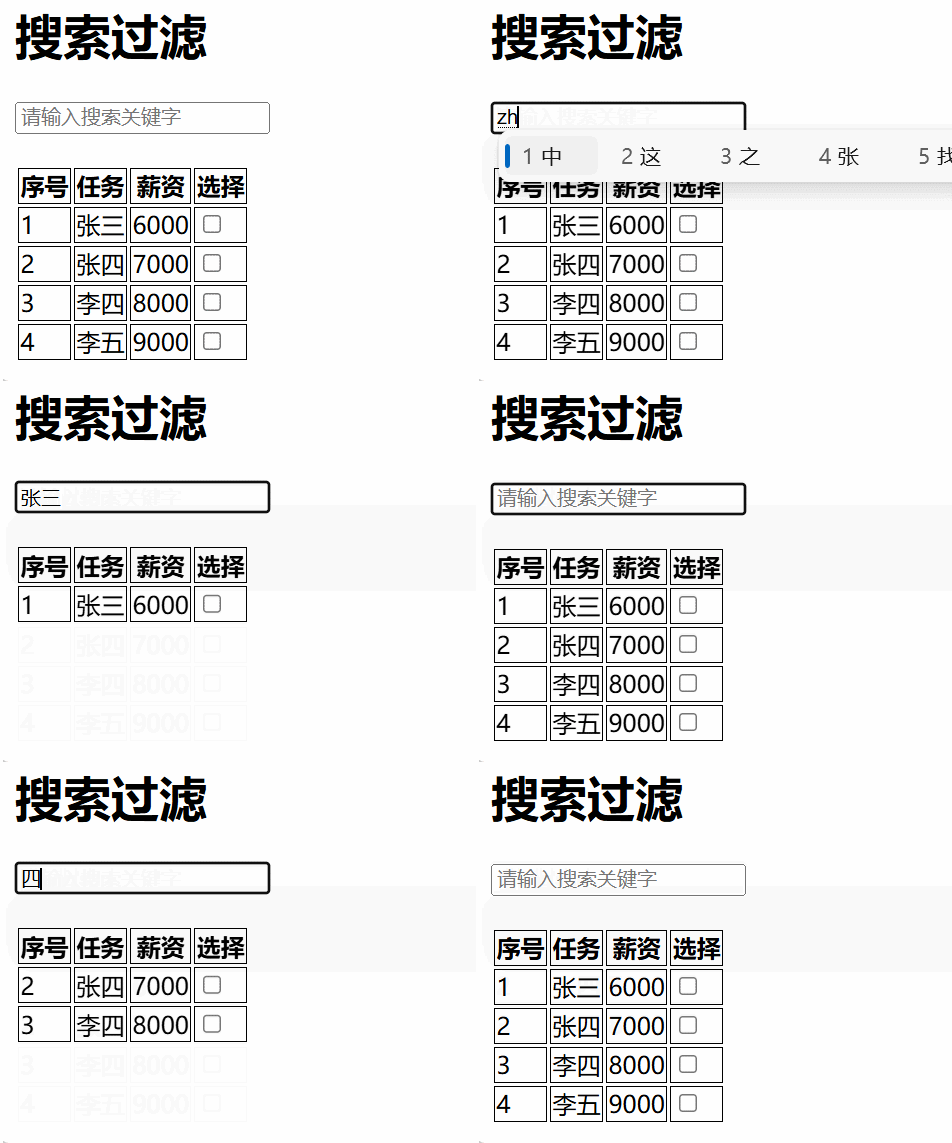
使用computed实现
javascript
<!doctype html>
<html lang="en">
  <head>
    <meta charset="UTF-8" />
    <title>列表过滤计算属性实现</title>
    <script src="./js/vue.js"></script>
    <style>
      th,
      td {
        border: 1px solid black;
      }
    </style>
  </head>

  <body>
    <div id="app">
      <h1>{{msg}}</h1>
      <input
        type="text"
        placeholder="请输入搜索关键字"
        v-model="keyword"
      /><br /><br />
      <table>
        <tr>
          <th>序号</th>
          <th>姓名</th>
          <th>薪资</th>
          <th>选择</th>
        </tr>
        <tr v-for="item in newHeros" :key="item.id">
          <td>{{item.id}}</td>
          <td>{{item.name}}</td>
          <td>{{item.power}}</td>
          <td><input type="checkbox" /></td>
        </tr>
      </table>
    </div>
    <script>
      const vm = new Vue({
        el: "#app",
        data() {
          return {
            msg: "列表过滤-计算属性",
            keyword: "",
            heros: [
              { id: "101", name: "张三", power: 10000 },
              { id: "102", name: "三德子", power: 9000 },
              { id: "103", name: "王德", power: 8000 },
              { id: "104", name: "张六", power: 6000 },
              { id: "105", name: "老六", power: 9100 },
            ],
          };
        },
        computed: {
          newHeros() {
            return this.heros.filter((item) => {
              return item.name.includes(this.keyword);
            });
          },
        },
      });
    </script>
  </body>
</html>
实现列表排序功能
javascript
<!doctype html>
<html lang="en">
  <head>
    <meta charset="UTF-8" />
    <title>列表排序</title>
    <script src="./js/vue.js"></script>
    <style>
      th,
      td {
        border: 1px solid black;
      }
    </style>
  </head>

  <body>
    <div id="app">
      <h1>{{msg}}</h1>
      <input type="text" placeholder="请输入搜索关键字" v-model="keyword" />
      <br />
      <button @click="type = 1">升序</button>
      <button @click="type = 2">降序</button>
      <button @click="type = 0">原序</button>
      <table>
        <tr>
          <th>序号</th>
          <th>姓名</th>
          <th>薪资</th>
          <th>选择</th>
        </tr>
        <tr v-for="item in newHeros" :key="item.id">
          <td>{{item.id}}</td>
          <td>{{item.name}}</td>
          <td>{{item.power}}</td>
          <td><input type="checkbox" /></td>
        </tr>
      </table>
    </div>
    <script>
      const vm = new Vue({
        el: "#app",
        data() {
          return {
            // 定义标识项,1是升序,2是降序,0是原序
            type: 0,
            keyword: "",
            msg: "列表排序",
            heros: [
              { id: "101", name: "章三", power: 10000 },
              { id: "102", name: "三响", power: 9000 },
              { id: "103", name: "李四", power: 8000 },
              { id: "104", name: "李章", power: 11000 },
            ],
            newHeros: [],
          };
        },
        // computed: {
        //   newHeros() {
        //     if (this.type == 0) {
        //       return this.heros;
        //     } else if (this.type == 1) {
        //       return this.heros.toSorted((a, b) => {
        //         return a.power - b.power;
        //       });
        //     } else if (this.type == 2) {
        //       return this.heros.toSorted((a, b) => {
        //         return b.power - a.power;
        //       });
        //     }
        //   },
        // },
        watch: {
          type: {
            handler(n) {
              // 先过滤,再排序
              let arr = this.heros.filter((item) => {
                return item.name.includes(this.keyword);
              });

              if (n == 0) {
                this.newHeros = arr;
              } else if (n == 1) {
                // sort会改变原数组
                this.newHeros = arr.sort((a, b) => {
                  return a.power - b.power;
                });
              } else if (n == 2) {
                this.newHeros = arr.sort((a, b) => {
                  return b.power - a.power;
                });
              }
            },
            immediate: true,
          },
        },
      });

      // 回顾sort方法
      let arr = [8, 9, 5, 4, 1, 2, 3];

      // sort方法排序之后,不会生成一个新的数组,是在原数组的基础之上进行排序,会影响原数组的结构。
      // a在前,升序,b在前降序
    </script>
  </body>
</html>
表单数据的收集
javascript
 <!-- 对于单选框:手动配置value值,用来标识到底选的是谁,v-model会把value放到对应变量中 -->
      性别:男:<input
        type="radio"
        name="sex"
        value="boy"
        v-model="userInfo.sex"
      />
javascript
    <!-- 复选框情况一:选择不止一个,选择复选框的value值放到数组中 -->
    爱好:运动
    <input type="checkbox" value="sprot" v-model="userInfo.hobbdy" /> 旅游
    <input type="checkbox" value="travel" v-model="userInfo.hobbdy" /> 唱歌
    <input type="checkbox" value="song" v-model="userInfo.hobbdy" /><br /><br />

....
 hobbdy: [],
....
javascript
 <!-- 复选框情况二:就一种情况,要么选中,要么是不选中
      不需要配置value,默认收集是true或false
      -->
    <input type="checkbox" v-model="userInfo.arrge" />阅读并接受协议<br /><br />


....
arrge: false,
....
javascript
<!-- 下拉框:value值配置在option中,数据收集放在select标签中 -->
    学历:<select name="" id="" v-model="userInfo.grade">
      <option value="dz">大专</option>
      <option value="bk">本科</option>
      <option value="ss">硕士</option>
      <option value="bs">博士</option>
    </select><br /><br />