前后置
比如我们要对某些网页进行测试,每个不同功能的测试动作都基于登录认证,因此我们要对每次的接口测试,进行相关初始化。
但使用pytest 框架,测试类中不可以添加init () 方法,那么我们将如何进行数据的初始化?
在测试框架中,前后置是指在执行测试用例前的测试用例后执行一些额外的操作,这些操作可以用于设置测试环境、准备测试数据等,以确保测试的可靠性:
pytest框架提供三种方法做前后置的操作:
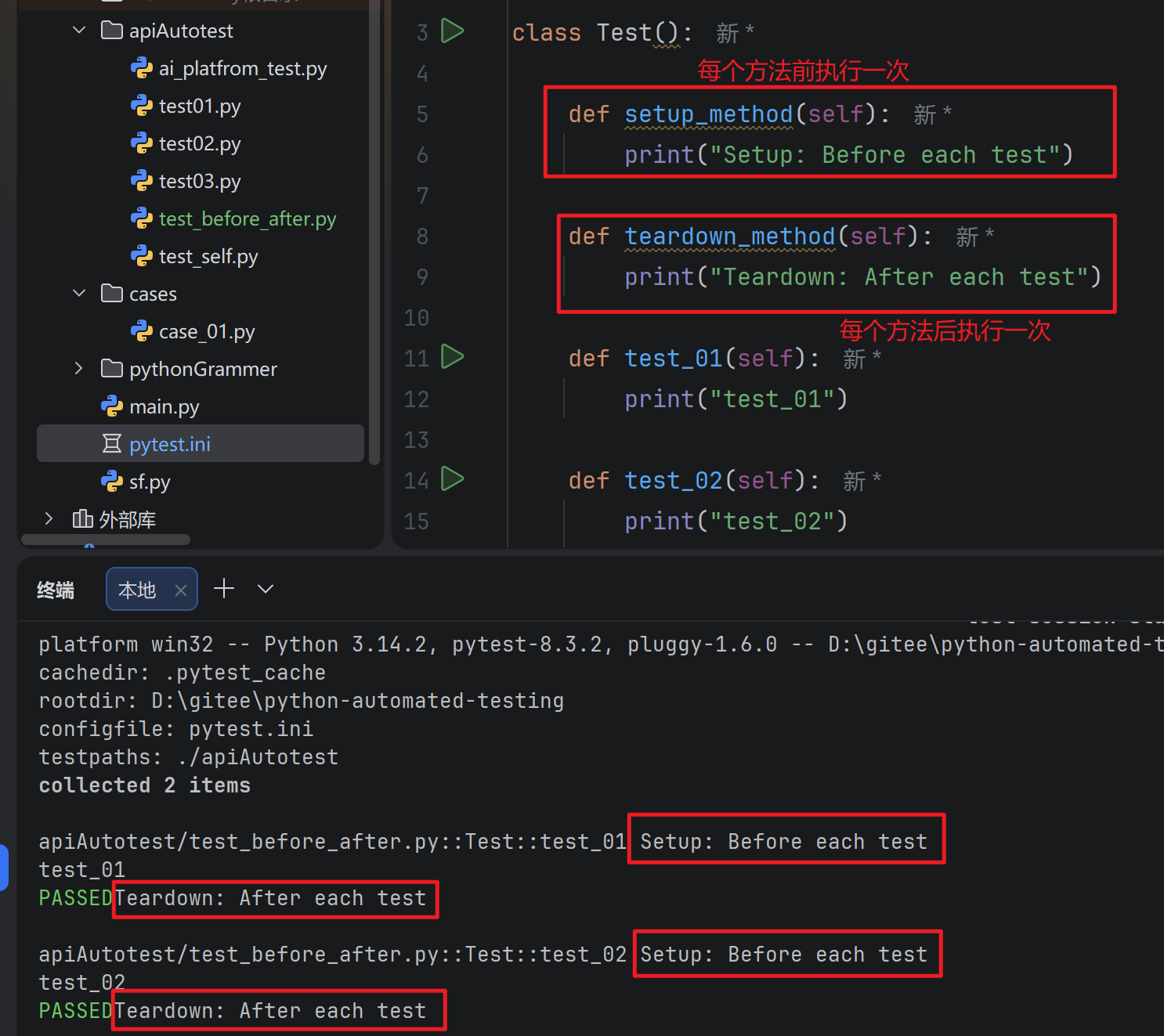
- setup_method 和 teardown_method:这两个方法用于类中的每个测试方法的前置和后置操作
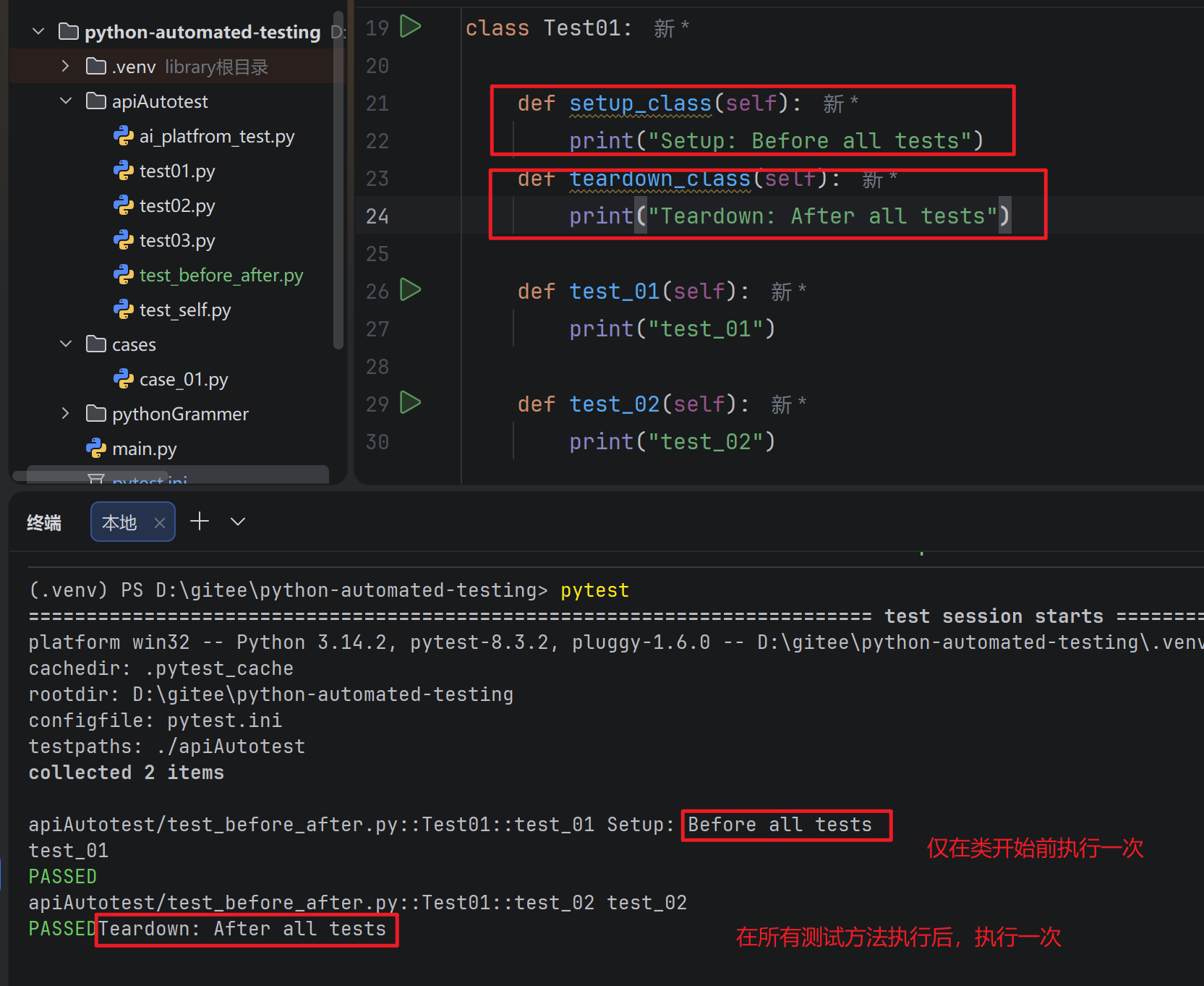
- setup_class 和 teardown_class:这两个方法用于整个测试类的前置和后置操作
- fixture :这是pytest推荐的方法来实现测试用例的前置和后置操作
示例1: setup_method 和 teardown_method
每个测试方法前会调用 setup_method
之后都会调用 teardown_method
示例2:setup_class 和 teardown_class
所有测试方法前会调用 setup_class
之后都会调用 teardown_class
断言
断言(assert)是一种调试辅助工具,用于检查程序的状态是否符合预期。如果断言失败(即条件为假),Python解释器将抛出一个AssertionError异常。断言通常用于检测程序中的逻辑错误。pytest 运行你在Python 测试中使用标准的Python asser 语句来验证预期和值
基本语法:
python
assert 条件, 错误信息- 条件: 必须是一个布尔表达式
- 错误信息: 当条件为假时显示的错误信息(可选)
示例1:基本数据类型的断言
python
import pytest

# 断言整数
a = 1
b = 2
assert a == b

# 断言字符串
str = "hello"
assert str == "hallo"
示例2:数据结构断言
python
def test():
    # 断言列表
    expect_list = [1, 'apple', 3.14]
    actual_list = [1, 'apple', 3.14]

    # 断言元组
    expect_tuple = (1, 'apple', 3.14)
    actual_tuple = (1, 'apple', 3.14)

    # 断言字典
    expect_dict = {'name':'Vera', 'age': 25}
    actual_dict = {'name': 'Vera', 'age': 25}

    # 断言集合
    expect_set = {1, 2, 3, 'apple'}
    actual_set = {1, 2, 3, 'apple'}

    assert expect_list == actual_list
    assert expect_tuple == actual_tuple
    assert expect_dict == actual_dict
    assert expect_set == actual_set
示例3:函数断言
python
# 函数断言
def test_divide(a, b):
    assert b != 0, "除数不能0"
    return a / b

# 正常情况
print(test_divide(10, 2))

# 触发断言
print(test_divide(10, 0))
示例4:接口返回值断言
python
# 测试接口返回数据所有内容:字段&字段值
def test1():
    url = "https://jsonplaceholder.typicode.com/posts/1"
    r = requests.get(url = url)

    print(r.json())

    expect_data = {
      "userId": 1,
      "id": 1,
      "title": "sunt aut facere repellat provident occaecati excepturi optio reprehenderit",
      "body": "quia et suscipit\nsuscipit recusandae consequuntur expedita et cum\nreprehenderit molestiae ut ut quas totam\nnostrum rerum est autem sunt rem eveniet architecto"
    }

    actual_data = r.json()

    assert actual_data == expect_data

# 对关键字段进行校验
def test2():
    url = "https://jsonplaceholder.typicode.com/comments?postId=1"

    r = requests.get(url= url)

    assert r.json()[0]['id'] == 1
    assert r.json()[1]['id'] == 2
    assert r.json()[2]['id'] == 3

# 对 h5 页面元素 进行校验
def test3():
    url = "https://jsonplaceholder.typicode.com/"

    r = requests.get(url= url) # 返回的是 h5 页面

    print(r.text)
    print()
    print(r.url)
    print()
    print(r.request)
    print()
    print(r.headers)

    text = "Use your own data"
    assert text in r.text # text的内容是否在 r.text中
参数化
参数化设计是自动化设计中的一个重要组成部分,它通过定义设计参数和规则,使得设计过程更加灵活和可控
pytest 中内置的pytest.mark,parametrize 装饰器允许对测试函数的参数进行参数化
示例1:在用例上使用参数化
python
# 针对方法
# 单个参数实现参数化

#  参数是统一类型
@pytest.mark.parametrize("data",(1,2,3))
def test4(data):
    print(data)

#  参数不是统一的类型
@pytest.mark.parametrize("data",(100, 55.2, "bite", 'a'))
def test5(data):
    print(data)

# 多个参数实现参数化
@pytest.mark.parametrize("test_input,expected", [("3+5", 8), ("2+4", 6), ("6*9", 42)])
def test6(test_input,expected):
    assert eval(test_input) == expected
这里, @parametrize 装饰器定义了三个不同的 (test_input, expected)元组,以便于test_eval 函数将依次使用它们允许三次
示例2:在类上使用参数化
python
# 针对类 对方法实现批量参数化

@pytest.mark.parametrize("n,expected", [(1, 2),(3, 4)])
class TestClass:
    def test_simple(self,n,expected):
        assert n == expected

    def test_weird_simple_case(self, n, expected):
        assert (n * 1) + 1 == expected
若要对 模块中 所有测试进行测试化,可以使用pytestmark 进行全局变量赋值
python
# 若要对模块中的所有测试进行参数化,可以使用 pytestmark 进行全局变量赋值

pytestmark = pytest.mark.parametrize("data",(1,2,3))

class Test_A:
    def test_a01(self,data):
        print(data)

    def test_a02(self,data):
        print(data)

class Test_B:
    def test_b01(self,data):
        print(data)

    def test_b02(self,data):
        print(data)
示例3:自定义参数化数据源
python
# 自定义参数化数据源

def data_provider():
    return ["a","b"]

# 定义一个测试函数,它依赖于上面函数的返回值
@pytest.mark.parametrize("data", data_provider())
def test_data(data):
    assert data != None
    print(f"Testing with data provider: {data}")