本文参考前文 win10安装mysql5.7
MySQL 5.7.36 国内 阿里云 下载地址
https://mirrors.aliyun.com/mysql/MySQL-5.7/mysql-5.7.36-winx64.msi
安装 mysql-5.7.36-winx64.msi 时,我选择的 custom 自定义安装
安装目录 D:\software\MySQL\MySQL-Server-5.7
安装完成后
在 D:\software\MySQL\MySQL-Server-5.7 这个目录下 创建 data 目录、新建 my.ini 文件
my.ini 文件就是 MySQL 数据库的具体配置
[mysql]
# 设置mysql客户端默认字符集
default_character_set=utf8mb4
[mysqld]
#设置3306端口
port = 3306
# 设置mysql的安装目录
basedir=D:\\software\\MySQL\\MySQL-Server-5.7
# 设置mysql数据库的数据的存放目录
datadir=D:\\software\\MySQL\\MySQL-Server-5.7\\data
# 允许最大连接数
max_connections=200
# 服务端使用的字符集默认为8比特编码的latin1字符集
character_set_server=utf8mb4
# 创建新表时将使用的默认存储引擎
default_storage_engine=INNODB
# 设置日志时间为系统时间
log_timestamps=SYSTEM
然后去配置 环境变量
然后去配置环境变量
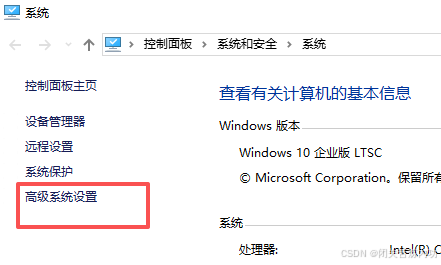
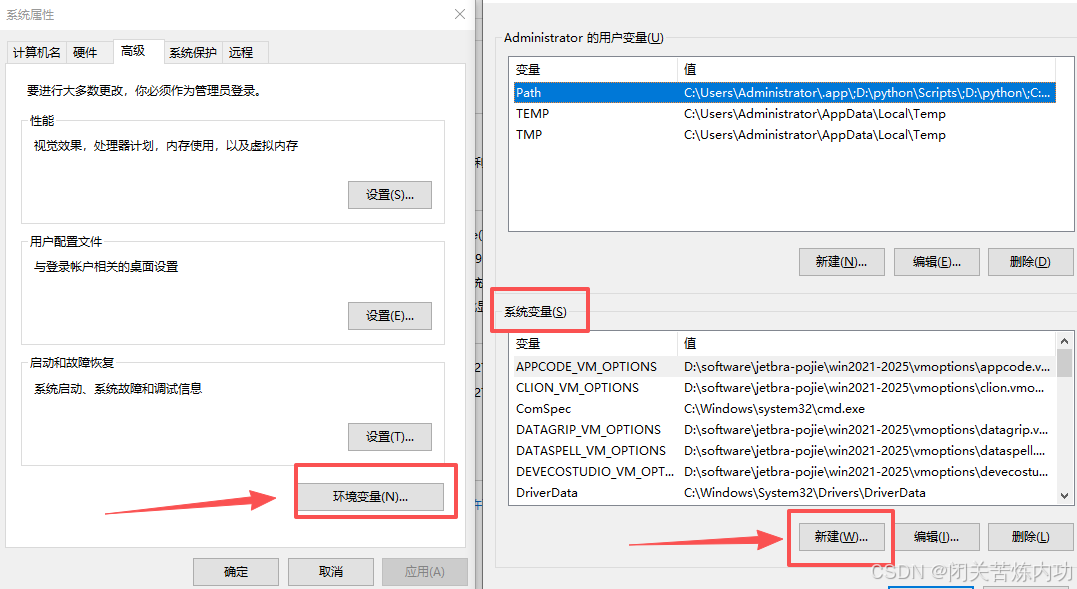
系统变量
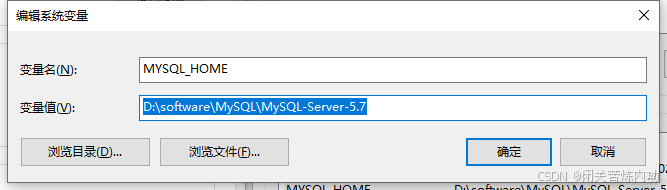
MYSQL_HOME
把解压目录配置进去
D:\software\MySQL\MySQL-Server-5.7
然后
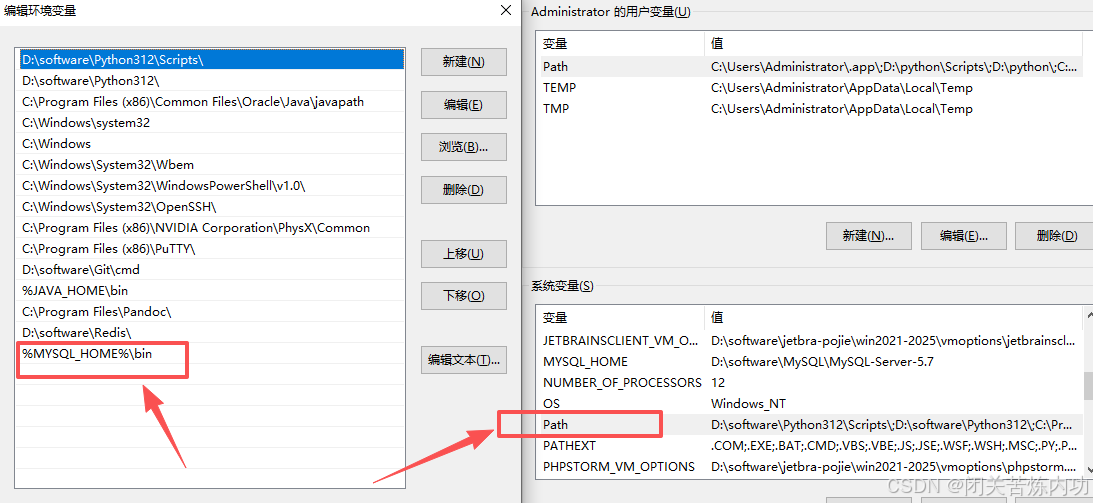
Path
%MYSQL_HOME%\bin
然后 win + r --> cmd --> ctrl+shift+enter--> 进入控制台管理员模式
C:\Users\Administrator>cd /d %MYSQL_HOME%\bin

D:\software\MySQL\MySQL-Server-5.7\bin>
D:\software\MySQL\MySQL-Server-5.7\bin>mysqld -install
Service successfully installed.

D:\software\MySQL\MySQL-Server-5.7\bin>mysqld --initialize-insecure --user=mysql

D:\software\MySQL\MySQL-Server-5.7\bin>net start mysql
MySQL 服务正在启动 .
MySQL 服务已经启动成功。


D:\software\MySQL\MySQL-Server-5.7\bin>mysql -V
mysql  Ver 14.14 Distrib 5.7.36, for Win64 (x86_64)

D:\software\MySQL\MySQL-Server-5.7\bin>mysql -uroot -p
Enter password:
Welcome to the MySQL monitor.  Commands end with ; or \g.
Your MySQL connection id is 2
Server version: 5.7.36 MySQL Community Server (GPL)

Copyright (c) 2000, 2021, Oracle and/or its affiliates.

Oracle is a registered trademark of Oracle Corporation and/or its
affiliates. Other names may be trademarks of their respective
owners.

Type 'help;' or '\h' for help. Type '\c' to clear the current input statement.

mysql> ALTER USER 'root'@'localhost' IDENTIFIED BY '123456';
Query OK, 0 rows affected (0.00 sec)

mysql> flush privileges;
Query OK, 0 rows affected (0.00 sec)

mysql> SELECT DISTINCT CONCAT('User: ''',user,'''@''',host,''';') AS query FROM mysql.user;
+------------------------------------+
| query                              |
+------------------------------------+
| User: 'mysql.session'@'localhost'; |
| User: 'mysql.sys'@'localhost';     |
| User: 'root'@'localhost';          |
+------------------------------------+
3 rows in set (0.00 sec)

mysql> show databases;
+--------------------+
| Database           |
+--------------------+
| information_schema |
| mysql              |
| performance_schema |
| sys                |
+--------------------+
4 rows in set (0.00 sec)

mysql> exit
Bye

D:\software\MySQL\MySQL-Server-5.7\bin>mysql -uroot -p123456
mysql: [Warning] Using a password on the command line interface can be insecure.
Welcome to the MySQL monitor.  Commands end with ; or \g.
Your MySQL connection id is 4
Server version: 5.7.36 MySQL Community Server (GPL)

Copyright (c) 2000, 2021, Oracle and/or its affiliates.

Oracle is a registered trademark of Oracle Corporation and/or its
affiliates. Other names may be trademarks of their respective
owners.

Type 'help;' or '\h' for help. Type '\c' to clear the current input statement.

mysql> exit
Bye

D:\software\MySQL\MySQL-Server-5.7\bin>
去看 data 目录下 err 日志
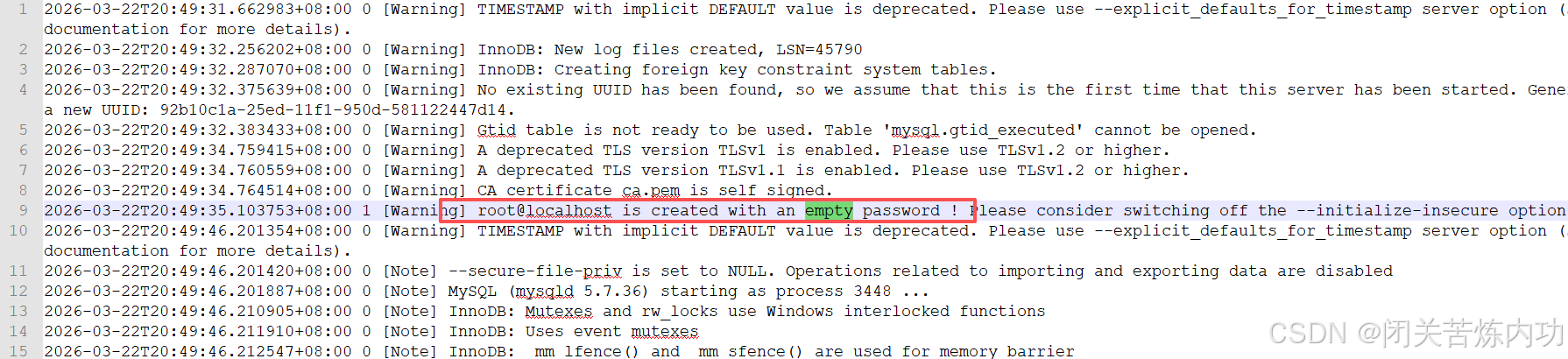
默认初始化是没设置密码,密码为空,所以首次登录直接回车,然后重新设置密码即可
数据库连接信息:
主机:localhost
端口:3306
账户:root
口令:123456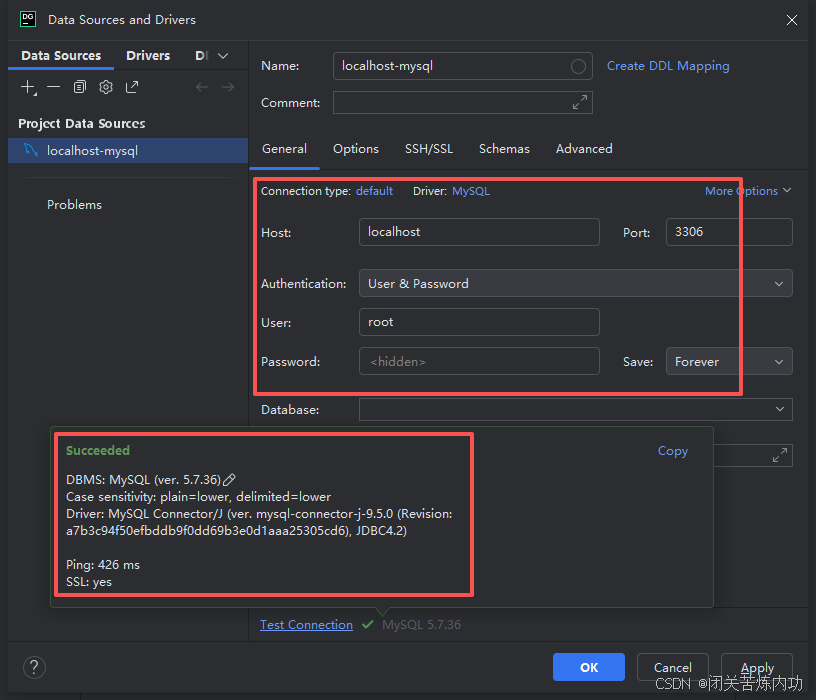
我们下期见,拜拜!