第22次:每日一题功能
每日一题是激励用户持续学习的有效方式。本次课程将实现每日一题功能,包括题目选择算法、答题界面和答案解析。
效果
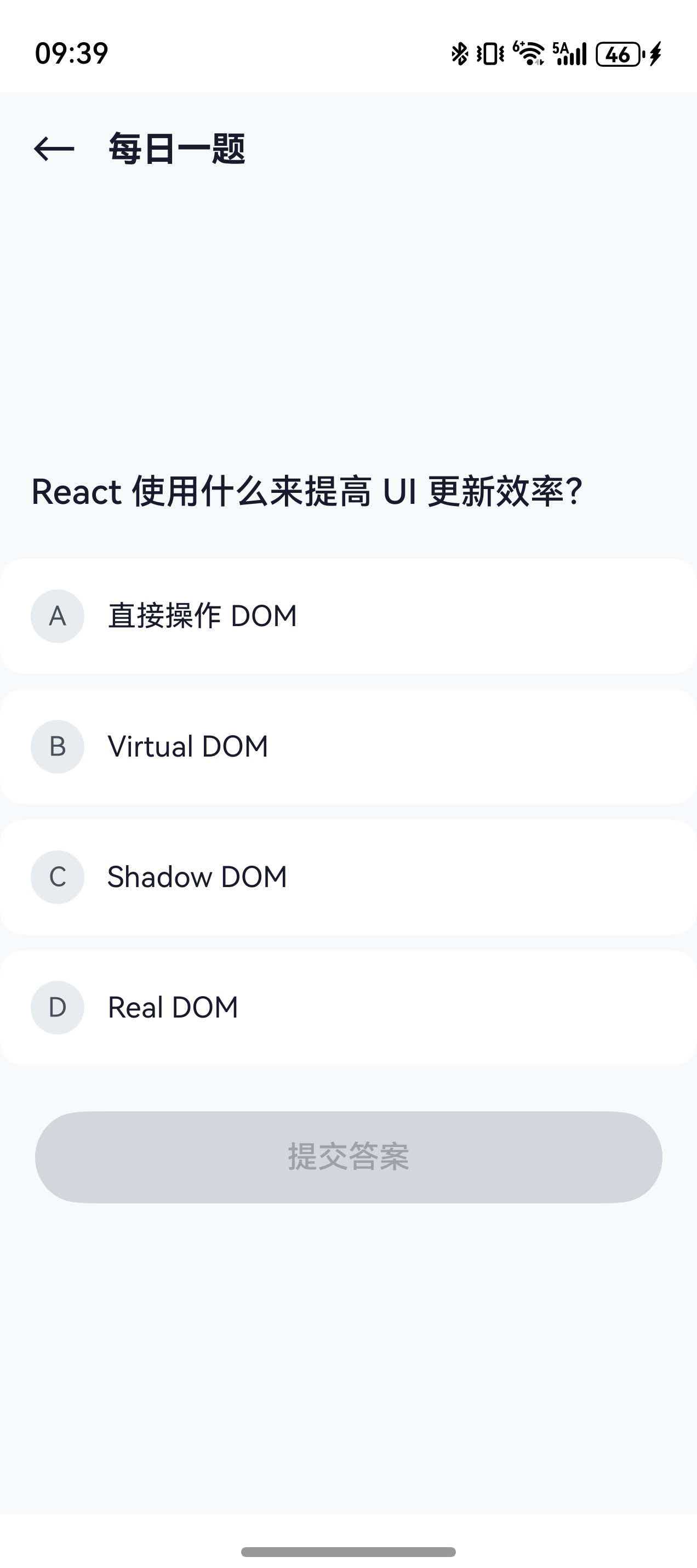

学习目标
- 掌握每日一题算法设计
- 实现 QuizPage 页面布局
- 设计选项交互效果
- 完成答案解析显示
- 实现每日一题完整功能
22.1 每日一题算法
题目选择逻辑
根据日期确定性地选择题目,确保同一天所有用户看到相同的题目:
typescript
static getDailyQuestion(): DailyQuestion {
  const today = new Date().toISOString().split('T')[0];  // 'YYYY-MM-DD'
  const questions = TutorialData.getAllQuizQuestions();

  // 根据日期计算索引
  const dateSum = today.split('-').reduce((a, b) => a + parseInt(b), 0);
  const index = Math.abs(dateSum) % questions.length;

  const q = questions[index];
  return {
    date: today,
    question: q.question,
    moduleId: q.moduleId,
    lessonId: q.lessonId,
    answered: false
  };
}
DailyQuestion 结构
typescript
interface DailyQuestion {
  date: string;           // 日期
  question: QuizItem;     // 题目
  moduleId: string;       // 所属模块
  lessonId: string;       // 所属课程
  answered: boolean;      // 是否已答
}
22.2 QuizPage 页面布局
页面结构
typescript
@Entry
@Component
struct QuizPage {
  @State question: DailyQuestion | null = null;
  @State selectedAnswer: number = -1;
  @State isSubmitted: boolean = false;
  @State isCorrect: boolean = false;
  @StorageLink('isDarkMode') isDarkMode: boolean = false;

  aboutToAppear(): void {
    this.question = TutorialService.getDailyQuestion();
  }
}
页面头部
typescript
@Builder
HeaderSection() {
  Row() {
    Text('←')
      .fontSize(24)
      .fontColor(this.isDarkMode ? '#ffffff' : '#1a1a2e')
      .onClick(() => router.back())

    Text('每日一题')
      .fontSize(18)
      .fontWeight(FontWeight.Bold)
      .fontColor(this.isDarkMode ? '#ffffff' : '#1a1a2e')
      .margin({ left: 16 })

    Blank()

    Text(this.question?.date ?? '')
      .fontSize(14)
      .fontColor(this.isDarkMode ? '#d1d5db' : '#495057')
  }
  .width('100%')
  .padding(16)
}
22.3 题目展示
题目卡片
typescript
@Builder
QuestionCard() {
  Column() {
    Text('📝')
      .fontSize(48)
      .margin({ bottom: 16 })

    Text(this.question?.question.question ?? '')
      .fontSize(18)
      .fontWeight(FontWeight.Medium)
      .fontColor(this.isDarkMode ? '#ffffff' : '#1a1a2e')
      .textAlign(TextAlign.Center)
  }
  .width('100%')
  .padding(24)
  .backgroundColor(this.isDarkMode ? '#282c34' : '#ffffff')
  .borderRadius(16)
  .margin({ left: 16, right: 16, top: 16 })
}
22.4 选项交互设计
选项列表
typescript
@Builder
OptionsSection() {
  Column({ space: 12 }) {
    ForEach(
      this.question?.question.options ?? [],
      (option: string, index: number) => {
        this.OptionItem(option, index)
      }
    )
  }
  .width('100%')
  .padding({ left: 16, right: 16, top: 24 })
}
选项项组件
typescript
@Builder
OptionItem(option: string, index: number) {
  Row() {
    // 选项字母
    Text(String.fromCharCode(65 + index))  // A, B, C, D
      .fontSize(16)
      .fontWeight(FontWeight.Bold)
      .fontColor(this.getOptionLetterColor(index))
      .width(32)
      .height(32)
      .textAlign(TextAlign.Center)
      .backgroundColor(this.getOptionBgColor(index))
      .borderRadius(16)

    // 选项内容
    Text(option)
      .fontSize(15)
      .fontColor(this.isDarkMode ? '#ffffff' : '#1a1a2e')
      .margin({ left: 12 })
      .layoutWeight(1)

    // 结果图标
    if (this.isSubmitted) {
      if (index === this.question?.question.correctAnswer) {
        Text('✓')
          .fontSize(18)
          .fontColor('#51cf66')
      } else if (index === this.selectedAnswer) {
        Text('✗')
          .fontSize(18)
          .fontColor('#ff6b6b')
      }
    }
  }
  .width('100%')
  .padding(16)
  .backgroundColor(this.getOptionCardBg(index))
  .borderRadius(12)
  .border({
    width: 2,
    color: this.getOptionBorderColor(index)
  })
  .onClick(() => {
    if (!this.isSubmitted) {
      this.selectedAnswer = index;
    }
  })
}
颜色计算方法
typescript
private getOptionBorderColor(index: number): string {
  if (this.isSubmitted) {
    if (index === this.question?.question.correctAnswer) {
      return '#51cf66';  // 正确答案绿色
    }
    if (index === this.selectedAnswer) {
      return '#ff6b6b';  // 错误选择红色
    }
  }
  if (index === this.selectedAnswer) {
    return '#61DAFB';    // 选中蓝色
  }
  return 'transparent';
}
22.5 答案解析显示
解析区域
typescript
@Builder
ExplanationSection() {
  if (this.isSubmitted && this.question) {
    Column() {
      Row() {
        Text(this.isCorrect ? '🎉' : '💡')
          .fontSize(24)
        Text(this.isCorrect ? '回答正确!' : '答案解析')
          .fontSize(16)
          .fontWeight(FontWeight.Bold)
          .fontColor(this.isDarkMode ? '#ffffff' : '#1a1a2e')
          .margin({ left: 8 })
      }
      .margin({ bottom: 12 })

      Text(this.question.question.explanation)
        .fontSize(14)
        .fontColor(this.isDarkMode ? '#e6e6e6' : '#333333')
        .lineHeight(22)
    }
    .width('100%')
    .padding(16)
    .margin({ left: 16, right: 16, top: 24 })
    .backgroundColor(this.isCorrect
      ? (this.isDarkMode ? 'rgba(81,207,102,0.15)' : 'rgba(81,207,102,0.1)')
      : (this.isDarkMode ? 'rgba(97,218,251,0.15)' : 'rgba(97,218,251,0.1)'))
    .borderRadius(12)
    .alignItems(HorizontalAlign.Start)
  }
}
22.6 提交按钮
按钮实现
typescript
@Builder
SubmitButton() {
  Button(this.isSubmitted ? '返回首页' : '提交答案')
    .width('90%')
    .height(48)
    .fontSize(16)
    .fontWeight(FontWeight.Medium)
    .backgroundColor(this.selectedAnswer === -1 && !this.isSubmitted
      ? (this.isDarkMode ? '#3d3d5c' : '#e9ecef')
      : '#61DAFB')
    .fontColor(this.selectedAnswer === -1 && !this.isSubmitted
      ? (this.isDarkMode ? '#9ca3af' : '#6c757d')
      : '#1a1a2e')
    .borderRadius(24)
    .margin({ top: 24 })
    .enabled(this.selectedAnswer !== -1 || this.isSubmitted)
    .onClick(() => {
      if (this.isSubmitted) {
        router.back();
      } else {
        this.submitAnswer();
      }
    })
}
提交逻辑
typescript
private submitAnswer(): void {
  if (this.question && this.selectedAnswer !== -1) {
    this.isCorrect = this.selectedAnswer === this.question.question.correctAnswer;
    this.isSubmitted = true;

    // 更新连续学习天数
    ProgressService.updateStreak();
  }
}
22.7 完整页面代码
typescript
@Entry
@Component
struct QuizPage {
  @State question: DailyQuestion | null = null;
  @State selectedAnswer: number = -1;
  @State isSubmitted: boolean = false;
  @State isCorrect: boolean = false;
  @StorageLink('isDarkMode') isDarkMode: boolean = false;

  aboutToAppear(): void {
    this.question = TutorialService.getDailyQuestion();
  }

  build() {
    Column() {
      this.HeaderSection()

      Scroll() {
        Column() {
          this.QuestionCard()
          this.OptionsSection()
          this.ExplanationSection()
          this.SubmitButton()
        }
        .padding({ bottom: 40 })
      }
      .layoutWeight(1)
      .scrollBar(BarState.Off)
    }
    .width('100%')
    .height('100%')
    .backgroundColor(this.isDarkMode ? '#1a1a2e' : '#f8f9fa')
  }

  // ... Builder 方法
}
本次课程小结
✅ 掌握了每日一题算法设计
✅ 实现了 QuizPage 页面布局
✅ 设计了选项交互效果
✅ 完成了答案解析显示
下次预告
第23次:面试题库功能 - 实现分类题库和练习模式