介绍
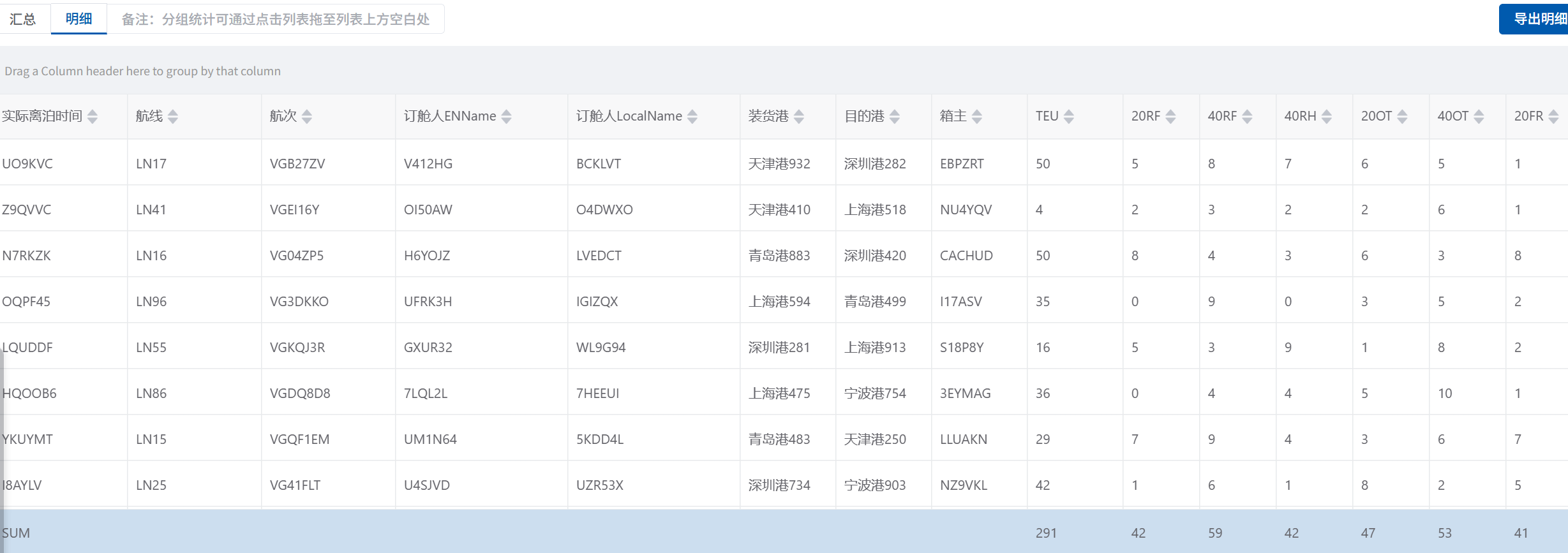
在企业级后台系统中,表格往往需要支持列拖拽分组、分组内数据求和、虚拟滚动等复杂功能。本文基于 Vue3 + TypeScript + Vxe Table + SortableJS,实现一套可拖拽分组、自动计算分组合计、支持虚拟滚动的高级表格组件,解决海量数据下的分组统计需求。
依赖安装
拖拽库SortableJS安装
javascript
npm i sortablejsVxeTable安装
javascript
npm i vxe-pc-ui
npm i vxe-tableVxeTable官网:https://vxetable.cn/#/demo/list
核心功能
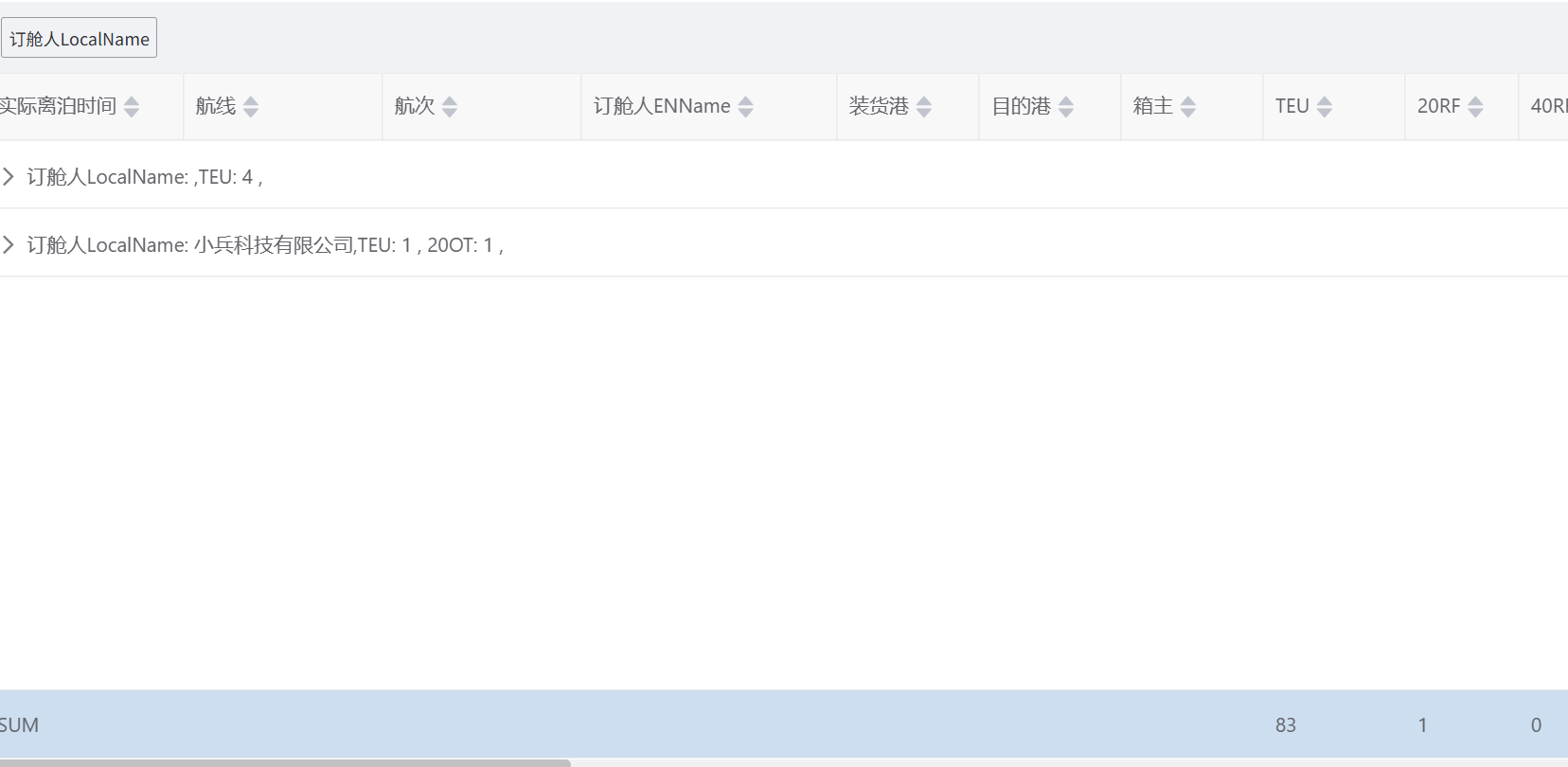
- 列头拖拽分组: 将表格列头拖拽到指定区域,自动按该列字段分组
- 分组内数据求和: 对指定字段自动计算分组内合计值,并渲染汇总行;
- 虚拟滚动: 支持大数据量表格的高性能渲染;
- 拖拽回退: 分组列可拖拽回表格,取消对应分组;
- 自适应高度:表格高度随容器自动适配,兼容窗口缩放。
代码实现
- 封装拖拽 Hook:useDragTable.ts
基于 SortableJS 封装通用的拖拽逻辑,支持表格列头与分组区域的双向拖拽: - 封装数据处理工具函数
提供分组聚合、求和计算的通用工具函数,适配不同业务场景: - 表格组件核心代码
整合拖拽、分组、求和、虚拟滚动的完整组件:
细节说明
1. 拖拽逻辑核心
- 使用 SortableJS 实现列头与分组区域的双向拖拽,通过group配置实现拖拽组关联;
- onMove事件阻止默认拖拽行为,onEnd事件处理列配置的移动逻辑;
- 组件卸载时销毁 Sortable 实例,避免内存泄漏。
2. 分组求和核心
- insertGroupData函数按分组 key 将数据分组,遍历计算每组内指定字段的合计值;
- 生成isGroupFooter标记的汇总行,通过spanMethod实现汇总行跨列展示;
- 兼容非数字值处理,避免 NaN 异常。
3. 性能优化
- 虚拟滚动:Vxe Table 的virtual-y-config配置,数据量 > 50 时自动启用;
- 自适应高度:通过 ResizeObserver 监听容器尺寸变化,动态调整表格高度;
- 深拷贝:所有数据处理均使用深拷贝,避免污染原始数据。
拖拽hooks
表格拖拽 useDragTable Hooks
javascript
import Sortable from 'sortablejs'
export const useDragTable = (tableRef, dropAreaRef, dragColumn, ColumnConfig, DomClass = '.el-table__header-wrapper tr') => {
  // Sortable实例
  let tableSortable: Sortable | null = null
  let areaSortable: Sortable | null = null

  // 用于记录拖拽的哪里到哪里
  let divToTable: any = {}
  let TableToDiv: any = {}
  // 初始化拖拽
  const initDrag = async () => {
    // 先销毁旧实例
    destroySortableInstances()
    // 等待 DOM 完全渲染
    await nextTick()
    // 表格表头拖拽
    if (!tableRef.value || !tableRef.value.$el) return
    const headerTr = tableRef.value.$el.querySelector(DomClass)
    if (!headerTr || !dropAreaRef.value) return
    tableSortable = Sortable.create(headerTr, {
      group: { name: 'table-columns', pull: true, put: true, },
      animation: 150,
      draggable: 'th',
      onMove: (evt: any) => {
        TableToDiv = evt
        return false
      },
      onEnd: (evt: any) => {
        if(TableToDiv.from === TableToDiv.to) return
        const [moved] = ColumnConfig.splice(evt.oldIndex, 1)
        dragColumn.value.splice(evt.newIndex, 0, moved)
        TableToDiv = {}
      }
    })

    areaSortable = Sortable.create(dropAreaRef.value, {
      group: { name: 'table-columns', pull: true, put: true },
      animation: 150,
      draggable: '.dragItem', // 明确单个拖拽单元
      onMove: (evt: any) => {
        divToTable = evt
        return false
      },
      onEnd: (evt: any) => {
        if(divToTable.from === divToTable.to) return
        const [moved] = dragColumn.value.splice(evt.oldIndex, 1)
        ColumnConfig.splice(moved.dragIndex || evt.newIndex, 0, moved)
        divToTable = {}
      }
    })
  }

  onMounted(async () => {
    await nextTick()
    initDrag()
  })

  // 组件卸载时销毁实例
  onUnmounted(() => {
    destroySortableInstances()
  })
  // 销毁 Sortable 实例(避免冲突和内存泄漏)
  const destroySortableInstances = () => {
    if (tableSortable) {
      tableSortable.destroy()
      tableSortable = null
    }
    if (areaSortable) {
      areaSortable.destroy()
      areaSortable = null
    }
  }
}
基于vxe Table 表头拖拽汇总组件
javascript
<template>
  <div class="dragContainer" >
    <div class="dragContent" ref="dropAreaRef">
      <div class="dragItem" v-for="(item, index) in dragColumn" :key="index">{{ item.title }}</div>
      <div class="dragTs" v-if="dragColumn.length === 0">Drag a Column header here to group by that column</div>
    </div>
  </div>
  <div class="table-container" ref="containerRef">
    <vxe-table
      ref="tableRef"
      :data="list"
      :virtual-y-config="{enabled: true, gt: 50}"
      :column-config="{resizable: true}"
      :row-config="{isHover: true}"
      :height="tableHeight"
      :span-method="spanMethod"
      :aggregate-config="aggregateConfig"
      :show-footer="true"
      :footer-method="footerMethod"
      :render-format="{ autoMerge: false }"
      :cell-class-name="getCellClassName"
      show-overflow="tooltip"
      :tooltip-config="{
        trigger: 'cell',
        enterable: true
      }"
      border
    >
      <vxe-column
        v-for="(item, index) in ColumnConfig"
        sortable
        :key="item.dataKey"
        :field="item.dataKey"
        :title="item.title"
        :min-width="item.width"
        :row-group-node="index === 0 ? true : false"
      >
        <template #group-content="{ childList }">
          <span v-for="(item, index) in dragColumn" :key="index">{{  item['title']  }}: {{ childList?.[0][item.dataKey] }},</span>
          <span v-for="(value, key, index) in parentFields" :key="index">
            <template v-if="!!childList?.[0][value]">
              {{ key }}: {{ childList?.[0][value] || 0 }}
              {{ index < Object.keys(parentFields).length - 1 ? ', ' : '' }}
            </template>
          </span>
        </template>
      </vxe-column>
    </vxe-table>
  </div>
</template>
<script lang="tsx" setup>
import { useDragTable } from '../hooks/useDragTable'
import { cloneDeep } from 'lodash-es'

const props = defineProps({
  // 表格配置项
  ColumnConfig: {
    type: Array as PropType<any[]>,
    default: () => []
  },
  tableNewList: {
    type: Array,
    default: () => []
  },
  parentFields: {
    type: Object,
    default: () => ({})
  },
})

const containerRef = ref<HTMLDivElement | null>(null)
const tableHeight = ref(0)
// 表格节点
const tableRef = ref()
// 拖拽节点
const dropAreaRef = ref()
// 列表数据
const list: any = ref([])
const dragColumn: any = ref([])
const aggregateConfig = reactive({})

onMounted(async () => {
  await nextTick()
  setTableHeight()
})
const setTableHeight = () => {
  if (!containerRef.value) return
  const containerHeight = containerRef.value.clientHeight
  tableHeight.value = containerHeight
}

window.addEventListener('resize', () => {
  setTableHeight()
})

onMounted(() => {
  if (!containerRef.value) return
  const resizeObserver = new ResizeObserver(() => {
    setTableHeight()
  })
  resizeObserver.observe(containerRef.value)
})
// 确定分组
const handleRowGroup = () => {
  const $table = tableRef.value
  if ($table) {
    $table.setRowGroups('complexField')
  }
}

// 取消分组
const cancelRowGroup = () => {
  const $table = tableRef.value
  if ($table) {
    $table.clearRowGroups()
  }
}

watch(() => props.tableNewList, (newVal) => {
  if(newVal.length > 0) {
    list.value = cloneDeep(props.tableNewList)
  }
  dragColumn.value.forEach(item => {
    let insertIndex = item.dragIndex
    if (insertIndex < 0) insertIndex = 0
    else if (insertIndex > props.ColumnConfig.length) insertIndex =  props.ColumnConfig.length
    props.ColumnConfig.splice(insertIndex, 0, { ...item })
  })
  dragColumn.value = []
}, { immediate: true, deep: true })

// 监听拖拽列变化
watch(() => dragColumn.value, (newValue) => {
  console.log('dragColumn', newValue)
  if(newValue.length > 0) {
    const tempRawList = cloneDeep(props.tableNewList)
    const oldDragList = newValue.map(item => item.dataKey)
    tempRawList.forEach((row: any) => {
      delete row.complexField
      row.complexField = oldDragList.map(field => row[field]).join('-');
    });
    // 分组
    handleRowGroup()
    list.value = insertGroupData(tempRawList)
  } else {
    list.value = cloneDeep(props.tableNewList)
    cancelRowGroup()
  }
}, { immediate: true, deep: true })
const spanMethod = ({ row, column }) => {
  const $table = tableRef.value
  const firstField = props.ColumnConfig[0]!.dataKey
  if ($table && $table.isAggregateRecord(row)) {
    if (column.field === firstField) {
      return { rowspan: 1, colspan: 100  }
    }
    return { rowspan: 0, colspan: 0 }
  }
  return { rowspan: 1, colspan: 1 }
}
// 单元格样式函数:为汇总行添加专属类名
const getCellClassName = ({ row }) => {
  // 如果是汇总行,返回自定义类名
  if (row.isGroupFooter) {
    return 'group-footer-row'
  }
  return ''
}
const footerMethod = ({ columns }) => {
  const data: any = props.tableNewList
  const needSumFieldValues = Object.values(props.parentFields);
  return [
    columns.map((column, index) => {
      if (index === 0) {
        return 'SUM'
      }
      const currentColumnProp = column.field;
      if (!needSumFieldValues.includes(currentColumnProp)) {
        return '';
      }

      // 满足条件,执行原有的合计计算逻辑
      const values = data.map((item) => Number(item[currentColumnProp]));

      if (!values.every((value) => Number.isNaN(value))) {
        return `${values.reduce((prev, curr) => {
          const value = Number(curr);
          if (!Number.isNaN(value)) {
            return prev + value
          } else {
            return prev;
          }
        }, 0)}`;
      }
    })
  ]
}

// 对分组后的每组数据进行求和
const insertGroupData = (list) => {
  const groupMap = {}
  list.forEach(item => {
    if (!groupMap[item.complexField]) {
      groupMap[item.complexField] = []
    }
    groupMap[item.complexField].push(item)
  })
  const result: any = []
  // 遍历每个分组,计算汇总并生成汇总行
  Object.keys(groupMap).forEach(groupKey => {
    const groupItems: any = groupMap[groupKey]
    // 添加分组内的原始数据
    result.push(...groupItems)

    // 对parentFields中的所有字段求和
    const sumResult = {}
    // 遍历parentFields的value(数据字段名),逐个求和
    Object.values(props.parentFields).forEach(field => {
      sumResult[field] = groupItems.reduce((sum, item) => {
        // 容错处理:非数字转0,避免NaN
        const value = Number(item[field]) || 0
        return sum + value
      }, 0)
    })
    // 生成分组汇总行(包含所有集装箱类型的求和结果)
    result.push({
      complexField: groupKey,
      groupName: groupKey,
      name: '【分组汇总】',
      isGroupFooter: true, // 标记为汇总行,避免被二次分组
      // 把求和结果赋值到对应字段
      ...sumResult,
      num: '合计',
    })
  })
  return result
}

// 拖拽表格
useDragTable(tableRef, dropAreaRef, dragColumn, props.ColumnConfig, '.vxe-table--header-inner-wrapper tr')
</script>
<style lang="scss" scoped>
.dragContainer {
  border: 1px solid #f0f2f5;
  background: #f0f2f5;
  height: 50px;
  overflow: hidden;
  box-sizing: border-box;
  .dragContent {
    display: flex;
    flex-wrap: wrap;
    height: 100%;
    align-items: center;
    padding: 0 10px;
  }
  .dragItem {
    box-sizing: border-box;
    font-size: 12px;
    border: 1px solid #999;
    padding: 5px;
    border-radius: 2px;
    margin-right: 10px;
  }
  .dragTs {
    color: #999;
    font-size: 12px;
    box-sizing: border-box;
  }
}
:deep(.el-table__row--level-0 td .cell) {
  display: flex;
  align-items: center;
}
:deep(.vxe-footer--row .vxe-footer--column) {
  background: rgba(0, 90, 174, 0.2);
}
:deep(.group-footer-row) {
  background: rgba(0, 90, 174, 0.1);
}
.table-container {
  height: calc(100vh - 300px);
  :deep(.vxe-table--column) {
    font-weight: normal;
    color: #636369;
  }
  :deep(.col--filter) {
    .vxe-cell--filter {
      float: right;
      vertical-align: middle;
      margin-top: 3px;
    }
    .vxe-filter--btn::before {
      content: '' !important;
      display: inline-block;
      width: 16px;
      height: 16px;
      background: url('@/assets/svgs/doc/filter.svg') no-repeat center center;
      background-size: 100% 100%;
      vertical-align: middle;
    }
    .vxe-cell--title {
      color: #636369;
    }
  }
  :deep(.is--filter-active) {
    .vxe-cell--filter {
      float: right;
      vertical-align: middle;
      margin-top: 3px;
    }
    .vxe-filter--btn::before {
      content: '' !important;
      display: inline-block;
      width: 16px;
      height: 16px;
      background: url('@/assets/svgs/doc/filter-checked.svg') no-repeat center center;
      background-size: 100% 100%; // 适配图片尺寸
      vertical-align: middle;
    }
    .vxe-cell--title {
      color: #005aae;
    }
  }
}
</style>
组件引用
javascript
  <VxeDragTable
    :ColumnConfig="ColumnConfig"
    :tableNewList="tableNewList"
    :parentFields="parentFields"
  />
const ColumnConfig = ref([
  { dataKey: 'hs40', title: '40HS', width: 80, dragIndex: 1 },
  { dataKey: 'ht20', title: '20HT', width: 80, dragIndex: 2 },
  { dataKey: 'ht40', title: '40HT', width: 80, dragIndex: 3 },
  { dataKey: 'pl20', title: '20PL', width: 80, dragIndex: 4 },
]) // 表格配置
const tableNewList = ref([]) // 数据
const parentFields = ref({ // 需要求和字段
  'TEU': 'teu',
  '20RF': 'rf20',
  '40RF': 'rf40',
  '40RH': 'rh40',
  '20OT': 'ot20',
  '40OT': 'ot40',
  '20FR': 'fr20',
  '40FR': 'fr40',
  '20GP': 'gp20',
  '40GP': 'gp40',
  '40HC': 'hc40',
  '20TK': 'tk20',
  '40TK': 'tk40',
  '20HS': 'hs20',
  '40HS': 'hs40',
  '20HT': 'ht20',
  '40HT': 'ht40',
  '20PL': 'pl20',
  '40PL': 'pl40',
  '20HC': 'hc20',
  '20RH': 'rh20',
  '40HR': 'hr40',
  '45GP': 'gp45',
  '45HC': 'hc45'
})