Ollama + Gemma 2 2B 本地部署入门指南
本文档面向新手,手把手教你使用 Ollama 在本地部署和运行 Google Gemma 2 2B 轻量级模型
目录
- [为什么选择 Gemma 2 2B?](#为什么选择 Gemma 2 2B?)
- 环境准备
- [安装 Ollama](#安装 Ollama)
- [下载并运行 Gemma 2 2B](#下载并运行 Gemma 2 2B)
- 常用操作命令
- [通过 API 调用](#通过 API 调用)
- 性能优化建议
- 常见问题排查
为什么选择 Gemma 2 2B?
Gemma 2 2B 是 Google 推出的轻量级开源大语言模型,相比 GPT-2 有以下优势:
| 特性 | Gemma 2 2B | GPT-2 |
|---|---|---|
| 参数量 | 2.6B | 1.5B(最大版本) |
| 模型大小 | ~1.6GB | ~500MB |
| 上下文长度 | 8192 tokens | 1024 tokens |
| 多语言支持 | 优秀 | 一般 |
| 推理速度 | 更快 | 较慢 |
| 代码能力 | 强 | 较弱 |
Gemma 2 2B 的核心优势
- 🚀 超轻量级:适合笔记本和普通电脑运行
- 💨 推理速度快:低延迟响应
- 🌍 多语言能力强:中文支持优秀
- 💻 低内存占用:4GB 内存即可流畅运行
- 🔒 开源可商用:Apache 2.0 许可证
环境准备
系统要求
| 项目 | 最低配置 | 推荐配置 |
|---|---|---|
| 操作系统 | macOS 11+ / Linux / Windows 10+ | macOS 14+ / Ubuntu 22.04 |
| 内存 | 4GB | 8GB+ |
| 磁盘空间 | 3GB | 10GB+ |
| 网络 | 需要下载模型 | 稳定的网络连接 |
前置检查
在终端执行以下命令,确认系统环境:
bash
# 查看操作系统版本
uname -a

# 查看内存和磁盘空间
system_profiler SPHardwareDataType | grep Memory
df -h

# 检查网络连接
ping -c 3 www.google.com
安装 Ollama
macOS 安装
方式一:使用 Homebrew(推荐)
bash
# 安装 Homebrew(如未安装)
/bin/bash -c "$(curl -fsSL https://raw.githubusercontent.com/Homebrew/install/HEAD/install.sh)"

# 安装 Ollama
brew install ollama
方式二:官方安装脚本
bash
# 下载并安装
curl -fsSL https://ollama.com/install.sh | sh
Linux 安装
bash
curl -fsSL https://ollama.com/install.sh | shWindows 安装
- 访问官网下载安装包:https://ollama.com/download
- 双击运行安装程序
- 按提示完成安装
验证安装
bash
# 检查版本
ollama --version

# 预期输出类似:ollama version 0.3.x
下载并运行 Gemma 2 2B
步骤 1:启动 Ollama 服务
bash
# 启动服务(macOS/Linux)
ollama serve

# 或者让服务在后台运行
nohup ollama serve > ollama.log 2>&1 &
💡 提示:Windows 安装后会自动启动服务
步骤 2:拉取 Gemma 2 2B 模型
注意:这里要新开窗口。
bash
# 下载 Gemma 2 2B 模型(约 1.6GB)
ollama pull gemma2:2b

# 查看下载进度(重新打开终端)
ollama list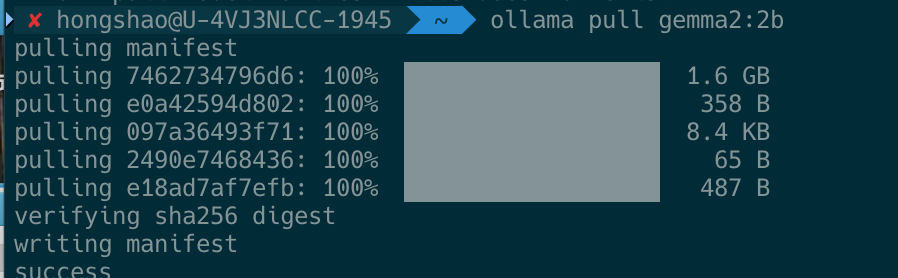
下载过程说明:
- 首次下载需要 5-15 分钟(取决于网络速度)
- 模型文件会存储在
~/.ollama/models/目录 - 下载完成后即可离线使用

步骤 3:运行模型
交互式对话模式
bash
# 启动 Gemma 2 2B 进行对话
ollama run gemma2:2b
运行后会进入交互界面:
>>> 你好,请介绍一下自己
你好!我是 Gemma,一个由 Google 开发的大型语言模型。我可以帮助你完成各种任务,比如回答问题、写作、翻译、编程等。有什么我可以帮你的吗?
# 按 Ctrl+D 或输入 /bye 退出!使用示例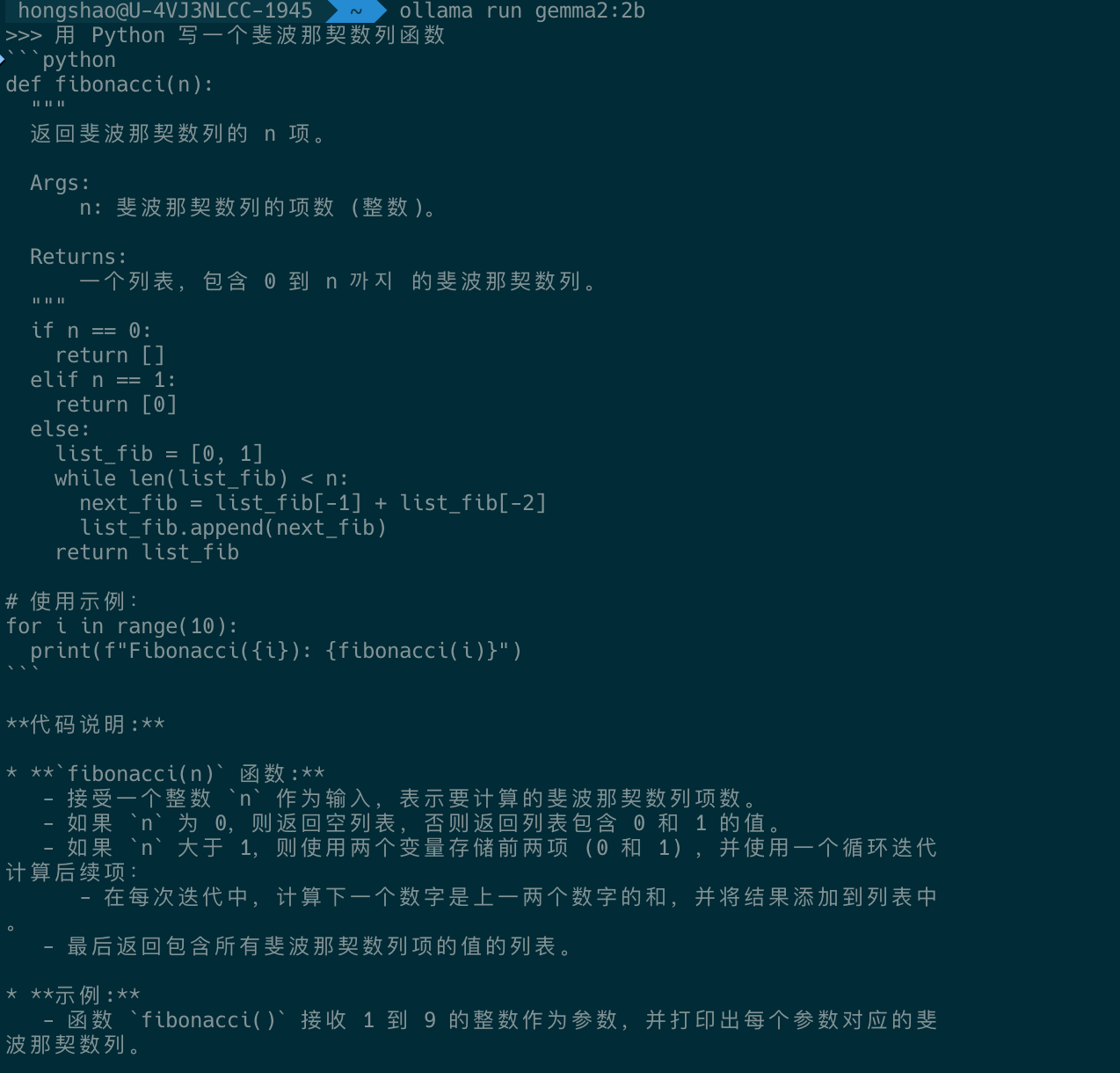
单次生成模式
bash
# 单次提问,直接返回结果
ollama run gemma2:2b "请用三句话介绍机器学习"

# 代码相关提问
ollama run gemma2:2b "解释 Python 中的装饰器,并给出示例代码"
常用操作命令
模型管理
bash
# 列出本地所有模型
ollama list

# 示例输出:
# NAME            ID              SIZE      MODIFIED
# gemma2:2b       8c9f5f98f8d3    1.6GB     5 minutes ago

# 删除指定模型
ollama rm gemma2:2b

# 复制模型
ollama cp gemma2:2b my-gemma2-backup

# 查看模型详细信息
ollama show gemma2:2b
服务管理
bash
# 查看运行中的模型
ollama ps

# 停止正在运行的模型(释放内存)
ollama stop gemma2:2b

# 停止所有运行中的模型
ollama stop $(ollama ps | tail -n +2 | awk '{print $1}')

# 停止 Ollama 服务
# macOS: 在 Activity Monitor 中找到 ollama 进程并结束
# Linux: pkill ollama
高级参数调优
bash
# 设置生成参数
ollama run gemma2:2b --temperature 0.7 --top-p 0.95

# 参数说明:
# --temperature: 创造性程度(0-2,默认 0.8)
#   - 0.2-0.5: 更确定、更保守的回答
#   - 0.7-1.0: 平衡的回答(推荐)
#   - 1.2-2.0: 更有创意、更多样化的回答
#
# --top-p: 核采样概率(0-1,默认 0.9)
# --num-ctx: 上下文窗口大小(默认 2048)
通过 API 调用
Ollama 提供了 HTTP API,方便集成到应用程序中。
启动 API 服务
bash
# 确保服务已启动
ollama serve
Python 调用示例
python
import requests
import json

# API 地址
url = "http://localhost:11434/api/generate"

# 请求参数
data = {
    "model": "gemma2:2b",
    "prompt": "请用中文解释什么是深度学习",
    "stream": False,
    "options": {
        "temperature": 0.7,
        "top_p": 0.95,
        "num_ctx": 4096
    }
}

# 发送请求
response = requests.post(url, json=data)
result = response.json()

# 打印结果
print(result['response'])
curl 调用示例
bash
curl -X POST http://localhost:11434/api/generate \
  -H "Content-Type: application/json" \
  -d '{
    "model": "gemma2:2b",
    "prompt": "列举三个提高编程效率的建议",
    "stream": false
  }'
流式输出示例(实时显示)
python
import requests
import json

url = "http://localhost:11434/api/generate"

data = {
    "model": "gemma2:2b",
    "prompt": "写一首关于程序员的短诗",
    "stream": True
}

response = requests.post(url, json=data, stream=True)

print("Gemma 2: ", end="", flush=True)
for line in response.iter_lines():
    if line:
        chunk = json.loads(line)
        if 'response' in chunk:
            print(chunk['response'], end='', flush=True)
print() # 最后换行响应超级快:
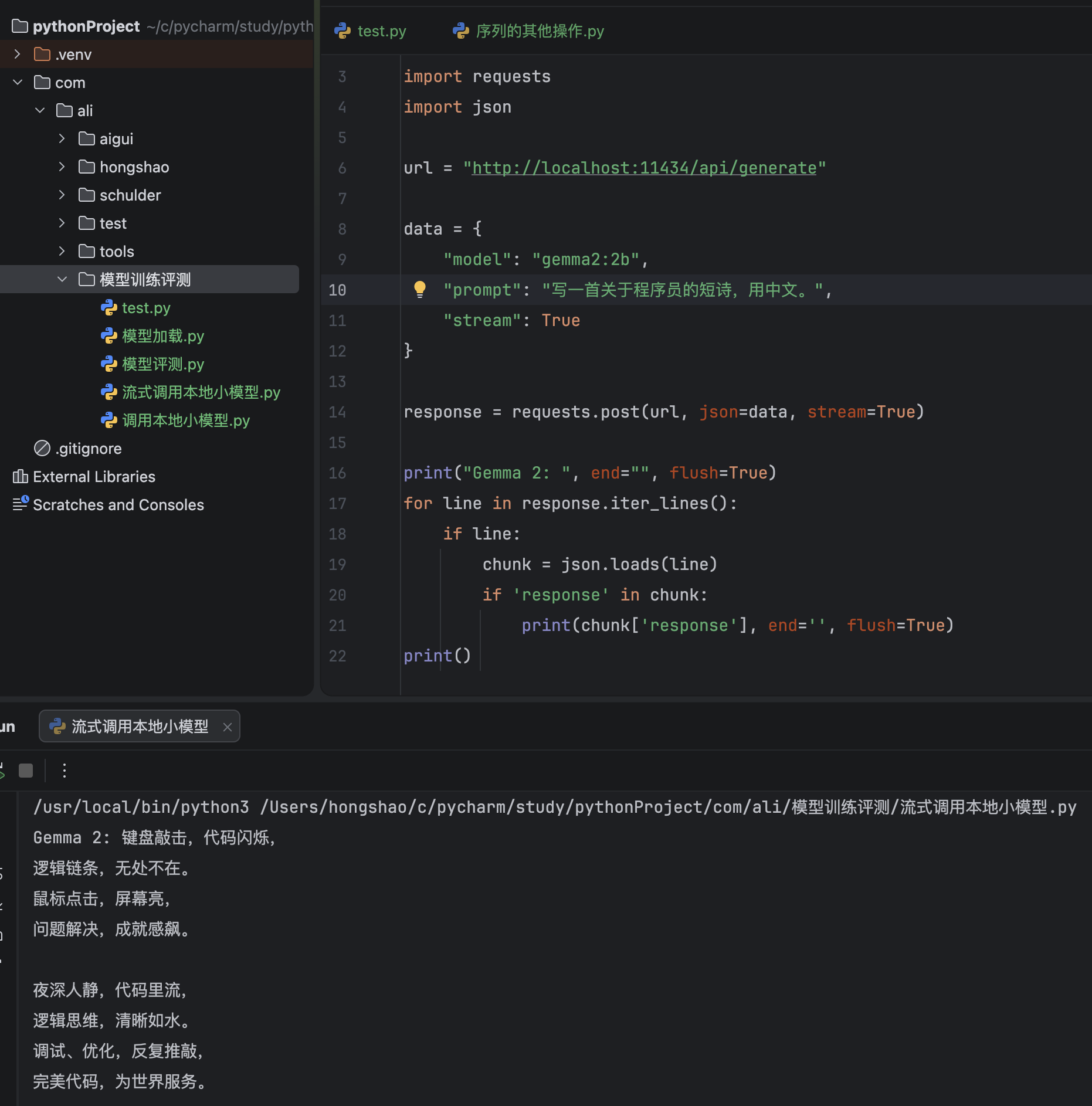
聊天对话 API
python
import requests

url = "http://localhost:11434/api/chat"

data = {
    "model": "gemma2:2b",
    "messages": [
        {"role": "system", "content": "你是一个友好的编程助手"},
        {"role": "user", "content": "Python 中列表和元组有什么区别?"}
    ],
    "stream": False
}

response = requests.post(url, json=data)
result = response.json()
print(result['message']['content'])
性能优化建议
1. 内存优化
bash
# 如果内存紧张,可以减小上下文窗口
ollama run gemma2:2b --num-ctx 1024
2. CPU 优化
bash
# 查看 CPU 核心数,合理设置线程
sysctl -n hw.ncpu  # macOS
nproc              # Linux

# Ollama 会自动优化,无需手动设置
3. 模型量化版本
如果 2B 模型运行仍有压力,可以尝试量化版本:
bash
# 拉取量化版本(更小、更快,质量略有下降)
ollama pull gemma2:2b-instruct-q4_0

# 查看所有可用版本
ollama list gemma2
4. 多轮对话优化
python
# 保持对话上下文,避免重复加载模型
import requests

class GemmaChat:
    def __init__(self):
        self.url = "http://localhost:11434/api/chat"
        self.messages = []

    def chat(self, user_input):
        self.messages.append({"role": "user", "content": user_input})

        data = {
            "model": "gemma2:2b",
            "messages": self.messages,
            "stream": False
        }

        response = requests.post(self.url, json=data)
        result = response.json()

        assistant_reply = result['message']['content']
        self.messages.append({"role": "assistant", "content": assistant_reply})

        return assistant_reply

# 使用示例
chat = GemmaChat()
print(chat.chat("你好"))
print(chat.chat("刚才我说了什么?"))  # 保持上下文记忆
常见问题排查
问题 1:模型下载慢或失败
解决方案:
bash
# 设置镜像源(国内用户)
export OLLAMA_HOST="0.0.0.0:11434"

# 或者使用代理
export HTTP_PROXY="http://your-proxy:port"
export HTTPS_PROXY="http://your-proxy:port"

# 重新拉取
ollama pull gemma2:2b
问题 2:内存不足导致运行缓慢
症状:生成响应很慢,系统卡顿
解决方案:
bash
# 1. 关闭其他占用内存的应用
# 2. 使用更小的上下文窗口
ollama run gemma2:2b --num-ctx 1024

# 3. 使用量化版本
ollama pull gemma2:2b-instruct-q4_0
问题 3:端口被占用
解决方案:
bash
# 查找占用 11434 端口的进程
lsof -i :11434

# 结束进程后重新启动
kill -9 <PID>
ollama serve
问题 4:中文输出乱码或质量差
解决方案:
bash
# 在 prompt 中明确要求中文回答
ollama run gemma2:2b "请用中文回答:什么是机器学习?"

# 或者使用系统提示
ollama run gemma2:2b --system "你是一个中文助手,请用中文回答所有问题"
问题 5:生成结果不理想
调优建议:
- 降低
temperature(0.3-0.5)使结果更确定 - 提供更详细的 prompt 提示
- 使用 few-shot 示例引导模型
bash
# 示例:使用 few-shot
ollama run gemma2:2b ""
# 输入:
# 将以下英文翻译成中文:
# 英文:Hello world
# 中文:你好世界
#
# 英文:Artificial Intelligence
# 中文:
进阶学习
探索 Gemma 系列其他模型
bash
# 查看可用模型
ollama list

# Gemma 系列:
ollama pull gemma2:2b              # 2B 基础版(推荐新手)
ollama pull gemma2:2b-instruct    # 2B 指令微调版
ollama pull gemma2:9b              # 9B 大参数版(需要更多内存)
ollama pull gemma2:27b             # 27B 超大版(需要 16GB+ 内存)
对比其他轻量级模型
bash
# 推荐尝试的其他轻量级模型:
ollama pull llama3.2:1b           # Meta 1B 模型
ollama pull qwen2.5:1.5b          # 阿里通义千问 1.5B
ollama pull phi3:3.8b             # 微软 Phi-3
ollama pull tinyllama             # 超轻量 TinyLlama
自定义模型
bash
# 创建 Modelfile
cat > Modelfile << 'EOF'
FROM gemma2:2b

SYSTEM """你是一个专业的编程助手,擅长 Python、Java 和 JavaScript。
请提供清晰、简洁、带有代码示例的回答。"""

PARAMETER temperature 0.3
PARAMETER top_p 0.9
PARAMETER num_ctx 4096
EOF

# 构建自定义模型
ollama create my-coding-assistant -f Modelfile

# 运行自定义模型
ollama run my-coding-assistant
总结
恭喜你!通过本指南,你已经学会了:
✅ 了解 Gemma 2 2B 的优势和特点
✅ 安装和配置 Ollama
✅ 下载并运行 Gemma 2 2B 模型
✅ 使用命令行与模型交互
✅ 通过 API 集成到 Python 应用程序
✅ 性能优化和常见问题解决
参考资源
如有问题,欢迎交流讨论!