Pygame 小游戏------记忆方格
项目概述
Pygame 是 Python 中一个功能强大的 2D 游戏开发库,它提供了处理图形、声音、输入和事件循环的完整工具集。本文通过 Pygame 实现一个经典记忆类小游戏------记忆方格(Memory Grid)。
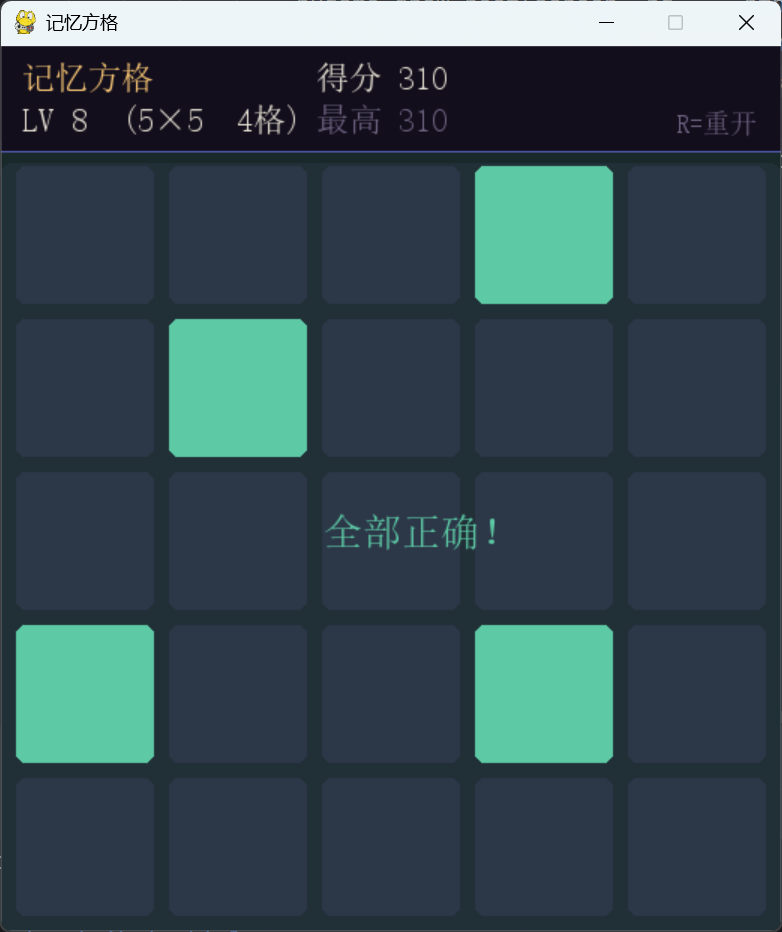
在这个游戏中,玩家需要在短暂的展示时间内记住网格中高亮的方格位置,随后在空白网格上点击还原出相同的图案。随着关卡推进,网格尺寸从 3×3 逐渐扩大到 6×6,高亮方格数量也随之增加,对短期记忆的挑战不断加深。其中:
- 记忆阶段:每轮开始时,目标方格以金色高亮显示 1.2 秒,同时屏幕底部显示倒计时进度条,提醒玩家抓紧记忆。
- 作答阶段:高亮消失后,玩家逐一点击认为正确的方格;点中则变为青绿色并触发粒子爆炸,点错则变为红色并立即结束本轮。
- 关卡递进:全部点对后自动进入下一关,难度沿预设表格线性提升------先增加高亮数量,再扩大网格尺寸,共 16 级。
- 得分规则 :每关得分为
高亮方格数 × 10,方格越多单关分值越高,最高分跨局保留。 - 失败处理:点错即游戏结束,结束画面同时展示正确图案(半透明金色),并提供"再试本关"和"重新开始"两个选项。
- 键盘操作:R:重新开始;Enter:再试本关(仅游戏结束时有效)。
游戏实现
初始化与基础设置
游戏启动时初始化 Pygame 并定义屏幕尺寸和 HUD 高度。
python
pygame.init()

SIZE  = 520
HUD_H = 70
screen = pygame.display.set_mode((SIZE, SIZE + HUD_H))
pygame.display.set_caption("记忆方格")
clock  = pygame.time.Clock()
游戏区为 520×520 像素的正方形,顶部 70 像素作为 HUD 信息栏,总窗口高度为 590 像素。
颜色定义
python
BG      = (12,  10,  18)    # 全局深色背景
HUD_BG  = (18,  14,  28)    # HUD 背景
GRID_BG = (22,  18,  34)    # 网格背景板
EMPTY   = (35,  28,  55)    # 空格底色
CORRECT = (93,  202, 165)   # 答对颜色(青绿)
WRONG   = (226,  75,  74)   # 答错颜色(红)
ACTIVE  = (83,   74, 183)   # 强调色(靛蓝)
REVEAL  = (250, 199, 117)   # 展示阶段高亮色(金)
WHITE   = (230, 225, 210)   # 主文字
GRAY    = (110, 100, 130)   # 次要文字
DIM     = (60,   52,  90)   # 暗色按钮底色
整体采用深紫色调背景,以金色(展示)、青绿色(正确)、红色(错误)三种功能色形成清晰的视觉语义。
难度表格
python
LEVELS = [
    (3, 2),   # lv1 : 3×3, 2 个高亮格
    (3, 3),   # lv2
    (3, 4),   # lv3
    (4, 3),   # lv4 : 网格扩大至 4×4
    (4, 4),   # lv5
    # ...共 16 级
    (6, 9),   # lv16: 6×6, 9 个高亮格
]
每个元素为 (grid_size, num_lit) 二元组,高亮比例始终维持在 20%~40%,保证难度循序渐进而不失可玩性。关卡数超过表格长度时自动停留在最高难度。
字体加载
python
CHINESE_FONT_PATH = r"C:/Windows/Fonts/simsun.ttc"
try:
    font_hud = pygame.font.Font(CHINESE_FONT_PATH, 22)
    font_big = pygame.font.Font(CHINESE_FONT_PATH, 52)
    font_mid = pygame.font.Font(CHINESE_FONT_PATH, 26)
    font_sm  = pygame.font.Font(CHINESE_FONT_PATH, 18)
except FileNotFoundError:
    font_hud = pygame.font.SysFont("Arial", 20, bold=True)
    # ...
优先加载系统宋体以支持中文;若路径不存在则回退到 SysFont,保证跨平台兼容性。
布局计算
网格尺寸随关卡动态变化,因此方格大小需要实时计算。
布局函数 compute_layout:
python
def compute_layout(cols):
    area  = SIZE - GAP * (cols + 1)   # 可用像素宽度(扣除所有间距)
    tw    = area // cols               # 单格宽度
    th    = tw                         # 保持正方形
    total_w = cols * tw + GAP * (cols + 1)
    ox    = (SIZE - total_w) // 2      # 水平居中偏移
    return tw, th, ox
以固定间距 GAP = 10 均匀分配可用宽度,水平居中整个网格。网格尺寸从 3 增大到 6 时,方格边长自动从约 160px 缩小至约 73px,始终填满同一区域。
方格矩形 tile_rect:
python
def tile_rect(row, col, cols, tile_w, tile_h, ox):
    x = ox + GAP + col * (tile_w + GAP)
    y = HUD_H + GAP + row * (tile_h + GAP)
    return pygame.Rect(x, y, tile_w, tile_h)
通过行列索引直接计算像素坐标,供绘制和碰撞检测复用。
核心类设计
粒子类(Particle)
与打砖块游戏中的粒子效果类似,点击方格时触发小型爆炸粒子动画,根据答对或答错使用不同颜色。
python
class Particle:
    def __init__(self, x, y, color):
        self.vx  = random.uniform(-2.5, 2.5)
        self.vy  = random.uniform(-3.5, 0.5)
        self.life = 22
        self.color = color

    def update(self):
        self.x  += self.vx
        self.y  += self.vy
        self.vy += 0.18    # 模拟重力
        self.life -= 1

    def draw(self, surf):
        a = min(255, self.life * 11)   # 透明度线性衰减
        s = pygame.Surface((5, 5), pygame.SRCALPHA)
        s.fill((*self.color[:3], a))
        surf.blit(s, (int(self.x), int(self.y)))
答对生成青绿色粒子,答错生成红色粒子,通过颜色即时传达反馈信息。
游戏主类(Game)
Game 类通过状态机驱动整个流程,所有逻辑集中在一处。
状态机设计:
reveal → input → correct → (下一关 reveal)
                ↘ wrong → gameover → restart / retry
游戏共有 5 个状态,每个状态决定绘制内容和事件响应方式,职责清晰,扩展方便。
构造函数 __init__:
python
def __init__(self):
    self.score     = 0
    self.best      = 0
    self.level     = 0      # LEVELS 表格索引
    self.particles = []
    self._new_round()
新回合初始化 _new_round:
python
def _new_round(self):
    cols, num_lit = LEVELS[min(self.level, len(LEVELS) - 1)]
    self.cols    = cols
    self.num_lit = num_lit
    self.tile_w, self.tile_h, self.ox = compute_layout(cols)
    self.pattern = set(random.sample(range(cols * cols), num_lit))
    self.clicked  = set()    # 玩家已点中的正确格
    self.wrong_set = set()   # 玩家点错的格
    self.state   = "reveal"
    self.timer   = time.time()
pattern 使用 random.sample 从所有格子索引中无重复抽取 num_lit 个,保证每局图案随机且不重叠。clicked 和 wrong_set 分开存储,方便绘制时分颜色渲染。
重开与重试:
python
def _restart(self):
    """完全重开:分数和关卡归零。"""
    self.score = 0
    self.level = 0
    self.particles = []
    self._new_round()

def _retry(self):
    """再试本关:保留分数和最高分,重置图案。"""
    self.particles = []
self._new_round()两种重置策略分离设计,_retry 不修改 self.level,使玩家可以在同一关卡反复练习,同时不影响历史最高分。
事件处理 handle_events
python
def handle_events(self):
    for event in pygame.event.get():
        ...
        if event.type == pygame.MOUSEBUTTONDOWN and event.button == 1:
            if self.state == "input":
                idx = self._cell_at(*event.pos)
                if idx is not None and idx not in self.clicked and idx not in self.wrong_set:
                    if idx in self.pattern:
                        self.clicked.add(idx)
                        # 生成青绿粒子
                        if self.clicked == self.pattern:
                            self.score += self.num_lit * 10
                            self.state = "correct"
                    else:
                        self.wrong_set.add(idx)
                        # 生成红色粒子
                        self.state = "wrong"
点击逻辑的三个判断层次:① 点到有效格子、② 该格尚未被点过、③ 是否在答案集合中。self.clicked == self.pattern 用集合相等判断是否全部答对,避免逐一遍历。
单元格点击检测 _cell_at:
python
def _cell_at(self, mx, my):
    for r in range(self.cols):
        for c in range(self.cols):
            rect = tile_rect(r, c, self.cols, self.tile_w, self.tile_h, self.ox)
            if rect.collidepoint(mx, my):
                return r * self.cols + c
    return None
遍历所有格子矩形,找到鼠标点击位置对应的格子线性索引。返回值为 行 × 列数 + 列,与 pattern 集合中的索引格式统一。
核心更新 update
python
def update(self):
    now = time.time()
    if self.state == "reveal":
        if now - self.timer >= REVEAL_SECS:    # 展示 1.2 秒后切换
            self.state = "input"
    elif self.state == "correct":
        if now - self.timer >= 0.7:            # 短暂绿色反馈后进入下一关
            self.level = min(self.level + 1, len(LEVELS) - 1)
            self._new_round()
    elif self.state == "wrong":
        if now - self.timer >= 1.0:            # 短暂红色反馈后显示结束画面
            self.state = "gameover"

    for p in self.particles[:]:
        p.update()
        if p.life <= 0:
            self.particles.remove(p)
使用 time.time() 计时而非帧计数,保证在不同帧率环境下状态切换时间一致。"答对"和"答错"各保留一段短暂的视觉反馈时间,再执行后续状态跳转,避免画面突兀切换。
绘制方法 draw
倒计时进度条:
python
if self.state == "reveal":
    remaining = max(0.0, REVEAL_SECS - (time.time() - self.timer))
    bar_w = int((remaining / REVEAL_SECS) * (SIZE - 40))
    pygame.draw.rect(screen, DIM,    (20, y, SIZE - 40, 6), border_radius=3)
    pygame.draw.rect(screen, REVEAL, (20, y, bar_w,    6), border_radius=3)
进度条宽度与剩余展示时间线性对应,实时缩短,给玩家直观的时间压力感。
方格多状态渲染:
python
for idx in range(cols * cols):
    r, c = divmod(idx, cols)
    rect = tile_rect(r, c, cols, tw, th, ox)

    pygame.draw.rect(screen, EMPTY, rect, border_radius=6)   # 基础底色

    if revealing and idx in self.pattern:
        pygame.draw.rect(screen, REVEAL, rect, border_radius=6)   # 金色展示
    elif idx in self.clicked:
        pygame.draw.rect(screen, CORRECT, rect, border_radius=6)  # 青绿已答
    elif idx in self.wrong_set:
        pygame.draw.rect(screen, WRONG, rect, border_radius=6)    # 红色答错
    elif showing_answer and idx in self.pattern:
        # 游戏结束时半透明显示正确答案
        s = pygame.Surface((tw, th), pygame.SRCALPHA)
        pygame.draw.rect(s, (*REVEAL, 120), (0, 0, tw, th), border_radius=6)
screen.blit(s, rect.topleft)每个方格根据当前状态和所属集合(pattern/clicked/wrong_set)选择渲染颜色,逻辑清晰。游戏结束时以半透明金色叠加显示正确答案,帮助玩家对照学习。
鼠标悬停高亮:
python
if self.state == "input":
    mx, my = pygame.mouse.get_pos()
    if rect.collidepoint(mx, my) and idx not in self.clicked and idx not in self.wrong_set:
        s = pygame.Surface((tw, th), pygame.SRCALPHA)
        pygame.draw.rect(s, (255, 255, 255, 30), (0, 0, tw, th), border_radius=6)
        screen.blit(s, rect.topleft)
仅在作答阶段、鼠标悬停于未点击格时叠加 30/255 透明度的白色高亮,提供轻微的交互反馈,不干扰游戏信息。
结束画面按钮:
python
for btn, label, color in [
    (btn_retry,   "再试本关  Enter", ACTIVE),
    (btn_restart, "重新开始  R",     DIM),
]:
    hover = btn.collidepoint(mx, my)
    bg    = tuple(min(255, v + 30) for v in color) if hover else color
    pygame.draw.rect(screen, bg,    btn, border_radius=8)
    pygame.draw.rect(screen, WHITE, btn, width=1, border_radius=8)
鼠标悬停时按钮颜色各通道提亮 30,模拟简单的 hover 效果;同时在按钮内显示对应的键盘快捷键,提示玩家也可用键盘操作。
绘制顺序为:背景 → HUD → 网格底板 → 方格 → 粒子 → 状态遮罩 → 结束按钮,严格保证层次正确。
主循环 run:
python
def run(self):
    while True:
        self.handle_events()
        self.update()
        self.draw()
        clock.tick(60)
固定 60 FPS,保证动画和计时器在不同性能机器上表现一致。
全部代码
python
import pygame
import sys
import random
import time

pygame.init()

SIZE     = 520
HUD_H    = 70
screen   = pygame.display.set_mode((SIZE, SIZE + HUD_H))
pygame.display.set_caption("记忆方格")
clock    = pygame.time.Clock()

# ── Colors ──────────────────────────────────────────────────────────────────
BG        = (12,  10,  18)
HUD_BG    = (18,  14,  28)
GRID_BG   = (22,  18,  34)
EMPTY     = (35,  28,  55)
CORRECT   = (93, 202, 165)    # teal-green
WRONG     = (226, 75,  74)    # red
ACTIVE    = (83,  74, 183)    # indigo
REVEAL    = (250,199, 117)    # gold
WHITE     = (230, 225, 210)
GRAY      = (110, 100, 130)
DIM       = (60,  52,  90)

CHINESE_FONT_PATH = r"C:/Windows/Fonts/simsun.ttc"
try:
    font_hud  = pygame.font.Font(CHINESE_FONT_PATH, 22)
    font_big  = pygame.font.Font(CHINESE_FONT_PATH, 52)
    font_mid  = pygame.font.Font(CHINESE_FONT_PATH, 26)
    font_sm   = pygame.font.Font(CHINESE_FONT_PATH, 18)
except FileNotFoundError:
    font_hud  = pygame.font.SysFont("Arial", 20, bold=True)
    font_big  = pygame.font.SysFont("Arial", 48, bold=True)
    font_mid  = pygame.font.SysFont("Arial", 24, bold=True)
    font_sm   = pygame.font.SysFont("Arial", 16)

# ── Difficulty table  (grid_size, num_lit) ──────────────────────────────────
# Keep lit-ratio between ~20%-40% for good difficulty
LEVELS = [
    (3, 2),   # lv1  : 3×3, 2 lit
    (3, 3),   # lv2
    (3, 4),   # lv3
    (4, 3),   # lv4  : 4×4, 3 lit  (grid grows)
    (4, 4),   # lv5
    (4, 5),   # lv6
    (4, 6),   # lv7
    (5, 4),   # lv8  : 5×5
    (5, 5),   # lv9
    (5, 6),   # lv10
    (5, 7),   # lv11
    (6, 5),   # lv12 : 6×6
    (6, 6),   # lv13
    (6, 7),   # lv14
    (6, 8),   # lv15
    (6, 9),   # lv16
]

REVEAL_SECS = 1.2      # how long to show the pattern

GAP = 10               # gap between tiles


def compute_layout(cols):
    """Return (tile_w, tile_h, offset_x) for a given grid size."""
    area  = SIZE - GAP * (cols + 1)
    tw    = area // cols
    th    = tw
    total_w = cols * tw + GAP * (cols + 1)
    ox    = (SIZE - total_w) // 2
    return tw, th, ox


def tile_rect(row, col, cols, tile_w, tile_h, ox):
    x = ox + GAP + col * (tile_w + GAP)
    y = HUD_H + GAP + row * (tile_h + GAP)
    return pygame.Rect(x, y, tile_w, tile_h)


class Particle:
    def __init__(self, x, y, color):
        self.x   = float(x)
        self.y   = float(y)
        self.vx  = random.uniform(-2.5, 2.5)
        self.vy  = random.uniform(-3.5, 0.5)
        self.life = 22
        self.color = color

    def update(self):
        self.x  += self.vx
        self.y  += self.vy
        self.vy += 0.18
        self.life -= 1

    def draw(self, surf):
        if self.life <= 0: return
        a = min(255, self.life * 11)
        s = pygame.Surface((5, 5), pygame.SRCALPHA)
        s.fill((*self.color[:3], a))
        surf.blit(s, (int(self.x), int(self.y)))


class Game:
    def __init__(self):
        self.score      = 0
        self.best       = 0
        self.level      = 0          # index into LEVELS
        self.particles  = []
        self._new_round()

    # ── State machine ──────────────────────────────────────────────────────
    # state: "reveal"  → showing pattern
    #        "input"   → waiting for player clicks
    #        "correct" → brief green flash
    #        "wrong"   → brief red flash
    #        "gameover"
    def _restart(self):
        """Full restart: score and level reset."""
        self.score = 0
        self.level = 0
        self.particles = []
        self._new_round()

    def _retry(self):
        """Same level, keep score and best."""
        self.particles = []
        self._new_round()

    def _new_round(self):
        cols, num_lit = LEVELS[min(self.level, len(LEVELS) - 1)]
        self.cols       = cols
        self.num_lit    = num_lit
        self.tile_w, self.tile_h, self.ox = compute_layout(cols)
        self.pattern    = set(random.sample(range(cols * cols), num_lit))
        self.clicked    = set()
        self.wrong_set  = set()
        self.state      = "reveal"
        self.timer      = time.time()
        self.flash_alpha = 0

    def _cell_at(self, mx, my):
        """Return (row, col) or None."""
        cols = self.cols
        for r in range(cols):
            for c in range(cols):
                rect = tile_rect(r, c, cols, self.tile_w, self.tile_h, self.ox)
                if rect.collidepoint(mx, my):
                    return r * cols + c
        return None

    def _btn_rects(self):
        """Return (btn_restart_rect, btn_retry_rect) for the gameover overlay."""
        cx = SIZE // 2
        cy = HUD_H + SIZE // 2
        bw, bh = 160, 38
        gap = 20
        btn_retry   = pygame.Rect(cx - bw - gap // 2, cy + 60, bw, bh)
        btn_restart = pygame.Rect(cx + gap // 2,       cy + 60, bw, bh)
        return btn_restart, btn_retry

    def handle_events(self):
        for event in pygame.event.get():
            if event.type == pygame.QUIT:
                pygame.quit(); sys.exit()
            if event.type == pygame.KEYDOWN:
                if event.key == pygame.K_r:
                    self._restart()
                if event.key == pygame.K_RETURN and self.state == "gameover":
                    self._retry()
            if event.type == pygame.MOUSEBUTTONDOWN and event.button == 1:
                if self.state == "input":
                    idx = self._cell_at(*event.pos)
                    if idx is not None and idx not in self.clicked and idx not in self.wrong_set:
                        if idx in self.pattern:
                            self.clicked.add(idx)
                            cols = self.cols
                            r, c  = divmod(idx, cols)
                            rect  = tile_rect(r, c, cols, self.tile_w, self.tile_h, self.ox)
                            for _ in range(10):
                                self.particles.append(Particle(rect.centerx, rect.centery, CORRECT))
                            if self.clicked == self.pattern:
                                self.score += self.num_lit * 10
                                if self.score > self.best: self.best = self.score
                                self.state = "correct"
                                self.timer = time.time()
                        else:
                            self.wrong_set.add(idx)
                            cols = self.cols
                            r, c  = divmod(idx, cols)
                            rect  = tile_rect(r, c, cols, self.tile_w, self.tile_h, self.ox)
                            for _ in range(10):
                                self.particles.append(Particle(rect.centerx, rect.centery, WRONG))
                            self.state = "wrong"
                            self.timer = time.time()
                elif self.state == "gameover":
                    btn_restart, btn_retry = self._btn_rects()
                    if btn_restart.collidepoint(event.pos):
                        self._restart()
                    elif btn_retry.collidepoint(event.pos):
                        self._retry()

    def update(self):
        now = time.time()
        if self.state == "reveal":
            if now - self.timer >= REVEAL_SECS:
                self.state = "input"
        elif self.state == "correct":
            if now - self.timer >= 0.7:
                self.level  = min(self.level + 1, len(LEVELS) - 1)
                self._new_round()
        elif self.state == "wrong":
            if now - self.timer >= 1.0:
                # show correct pattern then game over
                self.state = "gameover"

        for p in self.particles[:]:
            p.update()
            if p.life <= 0:
                self.particles.remove(p)

    def draw(self):
        screen.fill(BG)
        cols  = self.cols
        tw, th, ox = self.tile_w, self.tile_h, self.ox

        # ── HUD ─────────────────────────────────────────────────────────────
        pygame.draw.rect(screen, HUD_BG, (0, 0, SIZE, HUD_H))
        pygame.draw.line(screen, ACTIVE, (0, HUD_H), (SIZE, HUD_H), 1)
        screen.blit(font_hud.render("记忆方格", True, REVEAL), (14, 10))
        lv_text = f"LV {self.level + 1}  ({cols}×{cols}  {self.num_lit}格)"
        screen.blit(font_hud.render(lv_text,                True, WHITE), (14, 38))
        screen.blit(font_hud.render(f"得分 {self.score}",  True, WHITE), (SIZE // 2 - 50, 10))
        screen.blit(font_hud.render(f"最高 {self.best}",   True, GRAY),  (SIZE // 2 - 50, 38))
        screen.blit(font_sm.render("R=重开",               True, GRAY),  (SIZE - 70, 42))

        # ── Grid background ──────────────────────────────────────────────────
        grid_total_h = cols * (th + GAP) + GAP
        grid_rect = pygame.Rect(ox - 2, HUD_H + GAP - 2,
                                cols * (tw + GAP) + GAP + 4,
                                grid_total_h + 4)
        pygame.draw.rect(screen, GRID_BG, grid_rect, border_radius=10)

        revealing = self.state == "reveal"
        showing_answer = self.state in ("wrong", "gameover")

        # ── Tiles ────────────────────────────────────────────────────────────
        for idx in range(cols * cols):
            r, c = divmod(idx, cols)
            rect = tile_rect(r, c, cols, tw, th, ox)

            # base slot
            pygame.draw.rect(screen, EMPTY, rect, border_radius=6)

            if revealing and idx in self.pattern:
                pygame.draw.rect(screen, REVEAL, rect, border_radius=6)

            elif self.state == "input" or self.state in ("correct","wrong","gameover"):
                if idx in self.clicked:
                    pygame.draw.rect(screen, CORRECT, rect, border_radius=6)
                elif idx in self.wrong_set:
                    pygame.draw.rect(screen, WRONG, rect, border_radius=6)
                elif showing_answer and idx in self.pattern:
                    # dim reveal of correct answer
                    s = pygame.Surface((tw, th), pygame.SRCALPHA)
                    pygame.draw.rect(s, (*REVEAL, 120), (0, 0, tw, th), border_radius=6)
                    screen.blit(s, rect.topleft)

            # hover highlight in input state
            if self.state == "input":
                mx, my = pygame.mouse.get_pos()
                if rect.collidepoint(mx, my) and idx not in self.clicked and idx not in self.wrong_set:
                    s = pygame.Surface((tw, th), pygame.SRCALPHA)
                    pygame.draw.rect(s, (255, 255, 255, 30), (0, 0, tw, th), border_radius=6)
                    screen.blit(s, rect.topleft)

        # ── Particles ────────────────────────────────────────────────────────
        for p in self.particles:
            p.draw(screen)

        # ── Status overlays ──────────────────────────────────────────────────
        if self.state == "reveal":
            remaining = max(0.0, REVEAL_SECS - (time.time() - self.timer))
            bar_w = int((remaining / REVEAL_SECS) * (SIZE - 40))
            pygame.draw.rect(screen, DIM, (20, HUD_H + grid_total_h + GAP * 2 + 4, SIZE - 40, 6), border_radius=3)
            pygame.draw.rect(screen, REVEAL, (20, HUD_H + grid_total_h + GAP * 2 + 4, bar_w, 6), border_radius=3)
            label = font_sm.render("记住这些方格!", True, REVEAL)
            screen.blit(label, (SIZE // 2 - label.get_width() // 2,
                                HUD_H + grid_total_h + GAP * 2 + 14))

        elif self.state == "input":
            left = self.num_lit - len(self.clicked)
            label = font_sm.render(f"还需选 {left} 个方格", True, GRAY)
            screen.blit(label, (SIZE // 2 - label.get_width() // 2, SIZE + HUD_H - 28))

        elif self.state == "correct":
            overlay = pygame.Surface((SIZE, SIZE), pygame.SRCALPHA)
            overlay.fill((93, 202, 165, 40))
            screen.blit(overlay, (0, HUD_H))
            t = font_mid.render("✓ 全部正确!", True, CORRECT)
            screen.blit(t, (SIZE // 2 - t.get_width() // 2, HUD_H + SIZE // 2 - 20))

        elif self.state in ("wrong", "gameover"):
            overlay = pygame.Surface((SIZE, SIZE), pygame.SRCALPHA)
            overlay.fill((226, 75, 74, 35))
            screen.blit(overlay, (0, HUD_H))

        if self.state == "gameover":
            overlay2 = pygame.Surface((SIZE, SIZE), pygame.SRCALPHA)
            overlay2.fill((12, 10, 18, 180))
            screen.blit(overlay2, (0, HUD_H))
            t1 = font_big.render("GAME OVER", True, WRONG)
            t2 = font_hud.render(f"得分 {self.score}   最高 {self.best}", True, WHITE)
            cx = SIZE // 2
            cy = HUD_H + SIZE // 2
            screen.blit(t1, (cx - t1.get_width() // 2, cy - 80))
            screen.blit(t2, (cx - t2.get_width() // 2, cy - 10))

            btn_restart, btn_retry = self._btn_rects()
            mx, my = pygame.mouse.get_pos()
            for btn, label, color in [
                (btn_retry,   "再试本关  Enter", ACTIVE),
                (btn_restart, "重新开始  R",     DIM),
            ]:
                hover = btn.collidepoint(mx, my)
                bg    = tuple(min(255, v + 30) for v in color) if hover else color
                pygame.draw.rect(screen, bg,    btn, border_radius=8)
                pygame.draw.rect(screen, WHITE, btn, width=1, border_radius=8)
                txt = font_sm.render(label, True, WHITE)
                screen.blit(txt, (btn.centerx - txt.get_width() // 2,
                                  btn.centery - txt.get_height() // 2))

        pygame.display.flip()

    def run(self):
        while True:
            self.handle_events()
            self.update()
            self.draw()
            clock.tick(60)


if __name__ == "__main__":
    Game().run()
附:文章说明
本文仅为个人理解,若有不当之处,欢迎指正~