🍓 简介:java系列技术分享(👉持续更新中...🔥)
🍓 初衷:一起学习、一起进步、坚持不懈
🍓 如果文章内容有误与您的想法不一致,欢迎大家在评论区指正🙏
🍓 希望这篇文章对你有所帮助,欢迎点赞 👍 收藏 ⭐留言 📝
🍓 更多文章请点击

文章目录
- 一、方式一(getClassLoader)
- 二、方式二(getClass())
- [三、方式三(ClassPathResource)(`Spring Boot 项目-推荐`)](#三、方式三(ClassPathResource)(
Spring Boot 项目-推荐)) - 四、三种方式区别对别
-
- [4.1 路径处理详细对比](#4.1 路径处理详细对比)
- [4.2 核心优势对比](#4.2 核心优势对比)
- [4.3 总结建议](#4.3 总结建议)
- 五、Excel模板下载
-
- [5.1 Controller](#5.1 Controller)
- [5.2 Service](#5.2 Service)
- [5.3 Impl](#5.3 Impl)
本文提供多种获取resources目录下文件的方式
一、方式一(getClassLoader)
使用getResourceAsStream方法获取流,在SpringBoot中所有文件都在jar包中,没有一个实际的路径,因此可以使用以下方式。
java
    /**
     * 直接使用getResourceAsStream方法获取流
     *
     * @param fileName
     * @throws IOException
     */
    public void function4(String fileName) throws IOException {
        InputStream in = this.getClass().getClassLoader().getResourceAsStream(fileName);
    }
二、方式二(getClass())
使用getResourceAsStream方法获取流,不使用getClassLoader可以使用getResourceAsStream("/测试.txt")直接从resources根路径下获取,SpringBoot中所有文件都在jar包中,没有一个实际的路径,因此可以使用以下方式。
java
    /**
     * 直接使用getResourceAsStream方法获取流
     *
     * @param fileName
     * @throws IOException
     */
    public void function5(String fileName) throws IOException {
        InputStream in = this.getClass().getResourceAsStream("/" + fileName);
}三、方式三(ClassPathResource)(Spring Boot 项目-推荐)
通过ClassPathResource类获取文件流,SpringBoot中所有文件都在jar包中,没有一个实际的路径,因此可以使用以下方式。
java
    /**
     * 通过ClassPathResource类获取,建议SpringBoot中使用
     *
     * @param fileName
     * @throws IOException
     */
    public void function6(String fileName) throws IOException {
        ClassPathResource classPathResource = new ClassPathResource(fileName);
        InputStream inputStream = classPathResource.getInputStream();
        getFileContent(inputStream);
    }
四、三种方式区别对别
假设 fileName = "excel/模板.xlsx"
java
// 方式1:ClassLoader - 始终从 classpath 根路径
InputStream in = this.getClass().getClassLoader().getResourceAsStream(fileName);
// 实际查找路径:classpath:/excel/模板.xlsx

// 方式2:Class - 需要手动加 / 才能到根路径
InputStream in = this.getClass().getResourceAsStream("/" + fileName);
// 实际查找路径:classpath:/excel/模板.xlsx

// 方式3:ClassPathResource - 默认从根路径,可加 / 或不加
ClassPathResource resource = new ClassPathResource(fileName);
InputStream inputStream = resource.getInputStream();
// fileName 可以是 "excel/模板.xlsx" 或 "/excel/模板.xlsx",效果相同
4.1 路径处理详细对比
| 方式 | 路径示例 | 实际查找路径 | 支持 / 开头 |
|---|---|---|---|
| ClassLoader | "excel/模板.xlsx" |
classpath:/excel/模板.xlsx |
❌ |
| ClassLoader | "/excel/模板.xlsx" |
classpath:/excel/模板.xlsx |
⚠️ |
| Class | "excel/模板.xlsx" |
classpath:/包路径/excel/模板.xlsx |
❌ |
| Class | "/excel/模板.xlsx" |
classpath:/excel/模板.xlsx |
✅ |
| ClassPathResource | "excel/模板.xlsx" |
classpath:/excel/模板.xlsx |
✅ |
| ClassPathResource | "/excel/模板.xlsx" |
classpath:/excel/模板.xlsx |
✅ |
4.2 核心优势对比
| 维度 | ClassPathResource | Class.getResourceAsStream |
|---|---|---|
| 资源存在性检查 | ✅ 提供 exists() 方法 |
❌ 无法提前检查,返回 null 才知道 |
| 文件信息获取 | ✅ 可获取 URL、URI、文件名等 | ❌ 只有 InputStream |
| Spring 生态集成 | ✅ 完美集成,支持注入 | ⚠️ 需要手动处理 |
| 异常处理 | ✅ 抛出明确的 IOException | ❌ 返回 null,容易 NPE |
| 单元测试友好 | ✅ 易于 Mock | ⚠️ 需要 PowerMock |
| 路径灵活性 | ✅ 支持 classpath:/ 前缀 | ⚠️ 需要加 / 或不加 |
4.3 总结建议
| 项目类型 | 推荐方案 | 理由 |
|---|---|---|
| Spring Boot 项目 | ClassPathResource |
功能丰富、易测试、支持注入 |
| 传统 Spring 项目 | ClassPathResource |
与 Spring 生态完美集成 |
| 非 Spring 项目 | Class.getResourceAsStream |
轻量、无需依赖 |
| 需要文件信息 | ClassPathResource |
可获取文件名、大小等 |
| 需要配置化路径 | ClassPathResource + @Value |
支持外部配置 |
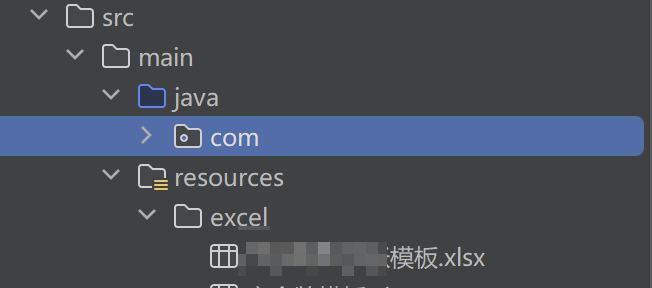
五、Excel模板下载
5.1 Controller
java
    /**
     * 模板导出
     *
     * @param response response
     */
    @GetMapping("/exportTemplate")
    public void exportTemplate(HttpServletResponse response){
        manageService.exportTemplate(response);
    }
5.2 Service
java
    /**
     * 模板导出
     *
     * @param response response
     */
    void exportTemplate(HttpServletResponse response);
5.3 Impl
this.getClass().getClassLoader().getResourceAsStream方式
java
@Override
public void exportTemplate(HttpServletResponse response) {
     try {
         String finalFileName = "模板.xlsx";
         InputStream fileStream;
         byte[] bytes = new byte[300000];

         fileStream = this.getClass().getResourceAsStream("/excel/模板.xlsx");
         fileStream.read(bytes);

         OutputStream outputStream = null;
         try {
             outputStream = response.getOutputStream();
             // 设值返回文件属性,浏览器会根据属性调用下载文件方法
             response.addHeader("Content-Disposition",
                     "attachment;filename=" + URLEncoder.encode(finalFileName, "utf-8"));
             // 设值文件大小属性,浏览器用于判断文件是否写完
             response.addHeader("Content-Length", "" + bytes.length);
             // 前端获取文件名,需要解码
             response.addHeader("downLoadName", URLEncoder.encode(finalFileName, "utf-8"));
             // 定义输出流
             outputStream = new BufferedOutputStream(response.getOutputStream());
             // 定义输出类型为二进制流输出
             response.setContentType("application/vnd.openxmlformats-officedocument.spreadsheetml.sheet");
             response.setCharacterEncoding("UTF-8");
             outputStream.write(bytes);
             outputStream.flush();
         } catch (Exception e) {
             throw BusinessException.buildBusinessExceptionAlert("程序异常");
         } finally {
             outputStream.close();
         }
     } catch (BusinessException error) {
         throw error;
     } catch (Exception e) {
         log.error("模板导出异常", e);
         throw new BusinessException("-1", "模板导出异常,请稍后重试");
     }
}ClassPathResource方式
java
@Override
public void exportTemplate(HttpServletResponse response) {
    String fileName = "模板.xlsx";
    String resourcePath = "/excel/模板.xlsx";

    // 使用 ClassPathResource 统一处理
    ClassPathResource resource = new ClassPathResource(resourcePath);

    try {
        // 1. 检查资源
        if (!resource.exists()) {
            throw BusinessException.buildBusinessExceptionAlert("模板文件不存在");
        }

        // 2. 设置响应头(包括准确的 Content-Length)
        response.setContentType("application/vnd.openxmlformats-officedocument.spreadsheetml.sheet");
        response.setCharacterEncoding("UTF-8");
        response.setHeader("Content-Disposition",
            "attachment;filename=" + URLEncoder.encode(fileName, StandardCharsets.UTF_8.name()));
        response.setHeader("downLoadName", URLEncoder.encode(fileName, StandardCharsets.UTF_8.name()));
        response.setContentLengthLong(resource.contentLength());  // ✅ 准确设置大小

        // 3. 流拷贝
        try (InputStream inputStream = resource.getInputStream();
             OutputStream outputStream = response.getOutputStream()) {
            FileCopyUtils.copy(inputStream, outputStream);
            outputStream.flush();
        }

    } catch (BusinessException e) {
        throw e;
    } catch (Exception e) {
        log.error("模板导出异常", e);
        throw new BusinessException("-1", "模板导出异常,请稍后重试");
    }
}