YAML 介绍
YAML 文件的后缀名是 .yaml 或 .yml,常用的是 .yml。
yaml 中支持不同数据类型,但在写法上稍有区别。
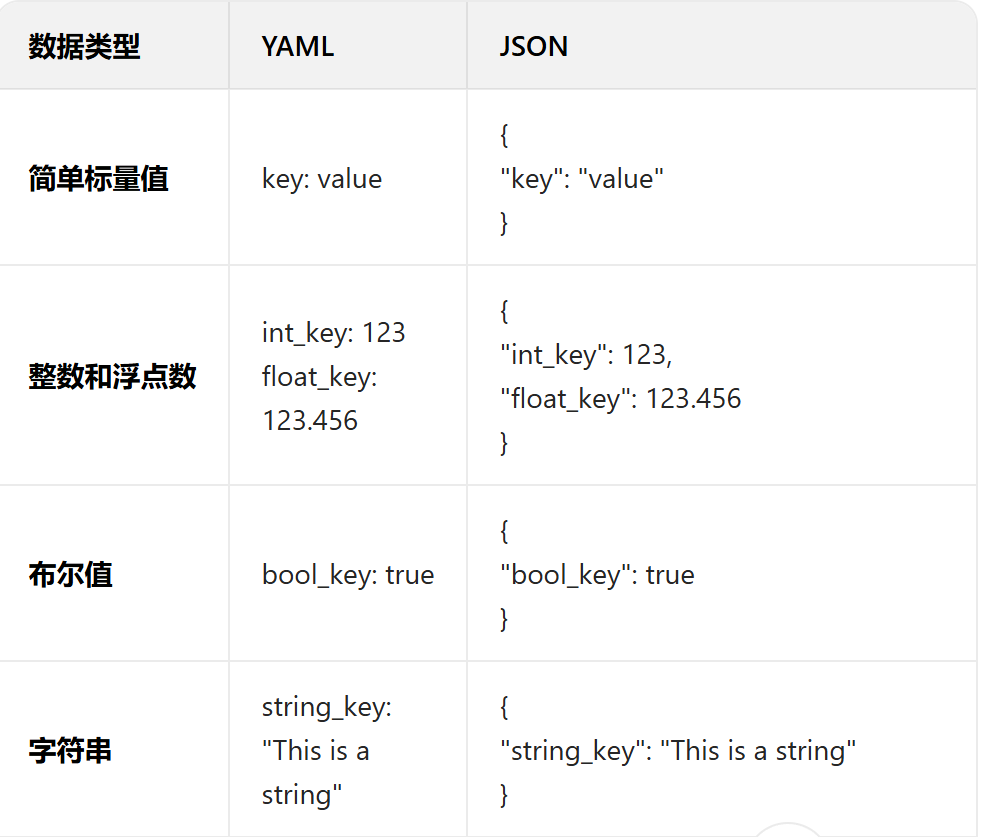
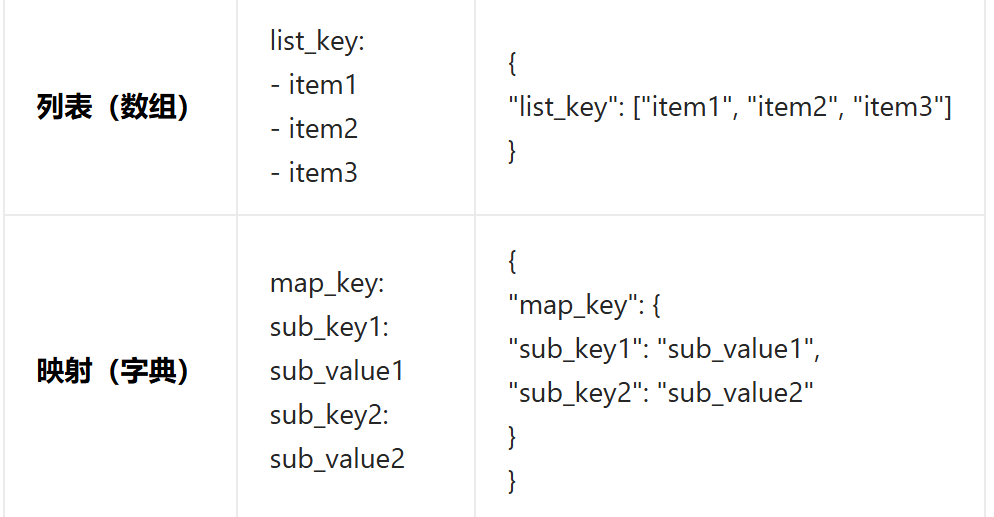
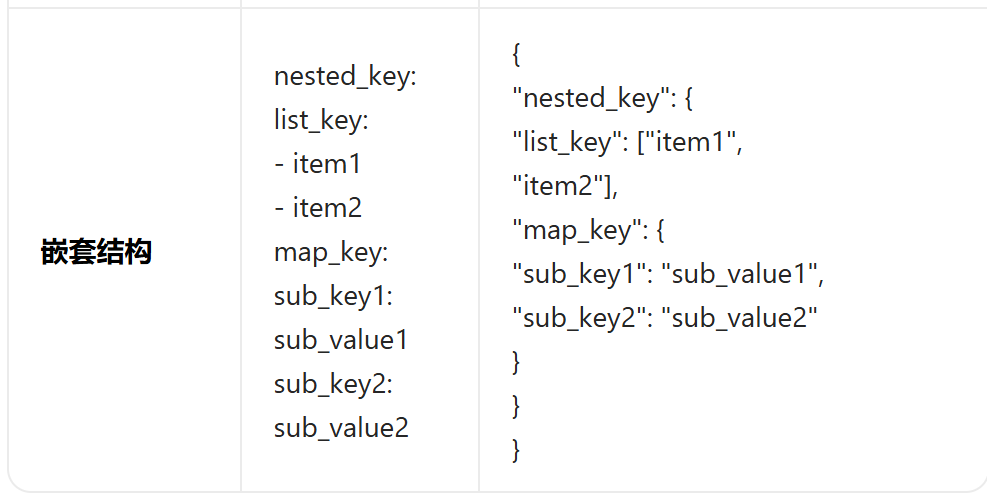
使用
yaml 文件通常作为配置文件来使用,可以使用yaml 库来读取和写入 YAML 文件
python
import json
import  yaml

# 向yaml 文件中写入数据 (追加写入)
def write_yaml(filename,data):
    # 打开文件
    with open(file=filename,mode="a+",encoding="utf-8") as f:
        # 向yaml 文件中写数据
        yaml.safe_dump(data=data,stream=f)

# 读取yaml 文件中的数据
def read_yaml(filename):
    # 打开文件
    with open(file=filename,mode="r",encoding="utf-8") as f:
        # 读取yaml文件数据
        data = yaml.safe_load(stream=f)
        return data

# 清空yaml 文件中的数据
def clear_yaml(filename):
    with open(file=filename,mode="w",encoding="utf-8") as f:
        f.truncate()

# 测试向yaml 文件中写入数据
# def test_write():
#     data = {
#         "name" : "zhangsan",
#         "age" : 20
#     }
#     write_yaml("firstyaml.yml",data)

# 测试读取yaml 文件中的数据
def test_read():
    data = read_yaml("secondyaml.yml")
    print(json.dumps(data))# 字典格式数据转json 格式 # 输出的是双引号{"age": 20, "name": "zhangsan"}
    # print(data) # 字典格式 # 输出的是单引号 {'age': 20, 'name': 'zhangsan'}

# # 测试清空yaml 文件中的数据
# def test_clear():
#     data = clear_yaml("firstyaml.yml")
JSON Schema
JSON Schema 是一个用来定义和校验JSON 的 web 规范,简而言之,JSON Schema 是用来校验json 是否符合预期
根据 json 创建 JSON Schema 后,你可以使用你选择的语言中的验证器将示例数据与自定义的模式进行验证
介绍
JSON:
python
{
        "code": "SUCCESS",
        "errMsg": "",
        "data": False
    }
JSON Schema:
python
{
        "type": "object",
        "required": [],
        "properties": {
            "code": {
                "type": "string",
            },
            "errMsg": {
                "type": "string",
            },
            "data": {
                "type": "boolean",
            }
        }
    }
通过对比可见,JSON Schema 从多个方面对JSON 数据进行校验。
如"type"、"required"、"properties" 等以确保其正确性和一致性。接下来我们将了解
JSON Schema 中的关键词以及作用
数据类型
type 关键字指定了数据类型
可以验证JSON 数据中每个属性的数据类型是否符合预期。常用的数据类型包括:
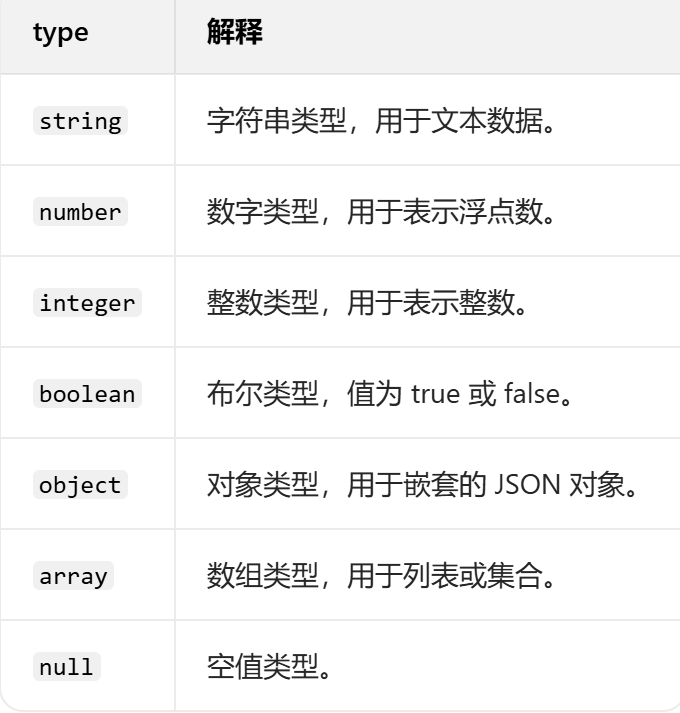
int只能表示整数数据
但是number 表示数字:整数、浮点数...
示例:
python
{
        "type": "object",
        "properties": {
            "name": {
                "type": "string",
            },
            "age": {
                "type": "integer"
            }
        }
    }
不同数据类型
python
{
        "type": "object",
        "properties": {
            "addr":{
                "type": "null"
            },
            "data":{
                "type": "array",
                "items": {
                    "type": "object",
                    "properties": {
                        "name": {
                            "type": "string",
                        },
                        "age": {
                            "type": "integer"
                        }
                    }
                }
    }
        }
    }
示例:
python
# 不同数据类型
def test_04():
    json = {
        "data": [
            {
                "name": "lisi",
                "age": 18
            },
            {
                "name": "zhangsan",
                "age": 20
            }
        ],
        "addr": None
    }

    json_schema = {
        "type": "object",
        "properties": {
            "addr":{
                "type": "null"
            },
            "data":{
                "type": "array",
                "items": {
                    "type": "object",
                    "properties": {
                        "name": {
                            "type": "string",
                        },
                        "age": {
                            "type": "integer"
                        }
                    }
                }
    }
        }
    }
    validate(json, json_schema)
最大最小值
- minimum 和 maximum:指定数值的最小值和最大值 (min <= x <= max)
- exclusiveMinimum 和 exclusiveMaximum:指定数值必须严格大于或小于某个值 (min < x < max)
python
{
        "type": "object",
        "properties": {
            "name": {"type": "string"},
            "age": {"type": "integer",
                    # "maximum": 100, # 最大值(包含)
                    # "minimum": 0 ,# 最小值(包含)
                    "exclusiveMaximum": 100, # 最大值(不包含)
                    "exclusiveMinimum": 0  # 最小值(不包含)
                    }
        }
    }
示例:
python
# 最大最小值
def test_05():
    json = {
        "name": "zhangsan",
        "age": 22
    }

    json_schema = {
        "type": "object",
        "properties": {
            "name": {"type": "string"},
            "age": {"type": "integer",
                    # "maximum": 100, # 最大值(包含)
                    # "minimum": 0 ,# 最小值(包含)
                    "exclusiveMaximum": 100, # 最大值(不包含)
                    "exclusiveMinimum": 0  # 最小值(不包含)
                    }
        }
    }

    validate(json, json_schema)
字符串特殊校验
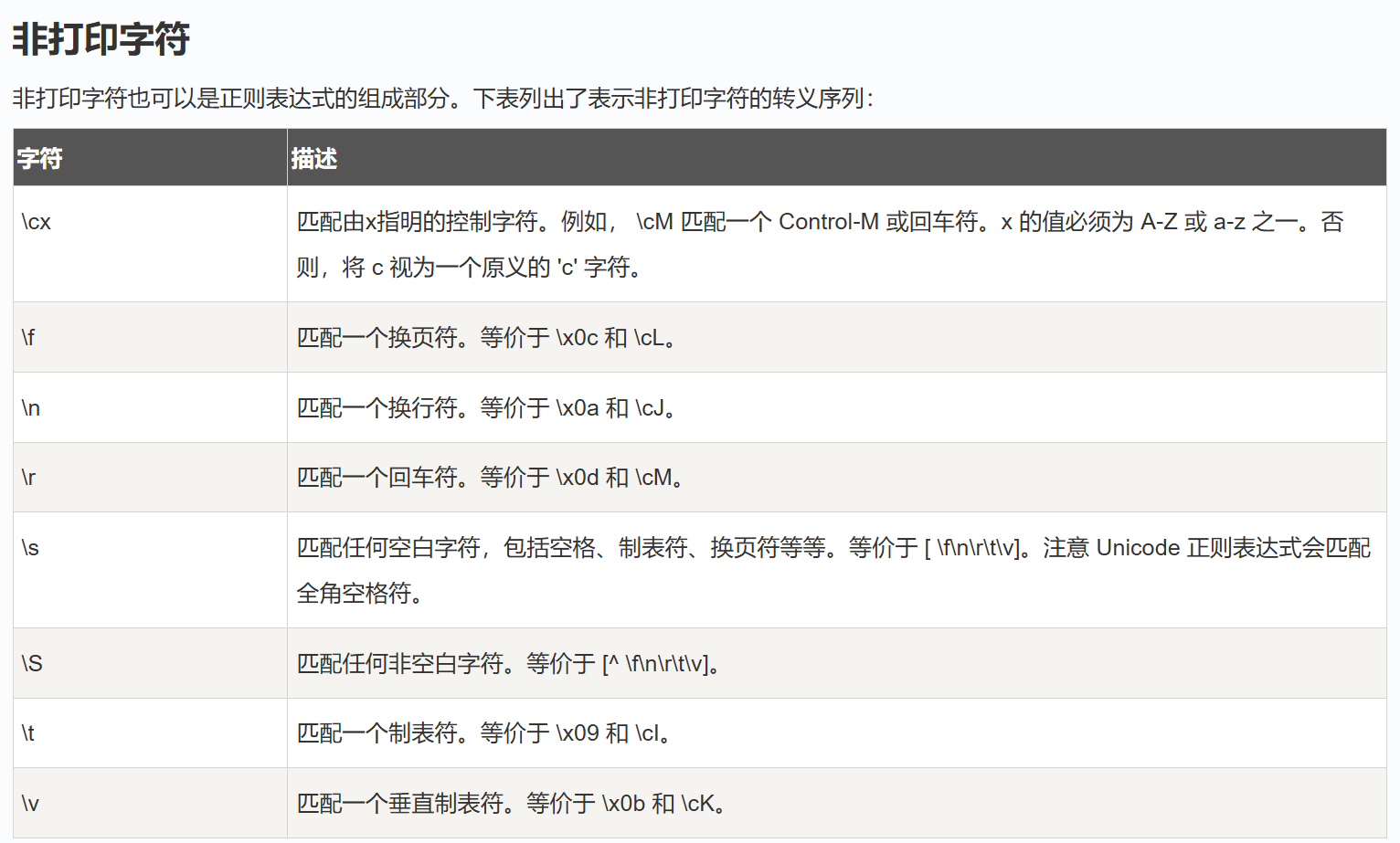
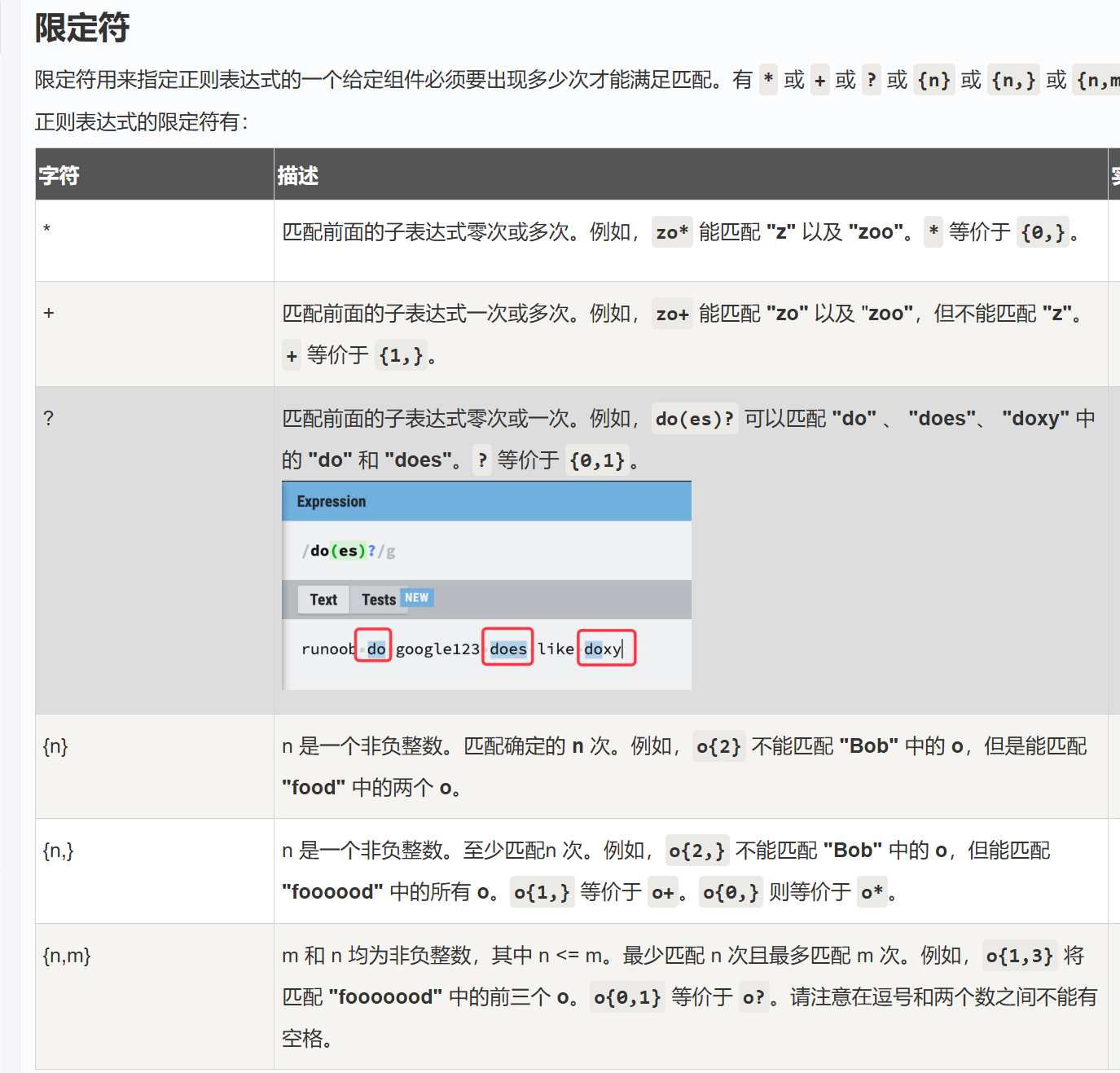
- pattern:使用正则表达式来验证字符串是否符合特定的模式
python
{
        "type": "object",
        "required": [],
        "properties": {
            "name": {
                "type": "string",
                "pattern":"\S{20,}" # 正则表达式
            },
            "age": {
                "type": "number"
            }
        }
    }
示例:
python
# 字符串特殊校验
def test_02():
    json = {
        "name": "zhangsa",
        "age": 10
    }
    json_schema = {
        "type": "object",
        "required": [],
        "properties": {
            "name": {
                "type": "string",
                "pattern":"\S{20,}" # 正则表达式
            },
            "age": {
                "type": "number"
            }
        }
    }
    validate(instance=json,schema=json_schema)
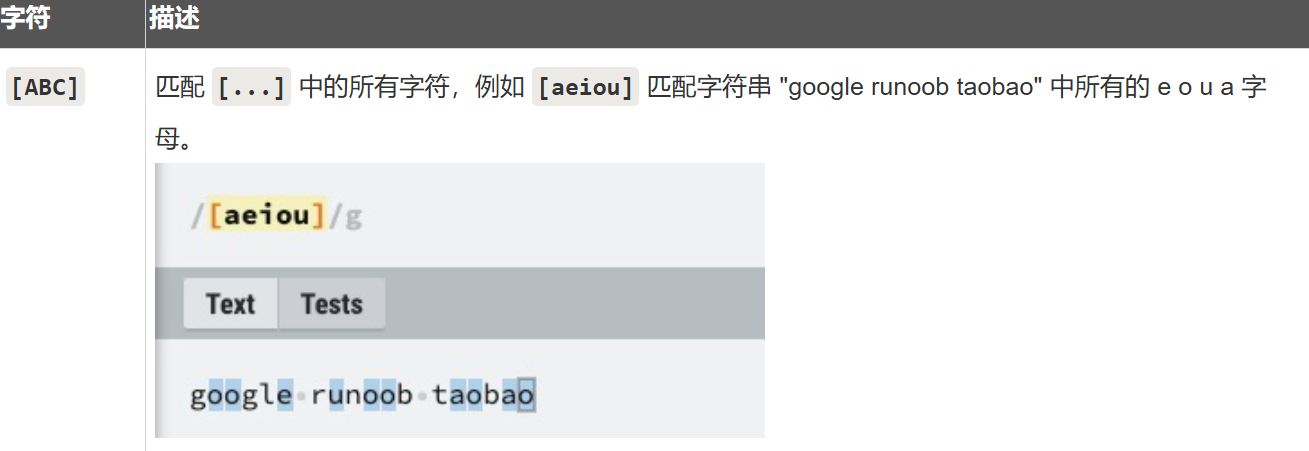
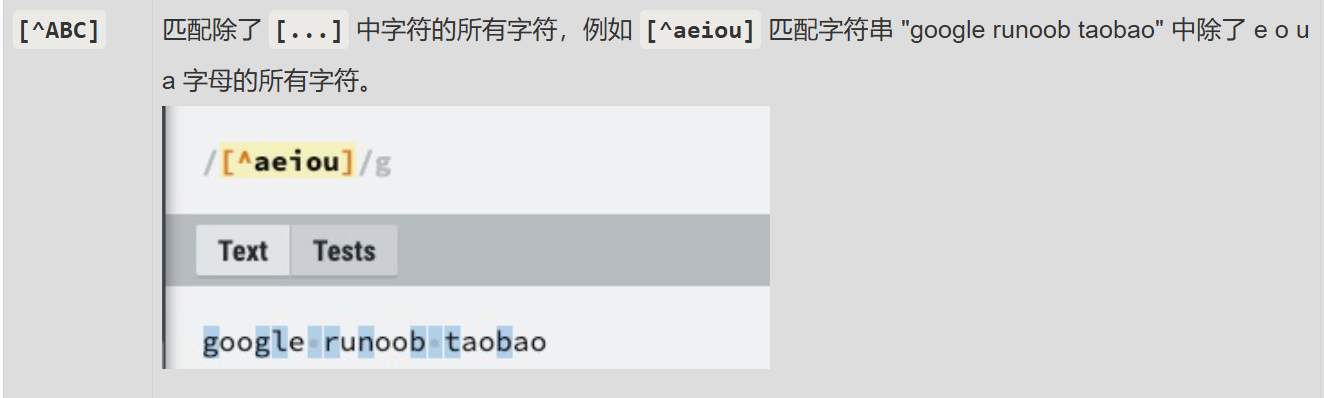
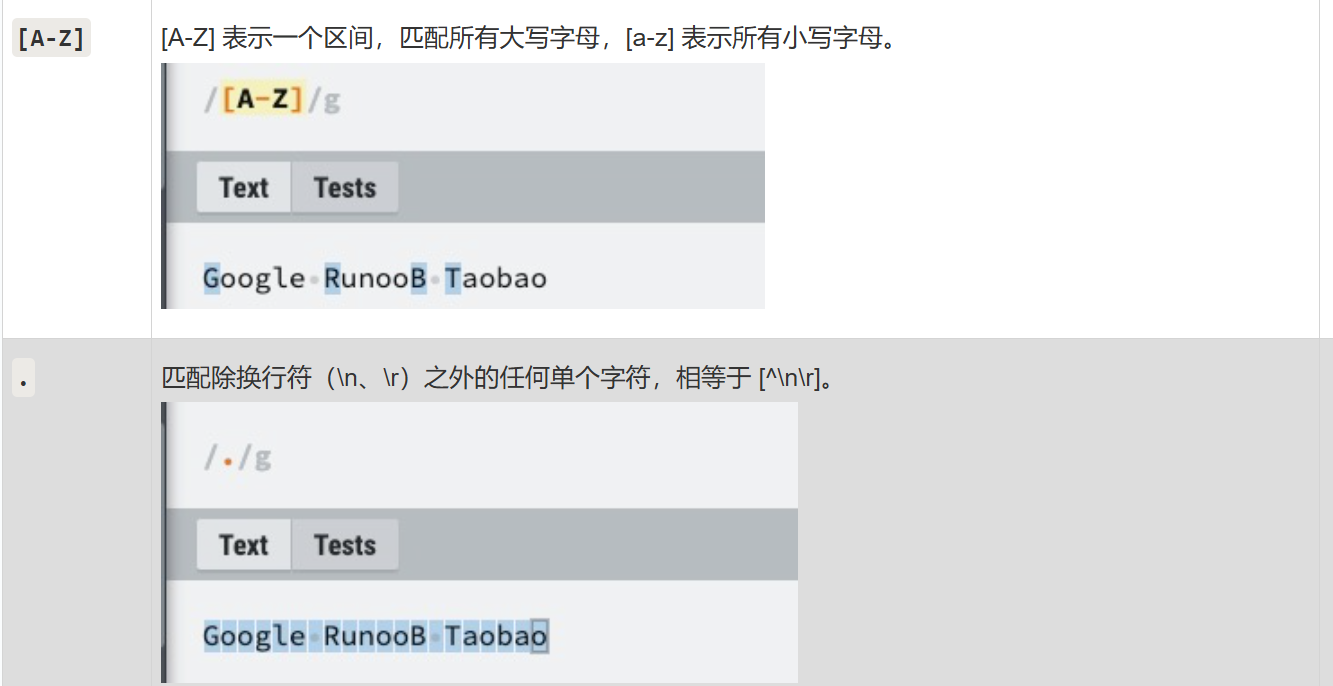
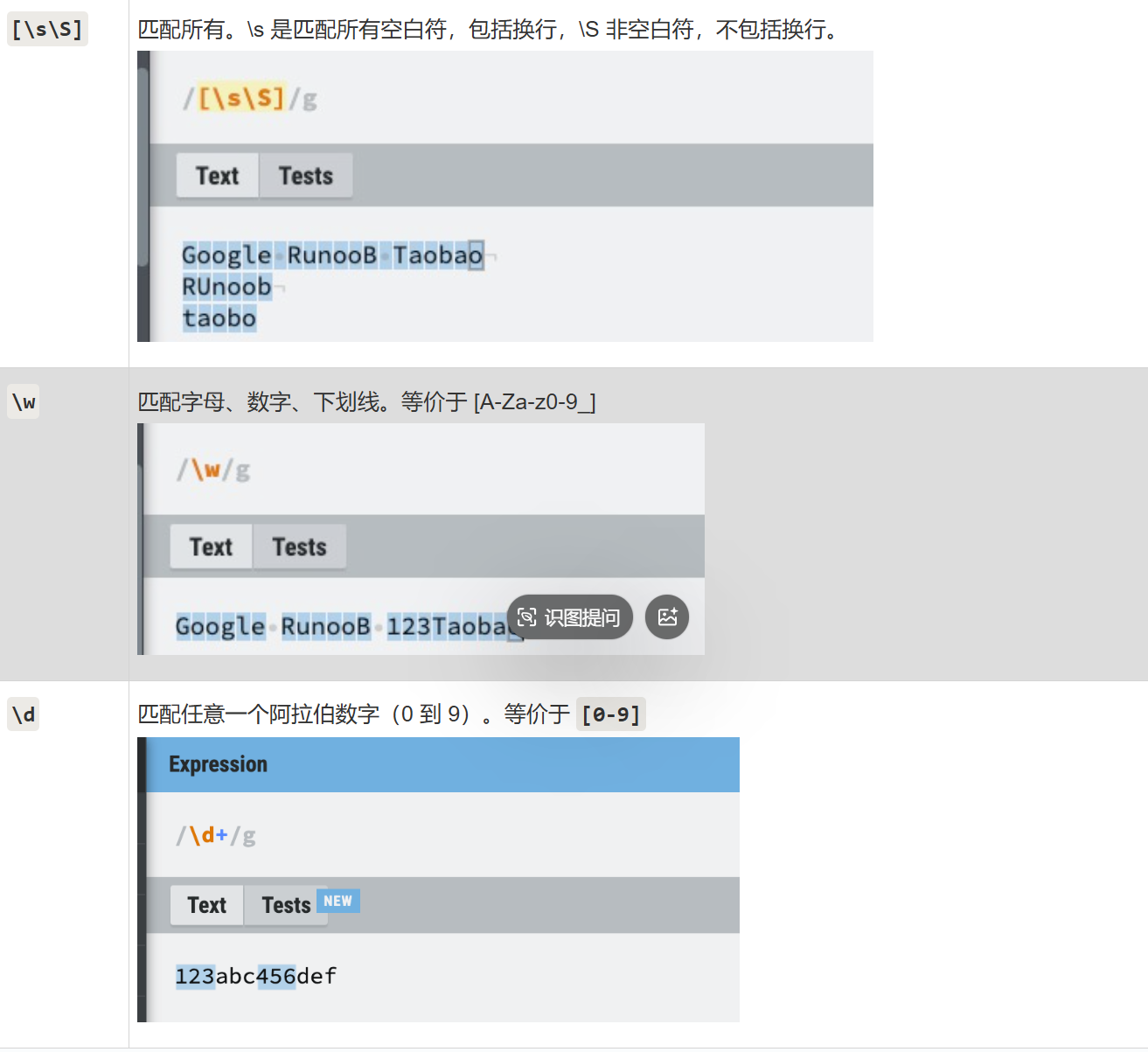
正则表达式的语法
数组约束
- minItems 和 maxItems:指定数组的最小和最大长度
- uniqueItems:确保数组中的元素是唯一的
- items:定义数组中每个元素的类型和约束
python
# 数组约束
def test_06():
    json = {
        # "data": [1,2,3,4,5],
        "data": ["hello","world"],
        "str": "hello"
    }

    json_schema = {
        "type": "object",
        "properties": {
            "data": {
                "type": "array",
                # 针对数组添加最大和最小长度限制
                "minItems": 1,
                "maxItems": 5,
                # 要求数组中元素唯一
                "uniqueItems": True,
                "items":{
                    # "type": "number"
                    "type": "string"
                }
            },
            "str": {
                "type": "string"
            }
        }
    }
对象约束
- minProperties 和 maxProperties:指定对象的最小和最大属性数量
- additionalProperties:控制是否允许对象中存在 未在properties 中定义的额外属性,默认为True
python
{
        "type": "object",
        "properties": {
            "name": {"type": "string"},
        },
        "minProperties": 1,
        "maxProperties": 5,
        "additionalProperties": False
    }
必需属性
- 通过 required 关键字,JSON Schema 可以指定哪些属性是必需的。如果 JSON 实例中缺少这些必需属性,验证将失败
python
# 必需属性
def test_08():
    json = {
        "code": "SUCCESS",
        "errMsg": "",
        "data": [
            {
                "id": 21430,
                "title": "自动化测试实例",
                "content": "##在这里写下一篇博客",
                "userId": 2,
                "deleteFlag": 0,
                "createTime": "2025-03-02 21:59",
                "updateTime": "2025-03-02T13:59:10.000+00:00",
                # "loginUser": False
            }
        ]
    }
    json_schema ={
      "type": "object",
      #   添加必需属性
      "required": ["code","errMsg","data"],
      "properties": {
        "code": {
          "type": "string"
        },
        "errMsg": {
          "type": "string"
        },
        "data": {
          "type": "array",
          "items": {
            "type": "object",
            "required": ["id","loginUser"],
            "properties": {
              "id": {
                "type": "number"
              },
              "title": {
                "type": "string"
              },
              "content": {
                "type": "string"
              },
              "userId": {
                "type": "number"
              },
              "deleteFlag": {
                "type": "number"
              },
              "createTime": {
                "type": "string"
              },
              "updateTime": {
                "type": "string"
              },
              "loginUser": {
                "type": "boolean"
              }
            }
          }
        }
      }
    }

    validate(instance=json,schema=json_schema)
依赖关系
- dependentRequired 可以定义属性之间的依赖关系。例如,如果某个属性存在,则必须存在另一个属性
python
    def test_09():
        json = {
            "username":"zhagnsan",
            "age":18,
            "height":175,
            "gender":"female",
            "hobby":{
                # "aaa":"aaa",
                # "bbb":"bbb"
            }
        }
        schema = {
          "type": "object",
          "required": [],
          "properties": {
            "username": {
              "type": "string"
            },
            "age": {
              "type": "number"
            },
            "height": {
              "type": "number"
            },
            "gender": {
              "type": "string"
            },
            "hobby":{
                "type":"object",
                "properties":{
                    "aaa":{
                        "type":"string"
                    },
                    "bbb":{
                        "type": "string"
                    }
                },
                "dependentRequired":{
                    "aaa":["bbb"]
                }
            }
          },
          "dependentRequired":{
              "age":["height","gender"]
          }
        }
        validate(instance=json,schema=schema)
logging 日志模块
介绍
logging 是 Python 标准库中的一个模块,它提供了灵活的日志记录功能。通过 logging ,开发者可以方便的将日志信息输出到控制台、文件、网络等多种目标,同时支持不同级别的日志记录,以满足不同场景下的需求
使用
示例:全局logging
python
import logging

# 全局logging

# 日志级别 从INFO 开始输出
logging.basicConfig(level=logging.INFO)

logging.debug('This is a debug message')
logging.info('This is an info message')
logging.warning('This is a warning message')
logging.error('This is an error message')
logging.critical('This is a critical message')
示例:自定义logger 并输出到控制台
python
# 自定义logging
import logging

logging.basicConfig(level=logging.INFO)

# 获取一个日志记录器对象,名称为当前模块的名称
logger = logging.getLogger("my_logger")

# 设置日志记录器的级别为 DEBUG
# 这意味着所有级别为 DEBUG 及以上的日志都会被记录
logger.setLevel(level=logging.DEBUG)

logger.debug('This is a debug message')
logger.info('This is an info message')
logger.warning('This is a warning message')
logger.error('This is an error message')
logger.critical('This is a critical message')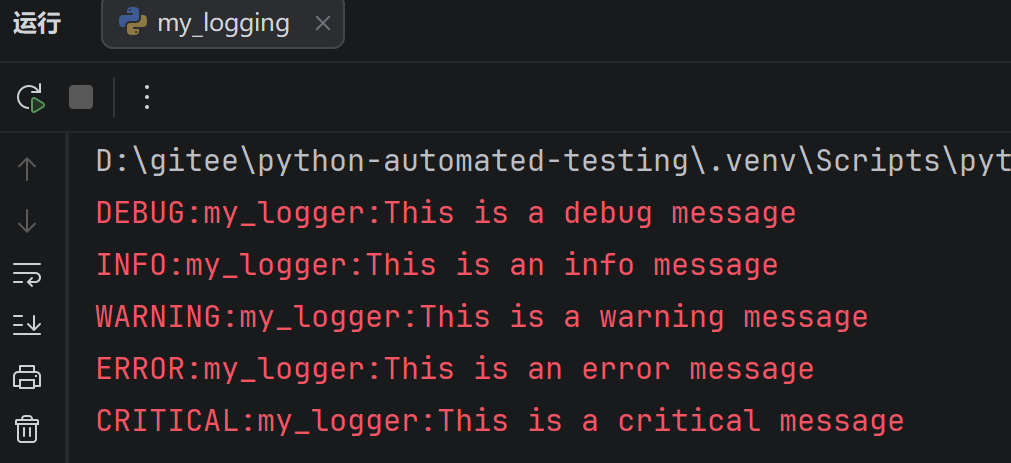
示例:自定义logger 并输出到日志文件
python
# 获取一个日志记录器对象,名称为当前模块的名称
logger = logging.getLogger("my_logger")

# 设置日志记录器的级别为 DEBUG
# 这意味着所有级别为 DEBUG 及以上的日志都会被记录
logger.setLevel(level=logging.DEBUG)

# 创建文件处理器---将日志输出到mylog.log(可以自动创建)
handler = logging.FileHandler(filename="mylog.log")

# 将处理器添加到日志记录器中
logger.addHandler(handler)

logger.debug('This is a debug message')
logger.info('This is an info message')
logger.warning('This is a warning message')
logger.error('This is an error message')
logger.critical('This is a critical message')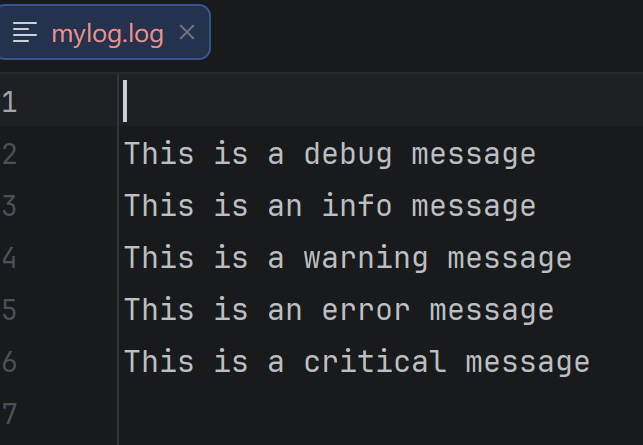
- 获取日志记录器: logging.getLogger(_ _ name _ _)获取一个日志记录器对象,name 是当前模块的名称。使用模块名称作为日志记录器的名称有助于在大型项目中区别不同模块的日志
- 设置日志级别: logger.setLevel (logging.DEBUG) 将日志记录器的级别设置为DEBUG,这意味着所有DEBUG 及以上级别的日志都会被记录
日志级别金字塔:DEBUG < INFO < WARRING < ERROR < CRITICAL
高于设定级别的日志才会被处理
- 创建文件处理器: logging.FileHandler (filename="test.log") 创建一个文件处理器,将日志信息写入到名为 test.log 的文件中
- 添加处理器: logger.addHandler(handler) 将文件处理器添加到日志记录器中,这样日志记录器就会使用这个处理器来处理日志信息
示例:设置日志格式
python
# 自定义logging

logging.basicConfig(level=logging.INFO)

# 获取一个日志记录器对象,名称为当前模块的名称
logger = logging.getLogger("my_logger")

# 设置日志记录器的级别为 DEBUG
# 这意味着所有级别为 DEBUG 及以上的日志都会被记录
logger.setLevel(level=logging.DEBUG)

# 创建文件处理器---将日志输出到mylog.log(可以自动创建)
handler = logging.FileHandler(filename="mylog.log")

# 创建一个日志格式器对象
formatter = logging.Formatter(
    "%(asctime)s %(levelname)s [%(name)s] [%(filename)s (%(funcName)s:%(lineno)d)] - %(message)s"
)

# 将格式器设置到处理器上
handler.setFormatter(formatter)

# 将处理器添加到日志记录器中
logger.addHandler(handler)

logger.debug('This is a debug message')
logger.info('This is an info message')
logger.warning('This is a warning message')
logger.error('This is an error message')
logger.critical('This is a critical message')
logging.Formatter 是用于定义日志输出格式的类。在构造函数中,传递了一个格式字符串,用于指定日志信息的格式。格式字符串中使用了一些特殊的占位符(以 % 开头),这些占位符会被替换为相应的日志信息内容
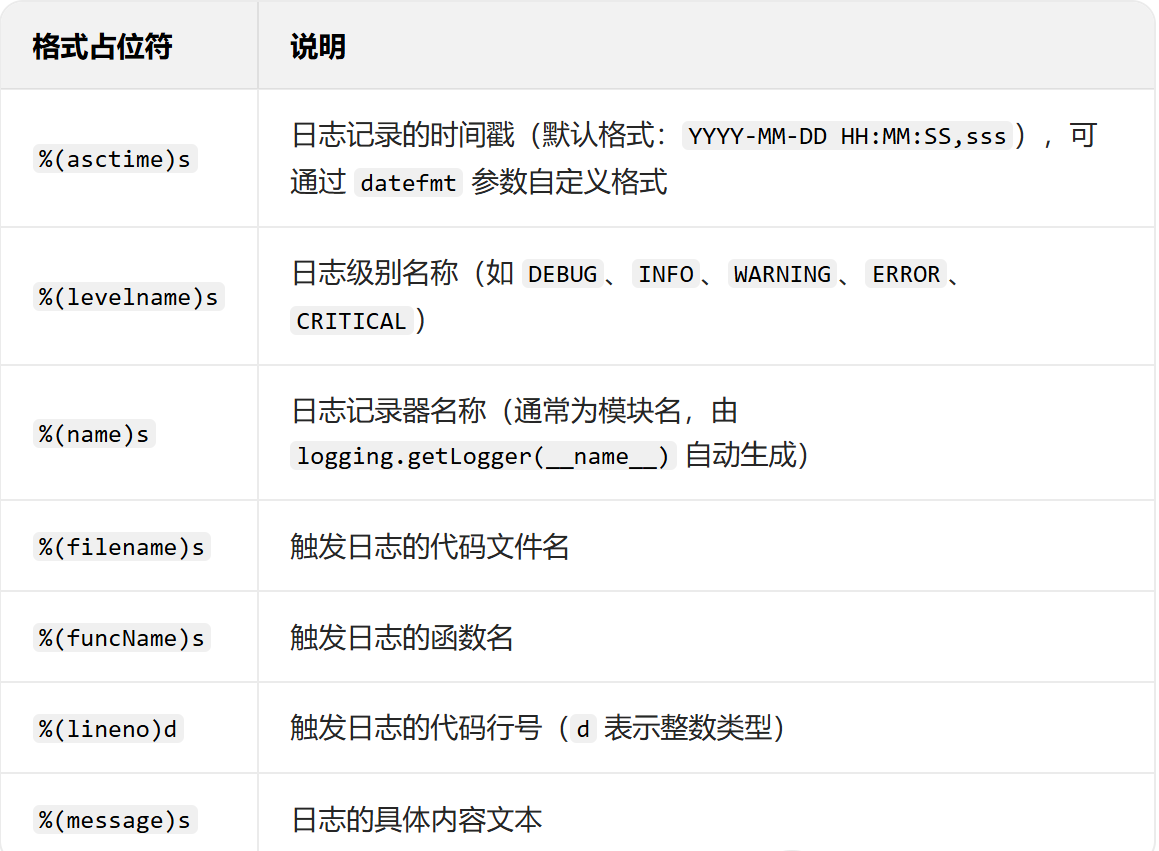
handler.setFormatter (formatter) 将创建的格式器对象设置到处理器上。这意味着处理器在处理日志信息时,会使用这个格式器来格式化日志信息
通过这种方式,你可以控制日志信息的输出格式,使其包含你感兴趣的信息,如时间戳、日志级别、文件名、函数名、行号等。