1. HPA 是什么?
全称:Horizontal Pod Autoscaler 中文:Pod 水平自动扩缩容
一句话解释:根据 CPU / 内存使用率,自动增加 / 减少 Pod 数量!
2. 为什么要用 HPA?
- 流量高 → 自动多开 Pod
- 流量低 → 自动关掉多余 Pod
- 不用人工手动扩缩容
- 防止服务崩溃、节省资源
3. HPA 靠什么工作?
必须依赖 metrics-server→ 也就是你刚才一直在装的组件!
HPA 工作流程:
- metrics-server 采集 Pod CPU / 内存
- HPA 读取指标
- 自动判断是否扩容 / 缩容
=====================================
操作步骤
1.metrics-server文件(用户采集信息)
vim components.yaml

apiVersion: v1
kind: ServiceAccount
metadata:
  labels:
    k8s-app: metrics-server-2
  name: metrics-server-2
  namespace: kube-system
---
apiVersion: rbac.authorization.k8s.io/v1
kind: ClusterRole
metadata:
  labels:
    k8s-app: metrics-server-2
    rbac.authorization.k8s.io/aggregate-to-admin: "true"
    rbac.authorization.k8s.io/aggregate-to-edit: "true"
    rbac.authorization.k8s.io/aggregate-to-view: "true"
  name: system:aggregated-metrics-reader
rules:
- apiGroups:
  - metrics.k8s.io
  resources:
  - pods
  - nodes
  verbs:
  - get
  - list
  - watch
---
apiVersion: rbac.authorization.k8s.io/v1
kind: ClusterRole
metadata:
  labels:
    k8s-app: metrics-server-2
  name: system:metrics-server-2
rules:
- apiGroups:
  - ""
  resources:
  - nodes/metrics
  verbs:
  - get
- apiGroups:
  - ""
  resources:
  - pods
  - nodes
  verbs:
  - get
  - list
  - watch
---
apiVersion: rbac.authorization.k8s.io/v1
kind: RoleBinding
metadata:
  labels:
    k8s-app: metrics-server-2
  name: metrics-server-2-auth-reader
  namespace: kube-system
roleRef:
  apiGroup: rbac.authorization.k8s.io
  kind: Role
  name: extension-apiserver-authentication-reader
subjects:
- kind: ServiceAccount
  name: metrics-server-2
  namespace: kube-system
---
apiVersion: rbac.authorization.k8s.io/v1
kind: ClusterRoleBinding
metadata:
  labels:
    k8s-app: metrics-server-2
  name: metrics-server-2:system:auth-delegator
roleRef:
  apiGroup: rbac.authorization.k8s.io
  kind: ClusterRole
  name: system:auth-delegator
subjects:
- kind: ServiceAccount
  name: metrics-server-2
  namespace: kube-system
---
apiVersion: rbac.authorization.k8s.io/v1
kind: ClusterRoleBinding
metadata:
  labels:
    k8s-app: metrics-server-2
  name: system:metrics-server-2
roleRef:
  apiGroup: rbac.authorization.k8s.io
  kind: ClusterRole
  name: system:metrics-server-2
subjects:
- kind: ServiceAccount
  name: metrics-server-2
  namespace: kube-system
---
apiVersion: v1
kind: Service
metadata:
  labels:
    k8s-app: metrics-server-2
  name: metrics-server-2
  namespace: kube-system
spec:
  ports:
  - name: https
    port: 443
    protocol: TCP
    targetPort: https
  selector:
    k8s-app: metrics-server-2
---
apiVersion: apps/v1
kind: Deployment
metadata:
  labels:
    k8s-app: metrics-server-2
  name: metrics-server-2
  namespace: kube-system
spec:
  replicas: 2
  selector:
    matchLabels:
      k8s-app: metrics-server-2
  strategy:
    rollingUpdate:
      maxUnavailable: 1
  template:
    metadata:
      labels:
        k8s-app: metrics-server-2
    spec:
      affinity:
        podAntiAffinity:
          requiredDuringSchedulingIgnoredDuringExecution:
          - labelSelector:
              matchLabels:
                k8s-app: metrics-server-2
            namespaces:
            - kube-system
            topologyKey: kubernetes.io/hostname
      containers:
      - args:
        - --cert-dir=/tmp
        - --secure-port=10250
        - --kubelet-preferred-address-types=InternalIP,Hostname,InternalDNS,ExternalDNS,ExternalIP
        - --kubelet-use-node-status-port
        - --metric-resolution=15s
        - --kubelet-insecure-tls  #跳过证书,能连节点 自建 K8s 集群的节点证书不被系统信任
        - --kubelet-preferred-address-types=InternalIP,Hostname,InternalDNS,ExternalDNS,ExternalIP   #优先用内网 IP 连接,保证稳定
        image: swr.cn-north-4.myhuaweicloud.com/ddn-k8s/registry.k8s.io/metrics-server/metrics-server:v0.7.2  #换镜像 = 国内能下载
        imagePullPolicy: IfNotPresent
        livenessProbe:
          failureThreshold: 3
          httpGet:
            path: /livez
            port: https
            scheme: HTTPS
          periodSeconds: 10
        name: metrics-server-2
        ports:
        - containerPort: 10250
          name: https
          protocol: TCP
        readinessProbe:
          failureThreshold: 3
          httpGet:
            path: /readyz
            port: https
            scheme: HTTPS
          initialDelaySeconds: 20
          periodSeconds: 10
        resources:
          requests:
            cpu: 100m
            memory: 200Mi
        securityContext:
          allowPrivilegeEscalation: false
          capabilities:
            drop:
            - ALL
          readOnlyRootFilesystem: true
          runAsNonRoot: true
          runAsUser: 1000
          seccompProfile:
            type: RuntimeDefault
        volumeMounts:
        - mountPath: /tmp
          name: tmp-dir
      nodeSelector:
        kubernetes.io/os: linux
      priorityClassName: system-cluster-critical
      serviceAccountName: metrics-server-2
      volumes:
      - emptyDir: {}
        name: tmp-dir
---
apiVersion: policy/v1
kind: PodDisruptionBudget
metadata:
  labels:
    k8s-app: metrics-server-2
  name: metrics-server-2
  namespace: kube-system
spec:
  minAvailable: 1
  selector:
    matchLabels:
      k8s-app: metrics-server-2
---
apiVersion: apiregistration.k8s.io/v1
kind: APIService
metadata:
  labels:
    k8s-app: metrics-server-2
  name: v1beta1.metrics.k8s.io
spec:
  group: metrics.k8s.io
  groupPriorityMinimum: 100
  insecureSkipTLSVerify: true
  service:
    name: metrics-server-2
    namespace: kube-system
  version: v1beta1
  versionPriority: 100
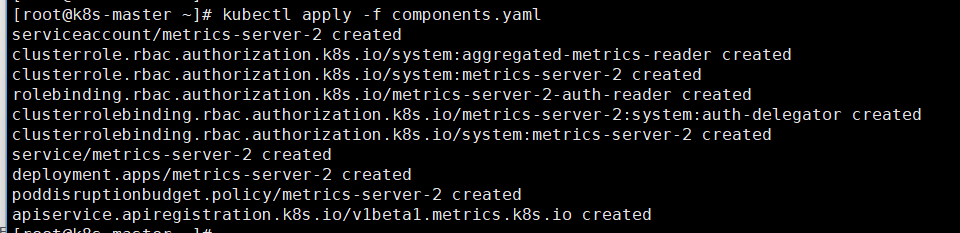
2.安装:kubectl apply -f components.yaml
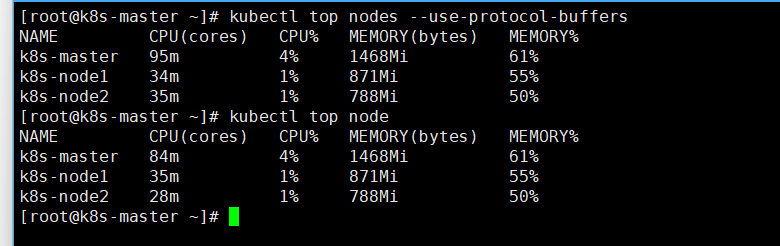
3.查看是否安装成功:kubectl top nodes --use-protocol-buffers
4.HAP监控Cpu使用率
vim k8s-hpa-deploy-svc.yaml

apiVersion: apps/v1
kind: Deployment
metadata:
  name: nginx-deploy
spec:
  selector:
    matchLabels:
      app: nginx
  template:
    metadata:
      labels:
        app: nginx
    spec:
      containers:
        - name: nginx
          image: nginx:1.17.1
          ports:
            - containerPort: 80
          resources: # 资源限制
            requests:
              cpu: "100m" # 100m 表示100 milli cpu,即 0.1 个CPU
---
apiVersion: v1
kind: Service
metadata:
  name: nginx-svc
spec:
  selector:
    app: nginx
  type: NodePort
  ports:
    - port: 80 # svc 的访问端口
      name: nginx
      targetPort: 80 # Pod 的访问端口
      protocol: TCP
      nodePort: 30010 # 在机器上开端口,浏览器访问

kubectl apply -f k8s-hpa-deploy-svc.yaml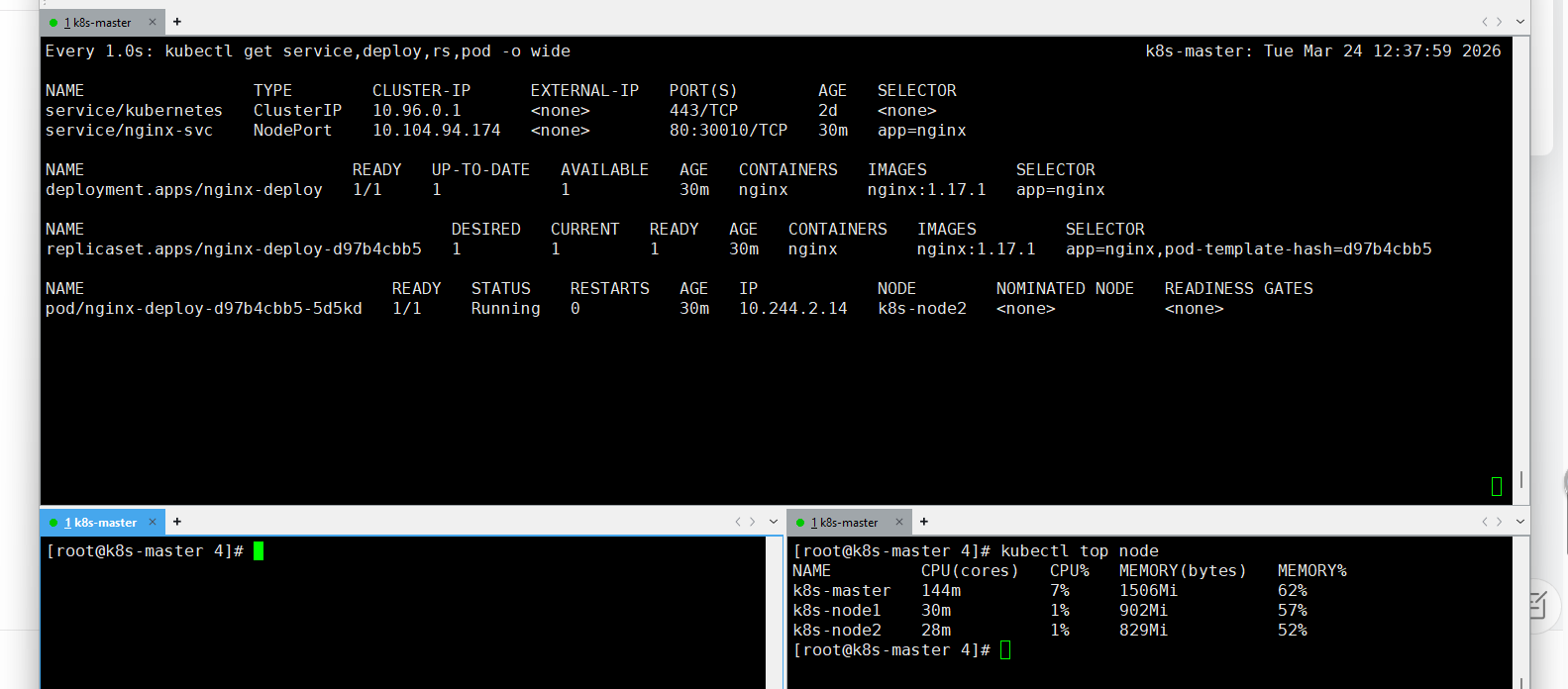
创建HPA
vim k8s-hpa.yaml

apiVersion: autoscaling/v2
kind: HorizontalPodAutoscaler
metadata:
  name: hpa-cpu
spec:
  scaleTargetRef:
    apiVersion: apps/v1
    kind: Deployment
    name: nginx-deploy
  minReplicas: 1
  maxReplicas: 10
  metrics:
  - type: Resource
    resource:
      name: cpu
      target:
        type: Utilization
        averageUtilization: 10  # CPU 50%
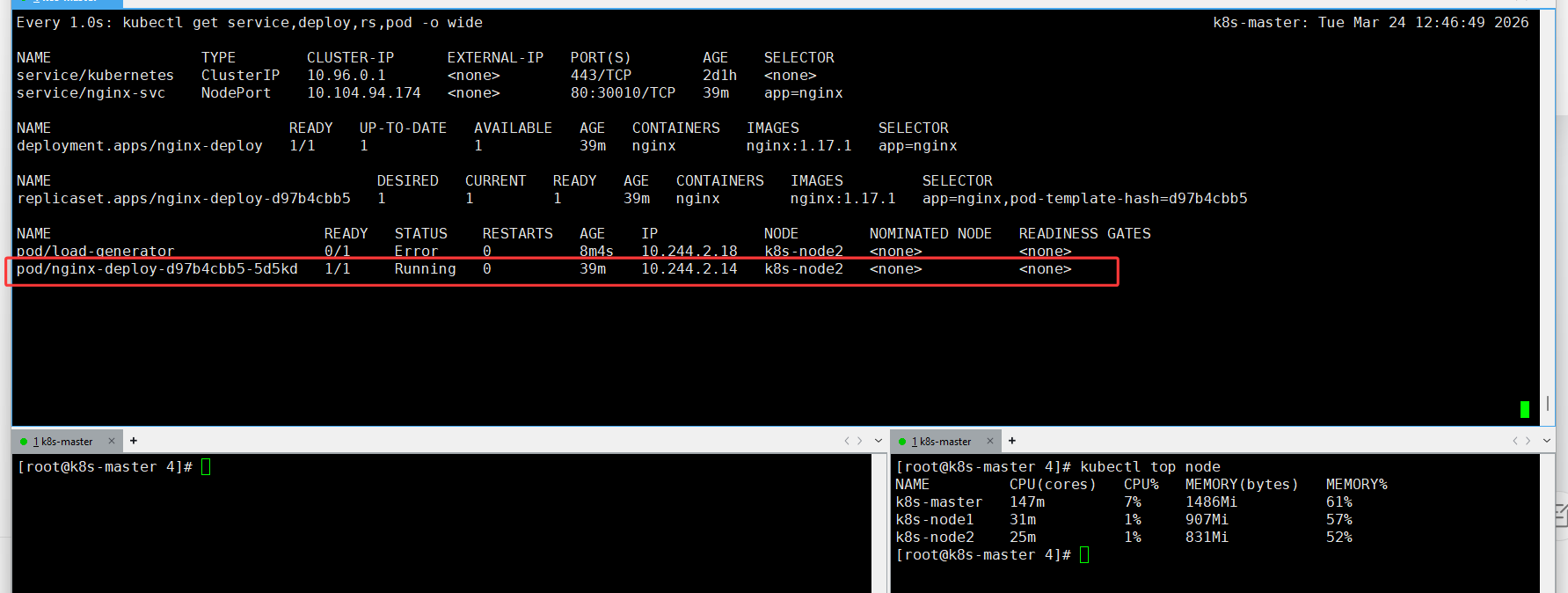
测试
kubectl run -i --tty load-generator --rm --image=busybox --restart=Never -- /bin/sh -c "while sleep 0.01; do wget -q -O- http://192.168.118.100:30010; done"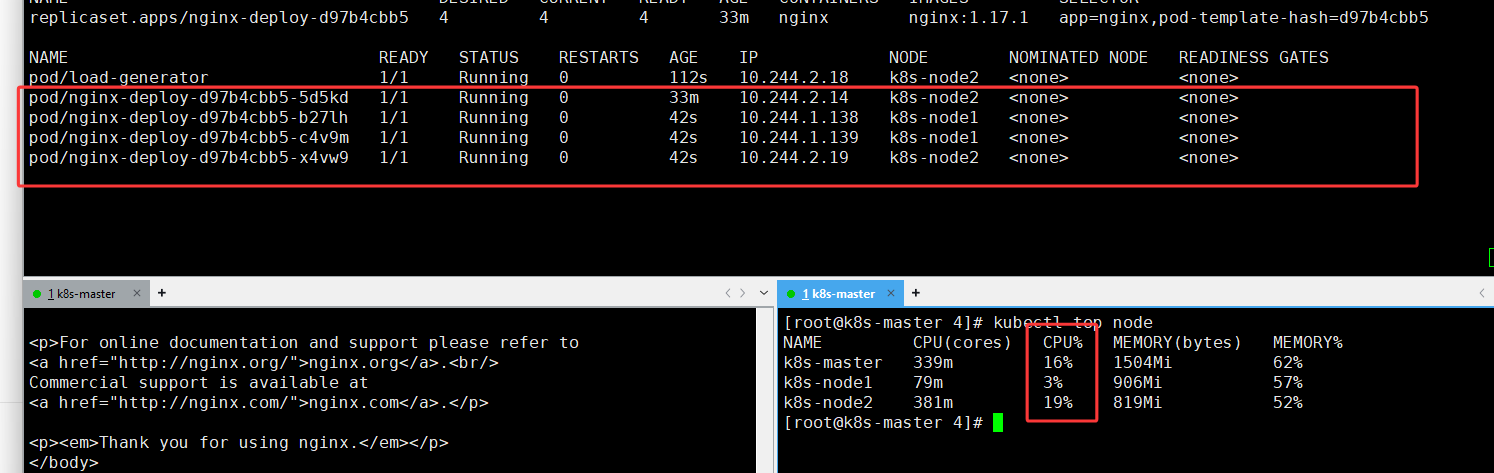
5.HAP监控内存使用率
(记得先删除多余的hpa : kubectl delete hpa <hpa名字>)
创建HPA
vim k8s-neicun.yaml

apiVersion: autoscaling/v2
kind: HorizontalPodAutoscaler
metadata:
  name: hpa-memory
spec:
  scaleTargetRef:
    apiVersion: apps/v1
    kind: Deployment
    name: nginx-deploy
  minReplicas: 1
  maxReplicas: 10
  metrics:
  - type: Resource
    resource:
      name: memory
      target:
        type: Utilization
        averageUtilization: 50  # 内存 50%

kubectl apply -f  k8s-neicun.yaml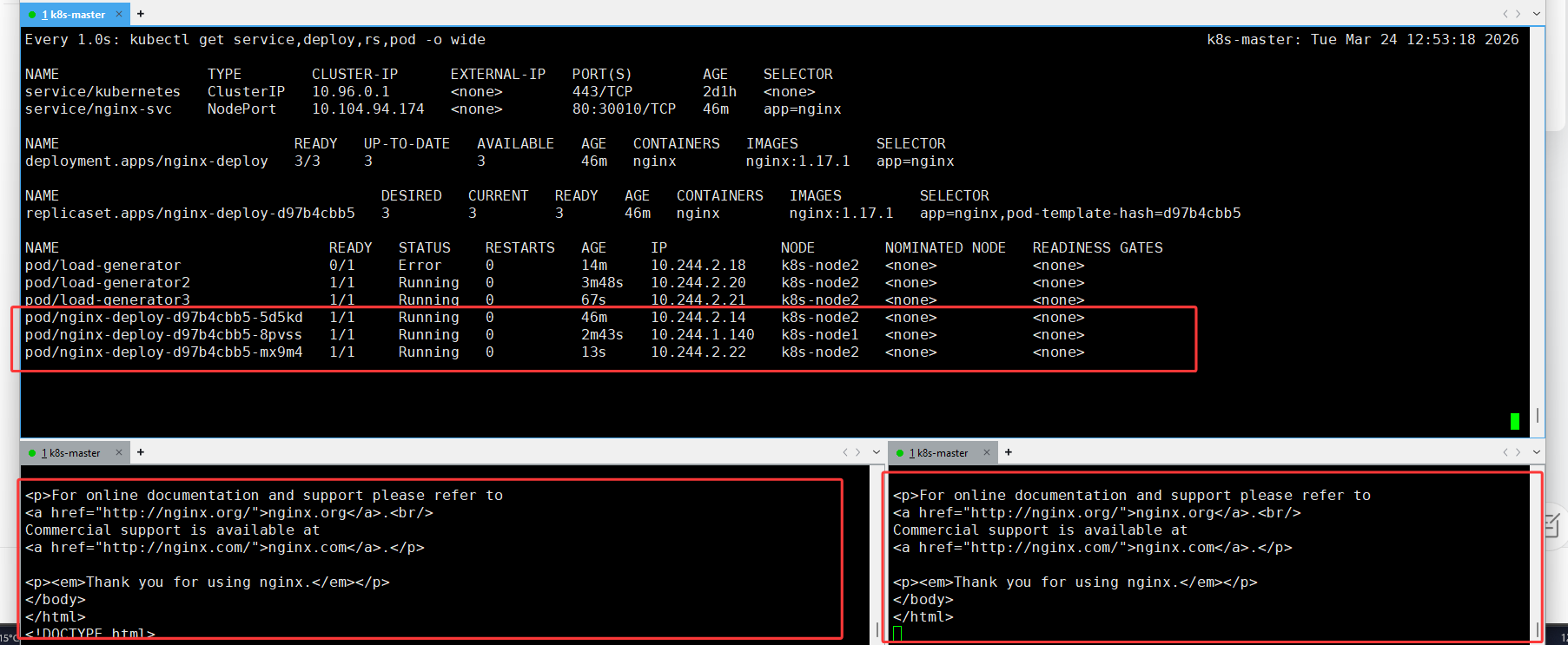
测试
kubectl run -i --tty load-generator --rm --image=busybox --restart=Never -- /bin/sh -c "while sleep 0.01; do wget -q -O- http://192.168.118.100:30010; done"6.同时监控 CPU + 内存(最常用)
apiVersion: autoscaling/v2
kind: HorizontalPodAutoscaler
metadata:
  name: hpa-cpu-mem
spec:
  scaleTargetRef:
    apiVersion: apps/v1
    kind: Deployment
    name: nginx-deploy
  minReplicas: 1
  maxReplicas: 10
  metrics:
  - type: Resource
    resource:
      name: cpu
      target:
        type: Utilization
        averageUtilization: 50
  - type: Resource
    resource:
      name: memory
      target:
        type: Utilization
        averageUtilization: 50
7.设置扩缩容速度参数(控制扩缩容等待时间)
(记得先删除多余的hpa : kubectl delete hpa <hpa名字>)
K8s 为了避免频繁扩缩容导致服务抖动,给 HPA 加了两个关键冷却时间:
-
扩容冷却 :默认
3 分钟→ 刚扩容后,3 分钟内不会再次扩容 -
缩容冷却 :默认
5 分钟→ 负载降下来后,必须等 5 分钟才会开始缩容behavior:
scaleUp:
stabilizationWindowSeconds: 60 # 扩容等待时间(避免频繁扩容)
scaleDown:
stabilizationWindowSeconds: 60 # 缩容等待时间(改成 60 秒测试很快看到缩容)
完整yaml
vim k8s-hpa-windows.yaml

apiVersion: autoscaling/v2
kind: HorizontalPodAutoscaler
metadata:
  name: test-hpa
spec:
  scaleTargetRef:
    apiVersion: apps/v1
    kind: Deployment
    name: nginx-deploy
  minReplicas: 1
  maxReplicas: 10
  metrics:
    - type: Resource
      resource:
        name: cpu
        target:
          type: Utilization
          averageUtilization: 10  # 阈值低,测试容易触发扩容
  behavior:
    scaleUp:
      stabilizationWindowSeconds: 10  # 扩容等待时间(避免频繁扩容)
    scaleDown:
      stabilizationWindowSeconds: 10  # 缩容等待时间(改成 10 秒测试很快看到缩容)

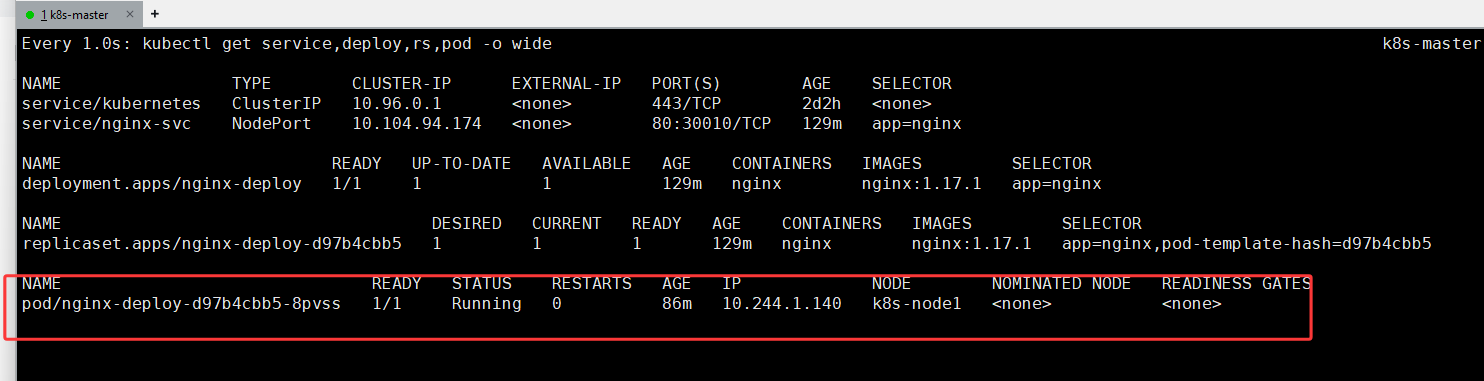
kubectl apply -f k8s-hpa-windows.yaml
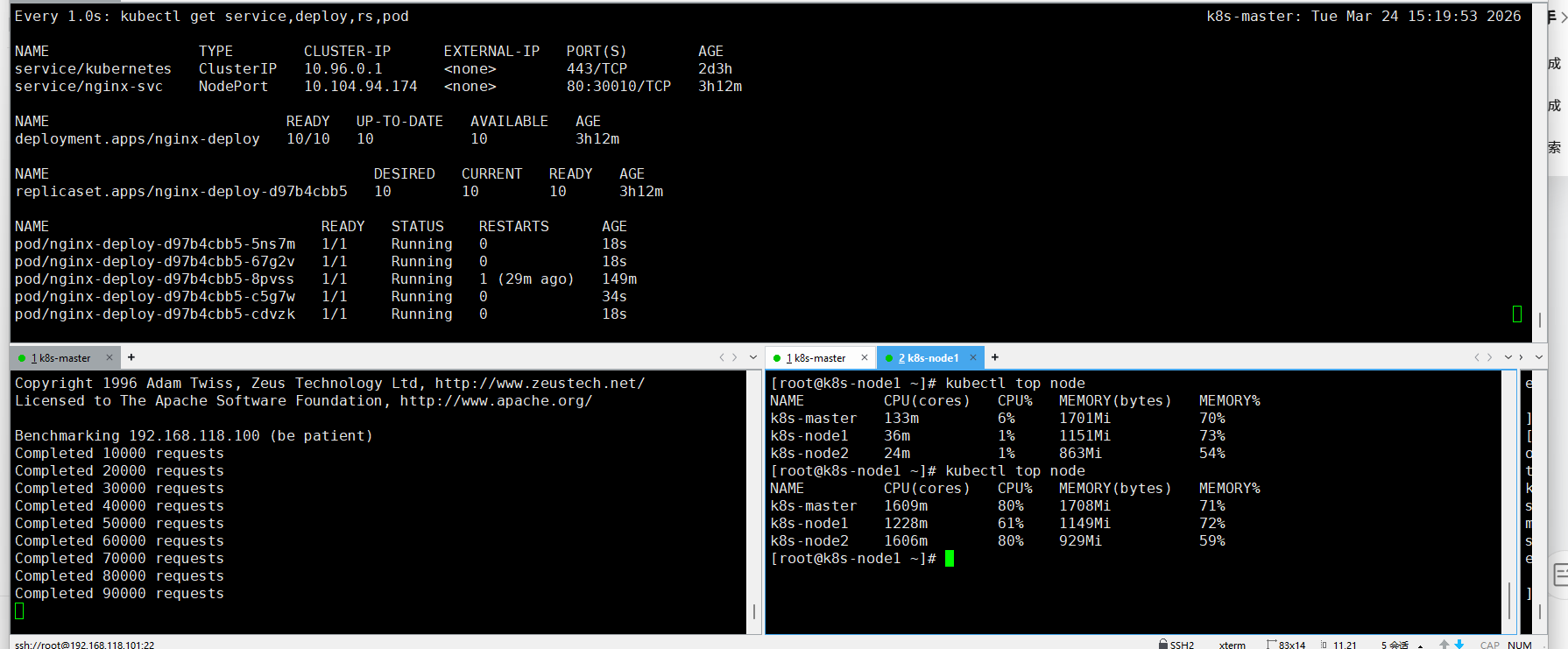
效果很快10秒就出效果
压力测另一种方式ab
kubectl run -it --rm ab --image=ikane/httpd-tools -- ab -c 10 -n 100000 http://192.168.118.100:30010/

===========================
yum install -y httpd-tools
#安装

ab -c 10 -n 100000 http://192.168.118.100:30010/
#-c 10 一次性并发访问10条
#-n 100000 总共发送100000条