这里写目录标题
- [<font color="FF00FF">1. 日志](#1. 日志)
- [<font color="FF00FF">2. 单例模式](#2. 单例模式)
-
- [<font color="FF00FF">2.1 懒汉方式实现单例模式](#2.1 懒汉方式实现单例模式)
- [<font color="FF00FF">3. 线程池](#3. 线程池)
- [<font color="FF00FF">4. 线程安全和重入问题](#4. 线程安全和重入问题)
- [<font color="FF00FF">5. 死锁](#5. 死锁)
-
- [<font color="FF00FF">4.1 死锁四个必要条件](#4.1 死锁四个必要条件)
1. 日志
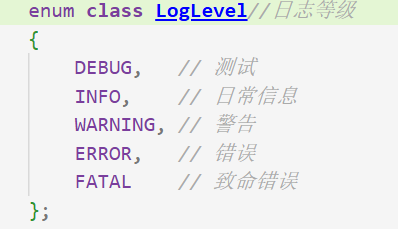
- 常见的日志等级有
日志可以向显示器打印,也可以向指定文件打印这叫策略模式
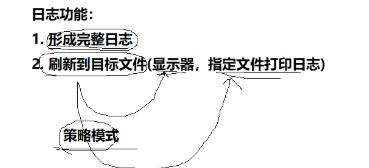
下面是日志要有的信息

Log.hpp
c
#pragma once
#include <iostream>
using namespace std;
#include <cstdio>
#include <string>
#include <filesystem> //C++17
#include <sstream>
#include <fstream>
#include <memory>
#include <ctime>
#include <unistd.h>
#include "Mutex.hpp"
namespace LogModule
{
    using namespace MutexModule;
    const std::string gsep = "\r\n";
    // 策略模式,C++多态特性
    // 2. 刷新策略 a: 显示器打印 b:向指定的文件写入
    class LogStrategy // 刷新策略基类
    {
    public:
        virtual ~LogStrategy() = default;
        virtual void SyncLog(const string &message) = 0; // 不同模式核⼼的刷新方式的不同
    };

    // 显示器打印日志的策略 :子类
    class ConsoleLogStrategy : public LogStrategy
    {
    public:
        ConsoleLogStrategy()
        {
        }
        void SyncLog(const string &message) override
        {
            LockGuard lockguard(_mutex);
            cout << message << gsep;
        }
        ~ConsoleLogStrategy()
        {
        }

    private:
        Mutex _mutex;
    };
    // 文件打印日志的策略 : 子类
    const string defaultpath = "./log";
    const string defaultfile = "my.log";
    class FileLogStrategy : public LogStrategy
    {
    public:
        FileLogStrategy(const std::string &path = defaultpath, const std::string &file = defaultfile)
            : _path(path), _file(file)
        {
            LockGuard lockguard(_mutex);
            if (filesystem::exists(_path))
            {
                return;
            }
            try
            {
                filesystem::create_directories(_path);
            }
            catch (const filesystem::filesystem_error &e)
            {
                std::cerr << e.what() << '\n';
            }
        }
        void SyncLog(const string &message) override
        {
            LockGuard lockguard(_mutex);
            string filename = _path + (_path.back() == '/' ? "" : "/") + _file; // "./log/" + "my.log"
            ofstream out(filename, ios::app);                                   // 追加写入的 方式打开
            if (!out.is_open())
            {
                return;
            }
            out << message << gsep;
            out.close();
        }
        ~FileLogStrategy()
        {
        }

    private:
        Mutex _mutex;
        string _path; // 日志文件所在路径
        string _file; // 日志文件本身
    };
    enum class LogLevel//日志等级
    {
        DEBUG,   // 测试
        INFO,    // 日常信息
        WARNING, // 警告
        ERROR,   // 错误
        FATAL    // 致命错误
    };
    string LevelStr(LogLevel level)
    {
        switch (level)
        {
        case LogLevel::DEBUG:
            return "DEBUG";
        case LogLevel::INFO:
            return "INFO";
        case LogLevel::WARNING:
            return "WARNING";
        case LogLevel::ERROR:
            return "ERROR";
        case LogLevel::FATAL:
            return "FATAL";
        default:
            return "UNKNOWN";
        }
    }
    string GetTimeStamp()
    {

        time_t curr = time(nullptr);
        struct tm curr_tm;
        localtime_r(&curr, &curr_tm);
        char timebuffer[128];
        snprintf(timebuffer, sizeof(timebuffer), "%4d-%02d-%02d %02d:%02d:%02d",
                 curr_tm.tm_year + 1900,
                 curr_tm.tm_mon + 1,
                 curr_tm.tm_mday,
                 curr_tm.tm_hour,
                 curr_tm.tm_min,
                 curr_tm.tm_sec);
        return timebuffer;
    }
    // 1. 形成日志 && 2. 根据不同的策略,完成刷新
    class Logger
    {
    public:
        Logger()
        {
            EnableConsoleLogStrategy();
        }
        void EnableConsoleLogStrategy() // 向显示器文件刷新
        {
            _fflush_strategy = make_unique<ConsoleLogStrategy>();
        }
        void EnableFileLogStrategy()
        {
            _fflush_strategy = make_unique<FileLogStrategy>();
        }
        // 表示的是未来的一条日志
        class LogMessage
        {
        public:
            LogMessage(LogLevel &level, string &srcname, int linenumber, Logger &logger)
                : _curr_time(GetTimeStamp()), _level(level), _src_name(srcname), _line_number(linenumber), _pid(getpid()), _logger(logger)
            {
                // 日志的左边部分,合并起来
                stringstream ss;
                ss << "[" << _curr_time << "]"
                   << "[" << LevelStr(_level) << "]"
                   << "[" << _pid << "]"
                   << "[" << _src_name << "]"
                   << "[" << _line_number << "]"
                   << "-";
                _loginfo = ss.str();
            }
            // LogMessage() << "hell world" << "XXXX" << 3.14 << 1234
            template <class T>
            LogMessage &operator<<(const T &info)
            {
                stringstream ss;
                ss << info;
                _loginfo += ss.str();
                return *this;
            }
            ~LogMessage()
            {
                if (_logger._fflush_strategy)
                {
                    _logger._fflush_strategy->SyncLog(_loginfo);
                }
            }

        private:
            std::string _curr_time;
            LogLevel _level;
            pid_t _pid;
            std::string _src_name;
            int _line_number;
            std::string _loginfo; // 合并之后,一条完整的信息
            Logger &_logger;
        };

        LogMessage operator()(LogLevel level, string name, int line)
        {
            return LogMessage(level, name, line, *this);
        }

    private:
        unique_ptr<LogStrategy> _fflush_strategy;
    };

    // 全局日志对象
    Logger logger;

// 使用宏,简化用户操作,获取文件名和行号
#define LOG(level) logger(level, __FILE__, __LINE__)
#define Enable_Console_Log_Strategy() logger.EnableConsoleLogStrategy()
#define Enable_File_Log_Strategy() logger.EnableFileLogStrategy()
}
// LogMessage() << "hell world" << "XXXX" << 3.14 << 1234
这里先调用operator(),返回临时对象,然后重载<<,返回引用就可以一直输出,然后最后临时对象在这一行后析构,调用析构函数
c
#include "Log.hpp"
#include <memory>
int main()
{
    using namespace LogModule;
    Enable_Console_Log_Strategy();
    LOG(LogLevel::DEBUG) << "hello world" << 3.141;
    LOG(LogLevel::DEBUG) << "hello world" << 3.142;

    Enable_File_Log_Strategy();
    LOG(LogLevel::DEBUG) << "hello world" << 3.143;
    LOG(LogLevel::DEBUG) << "hello world" << 3.144;
    return 0;
}
2. 单例模式
某些类,只应该具有一个对象(实例),就称之为单例
2.1 懒汉方式实现单例模式
一般都用懒汉方式实现单例,也就是等你真正用到这块空间时再把这块空间申请给你,在你没用这块空间前,可以把这块空间给别的线程用,提高空间利用率
c
template <typename T>
class Singleton {
 static T* inst;
public:
 static T* GetInstance() {
 if (inst == NULL) {
 inst = new T();
 }
 return inst;
 }
};
线程不安全第一次调用GetInstance的时候,如果两个线程同时调用,可能会创建出两份T对象的实例
3. 线程池
线程池是一种池化技术,先提前创建好,以后有任务了,直接让线程池里的线程来完成,不用等到来任务了再创建线程,提前创建,不用频繁的系统调用,就像stl容器1.5倍扩容,减少系统调用次数,提高效率

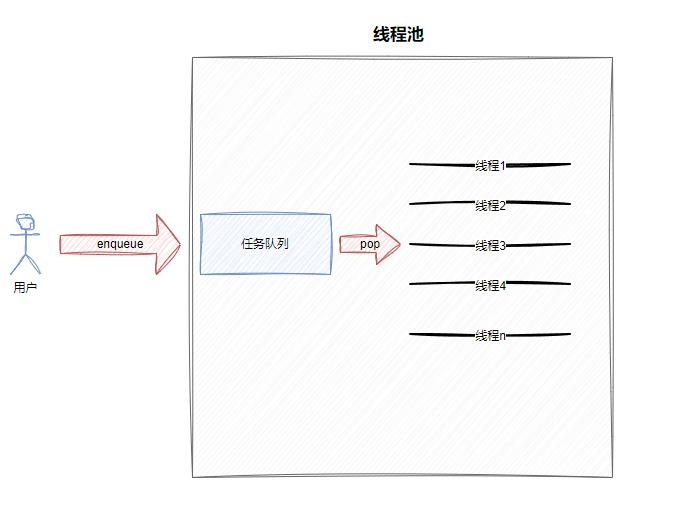
线程池就是一个生产消费者模型
ThreadPool.hpp
c
#pragma once
#include <iostream>
#include <string>
#include <vector>
#include <queue>
#include "Log.hpp"
#include "Thread.hpp"
#include "Cond.hpp"
#include "Mutex.hpp"

namespace ThreadPoolModule
{
    using namespace LogModule;
    using namespace ThreadModule;
    using namespace CondModule;
    using namespace MutexModule;
    static const int gnum = 5;
    template <typename T>
    class ThreadPool
    {
    private:
        void WakeUpAllThread()
        {
            {
                LockGuard lockguard(_mutex);
                if (_sleepnum)
                {
                    _cond.Broadcast();
                }
                LOG(LogLevel::INFO) << "唤醒所有的休眠线程";
            }
        }
        void WakeUpOneThread()
        {
            {

                _cond.Signal();
                LOG(LogLevel::INFO) << "唤醒一个休眠的线程";
            }
        }
        void Start()
        {
            if (_isrunning)
            {
                return;
            }
            _isrunning = true;
            for (auto &thread : _threads)
            {
                thread.start();
                LOG(LogLevel::INFO) << "start new thread success: " << thread.Name();
            }
        }
        ThreadPool(int num = gnum)
            : _isrunning(false), _num(num), _sleepnum(0)
        {
            for (int i = 0; i < num; i++)
            {
                _threads.emplace_back([this]()
                                      { HandlerTask(); });
            }
        }
        ThreadPool(const ThreadPool<T> &) = delete;
        ThreadPool<T> &operator=(const ThreadPool<T> &) = delete;

    public:
        static ThreadPool<T> *GetInstance()
        {

            if (inc == nullptr)
            {
                LockGuard lockguard(_lock);
                if (inc == nullptr)
                {
                    LOG(LogLevel::DEBUG) << "首次使用单例, 创建之....";
                    inc = new ThreadPool<T>();
                    inc->Start();
                }
            }
            return inc;
        }
        // ThreadPool(int num = gnum)
        //     : _isrunning(false), _num(num), _sleepnum(0)
        // {
        //     for (int i = 0; i < num; i++)
        //     {
        //         _threads.emplace_back([this]()
        //                               { HandlerTask(); });
        //     }
        // }
        // void Start()
        // {
        //     if (_isrunning)
        //     {
        //         return;
        //     }
        //     _isrunning = true;
        //     for (auto &thread : _threads)
        //     {
        //         thread.start();
        //         LOG(LogLevel::INFO) << "start new thread success: " << thread.Name();
        //     }
        // }
        void HandlerTask()
        {
            char name[128];
            pthread_getname_np(pthread_self(), name, sizeof(name));
            while (true)
            {
                T t;
                {

                    LockGuard lockguard(_mutex);
                    while (_isrunning && _taskq.empty())
                    {
                        _sleepnum++;
                        _cond.Wait(_mutex);
                        _sleepnum--;
                    }
                    if (!_isrunning && _taskq.empty())
                    {
                        LOG(LogLevel::INFO) << name << " 退出了, 线程池退出&&任务队列为空";
                        break;
                    }
                    t = _taskq.front();
                    _taskq.pop();
                }
                t();
            }
        }
        void Stop()
        {
            if (!_isrunning)
            {
                return;
            }
            _isrunning = false;
            WakeUpAllThread();
        }
        void Join()
        {
            for (auto &thread : _threads)
            {
                thread.join();
            }
        }
        bool Enqueue(const T &in)
        {
        sleep(1);
            if (_isrunning)
            {
                LockGuard lockguard(_mutex);
                _taskq.push(in);
                if (_sleepnum)
                {
                    WakeUpOneThread();

                    return true;
                }
            }
            return false;
        }

        ~ThreadPool()
        {
        }

    private:
        vector<Thread> _threads; // 管理多个线程
        Mutex _mutex;
        Cond _cond;
        bool _isrunning;           // 是否运行
        int _num;                  // 线程个数
        queue<T> _taskq;           // 任务
        int _sleepnum;             // 等待线程个数
        static ThreadPool<T> *inc; // 单例指针
        static Mutex _lock;        // 静态锁
    };
    template <typename T>
    ThreadPool<T> *ThreadPool<T>::inc = nullptr;

    template <typename T>
    Mutex ThreadPool<T>::_lock;
}
c
#include "Log.hpp"
#include "ThreadPool.hpp"
#include "Task.hpp"
#include <memory>
using namespace LogModule;
using namespace ThreadPoolModule;
int main()
{
    Enable_Console_Log_Strategy();
   // ThreadPool<task_t> *tp = new ThreadPool<task_t>();
    // tp->Start();
    // int cnt = 10;
    // while (cnt--)
    // {
    //     tp->Enqueue(Download);
    //     sleep(1);
    // }
    // tp->Stop();
    // tp->Join();
    //有一个单例了! 如果线程池本身,会被多线程获取呢??
    int count = 10;
    while (count--)
    {
       sleep(1);
        ThreadPool<task_t>::GetInstance()->Enqueue(Download);
        //count--;
    }

    ThreadPool<task_t>::GetInstance()->Stop();
    ThreadPool<task_t>::GetInstance()->Join();
}
4. 线程安全和重入问题
线程安全:就是多个线程在访问共享资源时,能够正确地执行,不会相互干扰或破坏彼此的执行结果,一般而言,多个线程并发同一段只有局部变量的代码时,不会出现不同的结果。但是对全局变量或者静态变量进行操作,并且没有锁保护的情况下,容易出现该问题
重入:同⼀个函数被不同的执行流调用,当前⼀个流程还没有执行完,就有其他的执行流再次进入,我们称之为重入,⼀个函数在重入的情况下,运行结果不会出现任何不同或者任何问题,则该函数被称为可重入函数,否则,是不可重入函数
重入其实可以分为两种情况
- 多线程重入函数
- 信号导致⼀个执行流重复进入函数
线程安全不⼀定是可重入的,而可重入函数则一定是线程安全的
定义就表明了可重入函数则⼀定是线程安全的,但是为什么线程安全不⼀定是可重入的呢?
因为当一个线程本身是线程安全的,但是如果去处理信号捕捉方法了,而信号捕捉方法内部又会再次调用这个函数,因为锁在调用这个信号捕捉方法的线程那里还没有释放,所有申请不了锁,没有锁不能访问临界资源,所有就一直阻塞着,这就是死锁问题
线程安全侧重说明线程访问公共资源的安全情况,表现的是并发线程的特点
可重入描述的是⼀个函数是否能被重复进入,表示的是函数的特点
如果不考虑信号导致⼀个执行流重复进入函数这种重入情况,就是线程安全⼀定是可重入的,而可重入函数则一定是线程安全的
5. 死锁
死锁是指在⼀组进程中的各个进程均占有不会释放的资源,但因互相申请被其他进程所占用不会释放的资源而处于的⼀种永久等待状态
假设现在线程A,线程B必须同时持有锁1和锁2,才能进行后续资源的访问
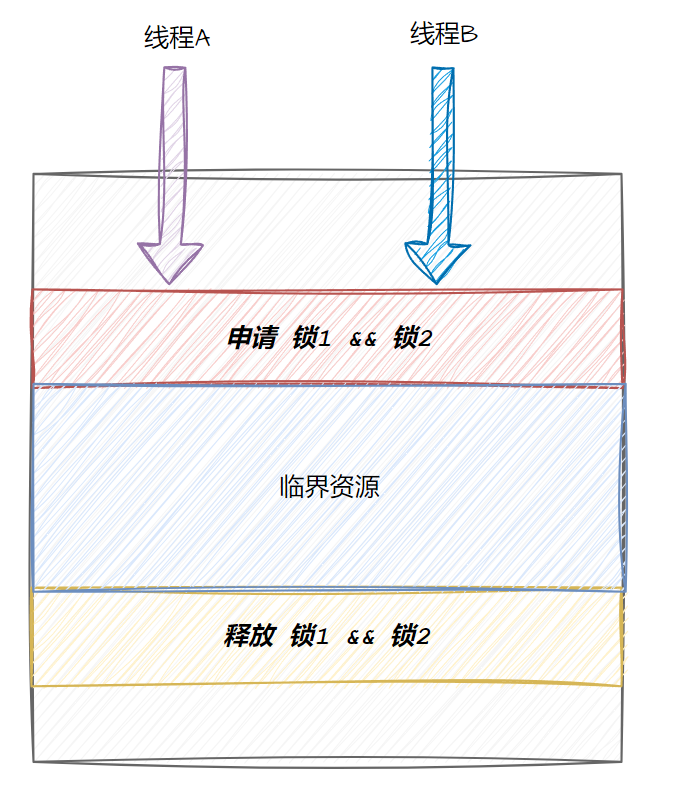
申请⼀把锁是原子的,但是申请两把锁就不一定了
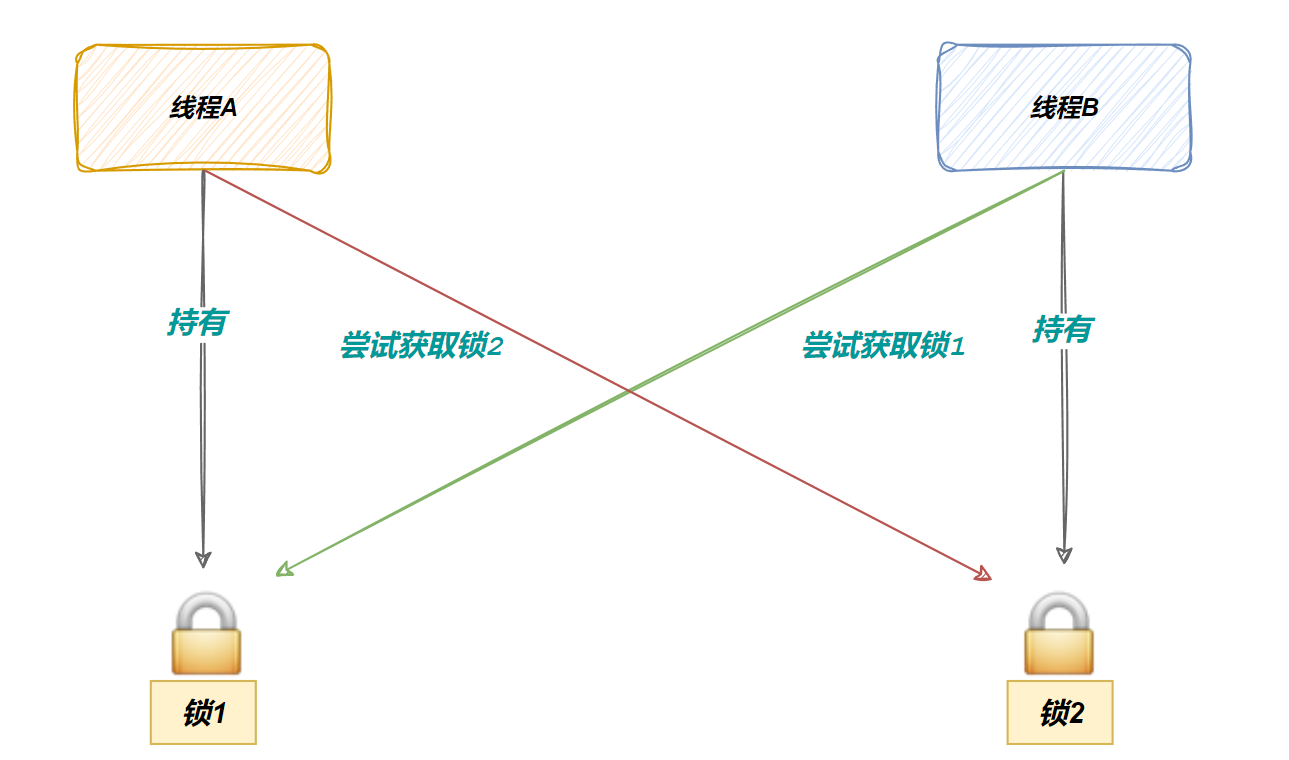
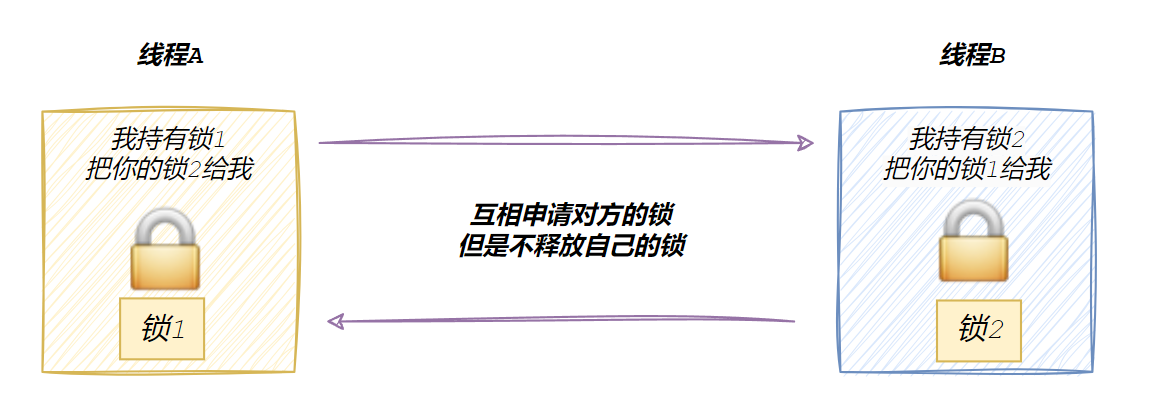
这就是死锁
4.1 死锁四个必要条件
- 互斥条件:一个资源每次只能被⼀个执行流使用
- 请求与保持条件:⼀个执行流因请求资源而阻塞时,对已获得的资源保持不放
- 不剥夺条件:⼀个执行流已获得的资源,在末使用完之前,不能强行剥夺
- 循环等待条件:若干执行流之间形成⼀种头尾相接的循环等待资源的关系
这四个条件必须同时满足才会死锁,破坏一个死锁解除
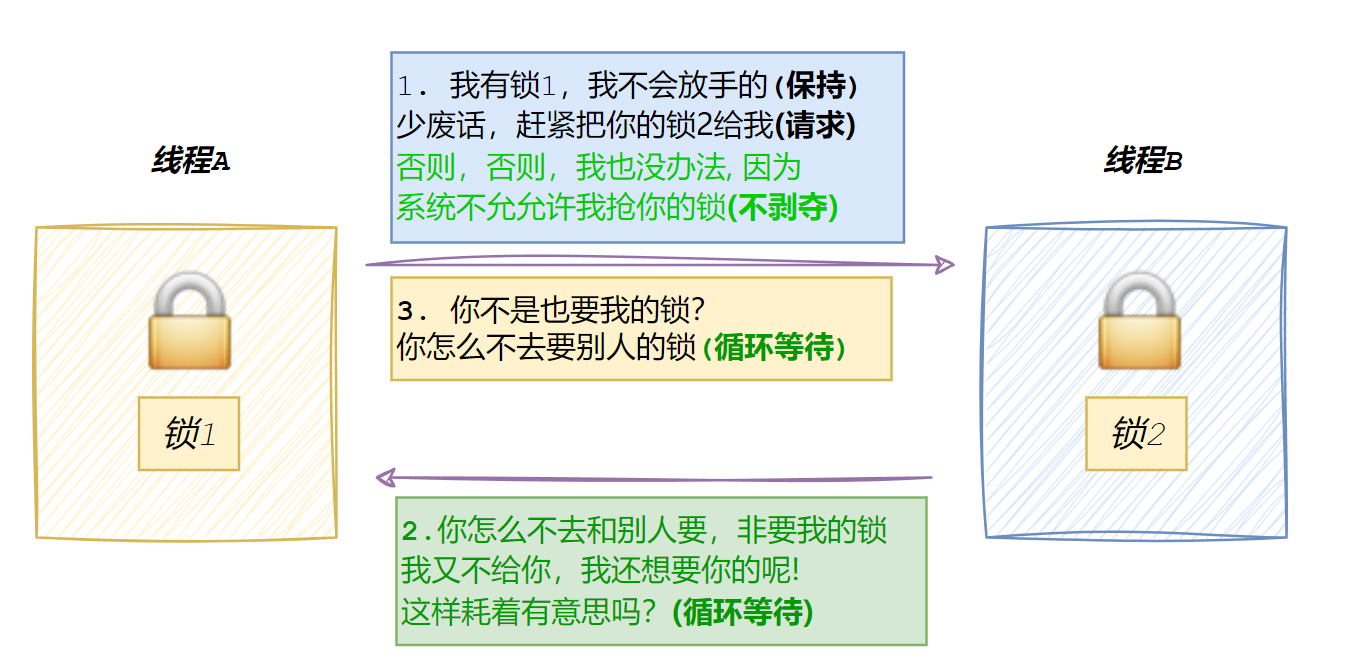
破坏互斥条件就是允许资源每次可以被多个执行流 (线程) 使用,不会出现只有一个线程占着自己的锁不放,另一个线程一直在等,如果一个线程一直占着自己的锁不放,因为锁共享了,所以可以让其它线程直接释放该锁