本文针对的是本地安装vscode远程连接服务器上面的项目,首先明确你要改的是远端文件,也就是服务器上的文件,因为真正工作的调试器通常跑在服务器上的 ~/.vscode-server/extensions/... 目录。
找一下文件位置,执行:
bash
find ~/.vscode-server ~/.cursor-server -path '*/ms-python.debugpy-*/bundled/libs/debugpy/_vendored/pydevd/_pydevd_bundle/pydevd_xml.py' 2>/dev/null找到文件路径:/disk2/***(你的用户名)/.vscode-server/extensions/ms-python.debugpy-***-linux-x64/bundled/libs/debugpy/_vendored/pydevd/_pydevd_bundle/pydevd_xml.py,先备份一下代码,执行备份命令:
bash
cp /disk2/***/.vscode-server/extensions/ms-python.debugpy-***-linux-x64/bundled/libs/debugpy/_vendored/pydevd/_pydevd_bundle/pydevd_xml.py /disk2/***/.vscode-server/extensions/ms-python.debugpy-***-linux-x64/bundled/libs/debugpy/_vendored/pydevd/_pydevd_bundle/pydevd_xml.py.bak然后确认一下备份成功:
bash
ls -l /disk2/wxr/.vscode-server/extensions/ms-python.debugpy-2025.18.0-linux-x64/bundled/libs/debugpy/_vendored/pydevd/_pydevd_bundle/pydevd_xml.py*你应该能看到两个文件:
pydevd_xml.pypydevd_xml.py.bak
打开pydevd_xml.py文件,找到def get_variable_details函数,替换成下面的版本:
python
def get_variable_details(val, evaluate_full_value=True, to_string=None, context: Optional[str] = None):
    """
    :param context:
        This is the context in which the variable is being requested. Valid values:
            "watch",
            "repl",
            "hover",
            "clipboard"
    """
    try:
        is_exception_on_eval = val.__class__ == ExceptionOnEvaluate
    except:
        is_exception_on_eval = False

    if is_exception_on_eval:
        v = val.result
    else:
        v = val

    _type, type_name, resolver = get_type(v)
    type_qualifier = getattr(_type, "__module__", "")

    if not evaluate_full_value:
        value = DEFAULT_VALUE
    else:
        try:
            shape_info = ""
            try:
                # PyTorch Tensor
                if hasattr_checked(v, "shape") and hasattr_checked(v, "dtype") and "torch" in type_qualifier:
                    try:
                        shape = tuple(v.shape)
                    except:
                        shape = v.shape
                    dtype = str(v.dtype)
                    shape_info = f"{{Tensor shape={shape}, dtype={dtype}}} "

                # NumPy ndarray
                elif hasattr_checked(v, "shape") and hasattr_checked(v, "dtype") and "numpy" in type_qualifier:
                    try:
                        shape = tuple(v.shape)
                    except:
                        shape = v.shape
                    dtype = str(v.dtype)
                    shape_info = f"{{ndarray shape={shape}, dtype={dtype}}} "

                # Pandas DataFrame
                elif "pandas.core.frame" in type_qualifier and hasattr_checked(v, "shape"):
                    try:
                        shape = tuple(v.shape)
                    except:
                        shape = v.shape
                    shape_info = f"{{DataFrame shape={shape}}} "

                # Pandas Series
                elif "pandas.core.series" in type_qualifier and hasattr_checked(v, "shape"):
                    try:
                        shape = tuple(v.shape)
                    except:
                        shape = v.shape
                    dtype = str(v.dtype) if hasattr_checked(v, "dtype") else "unknown"
                    shape_info = f"{{Series shape={shape}, dtype={dtype}}} "

                # Other objects with shape
                elif hasattr_checked(v, "shape"):
                    try:
                        shape = tuple(v.shape)
                    except:
                        shape = v.shape
                    shape_info = f"{{shape={shape}}} "

                # Sized containers
                elif hasattr_checked(v, "__len__"):
                    try:
                        length = len(v)
                        if type_name == "str":
                            shape_info = "{str} "
                        else:
                            shape_info = f"{{{type_name}: {length}}} "
                    except:
                        pass
            except:
                pass

            str_from_provider = _str_from_providers(v, _type, type_name, context)
            if str_from_provider is not None:
                value = shape_info + str_from_provider

            elif to_string is not None:
                value = shape_info + to_string(v)

            elif hasattr_checked(v, "__class__"):
                if v.__class__ == frame_type:
                    value = pydevd_resolver.frameResolver.get_frame_name(v)

                elif v.__class__ in (list, tuple):
                    if len(v) > 300:
                        value = "%s: %s" % (str(v.__class__), "<Too big to print. Len: %s>" % (len(v),))
                    else:
                        value = "%s: %s" % (str(v.__class__), v)
                else:
                    try:
                        cName = str(v.__class__)
                        if cName.find(".") != -1:
                            cName = cName.split(".")[-1]

                        elif cName.find("'") != -1:
                            cName = cName[cName.index("'") + 1:]

                        if cName.endswith("'>"):
                            cName = cName[:-2]
                    except:
                        cName = str(v.__class__)

                    value = "%s: %s" % (cName, v)
                    if shape_info:
                        value = shape_info + value
            else:
                value = shape_info + str(v)

        except:
            try:
                value = repr(v)
            except:
                value = "Unable to get repr for %s" % v.__class__

    try:
        if value.__class__ == bytes:
            value = value.decode("utf-8", "replace")
    except TypeError:
        pass

    return type_name, type_qualifier, is_exception_on_eval, resolver, value
保存之后退出。
最后很重要:重启 VS Code 远程会话!!重启之后打开本地VSCode,按Ctrl + Shift + P输入并执行Developer: Reload Window重新连接一次服务器。
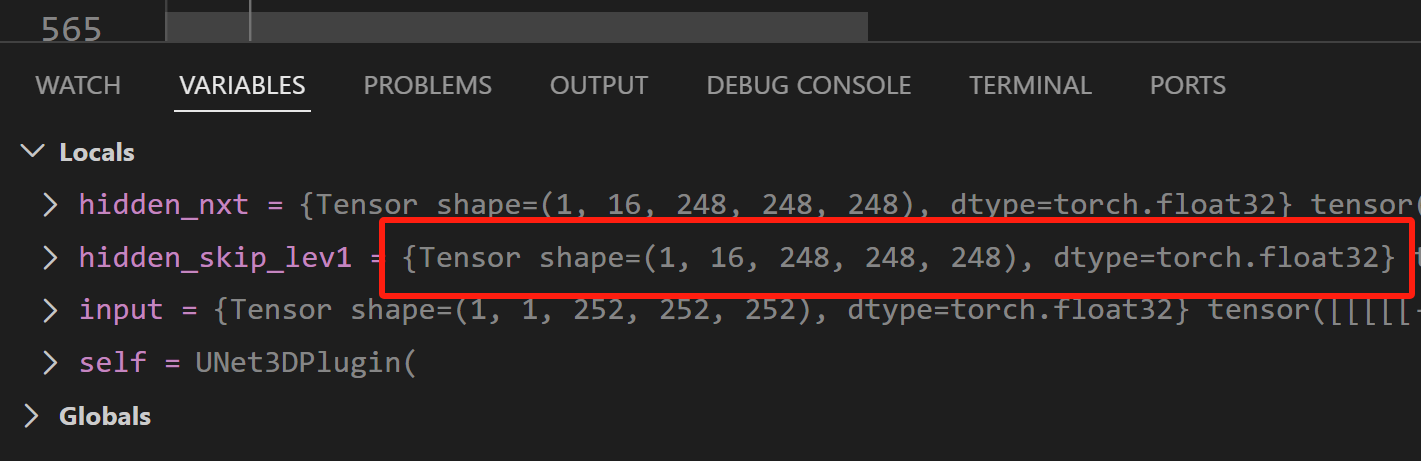
然后就和pycharm一样能看到tensor shape了: