记录一下阿里云MCP 部署,首先我们这边是有个现有的mcp 服务
url : https://cloud-findaxxxxx/mcp/
aurthorization: 1pzSGPxxxxxxxxxxx (也就是api key 啦)
tool :"extract_and_align_entities"
arguments={
"query": "腾讯控股在2024年第一季度发布了财报,净利润达到500亿港元。",
"entity_list": "机构-公司", "时间",
}
创建选项
阿里云有很多创建选项,然后我试的是 插件 和 脚本部署
- 插件 = 接"通用外部 API"
- 脚本部署 = 平台帮你"把 MCP 服务跑起来"
- AI 网关 = 接"企业内部已经管理好的服务"
- 阿里云 OpenAPI = 接"阿里云体系里的 API 服务"
然而,插件不支持已经写好的mcp, 它是把你的HTTP服务包成mcp,否则调用会出错
所以我们选择了脚本部署
脚本部署
通过http 模式,填入我们已经部署好的mcp
{
"mcpServers": {
"findata-mcp": {
"url": "https://cloud-findxxxxxxx/mcp/",
"type": "streamableHttp",
"headers": {
"Authorization": "Bearer 1pzxxxxxxx"
}
}
}
}
然后平台可以自动检测你有的工具,无需手动设计参数
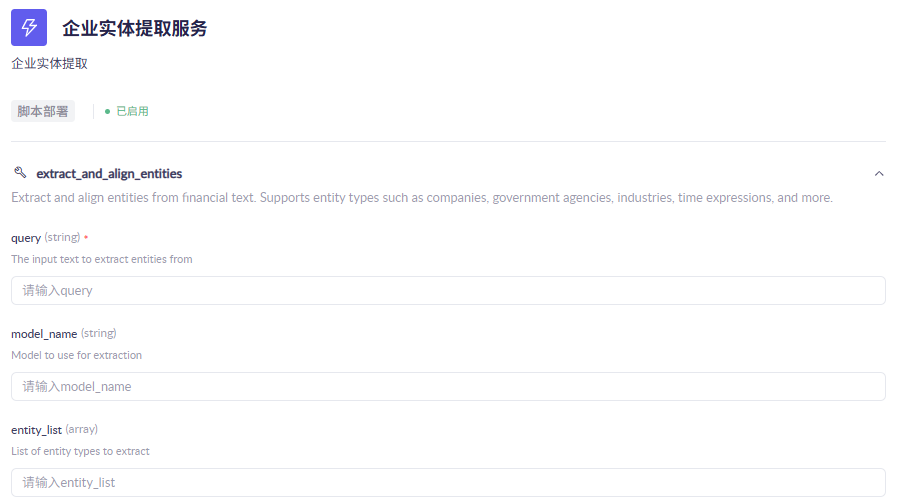
然后这里也可以测试部署的服务的tool 的使用
测试成功之后就开始尝试外部调用了↓
外部调用
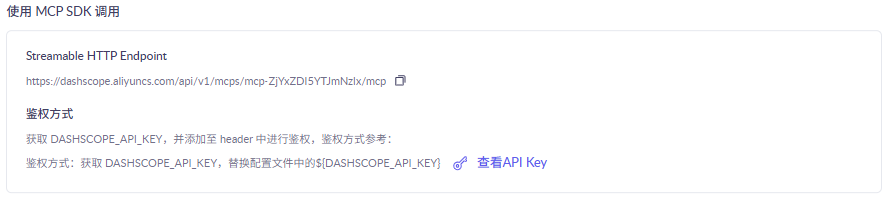
平台提供了一系列外部调用的方式,包括cherry studio, cursor 和 qwen code, 这里我们直接SDK 调用,平台会给我们一个api key, 这就相当于是这个aliyun 服务的api key了,和我们之前的原始api key 不一样。
测试脚本
python
#!/usr/bin/env python3
# -*- coding: utf-8 -*-

import asyncio
import httpx
from mcp import ClientSession
from mcp.client.streamable_http import streamable_http_client

API_KEY = "sk-0xxxxxxxxxxxxxxxxxxxxxx"
BASE_URL = "https://dashscope.aliyuncs.com/api/v1/mcps/mcp-ZjYxZDI5YTJmNzIx/mcp"


async def main():
    headers = {
        "Authorization": f"Bearer {API_KEY}"
    }

    async with httpx.AsyncClient(
        headers=headers,
        timeout=httpx.Timeout(30, read=300),
    ) as http_client:
        async with streamable_http_client(
            BASE_URL,
            http_client=http_client,
        ) as (read, write, _get_session_id):
            async with ClientSession(read, write) as session:
                await session.initialize()

                tools = await session.list_tools()
                print("Available tools:", [t.name for t in tools.tools])

                result = await session.call_tool(
                    "extract_and_align_entities",
                    arguments={
                        "query": "腾讯控股在2024年第一季度发布了财报,净利润达到500亿港元。",
                        "entity_list": ["机构-公司", "时间"],
                    },
                )
                print("Tool result:", result)


if __name__ == "__main__":
    asyncio.run(main())
跑一下测试成功~ 阿里云MCP 创建成功
计费部分需要通过阿里云网关部署另外的服务啥的,我盘了半天没盘出来,交给我的mentor 大人了