现象
每次公司网络切ip,会导致短时间内上不了网,等网络恢复时,网络图标却不会自动恢复正常。
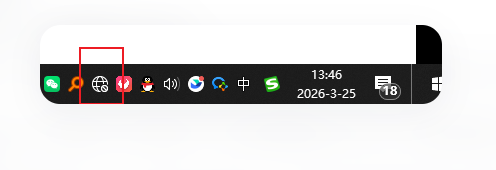
解决
以管理员身份运行 PowerShell:
bash
1 Restart-Service NlaSvc
2 Restart-Service Dhcp
3 Restart-Service Dnscache
也可以桌面创建个bat文件来执行,bat内容如下
bash
@echo off
:: This script will self-correct its encoding and then run the fix.
:: Do not modify the lines below.

set "Me=%~f0"
set "Temp=%temp%\fix_net_tmp.bat"

:: Create a new clean batch file with correct ANSI encoding using PowerShell
powershell -NoProfile -Command "^
    $content = @'
@echo off
title Network Icon Fix
color 0A
cls
echo ==========================================
echo   Running Network Repair...
echo ==========================================
echo.
echo [1/3] Stopping Network Service...
net stop NlaSvc /y >nul 2>&1
echo [2/3] Flushing DNS...
ipconfig /flushdns >nul 2>&1
echo [3/3] Starting Service...
net start NlaSvc >nul 2>&1
timeout /t 2 /nobreak >nul
cls
echo ==========================================
echo   DONE! Icon should be fixed now.
echo   (Wait 3 seconds if it doesn't change immediately)
echo ==========================================
echo.
pause
exit
'@;
    # Write using Default Encoding (ANSI for Chinese Windows)
    [System.IO.File]::WriteAllText('$using:Temp', $content, [System.Text.Encoding]::Default)
"

:: Run the newly created clean file
if exist "%Temp%" (
    call "%Temp%"
    del "%Temp%"
) else (
    echo Error: Failed to create temporary script.
    pause
)