一、问题描述
最近因为项目需求,需要下载 Stable-diffusion-1.5,项目中给出的配置指令如下:
bash
git lfs install
git clone https://huggingface.co/runwayml/stable-diffusion-v1-5
GIT_LFS_SKIP_SMUDGE=1 git clone https://huggingface.co/runwayml/stable-diffusion-v1-5
然而我在运行时无妨访问网站:
bash
(python311) C:\Users\XXX>git lfs install
Git LFS initialized.

(python311) C:\Users\XXX>git clone https://huggingface.co/runwayml/stable-diffusion-v1-5
Cloning into 'stable-diffusion-v1-5'...
fatal: unable to access 'https://huggingface.co/runwayml/stable-diffusion-v1-5/': Failed to connect to huggingface.co port 443 after 21309 ms: Couldn't connect to server
这里先贴几个我觉得比较好的回答:
二、解决方案
由于我是个小白,之前确实也没有搞过这些东西,所以上面的解决方案我还是看得一知半解,看完了还是不知道最后应该怎么弄。然后我问了下deep seek,这里我的解决方案如下:
- 首先第一个指令
git lfs install是成功了的,直接来看第二个指令; git clone https://huggingface.co/runwayml/stable-diffusion-v1-5
法一(失败):使用hf-mirror.com 镜像站
将命令改为如下形式:
bash
git clone https://hf-mirror.com/runwayml/stable-diffusion-v1-5执行后需要登录一下:

这里输入 GitHub 用户名密码或者邮箱登录一下就好了。然后输出如下:
bash
Cloning into 'stable-diffusion-v1-5'...
remote: Password authentication in git is no longer supported. You must use a user access token or an SSH key instead. See https://huggingface.co/blog/password-git-deprecation
fatal: Authentication failed for 'https://hf-mirror.com/runwayml/stable-diffusion-v1-5/'
hf-mirror.com 镜像站现在也要求身份验证了(返回 401 状态码),并且它遵循了 Hugging Face 的官方策略------不再支持密码认证,必须使用用户访问令牌(User Access Token)
如何获取token呢?还是需要登录 Hugging Face 获取。无解。
法二(失败):使用 ModelScope 镜像站(git下载)
在终端输入如下命令:
bash
git clone https://www.modelscope.cn/runwayml/stable-diffusion-v1-5.git输出如下:
bash
Cloning into 'stable-diffusion-v1-5'...
remote: The project you were looking for could not be found or you don't have permission to view it.
fatal: repository 'https://www.modelscope.cn/runwayml/stable-diffusion-v1-5.git/' not found没有这个地址。打开阿里达摩院官网,在搜索框中搜索stable-diffusion-v1-5,搜索结果如下:
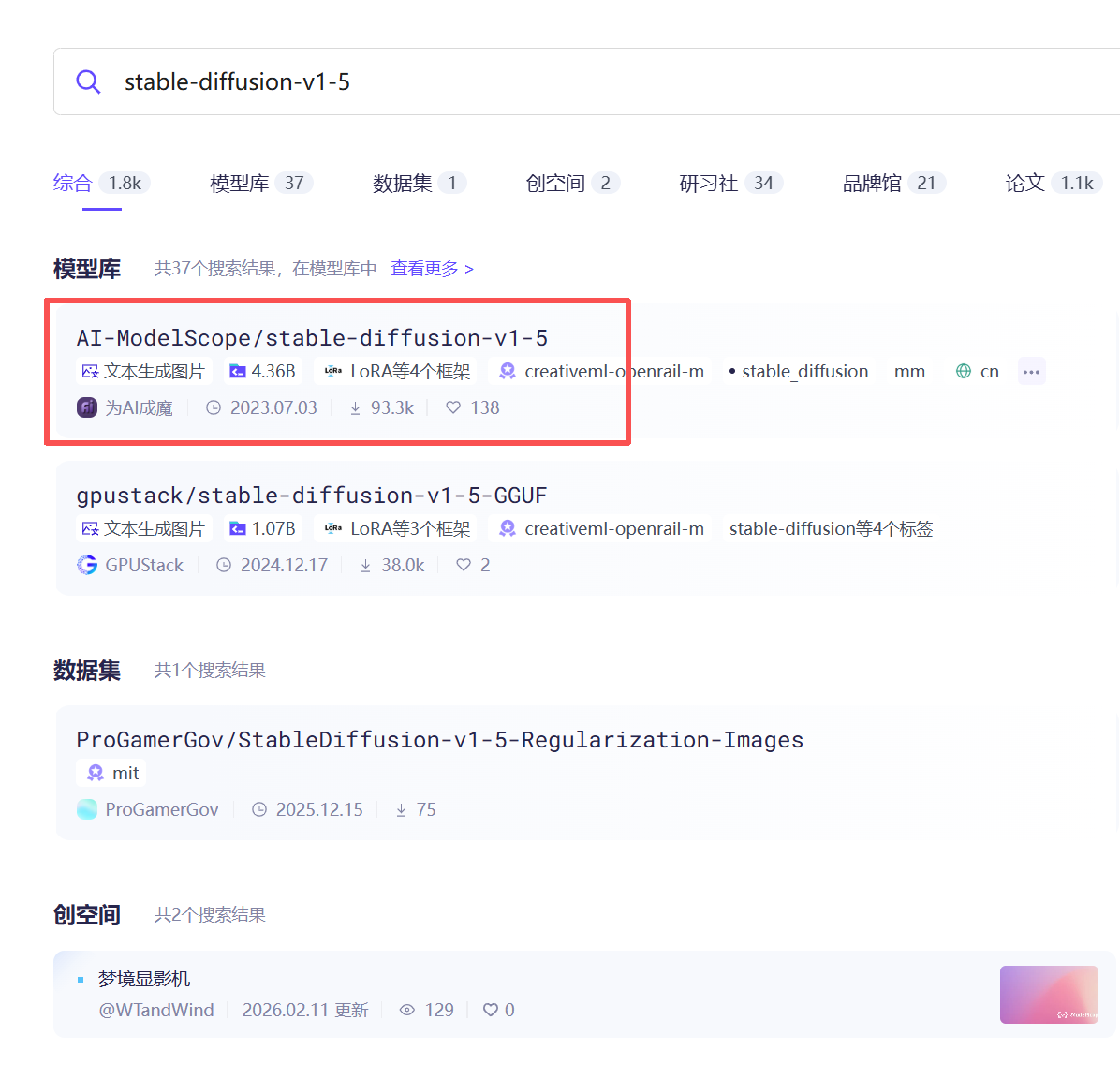
可以看到正确的路径如图中所示。将命令改为:
bash
git clone https://www.modelscope.cn/AI-ModelScope/stable-diffusion-v1-5.git接下来是漫长的等待下载过程...
然后出现如下错误:
bash
(python311) C:\Users\XXX>git clone https://www.modelscope.cn/AI-ModelScope/stable-diffusion-v1-5.git
Cloning into 'stable-diffusion-v1-5'...
remote: Enumerating objects: 94, done.
Receiving objects: 100% (94/94), 530.76 KiB | 3.40 MiB/s, done.
remote: Total 94 (delta 0), reused 0 (delta 0), pack-reused 94
Resolving deltas: 100% (28/28), done.
Downloading v1-5-pruned.ckpt (7.7 GB)5 GiB | 284.00 KiB/s
Error downloading object: v1-5-pruned.ckpt (e144158): Smudge error: Error downloading v1-5-pruned.ckpt (e1441589a6f3c5a53f5f54d0975a18a7feb7cdf0b0dee276dfc3331ae376a053): expected OID e1441589a6f3c5a53f5f54d0975a18a7feb7cdf0b0dee276dfc3331ae376a053, got 754f8f58b3887d9c555170089143ad1475a565defecaac1458cfc35bf965e1f3 after 514795922 bytes written

Errors logged to 'C:\Users\XXX\stable-diffusion-v1-5\.git\lfs\logs\20260324T225327.4163635.log'.
Use `git lfs logs last` to view the log.
error: external filter 'git-lfs filter-process' failed
fatal: v1-5-pruned.ckpt: smudge filter lfs failed
warning: Clone succeeded, but checkout failed.
You can inspect what was checked out with 'git status'
and retry with 'git restore --source=HEAD :/'
好像是因为网络不稳定吧,文件又太大,反正折腾了两天以后还是下载失败了。
再回到阿里达摩院官网,我们直接点击模型下方的下载链接,可以看到官方给了我们几个下载命令,分别是命令行下载、SDK下载和git下载:
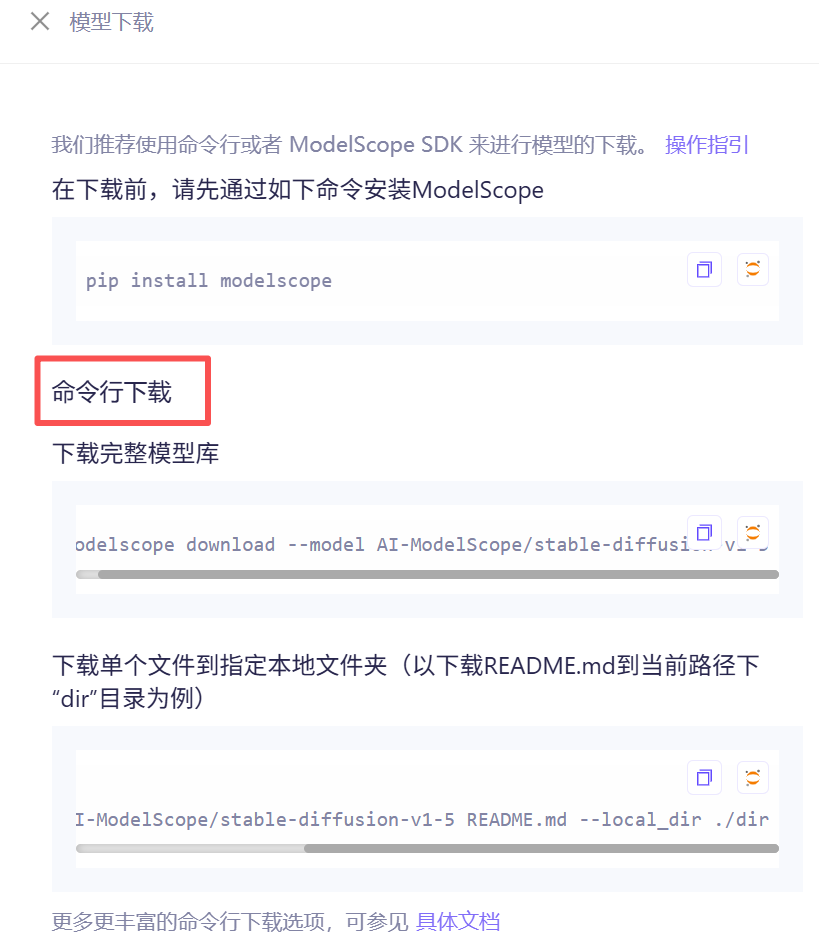
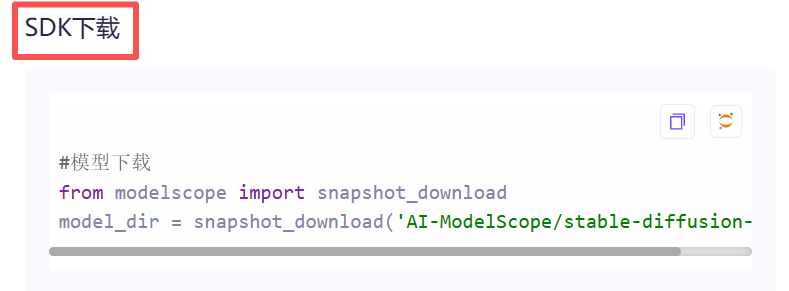
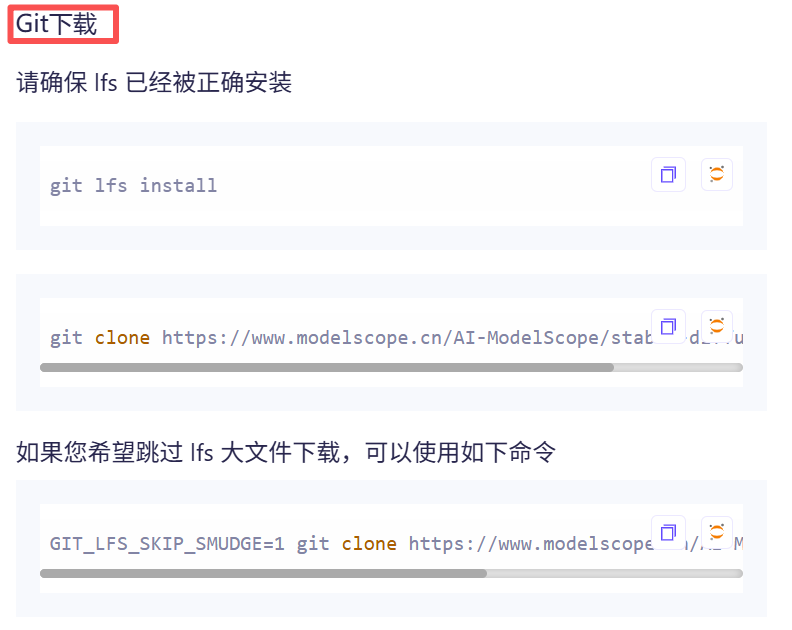
显然 git 下载命令和项目中给出的参考命令是一致的,也就是我们方法二中尝试的,但是最终失败了。
接下来我们试试使用命令行下载。
法三(成功):使用 ModelScope 镜像站(命令行下载)
在终端依次输入如下命令:
bash
pip install modelscope

modelscope download --model AI-ModelScope/stable-diffusion-v1-5 --local_dir E:\XXX\stable-diffusion-v1-5
根据我所配置的项目需求,这里我将文件存放在项目的根目录下。
bash
(python311) C:\Users\XXX>modelscope download --model AI-ModelScope/stable-diffusion-v1-5 --local_dir E:\project\Ph\DADO\Diffusion-Domain-Teacher-main\stable-diffusion-v1-5

 _   .-')                _ .-') _     ('-.             .-')                              _ (`-.    ('-.
( '.( OO )_             ( (  OO) )  _(  OO)           ( OO ).                           ( (OO  ) _(  OO)
 ,--.   ,--.).-'),-----. \     .'_ (,------.,--.     (_)---\_)   .-----.  .-'),-----.  _.`     \(,------.
 |   `.'   |( OO'  .-.  ',`'--..._) |  .---'|  |.-') /    _ |   '  .--./ ( OO'  .-.  '(__...--'' |  .---'
 |         |/   |  | |  ||  |  \  ' |  |    |  | OO )\  :` `.   |  |('-. /   |  | |  | |  /  | | |  |
 |  |'.'|  |\_) |  |\|  ||  |   ' |(|  '--. |  |`-' | '..`''.) /_) |OO  )\_) |  |\|  | |  |_.' |(|  '--.
 |  |   |  |  \ |  | |  ||  |   / : |  .--'(|  '---.'.-._)   \ ||  |`-'|   \ |  | |  | |  .___.' |  .--'
 |  |   |  |   `'  '-'  '|  '--'  / |  `---.|      | \       /(_'  '--'\    `'  '-'  ' |  |      |  `---.
 `--'   `--'     `-----' `-------'  `------'`------'  `-----'    `-----'      `-----'  `--'      `------'

Downloading Model from https://www.modelscope.cn to directory: E:\project\Ph\DADO\Diffusion-Domain-Teacher-main\stable-diffusion-v1-5
Downloading [safety_checker/config.json]: 100%|███████████████████████████████████| 4.61k/4.61k [00:00<00:00, 20.3kB/s]
Downloading [vae/config.json]: 100%|██████████████████████████████████████████████████| 547/547 [00:00<00:00, 2.19kB/s]
Downloading [configuration.json]: 100%|███████████████████████████████████████████| 1.65k/1.65k [00:00<00:00, 6.91kB/s]
Downloading [text_encoder/config.json]: 100%|█████████████████████████████████████████| 617/617 [00:00<00:00, 2.35kB/s]
Downloading [unet/config.json]: 100%|█████████████████████████████████████████████████| 743/743 [00:00<00:00, 2.10kB/s]
Downloading [model_index.json]: 100%|█████████████████████████████████████████████████| 543/543 [00:00<00:00, 2.18kB/s]
Downloading [tokenizer/merges.txt]: 100%|███████████████████████████████████████████| 512k/512k [00:00<00:00, 1.22MB/s]
Downloading [feature_extractor/preprocessor_config.json]: 100%|█████████████████████████| 342/342 [00:00<00:00, 615B/s]
Downloading [text_encoder/model.safetensors]: 100%|█████████████████████████████████| 469M/469M [04:41<00:00, 1.75MB/s]
Downloading [README.md]: 100%|████████████████████████████████████████████████████| 14.0k/14.0k [00:00<00:00, 32.0kB/s]
Downloading [scheduler/scheduler_config.json]: 100%|████████████████████████████████████| 308/308 [00:00<00:00, 839B/s]
Downloading [tokenizer/special_tokens_map.json]: 100%|████████████████████████████████| 472/472 [00:00<00:00, 1.25kB/s]
Downloading [tokenizer/tokenizer_config.json]: 100%|██████████████████████████████████| 806/806 [00:00<00:00, 1.79kB/s]
Downloading [vae/diffusion_pytorch_model.bin]: 100%|█████████████████████████████████| 319M/319M [10:49<00:00, 515kB/s]
Downloading [vae/diffusion_pytorch_model.safetensors]: 100%|█████████████████████████| 319M/319M [11:55<00:00, 468kB/s]
Downloading [safety_checker/pytorch_model.bin]: 100%|█████████████████████████████| 1.13G/1.13G [12:33<00:00, 1.61MB/s]
Downloading [text_encoder/pytorch_model.bin]: 100%|██████████████████████████████████| 469M/469M [37:00<00:00, 222kB/s]
Downloading [v1-inference.yaml]: 100%|████████████████████████████████████████████| 1.83k/1.83k [00:00<00:00, 5.69kB/s]
Downloading [tokenizer/vocab.json]: 100%|██████████████████████████████████████████| 1.01M/1.01M [00:01<00:00, 588kB/s]
Downloading [v1-5-pruned-emaonly.safetensors]: 100%|██████████████████████████████| 3.97G/3.97G [31:57<00:00, 2.22MB/s]
Downloading [unet/diffusion_pytorch_model.bin]: 100%|█████████████████████████████| 3.20G/3.20G [46:24<00:00, 1.23MB/s]
Downloading [safety_checker/model.safetensors]: 100%|██████████████████████████████| 1.13G/1.13G [47:41<00:00, 425kB/s]
Downloading [unet/diffusion_pytorch_model.safetensors]: 100%|█████████████████████| 3.20G/3.20G [56:58<00:00, 1.01MB/s]
Downloading [v1-5-pruned-emaonly.ckpt]: 100%|████████████████████████████████████| 3.97G/3.97G [1:11:32<00:00, 994kB/s]
Downloading [v1-5-pruned.ckpt]: 100%|███████████████████████████████████████████| 7.17G/7.17G [1:18:02<00:00, 1.65MB/s]
Downloading [v1-5-pruned.safetensors]: 100%|████████████████████████████████████| 7.17G/7.17G [1:23:40<00:00, 1.53MB/s]
Processing 26 items: 100%|█████████████████████████████████████████████████████████| 26.0/26.0 [1:36:14<00:00, 222s/it]
Downloading [v1-5-pruned.safetensors]: 100%|███████████████████████████████████▉| 7.17G/7.17G [1:23:40<00:00, 6.33MB/s]
Successfully Downloaded from model AI-ModelScope/stable-diffusion-v1-5.▉          | 1.67G/3.20G [46:23<25:42, 1.06MB/s]
Downloading [unet/diffusion_pytorch_model.safetensors]:  58%|████████████▏        | 1.86G/3.20G [47:40<08:33, 2.81MB/s]
Downloading [unet/diffusion_pytorch_model.safetensors]: 100%|█████████████████████| 3.20G/3.20G [56:58<00:00, 2.65MB/s]
虽然图中有一行文件显示只下载了58%,但这里应该是多文件并行下载时进度显示错位造成的。查看文件大小也没有问题。因此这就算是下载成功了。