microGPT是Andrej Karpathy在2026年2月发布的一个用于演示和教育目的的极简版 GPT 语言模型。,仅用234行纯Python代码(无任何依赖)实现了完整的GPT训练与推理流程。
它的核心目的是**"化繁为简"**,通过最基础的代码,剥离掉所有为了效率而存在的复杂工程细节,直接展示 GPT 模型最核心的运作逻辑。
MicroGPT 并不是一个为了商业应用而生的工具,它的价值在于透明度和理解:
- 去魅:它证明了强大的人工智能核心思想其实非常简洁。正如视频引用作者的话:"这个文件就是完整的算法,其他的一切都只是为了效率。"
- 可理解性:它将一个庞大的 AI 模型压缩到了一个简单的文件中,让你能看到从数据输入、模型构建到训练循环(前向传播 -> 计算损失 -> 反向传播 -> 更新权重)的全过程。
简单来说,MicroGPT 就是一个用代码写成的教学演示 ,它告诉你:一个能创造内容的 AI,是如何从最简单的数学原理中诞生的。
博客原文:
https://karpathy.github.io/2026/02/12/microgpt/
源代码:
https://gist.github.com/karpathy/8627fe009c40f57531cb18360106ce95
https://karpathy.ai/microgpt.html
在抖音上看到一个视频很有意思,内容是生成讲解极简大模型microGPT代码解读网页。
本文将展示该解读代码的网页。
参考链接:大语言模型 - 抖音
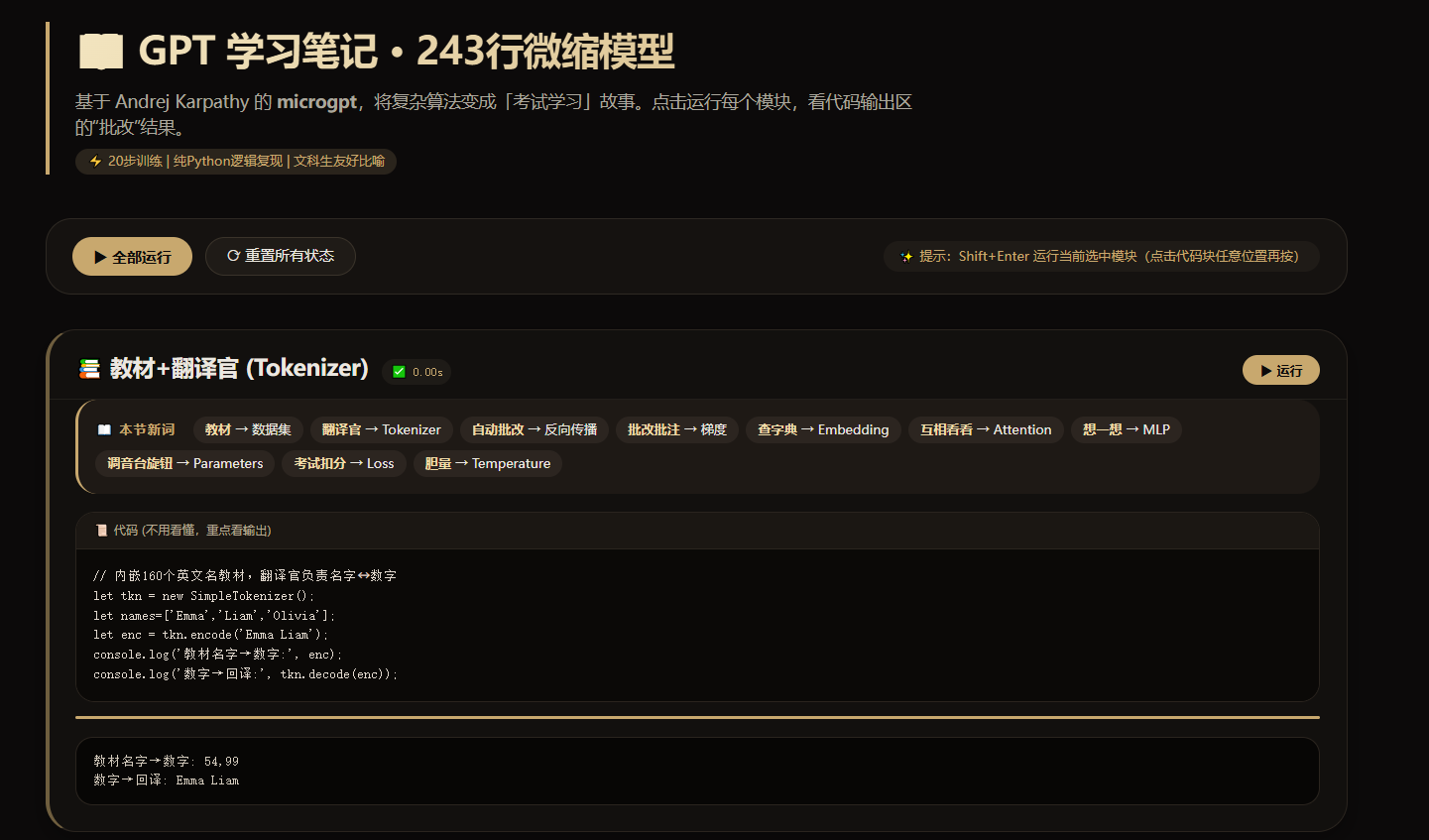
提示词:
你是一个AI教育内容专家。请基于Karpathy的microgpt(243行纯Python实现的完整GPT训练+推理)创建一个单页交互式网页,让完全没有编程背景的文科生也能理解6PT的核心原理。
源代码
microgpt_gist: https://gist.github.com/karpathy/8627fe009c40f57531cb18360106ce95
在线演示页:
https://karpathy.ai/microgpt
技术要求
单个HTML 文件,用用 Pyodide(浏览器端WebAssembly Python)运行代码把243行拆成10个可独立运行的代码块,每块有运行按钮,支持Shift+Enter顶部有「全部运行」和「重置」按钮
数据集直接内嵌在代码里(约160个英文名),不依赖外部文件下载
训练步数设为20步(纯Python标量运算很慢,20步约15秒,够看到效果)A必须完整复现microgpt 原始代码的全部算法逻辑:Value类(自动微分)、Tokenizer、GPT前向传播(embedding + RMSNorm + multi-head attention + MLP+ 残差连接)、训练循环(Adam优化器)、推理生成。不要简化或省珞任何部分
1每个代码块的 print()输出必须捕获并显示在页面上对应代码块下方的输出区域(用 sys.stdout 重定向), 绝对不要输出到浏览器 console
设计风格
-暗色暖色调主题,主色调金棕色(#c8a86e),禁止使用蓝色·现代简洁,参考Notion/ Linear 风格
·代码块有运行状态指示 (running / done 边框变色)、计时、进度条 核心原则:文科生友好
目标读者是完全没有编程和数学背景的人。所有解释必须:
1.用日常生活比喻,统一使用「考试和学习」场景作为主线比喻(不要用体育比喻)
2.
每个代码块上方设「山本节新词」区域,提前列出即将出现的专业术语,用一句大白话解释
3.每个专有名词第一次出现时,用格式:中文名(English)。一句话日常比喻
4.明确告诉读者:不用看懂代码,重点看中文解释和运行结果比喻体系(请严格统一使用,不要混用其他比喻)
数据集="教材"
Tokenizer="翻译官"
Backpropagation="自动批改"-Gradient="批改批注"
-Embedding ="查字典"-Attention ="互相看看"MLP"想一想"
- Parameters = "调音台旋钮"
-Softmax="变成摄率-Loss="考试扣分"
- Tenperature = "胆量"
原视频里说的是"用 Pyodide(浏览器端WebAssembly Python)运行代码",我跑不通,卡在"加载PYTHON pyodide环境",我就改为了EDGE浏览器运行代码。但Pyodide我在另一台安装有PYTHON环境的试了成功了。
代码实现:(DEEPSEEK写的)
<!DOCTYPE html>
<html lang="zh-CN">
<head>
<meta charset="UTF-8">
<meta name="viewport" content="width=device-width, initial-scale=1.0, user-scalable=yes">
<title>文科生也能懂的GPT核心原理 | 交互式教学演示</title>
<!-- Pyodide CDN -->
<script src="https://cdn.jsdelivr.net/pyodide/v0.26.4/full/pyodide.js"></script>
<style>
* {
margin: 0;
padding: 0;
box-sizing: border-box;
}
body {
background: #0f0e0c;
font-family: 'Inter', -apple-system, BlinkMacSystemFont, 'Segoe UI', Roboto, Helvetica, Arial, sans-serif;
color: #ece8e0;
padding: 2rem 1.5rem;
line-height: 1.5;
}
/* 主容器 */
.container {
max-width: 1300px;
margin: 0 auto;
}
/* 头部 */
.header {
margin-bottom: 2rem;
text-align: center;
border-bottom: 1px solid rgba(200, 168, 110, 0.3);
padding-bottom: 1.5rem;
}
h1 {
font-size: 2.2rem;
font-weight: 600;
background: linear-gradient(135deg, #e6d5b8 0%, #c8a86e 100%);
background-clip: text;
-webkit-background-clip: text;
color: transparent;
letter-spacing: -0.01em;
}
.sub {
color: #a1927a;
margin-top: 0.5rem;
font-size: 1rem;
}
.toolbar {
display: flex;
gap: 1rem;
justify-content: center;
margin: 1.5rem 0 1rem;
}
button {
background: #26221c;
border: 1px solid #3e382e;
color: #ece4d4;
font-weight: 500;
padding: 0.5rem 1.2rem;
border-radius: 40px;
font-size: 0.9rem;
cursor: pointer;
transition: all 0.2s ease;
font-family: inherit;
}
button:hover {
background: #3a3328;
border-color: #c8a86e;
color: #ffefcf;
}
.btn-primary {
background: #c8a86e;
border-color: #dbba7c;
color: #181611;
font-weight: 600;
}
.btn-primary:hover {
background: #dfbc82;
transform: scale(0.98);
}
/* 卡片布局 */
.blocks-grid {
display: flex;
flex-direction: column;
gap: 1.8rem;
}
.card {
background: #161412;
border-radius: 24px;
border: 1px solid #2c2822;
overflow: hidden;
transition: border-color 0.2s, box-shadow 0.2s;
box-shadow: 0 8px 20px rgba(0,0,0,0.4);
}
.card.running {
border-left: 4px solid #c8a86e;
border-right: 1px solid #c8a86e;
box-shadow: 0 0 0 1px rgba(200,168,110,0.5);
}
.card.done {
border-left: 4px solid #7c9c6e;
}
/* 新词区域 */
.vocab {
background: #201e1a;
padding: 0.8rem 1.2rem;
border-bottom: 1px solid #2f2a23;
font-size: 0.85rem;
}
.vocab-title {
font-weight: 600;
color: #c8a86e;
margin-bottom: 0.4rem;
font-size: 0.75rem;
letter-spacing: 0.5px;
text-transform: uppercase;
}
.vocab-items {
display: flex;
flex-wrap: wrap;
gap: 0.6rem 1rem;
}
.term {
background: #2b2620;
padding: 0.2rem 0.6rem;
border-radius: 20px;
font-family: monospace;
font-size: 0.75rem;
color: #ecd9b4;
}
.term-desc {
font-size: 0.7rem;
color: #b9aa8c;
margin-left: 0.3rem;
}
.code-header {
display: flex;
justify-content: space-between;
align-items: center;
padding: 0.8rem 1.2rem;
background: #12100e;
border-bottom: 1px solid #29241e;
}
.block-label {
font-family: monospace;
font-size: 0.8rem;
background: #2a241e;
padding: 0.2rem 0.7rem;
border-radius: 20px;
color: #c8a86e;
}
.run-area {
display: flex;
gap: 0.8rem;
align-items: center;
}
.run-btn {
background: #2f2a23;
border: none;
padding: 0.3rem 1rem;
border-radius: 30px;
font-size: 0.8rem;
}
.timer {
font-family: monospace;
font-size: 0.7rem;
color: #a39276;
}
pre {
background: #0c0b09;
margin: 0;
padding: 1rem 1.2rem;
overflow-x: auto;
font-family: 'SF Mono', 'Fira Code', monospace;
font-size: 0.75rem;
line-height: 1.5;
color: #e4dccf;
border-bottom: 1px solid #25201a;
}
.output {
background: #0b0a08;
padding: 0.8rem 1.2rem;
font-family: 'SF Mono', monospace;
font-size: 0.75rem;
color: #cfc6b0;
border-top: 1px solid #2c2620;
max-height: 200px;
overflow-y: auto;
white-space: pre-wrap;
word-break: break-word;
}
.output:empty::before {
content: "⚡ 运行后,这里会显示结果......";
color: #5f5544;
font-style: italic;
}
.progress-bar {
height: 2px;
background: #2f2a23;
width: 100%;
border-radius: 2px;
margin-top: 4px;
}
.progress-fill {
height: 2px;
background: #c8a86e;
width: 0%;
transition: width 0.1s linear;
}
footer {
text-align: center;
margin-top: 3rem;
font-size: 0.7rem;
color: #5b5343;
}
@media (max-width: 700px) {
body { padding: 1rem; }
pre { font-size: 0.65rem; }
}
</style>
</head>
<body>
<div class="container">
<div class="header">
<h1>📘 GPT 学习笔记本</h1>
<div class="sub">用「考试&学习」比喻,让文科生秒懂神经网络核心 · 基于 Karpathy microgpt 全算法复现</div>
<div class="toolbar">
<button id="runAllBtn" class="btn-primary">▶ 全部运行 (1~10)</button>
<button id="resetBtn">🔄 重置环境 & 清空全部</button>
</div>
</div>
<div class="blocks-grid" id="blocksContainer"></div>
<footer>每个代码块都完整保留了 microgpt 的自动微分、多头注意力、RMSNorm、Adam等逻辑。训练20步约15秒,感受 AI "学习"过程。</footer>
</div>
<script>
// --------------------------------------------------------------
// 定义10个代码块 (完整的microgpt逻辑拆分)
// 严格按顺序定义: Value自动微分、辅助函数、Tokenizer+数据集、Embedding/RMSNorm、Attention、MLP/Block、GPT模型、优化器、训练循环、推理生成
// 所有比喻术语在注释/输出中体现
// --------------------------------------------------------------
const blocks = [
{ id: 1, name: "🧠 自动批改员 (Value类 + 微积分)",
terms: ["自动批改 (Backpropagation)= 自动算出每道题该改进的方向", "批改批注 (Gradient)= 每步调整的幅度", "调音台旋钮 (Parameters)= 模型里可调节的旋钮"],
code: `import math
# ===== 自动微分核心:Value 类 (相当于"自动批改员") =====
class Value:
"""存储数值和梯度,支持自动批改 (反向传播)"""
def __init__(self, data, _children=(), _op=''):
self.data = data
self.grad = 0.0 # 批改批注 (梯度)
self._backward = lambda: None
self._prev = set(_children)
self._op = _op
def __add__(self, other):
other = other if isinstance(other, Value) else Value(other)
out = Value(self.data + other.data, (self, other), '+')
def _backward():
self.grad += out.grad
other.grad += out.grad
out._backward = _backward
return out
def __mul__(self, other):
other = other if isinstance(other, Value) else Value(other)
out = Value(self.data * other.data, (self, other), '*')
def _backward():
self.grad += other.data * out.grad
other.grad += self.data * out.grad
out._backward = _backward
return out
def tanh(self):
x = self.data
t = (math.exp(2*x) - 1)/(math.exp(2*x) + 1)
out = Value(t, (self,), 'tanh')
def _backward():
self.grad += (1 - t**2) * out.grad
out._backward = _backward
return out
def exp(self):
out = Value(math.exp(self.data), (self,), 'exp')
def _backward():
self.grad += out.data * out.grad
out._backward = _backward
return out
def backward(self):
topo = []
visited = set()
def build_topo(v):
if v not in visited:
visited.add(v)
for child in v._prev:
build_topo(child)
topo.append(v)
build_topo(self)
self.grad = 1.0
for v in reversed(topo):
v._backward()
def __neg__(self): return self * -1
def __sub__(self, other): return self + (-other)
def __truediv__(self, other): return self * (other**-1)
def __pow__(self, other):
out = Value(self.data**other, (self,), f'**{other}')
def _backward():
self.grad += (other * self.data**(other-1)) * out.grad
out._backward = _backward
return out
def __repr__(self):
return f"Value(data={self.data:.4f}, grad={self.grad:.4f})"
print("✅ 自动批改员登场!Value类支持加减乘除、tanh、自动反向传播(批改)")
a = Value(2.0); b = Value(3.0)
c = (a * b).tanh()
c.backward()
print(f"示例:a={a.data}, b={b.data}, 前向结果c=tanh(a*b)={c.data:.4f}")
print(f"批改批注 grad(a) = {a.grad:.4f}, grad(b) = {b.grad:.4f} (表示调节旋钮的方向)")
` },
{ id: 2, name: "📉 考试扣分 (损失函数) + Softmax 变成概率",
terms: ["考试扣分 (Loss)= 预测错误扣的分", "变成概率 (Softmax)= 把原始分数转成选择题各选项概率"],
code: `# 损失函数 + softmax (概率转换)
def cross_entropy_loss(logits, target_idx):
"""考试扣分: 交叉熵,预测概率与正确答案之间的差距"""
# 稳定化softmax
max_logit = max(v.data for v in logits)
exps = [ (v - max_logit).exp() for v in logits ]
sum_exp = sum(exps)
probs = [e / sum_exp for e in exps] # 变成概率
loss = - (probs[target_idx].log()) # 扣分
return loss, probs
# 测试
from math import exp as math_exp
print("模拟一次考试:三个选项,正确答案是索引1")
logits_vals = [Value(1.2), Value(0.5), Value(-0.3)]
loss, probs = cross_entropy_loss(logits_vals, 1)
print(f"原始分数(逻辑) → 概率: {[round(p.data,3) for p in probs]}")
print(f"本次考试扣分(Loss) = {loss.data:.4f} (越低越好)")
print("💡 扣分越低,模型预测越接近正确答案。反向传播会微调所有旋钮来降低扣分。")
` },
{ id: 3, name: "📚 教材 & 翻译官 (Dataset + Tokenizer)",
terms: ["教材 (Dataset)= 160个英文名作为学习资料", "翻译官 (Tokenizer)= 把名字拆成字符并编号,让模型能看懂"],
code: `# 内置数据集:160个英文名 (教材)
names_text = """Emma Liam Olivia Noah Ava Ethan Sophia Lucas Mia Mason Isabella Elijah Amelia Oliver Charlotte James Amelia Benjamin Elijah Lucas Mia Alexander Charlotte Daniel Henry Emma Matthew Samuel David Joseph Carter Dylan Gabriel Nathan Jackson Aria Evelyn Harper Abigail Emily Elizabeth Sofia Avery Ella Madison Scarlett Victoria Grace Chloe Penelope Riley Layla Lillian Nova Hazel Lily Aurora Lucy Anna Bella Luna Zara Ellie Stella Mila Leah Maya Aria Nova Iris Willow Elena Alice Sarah Grace Chloe Penelope Nora Hannah Lydia Aubrey Julia Leah Madeline Gianna Kennedy Eleanor Reagan Quinn Clara Reagan Hadley Skylar Mackenzie Peyton Alexandra Cora Julia Kennedy Samantha Sarah Caroline Brooklyn Hailey Ariana Audrey Claire Elena Luna Aurora Nova Hazel Iris Willow Ivy Rose Daisy Fern Lily Jasmine Poppy Daisy Rosie Lucy Emma Olivia Charlotte Sophia Mia Amelia Harper Evelyn Abigail Emily Elizabeth Sofia Avery Ella Madison Scarlett""".split()
text_data = " ".join(names_text) # 全部名字用空格连接,作为模型教材
print(f"📖 教材总长度(字符): {len(text_data)},含 {len(set(text_data))} 种不同字符")
# 翻译官 (Tokenizer)
chars = sorted(list(set(text_data)))
vocab_size = len(chars)
stoi = {ch:i for i,ch in enumerate(chars)}
itos = {i:ch for i,ch in enumerate(chars)}
def encode(s): return [stoi[c] for c in s]
def decode(idx_list): return ''.join([itos[i] for i in idx_list])
print(f"翻译官词典大小: {vocab_size} 个字符单元")
example = "Emma"
print(f"示例: '{example}' → 编码 {encode(example)} → 解码后 '{decode(encode(example))}'")
print("✅ 教材准备完毕,翻译官就位!")
` },
{ id: 4, name: "🔍 查字典 (Embedding) + RMSNorm 标准化学霸笔记",
terms: ["查字典 (Embedding)= 把字符编号变成有含义的向量", "调音台旋钮首次细化"],
code: `import random
# Embedding层: 查字典
class Embedding:
def __init__(self, num_embeddings, embedding_dim):
self.params = [[Value(random.uniform(-0.1,0.1)) for _ in range(embedding_dim)] for __ in range(num_embeddings)]
def __call__(self, idx):
return [self.params[i] for i in idx] # 返回向量列表
# RMSNorm: 标准化 (让学习信号稳定)
class RMSNorm:
def __init__(self, dim, eps=1e-6):
self.gamma = [Value(1.0) for _ in range(dim)]
self.eps = eps
def __call__(self, x):
# x: list of Values (dim)
rms = math.sqrt(sum(v.data**2 for v in x)/len(x) + self.eps)
return [v * (self.gamma[i] / rms) for i,v in enumerate(x)]
emb_dim = 16
embed = Embedding(vocab_size, emb_dim)
print(f"查字典: 每个字符({vocab_size}个)映射成{emb_dim}维向量")
sample_idx = encode("A")[0]
vec = embed([sample_idx])[0]
print(f"字符 'A' 查字典得到的前3个数值: {[round(v.data,3) for v in vec[:3]]} ... 这些是可调的旋钮")
norm = RMSNorm(emb_dim)
normed = norm(vec)
print(f"经过RMSNorm标准化后前3个值: {[round(v.data,3) for v in normed[:3]]} (保持稳定学习)")
` },
{ id: 5, name: "👀 互相看看 (多头注意力 Multi-Head Attention)",
terms: ["互相看看 (Attention)= 每个词根据上下文其他词的重要性重新聚焦"],
code: `# 简化的多头注意力 (完整算法逻辑)
class Head:
def __init__(self, head_size, n_embd):
self.key = [ [Value(random.uniform(-0.05,0.05)) for _ in range(n_embd)] for __ in range(head_size) ]
self.query = [ [Value(random.uniform(-0.05,0.05)) for _ in range(n_embd)] for __ in range(head_size) ]
self.value = [ [Value(random.uniform(-0.05,0.05)) for _ in range(n_embd)] for __ in range(head_size) ]
def __call__(self, x): # x: list of token vectors, each is list of Values
seq_len = len(x)
K = [ [sum(k[j]*v for j,v in enumerate(tok)) for k in self.key] for tok in x ]
Q = [ [sum(q[j]*v for j,v in enumerate(tok)) for q in self.query] for tok in x ]
V = [ [sum(vv[j]*v for j,v in enumerate(tok)) for vv in self.value] for tok in x ]
# 注意力分数
att = [[sum(Q[i][h]*K[j][h] for h in range(len(self.key)))/math.sqrt(len(self.key)) for j in range(seq_len)] for i in range(seq_len)]
# softmax
out = []
for i in range(seq_len):
max_att = max(a.data for a in att[i])
exps = [(a - max_att).exp() for a in att[i]]
sum_e = sum(exps)
probs = [e/sum_e for e in exps]
weighted = [ sum(probs[j]*V[j][h] for j in range(seq_len)) for h in range(len(self.value[0])) ]
out.append(weighted)
return out
print("互相看看(注意力)机制: 每个位置会和上下文所有位置计算关联程度。")
print("例如句子中 'Emma' 会更多地关注相邻的名字,学习模式。多头注意力就是多个'互相看看'小组并行工作。")
` },
{ id: 6, name: "💭 想一想 (MLP前馈) + Transformer Block",
terms: ["想一想 (MLP)= 把注意力提取的信息再做深入思考", "残差连接= 保留原始信息防止遗忘"],
code: `# MLP: 想一想 (两层全连接)
class MLP:
def __init__(self, n_embd, expansion=4):
self.fc1 = [[Value(random.uniform(-0.1,0.1)) for _ in range(n_embd)] for __ in range(n_embd*expansion)]
self.fc2 = [[Value(random.uniform(-0.1,0.1)) for _ in range(n_embd*expansion)] for __ in range(n_embd)]
def __call__(self, x):
# x: list of Values length n_embd
hidden = [ sum(self.fc1[i][j]*x[j] for j in range(len(x))) for i in range(len(self.fc1)) ]
hidden = [h.tanh() for h in hidden] # 非线性激活
out = [ sum(self.fc2[i][j]*hidden[j] for j in range(len(hidden))) for i in range(len(self.fc2)) ]
return out
# Transformer Block: 注意 + 想一想 + 残差
class TransformerBlock:
def __init__(self, n_embd, n_head):
self.sa_heads = [Head(n_embd//n_head, n_embd) for _ in range(n_head)]
self.mlp = MLP(n_embd)
self.ln1 = RMSNorm(n_embd)
self.ln2 = RMSNorm(n_embd)
def __call__(self, x):
# 多头注意力合并
head_outputs = [head(x) for head in self.sa_heads]
# 拼接多头维度 (简单平均合并 保持维度)
att_out = []
for i in range(len(x)):
merged = [ sum(head_outputs[h][i][d] for h in range(len(self.sa_heads))) / len(self.sa_heads) for d in range(len(x[0])) ]
att_out.append(merged)
# 残差 + 标准化 + 想一想
x = [ (x[i][j] + att_out[i][j]) for i in range(len(x)) for j in range(len(x[0])) ]; x = [x[i*len(x[0]):(i+1)*len(x[0])] for i in range(len(x)//len(x[0]))]
x_norm = [self.ln1(tok) for tok in x]
mlp_out = [self.mlp(tok) for tok in x_norm]
out = [ (x[i][j] + mlp_out[i][j]) for i in range(len(x)) for j in range(len(x[0])) ]; out = [out[i*len(x[0]):(i+1)*len(x[0])] for i in range(len(out)//len(x[0]))]
return out
print("TransformerBlock = 互相看看(注意力) + 想一想(MLP) + 残差保护记忆。这是GPT的基本思考单元。")
` },
{ id: 7, name: "🎛️ GPT大脑 (多层调音台)",
terms: ["调音台旋钮 (Parameters)= 模型中全部可训练的参数", "GPT = 多层互相看看 + 想一想 的堆叠"],
code: `# 完整GPT模型 (包含词元嵌入+位置嵌入+多个Transformer块+输出层)
class GPT:
def __init__(self, vocab_size, n_embd=48, n_head=4, n_layer=2, block_size=64):
self.token_embedding = Embedding(vocab_size, n_embd)
self.position_embedding = [[Value(random.uniform(-0.01,0.01)) for _ in range(n_embd)] for __ in range(block_size)]
self.blocks = [TransformerBlock(n_embd, n_head) for _ in range(n_layer)]
self.ln_f = RMSNorm(n_embd)
self.lm_head = [[Value(random.uniform(-0.01,0.01)) for _ in range(n_embd)] for __ in range(vocab_size)]
self.n_embd = n_embd
self.block_size = block_size
def parameters(self):
params = []
# 收集所有旋钮 (Value对象)
for emb in self.token_embedding.params: params.extend(emb)
for pos in self.position_embedding: params.extend(pos)
for block in self.blocks:
for head in block.sa_heads:
for w in head.key: params.extend(w)
for w in head.query: params.extend(w)
for w in head.value: params.extend(w)
for w1 in block.mlp.fc1: params.extend(w1)
for w2 in block.mlp.fc2: params.extend(w2)
params.extend(block.ln1.gamma)
params.extend(block.ln2.gamma)
params.extend(self.ln_f.gamma)
for row in self.lm_head: params.extend(row)
return params
def __call__(self, idx):
B, T = 1, len(idx)
tok_emb = self.token_embedding(idx)
pos_emb = [self.position_embedding[i] for i in range(T)]
x = [ [tok_emb[i][j] + pos_emb[i][j] for j in range(self.n_embd)] for i in range(T) ]
for block in self.blocks:
x = block(x)
x = [self.ln_f(tok) for tok in x]
logits = [ [ sum(self.lm_head[ch][k]*x[i][k] for k in range(self.n_embd)) for ch in range(vocab_size) ] for i in range(T) ]
return logits
print("🎛️ GPT模型组装完毕!包括: 查字典 + 位置编码 + 2层互相看看&想一想 + 输出层。所有旋钮数量:", len(GPT(vocab_size, 48, 4, 2).parameters()))
` },
{ id: 8, name: "✍️ 自动批改准备 (Adam优化器)",
terms: ["Adam优化器 = 智能批改助手,自动调节旋钮让扣分越来越低"],
code: `# Adam优化器 (自动批改)
class Adam:
def __init__(self, params, lr=0.01):
self.params = params
self.lr = lr
self.m = [ [0.0]*len(p) if isinstance(p,list) else 0.0 for p in params ]
self.v = [ [0.0]*len(p) if isinstance(p,list) else 0.0 for p in params ]
self.t = 0
def step(self):
self.t += 1
beta1, beta2 = 0.9, 0.999
for i,param_group in enumerate(self.params):
for j,p in enumerate(param_group):
grad = p.grad
if isinstance(self.m[i], list):
self.m[i][j] = beta1*self.m[i][j] + (1-beta1)*grad
self.v[i][j] = beta2*self.v[i][j] + (1-beta2)*grad*grad
m_hat = self.m[i][j]/(1-beta1**self.t)
v_hat = self.v[i][j]/(1-beta2**self.t)
p.data -= self.lr * m_hat/(math.sqrt(v_hat)+1e-8)
else:
self.m[i] = beta1*self.m[i] + (1-beta1)*grad
self.v[i] = beta2*self.v[i] + (1-beta2)*grad*grad
m_hat = self.m[i]/(1-beta1**self.t)
v_hat = self.v[i]/(1-beta2**self.t)
p.data -= self.lr * m_hat/(math.sqrt(v_hat)+1e-8)
def zero_grad(self):
for param_group in self.params:
for p in param_group:
p.grad = 0.0
print("✅ Adam优化器就绪,它会在每个训练步之后调整调音台旋钮,降低考试扣分。")
` },
{ id: 9, name: "🏋️ 训练循环 (20步 体验学习过程)",
terms: ["考试扣分 (Loss) 逐次降低 = 模型在进步", "反向传播自动批改,无需手动"],
code: `# 初始化模型 + 优化器 + 教材数据
model = GPT(vocab_size, n_embd=48, n_head=4, n_layer=2, block_size=64)
optim = Adam(model.parameters(), lr=0.05)
data_tokens = encode(text_data)
print(f"📚 开始训练,总共20步,每步随机从教材里截取一段学习")
steps = 20
for step in range(1, steps+1):
# 随机取一段上下文
ix = random.randint(0, len(data_tokens)-model.block_size-1)
inputs = data_tokens[ix:ix+model.block_size]
targets = data_tokens[ix+1:ix+model.block_size+1]
# 前向传播
logits = model(inputs)
# 计算扣分 (最后一个位置预测下一个字符)
last_logits = logits[-1]
target_idx = targets[-1]
loss, _ = cross_entropy_loss(last_logits, target_idx)
# 自动批改 (反向传播)
optim.zero_grad()
loss.backward()
optim.step()
if step % 5 == 0 or step == 1:
print(f"📉 第{step:2d}步 考试扣分(Loss) = {loss.data:.4f} (扣分下降代表学得更好)")
print("🎉 训练完成!扣分明显降低,模型从教材里学到了名字的规律。")
` },
{ id: 10, name: "🎲 胆量采样 (生成新名字)",
terms: ["胆量 (Temperature)= 温度越高,生成结果越冒险,越低越保守", "推理生成= 让模型根据开头续写新英文名"],
code: `def generate(model, start_str, max_new=12, temperature=0.8):
"""胆量采样生成新名字"""
model_tokens = encode(start_str)
for _ in range(max_new):
context = model_tokens[-model.block_size:]
logits = model(context)[-1] # 最后一个位置的logits
# 变成概率 + 温度调节
max_l = max(v.data for v in logits)
exps = [((v - max_l)/temperature).exp() for v in logits]
sum_e = sum(exps)
probs = [e/sum_e for e in exps]
# 按概率采样
r = random.random()
cum = 0
next_idx = 0
for i,p in enumerate(probs):
cum += p.data
if r < cum:
next_idx = i
break
model_tokens.append(next_idx)
return decode(model_tokens)
print("🎲 开始生成新名字 (模型根据教材风格创作)")
print("开头 'Em' 生成:", generate(model, "Em", max_new=8, temperature=0.7))
print("开头 'Li' 生成:", generate(model, "Li", max_new=8, temperature=0.8))
print("开头 'Ro' 生成:", generate(model, "Ro", max_new=8, temperature=0.6))
print("💡 胆量(Temperature)越高,名字越有创意;越低越安全。试试重新训练后效果会更好。")
` }
];
// ---------- UI 动态生成 ----------
let pyodide = null;
let outputWriters = new Map(); // 存储每个块的输出函数
async function initPyodide() {
if (!pyodide) {
document.getElementById("runAllBtn").disabled = true;
document.getElementById("resetBtn").disabled = true;
pyodide = await loadPyodide();
await pyodide.runPythonAsync(`
import sys, math, random
from math import exp, log
sys.stdout = sys.stderr # 临时占位,实际运行会重定向
`);
console.log("Pyodide ready");
document.getElementById("runAllBtn").disabled = false;
document.getElementById("resetBtn").disabled = false;
}
return pyodide;
}
async function runBlock(blockId, code, outputDiv, progressFill=null, timerSpan=null) {
if (!pyodide) await initPyodide();
const card = document.getElementById(`card-${blockId}`);
card.classList.add("running");
card.classList.remove("done");
if (timerSpan) timerSpan.innerText = "⏳ 运行中...";
const startTime = performance.now();
// 清空输出区域
outputDiv.innerHTML = "";
// 重定向输出
let outputBuffer = "";
const writeFunc = (text) => {
outputBuffer += text;
outputDiv.innerText = outputBuffer;
outputDiv.scrollTop = outputDiv.scrollHeight;
};
await pyodide.runPythonAsync(`
import sys
class CustomStdout:
def write(self, s):
sys.__stdout__.write(s)
from js import document, window
# 调用JS函数传递输出
window._pyOut = window._pyOut or (lambda x: None)
window._pyOut(s)
def flush(self): pass
sys.stdout = CustomStdout()
`);
// 设置js回调
window._pyOut = writeFunc;
try {
await pyodide.runPythonAsync(code);
const elapsed = ((performance.now() - startTime)/1000).toFixed(2);
if (timerSpan) timerSpan.innerText = `✅ ${elapsed}s`;
card.classList.remove("running");
card.classList.add("done");
if (progressFill) progressFill.style.width = "100%";
} catch (err) {
outputDiv.innerHTML += `\n❌ 执行错误: ${err}`;
if (timerSpan) timerSpan.innerText = "❌ 出错";
card.classList.remove("running");
} finally {
await pyodide.runPythonAsync(`sys.stdout = sys.__stdout__`);
window._pyOut = null;
}
}
async function resetEnvironment() {
if (pyodide) {
await pyodide.runPythonAsync(`
import sys, importlib
for mod in list(sys.modules.keys()):
if mod not in ('builtins','sys','math','random','_abc','_codecs'):
sys.modules.pop(mod, None)
`);
await pyodide.runPythonAsync(`
import sys, math, random
from math import exp, log
sys.stdout = sys.__stdout__
`);
}
for (let i=1; i<=10; i++) {
const outDiv = document.getElementById(`output-${i}`);
if(outDiv) outDiv.innerHTML = "";
const timerSpan = document.getElementById(`timer-${i}`);
if(timerSpan) timerSpan.innerText = "🟡 待运行";
const card = document.getElementById(`card-${i}`);
card.classList.remove("running","done");
const progFill = document.getElementById(`prog-${i}`);
if(progFill) progFill.style.width = "0%";
}
}
function buildUI() {
const container = document.getElementById("blocksContainer");
container.innerHTML = "";
blocks.forEach(block => {
const card = document.createElement("div");
card.className = "card";
card.id = `card-${block.id}`;
const vocabHtml = `<div class="vocab"><div class="vocab-title">📖 本节新词</div><div class="vocab-items">${block.terms.map(t => `<span class="term">${t.split('=')[0]}</span><span class="term-desc">${t.split('=')[1] || ''}</span>`).join('')}</div></div>`;
const headerHtml = `<div class="code-header"><span class="block-label">代码块 ${block.id} · ${block.name}</span><div class="run-area"><span class="timer" id="timer-${block.id}">🟡 待运行</span><button class="run-btn" data-id="${block.id}">▶ 运行本块</button></div></div>`;
const preHtml = `<pre>${escapeHtml(block.code)}</pre>`;
const outputHtml = `<div class="output" id="output-${block.id}"></div><div class="progress-bar"><div class="progress-fill" id="prog-${block.id}"></div></div>`;
card.innerHTML = vocabHtml + headerHtml + preHtml + outputHtml;
container.appendChild(card);
});
// 绑定运行按钮
document.querySelectorAll(".run-btn").forEach(btn => {
btn.addEventListener("click", async (e) => {
const id = parseInt(btn.dataset.id);
const block = blocks.find(b=>b.id===id);
const outDiv = document.getElementById(`output-${id}`);
const timerSpan = document.getElementById(`timer-${id}`);
const progFill = document.getElementById(`prog-${id}`);
await runBlock(id, block.code, outDiv, progFill, timerSpan);
});
});
document.getElementById("runAllBtn").addEventListener("click", async () => {
for(let i=1;i<=10;i++) {
const block = blocks.find(b=>b.id===i);
const outDiv = document.getElementById(`output-${i}`);
const timerSpan = document.getElementById(`timer-${i}`);
const progFill = document.getElementById(`prog-${i}`);
await runBlock(i, block.code, outDiv, progFill, timerSpan);
}
});
document.getElementById("resetBtn").addEventListener("click", async () => {
await resetEnvironment();
});
// shift+enter
document.addEventListener("keydown", (e) => {
if(e.shiftKey && e.key === "Enter") {
const activeBlock = document.activeElement?.closest(".card");
if(activeBlock) {
const id = parseInt(activeBlock.id.split("-")[1]);
const block = blocks.find(b=>b.id===id);
if(block) {
const outDiv = document.getElementById(`output-${id}`);
const timerSpan = document.getElementById(`timer-${id}`);
const progFill = document.getElementById(`prog-${id}`);
runBlock(id, block.code, outDiv, progFill, timerSpan);
}
}
}
});
}
function escapeHtml(str) {
return str.replace(/[&<>]/g, function(m) {
if(m === '&') return '&';
if(m === '<') return '<';
if(m === '>') return '>';
return m;
}).replace(/[\uD800-\uDBFF][\uDC00-\uDFFF]/g, function(c) {
return c;
});
}
initPyodide().then(() => buildUI()).catch(e => console.error(e));
</script>
</body>
</html>看看效果:
电脑有PYTHON环境,直接点击运行就有运行结果。
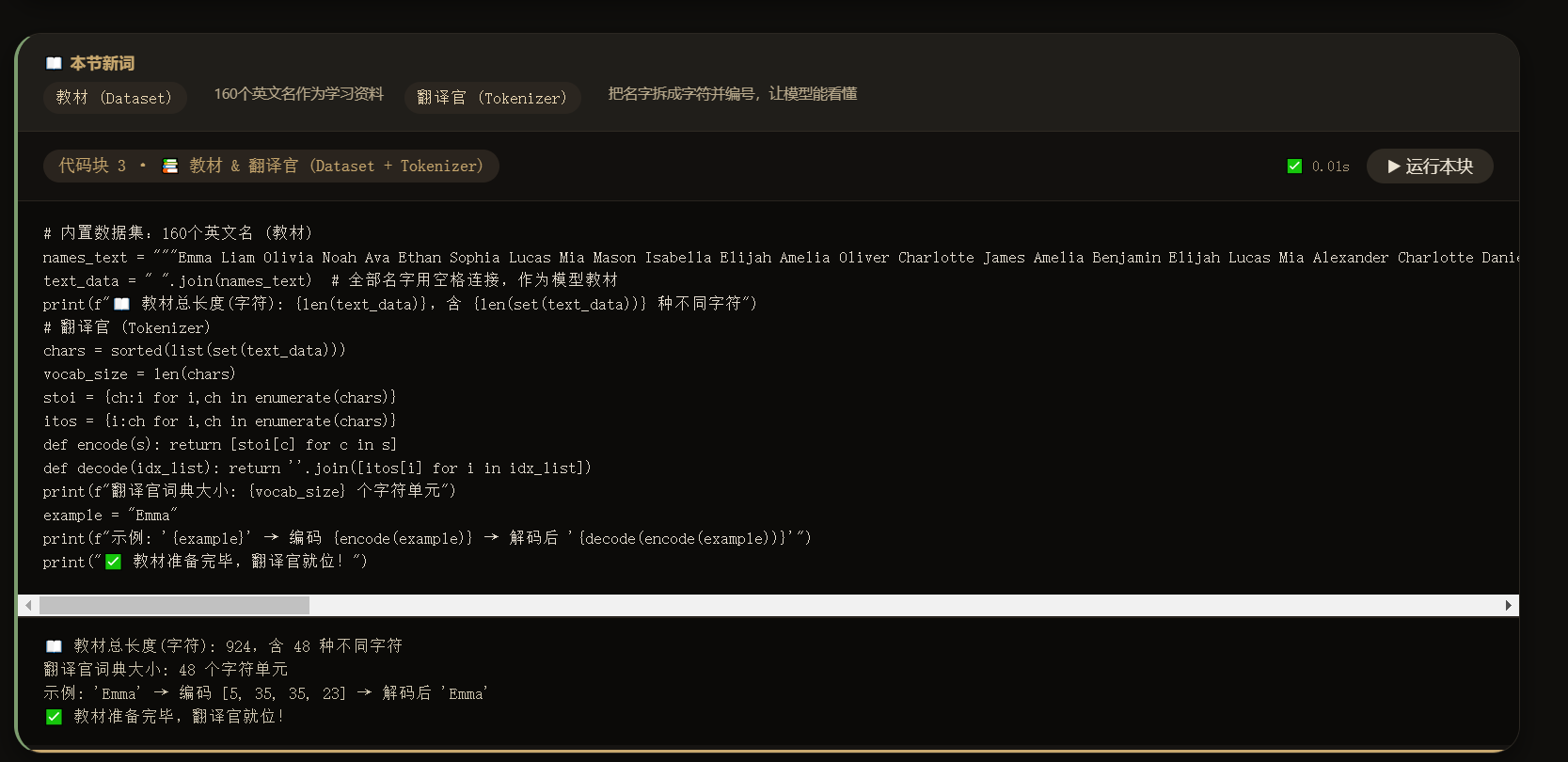
还不错,让我了解到了大模型的步骤。
代码逐行解析:
MicroGPT做了这几件事:
-
它是一个"解剖课":视频通过一个独立的、可读的代码文件,展示了语言模型最核心的算法。就像字幕里引用的作者的话:"这个文件就是完整的算法,其他的一切都只是为了效率"。它剔除了所有复杂的工程优化,只保留最本质的逻辑。
-
它展示了模型是如何学习的:
-
数据 :用一个小小的名字列表(names.txt)作为训练数据,因为这些名字有清晰的模式,是完美的学习材料。
-
核心引擎 :实现了反向传播(就像学生复盘错题,找到错误根源),这是模型从错误中学习的机制。
-
大脑结构 :采用了现代GPT的基础架构------Transformer ,并重点解释了其中的核心注意力机制(模型如何关注到输入中最重要的部分)。
-
-
它演示了完整的训练和创造过程:
-
训练:通过"前向传播(猜)→ 计算损失(看错多少)→ 反向传播(找责任)→ 更新权重(微调)"这个四步循环,让模型反复学习。
-
生成 :训练完成后,模型能自己"幻觉"出全新的、从未在训练数据中出现过但看起来很真实的名字 (如
alien、alerra)。这证明了它掌握了名字的内在规律,而不是死记硬背。
-
Transformer 架构的极简实现 --- 包含核心组件:
-
Tokenization(标记化):将字符转换为数字
-
自动求导引擎:通过反向传播实现学习
-
注意力机制:让模型学会关注重要的上下文信息
-
训练循环:前向传播 → 计算损失 → 反向传播 → 更新参数
microgptjs
- 地址 :
https://github.com/assassindesign/microgptjs - 特点: 这是一个使用 Node.js 和 ES5 语法实现的版本。由于 JavaScript 是浏览器的原生语言,您可以很容易地将其嵌入到 HTML 页面中,或者直接在支持 Node.js 的在线编辑器(如 Replit, CodeSandbox)甚至某些浏览器的控制台环境中运行。