文章目录
- 前言
- MyBatis基础操作
- MyBatis的xml配置规范
- 多表查询
- [#{ } 和 { }](#{ } 和 { })
- 数据库连接池
- 动态SQL操作
-
- \<if>标签
- \<trim>标签
- \<where>标签
- \<set>标签
- \<foreach>标签
- [\<sql>和\<include> 标签](#<sql>和<include> 标签)
前言
MyBatis是⼀款优秀的 持久层(Dao层) 框架,用于简化JDBC的开发
下面是一个实现 Mybatis 的例子,首先需要在 yml / properties 文件中配置数据库相关参数。
xml
# 数据库连接配置
spring:
  datasource:
    url: jdbc:mysql://127.0.0.1:3306/mybatis_test?characterEncoding=utf8&useSSL=false
    username: root
    password: root
    driver-class-name: com.mysql.cj.jdbc.Driver
在项目中, 创建持久层接口UserInfoMapper
java
@Mapper
public interface UserInfoMapper {
 //查询所有⽤⼾
 @Select("select * from userinfo")
 public List<UserInfo> queryAllUser();
}
可以在已经创建好的测试类下可进行测试(在src下的test目录下),或者可以使⽤Idea⾃动生成测试类(在Mapper中右键Generate Test),@SpringBootTest 注解加载 Spring 运行环境,测试结果打印表中的所有数据
java
@SpringBootTest
class DemoApplicationTests {

	@Autowired
	private UserInfoMapper userInfoMapper;

	@Test
	void contextLoads() {
		List<UserInfo> userInfoList = userInfoMapper.queryAllUser();
		System.out.println(userInfoList);
	}
}
Mybatis的持久层接⼝规范⼀般都叫 XxxMapper,@Mapper注解表示是 Mybatis 中的 Mapper 接口,程序运行时,框架会自动⽣成接口的实现类对象(代理对象),并给交 Spring 的 IOC 容器管理,@Select注解代表的就是 select 查询,也就是注解对应方法的具体实现内容。
MyBatis基础操作
打印日志
在配置文件中配置下面的信息,
xml
mybatis:
  configuration: # 配置打印 MyBatis⽇志
  log-impl: org.apache.ibatis.logging.stdout.StdOutImpl
java
@Slf4j
@SpringBootTest
class UserInfoMapperTest {

	@Autowired
	private UserInfoMapper userInfoMapper;

	@Test
	void queryAllUser() {
		log.info(userInfoMapper.queryAllUser().toString())
	}
}
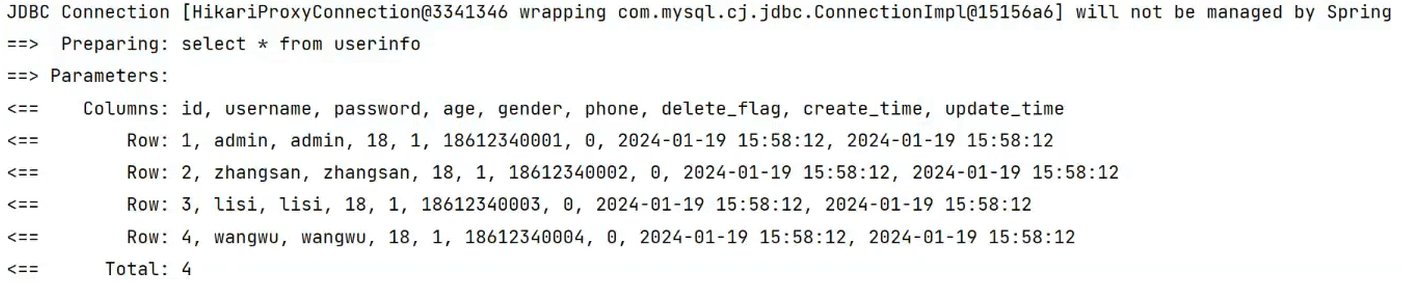
日志中显示查询语句,传递的参数及类型、SQL的执行结果
参数传递
使用 #{ } 的方式获取方法中的参数,当mapper接口方法形参只有⼀个普通类型的参数,#{...} 里的属性名可以随便写,但是建议和参数名保持⼀致
java
@Mapper
public interface UserInfoMapper {
 //通过id查询用户
 @Select("select * from userinfo where id = #{id}")
 public List<UserInfo> queryById(Integer userId);
}
java
@Test
void queryById() {
	UserInfo userInfo = userInfoMapper.queryById(4);
	System.out.println(userInfo);
}
当参数是两个及以上时,若SQL 占位符与参数名称不匹配,此时 MyBatis 默认按参数名匹配,按位生成userId、deleteFlag、param1、param2。此时无法找到 id 对应的值 。
java
@Mapper
public interface UserInfoMapper {
 @Select("select * from userinfo where id = #{id} and delete_flag = #{deleteFlag}")
 public List<UserInfo> queryByIdanddf(Integer userId, Integer deleteFlag);
}
param1、param2是给参数起的默认的名,对应的就是userId、deleteFlag。也可以通过param1、param2来进行传参,此时代码运行成功。
java
@Mapper
public interface UserInfoMapper {
 @Select("select * from userinfo where id = #{param1} and delete_flag = #{deleteFlag}")
 public List<UserInfo> queryByIdanddf(Integer userId, Integer deleteFlag);
}
也可以通过 @Param,设置参数的别名,如果使用 @Param 设置别名,#{...} 里的属性名必须和@Param 设置的⼀样,此时把 userId 参数绑定给了 id,此时不能使用 #{ userid }。
java
@Mapper
public interface UserInfoMapper {
 @Select("select * from userinfo where id = #{id} and delete_flag = #{deleteFlag}")
 public List<UserInfo> queryByParam(@Param("id")Integer userId, Integer deleteFlag);
}
参数传递时,默认使用的是方法中的参数名称,如果使用@Param进行了重命名,则使用重命名后的名字,总之必须保持前后对应
新增(Insert)
可以使用对象来进行参数传递,从而进行更新,此时直接使用属性名进行传递即可
java
@Insert("insert into userinfo (username, password, age, gender, phone) values (#{username},#{password},#{age},#{gender},#{phone})")
Integer insert(UserInfo userInfo);
如果设置了 @Param 属性,#{...}中就需要用 "参数.属性" 的方式来获取
java
@Insert("insert into userinfo (username, password, age, gender, phone) values (#{userInfo.username},#{userInfo.password},#{userInfo.age},#{userInfo.gender},#{userInfo.phone})")
Integer insert(@Param("userInfo")UserInfo userInfo);
Insert 语句默认返回的是受影响的行数,可以在Mapper接口的方法上添加⼀个Options的注解
- useGeneratedKeys 会令 MyBatis 使用 JDBC 的getGeneratedKeys 方法来取出由数据库内部生成的主键
- keyProperty 指定能够唯⼀识别对象的属性,此时插入自增的这个id会赋值到 keyProperty 指定的属性
java
@Options(useGeneratedKeys = true, keyProperty = "id")
@Insert("insert into userinfo (username, password, age, gender, phone) values (#{userInfo.username},#{userInfo.password},#{userInfo.age},#{userInfo.gender},#{userInfo.phone})")
Integer insert(@Param("userInfo")UserInfo userInfo);
此时会输出添加到数据库中的对应数据的 id 值
java
Integer count = userInfoMapper.insert(userInfo);
System.out.println("添加数据条数:" +count +", 数据ID:" + userInfo.getId());
删除(Delete)
java
@Delete("delete from userinfo where id = #{id}")
void delete(Integer id);
修改(Update)
java
@Update("update userinfo set username=#{username} where id=#{id}")
void update(UserInfo userInfo);
查询(Select)
java
@Select("select * from userinfo where id = #{id}")
public List<UserInfo> queryById(Integer userId);
查询中的赋值映射
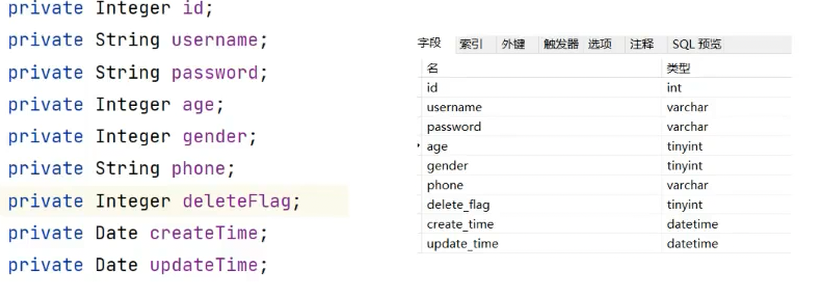
在使用MyBatis进行查询的时候,只有Java对象属性和数据库字段⼀模⼀样时, 才会进行赋值。
如下所示,当自动映射查询结果时,MyBatis 会获取结果中返回的列名并在 Java 类中查找相同名字的属性,此时deletFlag、creatTime、updateTime与数据库字段不一致,则不会进行赋值。
对于不一样的字段,可以通过以下方式进行对应赋值
- 改别名
java
@Select("select id, username, password, age, gender, phone, delete_flag as " +
"deleteFlag,create_time as createTime, update_time as updateTime from user_info")
public List<UserInfo> queryAllUser();- 通过@Results注解:column对应数据库中的字段;property对应Java中的属性。
java
@Results({
	@Result(column = "delete_flag",property = "deleteFlag"),
	@Result(column = "create_time",property = "createTime"),
	@Result(column = "update_time",property = "updateTime")
})
@Select("select id, username, `password`, age, gender, phone, delete_flag, create_time, update_time from user_info")
List<UserInfo> queryAllUser();
可以给@Results定义⼀个名称,后续可以通过@ResultMap进行复用
java
@Results(id = "Baseresult",value = {
	@Result(column = "delete_flag",property = "deleteFlag"),
	@Result(column = "create_time",property = "createTime"),
	@Result(column = "update_time",property = "updateTime")
})
@Select("select id, username, password, age, gender, phone, delete_flag, create_time, update_time from userinfo")
List<UserInfo> queryAllUser();

@ResultMap(value = "Baseresult")
@Select("select id, username, password, age, gender, phone, delete_flag, create_time, update_time from userinfo where id= #{userid}")
UserInfo queryById(@Param("userid") Integer id);- 自动驼峰转换
驼峰命名规则为 abc_xyz => abcXyz,因此对于数据库表中的字段名 abc_xyz ,对应类中属性名abcXyz。此时的Java 代码不做任何处理。
可在 yml 文件中进行配置
xml
mybatis:
 configuration:
 map-underscore-to-camel-case: true #配置驼峰⾃动转换
MyBatis的xml配置规范
对于同一个方法来说,Mybatis的实现方式有两种:通过注解和通过xml的方式实现。对于同一个接口来说,其中的方法可以任选一种进行实现
基础实现流程
可以通过以下步骤实现
(1)在数据持久层添加 mapper 接口
java
import com.example.demo.model.UserInfo;
import org.apache.ibatis.annotations.Mapper;
import java.util.List;

@Mapper
public interface UserInfoXMlMapper {
	List<UserInfo> queryAllUser();
}
(2)添加 UserInfoXMLMapper.xml,MyBatis 的固定 xml 格式如下,在namespace中声明实现的是哪一个接口
xml
<?xml version="1.0" encoding="UTF-8"?>
<!DOCTYPE mapper PUBLIC "-//mybatis.org//DTD Mapper 3.0//EN" "http://mybatis.org/dtd/mybatis-3-mapper.dtd">
<mapper namespace="com.example.demo.mapper.UserInfoMapper">

</mapper>
(3)配置 mybatis xml 的文件路径,本例在 resources/mapper 文件夹下创建所有表的 xml 文件,因此在 yml 文件中配置如下,classpath表示当前的资源目录(即resources),mapper 表示在mapper文件夹下,**Mapper.xml 表示以 Mapper.xml 作为结束的文件
xml
mybatis:
  mapper-locations: classpath:mapper/**Mapper.xml
(4)查询用户具体的实现,其中<select> 表示查询标签, id 中填写对应Interface (接口)中定义的方法名称,需要保持一致,表示对接空的具体实现\,resultType 表示返回的结果类型(路径写全)
xml
<?xml version="1.0" encoding="UTF-8"?>
<!DOCTYPE mapper PUBLIC "-//mybatis.org//DTD Mapper 3.0//EN" "http://mybatis.org/dtd/mybatis-3-mapper.dtd">
<mapper namespace="com.example.demo.mapper.UserInfoXMlMapper">
	<select id="queryAllUser" resultType="com.example.demo.model.UserInfo">
		select username,`password`, age, gender, phone from userinfo
	</select>
</mapper>
(5)进行单元测试
java
@SpringBootTest
class UserInfoMapperTest {
	@Autowired
	private UserInfoMapper userInfoMapper;

	@Test
	void queryAllUser() {
		List<UserInfo> userInfoList = userInfoMapper.queryAllUser();
		System.out.println(userInfoList);
	}
}
新增(Insert)
xml
<insert id="insertUser">
	insert into userinfo (username, password, age, gender, phone) values
	(#{username}, #{password}, #{age},#{gender},#{phone})
</insert>
删除(Delete)
xml
<delete id="deleteUser">
	delete from user_info where id = #{id}
</delete>
修改(Update)
xml
<update id="updateUser">
	update user_info set username=#{username} where id=#{id}
</update>
查询(Select)
xml
<select id="queryAllUser" resultType="com.example.demo.model.UserInfo">
	select id, username,password, age, gender, phone,
	delete_flag, create_time, update_time from user_info
</select>
查询中的赋值映射
和在使用注解实现 MyBatis 时遇到的问题一样,参数名和字段名不一致,查询返回为 null ,其解决方案和注解类似
- 起别名
- 结果映射
- 开启驼峰命名
其中1,3的解决办法和注解⼀样,对于结果映射来说使用<resultMap>来进行实现,其中<id>表示主键。需要注意<select>中的resultMap属性需要修改为 BaseMap
xml
<resultMap id="BaseMap" type="com.example.demo.model.UserInfo">
	<id column="id" property="id"></id>
	<result column="delete_flag" property="deleteFlag"></result>
	<result column="create_time" property="createTime"></result>
	<result column="update_time" property="updateTime"></result>
</resultMap>

<select id="queryAllUser" resultMap="BaseMap">
select id, username,`password`, age, gender, phone, delete_flag,
create_time, update_time from user_info
</select>
多表查询
需要补充实体类中的相关信息
java
@Data
public class ArticleInfo {
	private Integer id;
	private String title;
	private String content;
	private Integer uid;
	private Integer deleteFlag;
	private Date createTime;
	private Date updateTime;
	//⽤⼾相关信息
	private String username;
	private Integer age;
	private Integer gender;
}
多表查询的接口定义如下,
java
@Mapper
public interface ArticleInfoMapper {
	@Select("SELECT ta.id,ta.title,ta.content,ta.uid,tb.username,tb.age,tb.gender "+
	"FROM articleinfo ta LEFT JOIN user_info tb ON ta.uid = tb.id " +
	"WHERE ta.id = #{id}")
	ArticleInfo queryUserByUid(Integer id);
}
#{ } 和 ${ }
MyBatis 参数赋值有两种方式,包括使用 #{ } 和 ${ }。
对于 Interger 类型的参数
java
@Select("select * from user_info where id= #{id}")
UserInfo queryById1(Integer id);

@Select("select * from user_info where id= ${id}")
UserInfo queryById2(Integer id);
打印得到的日志如下,可以发现,使用 #{ } 进行参数传递时,存在占位符 " ?" ,此时为预编译SQL语句;使用 ${ } 进行参数传递时,直接进行了拼接,此时为即时SLQ语句。


对于 String类型的参数
java
@Select("select * from user_info where username= #{name} ")
UserInfo queryByName1(String name);

@Select("select * from user_info where username= ${name} ")
UserInfo queryByName2(String name);
此时${ } 进行参数传递时出现了错误,此时参数直接进行拼接,正确的SQL应为select * from userInfo where username = 'admin'


更改代码后,运行成功
java
@Select("select * from user_info where username= '${name}' ")
UserInfo queryByName2(String name);
- #{} 使⽤的是预编译SQL,通过 ? 占位的方式,提前对SQL进行编译,然后把参数填充到SQL语句中,#{} 会根据参数类型,自动拼接引号 ''
- ${} 会直接进行字符替换,⼀起对SQL进行编译,如果参数为字符串,需要加上引号 '' .
SQL注入
SQL注入是通过操作输入的数据来修改事先定义好的SQL语句,以达到执行代码对服务器进行攻击的方法。
例如一个正常的SQL语句,
sql
SELECT * FROM users WHERE username = 'user1' AND password = 'password1';如果用户输入user1 为 admin' --,password1 为 anything,此时的SQL语句如下,-- 会把后面的校验注释掉,直接进行登录。
sql
SELECT * FROM users WHERE username = 'admin' --' AND password = 'anything';又例如用户输入 user1 为 admin' OR '1'='1,password1 为 anything,此时的SQL语句如下,由于 '1'='1' 为 true,此时也会绕过验证。
sql
SELECT * FROM users WHERE username = 'admin' OR '1'='1' AND password = 'anything';排序功能
使用#{ }进行排序时,结果会出现报错
java
@Select("select * from user_info order by id #{sort} ")
List<UserInfo> queryAllUserBySort(String sort);
此时的SQL语句如下所示,排序规则字段 desc 不需要加引号,此时使用${ }则更为合适。
sql
select * from user_info order by id 'desc'
但是${ }存在注入风险,此时可以选择不接受用户输入的参数,参数由后台来进行处理,以上面为例对参数进行校验,仅接收 desc 或 asc 。
like查询
like 使用 #{} 报错
java
@Select("select * from user_info where username like %#{key}%")
List<UserInfo> queryAllUserByLike(String key);
此时的 SQL 语句为
sql
select * from user_info where username like %'admin'%
可以使用字符串拼接语句concat来进行处理
java
@Select("select * from user_info where username like concat('%',#{key},'%')")
List<UserInfo> queryAllUserByLike(String key);
或修改为${ }后查询正确
java
@Select("select * from user_info where username like '%${key}%'")
List<UserInfo> queryAllUserByLike(String key);
#{ } 和 ${ } 的区别
-
#{ }执行预编译SQL,{} 执行即时SQL,#{ }的性能比{ }优:#{ }执行的是预编译SQL,编译⼀次之后会将编译后的SQL语句缓存起来;${ }执行的是即时SLQ,需要每次进行编译。大多数情况下, 某⼀条 SQL 语句可能会被反复调用执行,因此使用#{ }的效率会更高
-
#{ }根据参数类型自动加引号,{} 直接进行字符串拼接,可能产生SQL注入问题,#{ }比{ }更安全:#{ }通过 ? 占位的方式提前对SQL进行编译,#{} 会根据参数类型,自动拼接引号;${ }则会直接进行字符替换。
-
默写特殊情况下使用更为方便,例如排序或者模糊查询时:替换参数对于一些表名、字段名,不需要加引号的,使用${ }更为合适(例如排序功能的desc 或 asc)
数据库连接池
Mybatis 使用到了数据库连接池,数据库连接池负责分配、管理和释放数据库连接,它允许应⽤程序重复使同⼀个现有的数据库连接,而不是再重新建立一个。
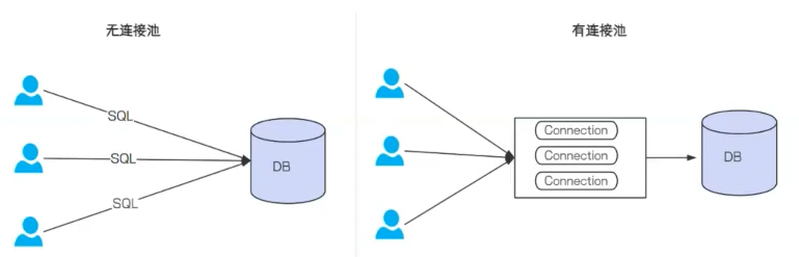
没有使用连接池时,每次执行SQL语句,要先创建⼀个新的连接对象, 然后执行SQL语句,执行完再关闭连接对象释放资源;使用数据库连接池后,程序启动后会在数据库连接池中创建⼀定数量的Connection对象, 当请求时会从池中获取Connection对象,然后执行SQL,执行完再把Connection归还给连接池。
动态SQL操作
对于用户注册的情况,例如注册姓名、性别、年龄等数据,其中性别为非必填字段,即传入的数据为null,但此时数据库默认的gender字段设置为默认值为0,但是直接传入的时候会将该字段设置为null,此时就需要根据gender的输入做出动态的拼接操作
<if>标签
test 中写判断添加,其中的 gender,是传入对象中的属性,不是数据库字段
xml
<insert id="insertUserByCondition">
insert into userinfo (username,password,age,
	<if test="gender != null">
	gender,
	</if>
	phone)
	values(#{username},#{password},#{age},
	<if test="gender != null">
	#{gender},
	</if>
	#{phone})
</insert>
对于所有字段都是非必填的情况来说,有下面的代码,但是如果传入的字段为username = admin ,password = 123,其余为空,此时的 SQL 语句会出现错误:insert into userinfo ( username,password ,) values ( admin,123,)。逗号更改在字段前面也会出现同样的错误
xml
<insert id="insertUserByCondition">
insert into userinfo (
	<if test="username != null">username,</if>
	<if test="password!= null">password,</if>
	<if test="age!= null">age,</if>
	<if test="gender != null">gender,</if>
	<if test="phone!= null">phone</if>)
	values(
	<if test="username!= null">#{username},</if>
	<if test="password!= null">#{password},</if>
	<if test="age!= null">#{age},</if>
	<if test="gender!= null">#{gender},</if>
	<if test="phone!= null">#{phone}</if>
</insert>
<trim>标签
对于多个字段,⼀般考虑使用标签结合标签,对多个字段都采取动态生成的方式,<trim>有以下几个属性
- prefix:表示整个语句块,以prefix的值作为前缀
- suffix:表示整个语句块,以suffix的值作为后缀
- prefixOverrides:表示整个语句块要去除掉的前缀
- suffixOverrides:表示整个语句块要去除掉的后缀
此时代码如下所示,会去掉最后的逗号,同时给前后添加括号
xml
<insert id="insertUserByCondition">
insert into userinfo
	<trim prefix="(" suffix=")" suffixOverrides=",">
		<if test="username != null">username,</if>
		<if test="password!= null">password,</if>
		<if test="age!= null">age,</if>
		<if test="gender != null">gender,</if>
		<if test="phone!= null">phone</if>
	</trim>
	values
	<trim prefix="(" suffix=")" suffixOverrides=",">
		<if test="username!= null">#{username},</if>
		<if test="password!= null">#{password},</if>
		<if test="age!= null">#{age},</if>
		<if test="gender!= null">#{gender},</if>
		<if test="phone!= null">#{phone}</if>
	</trim>
</insert>
<where>标签
对于多个条件查询情况,例如查询年龄为20、性别为男的所有用户,或仅查询年龄为20的用户,其中也需要用到字符串拼接操作
xml
<select id="queryByCondition" resultType="com.example.demo.model.UserInfo">
select id, username, age, gender, phone, delete_flag, create_time, update_time from userinfo where
	<if test="age!= null">
	age = #{age}
	</if>
	<if test="gender!= null">
	and gender = #{gender}
	</if>
</select>
此时若输入 age = null,gender = " 男 ",此时的SQL语句为 select * from userinfo where and gender = " 男 "出现错误。此时可以使用 <where>标签如下所示,此时<where>会自动把 and 删掉。
xml
<select id="queryByCondition" resultType="com.example.demo.model.UserInfo">
select * from userinfo
	<where>
		<if test="age!= null">
		age = #{age}
		</if>
		<if test="gender!= null">
		and gender = #{gender}
		</if>
	</where>
</select>
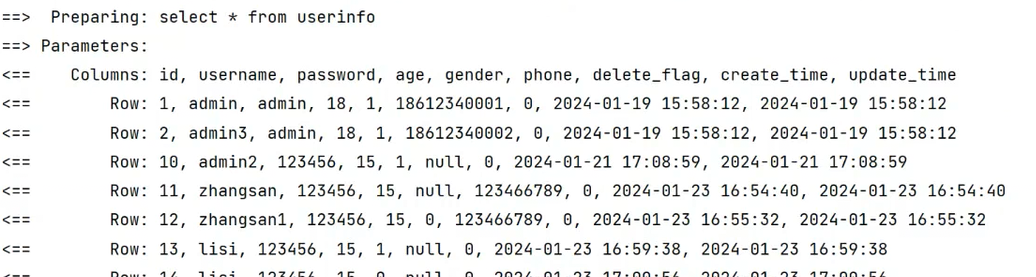
若输入 age = null,gender = null,<where>标签会自动删除where,此时的SQL语句为select * from userinfo
<set>标签
<set>标签与 <trim>标签类似,;<set>标签用于去除更新操作中最后多余的逗号。
xml
<update id="updateUserByCondition">
	update userinfo
	<set>
		<if test="username != null">username = #{username},</if>
		<if test="age != null">age = #{age},</if>
		<if test="deleteFlag != null">	delete_flag = #{deleteFlag},</if>
	</set>
	where id = #{id}
</update>
<foreach>标签
对集合进行遍历时可以使⽤该标签, <foreach>标签有以下属性,
- collection:绑定方法参数中的集合,如 List,Set,Map或数组对象
- item:遍历时的每⼀个对象
- open:语句块开头的字符串
- close:语句块结束的字符串
- separator:每次遍历之间间隔的字符串
例如下面的批量删除操作
xml
<delete id="deleteByIds">
	delete from userinfo where id in
	<foreach collection="ids" item="id" separator="," open="(" close=")">
	#{id}
	</foreach>
</delete>
测试用例的输入如下所示,
java
void deleteByIds(List<Integer> ids);
java
void deleteByIds(){
	userInfoMapper.deleteByIds(Arrays.asList(14,15,16,17));
}
<sql>和<include> 标签
- <sql> :定义可重用的SQL片段
- <include> :通过属性refid,指定包含的SQL片段
xml
<sql id="allColumn">
	id, username, age, gender, phone, delete_flag, create_time, update_time
</sql>
通过 <include> 标签在原来抽取的地方进行引用
xml
<select id="queryAllUser" resultMap="BaseMap">
	select
	<include refid="allColumn"></include>
	from userinfo
</select>

<select id="queryById" resultType="com.example.demo.model.UserInfo">
	select
	<include refid="allColumn"></include>
	from userinfo where id= #{id}
</select>