话不多说,先上 GitHub 文档地址:https://microsoft.github.io/graphrag/get_started/,本次在 Linux 环境下进行一次安装测试,环境说明:
bash
# 系统
NAME="openEuler"
VERSION="22.03 (LTS-SP3)"

# conda版本
conda 23.7.2
服务器上没有 GPU 导致创建索引的时候不是超时就是报错,配置信息反复修改多次才创建成功。
Linux环境安装部署GraphRAG
- 1.环境搭建
-
- [1.1 创建虚拟环境](#1.1 创建虚拟环境)
- [1.2 安装](#1.2 安装)
- [1.3 初始化](#1.3 初始化)
- [1.4 下载样本文件](#1.4 下载样本文件)
- [1.5 设置工作区变量](#1.5 设置工作区变量)
- [1.5 创建索引](#1.5 创建索引)
- 2.测试
- 3.总结
1.环境搭建
1.1 创建虚拟环境
官网的步骤是:create a project space and python virtual environment to install graphrag.
bash
# 1.Create Project Space
mkdir graphrag_quickstart
cd graphrag_quickstart
python -m venv .venv

# 2.Activate Python Virtual Environment - Unix/MacOS
source .venv/bin/activate

# 3.Activate Python Virtual Environment - Windows
.venv\Scripts\activate
我使用的是 Anaconda,Anaconda 的安装操作这里不再赘述,部署文件提示 GraphRAG requires Python 3.10 - 3.12 。本次使用之前创建的虚拟环境 AutoGenStudio。
bash
# 创建虚拟环境
conda create -n AutoGenStudio python=3.10
1.2 安装
bash
python -m pip install graphrag

# 安装成功的版本
autograd                  1.8.0                    pypi_0    pypi
1.3 初始化
bash
graphrag init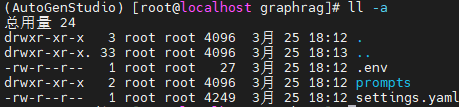
官网的说明信息已经过时了:
This will create two files,
.envandsettings.yaml, and a directoryinput, in the current directory.
inputLocation of text files to process withgraphrag..envcontains the environment variables required to run the GraphRAG pipeline. If you inspect the file, you'll see a single environment variable defined,GRAPHRAG_API_KEY=<API_KEY>. Replace<API_KEY>with your own OpenAI or Azure API key.settings.yamlcontains the settings for the pipeline. You can modify this file to change the settings for the pipeline.
1.4 下载样本文件
bash
# 创建目录
mkdir input

# 下载样本文件
curl https://www.gutenberg.org/cache/epub/24022/pg24022.txt -o ./input/book.txt样本文件是纯英文的,为测试中文又上传了一本《塔木德》tamude.txt(1.75MB),但是初始化 Graph 数据太慢了,最终使用了一个文件里边只有一句话 张三是小学语文老师,他的哥哥张三丰是中学数学老师,他们都在郑州。。
1.5 设置工作区变量
修改配置文件 settings.yaml里的模型相关信息,原始配置如下:
bash
# 模型配置
models:
  default_chat_model:
    type: chat
    model_provider: openai
    auth_type: api_key # or azure_managed_identity
    api_key: ${GRAPHRAG_API_KEY} # set this in the generated .env file, or remove if managed identity
    model: gpt-4-turbo-preview
    # api_base: https://<instance>.openai.azure.com
    # api_version: 2024-05-01-preview
    model_supports_json: true # recommended if this is available for your model.
    concurrent_requests: 25
    async_mode: threaded # or asyncio
    retry_strategy: exponential_backoff
    max_retries: 10
    tokens_per_minute: null
    requests_per_minute: null
  default_embedding_model:
    type: embedding
    model_provider: openai
    auth_type: api_key
    api_key: ${GRAPHRAG_API_KEY}
    model: text-embedding-3-small
    # api_base: https://<instance>.openai.azure.com
    # api_version: 2024-05-01-preview
    concurrent_requests: 25
    async_mode: threaded # or asyncio
    retry_strategy: exponential_backoff
    max_retries: 10
    tokens_per_minute: null
    requests_per_minute: null

# 文本分块
chunks:
  size: 1200
  overlap: 100
  group_by_columns: [id]

# 图相关配置
extract_graph:
  model_id: default_chat_model
  prompt: "prompts/extract_graph.txt"
  entity_types: [organization,person,geo,event]
  max_gleanings: 1
extract_graph_nlp:
  text_analyzer:
    extractor_type: regex_english # [regex_english, syntactic_parser, cfg]
  async_mode: threaded # or asyncio
配置使用 Ollama 部署的两个本地模型,本地测试根据 GPU 情况尽量选择小一点儿的模型:
bash
NAME                                  ID              SIZE      MODIFIED
nomic-embed-text:latest               0a109f422b47    274 MB    9 months ago
qwen2.5:0.5b                          a8b0c5157701    397 MB    12 months ago

# 确认本地Ollama服务可用
curl http://localhost:11434/api/tags
修改配置为:
bash
# 模型配置【本地模型参数配置要低一些】
models:
  default_chat_model:
    type: chat
    model_provider: ollama
    auth_type: api_key
    api_key: dummy_key
    model: qwen2.5:0.5b
    api_base: http://localhost:11434
    model_supports_json: true
    concurrent_requests: 1
    async_mode: threaded
    retry_strategy: exponential_backoff
    max_retries: 1
    request_timeout: 1800
    tokens_per_minute: null
    requests_per_minute: null
  default_embedding_model:
    type: embedding
    model_provider: ollama
    auth_type: api_key
    api_key: dummy_key
    model: nomic-embed-text:latest
    api_base: http://localhost:11434
    concurrent_requests: 1
    request_timeout: 1800
    async_mode: threaded
    retry_strategy: exponential_backoff
    max_retries: 1
    tokens_per_minute: null
    requests_per_minute: null

# 文本分块【本地测试的时候尽量小】
chunks:
  size: 64
  overlap: 8
  group_by_columns: [id]

# 抽取实体
extract_graph:
  extractor_type: nlp
extract_graph_nlp:
  text_analyzer:
    extractor_type: regex_english
  async_mode: asyncio
1.5 创建索引
bash
graphrag index创建索引的过程中会有日志信息输出 logs/indexing-engine.log 以下报错的原因是配置信息api_base: http://localhost:11434/v1是错误的,不能带 /v1。
bash
ERROR - graphrag.language_model.providers.litellm.services.retry.exponential_retry - ExponentialRetry: Request failed, retrying, retries=1, delay=2.0, max_retries=10, exception=litell
m.APIConnectionError: OllamaException - 404 page not found
Traceback (most recent call last):
...
httpx.HTTPStatusError: Client error '404 Not Found' for url 'http://localhost:11434/v1/api/generate'
For more information check: https://developer.mozilla.org/en-US/docs/Web/HTTP/Status/404
创建索引完成:
bash
graphrag.cli.index - All workflows completed successfully.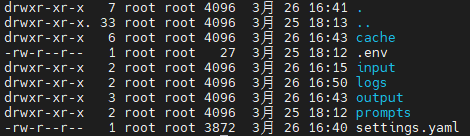
2.测试
测试的文件内容是 张三是小学语文老师,他的哥哥张三丰是中学数学老师,他们都在郑州。
- 全局查询
bash
# 问题1
graphrag query -m global -q "郑州有几个老师?"

# 输出结果
对不起,我无法回答这个问题。根据提供的信息,我们只知道有两个老师在郑州工作,但没有提供具体的数量或详细的信息。如果您有其他关于郑州教师的疑问,请告诉我,我会尽力帮助您解答。

# 问题2
graphrag query -m global -q "郑州的这两个老师什么关系?"

# 输出结果
### Response:
这两个老师是同一家公司的同事,共同工作在同一个城市。他们都是小学语文教师,从事相同的职业和地点。他们都是在中国的学校里教书的老师,拥有相同的地理位置。他们都是中国的小学语文教师,具有相似的专业背景。
---
### Analyst Reports (Descending Order of Importance)
#### Analyst 1
**Importance Score: 100**
这两个老师是同一家公司的同事,共同工作在同一个城市。
**Importance Score: 85**
他们都是小学语文教师,从事相同的职业和地点。
**Importance Score: 75**
他们都是在中国的学校里教书的老师,拥有相同的地理位置。
**Importance Score: 60**
他们都是中国的小学语文教师,具有相似的专业背景。
---
### Explanation
根据分析师报告的内容,我们可以得出以下结论:
1. **同事关系**:这两个老师是同一家公司的同事,共同工作在同一个城市。
2. **职业和地点**:他们都是小学语文教师,从事相同的职业和地点。这意味着他们在同一所学校或教育机构中工作。
3. **地理位置**:他们都是在中国的学校里教书的老师,拥有相同的地理位置。这表明他们的工作地点是相同的。
4. **专业背景**:他们都是中国的小学语文教师,具有相似的专业背景。
这些信息共同说明了这两个老师之间的关系和他们在教育领域的相同之处。通过分析,我们可以得出结论,这两个老师在职业、地点和专业领域上都是一致的,因此他们是同事关系。- 本地查询
bash
# 问题1
graphrag query -m local -q "郑州有几个老师?"

# 输出结果
根据提供的数据,郑州市目前没有具体的教师数量信息。但是我们可以从其他相关数据中推断出一些可能的情况。
首先,我们查看了"Entities"表中的记录,发现有两所学校的信息:一个是"ZHANG SONG FENG",另一个是"ZHANG SONG"。这两个实体分别对应的是"张三丰"和"张三"的描述。这表明可能存在多个老师在郑州工作,但具体数量无法从现有数据中得知。
此外,"Relationships"表中的记录显示了两对教师之间的关系:一对是"ZHANG SONG FENG"和"ZHANG SONG",另一对是"ZHANG SONG FENG"和"张三"。这些信息表明可能存在多个老师在郑州工作,但具体数量也无法从现有数据中得知。
综上所述,根据提供的数据,郑州市目前没有具体的教师数量信息。但是,我们可以推测可能有多个老师在郑州工作,但由于缺乏确切的数字,我们无法给出一个准确的答案。

# 问题2
graphrag query -m local -q "郑州的这两个老师什么关系?"

# 输出结果
在提供的数据中,我们无法直接找到关于"郑州的两个老师"之间具体关系的信息。然而,我们可以从其他相关数据中推断出一些可能的关系。
根据"Entities"表中的信息,"ZHANG SONG FENG"和"ZHANG SONG"都是描述为"小学语文老师"的人。这表明这两个老师都从事教育工作,并且他们都在同一个城市(郑州)工作。因此,我们可以推测:
- **Zhao Song Feng 和 Zhao Song 是同一个人**:因为他们的职业是相同的(小学语文教师),并且他们都位于同一个城市(郑州)。这种职业和地理位置上的重合可能意味着他们是同一人。
- **Zhao Song Feng 和 Zhao Song 有共同的教育背景**:他们都是在同一个城市工作的语文老师,这表明他们在教育领域有着相似的经历或知识基础。
综上所述,"郑州的这两个老师"可能是同一个人,即"Zhao Song Feng"。他们的职业和地理位置上的重合可能意味着他们是同一人。
3.总结
- 官网的部署流程并非最新的
- 没有 GPU 的服务器初始化及问答的效果都不好
- 其他原因(模型小、知识图谱索引质量低、文本质量差)