跳过安装好python及环境
安装:
pip install pytest
安装检查:
pytest --version
出现版本号就成功了。
pytest 命名规则(必须记住)
pytest 自动识别哪些是测试用例,规则非常简单:
- 文件名必须以 test_ 开头 或 _test.py 结尾
- 函数名必须以 test_ 开头
- 类名以 Test 开头
- 类里面方法以 test_ 开头
不符合 → 不执行。
多线程启动插件安装:
pip install pytest-xdist
运行
pytest -n auto
生成报告安装插件:
pip install pytest-html
运行:
pytest --html=report.html
打开 report.html 即可看到可视化报告。
还有以下常用插件:
pip install pytest-rerunfailures  # 失败重跑 pytest --reruns 2  # 失败自动重试2次
pip install pytest-cov         # 覆盖率报告 pytest --cov=./ --cov-report=html
启动常用命令:
pytest                  # 运行所有用例
pytest -v               # 详细输出
pytest -s               # 显示 print 内容
pytest test_demo.py     # 只运行这个文件
pytest -k "add"         # 只运行名字含 add 的用例
pytest --tb=short       # 简化报错信息
pytest --lf             # 只跑上次失败的用例
pytest --ff             # 先跑失败的,再跑成功的

# 只运行某个文件
pytest test_login.py -v


# 运行失败时暂停
pytest -x

# 生成测试报告
pytest --html=report.html
常用判断:
# 1. 判断相等
assert 1 + 1 == 2

# 2. 判断不相等
assert 5 != 3

# 3. 判断True/False
assert True

# 4. 判断包含
assert "hello" in "hello pytest"

# 5. 判断大于/小于
assert 6 > 3
进阶:setup/teardown ------ 用例前后自动执行
# 所有用例执行前 执行一次
def setup_module():
    print("=== 所有用例开始 ===")

# 所有用例执行后 执行一次
def teardown_module():
    print("=== 所有用例结束 ===")

# 每个用例执行前
def setup_function():
    print("前置操作:准备数据")

# 每个用例执行后
def teardown_function():
    print("后置操作:清理数据")

# 测试用例
def test_case1():
    assert 1 == 1

def test_case2():
    assert 2 == 2
其他疑难杂症
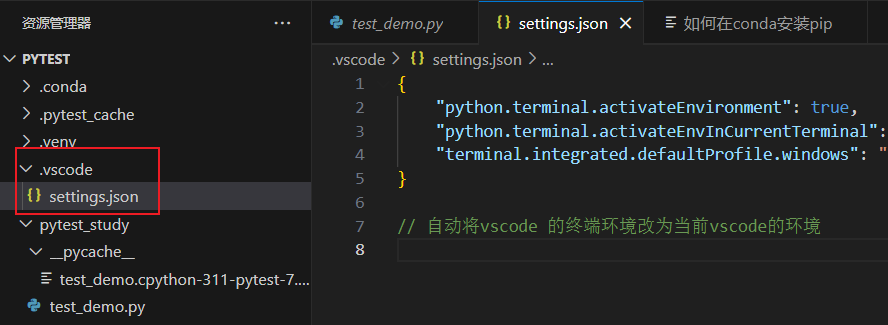
在你项目根目录下,新建一个文件:
文件名必须叫:
.vscode/settings.json
(没有 .vscode 文件夹就自己新建一个)
{
    "python.terminal.activateEnvironment": true,
    "python.terminal.activateEnvInCurrentTerminal": true,
    "terminal.integrated.defaultProfile.windows": "Command Prompt"
}