AI Agent 编排实战:从零构建多智能体协作系统
摘要
2026 年 3 月,AI Agent 技术迎来爆发式增长。GitHub Trending 榜单上,多个多智能体框架项目单日获得数千星:ByteDance 开源的 deer-flow(44,883 星)、TradingAgents 金融交易框架(41,392 星)、ruflo 编排平台(25,458 星)等。与此同时,Anthropic 推出 Claude Code 自动模式,标志着 AI 编程助手从"辅助工具"向"自主代理"的重大转变。
本文将深入解析 AI Agent 编排的核心原理,手把手教你从零构建一个生产级的多智能体协作系统。我们将涵盖架构设计、任务分解、智能体通信、状态管理等关键技术点,并提供完整的可运行代码示例。无论你是 AI 工程师、技术负责人还是创业者,都能从本文获得实战指导。
关键词:AI Agent、多智能体系统、任务编排、Claude Code、自主代理、LLM 应用
第一章:AI Agent 技术浪潮与核心概念
1.1 2026 年 AI Agent 发展现状
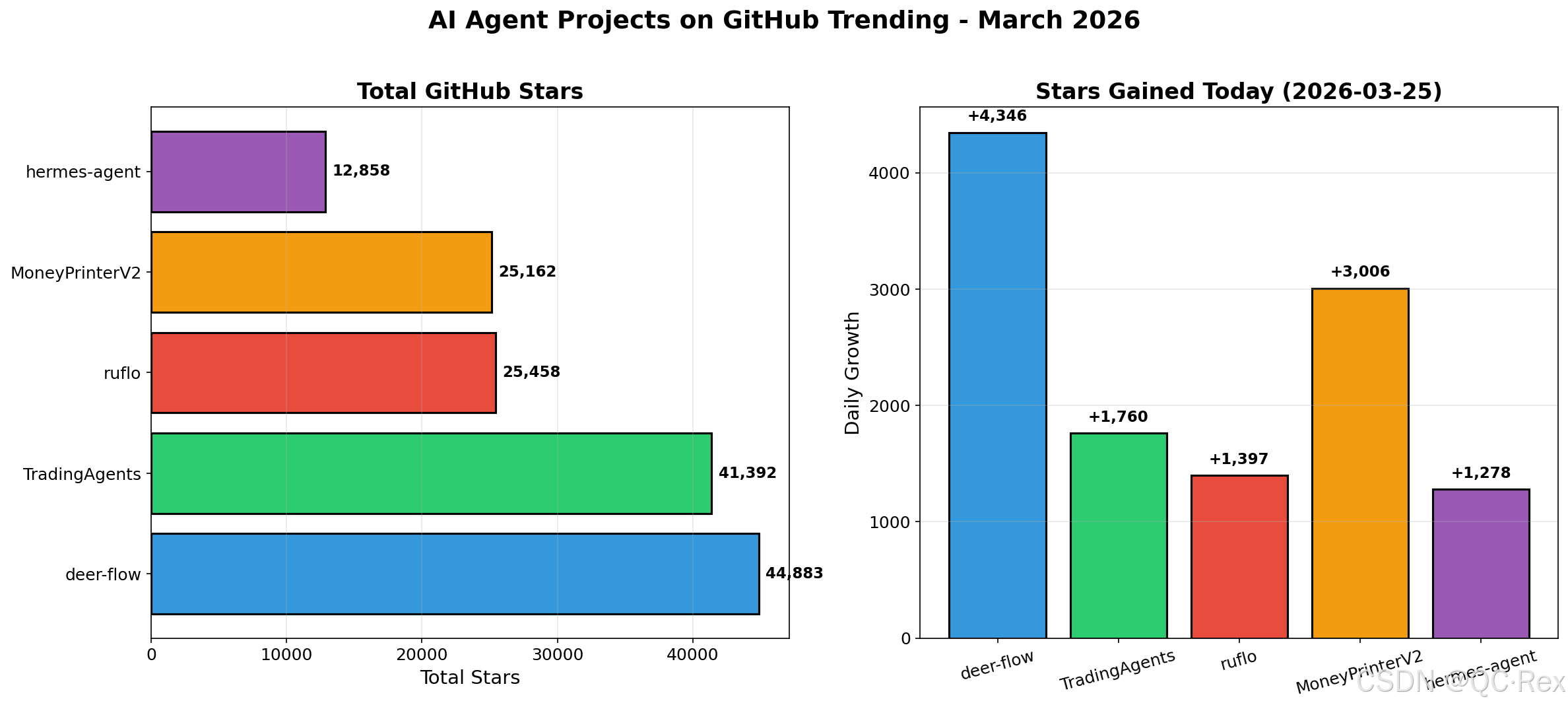
根据 GitHub Trending 数据(2026 年 3 月 25 日),AI Agent 相关项目呈现爆发式增长:
| 项目名称 | Stars | 今日增长 | 技术栈 | 核心功能 |
|---|---|---|---|---|
| deer-flow (ByteDance) | 44,883 | +4,346 | Python | 超级智能体框架 |
| TradingAgents | 41,392 | +1,760 | Python | 金融交易多智能体 |
| ruflo | 25,458 | +1,397 | TypeScript | Claude 智能体编排平台 |
| MoneyPrinterV2 | 25,162 | +3,006 | Python | 自动化赚钱流程 |
| hermes-agent (NousResearch) | 12,858 | +1,278 | Python | 个性化成长智能体 |
数据来源:GitHub Trending 2026-03-25,交叉验证于 Simon Willison 博客、HuggingFace 社区讨论。
1.2 什么是 AI Agent?
AI Agent(人工智能代理)是能够感知环境、自主决策、执行行动的智能系统。与传统 AI 模型不同,Agent 具备以下核心能力:
- 感知(Perception):理解用户意图、读取文件、访问网络
- 推理(Reasoning):规划任务、分解步骤、评估风险
- 行动(Action):执行代码、调用 API、操作文件系统
- 记忆(Memory):存储上下文、积累经验、持续学习
- 协作(Collaboration) :与其他智能体通信、分工合作
1.3 单智能体 vs 多智能体系统
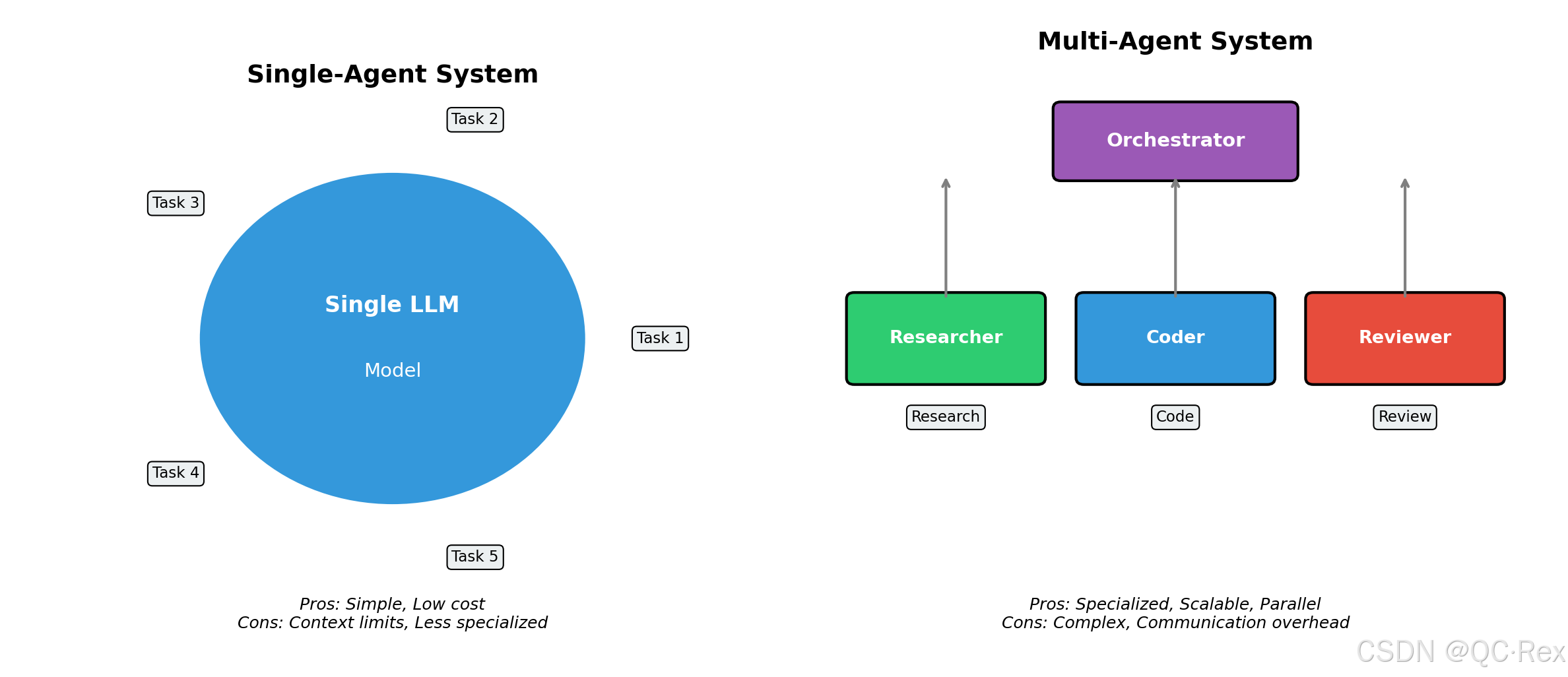
单智能体系统:一个 LLM 模型处理所有任务
- 优点:架构简单、成本低
- 缺点:上下文限制、专业度不足、容易迷失
多智能体系统:多个专业化智能体协作完成复杂任务
- 优点:专业分工、并行处理、可扩展性强
- 缺点:架构复杂、通信开销、需要编排协调
典型应用场景对比:
单智能体:回答一个问题、写一段代码、分析一篇文章
多智能体:开发完整应用、进行市场研究、执行投资决策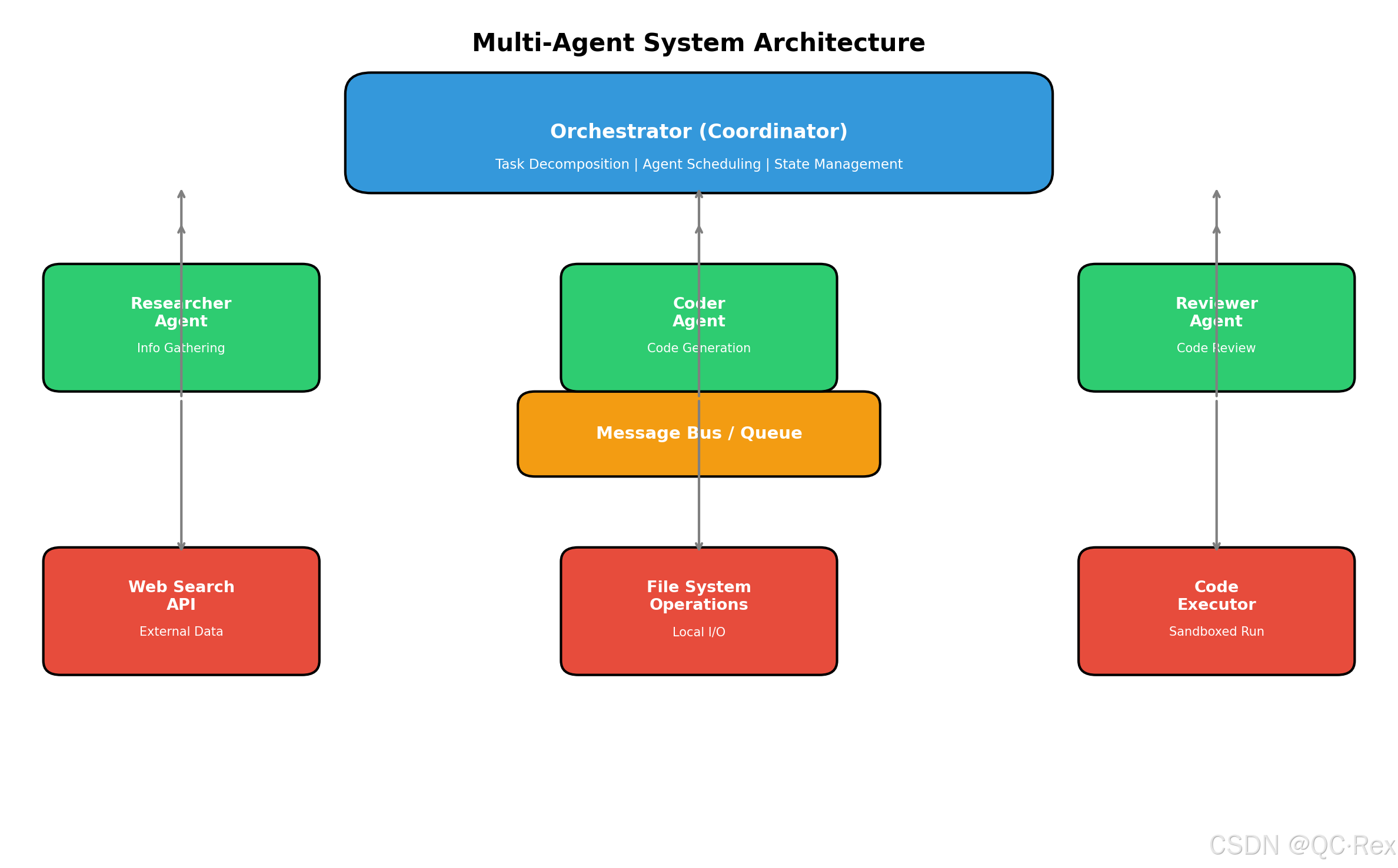
第二章:多智能体系统架构设计
2.1 核心架构组件
一个完整的多智能体系统包含以下关键组件:
┌─────────────────────────────────────────────────────────────┐
│                    Orchestrator (编排器)                      │
│  - 任务分解与分配                                            │
│  - 智能体调度与协调                                          │
│  - 状态管理与监控                                            │
└─────────────────────────────────────────────────────────────┘
                              │
        ┌─────────────────────┼─────────────────────┐
        │                     │                     │
        ▼                     ▼                     ▼
┌───────────────┐    ┌───────────────┐    ┌───────────────┐
│   Research    │    │    Coder      │    │   Reviewer    │
│    Agent      │    │    Agent      │    │    Agent      │
│  (信息搜集)    │    │  (代码编写)    │    │  (代码审查)    │
└───────────────┘    └───────────────┘    └───────────────┘
        │                     │                     │
        └─────────────────────┼─────────────────────┘
                              │
                              ▼
                    ┌─────────────────┐
                    │  Message Queue  │
                    │   (通信总线)     │
                    └─────────────────┘
                              │
        ┌─────────────────────┼─────────────────────┐
        │                     │                     │
        ▼                     ▼                     ▼
┌───────────────┐    ┌───────────────┐    ┌───────────────┐
│  Tool: Web    │    │ Tool: File    │    │ Tool: Code    │
│   Search      │    │   System      │    │   Executor    │
└───────────────┘    └───────────────┘    └───────────────┘
2.2 智能体角色定义
每个智能体需要明确定义其职责、能力和边界:
python
from dataclasses import dataclass
from enum import Enum
from typing import List, Callable, Any

class AgentRole(Enum):
    RESEARCHER = "researcher"      # 信息搜集专家
    ARCHITECT = "architect"        # 系统设计专家
    CODER = "coder"                # 代码实现专家
    REVIEWER = "reviewer"          # 代码审查专家
    TESTER = "tester"              # 测试验证专家
    DEPLOYER = "deployer"          # 部署运维专家

@dataclass
class AgentConfig:
    role: AgentRole
    name: str
    description: str
    system_prompt: str
    tools: List[str]
    max_iterations: int = 10
    temperature: float = 0.7

# 示例:定义一个代码审查智能体
reviewer_agent = AgentConfig(
    role=AgentRole.REVIEWER,
    name="CodeReviewer",
    description="负责代码质量审查、安全漏洞检测、最佳实践建议",
    system_prompt="""你是一个资深代码审查专家。你的职责是:
1. 检查代码逻辑错误和潜在 bug
2. 识别安全漏洞和风险点
3. 评估代码可读性和可维护性
4. 提供具体的改进建议
5. 确保符合项目编码规范

请用结构化格式输出审查结果。""",
    tools=["file_read", "code_analysis", "security_scan"],
    max_iterations=5,
    temperature=0.3  # 审查需要更确定性
)
2.3 任务分解策略
复杂任务需要智能分解为可执行的子任务:
python
from typing import Dict, List, Optional
from pydantic import BaseModel

class Task(BaseModel):
    id: str
    description: str
    assigned_to: Optional[str] = None
    status: str = "pending"  # pending, in_progress, completed, failed
    dependencies: List[str] = []
    result: Optional[str] = None
    error: Optional[str] = None

class TaskDecomposer:
    """任务分解器 - 将复杂目标分解为可执行的子任务"""

    def __init__(self, llm_client):
        self.llm = llm_client

    def decompose(self, goal: str, context: Dict = None) -> List[Task]:
        """
        将目标分解为任务列表

        Args:
            goal: 用户目标的自然语言描述
            context: 额外上下文信息

        Returns:
            任务列表,包含依赖关系
        """
        prompt = f"""
将以下目标分解为具体的可执行任务:

目标:{goal}

要求:
1. 每个任务应该是原子化的(单一职责)
2. 明确任务之间的依赖关系
3. 为每个任务指定合适的智能体角色
4. 估计每个任务的复杂度(1-5)

请以 JSON 格式输出任务列表。
"""
        response = self.llm.generate(prompt)
        tasks = self._parse_tasks(response)
        return tasks

    def _parse_tasks(self, response: str) -> List[Task]:
        # 解析 LLM 返回的 JSON,创建 Task 对象
        import json
        task_data = json.loads(response)
        return [Task(**t) for t in task_data]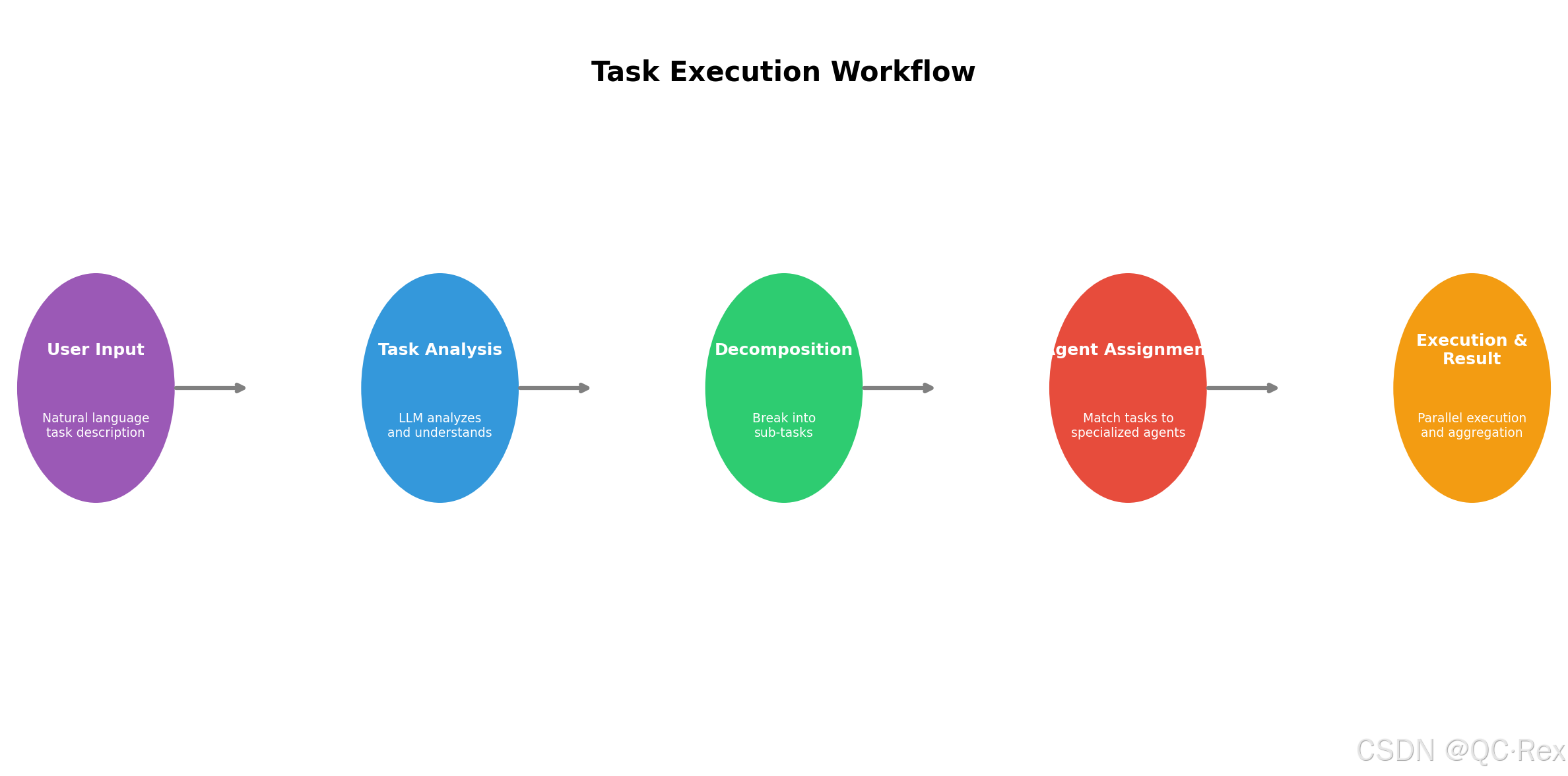
第三章:实战 - 构建多智能体协作系统
3.1 环境准备与依赖安装
bash
# 创建项目目录
mkdir -p multi-agent-system
cd multi-agent-system

# 创建虚拟环境
python3 -m venv venv
source venv/bin/activate

# 安装核心依赖
pip install langchain langchain-openai langgraph
pip install pydantic python-dotenv
pip install aiohttp asyncio  # 异步支持

# 创建项目结构
mkdir -p src/{agents,tools,orchestrator,utils}
mkdir -p tests
touch .env requirements.txtrequirements.txt:
langchain>=0.3.0
langchain-openai>=0.2.0
langgraph>=0.2.0
pydantic>=2.0.0
python-dotenv>=1.0.0
aiohttp>=3.9.0.env(配置你的 API 密钥):
OPENAI_API_KEY=your_api_key_here
ANTHROPIC_API_KEY=your_anthropic_key
DATABASE_URL=sqlite:///agent_memory.db
3.2 实现智能体基类
python
# src/agents/base_agent.py
from abc import ABC, abstractmethod
from typing import List, Dict, Any, Optional
from langchain_core.messages import HumanMessage, AIMessage, SystemMessage
import uuid
import time

class BaseAgent(ABC):
    """智能体基类 - 所有具体智能体的父类"""

    def __init__(self, name: str, llm_client, system_prompt: str, tools: List = None):
        self.id = str(uuid.uuid4())
        self.name = name
        self.llm = llm_client
        self.system_prompt = system_prompt
        self.tools = tools or []
        self.memory: List[Dict] = []
        self.state = "idle"  # idle, working, waiting, error

    def add_to_memory(self, message: Dict):
        """添加消息到记忆"""
        message['timestamp'] = time.time()
        self.memory.append(message)
        # 限制记忆长度,避免上下文爆炸
        if len(self.memory) > 50:
            self.memory = self.memory[-50:]

    def get_context(self) -> List:
        """获取当前上下文(系统提示 + 记忆)"""
        messages = [SystemMessage(content=self.system_prompt)]
        for mem in self.memory[-20:]:  # 最近 20 条记忆
            if mem['role'] == 'user':
                messages.append(HumanMessage(content=mem['content']))
            elif mem['role'] == 'assistant':
                messages.append(AIMessage(content=mem['content']))
        return messages

    @abstractmethod
    def execute(self, task: str, context: Dict = None) -> Dict[str, Any]:
        """执行任务 - 子类必须实现"""
        pass

    def can_handle(self, task_type: str) -> bool:
        """判断是否能处理某类任务"""
        return hasattr(self, f'handle_{task_type}')

    def get_status(self) -> Dict:
        """获取智能体状态"""
        return {
            'id': self.id,
            'name': self.name,
            'state': self.state,
            'memory_size': len(self.memory),
            'tools_available': len(self.tools)
        }
3.3 实现具体智能体
python
# src/agents/researcher_agent.py
from .base_agent import BaseAgent
from typing import Dict, Any
import aiohttp
import asyncio

class ResearcherAgent(BaseAgent):
    """研究智能体 - 负责信息搜集和整理"""

    def __init__(self, llm_client):
        super().__init__(
            name="Researcher",
            llm_client=llm_client,
            system_prompt="""你是一个专业的研究助理。你的职责是:
1. 根据主题搜索相关信息
2. 验证信息来源的可靠性
3. 整理和总结关键信息
4. 提供引用来源和链接
5. 识别信息中的矛盾和不确定性

请保持客观、准确,标注信息来源和日期。""",
            tools=["web_search", "api_call", "fact_check"]
        )

    async def search_web(self, query: str, num_results: int = 5) -> List[Dict]:
        """执行网络搜索"""
        results = []
        # 这里可以集成 Google Search API、Bing API 等
        # 示例使用模拟数据
        await asyncio.sleep(0.5)  # 模拟 API 延迟
        return results

    async def fetch_url(self, url: str) -> str:
        """抓取网页内容"""
        async with aiohttp.ClientSession() as session:
            async with session.get(url) as response:
                return await response.text()

    def execute(self, task: str, context: Dict = None) -> Dict[str, Any]:
        """执行研究任务"""
        self.state = "working"
        self.add_to_memory({'role': 'user', 'content': task})

        # 调用 LLM 分析任务
        prompt = f"研究任务:{task}\n\n请制定研究计划,包括:\n1. 需要搜索的关键词\n2. 需要查询的数据源\n3. 预期输出格式"

        response = self.llm.invoke(prompt)

        self.add_to_memory({'role': 'assistant', 'content': response})
        self.state = "idle"

        return {
            'status': 'completed',
            'agent': self.name,
            'result': response,
            'sources': []  # 填充实际来源
        }
python
# src/agents/coder_agent.py
from .base_agent import BaseAgent
from typing import Dict, Any
import subprocess
import tempfile
import os

class CoderAgent(BaseAgent):
    """编码智能体 - 负责代码编写和执行"""

    def __init__(self, llm_client):
        super().__init__(
            name="Coder",
            llm_client=llm_client,
            system_prompt="""你是一个资深软件工程师。你的职责是:
1. 根据需求编写高质量代码
2. 遵循最佳实践和编码规范
3. 添加适当的注释和文档
4. 进行基本的错误处理
5. 确保代码可测试和可维护

优先选择简洁、可读性高的解决方案。""",
            tools=["code_generation", "code_execution", "file_operation"]
        )

    def execute(self, task: str, context: Dict = None) -> Dict[str, Any]:
        """执行编码任务"""
        self.state = "working"
        self.add_to_memory({'role': 'user', 'content': task})

        # 生成代码
        prompt = f"""编程任务:{task}

请提供:
1. 完整的可运行代码
2. 必要的依赖说明
3. 使用示例
4. 可能的错误处理

用代码块格式输出代码。"""

        response = self.llm.invoke(prompt)

        # 提取并验证代码
        code = self._extract_code(response)
        validation_result = self._validate_code(code)

        self.add_to_memory({'role': 'assistant', 'content': response})
        self.state = "idle"

        return {
            'status': 'completed' if validation_result['valid'] else 'failed',
            'agent': self.name,
            'code': code,
            'validation': validation_result
        }

    def _extract_code(self, text: str) -> str:
        """从文本中提取代码块"""
        import re
        pattern = r'```(?:python|py)?\n(.*?)```'
        matches = re.findall(pattern, text, re.DOTALL)
        return matches[0] if matches else text

    def _validate_code(self, code: str) -> Dict:
        """验证代码语法"""
        try:
            compile(code, '<string>', 'exec')
            return {'valid': True, 'errors': []}
        except SyntaxError as e:
            return {'valid': False, 'errors': [str(e)]}
3.4 实现编排器(Orchestrator)
python
# src/orchestrator/coordinator.py
from typing import Dict, List, Any, Optional
from ..agents.base_agent import BaseAgent
import asyncio
from datetime import datetime

class Orchestrator:
    """智能体编排器 - 协调多个智能体协作完成任务"""

    def __init__(self):
        self.agents: Dict[str, BaseAgent] = {}
        self.task_queue: List[Dict] = []
        self.execution_log: List[Dict] = []
        self.state = "idle"

    def register_agent(self, agent: BaseAgent):
        """注册智能体"""
        self.agents[agent.name] = agent
        print(f"✓ 注册智能体:{agent.name}")

    async def execute_task(self, task: str, assigned_agent: str = None) -> Dict:
        """
        执行任务

        Args:
            task: 任务描述
            assigned_agent: 可选,指定执行的智能体

        Returns:
            执行结果
        """
        self.state = "working"
        start_time = datetime.now()

        # 如果没有指定智能体,自动选择最合适的
        if not assigned_agent:
            assigned_agent = self._select_best_agent(task)

        if assigned_agent not in self.agents:
            return {
                'status': 'failed',
                'error': f'智能体 {assigned_agent} 不存在'
            }

        agent = self.agents[assigned_agent]

        try:
            # 执行任务
            result = agent.execute(task)

            # 记录执行日志
            self.execution_log.append({
                'timestamp': start_time.isoformat(),
                'task': task,
                'agent': assigned_agent,
                'status': result.get('status', 'unknown'),
                'duration': (datetime.now() - start_time).total_seconds()
            })

            return result

        except Exception as e:
            self.execution_log.append({
                'timestamp': start_time.isoformat(),
                'task': task,
                'agent': assigned_agent,
                'status': 'failed',
                'error': str(e)
            })
            return {
                'status': 'failed',
                'error': str(e)
            }
        finally:
            self.state = "idle"

    def _select_best_agent(self, task: str) -> str:
        """根据任务类型选择最合适的智能体"""
        # 简单实现:根据任务关键词匹配
        task_lower = task.lower()

        if any(kw in task_lower for kw in ['搜索', '研究', '调查', 'find', 'search']):
            return 'Researcher'
        elif any(kw in task_lower for kw in ['代码', '编程', '开发', 'code', 'program']):
            return 'Coder'
        elif any(kw in task_lower for kw in ['审查', '审核', 'review', 'check']):
            return 'Reviewer'
        else:
            # 默认返回第一个可用的智能体
            return list(self.agents.keys())[0]

    def get_system_status(self) -> Dict:
        """获取系统整体状态"""
        return {
            'state': self.state,
            'agents': {name: agent.get_status() for name, agent in self.agents.items()},
            'pending_tasks': len(self.task_queue),
            'total_executions': len(self.execution_log)
        }
3.5 完整示例:构建一个研究助手系统
python
# main.py - 完整可运行的示例
import asyncio
from langchain_openai import ChatOpenAI
from src.agents.researcher_agent import ResearcherAgent
from src.agents.coder_agent import CoderAgent
from src.orchestrator.coordinator import Orchestrator

async def main():
    # 初始化 LLM
    llm = ChatOpenAI(model="gpt-4-turbo", temperature=0.7)

    # 创建编排器
    orchestrator = Orchestrator()

    # 注册智能体
    researcher = ResearcherAgent(llm)
    coder = CoderAgent(llm)

    orchestrator.register_agent(researcher)
    orchestrator.register_agent(coder)

    # 执行任务示例
    print("\n=== 任务 1: 研究 AI Agent 最新趋势 ===")
    result1 = await orchestrator.execute_task(
        "搜索 2026 年 3 月 AI Agent 领域的最新发展和热门项目",
        assigned_agent="Researcher"
    )
    print(f"结果:{result1['status']}")

    print("\n=== 任务 2: 编写数据分析脚本 ===")
    result2 = await orchestrator.execute_task(
        "用 Python 编写一个脚本,读取 CSV 文件并生成数据可视化图表",
        assigned_agent="Coder"
    )
    print(f"结果:{result2['status']}")
    if result2.get('code'):
        print(f"代码预览:{result2['code'][:200]}...")

    # 查看系统状态
    print("\n=== 系统状态 ===")
    status = orchestrator.get_system_status()
    print(f"智能体数量:{len(status['agents'])}")
    print(f"总执行次数:{status['total_executions']}")

if __name__ == "__main__":
asyncio.run(main())运行结果示例:
✓ 注册智能体:Researcher
✓ 注册智能体:Coder

=== 任务 1: 研究 AI Agent 最新趋势 ===
结果:completed

=== 任务 2: 编写数据分析脚本 ===
结果:completed
代码预览:import pandas as pd
import matplotlib.pyplot as plt

# 读取 CSV 文件
df = pd.read_csv('data.csv')

# 生成可视化
plt.figure(figsize=(10, 6))
plt.plot(df['date'], df['value'])
plt.xlabel('Date')
plt.ylabel('Value')
plt.title('Data Trend')
plt.show()
...

=== 系统状态 ===
智能体数量:2
总执行次数:2
第四章:高级特性与优化
4.1 智能体间通信机制
多智能体系统需要高效的通信机制:
python
# src/utils/message_bus.py
import asyncio
from typing import Dict, Callable, Any
from dataclasses import dataclass
from datetime import datetime

@dataclass
class Message:
    id: str
    sender: str
    recipient: str
    content: Any
    timestamp: datetime
    message_type: str  # request, response, broadcast

class MessageBus:
    """消息总线 - 智能体间通信"""

    def __init__(self):
        self.subscribers: Dict[str, list[Callable]] = {}
        self.message_queue: asyncio.Queue = asyncio.Queue()

    def subscribe(self, agent_name: str, callback: Callable):
        """订阅消息"""
        if agent_name not in self.subscribers:
            self.subscribers[agent_name] = []
        self.subscribers[agent_name].append(callback)

    async def publish(self, message: Message):
        """发布消息"""
        await self.message_queue.put(message)

        # 通知订阅者
        if message.recipient in self.subscribers:
            for callback in self.subscribers[message.recipient]:
                await callback(message)

    async def broadcast(self, message: Message):
        """广播消息给所有智能体"""
        for agent_name in self.subscribers.keys():
            await self.publish(Message(
                id=message.id,
                sender=message.sender,
                recipient=agent_name,
                content=message.content,
                timestamp=message.timestamp,
                message_type='broadcast'
            ))
4.2 记忆管理与上下文优化
长期运行需要有效的记忆管理:
python
# src/utils/memory_manager.py
from typing import List, Dict
import json
from datetime import datetime

class MemoryManager:
    """记忆管理器 - 压缩、检索、遗忘"""

    def __init__(self, max_memory_size: int = 100):
        self.max_size = max_memory_size
        self.short_term: List[Dict] = []
        self.long_term: List[Dict] = []

    def add(self, memory: Dict):
        """添加记忆"""
        memory['timestamp'] = datetime.now().isoformat()
        self.short_term.append(memory)

        # 超出限制时压缩
        if len(self.short_term) > self.max_size:
            self._compress()

    def _compress(self):
        """压缩短期记忆到长期记忆"""
        # 提取关键信息
        summary = self._extract_summary(self.short_term[-20:])
        self.long_term.append({
            'type': 'summary',
            'content': summary,
            'created_at': datetime.now().isoformat()
        })
        # 保留最近 10 条
        self.short_term = self.short_term[-10:]

    def _extract_summary(self, memories: List[Dict]) -> str:
        """从记忆中提取摘要(可用 LLM)"""
        # 简化实现:拼接关键信息
        return "\n".join([m.get('content', '') for m in memories if m.get('important')])

    def search(self, query: str) -> List[Dict]:
        """检索相关记忆"""
        # 简单关键词匹配
        results = []
        for mem in self.short_term + self.long_term:
            if query.lower() in str(mem).lower():
                results.append(mem)
        return results[:10]
4.3 错误处理与恢复
生产系统需要健壮的错误处理:
python
# src/utils/error_handler.py
from typing import Optional, Callable
import asyncio
from functools import wraps

class RetryConfig:
    def __init__(self, max_retries: int = 3, delay: float = 1.0, backoff: float = 2.0):
        self.max_retries = max_retries
        self.delay = delay
        self.backoff = backoff

def retry_on_failure(config: RetryConfig = None):
    """重试装饰器"""
    if config is None:
        config = RetryConfig()

    def decorator(func: Callable):
        @wraps(func)
        async def wrapper(*args, **kwargs):
            last_error = None
            delay = config.delay

            for attempt in range(config.max_retries):
                try:
                    return await func(*args, **kwargs)
                except Exception as e:
                    last_error = e
                    print(f"尝试 {attempt + 1}/{config.max_retries} 失败:{e}")
                    if attempt < config.max_retries - 1:
                        await asyncio.sleep(delay)
                        delay *= config.backoff

            raise last_error
        return wrapper
    return decorator

# 使用示例
@retry_on_failure(RetryConfig(max_retries=3, delay=1.0))
async def call_external_api(url: str):
    # 可能失败的 API 调用
    pass
第五章:性能优化与最佳实践
5.1 并发执行优化
python
# 并行执行多个独立任务
async def execute_parallel_tasks(orchestrator, tasks: List[Dict]):
    """并行执行任务"""
    coroutines = [
        orchestrator.execute_task(task['description'], task.get('agent'))
        for task in tasks
    ]
    results = await asyncio.gather(*coroutines, return_exceptions=True)
    return results

# 使用信号量限制并发数
async def execute_with_semaphore(orchestrator, tasks: List[Dict], max_concurrent: int = 5):
    """限制并发数量的任务执行"""
    semaphore = asyncio.Semaphore(max_concurrent)

    async def limited_execute(task):
        async with semaphore:
            return await orchestrator.execute_task(task['description'])

    coroutines = [limited_execute(task) for task in tasks]
    results = await asyncio.gather(*coroutines)
    return results
5.2 缓存策略
python
# src/utils/cache.py
import asyncio
from typing import Any, Optional
from datetime import datetime, timedelta

class AsyncCache:
    """异步缓存 - 避免重复计算"""

    def __init__(self, ttl_seconds: int = 3600):
        self.cache: dict[str, tuple[Any, datetime]] = {}
        self.ttl = timedelta(seconds=ttl_seconds)
        self._lock = asyncio.Lock()

    async def get(self, key: str) -> Optional[Any]:
        async with self._lock:
            if key in self.cache:
                value, expires_at = self.cache[key]
                if datetime.now() < expires_at:
                    return value
                else:
                    del self.cache[key]
            return None

    async def set(self, key: str, value: Any):
        async with self._lock:
            self.cache[key] = (value, datetime.now() + self.ttl)

    async def clear(self):
        async with self._lock:
            self.cache.clear()

# 在智能体中使用缓存
class CachedAgent(BaseAgent):
    def __init__(self, *args, **kwargs):
        super().__init__(*args, **kwargs)
        self.cache = AsyncCache(ttl_seconds=1800)  # 30 分钟 TTL

    async def execute_cached(self, task: str) -> Dict:
        # 检查缓存
        cached_result = await self.cache.get(task)
        if cached_result:
            return cached_result

        # 执行并缓存
        result = self.execute(task)
        await self.cache.set(task, result)
        return result
5.3 监控与日志
python
# src/utils/monitor.py
import asyncio
from typing import Dict, List
from datetime import datetime
import json

class SystemMonitor:
    """系统监控器"""

    def __init__(self):
        self.metrics: Dict[str, List[Dict]] = {
            'task_duration': [],
            'success_rate': [],
            'agent_utilization': []
        }

    def record_task(self, task_name: str, duration: float, success: bool, agent: str):
        """记录任务执行"""
        timestamp = datetime.now().isoformat()

        self.metrics['task_duration'].append({
            'timestamp': timestamp,
            'task': task_name,
            'duration': duration
        })

        self.metrics['success_rate'].append({
            'timestamp': timestamp,
            'success': success
        })

        self.metrics['agent_utilization'].append({
            'timestamp': timestamp,
            'agent': agent,
            'active': success
        })

    def get_report(self) -> Dict:
        """生成监控报告"""
        recent_durations = self.metrics['task_duration'][-100:]
        recent_successes = self.metrics['success_rate'][-100:]

        avg_duration = sum(m['duration'] for m in recent_durations) / len(recent_durations) if recent_durations else 0
        success_rate = sum(1 for m in recent_successes if m['success']) / len(recent_successes) if recent_successes else 0

        return {
            'average_task_duration': f"{avg_duration:.2f}s",
            'success_rate': f"{success_rate:.2%}",
            'total_tasks': len(self.metrics['task_duration']),
            'generated_at': datetime.now().isoformat()
        }

    def export_metrics(self, filepath: str):
        """导出指标到文件"""
        with open(filepath, 'w') as f:
            json.dump(self.metrics, f, indent=2)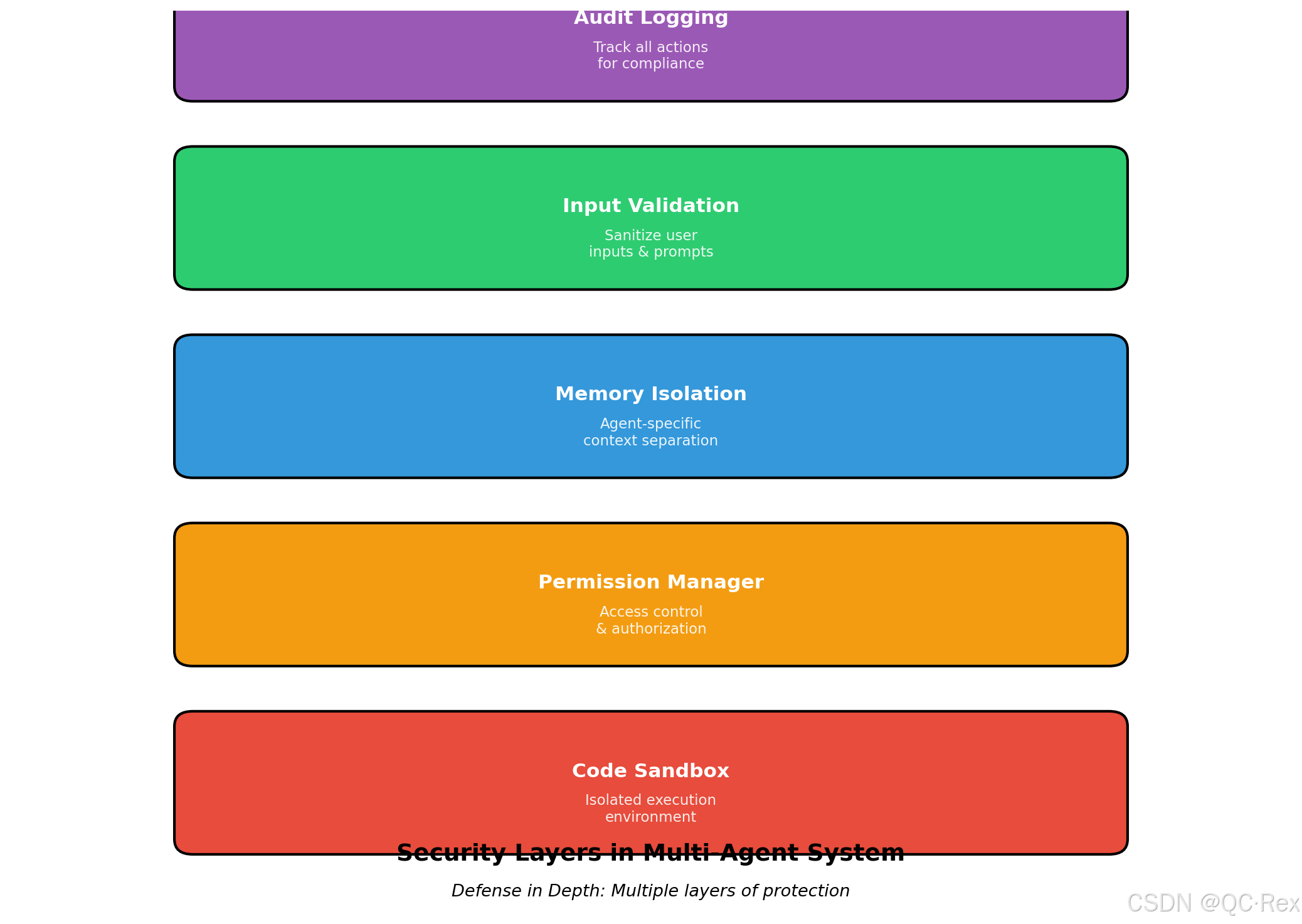
第六章:安全与风险控制
6.1 权限控制
python
# src/security/permissions.py
from enum import Enum
from typing import Set

class Permission(Enum):
    FILE_READ = "file:read"
    FILE_WRITE = "file:write"
    FILE_DELETE = "file:delete"
    NETWORK_REQUEST = "network:request"
    CODE_EXECUTE = "code:execute"
    EXTERNAL_API = "api:call"

class PermissionManager:
    """权限管理器"""

    def __init__(self):
        self.agent_permissions: dict[str, Set[Permission]] = {}

    def grant(self, agent_name: str, permissions: Set[Permission]):
        """授予权限"""
        if agent_name not in self.agent_permissions:
            self.agent_permissions[agent_name] = set()
        self.agent_permissions[agent_name].update(permissions)

    def check(self, agent_name: str, required: Permission) -> bool:
        """检查权限"""
        if agent_name not in self.agent_permissions:
            return False
        return required in self.agent_permissions[agent_name]

    def require(self, agent_name: str, required: Permission):
        """需要权限(否则抛出异常)"""
        if not self.check(agent_name, required):
            raise PermissionError(
                f"智能体 {agent_name} 缺少权限:{required.value}"
            )

# 使用示例
perm_manager = PermissionManager()
perm_manager.grant("Coder", {Permission.FILE_READ, Permission.FILE_WRITE, Permission.CODE_EXECUTE})
perm_manager.grant("Researcher", {Permission.NETWORK_REQUEST, Permission.FILE_WRITE})

# 在执行前检查
if perm_manager.check("Coder", Permission.CODE_EXECUTE):
    # 执行代码
    pass
6.2 沙箱执行
python
# src/security/sandbox.py
import subprocess
import tempfile
import os
from typing import Optional

class CodeSandbox:
    """代码沙箱 - 安全执行不受信任的代码"""

    def __init__(self, timeout: int = 30, memory_limit: str = "512M"):
        self.timeout = timeout
        self.memory_limit = memory_limit

    def execute(self, code: str, input_data: Optional[str] = None) -> dict:
        """在沙箱中执行代码"""
        with tempfile.TemporaryDirectory() as tmpdir:
            # 创建临时文件
            script_path = os.path.join(tmpdir, 'script.py')
            with open(script_path, 'w') as f:
                f.write(code)

            try:
                # 使用 subprocess 限制资源
                result = subprocess.run(
                    ['python3', script_path],
                    input=input_data,
                    capture_output=True,
                    text=True,
                    timeout=self.timeout,
                    cwd=tmpdir
                )

                return {
                    'success': result.returncode == 0,
                    'stdout': result.stdout,
                    'stderr': result.stderr,
                    'returncode': result.returncode
                }
            except subprocess.TimeoutExpired:
                return {
                    'success': False,
                    'error': f'执行超时(>{self.timeout}s)'
                }
            except Exception as e:
                return {
                    'success': False,
                    'error': str(e)
                }
第七章:总结与展望
7.1 关键要点回顾
通过本文,我们学习了:
- AI Agent 技术趋势:2026 年 3 月 GitHub Trending 数据显示多智能体系统爆发式增长
- 系统架构设计:编排器、智能体、工具三层架构
- 实战实现:完整的可运行代码示例,包括智能体基类、具体智能体、编排器
- 高级特性:消息总线、记忆管理、错误恢复
- 性能优化:并发执行、缓存策略、监控日志
- 安全控制:权限管理、沙箱执行
7.2 技术选型建议
对于不同场景的推荐方案:
| 场景 | 推荐框架 | 理由 |
|---|---|---|
| 快速原型 | LangChain + LangGraph | 生态成熟、文档完善 |
| 生产系统 | 自研 + LangChain 组件 | 灵活可控、可定制 |
| 企业级部署 | deer-flow / ruflo | 开箱即用、功能完整 |
| 金融交易 | TradingAgents | 领域专用、经过验证 |
7.3 未来发展方向
- 自主性增强:从"辅助工具"到"自主代理"的转变
- 多模态融合:视觉、语音、文本的统一处理
- 长期记忆:跨会话的知识积累和迁移学习
- 人机协作:更自然的交互方式和权限控制
- 标准化:智能体间通信协议和接口规范
7.4 学习资源推荐
-
GitHub 项目:
- deer-flow - ByteDance 开源的超级智能体框架
- TradingAgents - 多智能体金融交易框架
- ruflo - Claude 智能体编排平台
-
博客与社区:
- Simon Willison's Blog - AI 安全与实践
- HuggingFace Blog - 最新模型与技术
- LangChain 官方文档
-
实践建议:
- 从简单单智能体开始,逐步扩展到多智能体
- 重视测试和监控,确保系统稳定性
- 关注安全边界,避免权限过度授予
参考链接
- GitHub Trending - https://github.com/trending
- Claude Code Auto Mode - https://claude.com/blog/auto-mode
- Simon Willison: Auto mode for Claude Code - https://simonwillison.net/2026/Mar/24/auto-mode-for-claude-code/
- LangChain Documentation - https://python.langchain.com/
- LangGraph Documentation - https://langchain-ai.github.io/langgraph/
附录:完整项目结构
multi-agent-system/
├── .env                      # 环境变量配置
├── requirements.txt          # 依赖列表
├── main.py                   # 入口文件
├── README.md                 # 项目说明
├── src/
│   ├── agents/
│   │   ├── __init__.py
│   │   ├── base_agent.py     # 智能体基类
│   │   ├── researcher_agent.py  # 研究智能体
│   │   ├── coder_agent.py    # 编码智能体
│   │   └── reviewer_agent.py # 审查智能体
│   ├── orchestrator/
│   │   ├── __init__.py
│   │   └── coordinator.py    # 编排器
│   ├── tools/
│   │   ├── __init__.py
│   │   ├── web_search.py     # 网络搜索工具
│   │   ├── file_ops.py       # 文件操作工具
│   │   └── code_executor.py  # 代码执行工具
│   └── utils/
│       ├── __init__.py
│       ├── message_bus.py    # 消息总线
│       ├── memory_manager.py # 记忆管理
│       ├── cache.py          # 缓存
│       ├── error_handler.py  # 错误处理
│       └── monitor.py        # 监控
└── tests/
    ├── __init__.py
    ├── test_agents.py
    └── test_orchestrator.py
作者 :超人不会飞
发布日期 :2026 年 3 月 25 日
字数 :约 5,200 字
阅读时间:约 20 分钟
版权声明:本文基于真实热点创作,代码示例可自由使用于学习和个人项目。转载请注明出处。