目录
[7)lateral view](#7)lateral view)
[2、开启 Map输出阶段压缩(MR引擎)](#2、开启 Map输出阶段压缩(MR引擎))
[3、开启 Reduce 输出阶段压缩](#3、开启 Reduce 输出阶段压缩)
[4、 文件存储格式](#4、 文件存储格式)
[(1)TextFile 格式](#(1)TextFile 格式)
[(2)Orc 格式](#(2)Orc 格式)
[(3)Parquet 格式](#(3)Parquet 格式)
[3)SMB(Sort Merge Bucket join)](#3)SMB(Sort Merge Bucket join))
[(3)Group By](#(3)Group By)
[(5) 笛卡尔积](#(5) 笛卡尔积)
[(3)合理设置 Reduce 数](#(3)合理设置 Reduce 数)
[(2)使用order by没有limit过滤](#(2)使用order by没有limit过滤)
一、函数
1、常用函数
(1)系统内置函数
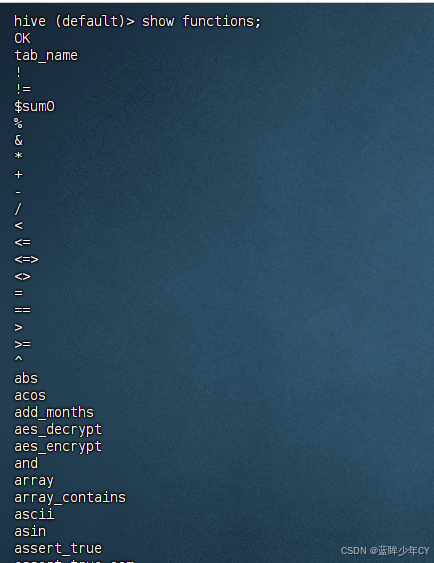
1)查看自带函数
show functions;
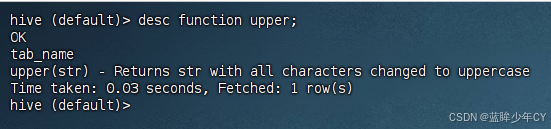
2)查看函数说明
desc function 函数名;
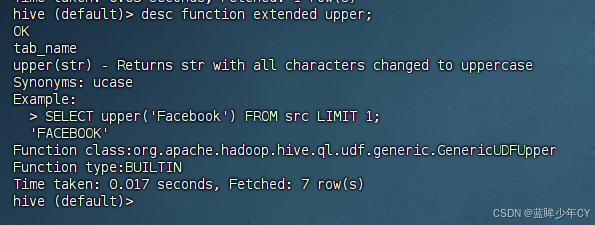
3)查看详细说明
desc function extended 函数名;
(2)常用内置函数
1)nvl()函数
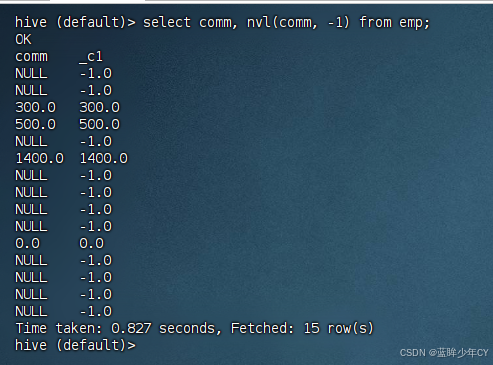
NVL:给值为NULL的数据赋值,它的功能是。
NVL( value,default_value)
如果value 为NULL,则NVL函数返回default_value 的值,否则返回value的值,如果两个参数 都为NULL ,则返回NULL
案例:
如果员工的comm为NULL,则用-1代替
select comm, nvl(comm, -1) from emp;
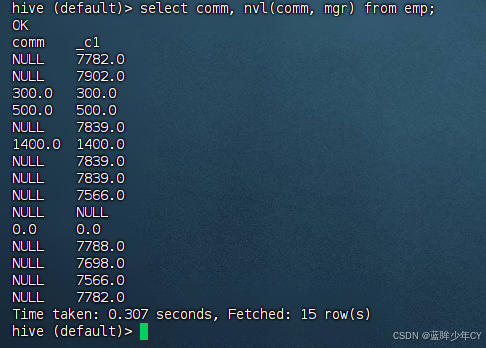
如果员工的comm为NULL,则用领导id代替
select comm, nvl(comm, mgr) from emp;
2)case使用
使用案例展示其功能
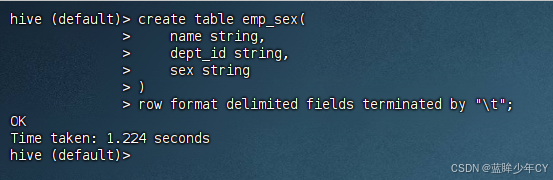
a、创建表
create table emp_sex(
name string,
dept_id string,
sex string
)
row format delimited fields terminated by "\t";
b、创建数据
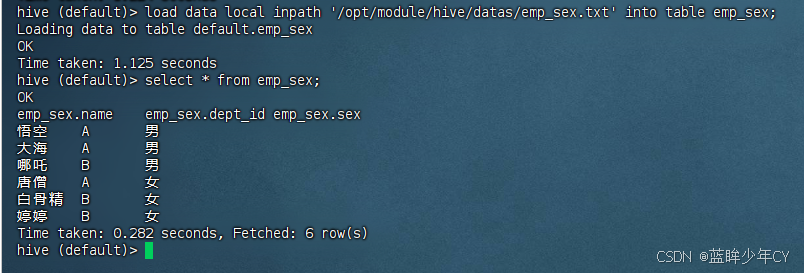
emp_sex.txt
悟空 A 男
大海 A 男
哪吒 B 男
唐僧 A 女
白骨精 B 女
婷婷 B 女
c、加载数据
load data local inpath '/opt/module/hive/datas/emp_sex.txt' into table emp_sex;
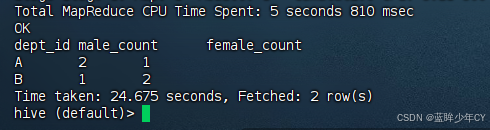
d、查询每个部门的男女生人数
select
dept_id,
sum(case sex when '男' then 1 else 0 end) male_count,
sum(case sex when '女' then 1 else 0 end) female_count
from emp_sex
group by dept_id;
或者
select
dept_id,
sum(if(sex='男', 1, 0)) male_count,
sum(if(sex='女', 1, 0)) female_count
from emp_sex
group by dept_id;
3)concat()函数
返回输入字符串连接后的结果,支持任意个输入字 符串;
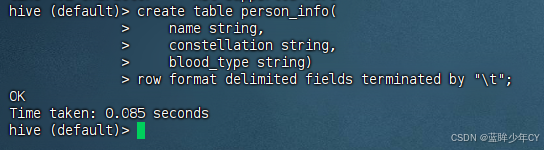
a、创建表
create table person_info(
name string,
constellation string,
blood_type string)
row format delimited fields terminated by "\t";
b、创建数据
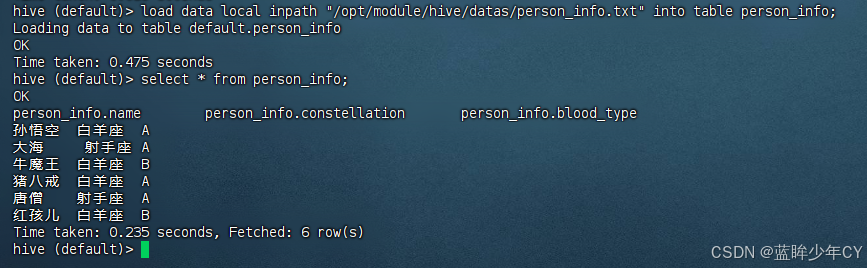
person_info.txt
孙悟空 白羊座 A
大海 射手座 A
牛魔王 白羊座 B
猪八戒 白羊座 A
唐僧 射手座 A
红孩儿 白羊座 B
c、加载数据
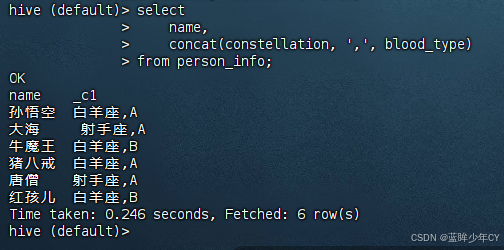
d、把星座和血型用自定义字符连接起来
select
name,
concat(constellation, ',', blood_type)
from person_info;
4)concat_ws()函数
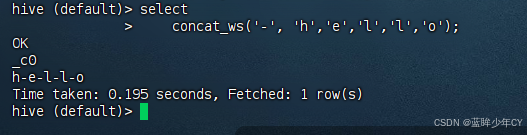
CONCAT_WS(separator, str1, str2,...):它是一个特殊形式的 CONCAT()。第一个参数连接分隔符。分隔符可以是与剩余参数一样的字符串。如果分隔符是 NULL,返回值也将 为 NULL。这个函数会跳过分隔符参数后的任何 NULL 和空字符串。
注意: CONCAT_WS 必须是字符串或者数组
select concat_ws('-', 'h','e','l','l','o');
5)collect_set()函数
COLLECT_SET(col):函数只接受基本数据类型,它的主要作用是将某字段的值进行去重 汇总,产生Array类型字段。
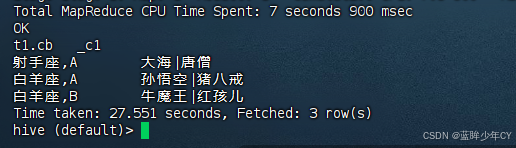
例如:把星座和血型一样的人归类到一起
select
t1.cb,
concat_ws('|', collect_set(t1.name))
from (
select
name,
concat(constellation, ',', blood_type) cb
from person_info
) t1
group by t1.cb;
6)explode()函数
EXPLODE(col):将 hive 一列中复杂的Array或者 Map结构拆分成多行。
7)lateral view
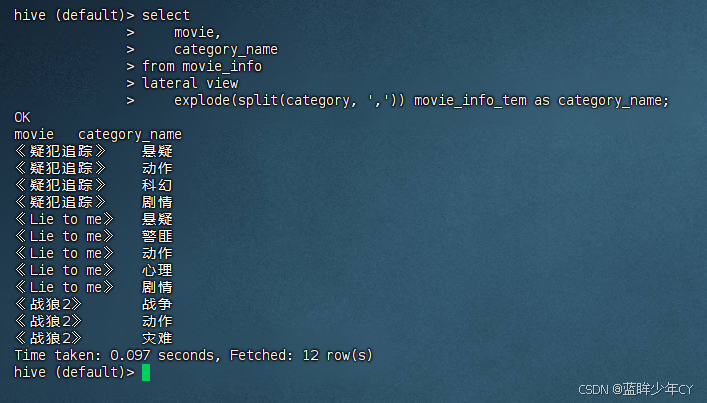
LATERAL VIEW 用法:用于和split, explode 等 UDTF 一起使用,它能够将一列数据拆成多行数据,在此基础上可以对拆分后的数据进行聚合。
案例:
a、创建表
create table movie_info(
movie string,
category string)
row format delimited fields terminated by "\t";
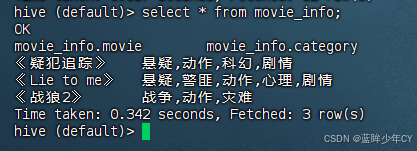
b、创建数据
movie_info.txt
《疑犯追踪》 悬疑,动作,科幻,剧情
《Lie to me》 悬疑,警匪,动作,心理,剧情
《战狼2》 战争,动作,灾难
c、加载数据
load data local inpath "/opt/module/hive/datas/movie.txt" into table movie_info;
d、将电影分类中的数组数据展开
select
movie,
category_name
from movie_info
lateral view
explode(split(category, ',')) movie_info_tem as category_name;
2、窗口函数(重点)
(1)函数说明
|--------------------------|---------------------------------------------------------------------|
| 函数 | 说明 |
| OVER | 指定分析函数工作的数据窗口大小,这个数据窗口大小可能会随着行的变而变化 |
| CURRENT ROW | 当前行 |
| n PRECEDING | 往前n行数据 |
| n FOLLOWING | 往后n行数据 |
| UNBOUNDED PRECEDING | 表示从前面的起点 |
| UNBOUNDED FOLLOWING | 表示到后面的终点 |
| LAG(col,n,default_val) | 往前第 n 行数据 |
| LEAD(col,n, default_val) | 往后第 n 行数据 |
| NTILE(n) | 把有序窗口的行分发到指定数据的组中,各个组有编号,编号从1开始,对于每一行,NTILE返回此行所属的组的编号。注意:n必须为int类型 |
(2)案例
a、创建表
create table business(
name string,
orderdate string,
cost int
) ROW FORMAT DELIMITED FIELDS TERMINATED BY ',';
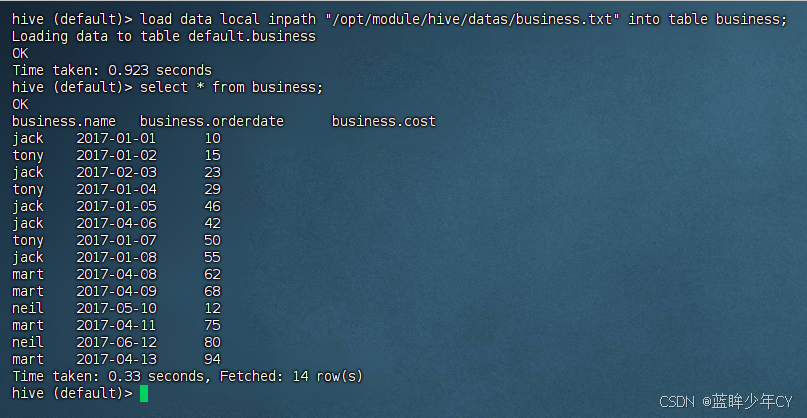
b、创建数据
business.txt
jack,2017-01-01,10
tony,2017-01-02,15
jack,2017-02-03,23
tony,2017-01-04,29
jack,2017-01-05,46
jack,2017-04-06,42
tony,2017-01-07,50
jack,2017-01-08,55
mart,2017-04-08,62
mart,2017-04-09,68
neil,2017-05-10,12
mart,2017-04-11,75
neil,2017-06-12,80
mart,2017-04-13,94
c、加载数据
load data local inpath "/opt/module/hive/datas/business.txt" into table business;
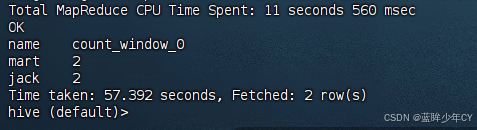
d、查询在2017年4月份购买过的顾客及总人数
select
name,
count(*) over()
from business
where
substring(orderdate, 0, 7) = '2017-04'
group by name;
e、总购买金额
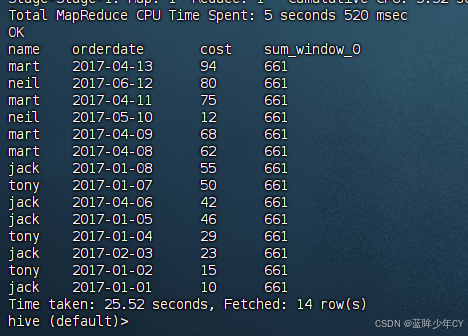
select
name,
orderdate,
cost,
sum(cost) over() --所有行相加
from business;
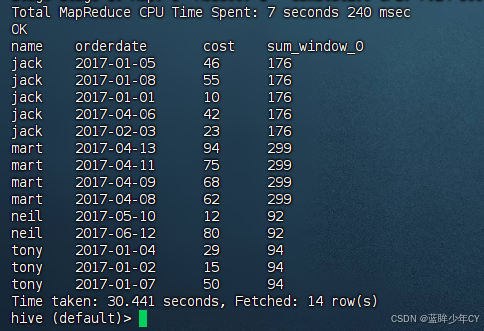
f、将每个顾客总购买金额
select
name,
orderdate,
cost,
sum(cost) over(partition by name) --按name分组,组内数据相加
from business;
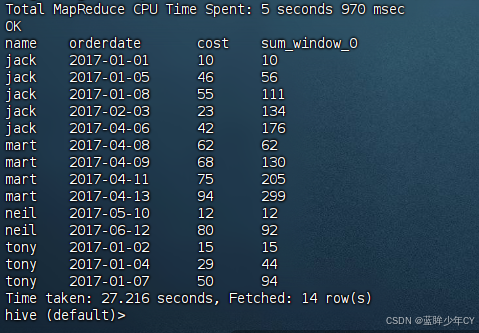
j、将每个顾客按时间排序后每天累加
select
name,
orderdate,
cost,
sum(cost) over(partition by name order by orderdate) --按name 分组,组内数据累加from business;
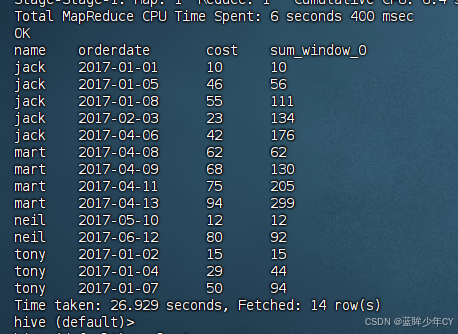
h、将每个顾客按时间排序后每天累加
rows必须跟在order by 子句之后,对排序的结果进行限制,使用固定的行数来限制分区中的数据行数量
select
name,
orderdate,
cost,
sum(cost) over(partition by name order by orderdate rows between unbounded preceding and current row) -- 由起点到 当前行的聚合from business;
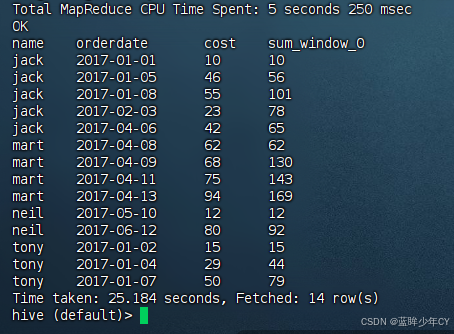
h、将每个顾客按时间排序后当前行和前面一行进行相加
select
name,
orderdate,
cost,
sum(cost) over(partition by name order by orderdate rows between 1 preceding and current row) --当前行和前面一行做聚合from business;
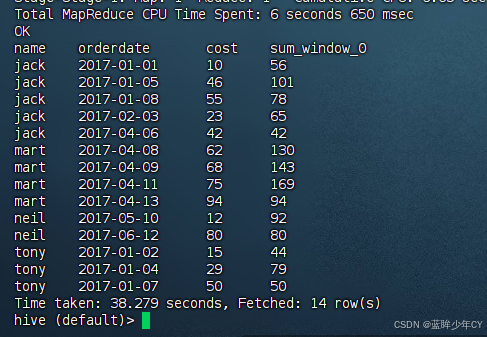
i、将每个顾客按时间排序后当前行和后面一行进行相加
select
name,
orderdate,
cost,
sum(cost) over(partition by name order by orderdate rows between current row and 1 following) --当前行和后面一行做聚合from business;
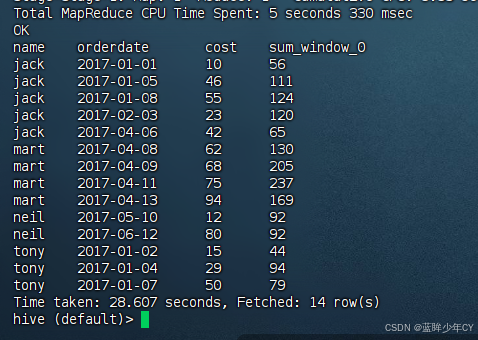
g、将每个顾客按时间排序后当前行与前一行和后面一行进行相加
select
name,
orderdate,
cost,
sum(cost) over(partition by name order by orderdate rows between 1 preceding and 1 following) --当前行和前边一行及后面一行from business;
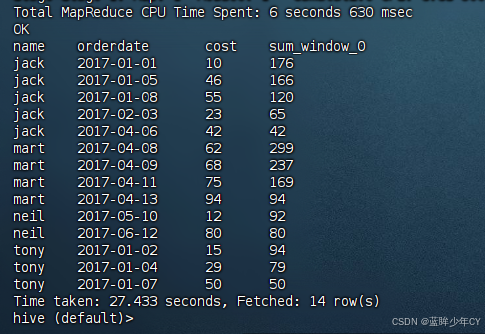
k、将每个顾客按时间排序后当前行与后面所有行进行相加
select
name,
orderdate,
cost,
sum(cost) over(partition by name order by orderdate rows between current row and unbounded following) --当前行及后面所有行from business;
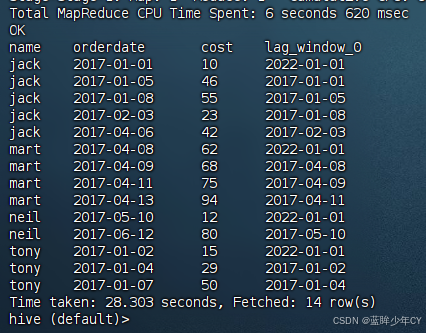
l、查看顾客上次的购买时间
select
name,
orderdate,
cost,
lag(orderdate, 1, '2022-01-01') over(partition by name order by orderdate) -- 向前1行
from business;
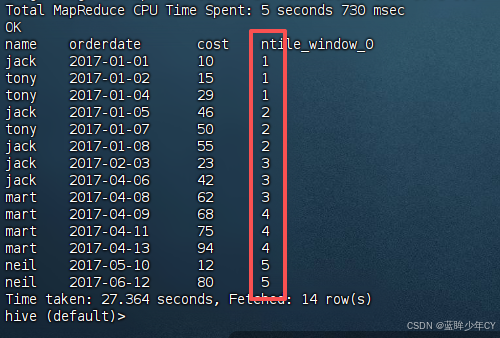
m、查询前20%时间的订单信息
第一步分组
select
name,
orderdate,
cost,
ntile(5) over(order by orderdate)
from business;
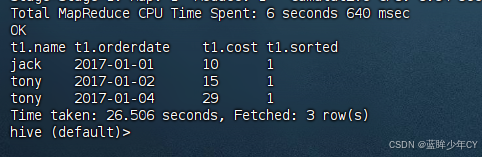
最终结果
select
*
from (
select
name,
orderdate,
cost,
ntile(5) over(order by orderdate) sorted
from business
) t1
where t1.sorted = 1;
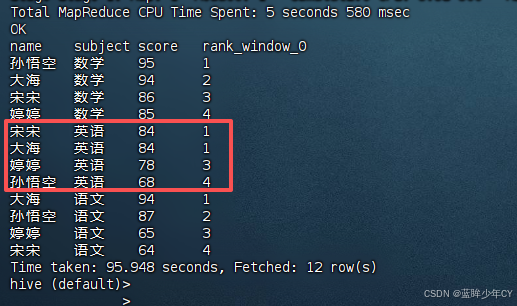
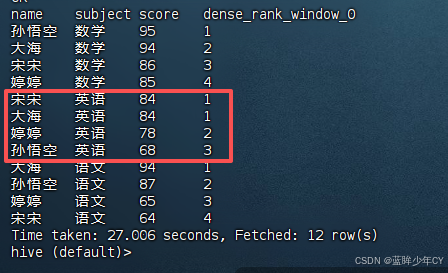
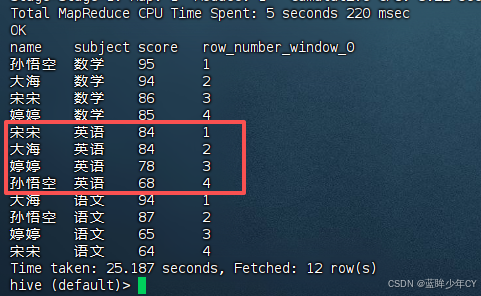
(3)Rank函数
1)函数说明
RANK() :排序相同时会重复,总数不会变
DENSE_RANK() :排序相同时会重复,总数会减少
ROW_NUMBER() :会根据顺序计算
2)案例
a、创建表
create table score(
name string,
subject string,
score int
)
row format delimited fields terminated by "\t";
b、创建数据
score.txt
孙悟空 语文 87
孙悟空 数学 95
孙悟空 英语 68
大海 语文 94
大海 数学 94
大海 英语 84
宋宋 语文 64
宋宋 数学 86
宋宋 英语 84
婷婷 语文 65
婷婷 数学 85
婷婷 英语 78
c、加载数据
load data local inpath '/opt/module/hive/datas/score.txt' into table score;
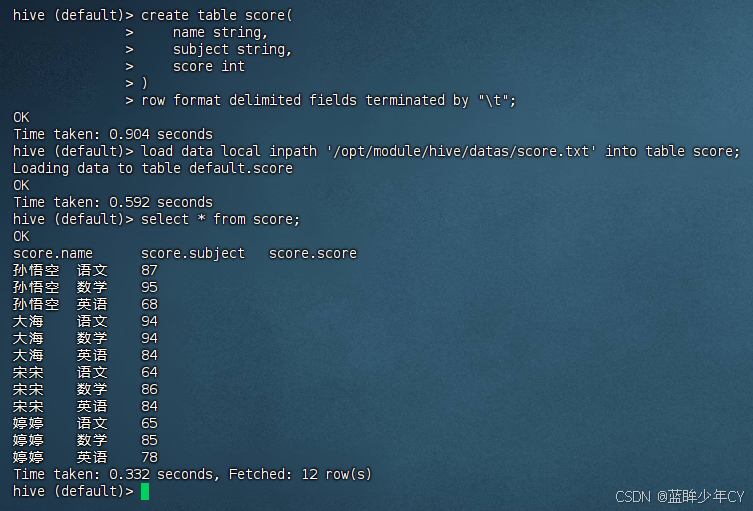
d、计算每门学科成绩排名。
select
name,
subject,
score,
rank() over(partition by subject order by score desc)
from score;
select
name,
subject,
score,
dense_rank() over(partition by subject order by score desc)
from score;
select
name,
subject,
score,
row_number() over(partition by subject order by score desc)
from score;
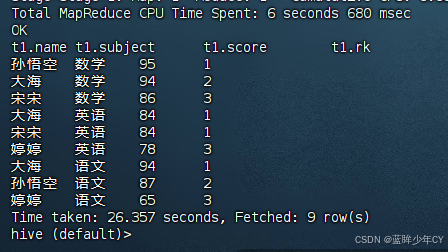
e、求出每门学科前三名的学生。
select
*
from (
select
name,
subject,
score,
rank() over(partition by subject order by score desc) rk
from score
) t1
where t1.rk <= 3;
3、其他常用函数
(1)日期函数
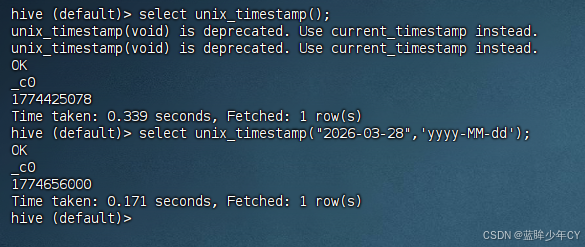
1)unix_timestamp
返回当前或指定时间的时间戳
select unix_timestamp();
select unix_timestamp("2026-03-28",'yyyy-MM-dd');
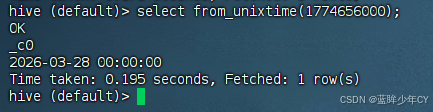
2)from_unixtime
将时间戳转为日期格式
select from_unixtime(1774656000);
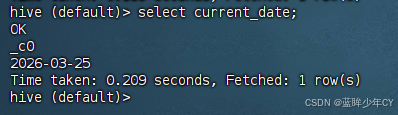
3)current_date
当前日期
select current_date;
4)current_timestamp
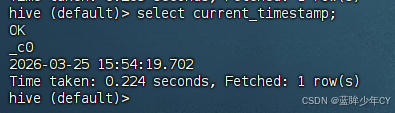
当前的日期加时间
select current_timestamp;
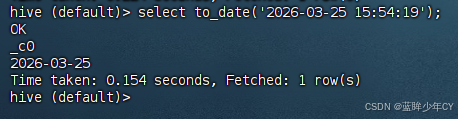
5)to_date
抽取日期部分
select to_date('2026-03-25 15:54:19');
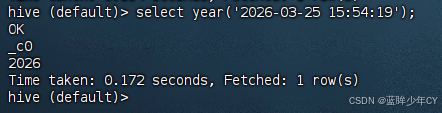
6)year
获取年
select year('2026-03-25 15:54:19');
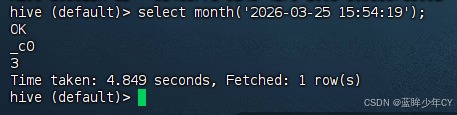
7)month
获取月
select month('2026-03-25 15:54:19');
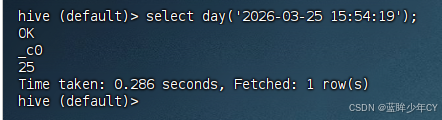
8、day
获取日
select day('2026-03-25 15:54:19');
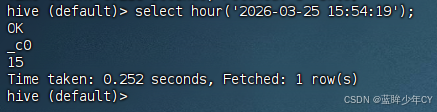
9)hour
获取时
select hour('2026-03-25 15:54:19');
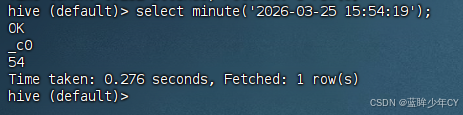
10)minute
获取分
select minute('2026-03-25 15:54:19');
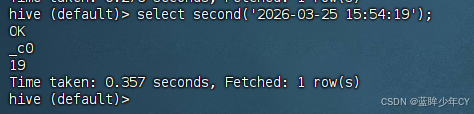
11)second
获取秒
select second('2026-03-25 15:54:19');
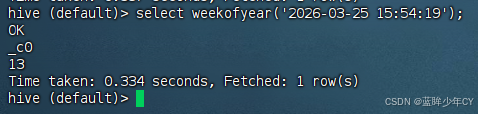
12)weekofyear
当前时间是一年中的第几周
select weekofyear('2026-03-25 15:54:19');
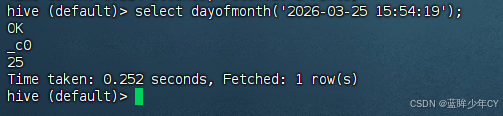
13)dayofmonth
当前时间是一个月中的第几天
select dayofmonth('2026-03-25 15:54:19');
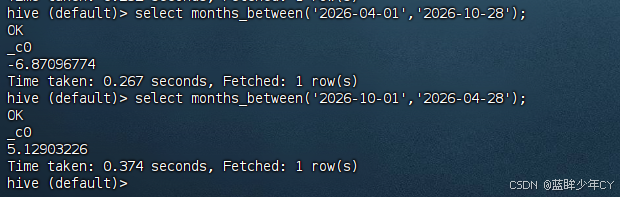
14)months_between
两个日期间的月份
select months_between('2026-10-01','2026-04-28');
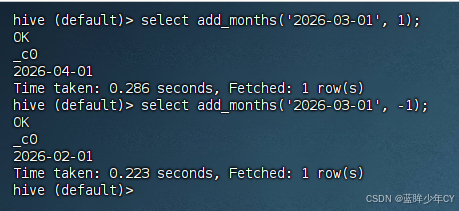
15)add_months
日期加减月
select add_months('2026-03-01', 1);
select add_months('2026-03-01', -1);
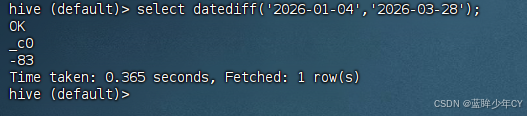
16)datediff
两个日期相差的天数
select datediff('2026-01-04','2026-03-28');
17)date_add
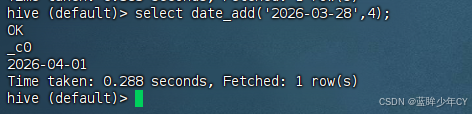
日期加天数
select date_add('2026-03-28',4);
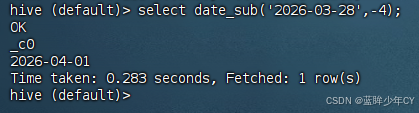
18)date_sub
日期减天数
select date_sub('2026-03-28',-4);
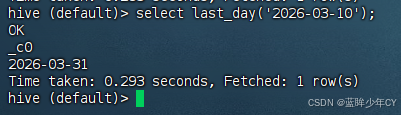
19)last_day
日期的当月的最后一天
select last_day('2026-03-10');
20)date_format()
格式化日期
select date_format('2026-10-28 12:12:12','yyyy/MM/dd HH:mm:ss');

(2)取整函数
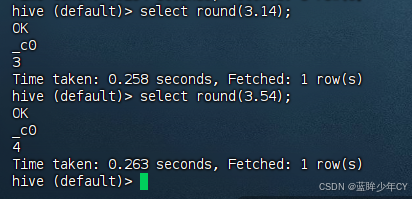
1)round
四舍五入
select round(3.14);
select round(3.54);
2)ceil
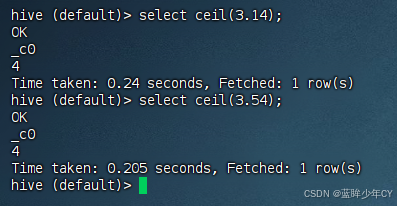
向上取整
select ceil(3.14);
select ceil(3.54);
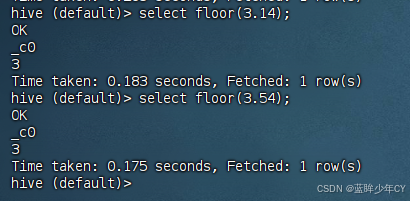
3)floor
向下取整
select floor(3.14);
select floor(3.54);
(3)字符串函数
1)upper
转大写
select upper('low');
2)lower
转小写
select lower('low');
3)length
长度
select length("hello");
4)trim
前后去空格
select trim(" hello");
5)lpad
向左补齐,到指定长度
select lpad('hello',9,'l');
6)rpad
向右补齐,到指定长度
select rpad('hello',9,'g');
7)regexp_replace
使用正则表达式匹配目标字符串,匹配成功后替换!
select regexp_replace('2025/10/25', '/', '-');
(4)集合操作
1)size
集合中元素的个数
select size(friends) from test3;
2)map_keys
返回map中的key
select map_keys(children) from test3;
3)map_values
返回map中的value
select map_values(children) from test3;
4)array_contains
判断array中是否包含某个元素
select array_contains(friends,'bingbing') from test3;
5)sort_array
将array中的元素排序
select sort_array(friends) from test3;
4、自定义函数
(1)概述
当Hive 提供的内置函数无法满足你的业务处理需要时,此时就可以考虑使用用户自定义 函数(UDF:user-defined function)。
自定义函数类别:
- UDF(User-Defined-Function) 一进一出
- UDAF(User-Defined Aggregation Function) 聚集函数,多进一出 类似于:count/max/min
- UDTF(User-Defined Table-Generating Functions) 一进多出 如lateral view explode()
官方文档地址  https://cwiki.apache.org/confluence/display/Hive/HivePlugins
(2)编程步骤
1)继承Hive提供的类 org.apache.hadoop.hive.ql.udf.generic.GenericUDF org.apache.hadoop.hive.ql.udf.generic.GenericUDTF;
2)实现类中的抽象方法
3)在hive的命令行窗口创建函数添加jar
add jar linux_jar_path
创建function
create temporary function dbname.function_name AS class_name;
4)在hive的命令行窗口删除函数
drop temporary function if exists dbname.function_name;
(3)自定义UDF函数
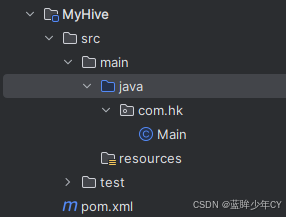
自定义一个计算字符串长度的UDF函数my_str_len()
1)创建工程
2)添加依赖
XML
    <dependencies>
        <dependency>
            <groupId>org.apache.hive</groupId>
            <artifactId>hive-exec</artifactId>
            <version>3.1.2</version>
        </dependency>
    </dependencies>
3)创建类继承GenericUDF
java
package com.hk;

import org.apache.hadoop.hive.ql.exec.UDFArgumentException;
import org.apache.hadoop.hive.ql.exec.UDFArgumentLengthException;
import org.apache.hadoop.hive.ql.metadata.HiveException;
import org.apache.hadoop.hive.ql.udf.generic.GenericUDF;
import org.apache.hadoop.hive.serde2.objectinspector.ObjectInspector;
import org.apache.hadoop.hive.serde2.objectinspector.primitive.PrimitiveObjectInspectorFactory;

public class MyStringLength extends GenericUDF {
    // 初始化方法
    @Override
    public ObjectInspector initialize(ObjectInspector[] objectInspectors) throws UDFArgumentException {
        // 判断输入参数的个数
        if(objectInspectors.length != 1) {
            throw new UDFArgumentLengthException("参数个数只能为1!");
        }
        //函数本身返回值为int,需要返回int类型的鉴别器对象
        return PrimitiveObjectInspectorFactory.javaIntObjectInspector;
    }

    //  函数的逻辑处理
    @Override
    public Object evaluate(DeferredObject[] deferredObjects) throws HiveException {
        if(deferredObjects[0].get() == null){
            return 0;
        }

        return deferredObjects[0].get().toString().length();
    }

    @Override
    public String getDisplayString(String[] strings) {
        return "";
    }
}
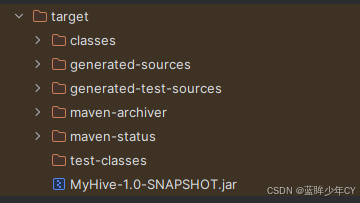
4)打包
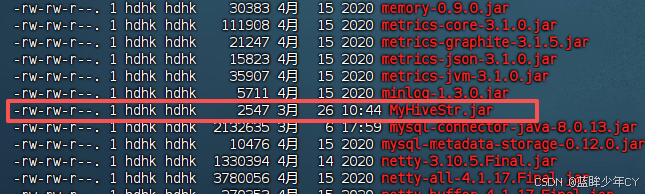
5)上传jar包并添加到hive的lib目录下
6)将jar包添加到hive的classpath
add jar /opt/module/hive/lib/MyHiveStr.jar;

7)创建临时函数与开发好的java class关联
create temporary function mystrlen as "com.hk.MyStringLength";

8)测试
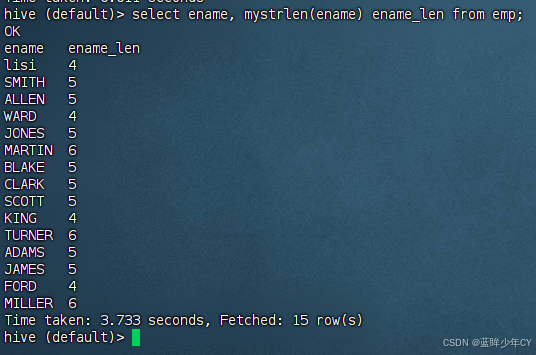
select ename, mystrlen(ename) ename_len from emp;
(4)自定义UDTF函数
自定义一个UDTF,将一个任意分割符的字符串切割成独立的单词
1)自定义类继承GenericUDTF
java
package com.hk;

import org.apache.hadoop.hive.ql.exec.UDFArgumentException;
import org.apache.hadoop.hive.ql.metadata.HiveException;
import org.apache.hadoop.hive.ql.udf.generic.GenericUDTF;
import org.apache.hadoop.hive.serde2.objectinspector.ObjectInspector;
import org.apache.hadoop.hive.serde2.objectinspector.ObjectInspectorFactory;
import org.apache.hadoop.hive.serde2.objectinspector.StructObjectInspector;
import org.apache.hadoop.hive.serde2.objectinspector.primitive.PrimitiveObjectInspectorFactory;

import java.util.ArrayList;
import java.util.List;

public class MyUDTF extends GenericUDTF {

    private ArrayList<String> outList = new ArrayList<>();

    // 初始化操作
    @Override
    public StructObjectInspector initialize(StructObjectInspector argOIs) throws UDFArgumentException {
        //1.定义输出数据的列名和类型
        List<String> fieldNames = new ArrayList<>();
        List<ObjectInspector> fieldOIs = new ArrayList<>();

        //2.添加输出数据的列名和类型
        fieldNames.add("_word_");
        fieldOIs.add(PrimitiveObjectInspectorFactory.javaStringObjectInspector);
        return ObjectInspectorFactory.getStandardStructObjectInspector(fieldNames, fieldOIs);
    }

    @Override
    public void process(Object[] objects) throws HiveException {
        // 获取要处理的字符串
        String arg = objects[0].toString();
        // 获取分隔符
        String splitKey = objects[1].toString();

        String[] split = arg.split(splitKey);

        for (String s : split) {
            //集合为复用的,首先清空集合
            outList.clear();

            //将每一个单词添加至集合
            outList.add(s);

            // 将集合内容写出
            forward(outList);
        }
    }

    @Override
    public void close() throws HiveException {

    }
}
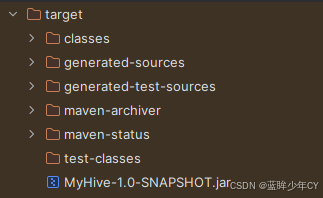
2)打包
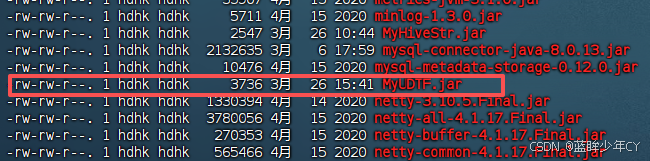
3)上传jar包并添加到hive的lib目录下
4)将jar包添加到hive的classpath
add jar /opt/module/hive/lib/MyUDTF.jar;

5)创建临时函数与开发好的java class关联
create temporary function myudtf as "com.hk.MyUDTF";

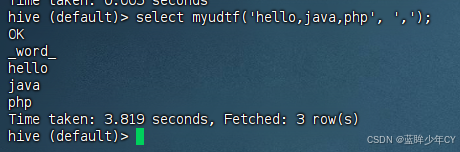
8)测试
select myudtf('hello,java,php', ',');
二、压缩与存储
1、Hadoop压缩配置
(1)MR支持的压缩编码
|---------|---------|----------|-------|
| 压缩格式 | 算法 | 文件扩展名 | 是否可切分 |
| DEFLATE | DEFLATE | .deflate | 否 |
| Gzip | DEFLATE | .gz | 否 |
| bzip2 | bzip2 | .bz2 | 是 |
| LZO | LZO | .lzo | 是 |
| Snappy | Snappy | .snappy | 否 |
对应的编解码器
|---------|--------------------------------------------|
| 压缩格式 | 对应的编码/解码器 |
| DEFLATE | org.apache.hadoop.io.compress.DefaultCodec |
| Gzip | org.apache.hadoop.io.compress.GzipCodec |
| bzip2 | org.apache.hadoop.io.compress.BZip2Codec |
| LZO | com.hadoop.compression.lzo.LzopCodec |
| Snappy | org.apache.hadoop.io.compress.SnappyCodec |
(2)压缩参数配置
|--------------------------------------------------|-----------------------------------------------------------------------------------------------------------------------------------------------------------------------|------------|-----------------------------------|
| 参数 | 默认值 | 阶段 | 阶段 |
| io.compression.codecs (在core-site.xml 中配置) | org.apache.hadoop.io.compress.DefaultCodec, org.apache.hadoop.io.compress.GzipCodec, org.apache.hadoop.io.compress.BZip2Codec, org.apache.hadoop.io.compress.Lz4Codec | 输入压缩 | Hadoop 使用文件扩展名判断是否支持某种编解码器 |
| mapreduce.map.output.compress | false | mapper 输出 | 这个参数设为true启 用压缩 |
| mapreduce.map.output.com press.codec | org.apache.hadoop.io.compress.DefaultCodec | mapper 输出 | 使用LZO、LZ4或 snappy 编解码器在此 阶段压缩数据 |
| mapreduce.output.fileoutputformat.compress | false | reducer 输出 | 这个参数设为true启用压缩 |
| mapreduce.output.fileoutputformat.compress.codec | org.apache.hadoop.io.compress.DefaultCodec | reducer 输出 | 使用标准工具或者编解码器,如gzip和bzip2 |
| mapreduce.output.fileoutputformat.compress.type | RECORD | reducer 输出 | SequenceFile 输出使用的压缩类型:NONE和BLOCK |
2、开启 Map输出阶段压缩(MR引擎)
开启map输出阶段压缩可以减少job中map和Reduce task间数据传输量。
(1)开启hive中间传输数据压缩功能
set hive.exec.compress.intermediate=true;
默认值为 false

(2)开启mapreduce中map输出压缩功能
set mapreduce.map.output.compress=true;
默认值为 fasle

(3)设置mapreduce中map输出数据的压缩方式
set mapreduce.map.output.compress.codec=org.apache.hadoop.io.compress.SnappyCodec;
默认值为:org.apache.hadoop.io.compress.DefaultCodec

(4)执行查询语句
select count(ename) name from emp;
查看history日志发现压缩格式为Snappy
3、开启 Reduce 输出阶段压缩
当 Hive 将输出写入到表中时,输出内容同样可以进行压缩。属性 hive.exec.compress.output控制着这个功能,默认值为 false 就是非压缩的纯文本文件。可以通过设置这个值为 true,来开启输出结果压缩功能。
(1)开启hive最终输出数据压缩功能
set hive.exec.compress.output=true;
(2)开启mapreduce最终输出数据压缩
set mapreduce.output.fileoutputformat.compress=true;
(3)设置mapreduce最终数据输出压缩方式
set mapreduce.output.fileoutputformat.compress.codec = org.apache.hadoop.io.compress.SnappyCodec;
(4)设置mapreduce最终数据输出压缩为块压缩
set mapreduce.output.fileoutputformat.compress.type=BLOCK;
(5)测试一下输出结果是否是压缩文件
insert overwrite local directory '/opt/module/hive/datas/distribute-result'
select * from emp distribute by deptno sort by empno desc;


4、 文件存储格式
Hive 支持的存储数据的格式主要有:TEXTFILE 、SEQUENCEFILE、ORC、PARQUET。
- TEXTFILE 和 SEQUENCEFILE 的存储格式都是基于行存储的;
- ORC 和PARQUET是基于列式存储的。
(1)TextFile 格式
默认格式,数据不做压缩,磁盘开销大,数据解析开销大。可结合Gzip、Bzip2使用, 但使用Gzip这种方式,hive不会对数据进行切分,从而无法对数据进行并行操作。
测试:
1)创建表,存储数据格式为TEXTFILE
create table log_text (
track_time string,
url string,
session_id string,
referer string,
ip string,
end_user_id string,
city_id string
)
row format delimited fields terminated by '\t'
stored as textfile;
2)加载数据
load data local inpath '/opt/module/hive/datas/log.data' into table log_text;
3)查看表中数据大小
dfs -du -h /user/hive/warehouse/log_text;


(2)Orc 格式
Orc (Optimized Row Columnar)是 Hive 0.11 版里引入的新的存储格式。每个Orc文件由1个或多个stripe组成,每个stripe一般为HDFS 的块大小,每一个stripe包含多条记录,这些记录按照列进行独立存储,对应到Parquet 中的row group 的概念。
每个Stripe里有三部分组成,分别是Index Data,Row Data,Stripe Footer:
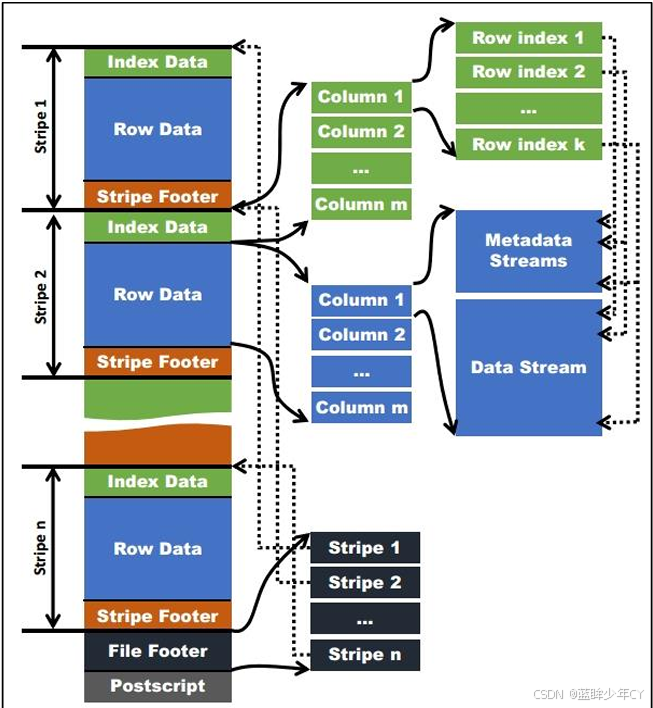
1)Index Data:一个轻量级的index,默认是每隔1W行做一个索引。这里做的索引只是记录某行的各字段在Row Data中的offset。
2)Row Data:存的是具体的数据,先取部分行,然后对这些行按列进行存储。对每个列进行了编码,分成多个Stream来存储。
3)Stripe Footer:存的是各个Stream的类型,长度等信息。
每个文件有一个File Footer,这里面存的是每个Stripe的行数,每个Column的数据类型信息等;每个文件的尾部是一个PostScript,这里面记录了整个文件的压缩类型以及 FileFooter的长度信息等。在读取文件时,会seek到文件尾部读PostScript,从里面解析到 File Footer长度,再读FileFooter,从里面解析到各个Stripe信息,再读各个Stripe,即从后 往前读。
测试:
1)创建表,存储数据格式为ORC
create table log_orc(
track_time string,
url string,
session_id string,
referer string,
ip string,
end_user_id string,
city_id string
)
row format delimited fields terminated by '\t'
stored as orc
tblproperties("orc.compress"="NONE"); -- 设置orc存储不使用压缩
2)加载数据
insert into table log_orc select * from log_text;
3)查看表中数据大小
dfs -du -h /user/hive/warehouse/log_orc;


(3)Parquet 格式
Parquet 文件是以二进制方式存储的,所以是不可以直接读取的,文件中包括该文件的数据和元数据,因此Parquet格式文件是自解析的。
1)行组(Row Group):每一个行组包含一定的行数,在一个 HDFS 文件中至少存储一 个行组,类似于orc的stripe的概念。
2)列块(Column Chunk):在一个行组中每一列保存在一个列块中,行组中的所有列连续的存储在这个行组文件中。一个列块中的值都是相同类型的,不同的列块可能使用不同的算法进行压缩。
3)页(Page):每一个列块划分为多个页,一个页是最小的编码的单位,在同一个列块的不同页可能使用不同的编码方式。
通常情况下,在存储Parquet数据的时候会按照Block大小设置行组的大小,由于一般 情况下每一个Mapper 任务处理数据的最小单位是一个 Block,这样可以把每一个行组由一 个Mapper任务处理,增大任务执行并行度。Parquet文件的格式。
测试:
1)创建表,存储数据格式为parquet
create table log_parquet(
track_time string,
url string,
session_id string,
referer string,
ip string,
end_user_id string,
city_id string
)
row format delimited fields terminated by '\t'
stored as parquet;
2)加载数据
insert into table log_parquet select * from log_text;
3)查看表中数据大小
dfs -du -h /user/hive/warehouse/log_parquet/;


存储文件的对比总结: ORC > Parquet > textFile
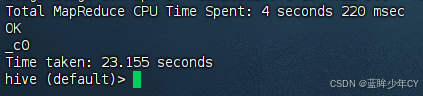
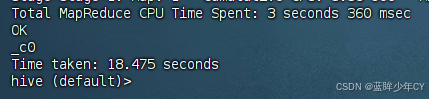
存储文件的查询速度测试:
(1)TextFile
insert overwrite local directory '/opt/module/hive/datas/log_text'
select substring(url,1,4) from log_text;
(2)ORC
insert overwrite local directory '/opt/module/hive/datas/log_orc'
select substring(url,1,4) from log_orc;
(3)Parquet
insert overwrite local directory '/opt/module/hive/datas/log_parquet'
select substring(url,1,4) from log_parquet;
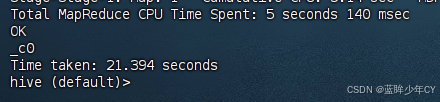
查询速度总结:查询速度相近。
5、存储与压缩结合
(1)ZLIB压缩的ORC存储
1)创建表
create table log_orc_zlib(
track_time string,
url string,
session_id string,
referer string,
ip string,
end_user_id string,
city_id string
)
row format delimited fields terminated by '\t'
stored as orc
tblproperties("orc.compress"="ZLIB");
2)插入数据
insert into log_orc_zlib select * from log_text;
(3)查看数据
dfs -du -h /user/hive/warehouse/log_orc_zlib;


(2)SNAPPY压缩的ORC存储
1)创建表
create table log_orc_snappy(
track_time string,
url string,
session_id string,
referer string,
ip string,
end_user_id string,
city_id string
)
row format delimited fields terminated by '\t'
stored as orc
tblproperties("orc.compress"="SNAPPY");
2)插入数据
insert into log_orc_snappy select * from log_text;
3)查看数据
dfs -du -h /user/hive/warehouse/log_orc_snappy;


ZLIB 比 Snappy 压缩的还小。原因是ZLIB采用的是deflate压缩算法。比snappy压缩的 压缩率高。
(3)SNAPPY压缩的parquet存储
1)创建表
create table log_parquet_snappy(
track_time string,
url string,
session_id string,
referer string,
ip string,
end_user_id string,
city_id string
)
row format delimited fields terminated by '\t'
stored as parquet
tblproperties("parquet.compression"="SNAPPY");
2)插入数据
insert into log_parquet_snappy select * from log_text;
3)查看数据
dfs -du -h /user/hive/warehouse/log_parquet_snappy/;


总结 hive表的数据存储格式一般选择:orc或parquet。压缩方式一 般选择snappy,lzo。
三、调优
1、执行计划(Explain)
(1)基本语法
EXPLAIN EXTENDED \| DEPENDENCY \| AUTHORIZATION query
(2)查询
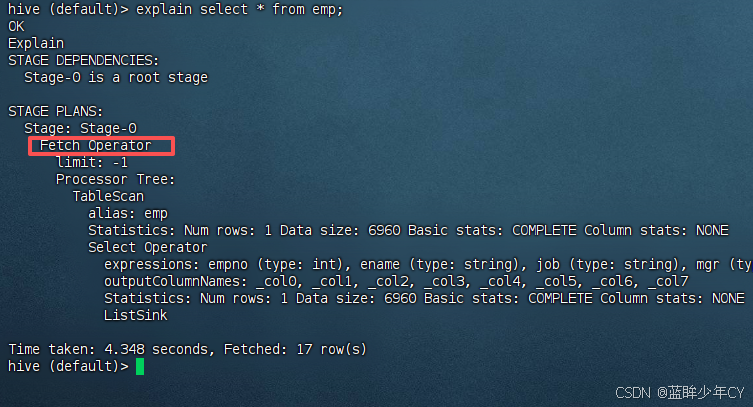
没有生成MR任务的
explain select * from emp;
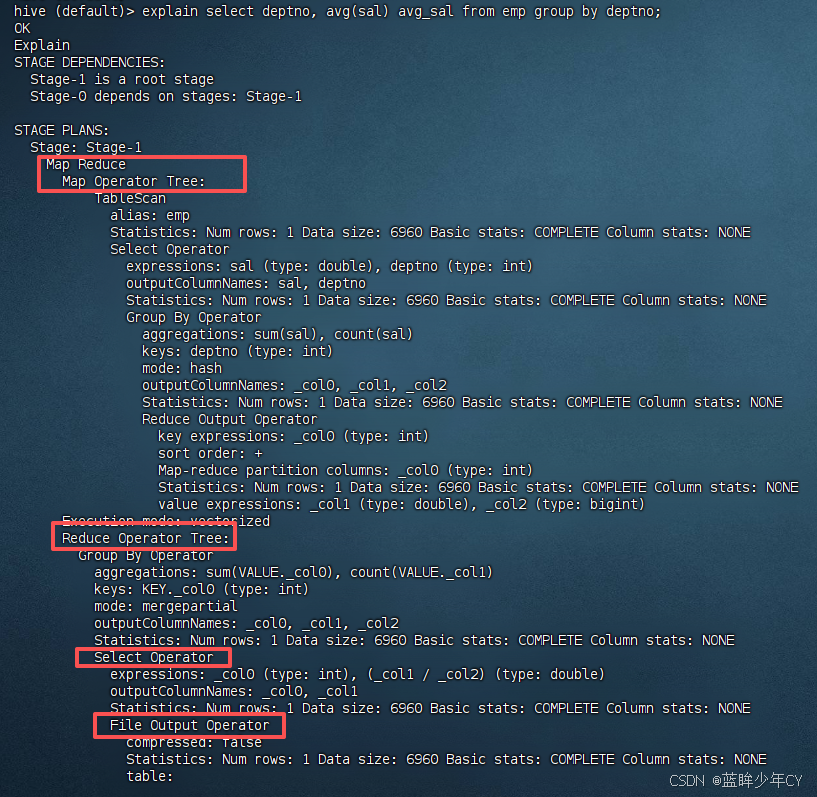
有生成MR任务的
explain select deptno, avg(sal) avg_sal from emp group by deptno;
(3)查看详细执行计划
explain extended select * from emp;
explain extended select deptno, avg(sal) avg_sal from emp group by deptno;
2、Fetch抓取
Fetch抓取是指,Hive中对某些情况的查询可以不必使用MapReduce计算。例如:SELECT * FROM employees; 在这种情况下,Hive可以简单地读取employee对应的存储目录下的文件, 然后输出查询结果到控制台。
在hive-default.xml.template 文件中hive.fetch.task.conversion默认是more,老版本hive 默认是minimal,该属性修改为more以后,在全局查找、字段查找、limit查找等都不走mapreduce。
案例:
(1)把 hive.fetch.task.conversion 设置成 none,然后执行查询语句,都会执行mapreduce 程序。
set hive.fetch.task.conversion=none;
select * from emp;
select ename from emp;
select ename from emp limit 3;
正常情况 select * from emp; 是不走MR任务的,设置之后就会走MR任务

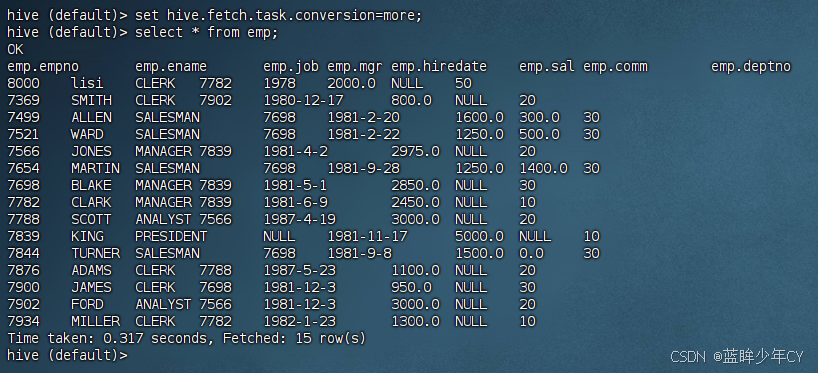
(2)把hive.fetch.task.conversion 设置成 more,然后执行查询语句,如下查询方式都不会执行mapreduce程序。
set hive.fetch.task.conversion=more;
select * from emp;
select ename from emp;
select ename from emp limit 3;
3、本地模式
大多数的Hadoop Job是需要Hadoop提供完整的可扩展性来处理大数据集的。不过,有时Hive 的输入数据量是非常小的。在这种情况下,为查询触发执行任务消耗的时间可能会比实际job的执行时间要多的多。对于大多数这种情况,Hive可以通过本地模式在单台机器上处理所有的任务。对于小数据集,执行时间可以明显被缩短。
通过设置hive.exec.mode.local.auto 的值为 true,来让 Hive 在适当的时候自动 启动这个优化。
// 开启本地mr
set hive.exec.mode.local.auto=true;
//设置local mr的最大输入数据量,当输入数据量小于这个值时采用local mr的方式,默认为134217728,即128M
set hive.exec.mode.local.auto.inputbytes.max=50000000;
//设置local mr的最大输入文件个数,当输入文件个数小于这个值时采用local mr的方式,默认为4
set hive.exec.mode.local.auto.input.files.max=10;
案例:
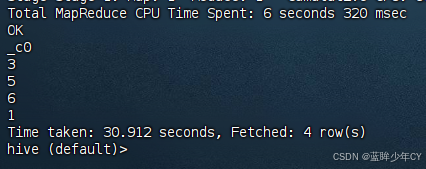
1)关闭本地模式(默认是关闭的),并执行查询语句查看结果
set hive.exec.mode.local.auto=false;
select count(*) from emp group by deptno;
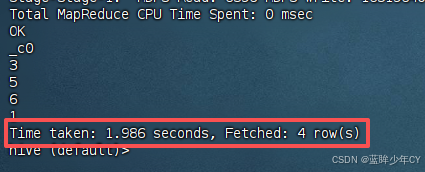
2)开启本地模式,并执行查询语句查看结果
set hive.exec.mode.local.auto=true;
select count(*) from emp group by deptno;
4、表的优化
(1)小表大表Join(MapJOIN)
将key相对分散,并且数据量小的表放在join的左边,可以使用map join让小的维度表先进内存。在map端完成join。
实测发现:新版的hive已经对小表JOIN大表和大表JOIN小表进行了优化。小表放在左边和右边已经没有区别。
**测试:**测试大表JOIN小表和小表JOIN大表的效率
1)开启MapJoin参数设置
// 设置自动选择Mapjoin,默认为 true
set hive.auto.convert.join = true;
// 大表小表的阈值设置(默认25M以下认为是小表)
set hive.mapjoin.smalltable.filesize = 25000000;
2)创建表
// 创建大表
create table bigtable(
id bigint,
t bigint,
uid string,
keyword string,
url_rank int,
click_num int,
click_url string
) row format delimited fields terminated by '\t';
// 创建小表
create table smalltable(
id bigint,
t bigint,
uid string,
keyword string,
url_rank int,
click_num int,
click_url string
)
row format delimited fields terminated by '\t';
// 创建join后表的语句
create table jointable(
id bigint,
t bigint,
uid string,
keyword string,
url_rank int,
click_num int,
click_url string
)
row format delimited fields terminated by '\t';
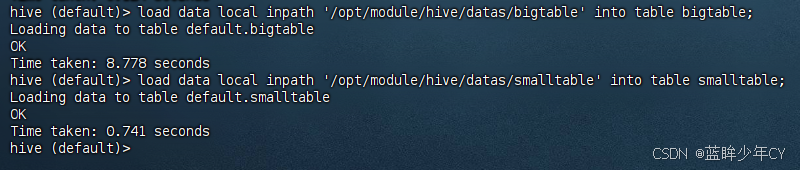
3)分别向大表和小表中导入数据
load data local inpath '/opt/module/hive/datas/bigtable' into table bigtable;
load data local inpath '/opt/module/hive/datas/smalltable' into table smalltable;
4)小表JOIN大表语句
insert overwrite table jointable
select b.id, b.t, b.uid, b.keyword, b.url_rank, b.click_num, b.click_url
from smalltable s

5)大表JOIN小表语句
insert overwrite table jointable
select b.id, b.t, b.uid, b.keyword, b.url_rank, b.click_num, b.click_url
from bigtable b

(2)大表Join大表
1)空KEY过滤
有时join超时是因为某些key对应的数据太多,而相同key对应的数据都会发送到相同的reducer上,从而导致内存不够。此时应该仔细分析这些异常的key,很多情况下, 这些key对应的数据是异常数据,需要在SQL语句中进行过滤。
案例:key对应的字段为空
a、配置历史服务器
配置hadoop的 mapred-site.xml
XML
<property>
    <name>mapreduce.jobhistory.address</name>
    <value>hadoop102:10020</value>
</property>

<property>
    <name>mapreduce.jobhistory.webapp.address</name>
    <value>hadoop102:19888</value>
</property>
b、启动历史服务器
sbin/mr-jobhistory-daemon.sh start historyserver
c、查看jobhistory
http://hadoop102:19888/jobhistory
d、创建表
create table nullidtable(
id bigint,
t bigint,
uid string,
keyword string,
url_rank int,
click_num int,
click_url string
)
row format delimited fields terminated by '\t';
e、加载数据
load data local inpath '/opt/module/hive/datas/nullid' into table nullidtable;
f、测试不过滤空id
insert overwrite table jointable
select
n.*
from nullidtable n
g、测试过滤空id
insert overwrite table jointable
select
n.*
from (
select
*
from nullidtable
where id is not null
) n
2)空key转换
有时虽然某个key为空对应的数据很多,但是相应的数据不是异常数据,必须要包含在 join 的结果中,此时可以在表a中key为空的字段赋一个随机的值,使得数据随机均匀地 分不到不同的reducer上。
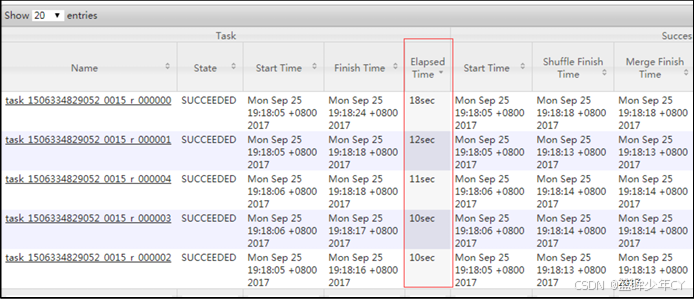
案例1:不随机分布空null值
a、设置5个reduce个数
set mapreduce.job.reduces = 5;
b、JOIN两张表
insert overwrite table jointable
select
n.*
from nullidtable n
结果可以看出来,出现了数据倾斜,某些reducer的资源消耗远大于其他reducer。
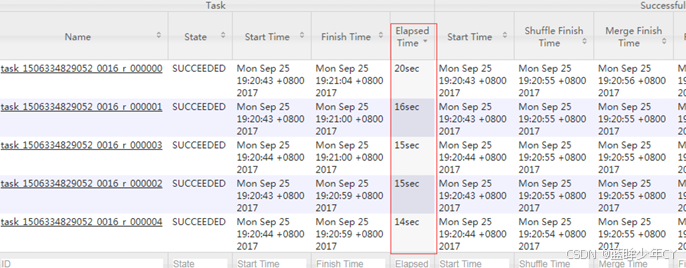
案例2:随机分布空null值
a、设置5个reduce个数
set mapreduce.job.reduces = 5;
b、JOIN两张表
insert overwrite table jointable
select
n.*
from nullidtable n
结果可以看出来,消除了数据倾斜,负载均衡reducer的资源消耗
3)SMB(Sort Merge Bucket join)
测试1:直接大表join大表
a、创建第二张大表
create table bigtable2(
id bigint,
t bigint,
uid string,
keyword string,
url_rank int,
click_num int,
click_url string)
row format delimited fields terminated by '\t';
// 加载数据
load data local inpath '/opt/module/hive/datas/bigtable' into table bigtable2;
b、大表直接JOIN
insert overwrite table jointable
select b.id, b.t, b.uid, b.keyword, b.url_rank, b.click_num, b.click_url
from bigtable s
时间特别长

测试2:分桶表join
a、创建分通表1,桶的个数不要超过可用CPU的核数
create table bigtable_buck1(
id bigint,
t bigint,
uid string,
keyword string,
url_rank int,
click_num int,
click_url string
)
clustered by(id)
sorted by(id)
into 6 buckets
row format delimited fields terminated by '\t';
/ / 加载数据
load data local inpath '/opt/module/hive/datas/bigtable' into table bigtable_buck1;
b、创建分通表2,桶的个数不要超过可用CPU的核数
create table bigtable_buck2(
id bigint,
t bigint,
uid string,
keyword string,
url_rank int,
click_num int,
click_url string
)
clustered by(id)
sorted by(id)
into 6 buckets
row format delimited fields terminated by '\t';
/ / 加载数据
load data local inpath '/opt/module/hive/datas/bigtable' into table bigtable_buck2;
c、设置参数
set hive.optimize.bucketmapjoin = true;
set hive.optimize.bucketmapjoin.sortedmerge = true;
set hive.input.format=org.apache.hadoop.hive.ql.io.BucketizedHiveInputFormat;
d、测试
insert overwrite table jointable
select b.id, b.t, b.uid, b.keyword, b.url_rank, b.click_num, b.click_url
from bigtable_buck1 s
发现时间缩短了一半

(3)Group By
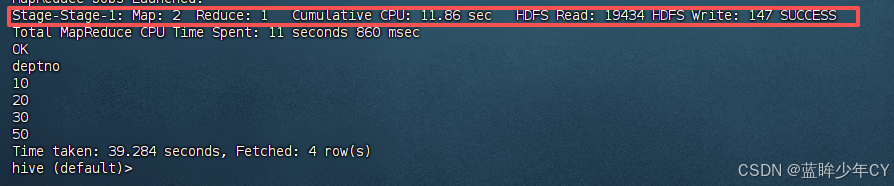
默认情况下,Map阶段同一Key数据分发给一个reduce,当一个key数据过大时就倾斜了。并不是所有的聚合操作都需要在Reduce端完成,很多聚合操作都可以先在Map端进行 部分聚合,最后在Reduce端得出最终结果。
开启Map端聚合参数设置
// 是否在Map端进行聚合,默认为True
set hive.map.aggr = true
// 在Map端进行聚合操作的条目数目
set hive.groupby.mapaggr.checkinterval = 100000
// 有数据倾斜的时候进行负载均衡(默认是false)
set hive.groupby.skewindata = true
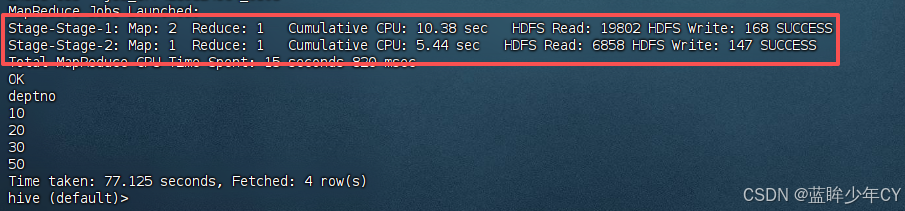
当选项设定为 true,生成的查询计划会有两个MR Job。第一个MR Job中,Map的输出结果会随机分布到Reduce中,每个Reduce做部分聚合操作,并输出结果,这样处理的结果是 相同的Group By Key有可能被分发到不同的Reduce中,从而达到负载均衡的目的;第二个MR Job 再根据预处理的数据结果按照Group By Key分布到Reduce中(这个过程可以保证相同的Group By Key 被分布到同一个Reduce中),最后完成最终的聚合操作。
优化前:
select deptno from emp group by deptno;
优化后:
set hive.groupby.skewindata = true;
select deptno from emp group by deptno;
(4)Count(Distinct)
去重统计:数据量大的情况下,由于 COUNT DISTINCT 操作需要用一个 Reduce Task 来完成,这一个 Reduce 需要处理的数据量太大,就会导致整个Job 很难完成, 一般COUNT DISTINCT 使用先 GROUP BY 再 COUNT 的方式替换,但是需要注意group by造成的数据倾斜问题.
案例:采用GROUP by去重id
1)创建一张大表
create table bigtable(
id bigint,
time bigint,
uid string,
keyword string,
url_rank int,
click_num int,
click_url string
)
row format delimited fields terminated by '\t';
2)加载数据
load data local inpath '/opt/module/hive/datas/bigtable' into table bigtable;
3)设置5个reduce个数
set mapreduce.job.reduces = 5;
4)执行去重id查询
select count(distinct id) from bigtable;

5)采用GROUP by去重id
select count(id) from (select id from bigtable group by id) a;
虽然会多用一个Job来完成,但在数据量大的情况下绝对是值得的。

(5) 笛卡尔积
尽量避免笛卡尔积,join的时候不加on条件,或者无效的on条件,Hive只能使用1个 reducer 来完成笛卡尔积。
5、合理设置Map及Reduce数
(1)复杂文件增加Map数
当input 的文件都很大,任务逻辑复杂,map执行非常慢的时候,可以考虑增加Map数,来使得每个map处理的数据量减少,从而提高任务的执行效率。
增加map的方法为:根据 computeSliteSize(Math.max(minSize,Math.min(maxSize,blocksize)))=blocksize=128M 公式, 调整maxSize 最大值。让maxSize最大值低于blocksize就可以增加map的个数。
案例:
1)直接查询
select count(*) from emp;
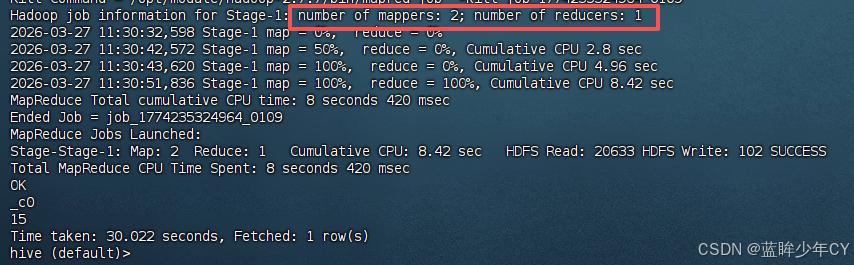
2)设置最大切片值为100个字节,再次查询
set mapreduce.input.fileinputformat.split.maxsize=100;
select count(*) from emp;
(2)小文件进行合并
1)在map执行前合并小文件,减少map数
- CombineHiveInputFormat具有对小文件进行合并的功能(系统默认的格式)。
- HiveInputFormat没有对小文件合并功能。
set hive.input.format= org.apache.hadoop.hive.ql.io.CombineHiveInputFormat;
2)在Map-Reduce 的任务结束合并小文件
// 在map-only 任务结束时合并小文件,默认true
SET hive.merge.mapfiles = true;
// 在map-reduce 任务结束时合并小文件,默认false
SET hive.merge.mapredfiles = true;
// 合并文件的大小,默认256M
SET hive.merge.size.per.task = 268435456;
// 当输出文件的平均大小 小于该值时,启动一个独立的map-reduce任务进行文件merge
SET hive.merge.smallfiles.avgsize = 16777216;
(3)合理设置 Reduce 数
1)调整reduce个数
方法一:
// 每个Reduce处理的数据量默认是256MB
hive.exec.reducers.bytes.per.reducer=256000000
// 每个任务最大的reduce数,默认为1009
hive.exec.reducers.max=1009
// 计算reducer数的公式
N=min(参数2,总输入数据量/参数1)
方法二:
在hadoop 的mapred-default.xml 文件中修改,设置每个job的Reduce个数
set mapreduce.job.reduces = 15;
2)注意
- 过多的启动和初始化reduce也会消耗时间和资源;
- 有多少个reduce,就会有多少个输出文件,如果生成了很多个小文件,那么这些小文件作为下一个任务的输入,则也会出现小文件过多的问题;
在设置reduce个数的时候也需要考虑这两个原则:处理大数据量利用合适的reduce数; 使单个reduce任务处理数据量大小要合适;
6、并行执行
Hive 会将一个查询转化成一个或者多个阶段。这样的阶段可以是MapReduce阶段、抽样阶段、合并阶段、limit阶段。或者Hive执行过程中可能需要的其他阶段。默认情况下, Hive 一次只会执行一个阶段。不过,某个特定的job可能包含众多的阶段,而这些阶段可能 并非完全互相依赖的,也就是说有些阶段是可以并行执行的,这样可能使得整个job的执行时间缩短。不过,如果有更多的阶段可以并行执行,那么job可能就越快完成。
通过设置参数hive.exec.parallel 值为 true,就可以开启并发执行。不过,在共享集群中, 需要注意下,如果job中并行阶段增多,那么集群利用率就会增加。
set hive.exec.parallel=true; //打开任务并行执行
set hive.exec.parallel.thread.number=16; //同一个sql 允许最大并行度,默认为 8
7、严格模式
Hive 可以通过设置防止一些危险操作:
(1)分区表不使用分区过滤
将hive.strict.checks.no.partition.filter 设置为 true时,对于分区表,除非 where 语句中含有分区字段过滤条件来限制范围,否则不允许执行。换句话说,就是不允许扫描所有分区。进行这个限制的原因是,通常分区表都拥有非常大的数据集,而且数据增加迅速。没有进行分区限制的查询可能会消耗巨大资源来处理这个表。
(2)使用order by没有limit过滤
将hive.strict.checks.orderby.no.limit 设置为 true时,对于使用了 order by 语句的查询,要求必须使用limit 语句。因为order by为了执行排序过程会将所有的结果数据分发到同一个 Reducer 中进行处理,强制要求增加这个LIMIT语句可以防止Reducer额外执行很长一 段时间。
(3)笛卡尔积
将hive.strict.checks.cartesian.product 设置为 true 时,会限制笛卡尔积的查询。
四、案例
(hive安装tez报错,案例效果后续补上....)
(1)创建表
(2)导入数据
(3)安装Tez引擎
1)解压文件
mkdir /opt/module/tez
tar -zxvf tez-0.10.1-SNAPSHOT-minimal.tar.gz -C /opt/module/tez/

2)上传tez依赖到HDFS
hadoop fs -mkdir /tez
hadoop fs -put /opt/software/tez-0.10.1-SNAPSHOT.tar.gz /tez


3)新建tez-site.xml
vim $HADOOP_HOME/etc/hadoop/tez-site.xml
XML
<?xml version="1.0" encoding="UTF-8"?>
<?xml-stylesheet type="text/xsl" href="configuration.xsl"?>
<configuration>
    <property>
        <name>tez.lib.uris</name>
        <value>${fs.defaultFS}/tez/tez-0.10.1-SNAPSHOT.tar.gz</value>
    </property>
    <property>
        <name>tez.use.cluster.hadoop-libs</name>
        <value>true</value>
    </property>
    <property>
        <name>tez.am.resource.memory.mb</name>
        <value>1024</value>
    </property>
    <property>
        <name>tez.am.resource.cpu.vcores</name>
        <value>1</value>
    </property>
    <property>
        <name>tez.container.max.java.heap.fraction</name>
        <value>0.4</value>
    </property>
    <property>
        <name>tez.task.resource.memory.mb</name>
        <value>1024</value>
    </property>
    <property>
        <name>tez.task.resource.cpu.vcores</name>
        <value>1</value>
    </property>
</configuration>
4)修改Hadoop环境变量
vim $HADOOP_HOME/etc/hadoop/shellprofile.d/tez.sh
XML
hadoop_add_profile tez
function _tez_hadoop_classpath
{
    hadoop_add_classpath "$HADOOP_HOME/etc/hadoop" after
    hadoop_add_classpath "/opt/module/tez/*" after
    hadoop_add_classpath "/opt/module/tez/lib/*" after
}
5)修改Hive的计算引擎
vim $HIVE_HOME/conf/hive-site.xml
添加
XML
<property>
    <name>hive.execution.engine</name>
    <value>tez</value>
</property>
<property>
    <name>hive.tez.container.size</name>
    <value>1024</value>
</property>
6)重启
重启hadoop