自带库:math,time,datetime.os,open,random
三方库:numpy,pandas
math库
python
import math

print(f"平方根{math.sqrt(16)}")
print(f"幂运算{math.pow(2,3)}")
print(f"圆周率{math.pi}")
print(f"向上取整{math.ceil(3.3)}")
print(f"向下取整{math.floor(3.3)}")
print(f"绝对值{math.fabs(-3.3)}")
print(f"对数{math.log(5)}")
print(f"正弦{math.sin(math.pi/2)}")
time:
python
import time

#获得当前时间戳
timestamp = time.time()
print(f"时间戳{timestamp}")


#获取当前的时间(将时间戳变得可读)
local_time = time.localtime(timestamp)
print(f"时间可读{time.strftime("%Y-%m-%d %H:%M:%S",local_time)}")


#获取结构化时间
print(time.localtime())
tm = time.localtime()
print(f"年{tm.tm_year},月{tm.tm_mon},日{tm.tm_mday}")
datatime:
python
from datetime import datetime,date,timedelta

#获取当前时间
now = datetime.now()
print(f"当前时间{now}")

#创建指定时间
dt = datetime(2024,1,1,1,00,00)
print(f"{dt}")

#将时间格式化
formatted = now.strftime("%Y-%m-%d %H:%M:%S")
print(f"{formatted}")

#日期时间计算
now1 = now + timedelta(days=7)
print(f"七天后{now1}")

#日期对象
now2 = date.today()
print(f"{now2}")
os:
python
import os

#获得当前目录
current_dir = os.getcwd()
print(f"当前目录{current_dir}")

#检查文件或目录是否存在
if os.path.exists("test.txt"):
  print("test.txt文件存在")

else:
  print("test.txt文件不存在")

#检查是否是文件
if os.path.isfile("test.txt"):
  print("test.txt是文件")

#检查是否是目录
if os.path.isdir("."):
  print("当前目录是文件夹")

# 列出目录中的文件和文件夹
files = os.listdir(".")
print("当前目录内容:",files[5]) #是显示前5个

# 获取文件大小
if os.path.exists("test.txt"):
  size = os.path.getsize("test.txt")
  print(f"{size}")

#路径操作:
files = os.path.join("fi","file.txt")
print(f"拼接后的路径{files}")

# 获取路径的目录名和文件名
dirname = os.path.dirname("/path/to/list.txt")
basename = os.path.basename("/path/to/list.txt")
print(f"目录名{dirname},文件名:{basename}")
random:
python
import random

#生成随机数
num = random.randint(1,100)
print(f"生成随机数(1,100){num}")

#生成随机数浮点数(0,1)
num1 = random.random()
print(f"生成随机浮点数{num1:.2f}")

#从序列中选择一份
fruits = ["苹果","香蕉","橙子"]
num2 = random.choice(fruits)
print(f"随机从序列中选择{num2}")

#从序列中选择多个(不重复)
num3 = random.sample(fruits,2)
print(f"选择多个{num3}")

#打乱列表
rand = [1,2,3,4,5,6]
random.shuffle(rand)
print(f"{rand}")

#生成指定范围内的随机整数
rand_range = random.randrange(0,10)
print(f"{rand_range}")
open:
python
with open("Student.txt","w",encoding="utf-8") as f:
  f.write("1\n")
  f.write("2\n")

print("写入完毕")

# 读取文件全部内容
with open("Student.txt","r",encoding="utf-8") as f:
  content = f.read()
  print("读取全部内容")
  print(content)

# 逐行读取
with open("Student.txt","r",encoding="utf-8") as f:
  for line in f:
    print(line.strip())

# 读取所有行到列表
with open("Student.txt","r",encoding="utf-8") as f:
  lines = f.readlines()
  print(f"{lines}")

# 追加模式
with open("Student.txt","a",encoding="utf-8") as f:
  f.write("追加内容")

print("OK")
pandas:
核心数据结构:
Series: 一维数组,类似列表
DataFrame:二维表格,类似Excel表格
python
try:

  import pandas as pd

  data = {
    "姓名":["张三","李四","王五","赵六"],
    "年龄":[20,19,21,20],
    "成绩":[85,90,88,92],
    "班级":["一班","二班","三班","四班"]
  }

  df = pd.DataFrame(data)
  print("创建的DataFrame")
  print(df)
  print(f"\nDataFrame形状,{df.shape}")  #{行数,列数}
  print(f"列名:{df.columns.tolist()}")

except ImportError:
  print("pandas未安装,请运行:pip install pandas")
读取csv文件:
python
try:
  import pandas as pd


  data = {
    "姓名":["张三","李四","王五","赵六"],
    "年龄":[20,19,21,20],
    "成绩":[85,90,88,92],
    "班级":["一班","二班","三班","四班"]
  }

  df = pd.DataFrame(data)
  df.to_csv("students.csv",index=True,encoding="utf-8")

  #读取csv文件
  df_read = pd.read_csv("students.csv",encoding="utf-8")
  print(df_read)

except ImportError:
  print("pandas未安装,请运行: pip install pandas")
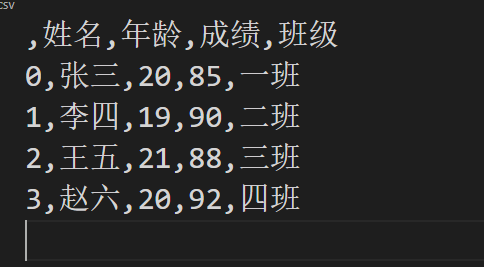
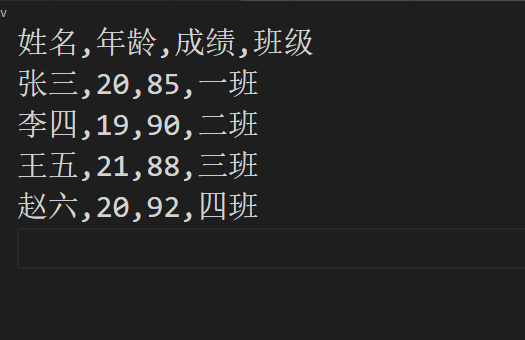
index = True 和index= False的差别
True的时候 好像是多了个序号
False的时候
写入excel:
python
import pandas as pd
data1 = {
"姓名":["张三","李四","王五","赵六"],
"年龄":[20,19,21,20],
"成绩":[85,90,88,92],
"班级":["一班","二班","三班","四班"]
}

df1 = pd.DataFrame(data1)

data2 = {
  "课程":["数学","语文","英语"],
  "平均分":[87,85,86]
}

df2 = pd.DataFrame(data2)


#写入单个表
df1.to_excel("output.xlsx",index=False,sheet_name="学生信息")

#写入多个表
with pd.ExcelWriter("output.multi.xlsx",engine="openpyxl") as writer:
  df1.to_excel(writer,sheet_name="学生信息",index=False)
  df2.to_excel(writer,sheet_name="课程信息",index=False)
条件
python
import pandas as pd
data1 = {
"姓名":["张三","李四","王五","赵六"],
"年龄":[20,19,21,20],
"成绩":[85,90,88,92],
"班级":["一班","二班","三班","四班"]
}

df1 = pd.DataFrame(data1)

print(df1[["姓名","成绩"]])

print(df1[df1["成绩"]>85])

print(df1[df1["班级"]=="一班"])

#使用iloc按位置选择
print(df1.iloc[0])

#使用iloc的位置选择
print(df1.iloc[0:2,0:2])  #不包含右边的约束

# data2 = {
#   "课程":["数学","语文","英语"],
#   "平均分":[87,85,86]
# }

# df2 = pd.DataFrame(data2)


# #写入单个表
# df1.to_excel("output.xlsx",index=False,sheet_name="学生信息")

# #写入多个表
# with pd.ExcelWriter("output.multi.xlsx",engine="openpyxl") as writer:
#   df1.to_excel(writer,sheet_name="学生信息",index=False)
#   df2.to_excel(writer,sheet_name="课程信息",index=False)
同时包含也有
基本统计
print(f"平均值:df\["成绩".mean():.2f]")
平均值: mean()
最小值: min()
最大值: max()
总和: sum()
标准差:std()
中位数: median()
分组统计:
print(df.groupby("班级")"成绩".mean)
计数
print(df"班级".value_counts())
怎么统计多个指标
print(df.groupby("班级").add({
"成绩":"max","min",
"年龄":"mean"
}))
numpy
矩阵运算
python
try:
  import numpy as np

  arr1 = np.array([1,2,3,4,5])
  arr2 = np.array([6,7,8,9,10])

  #加减乘除
  print("数组加:",arr1+arr2)
  print("数组减:",arr1-arr2)
  print("数组相乘",arr1*arr2)
  print("数组相除",arr1/arr2)
  print("数组的幂运算",arr1**2)

  #标量与数组运算
  print("每个元素加10",arr1+10)
  print("每个元素乘以2",arr2*2)

  # 矩阵运算
  matrix1 = np.array([[1,2],[3,4]])
  matrix2 = np.array([[5,6],[7,8]])

  print("矩阵1\n",matrix1)
  print("矩阵2\n",matrix2)
  print("矩阵相乘\n",matrix1*matrix2)
  print("矩阵点积\n",matrix1@matrix2)
  print("矩阵点积\n",np.dot(matrix1,matrix2))  #第二种写法


except ImportError:
  print("numpy未安装,pip install numpy")
数组统计函数
python
try:
  import numpy as np

  arr = np.array([1,2,3,4,5,6,7,8,9])
  arr2d = np.array([
    [1,2,3],
    [4,5,6],
    [7,8,9]
  ])

  print(f"数组{arr}")
  print(f"平均值:{np.mean(arr)}")
  #最大值一样的写法...
  print(f"标准差:{np.std(arr):.2f}")
  print(f"方差:{np.var(arr):.2f}")

  print(f"二维数组",arr2d)
  print(f"每列平均值",np.mean(arr2d,axis=0)) #等于0时沿着列的方向
  print(f"每行平均值",np.mean(arr2d,axis=1)) #等于1时时每行

  #累计求和
  print(f"求和:{np.cumsum(arr)}")
  print(f"累积积",np.cumprod([1,2,3,4]))

except ImportError:
  print("numpy未安装,请运行:pip install numpy")