第十三届蓝桥杯省赛 :水果拼盘
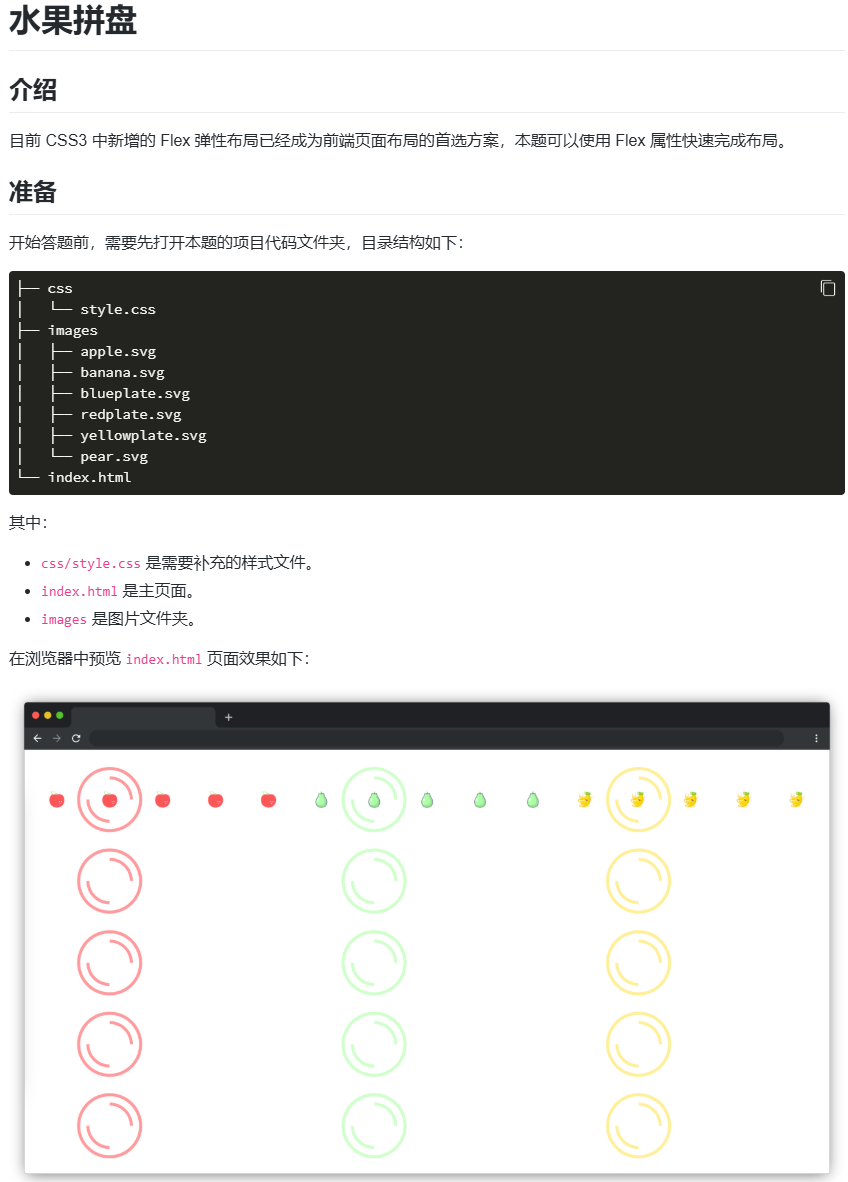
/* TODO:待补充代码 */
#pond {
  display: flex;
  flex-wrap: wrap;
  flex-direction: column;
}

/* 以下代码不需要修改 */

.fruit.apple .bg {
  background-image: url(../images/apple.svg);
}

.fruit.pear .bg {
  background-image: url(../images/pear.svg);
}

.fruit.banana .bg {
  background-image: url(../images/banana.svg);
}

#pond {
  z-index: 20;
}

#pond,
#fruit-background {
  display: flex;
  position: absolute;
  top: 0;
  left: 0;
  width: 100%;
  height: 100%;
  padding: 1em;
}

.lilypad,
.fruit {
  position: relative;
  width: 20%;
  height: 20%;
  overflow: hidden;
}

.lilypad .bg,
.fruit .bg {
  width: 100%;
  height: 100%;
  background-position: center center;
  background-repeat: no-repeat;
}

.animated.infinite {
  -webkit-animation-iteration-count: infinite;
  animation-iteration-count: infinite;
}

.pulse {
  -webkit-animation-name: pulse;
  animation-name: pulse;
}

.animated {
  -webkit-animation-duration: 1s;
  animation-duration: 1s;
  -webkit-animation-fill-mode: both;
  animation-fill-mode: both;
}

@-webkit-keyframes pulse {
  0% {
    -webkit-transform: scaleX(1);
    transform: scaleX(1);
  }

  50% {
    -webkit-transform: scale3d(1.05, 1.05, 1.05);
    transform: scale3d(1.05, 1.05, 1.05);
  }

  to {
    -webkit-transform: scaleX(1);
    transform: scaleX(1);
  }
}

@keyframes pulse {
  0% {
    -webkit-transform: scaleX(1);
    transform: scaleX(1);
  }

  50% {
    -webkit-transform: scale3d(1.05, 1.05, 1.05);
    transform: scale3d(1.05, 1.05, 1.05);
  }

  to {
    -webkit-transform: scaleX(1);
    transform: scaleX(1);
  }
}

.lilypad .bg,
.fruit .bg {
  width: 100%;
  height: 100%;
  background-position: center center;
  background-size: 80% 80%;
  background-repeat: no-repeat;
}

.fruit .bg {
  background-size: 30% 30%;
}

* {
  box-sizing: border-box;
}

.lilypad.apple .bg {
  border-radius: 50%;
  background-image: url(../images/redplate.svg);
  opacity: 0.6;
}

.lilypad.banana .bg {
  border-radius: 50%;
  background-image: url(../images/yellowplate.svg);
  opacity: 0.6;
}

.lilypad.pear .bg {
  border-radius: 50%;
  opacity: 0.6;
  background-image: url(../images/blueplate.svg);
}

#pond {
  display: flex;    /* 定义为 Flex 容器 */
  flex-wrap: wrap;  /* 允许项目换行 */
  flex-direction: column; /* 项目垂直排列(从上到下) */
}
Flex 布局简介
Flex(Flexible Box,弹性盒子)是 CSS3 中用于一维布局 的强大工具,能让容器内的元素自动对齐、分配空间,完美适配不同屏幕尺寸。它由 Flex 容器 (父元素)和 Flex 项目(子元素)组成。
Flex 容器属性(父元素设置)
| 属性 | 可选值 | 作用 |
|---|---|---|
display |
flex(块级容器)/ inline-flex(行内容器) |
定义元素为 Flex 容器,子元素自动成为 Flex 项目。 |
flex-direction |
row(默认,水平从左到右)/ row-reverse(水平从右到左)/ column(垂直从上到下)/ column-reverse(垂直从下到上) |
定义 Flex 项目的排列方向。 |
flex-wrap |
nowrap(默认,不换行)/ wrap(换行,第一行在上)/ wrap-reverse(换行,第一行在下) |
定义 Flex 项目是否换行。 |
flex-flow |
flex-direction 和 flex-wrap 的简写,如 row wrap |
同时定义排列方向和换行方式。 |
justify-content |
flex-start(默认,左对齐)/ flex-end(右对齐)/ center(居中)/ space-between(两端对齐,项目间间距相等)/ space-around(每个项目两侧间距相等)/ space-evenly(项目间及与容器边缘间距相等) |
定义 Flex 项目在主轴 (flex-direction 定义的方向)上的对齐方式。 |
align-items |
stretch(默认,项目拉伸占满容器高度)/ flex-start(交叉轴起点对齐)/ flex-end(交叉轴终点对齐)/ center(交叉轴居中)/ baseline(项目第一行文字基线对齐) |
定义 Flex 项目在交叉轴(与主轴垂直的方向)上的对齐方式。 |
align-content |
同 justify-content,额外需 stretch(默认) |
定义多行 Flex 项目在交叉轴上的对齐方式(仅 flex-wrap: wrap 时生效)。 |
Flex 项目属性(子元素设置)
| 属性 | 可选值 | 作用 |
|---|---|---|
order |
整数(默认 0) |
定义 Flex 项目的排列顺序,数值越小越靠前。 |
flex-grow |
非负整数(默认 0) |
定义 Flex 项目的放大比例 ,0 表示不放大,数值越大放大越多。 |
flex-shrink |
非负整数(默认 1) |
定义 Flex 项目的缩小比例 ,0 表示不缩小,数值越大缩小越多。 |
flex-basis |
长度值(如 200px)/ auto(默认) |
定义 Flex 项目在分配空间前的初始大小。 |
flex |
flex-grow flex-shrink flex-basis 的简写,如 1 1 auto(默认)/ none(0 0 auto) |
同时定义放大、缩小和初始大小,推荐使用简写。 |
align-self |
auto(默认,继承父元素 align-items)/ 同 align-items 其他值 |
单独定义单个 Flex 项目 在交叉轴上的对齐方式,覆盖父元素 align-items。 |