📚 本教程旨在帮助你从零开始理解 Agent Skills ------ 一个为 AI Agent 赋予新能力的开放格式规范。
第三章:规范详解
本章详细解读 Agent Skills 的完整格式规范,包括每个字段的约束条件、验证规则和使用示例。
3.1 SKILL.md 完整格式
一个包含所有字段的 SKILL.md 示例:
markdown
---
name: pdf-processing
description: >
  Extract text and tables from PDF files, fill PDF forms,
  and merge multiple PDFs. Use when handling PDFs.
license: Apache-2.0
compatibility: Requires Python 3.11+ and pdfplumber
metadata:
  author: example-org
  version: "1.0"
allowed-tools: Bash(python3:*) Read
---

# PDF Processing

## When to use this skill
Use this skill when the user needs to work with PDF files...

## How to extract text
1. Use pdfplumber for text extraction...

## How to fill forms
...
3.2 必需字段详解
name 字段
name 是 Skill 的唯一标识符,用于发现、激活和引用。
约束条件:
graph LR
A["name 字段"] --> B["1-64 字符"]
A --> C["仅小写字母 + 数字 + 连字符"]
A --> D["不能以连字符开头/结尾"]
A --> E["不能含连续连字符"]
A --> F["必须匹配目录名"]
A --> G["支持 Unicode(NFKC 标准化)"]
示例:
yaml
# ✅ 正确
name: pdf-processing        # 标准 kebab-case
name: data-analysis         # 两个单词
name: a                     # 最短:1 字符
name: code-review-helper    # 三个单词

# ❌ 错误
name: PDF-Processing        # 大写字母
name: -pdf                  # 以连字符开头
name: pdf-                  # 以连字符结尾
name: pdf--process          # 连续连字符
name: pdf processing        # 包含空格
name: pdf_processing # 包含下划线目录名匹配规则:
markdown
✅ 正确:
pdf-processing/        ← 目录名
└── SKILL.md
    name: pdf-processing  ← 与目录名一致

❌ 错误:
my-folder/             ← 目录名
└── SKILL.md
    name: pdf-processing  ← 与目录名不匹配!
description 字段
description 是 Agent 判断是否激活 Skill 的唯一依据。
约束条件:
- 必须是非空字符串
- 最多 1024 字符
- 应描述做什么 和什么时候用
好的描述模式:
yaml
# 模式 1:做什么 + 什么时候用
description: >
  Extract text and tables from PDF files, fill PDF forms,
  and merge multiple PDFs. Use when working with PDF documents
  or when the user mentions PDFs, forms, or document extraction.

# 模式 2:动作列表 + 触发条件
description: >
  Analyze CSV and tabular data files --- compute summary statistics,
  add derived columns, generate charts, and clean messy data. Use
  this skill when the user has a CSV, TSV, or Excel file.

# 模式 3:简短但精准
description: >
  Roll dice using a random number generator. Use when asked to
  roll a die (d6, d20, etc.) or generate random dice rolls.
3.3 可选字段详解
license 字段
指定 Skill 的许可证信息。
yaml
# SPDX 许可证标识
license: Apache-2.0

# 引用许可文件
license: Proprietary. LICENSE.txt has complete terms

# MIT 许可
license: MIT
compatibility 字段
描述 Skill 的环境要求(最多 500 字符)。
yaml
# 指定运行环境
compatibility: Designed for Claude Code (or similar products)

# 指定依赖工具
compatibility: Requires git, docker, jq, and access to the internet

# 指定语言版本
compatibility: Requires Python 3.14+ and uv
💡 大多数 Skill 不需要此字段。只在有特殊环境要求时才使用。
metadata 字段
自定义键值对,用于客户端特定的属性。
yaml
metadata:
  author: example-org
  version: "1.0"
  category: data-processing
tags: "csv, analysis, charts"- 键和值都必须是字符串
- 建议使用独特的键名以避免冲突
- 客户端可以利用 metadata 存储自定义属性
allowed-tools 字段(实验性)
指定 Skill 预授权可以使用的工具,以空格分隔。
yaml
# 授权使用 git 和 jq 命令,以及文件读取
allowed-tools: Bash(git:*) Bash(jq:*) Read
⚠️ 这是实验性功能,不同 Agent 实现对此字段的支持可能不同。
3.4 字段约束汇总
graph TB
subgraph "必需字段"
A["name<br/>1-64 字符<br/>kebab-case"]
B["description<br/>1-1024 字符<br/>非空字符串"]
end
subgraph "可选字段"
C["license<br/>无长度限制<br/>字符串"]
D["compatibility<br/>1-500 字符<br/>字符串"]
E["metadata<br/>键值对映射<br/>string → string"]
F["allowed-tools<br/>空格分隔列表<br/>实验性"]
end
style A fill:#4CAF50,color:#fff
style B fill:#4CAF50,color:#fff
style C fill:#2196F3,color:#fff
style D fill:#2196F3,color:#fff
style E fill:#2196F3,color:#fff
style F fill:#FF9800,color:#fff
| 字段 | 类型 | 必需 | 最大长度 | 验证规则 |
|---|---|---|---|---|
name |
string | ✅ | 64 字符 | 小写字母+数字+连字符, 不以连字符开头/结尾, 无连续连字符, 匹配目录名 |
description |
string | ✅ | 1024 字符 | 非空 |
license |
string | ❌ | 无限制 | 无 |
compatibility |
string | ❌ | 500 字符 | 非空(如果提供) |
metadata |
map | ❌ | 无限制 | key-value 都必须是 string |
allowed-tools |
string | ❌ | 无限制 | 空格分隔的工具模式列表 |
3.5 Frontmatter 字段限制
SKILL.md 的 frontmatter 中只允许出现以上 6 个字段。任何未知字段都会导致验证失败:
yaml
---
name: my-skill
description: My skill description
author: John      # ❌ 不允许!"author" 不在允许列表中
version: 1.0      # ❌ 不允许!"version" 不在允许列表中
---
如果需要存储额外信息,请使用 metadata 字段:
yaml
---
name: my-skill
description: My skill description
metadata:          # ✅ 正确做法
  author: John
  version: "1.0"
---
3.6 Body 内容指南
Frontmatter 之后的 Markdown 正文是 Agent 执行任务时的指令。虽然没有格式限制,但有以下推荐做法:
推荐的内容组织
markdown
# Skill 标题

## 使用场景
说明什么时候应该使用这个 Skill...

## 操作步骤
1. 第一步:准备工作
2. 第二步:执行操作
3. 第三步:验证结果

## 示例
输入输出示例...

## 注意事项
- 边界情况处理
- 常见错误避免
文件引用
在 SKILL.md 中引用其他文件时,使用相对于 Skill 根目录的路径:
markdown
## 可用脚本

- `scripts/extract.py` --- 提取数据
- `scripts/validate.sh` --- 验证结果

## 详细参考

查看 [API 参考](references/api-guide.md) 获取更多信息。

## 工作流程

1. 运行提取脚本:
   ```bash
   python3 scripts/extract.py input.pdf
   ```
正文长度建议
- 推荐 :保持
SKILL.md在 500 行以内 、5000 tokens 以内 - 超出时 :将详细内容拆分到
references/目录 - 原因:正文一旦加载就占用上下文窗口空间
graph LR
A["SKILL.md<br/>(核心指令 < 500 行)"] -->|详细信息| B["references/api-errors.md"]
A -->|详细信息| C["references/advanced-usage.md"]
A -->|告诉 Agent 何时加载| D["如果 API 返回非 200<br/>请阅读 references/api-errors.md"]
style A fill:#4CAF50,color:#fff
style B fill:#FF9800,color:#fff
style C fill:#FF9800,color:#fff
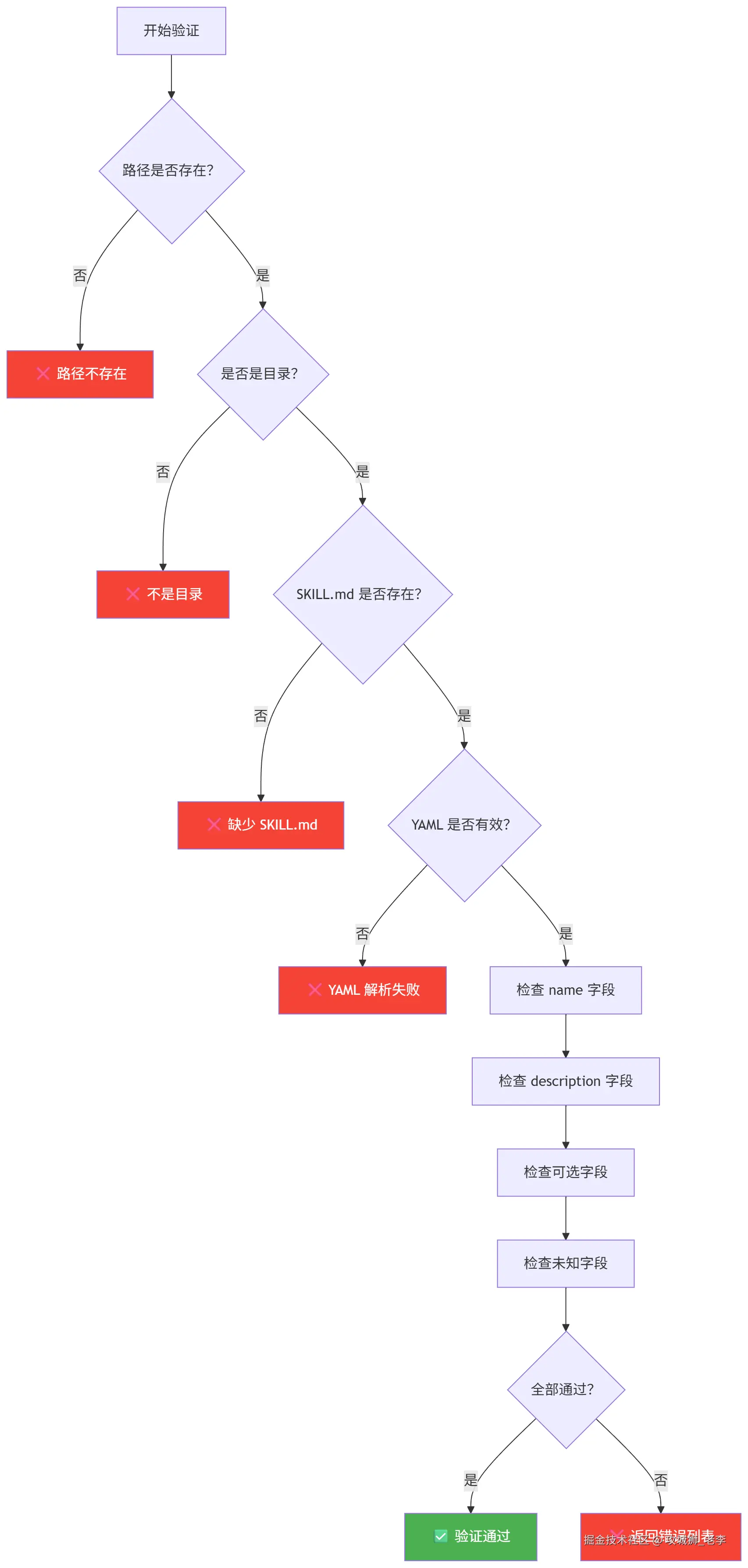
3.7 验证流程
使用 skills-ref 工具可以验证 Skill 是否符合规范:
bash
# 验证 Skill 目录
skills-ref validate ./my-skill

# 输出示例(通过):
# Valid skill: ./my-skill

# 输出示例(失败):
# Validation failed for ./my-skill:
#   - Skill name 'My-Skill' must be lowercase
#   - Directory name 'my_skill' must match skill name 'my-skill'
验证检查项
3.8 完整示例
最小示例
markdown
---
name: hello-world
description: A simple greeting skill. Use when the user wants to say hello.
---

Greet the user warmly and ask how you can help them today.
完整示例
markdown
---
name: pdf-processing
description: >
  Extract text and tables from PDF files, fill PDF forms,
  and merge multiple PDFs. Use when handling PDFs.
license: Apache-2.0
compatibility: Requires Python 3.11+ and pdfplumber
metadata:
  author: example-org
  version: "1.0"
---

# PDF Processing

## When to use this skill
Use this skill when the user needs to:
- Extract text from PDF files
- Fill in PDF forms
- Merge multiple PDFs into one

## How to extract text

Use pdfplumber for text extraction. For scanned documents,
fall back to pdf2image with pytesseract.

```python
import pdfplumber

with pdfplumber.open("file.pdf") as pdf:
    text = pdf.pages[0].extract_text()
```

## Available scripts

- `scripts/extract.py` --- Extract text from PDF
- `scripts/merge.py` --- Merge multiple PDFs
- `scripts/fill_form.py` --- Fill PDF forms

## Gotchas

- Some PDFs are scanned images, not text. Use OCR for these.
- Password-protected PDFs need the password before processing.
- Large PDFs (>100 pages) should be processed in chunks.
3.9 本章小结
| 要点 | 说明 |
|---|---|
| 必需字段 | name(kebab-case, ≤64 字符)和 description(≤1024 字符) |
| 可选字段 | license、compatibility、metadata、allowed-tools |
| 字段限制 | 只允许 6 个指定字段,其他字段验证失败 |
| 正文建议 | ≤500 行、≤5000 tokens,大内容拆分到 references/ |
| 文件引用 | 使用相对路径,相对于 Skill 根目录 |
➡️ 下一章:动手实践:创建第一个 Skill --- 从零创建一个可工作的 Skill。