[root@master ~]# kubectl run  webpod --image nginx:1.26 --port 80

[root@master ~]# kubectl run  webpod --image nginx:latest --port 80   #这是老师的版本

[root@master ~]# kubectl get pods
webpod   1/1     Running   0          33s

[root@master ~]# kubectl describe pods webpod

[root@master ~]# kubectl get pods  -o wide
NAME     READY   STATUS    RESTARTS   AGE     IP           NODE    NOMINATED NODE   READINESS GATES
webpod   1/1     Running   0          2m46s   10.244.2.2   node2   <none>           <none>

[root@master ~]# kubectl delete pods webpod
pod "webpod" deleted from default namespace
2.yaml文件方式
复制代码
[root@master ~]# kubectl create deployment test --image nginx --replicas 1  --dry-run=client -o yaml  > test.yml     //老师的

[root@master ~]# kubectl create deployment test --image nginx:1.26 --replicas 1  --dry-run=client -o yaml  > test.yml    //我们的文件要写这个

[root@master ~]# vim test.yml
apiVersion: apps/v1
kind: Deployment
metadata:
  labels:
    app: test
  name: test
spec:
  replicas: 1
  selector:
    matchLabels:
      app: test
  template:
    metadata:
      labels:
        app: test
    spec:
      containers:
      - image: nginx:1.26
        name: nginx

#建立式
[root@master ~]# kubectl create  -f test.yml
deployment.apps/test created
[root@master ~]# kubectl get pods
NAME                    READY   STATUS    RESTARTS   AGE
test-56848fd9dc-h2sct   1/1     Running   0          8s

[root@master ~]# kubectl delete -f test.yml
deployment.apps "test" deleted from default namespace
[root@master ~]# kubectl get pods
No resources found in default namespace.


#声明式
[root@master ~]# kubectl apply -f test.yml
deployment.apps/test created
[root@master ~]# kubectl get pods
NAME                    READY   STATUS    RESTARTS   AGE
test-56848fd9dc-cxtnp   1/1     Running   0          1s


#注意建立只能建立不能更新,声明可以
[root@master ~]# vim test.yml
apiVersion: apps/v1
kind: Deployment
metadata:
  labels:
    app: test
  name: test
spec:
  replicas: 2			#只修改pod数量
。。。。。。。。。。。。。。。。。。


[root@master ~]# kubectl create  -f test.yml
Error from server (AlreadyExists): error when creating "test.yml": deployments.apps "test" already exists

[root@master ~]# kubectl apply  -f test.yml
deployment.apps/test configured
[root@master ~]# kubectl get pods
NAME                    READY   STATUS    RESTARTS   AGE
test-56848fd9dc-9sw95   1/1     Running   0          8s
test-56848fd9dc-cxtnp   1/1     Running   0          2m42s
二.资源类型
1.node
复制代码
[root@master ~]# kubectl get nodes
NAME     STATUS   ROLES           AGE   VERSION
master   Ready    control-plane   18h   v1.35.3
node1    Ready    <none>          17h   v1.35.3
node2    Ready    <none>          17h   v1.35.3

[root@master ~]#  kubeadm token create --print-join-command
2.namespace
复制代码
[root@master ~]# kubectl get namespaces
NAME              STATUS   AGE
default           Active   18h
kube-flannel      Active   17h
kube-node-lease   Active   18h
kube-public       Active   18h
kube-system       Active   18h
[root@master ~]# kubectl get pods
NAME                    READY   STATUS    RESTARTS   AGE
test-56848fd9dc-9sw95   1/1     Running   0          25m
test-56848fd9dc-cxtnp   1/1     Running   0          27m
[root@master ~]# kubectl -n kube-flannel get pods
NAME                    READY   STATUS    RESTARTS      AGE
kube-flannel-ds-hc8gt   1/1     Running   1 (17h ago)   17h
kube-flannel-ds-rvzng   1/1     Running   1 (17h ago)   17h
kube-flannel-ds-s29g5   1/1     Running   1 (17h ago)   17h


[root@master ~]# kubectl create namespace timinglee
namespace/timinglee created
[root@master ~]# kubectl get namespaces
NAME              STATUS   AGE
default           Active   18h
kube-flannel      Active   17h
kube-node-lease   Active   18h
kube-public       Active   18h
kube-system       Active   18h
timinglee         Active   6s


[root@master ~]# kubectl -n timinglee  run testpod --image  nginx:latest
pod/testpod created
----- kubectl -n timinglee  run testpod --image  nginx:1.26   //这个

[root@master ~]# kubectl get pods
NAME                    READY   STATUS    RESTARTS   AGE
test-56848fd9dc-9sw95   1/1     Running   0          28m
test-56848fd9dc-cxtnp   1/1     Running   0          30m
[root@master ~]# kubectl -n timinglee  get pods
NAME      READY   STATUS    RESTARTS   AGE
testpod   1/1     Running   0          17s
[root@master ~]# kubectl -n timinglee  run testpod --image  nginx:latest
Error from server (AlreadyExists): pods "testpod" already exists
---------kubectl -n timinglee  run testpod --image  nginx:1:26   //这个
[root@master ~]# kubectl  run testpod --image  nginx:latest
pod/testpod created
----------kubectl  run testpod --image  nginx:1:26   //这个
三.kubectl命令
复制代码
[root@master ~]# kubectl get deployments.apps
root@master ~]# kubectl get pods
NAME                    READY   STATUS    RESTARTS   AGE
test-56848fd9dc-9sw95   1/1     Running   0          37m
test-56848fd9dc-cxtnp   1/1     Running   0          40m

[root@master ~]# kubectl edit deployments.apps test
.....
replicas: 4
.....

[root@master ~]# kubectl get pods
NAME                    READY   STATUS    RESTARTS   AGE
test-56848fd9dc-9sw95   1/1     Running   0          39m
test-56848fd9dc-cxtnp   1/1     Running   0          41m
test-56848fd9dc-kdm4h   1/1     Running   0          28s
test-56848fd9dc-lmpdt   1/1     Running   0          28s


[root@master ~]# kubectl patch  deployments.apps test  -p '{"spec":{"replicas":1}}'
deployment.apps/test patched
[root@master ~]# kubectl get pods
NAME                    READY   STATUS    RESTARTS   AGE
test-56848fd9dc-9sw95   1/1     Running   0          42m
#端口暴露
复制代码
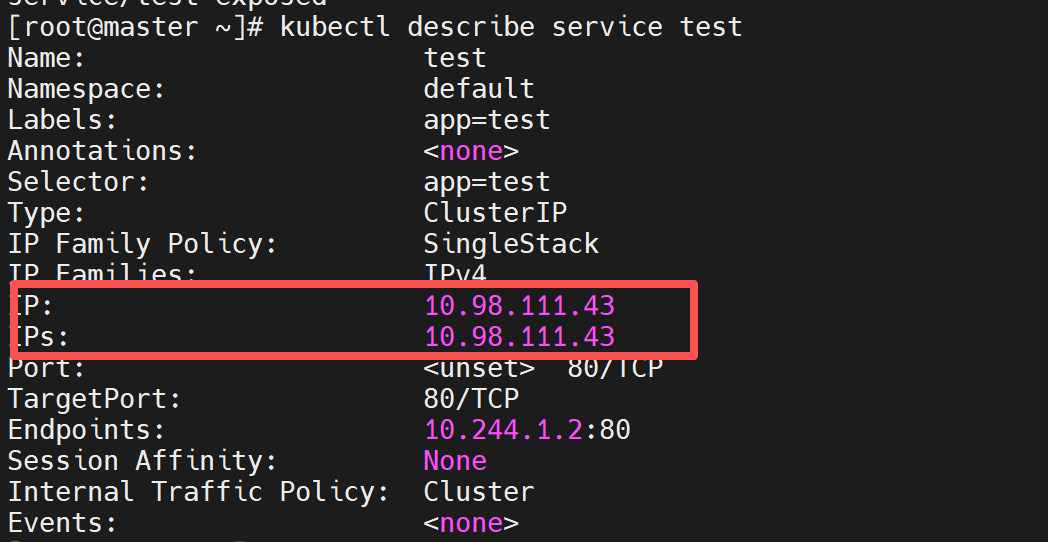
[root@master ~]# kubectl expose  deployment test --port  80 --target-port 80
service/test exposed
[root@master ~]# kubectl describe service test
Name:                     test
Namespace:                default
Labels:                   app=test
Annotations:              <none>
Selector:                 app=test
Type:                     ClusterIP
IP Family Policy:         SingleStack
IP Families:              IPv4
IP:                       10.104.29.36
IPs:                      10.104.29.36
Port:                     <unset>  80/TCP
TargetPort:               80/TCP
Endpoints:                10.244.1.2:80,10.244.2.11:80,10.244.1.5:80 + 1 more...
Session Affinity:         None
Internal Traffic Policy:  Cluster
Events:                   <none>
root@master \~# curl 10.98.111.43
复制代码
[root@master ~]# kubectl logs testpod -n timinglee

#删除    kubectl delete pod testpod
#attech
[root@master ~]# kubectl run testpod  -it --image busybox
All commands and output from this session will be recorded in container logs, including credentials and sensitive information passed through the command prompt.
If you don't see a command prompt, try pressing enter.
/ #
/ #  ctrl+pq
/ # Session ended, resume using 'kubectl attach testpod -c testpod -i -t' command when the pod is running

[root@master ~]# kubectl attach pods/testpod -it
All commands and output from this session will be recorded in container logs, including credentials and sensitive information passed through the command prompt.
If you don't see a command prompt, try pressing enter.
/ #
/ #
/ #


[root@master ~]# kubectl exec -it pods/testpod -c testpod -- /bin/sh
/ #
/ #


[root@master ~]# kubectl cp testpod.yml testpod:/ -c testpod
[root@master ~]# kubectl ^C
[root@master ~]# kubectl exec -it pods/testpod -c testpod -- /bin/sh
/ #
/ # ls
bin          etc          lib          proc         sys          tmp          var
dev          home         lib64        root         testpod.yml  usr
root@master \~# vim testpod.yml
apiVersion: v1
kind: Pod
metadata:
labels:
run: testpod
name: testpod
spec:
containers:
image: nginx:1.26
name: web1
ports:
containerPort: 80
image: busybox:latest
name: busybox
command:
/bin/sh
-c
sleep 3000
#扩容
[root@master ~]# kubectl get pods
NAME READY STATUS RESTARTS AGE
test-68d8574cb-8xjdv 1/1 Running 0 14m
test-68d8574cb-b9p9x 1/1 Running 0 14m
test-68d8574cb-lb9gq 1/1 Running 0 14m
test-68d8574cb-xkd56 1/1 Running 0 14m
[root@master ~]# kubectl scale deployment test --replicas 6
deployment.apps/test scaled
[root@master ~]# kubectl get pods
NAME READY STATUS RESTARTS AGE
test-68d8574cb-5kbgs 1/1 Running 0 2s
test-68d8574cb-7nnmn 1/1 Running 0 2s
test-68d8574cb-8xjdv 1/1 Running 0 15m
test-68d8574cb-b9p9x 1/1 Running 0 15m
test-68d8574cb-lb9gq 1/1 Running 0 15m
test-68d8574cb-xkd56 1/1 Running 0 15m
[root@master ~]# kubectl scale deployment test --replicas 1
deployment.apps/test scaled
[root@master ~]# kubectl get pods
NAME READY STATUS RESTARTS AGE
test-68d8574cb-5kbgs 0/1 Completed 0 26s
test-68d8574cb-8xjdv 0/1 Completed 0 15m
test-68d8574cb-lb9gq 1/1 Running 0 15m
test-68d8574cb-xkd56 0/1 Completed 0 15m
testpod 1/1 Running 1 (6m54s ago) 8m12s
[root@master ~]# kubectl get pods
NAME READY STATUS RESTARTS AGE
test-68d8574cb-lb9gq 1/1 Running 0 15m
testpod 1/1 Running 1 (6m56s ago) 8m14s
[root@master ~]# kubectl get pods --show-labels
NAME READY STATUS RESTARTS AGE LABELS
test-68d8574cb-lb9gq 1/1 Running 0 16m app=test,pod-template-hash=68d8574cb
testpod 1/1 Running 1 (7m54s ago) 9m12s run=testpod
[root@master ~]# kubectl label pods testpod name=lee
pod/testpod labeled
[root@master ~]# kubectl get pods --show-labels
NAME READY STATUS RESTARTS AGE LABELS
test-68d8574cb-lb9gq 1/1 Running 0 17m app=test,pod-template-hash=68d8574cb
testpod 1/1 Running 1 (8m23s ago) 9m41s name=lee,run=testpod
[root@master ~]# kubectl label pods testpod name-
pod/testpod unlabeled
[root@master ~]# kubectl get pods --show-labels
NAME READY STATUS RESTARTS AGE LABELS
test-68d8574cb-lb9gq 1/1 Running 0 18m app=test,pod-template-hash=68d8574cb
testpod 1/1 Running 1 (9m10s ago) 10m run=testpod
四.Pod应用
1.自助式管理pod
#清除所有的
kubectl delete pod --all root@harbor \~# docker load -i myapp
[root@master pod]# kubectl run  myappv2 --image  myapp:v2  --port 80
pod/myappv2 created
[root@master pod]# kubectl get pods
NAME      READY   STATUS              RESTARTS   AGE
myappv2   0/1     ContainerCreating   0          8s				#创建中
[root@master pod]# kubectl get pods
NAME      READY   STATUS         RESTARTS   AGE
myappv2   0/1     ErrImagePull   0          20s					#镜像拉取失败

[root@master pod]# kubectl get pods
NAME      READY   STATUS             RESTARTS   AGE
myappv2   0/1     ImagePullBackOff   0          3m48s			#尝试从新拉去镜像

[root@master pod]# kubectl get pods
NAME      READY   STATUS    RESTARTS   AGE
myappv2   1/1     Running   0          4m20s

[root@master pod]# kubectl delete pods myappv2
pod "myappv2" deleted from default namespace
[root@master pod]# kubectl get pods
No resources found in default namespace.