1.使用vllm的步骤
bash
root@DESKTOP-8IU6393:~# # 换阿里云源
sudo sed -i 's/archive.ubuntu.com/mirrors.aliyun.com/g' /etc/apt/sources.list
sudo sed -i 's/security.ubuntu.com/mirrors.aliyun.com/g' /etc/apt/sources.list

# 更新系统(修正你之前的命令语法)
sudo apt update && sudo apt upgrade -y


root@DESKTOP-8IU6393:~# sudo apt install -y build-essential cmake ninja-build git curl python3 python3-pip python3-venv python3-dev

root@DESKTOP-8IU6393:~# wget https://developer.download.nvidia.com/compute/cuda/repos/wslubuntu2404/x86_64/cuda-wslubuntu2404.pin
sudo mv cuda-wslubuntu2404.pin /etc/apt/preferences.d/cuda-repository-pin-600
sudo apt-key adv --fetch-keys https://developer.download.nvidia.com/compute/cuda/repos/wslubuntu2404/x86_64/3bf863cc.pub
sudo add-apt-repository "deb https://developer.download.nvidia.com/compute/cuda/repos/wslubuntu2404/x86_64/ /"
sudo apt update
sudo apt install -y cuda-toolkit-12-1

#
```bash
root@DESKTOP-8IU6393:~# # 第一步:创建虚拟环境
python3 -m venv vllm-env
root@DESKTOP-8IU6393:~# # 第二步:激活环境
source vllm-env/bin/activate
(vllm-env) root@DESKTOP-8IU6393:~# pip install --upgrade pip
pip install vllm[cuda121]
(vllm-env) root@DESKTOP-8IU6393:~# python -c "from vllm import LLM; print('vLLM 安装成功!')"
vLLM 安装成功!
(vllm-env) root@DESKTOP-8IU6393:~#
(vllm-env) root@DESKTOP-8IU6393:~# pip install modelscope -i https://mirrors.aliyun.com/pypi/simple/
Looking in indexes: https://mirrors.aliyun.com/pypi/simple/
Collecting modelscope
  Downloading https://mirrors.aliyun.com/pypi/packages/0c/ca/52378c0ae37a77afd1bd48ad2d01a1638ae1192be7bfad31da3359306df9/modelscope-1.35.3-py3-none-any.whl (6.1 MB)
     ━━━━━━━━━━━━━━━━━━━━━━━━━━━━━━━━━━━━━━━━ 6.1/6.1 MB 3.5 MB/s  0:00:02
Requirement already satisfied: filelock in ./vllm-env/lib/python3.12/site-packages (from modelscope) (3.25.2)
Requirement already satisfied: packaging in ./vllm-env/lib/python3.12/site-packages (from modelscope) (26.0)
Requirement already satisfied: requests>=2.25 in ./vllm-env/lib/python3.12/site-packages (from modelscope) (2.33.0)
Requirement already satisfied: setuptools in ./vllm-env/lib/python3.12/site-packages (from modelscope) (80.10.2)
Requirement already satisfied: tqdm>=4.64.0 in ./vllm-env/lib/python3.12/site-packages (from modelscope) (4.67.3)
Requirement already satisfied: urllib3>=1.26 in ./vllm-env/lib/python3.12/site-packages (from modelscope) (2.6.3)
Requirement already satisfied: charset_normalizer<4,>=2 in ./vllm-env/lib/python3.12/site-packages (from requests>=2.25->modelscope) (3.4.6)
Requirement already satisfied: idna<4,>=2.5 in ./vllm-env/lib/python3.12/site-packages (from requests>=2.25->modelscope) (3.11)
Requirement already satisfied: certifi>=2023.5.7 in ./vllm-env/lib/python3.12/site-packages (from requests>=2.25->modelscope) (2026.2.25)
Installing collected packages: modelscope
Successfully installed modelscope-1.35.3
(vllm-env) root@DESKTOP-8IU6393:~#

(vllm-env) root@DESKTOP-8IU6393:~# modelscope download --model openai-mirror/gpt-oss-20b --local_dir ./gpt-oss-20b

 _   .-')                _ .-') _     ('-.             .-')                              _ (`-.    ('-.
( '.( OO )_             ( (  OO) )  _(  OO)           ( OO ).                           ( (OO  ) _(  OO)
 ,--.   ,--.).-'),-----. \     .'_ (,------.,--.     (_)---\_)   .-----.  .-'),-----.  _.`     \(,------.
 |   `.'   |( OO'  .-.  ',`'--..._) |  .---'|  |.-') /    _ |   '  .--./ ( OO'  .-.  '(__...--'' |  .---'
 |         |/   |  | |  ||  |  \  ' |  |    |  | OO )\  :` `.   |  |('-. /   |  | |  | |  /  | | |  |
 |  |'.'|  |\_) |  |\|  ||  |   ' |(|  '--. |  |`-' | '..`''.) /_) |OO  )\_) |  |\|  | |  |_.' |(|  '--.
 |  |   |  |  \ |  | |  ||  |   / : |  .--'(|  '---.'.-._)   \ ||  |`-'|   \ |  | |  | |  .___.' |  .--'
 |  |   |  |   `'  '-'  '|  '--'  / |  `---.|      | \       /(_'  '--'\    `'  '-'  ' |  |      |  `---.
 `--'   `--'     `-----' `-------'  `------'`------'  `-----'    `-----'      `-----'  `--'      `------'

Downloading Model from https://www.modelscope.cn to directory: /root/gpt-oss-20b
Downloading [config.json]: 100%|███████████████████████████████████████| 1.76k/1.76k [00:01<00:00, 1.63kB/s]
Downloading [original/dtypes.json]: 100%|██████████████████████████████| 12.8k/12.8k [00:01<00:00, 11.4kB/s]
Downloading [LICENSE]: 100%|███████████████████████████████████████████| 11.1k/11.1k [00:01<00:00, 9.88kB/s]
Downloading [configuration.json]: 100%|███████████████████████████████████| 73.0/73.0 [00:01<00:00, 56.1B/s]
Downloading [chat_template.jinja]: 100%|███████████████████████████████| 16.3k/16.3k [00:01<00:00, 12.3kB/s]
Downloading [original/config.json]: 100%|████████████████████████████████████| 376/376 [00:01<00:00, 271B/s]
Downloading [generation_config.json]: 100%|█████████████████████████████████| 177/177 [00:02<00:00, 85.1B/s]
Downloading [README.md]: 100%|█████████████████████████████████████████| 6.93k/6.93k [00:01<00:00, 5.91kB/s]
Downloading [model.safetensors.index.json]: 100%|██████████████████████| 35.5k/35.5k [00:01<00:00, 29.0kB/s]
Downloading [special_tokens_map.json]: 100%|██████████████████████████████| 98.0/98.0 [00:01<00:00, 82.5B/s]
Downloading [tokenizer_config.json]: 100%|█████████████████████████████| 4.10k/4.10k [00:01<00:00, 2.83kB/s]
Downloading [USAGE_POLICY]: 100%|████████████████████████████████████████████| 200/200 [00:01<00:00, 180B/s]
Downloading [tokenizer.json]: 100%|████████████████████████████████████| 26.6M/26.6M [00:02<00:00, 12.4MB/s]
Processing 18 items:  72%|█████████████████████████████████▉             | 13.0/18.0 [00:04<00:02, 2.46it/s]
Downloading [tokenizer.json]:  13%|████▊                               | 3.58M/26.6M [00:01<00:03, 6.83MB/s]
Downloading [model-00001-of-00002.safetensors]:   0%|                | 2.00M/4.47G [00:19<12:18:42, 108kB/s]
Downloading [original/model.safetensors]:   0%|                        | 23.0M/12.8G [00:03<13:25, 17.1MB/s]
Downloading [original/model.safetensors]:   1%|▎                        | 133M/12.8G [00:20<46:47, 4.85MB/s]
Successfully Downloaded from model openai-mirror/gpt-oss-20b.40MB/s]
Downloading [model-00000-of-00002.safetensors]: 4.80GB [16:28, 9.80MB/s](vllm-env) root@DESKTOP-8IU6393:~# nohup python -m vllm.entrypoints.openai.api_server --model ./gpt-oss-20b --trust-remote-code --gpu-memory-utilization 0.85 --host 0.0.0.0 --port 8000 > vllm.log 2>&1 &
[1] 10736
(vllm-env) root@DESKTOP-8IU6393:~#
(vllm-env) root@DESKTOP-8IU6393:~# tail -f vllm.log
nohup: ignoring input
(APIServer pid=11054) INFO 03-28 13:37:34 [utils.py:297]
(APIServer pid=11054) INFO 03-28 13:37:34 [utils.py:297] █ █ █▄ ▄█
(APIServer pid=11054) INFO 03-28 13:37:34 [utils.py:297] ▄▄ ▄█ █ █ █ ▀▄▀ █ version 0.18.0
(APIServer pid=11054) INFO 03-28 13:37:34 [utils.py:297] █▄█▀ █ █ █ █ model ./gpt-oss-20b
(APIServer pid=11054) INFO 03-28 13:37:34 [utils.py:297] ▀▀ ▀▀▀▀▀ ▀▀▀▀▀ ▀ ▀
(APIServer pid=11054) INFO 03-28 13:37:34 [utils.py:297]
(APIServer pid=11054) INFO 03-28 13:37:34 [utils.py:233] non-default args: {'host': '0.0.0.0', 'port': 8888, 'model': './gpt-oss-20b', 'trust_remote_code': True, 'gpu_memory_utilization': 0.85}
(APIServer pid=11054) INFO 03-28 13:37:34 [model.py:533] Resolved architecture: GptOssForCausalLM
(APIServer pid=11054) INFO 03-28 13:37:34 [model.py:1582] Using max model len 131072
(APIServer pid=11054) INFO 03-28 13:37:35 [scheduler.py:231] Chunked prefill is enabled with max_num_batched_tokens=2048.
(APIServer pid=11054) INFO 03-28 13:37:35 [config.py:78] Overriding max cuda graph capture size to 1024 for performance.
(APIServer pid=11054) INFO 03-28 13:37:35 [vllm.py:754] Asynchronous scheduling is enabled.
(APIServer pid=11054) WARNING 03-28 13:37:36 [interface.py:525] Using 'pin_memory=False' as WSL is detected. This may slow down the performance.
(EngineCore pid=11113) INFO 03-28 13:37:42 [core.py:103] Initializing a V1 LLM engine (v0.18.0) with config: model='./gpt-oss-20b', speculative_config=None, tokenizer='./gpt-oss-20b', skip_tokenizer_init=False, tokenizer_mode=auto, revision=None, tokenizer_revision=None, trust_remote_code=True, dtype=torch.bfloat16, max_seq_len=131072, download_dir=None, load_format=auto, tensor_parallel_size=1, pipeline_parallel_size=1, data_parallel_size=1, decode_context_parallel_size=1, dcp_comm_backend=ag_rs, disable_custom_all_reduce=False, quantization=mxfp4, enforce_eager=False, enable_return_routed_experts=False, kv_cache_dtype=auto, device_config=cuda, structured_outputs_config=StructuredOutputsConfig(backend='auto', disable_any_whitespace=False, disable_additional_properties=False, reasoning_parser='openai_gptoss', reasoning_parser_plugin='', enable_in_reasoning=False), observability_config=ObservabilityConfig(show_hidden_metrics_for_version=None, otlp_traces_endpoint=None, collect_detailed_traces=None, kv_cache_metrics=False, kv_cache_metrics_sample=0.01, cudagraph_metrics=False, enable_layerwise_nvtx_tracing=False, enable_mfu_metrics=False, enable_mm_processor_stats=False, enable_logging_iteration_details=False), seed=0, served_model_name=./gpt-oss-20b, enable_prefix_caching=True, enable_chunked_prefill=True, pooler_config=None, compilation_config={'mode': <CompilationMode.VLLM_COMPILE: 3>, 'debug_dump_path': None, 'cache_dir': '', 'compile_cache_save_format': 'binary', 'backend': 'inductor', 'custom_ops': ['none'], 'splitting_ops': ['vllm::unified_attention', 'vllm::unified_attention_with_output', 'vllm::unified_mla_attention', 'vllm::unified_mla_attention_with_output', 'vllm::mamba_mixer2', 'vllm::mamba_mixer', 'vllm::short_conv', 'vllm::linear_attention', 'vllm::plamo2_mamba_mixer', 'vllm::gdn_attention_core', 'vllm::olmo_hybrid_gdn_full_forward', 'vllm::kda_attention', 'vllm::sparse_attn_indexer', 'vllm::rocm_aiter_sparse_attn_indexer', 'vllm::unified_kv_cache_update', 'vllm::unified_mla_kv_cache_update'], 'compile_mm_encoder': False, 'compile_sizes': [], 'compile_ranges_endpoints': [2048], 'inductor_compile_config': {'enable_auto_functionalized_v2': False, 'combo_kernels': True, 'benchmark_combo_kernel': True}, 'inductor_passes': {}, 'cudagraph_mode': <CUDAGraphMode.FULL_AND_PIECEWISE: (2, 1)>, 'cudagraph_num_of_warmups': 1, 'cudagraph_capture_sizes': [1, 2, 4, 8, 16, 24, 32, 40, 48, 56, 64, 72, 80, 88, 96, 104, 112, 120, 128, 136, 144, 152, 160, 168, 176, 184, 192, 200, 208, 216, 224, 232, 240, 248, 256, 272, 288, 304, 320, 336, 352, 368, 384, 400, 416, 432, 448, 464, 480, 496, 512, 528, 544, 560, 576, 592, 608, 624, 640, 656, 672, 688, 704, 720, 736, 752, 768, 784, 800, 816, 832, 848, 864, 880, 896, 912, 928, 944, 960, 976, 992, 1008, 1024], 'cudagraph_copy_inputs': False, 'cudagraph_specialize_lora': True, 'use_inductor_graph_partition': False, 'pass_config': {'fuse_norm_quant': False, 'fuse_act_quant': False, 'fuse_attn_quant': False, 'enable_sp': False, 'fuse_gemm_comms': False, 'fuse_allreduce_rms': False}, 'max_cudagraph_capture_size': 1024, 'dynamic_shapes_config': {'type': <DynamicShapesType.BACKED: 'backed'>, 'evaluate_guards': False, 'assume_32_bit_indexing': False}, 'local_cache_dir': None, 'fast_moe_cold_start': True, 'static_all_moe_layers': []}
(EngineCore pid=11113) WARNING 03-28 13:37:42 [interface.py:525] Using 'pin_memory=False' as WSL is detected. This may slow down the performance.
(EngineCore pid=11113) INFO 03-28 13:37:42 [parallel_state.py:1395] world_size=1 rank=0 local_rank=0 distributed_init_method=tcp://192.168.1.8:44873 backend=nccl
(EngineCore pid=11113) INFO 03-28 13:37:43 [parallel_state.py:1717] rank 0 in world size 1 is assigned as DP rank 0, PP rank 0, PCP rank 0, TP rank 0, EP rank 0, EPLB rank N/A
(EngineCore pid=11113) INFO 03-28 13:37:43 [gpu_model_runner.py:4481] Starting to load model ./gpt-oss-20b...
(EngineCore pid=11113) INFO 03-28 13:37:44 [cuda.py:317] Using TRITON_ATTN attention backend out of potential backends: ['TRITON_ATTN'].
(EngineCore pid=11113) INFO 03-28 13:37:44 [mxfp4.py:166] Using Marlin backend
(EngineCore pid=11113) <frozen importlib._bootstrap_external>:1297: FutureWarning: The cuda.cudart module is deprecated and will be removed in a future release, please switch to use the cuda.bindings.runtime module instead.
(EngineCore pid=11113) <frozen importlib._bootstrap_external>:1297: FutureWarning: The cuda.nvrtc module is deprecated and will be removed in a future release, please switch to use the cuda.bindings.nvrtc module instead.
Loading safetensors checkpoint shards: 0% Completed | 0/3 [00:00<?, ?it/s]
Loading safetensors checkpoint shards: 33% Completed | 1/3 [00:01<00:02, 1.14s/it]
Loading safetensors checkpoint shards: 67% Completed | 2/3 [00:02<00:01, 1.51s/it]
Loading safetensors checkpoint shards: 100% Completed | 3/3 [00:04<00:00, 1.33s/it]
Loading safetensors checkpoint shards: 100% Completed | 3/3 [00:04<00:00, 1.34s/it]
(EngineCore pid=11113)
(EngineCore pid=11113) INFO 03-28 13:37:48 [default_loader.py:384] Loading weights took 4.22 seconds
(EngineCore pid=11113) INFO 03-28 13:37:50 [gpu_model_runner.py:4566] Model loading took 13.72 GiB memory and 5.851843 seconds
(EngineCore pid=11113) INFO 03-28 13:37:51 [backends.py:988] Using cache directory: /root/.cache/vllm/torch_compile_cache/0163f67ace/rank_0_0/backbone for vLLM's torch.compile
(EngineCore pid=11113) INFO 03-28 13:37:51 [backends.py:1048] Dynamo bytecode transform time: 1.45 s
(EngineCore pid=11113) INFO 03-28 13:37:52 [backends.py:284] Directly load the compiled graph(s) for compile range (1, 2048) from the cache, took 0.618 s
(EngineCore pid=11113) INFO 03-28 13:37:52 [monitor.py:48] torch.compile took 2.23 s in total
(EngineCore pid=11113) INFO 03-28 13:37:52 [decorators.py:296] Directly load AOT compilation from path /root/.cache/vllm/torch_compile_cache/torch_aot_compile/9037ebc8e2ce1a4a7de468f3165074ef11242194ce3270b5d722d5583fb786c3/rank_0_0/model
(EngineCore pid=11113) INFO 03-28 13:37:52 [monitor.py:76] Initial profiling/warmup run took 0.25 s
(EngineCore pid=11113) INFO 03-28 13:37:53 [kv_cache_utils.py:826] Overriding num_gpu_blocks=0 with num_gpu_blocks_override=1024
(EngineCore pid=11113) INFO 03-28 13:37:53 [gpu_model_runner.py:5607] Profiling CUDA graph memory: PIECEWISE=83 (largest=1024), FULL=35 (largest=256)
(EngineCore pid=11113) INFO 03-28 13:37:54 [gpu_model_runner.py:5686] Estimated CUDA graph memory: 0.59 GiB total
(EngineCore pid=11113) INFO 03-28 13:37:55 [gpu_worker.py:456] Available KV cache memory: 5.66 GiB
(EngineCore pid=11113) INFO 03-28 13:37:55 [gpu_worker.py:490] In v0.19, CUDA graph memory profiling will be enabled by default (VLLM_MEMORY_PROFILER_ESTIMATE_CUDAGRAPHS=1), which more accurately accounts for CUDA graph memory during KV cache allocation. To try it now, set VLLM_MEMORY_PROFILER_ESTIMATE_CUDAGRAPHS=1 and increase --gpu-memory-utilization from 0.8500 to 0.8744 to maintain the same effective KV cache size.
(EngineCore pid=11113) INFO 03-28 13:37:55 [kv_cache_utils.py:1316] GPU KV cache size: 123,552 tokens
(EngineCore pid=11113) INFO 03-28 13:37:55 [kv_cache_utils.py:1321] Maximum concurrency for 131,072 tokens per request: 1.85x
Capturing CUDA graphs (mixed prefill-decode, PIECEWISE): 100%|██████████| 83/83 [03:19<00:00, 2.41s/it]
Capturing CUDA graphs (decode, FULL): 100%|██████████| 35/35 [00:05<00:00, 6.80it/s]
(EngineCore pid=11113) INFO 03-28 13:41:20 [gpu_model_runner.py:5746] Graph capturing finished in 185 secs, took 0.25 GiB
(EngineCore pid=11113) INFO 03-28 13:41:20 [gpu_worker.py:617] CUDA graph pool memory: 0.25 GiB (actual), 0.59 GiB (estimated), difference: 0.33 GiB (133.1%).
(EngineCore pid=11113) INFO 03-28 13:41:20 [core.py:281] init engine (profile, create kv cache, warmup model) took 210.55 seconds
(EngineCore pid=11113) INFO 03-28 13:41:22 [vllm.py:754] Asynchronous scheduling is enabled.
(APIServer pid=11054) INFO 03-28 13:41:22 [api_server.py:576] Supported tasks: ['generate']
(APIServer pid=11054) WARNING 03-28 13:41:22 [serving.py:226] For gpt-oss, we ignore --enable-auto-tool-choice and always enable tool use.
(APIServer pid=11054) INFO 03-28 13:41:23 [hf.py:320] Detected the chat template content format to be 'string'. You can set `--chat-template-content-format` to override this.
(APIServer pid=11054) INFO 03-28 13:41:23 [api_server.py:580] Starting vLLM server on http://0.0.0.0:8888
(APIServer pid=11054) INFO 03-28 13:41:23 [launcher.py:37] Available routes are:
(APIServer pid=11054) INFO 03-28 13:41:23 [launcher.py:46] Route: /openapi.json, Methods: HEAD, GET
(APIServer pid=11054) INFO 03-28 13:41:23 [launcher.py:46] Route: /docs, Methods: HEAD, GET
(APIServer pid=11054) INFO 03-28 13:41:23 [launcher.py:46] Route: /docs/oauth2-redirect, Methods: HEAD, GET
(APIServer pid=11054) INFO 03-28 13:41:23 [launcher.py:46] Route: /redoc, Methods: HEAD, GET
(APIServer pid=11054) INFO 03-28 13:41:23 [launcher.py:46] Route: /tokenize, Methods: POST
(APIServer pid=11054) INFO 03-28 13:41:23 [launcher.py:46] Route: /detokenize, Methods: POST
(APIServer pid=11054) INFO 03-28 13:41:23 [launcher.py:46] Route: /load, Methods: GET
(APIServer pid=11054) INFO 03-28 13:41:23 [launcher.py:46] Route: /version, Methods: GET
(APIServer pid=11054) INFO 03-28 13:41:23 [launcher.py:46] Route: /health, Methods: GET
(APIServer pid=11054) INFO 03-28 13:41:23 [launcher.py:46] Route: /metrics, Methods: GET
(APIServer pid=11054) INFO 03-28 13:41:23 [launcher.py:46] Route: /v1/models, Methods: GET
(APIServer pid=11054) INFO 03-28 13:41:23 [launcher.py:46] Route: /ping, Methods: GET
(APIServer pid=11054) INFO 03-28 13:41:23 [launcher.py:46] Route: /ping, Methods: POST
(APIServer pid=11054) INFO 03-28 13:41:23 [launcher.py:46] Route: /invocations, Methods: POST
(APIServer pid=11054) INFO 03-28 13:41:23 [launcher.py:46] Route: /v1/chat/completions, Methods: POST
(APIServer pid=11054) INFO 03-28 13:41:23 [launcher.py:46] Route: /v1/responses, Methods: POST
(APIServer pid=11054) INFO 03-28 13:41:23 [launcher.py:46] Route: /v1/responses/{response_id}, Methods: GET
(APIServer pid=11054) INFO 03-28 13:41:23 [launcher.py:46] Route: /v1/responses/{response_id}/cancel, Methods: POST
(APIServer pid=11054) INFO 03-28 13:41:23 [launcher.py:46] Route: /v1/completions, Methods: POST
(APIServer pid=11054) INFO 03-28 13:41:23 [launcher.py:46] Route: /v1/messages, Methods: POST
(APIServer pid=11054) INFO 03-28 13:41:23 [launcher.py:46] Route: /v1/messages/count_tokens, Methods: POST
(APIServer pid=11054) INFO 03-28 13:41:23 [launcher.py:46] Route: /inference/v1/generate, Methods: POST
(APIServer pid=11054) INFO 03-28 13:41:23 [launcher.py:46] Route: /scale_elastic_ep, Methods: POST
(APIServer pid=11054) INFO 03-28 13:41:23 [launcher.py:46] Route: /is_scaling_elastic_ep, Methods: POST
(APIServer pid=11054) INFO 03-28 13:41:23 [launcher.py:46] Route: /v1/chat/completions/render, Methods: POST
(APIServer pid=11054) INFO 03-28 13:41:23 [launcher.py:46] Route: /v1/completions/render, Methods: POST
(APIServer pid=11054) INFO: Started server process [11054]
(APIServer pid=11054) INFO: Waiting for application startup.
(APIServer pid=11054) INFO: Application startup complete.2.无法连接大模型,发现根本原因
curl http://127.0.0.1:6666/v1/models 无反应
bash
Processes:                                                                              |
|  GPU   GI   CI              PID   Type   Process name                        GPU Memory |
|        ID   ID                                                               Usage      |
|=========================================================================================|
|  No running processes found                                                             |
+-----------------------------------------------------------------------------------------+
Sun Mar 29 15:05:39 2026
+-----------------------------------------------------------------------------------------+
| NVIDIA-SMI 580.126.09             Driver Version: 591.86         CUDA Version: 13.1     |
+-----------------------------------------+------------------------+----------------------+
| GPU  Name                 Persistence-M | Bus-Id          Disp.A | Volatile Uncorr. ECC |
| Fan  Temp   Perf          Pwr:Usage/Cap |           Memory-Usage | GPU-Util  Compute M. |
|                                         |                        |               MIG M. |
|=========================================+========================+======================|
|   0  NVIDIA GeForce RTX 4090 D      On  |   00000000:07:00.0  On |                  Off |
| 30%   45C    P8             18W /  425W |   24023MiB /  24564MiB |      4%      Default |
|                                         |                        |                  N/A |
+-----------------------------------------+------------------------+----------------------+

+-----------------------------------------------------------------------------------------+
| Processes:                                                                              |
|  GPU   GI   CI              PID   Type   Process name                        GPU Memory |
|        ID   ID                                                               Usage      |
|=========================================================================================|
|  No running processes found
nvidia-smi,瞬间破案了!这就是你 vLLM 一直假死、curl 没反应 的终极真相!
🚨 终极结论:显存炸了!RTX4090D 24G 跑 20B MXFP4 模型根本不够
显卡:RTX 4090D 24GB模型:GPT-OSS-20B MXFP4 量化
显存现状
总显存:24564MB
已占用:24023MB
剩余:不到 500MB!
这意味着:✅ 模型能加载进去✅ 服务能显示启动成功❌ 没有任何剩余显存做推理 / 响应 HTTP 请求❌ vLLM 直接卡死、假死、不响应、不报错
🔥 为什么 curl 没输出?
因为:模型占满显存 → KV Cache 无法分配 → API 收到请求但完全跑不动 → 卡死静默
这不是 WSL 问题不是命令问题是【24G 显存跑 20B MXFP4 不够用】!
3.更换大模型
Ollama 下载的模型 = 专用二进制格式 → vLLM 无法直接加载!
Ollama 用的是自己的 GGUF/GGUF 格式
vLLM 用的是 PyTorch/Transformers 格式(.bin/.safetensors)
两者不通用!
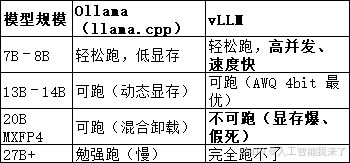
为什么这个是你 4090D 24G 的【上限】
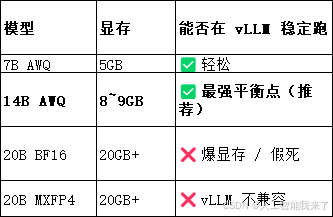
截至3月30日无法下载 Qwen3 / Qwen3.5 了,魔搭根本没上架!!!只能下载Qwen2.5-14B-Instruct-AWQ
bash
(vllm-env) root@DESKTOP-8IU6393:~# modelscope download --model qwen/Qwen2.5-14B-Instruct-AWQ --local_dir ./qwen2.5-14b-awq不知为何要运行2次才能连
(vllm-env) root@DESKTOP-8IU6393:~#  nohup python -m vllm.entrypoints.openai.api_server \
--model ./qwen2.5-7b-awq \
--quantization awq \
--trust-remote-code \
--gpu-memory-utilization 0.85 \
--max-model-len 16384 \
--host 0.0.0.0 \
--port 8888 > vllm.log 2>&1 &
[2] 1973
(vllm-env) root@DESKTOP-8IU6393:~# curl http://0.0.0.0:8888/v1/models
{"object":"list","data":[{"id":"./qwen2.5-7b-awq","object":"model","created":1774855675,"owned_by":"vllm","root":"./qwen2.5-7b-awq","parent":null,"max_model_len":16384,"permission":[{"id":"modelperm-bebcb9dcadc25831","object":"model_permission","created":1774855675,"allow_create_engine":false,"allow_sampling":true,"allow_logprobs":true,"allow_search_indices":false,"allow_view":true,"allow_fine_tuning":false,"organization":"*","group":null,"is_blocking":false}]}]}(vllm-env) root@DESKTOP-8IU6393:~#