之前的文章,介绍过C语言对json文件的读写,本篇,继续来讨论一种使用场景,json作为配置文件,使用C语言来读取,并支持对配置的修改。
例如,配置文件config.json中的内容如下:
json
{
    /*浮点数*/
    "temp_max" : 28.5, /*温度最大值*/
    "humi_max" : 85.0, /*湿度最大值*/

    /*整数*/
    "brightness_max" : 75, /*亮度最大值*/

    /*数组*/
    "repeat" : [1, 3, 5, 7], /*重复周期*/

    /*字符串*/
    "device_name" : "room_test"
}
配置文件中,包括常用的基本类型:
- 整数
- 浮点数
- 字符串
- 整型数组
如可用C语言来读取配置文件中的数据,并支持对配置的修改呢?下面来看代码逻辑分析
1 代码逻辑
1.1 配置文件准备与数据结构定义
配置文件的内容示例如下:
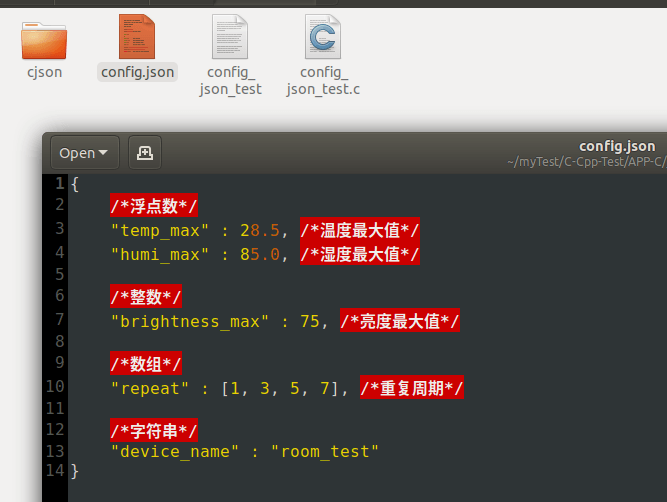
在代码中,定义结构体来存储从配置文件中读取到的数据:
c
#define CONFIG_FILE "config.json"

// 配置文件数据,对应配置文件中的内容
typedef struct{
    // 浮点数
    double tempMax;
    double humiMax;
    // 整数
    int brightnessMax;
    // 数组
    int repeat[7];
    // 字符串
    char deviceName[128];
}ConfigData_t;
1.2 文件读取与解析
c
// 全局 cJSON 对象,代表内存中的 JSON
static cJSON *g_root = NULL;

// 全局配置文件数据
ConfigData_t g_configData = {0};

// 从文件加载 JSON 到内存
int load_json(void)
{
    FILE *fp = fopen(CONFIG_FILE, "r");
    if (!fp)
    {
        printf("fopen:%s failed\n", CONFIG_FILE);
        return -1;
    }

    fseek(fp, 0, SEEK_END);
    long len = ftell(fp);
    fseek(fp, 0, SEEK_SET);

    char *buf = malloc(len + 1);
    fread(buf, 1, len, fp);
    fclose(fp);

    cJSON_Minify(buf); // 删除注释+压缩

    g_root = cJSON_Parse(buf);
    free(buf);

    if (!g_root)
    {
        printf("JSON parse err: %s\n", cJSON_GetErrorPtr());
        return -1;
    }

    // 解析josn中各字段的数据
    cJSON *jData = NULL;
    if ((jData = cJSON_GetObjectItem(g_root, "temp_max")))
    {
        g_configData.tempMax = jData->valuedouble;
    }

    if ((jData = cJSON_GetObjectItem(g_root, "humi_max")))
    {
        g_configData.humiMax = jData->valuedouble;
    }

    if ((jData = cJSON_GetObjectItem(g_root, "brightness_max")))
    {
        g_configData.brightnessMax = jData->valueint;
    }

    if ((jData = cJSON_GetObjectItem(g_root, "device_name")))
    {
        if (jData->valuestring)
        {
            strncpy(g_configData.deviceName, jData->valuestring, sizeof(g_configData.deviceName));
        }
    }

    if ((jData = cJSON_GetObjectItem(g_root, "repeat")))
    {
        cJSON *jDataItem = NULL;
        if (cJSON_IsArray(jData))
        {
            int i = 0;
            cJSON_ArrayForEach(jDataItem, jData)
            {
                g_configData.repeat[i++] = jDataItem->valueint;
            }
        }
    }


    printf(" tempMax:%.2f\n humiMax:%.2f\n brightnessMax:%d\n deviceName:%s\n",
        g_configData.tempMax, g_configData.humiMax, g_configData.brightnessMax, g_configData.deviceName);

    for (int i = 0; i < (sizeof(g_configData.repeat) / sizeof(g_configData.repeat[0])); i++)
    {
        printf("repeat[%d]:%d\n", i, g_configData.repeat[i]);
    }

    printf("parse %s ok\n", CONFIG_FILE);
    return 0;
}
1.3 json整体数据的打印
为了方便观察json配置数据中的内容,可以使用cJSON_Print将数据打印出来:
c
// 打印当前全部配置
void show_config(void)
{
    if (!g_root) return;

    char *text = cJSON_Print(g_root);
    printf("\n======== current config ========\n");
    printf("%s\n", text);
    cJSON_free(text);
    printf("==========================\n");
}
1.4 根据字段的名称修改json数据
在修改之前,需要先能判断出现这个字段之前存储的什么类型,比如配置文件这种使用场景,本来是数值类型的,就不应该被有意或无意的修改为字符串类型。
有一点需要注意,在cJson中,int和double是通用的,其内部同时存了两个值:
- valueint:int整数
- valuedouble:double浮点数
它们都属于number类型
1.4.1 判断字段的类型
由于int和double是通用,代码这里暂且把int和double都归为自定义的DATA_TYPE_DOUBLE这一类:
c
typedef enum{
    DATA_TYPE_ERR = 0,
    DATA_TYPE_INT,
    DATA_TYPE_DOUBLE,
    DATA_TYPE_STRING
}DataType_t;

// 判断数据的类型
DataType_t check_value_type(const char *key)
{
    DataType_t dataType = DATA_TYPE_ERR;

    cJSON *node = cJSON_GetObjectItemCaseSensitive(g_root, key);
    if (node)
    {
        if (cJSON_IsNumber(node))
        {
            printf("key:%s int:%d double:%f\n", key, node->valueint, node->valuedouble);

            // 整数和浮点数,统一按double处理
            dataType = DATA_TYPE_DOUBLE;
            printf("key:%s type is double\n", key);
        }
        else if (cJSON_IsString(node))
        {
            dataType = DATA_TYPE_STRING;
            printf("key:%s type is string\n", key);
        }
        else
        {
            printf("key:%s type is err\n", key);
        }
    }

    return dataType;
}
1.4.2 修改字段的值
根据字段的类型,使用对应的API接口修改不同类型的值。
这里将传入的数据使用void *来接收,并通过dataType来指示数据类型
c
// 修改字段的值
void update_item_value(const char *key, void *val, DataType_t dataType)
{
    cJSON *node = cJSON_GetObjectItemCaseSensitive(g_root, key);
    if (node)
    {
        if (DATA_TYPE_INT == dataType)
        {
            if (cJSON_IsNumber(node))
            {
                cJSON_SetNumberValue(node, *(int *)(val));
                printf("modify [%s] = %d\n", key, *(int *)(val));
            }
        }
        else if (DATA_TYPE_DOUBLE == dataType)
        {
            if (cJSON_IsNumber(node))
            {
                cJSON_SetNumberValue(node, *(double *)(val));
                printf("modify [%s] = %.2f\n", key, *(double *)(val));
            }
        }
        else if (DATA_TYPE_STRING == dataType)
        {
            if (cJSON_IsString(node))
            {
                cJSON_SetValuestring(node, (char *)(val));
                printf("modify [%s] = %s\n", key, (char *)val);
            }
        }

    }
    else
    {
        printf("key [%s] not exist or not num\n\n", key);
    }
}
1.4.3 修改数值中的值
数值中的值与上面的单个字段的值的修改逻辑不能通用,需要单独写一个处理函数:通过指定要修改的数组的位置索引,来修改数组中指定索引的值:
c
// 修改 int 数组中指定下标的值
void set_array_item(const char *arr_key, int index, int val)
{
    cJSON *arr = cJSON_GetObjectItemCaseSensitive(g_root, arr_key);
    if (!arr || !cJSON_IsArray(arr))
    {
        printf("数组 %s 不存在\n", arr_key);
        return;
    }

    int size = cJSON_GetArraySize(arr);
    if (index < 0 || index >= size)
    {
        printf("下标越界,数组长度: %d\n", size);
        return;
    }

    cJSON *item = cJSON_GetArrayItem(arr, index);
    if (item && cJSON_IsNumber(item))
    {
        cJSON_SetNumberValue(item, val);
        printf("%s[%d] = %d\n", arr_key, index, val);
    }
}
1.5 josn保存到文件
本实就是调用cJSON_Print得到文本格式的数据,然后通过fputs将内容写入到文件即可
c
// 保存内存中的 JSON 到文件
int save_json(void)
{
    if (!g_root)
    {
        return -1;
    }

    char *text = cJSON_Print(g_root);
    if (!text)
    {
        return -1;
    }

    FILE *fp = fopen(CONFIG_FILE, "w");
    if (!fp)
    {
        free(text);
        return -1;
    }

    fputs(text, fp);
    fclose(fp);
    cJSON_free(text);

    printf("save to %s\n", CONFIG_FILE);
    return 0;
}
1.6 一个交互式的配置工具
在命令行中,为了便于查看和修改配置文件,可以使用一个交互式的方式来查看修改
c
// 交互式菜单
void interactive_menu(void)
{
    int choice;
    while (1)
    {
        printf("\n===== 交互式配置工具 =====\n");
        printf("1. 显示当前配置\n");
        printf("2. 修改非数组key的值\n");
        printf("3. 修改数组key[int]的值\n");
        printf("4. 保存并退出\n");
        printf("5. 不保存退出\n");
        printf("请输入指令: ");

        if (scanf("%d", &choice) != 1)
        {
            // 清空输入缓冲区
            while (getchar() != '\n');
            printf("输入无效\n");
            continue;
        }

        switch (choice)
        {
            case 1:
            {
                show_config();
                break;
            }

            case 2:
            {
                char key[256] = {0};
                printf("输入要修正的非数组字段名称: ");
                scanf("%s", key);
                DataType_t dataType = check_value_type(key);
                if (DATA_TYPE_ERR == dataType)
                {
                    printf("配置文件中的数据类型错误\n");
                }
                else
                {
                    printf("输入要修改的值:");
                    if (DATA_TYPE_INT == dataType)
                    {
                        int valueInt = 0;
                        scanf("%d", &valueInt);
                        update_item_value(key, &valueInt, DATA_TYPE_INT);
                    }
                    else if (DATA_TYPE_DOUBLE == dataType)
                    {
                        double valuedouble = 0.0;
                        scanf("%lf", &valuedouble);
                        update_item_value(key, &valuedouble, DATA_TYPE_DOUBLE);
                    }
                    else if (DATA_TYPE_STRING == dataType)
                    {
                        char valueStr[256] = {0};
                        scanf("%s", valueStr);
                        update_item_value(key, &valueStr, DATA_TYPE_STRING);
                    }
                }


                break;
            }

            case 3:
            {
                int idx, val;
                printf("输入数组下标: ");
                scanf("%d", &idx);
                printf("输入新值: ");
                scanf("%d", &val);
                set_array_item("repeat", idx, val);
                break;
            }

            case 4:
            {
                save_json();
                cJSON_Delete(g_root);
                return;
            }

            case 5:
            {
                cJSON_Delete(g_root);
                printf("已退出,未保存\n");
                return;
            }
            default:
                printf("无效选项\n");
                break;
        }
    }
}
2 代码测试
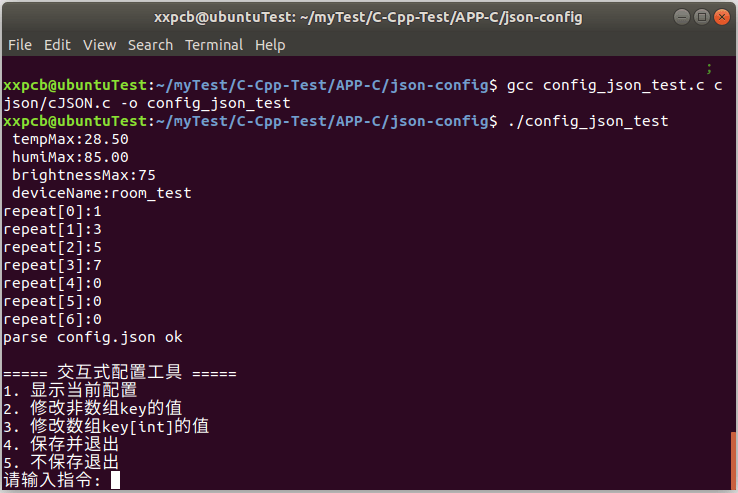
2.1 运行查看配置数据
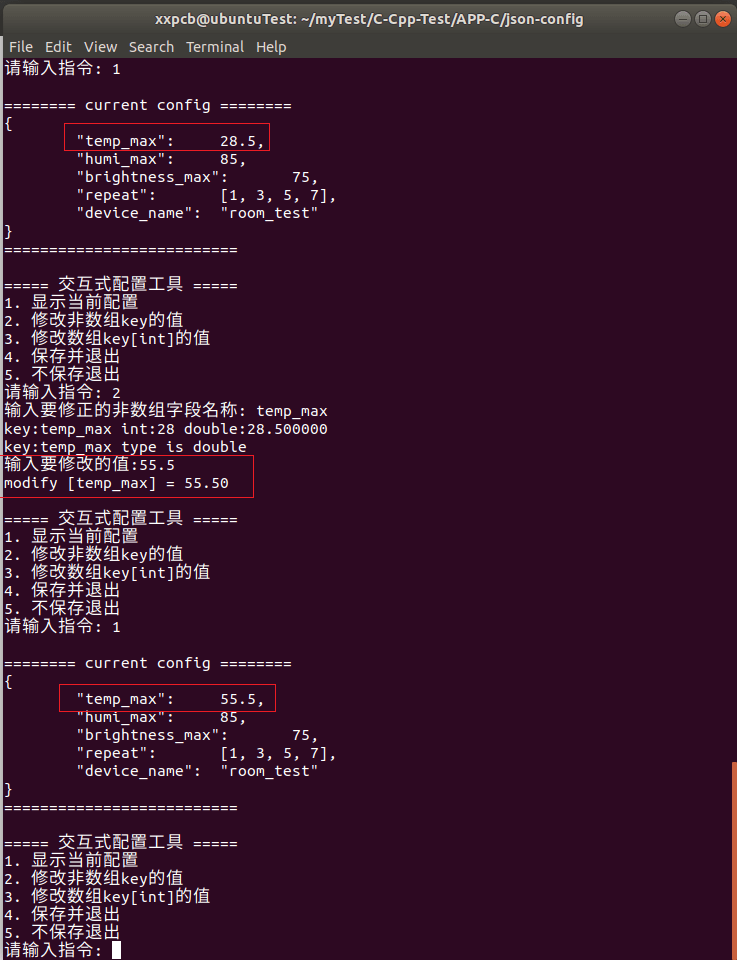
2.2 修改number类型的值
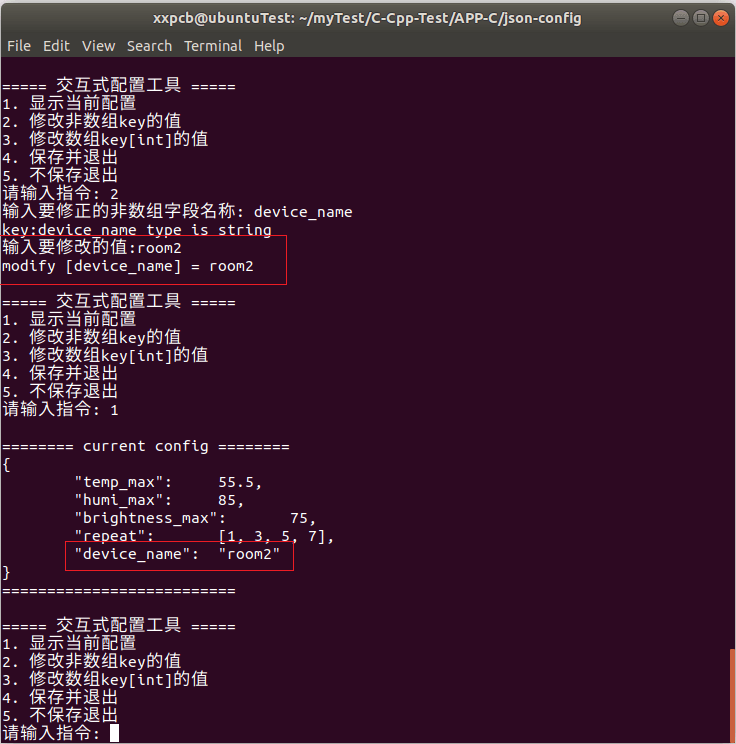
2.3 修改字符串类型的值
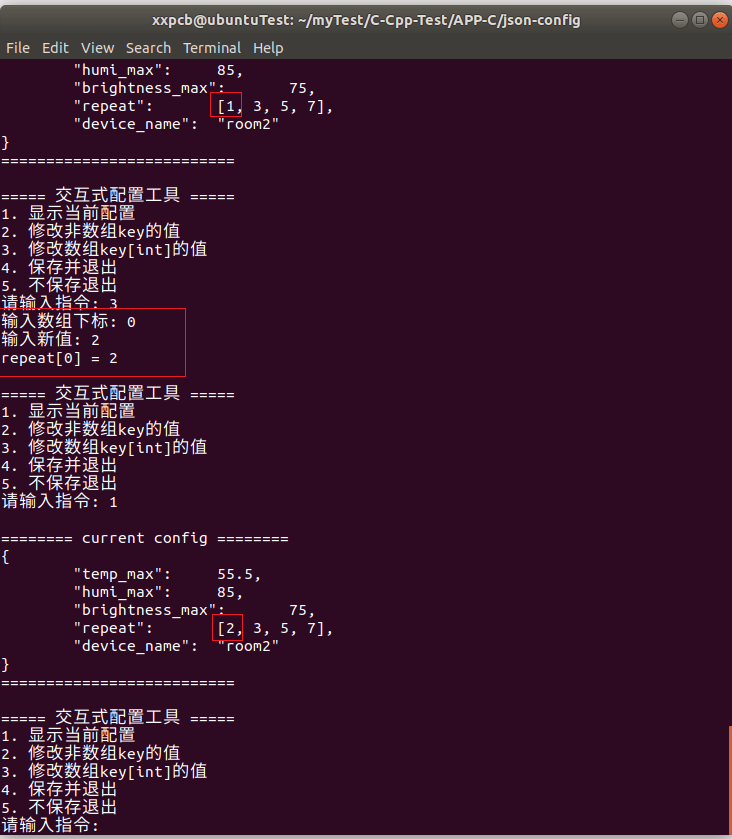
2.4 修改数组的值
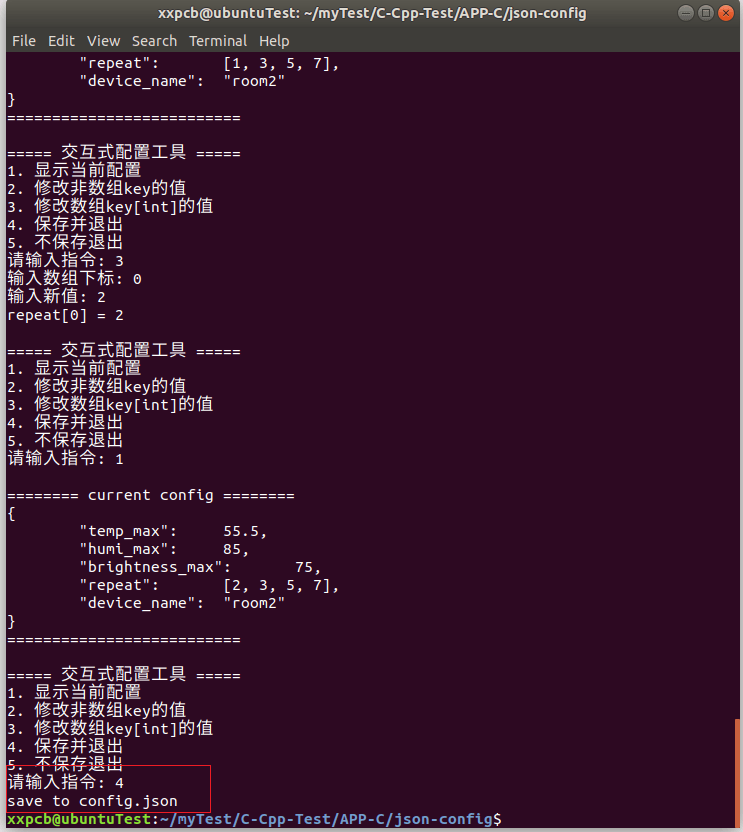
2.2 保存数据
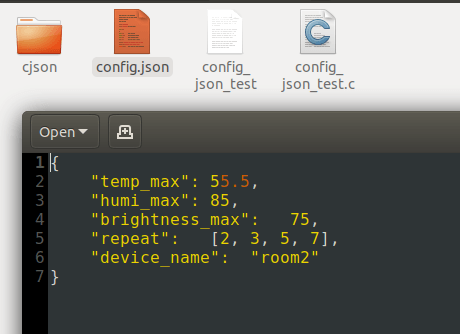
查看最终保存的配置文件:
3 完整代码
c
// gcc config_json_test.c cjson/cJSON.c -o config_json_test
#include <stdio.h>
#include <stdlib.h>
#include <string.h>
#include "cjson/cJSON.h"

#define CONFIG_FILE "config.json"

// 配置文件数据,对应配置文件中的内容
typedef struct{
    // 浮点数
    double tempMax;
    double humiMax;
    // 整数
    int brightnessMax;
    // 数组
    int repeat[7];
    // 字符串
    char deviceName[128];
}ConfigData_t;

typedef enum{
    DATA_TYPE_ERR = 0,
    DATA_TYPE_INT,
    DATA_TYPE_DOUBLE,
    DATA_TYPE_STRING
}DataType_t;

// 全局 cJSON 对象,代表内存中的 JSON
static cJSON *g_root = NULL;

// 全局配置文件数据
ConfigData_t g_configData = {0};

// 从文件加载 JSON 到内存
int load_json(void)
{
    FILE *fp = fopen(CONFIG_FILE, "r");
    if (!fp)
    {
        printf("fopen:%s failed\n", CONFIG_FILE);
        return -1;
    }

    fseek(fp, 0, SEEK_END);
    long len = ftell(fp);
    fseek(fp, 0, SEEK_SET);

    char *buf = malloc(len + 1);
    fread(buf, 1, len, fp);
    fclose(fp);

    cJSON_Minify(buf); // 删除注释+压缩

    g_root = cJSON_Parse(buf);
    free(buf);

    if (!g_root)
    {
        printf("JSON parse err: %s\n", cJSON_GetErrorPtr());
        return -1;
    }

    // 解析josn中各字段的数据
    cJSON *jData = NULL;
    if ((jData = cJSON_GetObjectItem(g_root, "temp_max")))
    {
        g_configData.tempMax = jData->valuedouble;
    }

    if ((jData = cJSON_GetObjectItem(g_root, "humi_max")))
    {
        g_configData.humiMax = jData->valuedouble;
    }

    if ((jData = cJSON_GetObjectItem(g_root, "brightness_max")))
    {
        g_configData.brightnessMax = jData->valueint;
    }

    if ((jData = cJSON_GetObjectItem(g_root, "device_name")))
    {
        if (jData->valuestring)
        {
            strncpy(g_configData.deviceName, jData->valuestring, sizeof(g_configData.deviceName));
        }
    }

    if ((jData = cJSON_GetObjectItem(g_root, "repeat")))
    {
        cJSON *jDataItem = NULL;
        if (cJSON_IsArray(jData))
        {
            int i = 0;
            cJSON_ArrayForEach(jDataItem, jData)
            {
                g_configData.repeat[i++] = jDataItem->valueint;
            }
        }
    }


    printf(" tempMax:%.2f\n humiMax:%.2f\n brightnessMax:%d\n deviceName:%s\n",
        g_configData.tempMax, g_configData.humiMax, g_configData.brightnessMax, g_configData.deviceName);

    for (int i = 0; i < (sizeof(g_configData.repeat) / sizeof(g_configData.repeat[0])); i++)
    {
        printf("repeat[%d]:%d\n", i, g_configData.repeat[i]);
    }

    printf("parse %s ok\n", CONFIG_FILE);
    return 0;
}

// 保存内存中的 JSON 到文件
int save_json(void)
{
    if (!g_root)
    {
        return -1;
    }

    char *text = cJSON_Print(g_root);
    if (!text)
    {
        return -1;
    }

    FILE *fp = fopen(CONFIG_FILE, "w");
    if (!fp)
    {
        free(text);
        return -1;
    }

    fputs(text, fp);
    fclose(fp);
    cJSON_free(text);

    printf("save to %s\n", CONFIG_FILE);
    return 0;
}

// 打印当前全部配置
void show_config(void)
{
    if (!g_root) return;

    char *text = cJSON_Print(g_root);
    printf("\n======== current config ========\n");
    printf("%s\n", text);
    cJSON_free(text);
    printf("==========================\n");
}

// 判断数据的类型
DataType_t check_value_type(const char *key)
{
    DataType_t dataType = DATA_TYPE_ERR;

    cJSON *node = cJSON_GetObjectItemCaseSensitive(g_root, key);
    if (node)
    {
        if (cJSON_IsNumber(node))
        {
            printf("key:%s int:%d double:%f\n", key, node->valueint, node->valuedouble);

            // 整数和浮点数,统一按double处理
            dataType = DATA_TYPE_DOUBLE;
            printf("key:%s type is double\n", key);
        }
        else if (cJSON_IsString(node))
        {
            dataType = DATA_TYPE_STRING;
            printf("key:%s type is string\n", key);
        }
        else
        {
            printf("key:%s type is err\n", key);
        }
    }

    return dataType;
}

// 修改字段的值
void update_item_value(const char *key, void *val, DataType_t dataType)
{
    cJSON *node = cJSON_GetObjectItemCaseSensitive(g_root, key);
    if (node)
    {
        if (DATA_TYPE_INT == dataType)
        {
            if (cJSON_IsNumber(node))
            {
                cJSON_SetNumberValue(node, *(int *)(val));
                printf("modify [%s] = %d\n", key, *(int *)(val));
            }
        }
        else if (DATA_TYPE_DOUBLE == dataType)
        {
            if (cJSON_IsNumber(node))
            {
                cJSON_SetNumberValue(node, *(double *)(val));
                printf("modify [%s] = %.2f\n", key, *(double *)(val));
            }
        }
        else if (DATA_TYPE_STRING == dataType)
        {
            if (cJSON_IsString(node))
            {
                cJSON_SetValuestring(node, (char *)(val));
                printf("modify [%s] = %s\n", key, (char *)val);
            }
        }

    }
    else
    {
        printf("key [%s] not exist or not num\n\n", key);
    }
}

// 修改 int 数组中指定下标的值
void set_array_item(const char *arr_key, int index, int val)
{
    cJSON *arr = cJSON_GetObjectItemCaseSensitive(g_root, arr_key);
    if (!arr || !cJSON_IsArray(arr))
    {
        printf("数组 %s 不存在\n", arr_key);
        return;
    }

    int size = cJSON_GetArraySize(arr);
    if (index < 0 || index >= size)
    {
        printf("下标越界,数组长度: %d\n", size);
        return;
    }

    cJSON *item = cJSON_GetArrayItem(arr, index);
    if (item && cJSON_IsNumber(item))
    {
        cJSON_SetNumberValue(item, val);
        printf("%s[%d] = %d\n", arr_key, index, val);
    }
}

// 交互式菜单
void interactive_menu(void)
{
    int choice;
    while (1)
    {
        printf("\n===== 交互式配置工具 =====\n");
        printf("1. 显示当前配置\n");
        printf("2. 修改非数组key的值\n");
        printf("3. 修改数组key[int]的值\n");
        printf("4. 保存并退出\n");
        printf("5. 不保存退出\n");
        printf("请输入指令: ");

        if (scanf("%d", &choice) != 1)
        {
            // 清空输入缓冲区
            while (getchar() != '\n');
            printf("输入无效\n");
            continue;
        }

        switch (choice)
        {
            case 1:
            {
                show_config();
                break;
            }

            case 2:
            {
                char key[256] = {0};
                printf("输入要修正的非数组字段名称: ");
                scanf("%s", key);
                DataType_t dataType = check_value_type(key);
                if (DATA_TYPE_ERR == dataType)
                {
                    printf("配置文件中的数据类型错误\n");
                }
                else
                {
                    printf("输入要修改的值:");
                    if (DATA_TYPE_INT == dataType)
                    {
                        int valueInt = 0;
                        scanf("%d", &valueInt);
                        update_item_value(key, &valueInt, DATA_TYPE_INT);
                    }
                    else if (DATA_TYPE_DOUBLE == dataType)
                    {
                        double valuedouble = 0.0;
                        scanf("%lf", &valuedouble);
                        update_item_value(key, &valuedouble, DATA_TYPE_DOUBLE);
                    }
                    else if (DATA_TYPE_STRING == dataType)
                    {
                        char valueStr[256] = {0};
                        scanf("%s", valueStr);
                        update_item_value(key, &valueStr, DATA_TYPE_STRING);
                    }
                }


                break;
            }

            case 3:
            {
                int idx, val;
                printf("输入数组下标: ");
                scanf("%d", &idx);
                printf("输入新值: ");
                scanf("%d", &val);
                set_array_item("repeat", idx, val);
                break;
            }

            case 4:
            {
                save_json();
                cJSON_Delete(g_root);
                return;
            }

            case 5:
            {
                cJSON_Delete(g_root);
                printf("已退出,未保存\n");
                return;
            }
            default:
                printf("无效选项\n");
                break;
        }
    }
}

int main()
{
    if (load_json() != 0)
    {
        printf("load config file err!\n");
        return -1;
    }

    interactive_menu();
    return 0;
}
4 总结
本篇介绍了一种json作为配置文件的读取与修改的简单示例,首先介绍了配置文件的结构以及读取和修改的代码逻辑,然后实际运行演示,并附上完整代码。