Tool Calling
Tool Calling(也称 function calling,函数调用)是 AI 应用中一种常见模式,它允许模型与外部 API 或工具交互,从而扩展模型的能力。
工具调用的主要用途
1. 信息检索
此类工具用于让模型从外部获取信息,例如数据库、Web 服务、文件系统或搜索引擎,从而回答模型自身无法直接回答的问题。比如:
- 获取某地的实时天气。
- 查询最新新闻。
- 根据 ID 查询数据库记录。
通过信息检索工具,模型能够突破训练知识的限制,获取实时或专业领域的数据。
2. 执行操作
此类工具让模型可以在软件系统中执行任务,自动化本需人工干预的操作。比如:
- 创建订单。
- 发送邮件。
- 创建数据库记录。
- 提交表单或触发工作流。
这些工具让模型不仅能回答问题,还能进行动手操作。
举个简单的栗子
知道Tool Calling的两个用途之后。下面我们分别举一个信息检索的例子和一个执行操作的例子感受一下。
1.查询最新的天气(信息检索)
我们先看看没使用Tool Calling时,AI的回答。

接下来让AI使用我们写好的Tools
- 定义一个工具
java
public class AiTools {
    @Tool(description = "根据城市查询天气信息")
    public String getWeather(WeatherRequest request) {
        //通过天气api查询一下天气
        return request.getLocation() + "的天气是晴天";
    }
}

public class WeatherRequest {
    @Schema(description = "城市名称,比如北京、上海、深圳")
    private String location;

    public String getLocation() {
        return location;
    }

    public void setLocation(String location) {
        this.location = location;
    }
}- 在请求中添加定义好的工具
java
@GetMapping("/weather")
public String weather(@RequestParam(value = "userInput", defaultValue = "") String userInput) {
    return this.openAiChatClient
            .prompt()
            .user(userInput)
            .tools(new AiTools())
            .call()
            .content();
}- 重新询问AI天气情况

2.创建订单(执行操作)
接下来我们使用AI帮我们完成一个电商下单的操作,具体的代码可查看项目代码。
- 定义创建订单的工具
java
@Tool(description = "创建订单工具,用户下单时调用,需要提供用户ID、商品列表和数量")
public CreateOrderResponse createOrder(CreateOrderRequest request) {

        // 1. 参数校验
        if (request.getUserId() == null) {
            throw new IllegalArgumentException("用户ID不能为空");
        }

        if (request.getItems() == null || request.getItems().isEmpty()) {
            throw new IllegalArgumentException("订单商品不能为空");
        }

        // 2. 模拟业务逻辑
        String orderNo = "order" + System.currentTimeMillis();

        // 3. 返回结果
        CreateOrderResponse response = new CreateOrderResponse();
        response.setOrderNo(orderNo);
        response.setStatus("success");

        return response;
}- 写一个接口进行测试
java
@GetMapping("/order")
public String order(@RequestParam(value = "userInput", defaultValue = "") String userInput) {
    return this.openAiChatClient
            .prompt()
            .user(userInput)
            .tools(new AiTools())
            .call()
            .content();
}
工具调用的工作原理
之前的文章中已经说过了工具调用的工作远程,我们这里回顾一下。
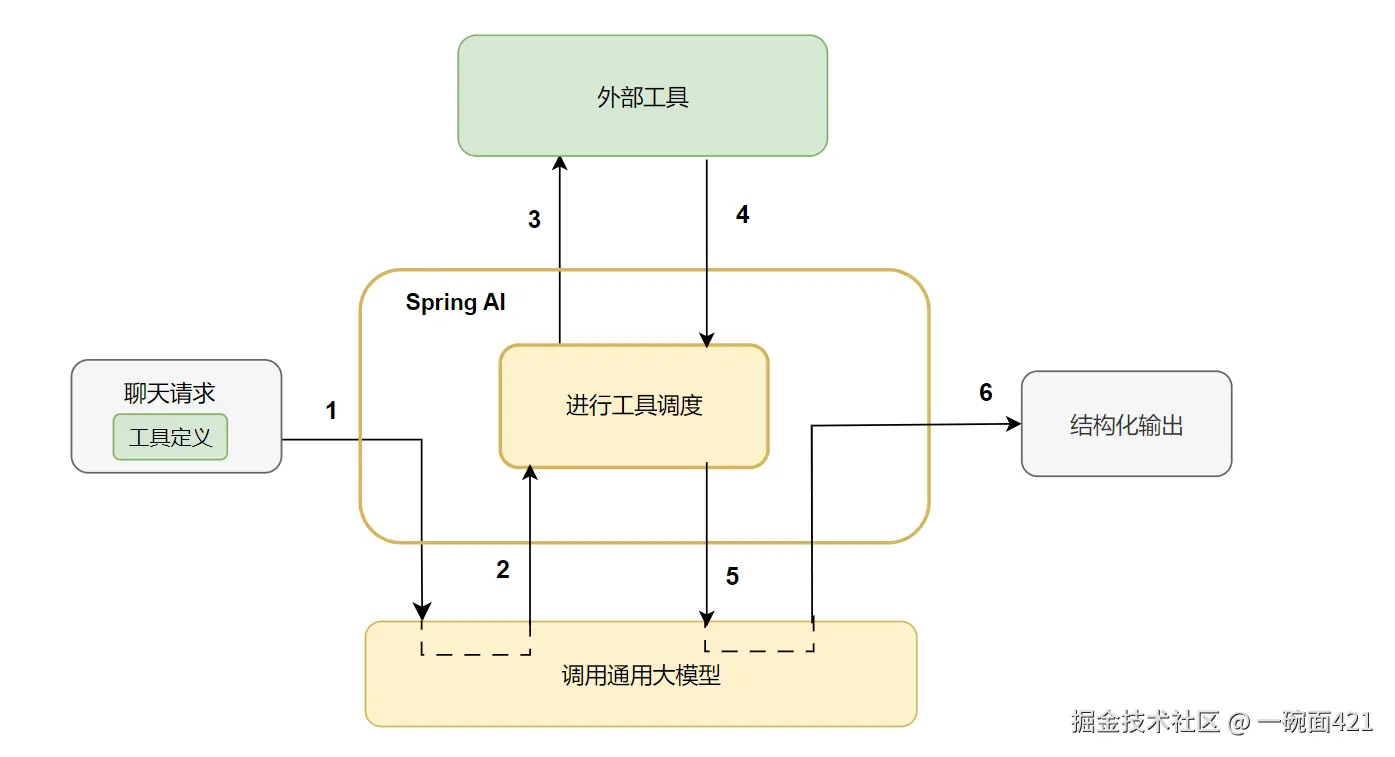
- 注册工具
- 在聊天请求中包含工具定义:
- 名称(name)
- 描述(description)
- 输入参数的 schema
- 在聊天请求中包含工具定义:
- 模型调用工具
- 模型根据需要返回:
- 工具名称
- 输入参数(遵循定义的 schema)
- 模型根据需要返回:
- 应用执行工具
- 应用根据工具名称找到对应方法,并使用参数执行
- 返回结果
- 工具执行结果被应用处理后,返回给模型
- 生成最终回答
- 模型将工具调用结果作为上下文,生成最终回答
定义工具的两种方式
SpringAI提供了两种方式让我们来定义工具:
- 声明式(Declarative)
通过 @Tool 注解即可快速定义工具,使用简单、开发效率高,适用于大多数场景。 - 编程式(Programmatic)
基于底层 API 手动定义工具,灵活性更高,但需要编写更多代码,适用于需要精细控制的场景
使用 @Tool 定义工具(声明式API)
在 Spring AI 中,我们可以通过在方法上添加 @Tool 注解,将一个普通方法转换为可被模型调用的工具。
方法使用要求
在使用 @Tool 时,需要注意以下几点约束:
可见性
- 支持 任意访问修饰符(public / protected / private)
- 同时支持: 实例方法 和 静态方法
参数要求
- 支持:无参方法和多参数方法
返回值要求
- 返回值必须是可序列化的。原因是:工具执行结果需要返回给模型,作为上下文继续参与推理
常见可用类型:
- 基本类型(String / int / boolean 等)
- POJO(会被序列化为 JSON)
不支持的类型
当前版本中,以下类型不支持作为方法参数或返回值:
Optional- 异步类型(
Future、CompletableFuture) - 响应式类型(
Mono、Flux) - 函数式类型(
Function、Supplier、Consumer)
下面我们查看@Tool的源码看看它几个参数的作用
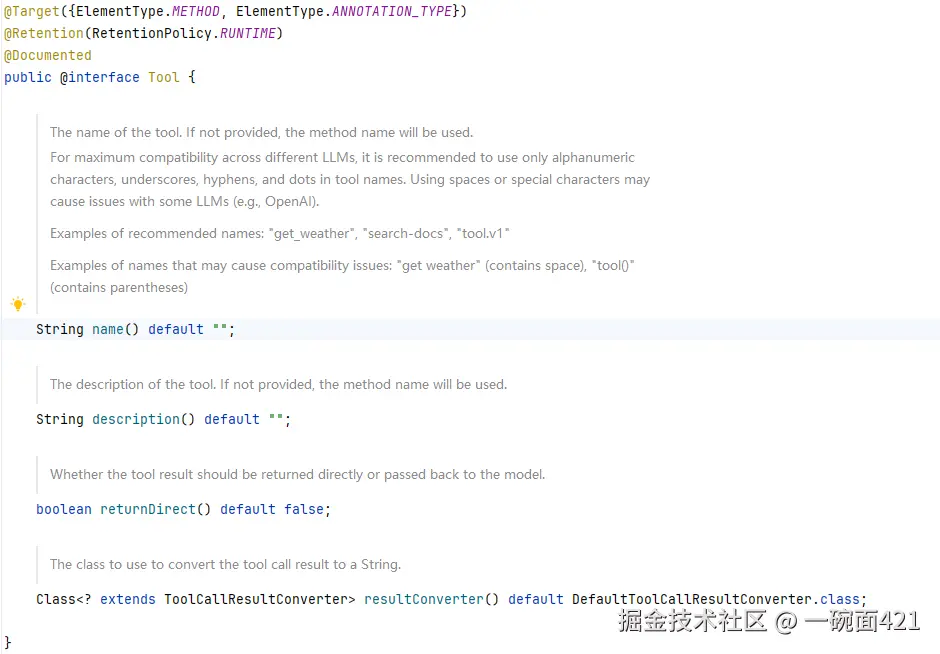
- name: 工具名称请保持唯一性。如果你不提供name,框架将使用方法名字作为工具名称。
- description:工具描述信息,请务必提供。模型可以用来理解何时以及如何调用该工具。
- returnDirect:工具结果是应该直接返回给客户端还是传回给模型
- resultConverter:将工具返回的结果转换成字符串,发送给模型处理
@ToolParam
对于简单类型参数,我们可以使用@ToolParam描述这个字段作用。 告诉大模型这个参数怎么用
java
public @interface ToolParam {

	/**
	 * 参数是否需要,默认是true。对于明确确定不需要模型提供的参数请设置成false。
     * 不然模型可能会提供一个错误的参数
	 */
	boolean required() default true;

	/**
	 * 给模型提供参数的描述和作用
	 */
	String description() default "";

}
java
public String getWeather(
 @ToolParam(description="城市名称,比如北京",required = true) String location
)
编程式API
FunctionToolCallback
我们使用FunctionToolCallback.Builder将上面的查询天气功能改造一下
java
@Bean
public FunctionToolCallback<WeatherRequest, String> weatherTool() {
    return FunctionToolCallback.<WeatherRequest, String>builder(
                    "getWeather",
                    request -> request.getLocation() + "的天气是晴天"
            )
            .description("根据城市查询天气信息")
            .inputType(WeatherRequest.class)
            .build();
}
注入使用
java
@Resource
private FunctionToolCallback<WeatherRequest, String> weatherTool;
@GetMapping("/weather2")
 public String weather2(@RequestParam(value = "userInput", defaultValue = "") String userInput) {
     return this.openAiChatClient
             .prompt()
             .user(userInput)
             .tools(weatherTool)
             .call()
             .content();
 }
FunctionToolCallback的限制
FunctionToolCallback所支持的类型是受限的。目前只推荐使用"单一 POJO 输入 + 简单输出"。
以下类型不支持作为FunctionToolCallback函数的输入或输出类型
- 基本类型
- Optional
- 集合类型(List,Array,Set,Map)
- 异步类型
- 响应式类型
但是基本类型和集合类型在@Tool注解的方法上是可以使用的。
JSON Schema
JSON Schema 用于描述工具的输入结构,帮助模型正确调用工具 。Description 写得越清楚,模型调用越准确
它会告诉模型:
- 参数有哪些?
- 每个参数的类型是什么?
- 是否必填?
- 参数含义是什么?
如何自定义 Schema
Spring AI 允许你通过注解来增强 schema,以下是SpringAi中支持的注解。
| 注解 | 来源 | 作用层级 | 推荐使用场景 |
|---|---|---|---|
@ToolParam |
Spring AI | 方法参数级 | Tool 入参(首选) |
@JsonPropertyDescription |
Jackson | 字段级 | POJO 字段(轻量) |
@Schema |
Swagger | 字段 / 类级 | 标准建模(推荐) |
@JsonClassDescription |
Jackson | 类级 | 补充整体说明(较少用) |
ToolContext
对于不想暴露敏感信息给模型 ,我们可以使用ToolContext 用来传递模型不可见的数据。
示例代码
自定义一个工具
java
@Tool(description = "根据城市查询天气")
public String getWeather4(String location, ToolContext context) {
    //从ToolContext 获取隐藏参数
    String userId = (String) context.getContext().get("userId");
    System.out.println("用户查询了天气:" + userId);
    return location + "天气是晴天";
}
在调用时进行传递userId
java
@GetMapping("/weather4")
public String weather4(@RequestParam(value = "userInput", defaultValue = "") String userInput) {
    return this.openAiChatClient
            .prompt()
            .user(userInput)
            .toolContext(Map.of(
                    "userId", "1001"
            ))
            .tools(new Weather4Tool())
            .call()
            .content();
}
ToolCallback
在 Spring AI 中,所有工具的本质都是 ToolCallback 接口。上面已经说了定义工具的两种方式,ToolCallbak其实是第三种,我们可以实现ToolCallback接口来完全控制 schema 和执行逻辑 。
plain
public interface ToolCallback {

    ToolDefinition getToolDefinition();

    ToolMetadata getToolMetadata();

    String call(String toolInput);

    String call(String toolInput, ToolContext toolContext);
}
它本质上做了三件事:
- 定义工具 getToolDefinition(给模型看的)
- 提供元信息 getToolMetadata(控制行为)
- 执行工具逻辑 call
自定义一个WeatherTool
java
public class WeatherTool implements ToolCallback {

    /**
     * 定义工具(给模型看的)
     * @return
     */
    @Override
    public ToolDefinition getToolDefinition() {
        return ToolDefinition.builder()
                .name("getWeather")
                .description("根据城市查询天气,例如输入北京、上海")
                .inputSchema("""
                {
                  "type": "object",
                  "properties": {
                    "location": {
                      "type": "string",
                      "description": "城市名称,比如北京、上海、东京"
                    }
                  },
                  "required": ["location"]
                }
                """)
                .build();
    }

    /**
     * 控制工具行为
     * @return
     */
    @Override
    public ToolMetadata getToolMetadata() {
        return ToolMetadata.builder()
                .returnDirect(false) // 是否直接返回给用户
                .build();
    }

    /**
     * 执行工具(无 context)
     * @param toolInput
     * @return
     */
    @Override
    public String call(String toolInput) {
        return call(toolInput, null);
    }


    /**
     * 执行工具(有 context)
     * @param toolInput
     * @param toolContext
     * @return
     */
    @Override
    public String call(String toolInput, ToolContext toolContext) {
        try {

            WeatherRequest request = JsonParser.fromJson(toolInput, WeatherRequest.class);

            String location = request.getLocation();

            String unit = "C";
            String userId = "unknown";

            if (toolContext != null) {
                unit = (String) toolContext.getContext().getOrDefault("unit", "C");
                userId = (String) toolContext.getContext().getOrDefault("userId", "unknown");
            }


            return "用户" + userId + "查询:"
                    + location + "天气是晴天,温度单位:" + unit;

        } catch (Exception e) {
            throw new ToolExecutionException(getToolDefinition(), e);
        }
    }
}
使用自定义的WeatherTool
java
@GetMapping("/weather3")
public String weather3(@RequestParam(value = "userInput", defaultValue = "") String userInput) {
    return this.openAiChatClient
    .prompt()
    .user(userInput)
    .toolCallbacks(new WeatherTool())
    .call()
    .content();
}
ToolDefinition
ToolDefinition 是给大模型看的,它决定了模型是否以及如何调用工具。
java
public interface ToolDefinition {

    String name();

    String description();

    String inputSchema();
}
核心三要素
- name:工具名称(必须唯一)
- description:工具描述(影响模型是否调用)
- inputSchema:参数结构(JSON Schema)
由于模型只认识JSON Schema。框架需要将我们定义好的工具转成JSON提供给模型。
最终的输出结果可能类似下面这样:
java
ToolDefinition toolDefinition = ToolDefinition.builder()
    .name("currentWeather")
    .description("Get the weather in location")
    .inputSchema("""
        {
            "type": "object",
            "properties": {
                "location": { "type": "string" },
                "unit": {
                    "type": "string",
                    "enum": ["C", "F"]
                }
            },
            "required": ["location", "unit"]
        }
    """)
    .build();
最后
项目的相关代码可以前往:github.com/byone421/sp... 获取
对于 Spring AI Tool Calling 的介绍就到这里。希望本文能对你在 Spring AI 工具调用的实践中有所帮助。