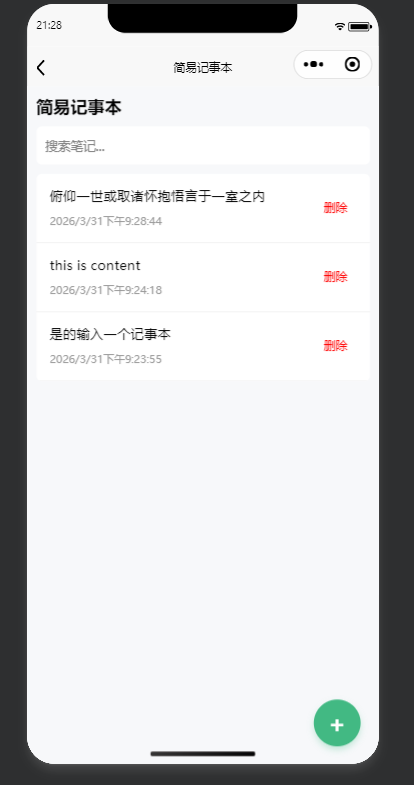
note.vue
html
<template>
  <view class="wrap">
    <view class="header">
      <text class="title">简易记事本</text>
    </view>

    <view class="search-box">
      <input v-model="keyword" placeholder="搜索笔记..." @input="doSearch" />
    </view>

    <view class="list">
      <view class="item" v-for="(item, idx) in showList" :key="idx">
        <!-- 点击进入编辑 -->
        <view class="content" @click="goEdit(idx)">
          <text class="txt">{{ item.title.length > 16 ? item.title.slice(0,16) + '...' : item.title }}</text>
          <text class="time">{{ item.time }}</text>
        </view>
        <!-- 删除按钮 -->
        <view class="del-btn" @click="delNote(idx)">删除</view>
      </view>

      <view class="empty" v-if="showList.length === 0">
        暂无笔记,点击右下角新增
      </view>
    </view>

    <view class="add-float-btn" @click="goAdd">
      <text class="add-icon">+</text>
    </view>
  </view>
</template>

<script>
export default {
  data() {
    return {
      noteList: [],
      showList: [],
      keyword: ""
    };
  },
  onShow() {
    this.getList();
  },
  methods: {
    getList() {
      let list = uni.getStorageSync("noteList") || [];
      this.noteList = list;
      this.showList = list;
    },
    doSearch() {
      let k = this.keyword.trim();
      if (!k) {
        this.showList = this.noteList;
        return;
      }
      this.showList = this.noteList.filter(item => item.title.includes(k));
    },
    goAdd() {
      uni.navigateTo({
        url: "/pages/note/edit"
      });
    },
    goEdit(idx) {
      uni.navigateTo({
        url: `/pages/note/edit?idx=${idx}`
      });
    },
    // 删除笔记
    delNote(idx) {
      uni.showModal({
        title: "确认删除",
        content: "确定要删除这条笔记吗?",
        success: (res) => {
          if (res.confirm) {
            let list = JSON.parse(JSON.stringify(this.noteList));
            list.splice(idx, 1);
            uni.setStorageSync("noteList", list);
            this.getList();
            uni.showToast({ title: "删除成功" });
          }
        }
      });
    }
  }
};
</script>

<style scoped>
.wrap {
  padding: 20rpx;
  background: #f7f8fa;
  min-height: 100vh;
}
.header {
  margin-bottom: 20rpx;
}
.title {
  font-size: 38rpx;
  font-weight: bold;
}
.search-box {
  background: #fff;
  border-radius: 12rpx;
  padding: 20rpx;
  margin-bottom: 20rpx;
}
.search-box input {
  font-size: 28rpx;
}
.list {
  background: #fff;
  border-radius: 12rpx;
  overflow: hidden;
}
.item {
  display: flex;
  align-items: center;
  padding: 30rpx;
  border-bottom: 1rpx solid #eee;
}
.content {
  flex: 1;
}
.txt {
  font-size: 30rpx;
  display: block;
  margin-bottom: 10rpx;
}
.time {
  font-size: 24rpx;
  color: #999;
}
/* 删除按钮 */
.del-btn {
  color: #ff0000;
  font-size: 26rpx;
  padding: 12rpx 20rpx;
  border-radius: 8rpx;
}
.empty {
  padding: 60rpx;
  text-align: center;
  color: #999;
}
.add-float-btn {
  position: fixed;
  right: 40rpx;
  bottom: 40rpx;
  width: 100rpx;
  height: 100rpx;
  border-radius: 50%;
  background: #42b983;
  display: flex;
  align-items: center;
  justify-content: center;
  box-shadow: 0 8rpx 16rpx rgba(66, 185, 131, 0.3);
  z-index: 999;
}
.add-icon {
  font-size: 50rpx;
  color: #fff;
  font-weight: bold;
}
</style>
edit.vue
html
<template>
  <view class="wrap">
    <textarea
      v-model="content"
      class="input-area"
      placeholder="请输入笔记内容..."
      placeholder-class="gray"
    />
  </view>
</template>

<script>
export default {
  data() {
    return {
      content: "",
      idx: -1
    };
  },
  onLoad(options) {
    this.idx = options.idx || -1;
    if (this.idx > -1) {
      let list = uni.getStorageSync("noteList") || [];
      this.content = list[this.idx]?.title || "";
    }
  },
  onUnload() {
    this.save();
  },
  methods: {
    save() {
      let val = this.content.trim();
      if (!val) return;

      let list = uni.getStorageSync("noteList") || [];
      let time = new Date().toLocaleString();

      if (this.idx > -1) {
        list[this.idx] = { title: val, time };
      } else {
        list.unshift({ title: val, time });
      }

      uni.setStorageSync("noteList", list);
    }
  }
};
</script>

<style scoped>
.wrap {
  padding: 30rpx;
  background: #fff;
  min-height: 100vh;
}
.input-area {
  width: 100%;
  min-height: 80vh;
  font-size: 32rpx;
  line-height: 1.6;
}
</style>