1 Jupyter Notebook 基础
1.1 基本概念
每一个有代码的格子在jupyter中叫做cell,比如下方这个cell中声明了两个变量,并输出其相加的值
python
a = 1
b = 2
print(a+b)3我们可以通过cell左边框的颜色来判断当前选中的cell,以及当前的状态,
比如下图表示我们选中了对应的cell,而旁边的蓝色代表当前处于命令模式
而当cell旁边的颜色为绿色时,这表明当前处于编辑模式,我们编辑修改cell中的内容,处于编辑模式时,可以看到我们的光标在闪烁

当我们选中某个cell并且处于命令模式时,就可以采取多种方式来运行选中的cell,常用的几种方式有:
- 选中cell然后点击界面上的按钮,
- 使用Ctrl+Enter快捷键,这个快捷键会运行选中的cell
- 使用Shift+Enter快捷键,这个快捷键会运行选中的cell并在cell下方创建一个空的cell
1.2 cell的基本操作
增加和删除cell
在命令模式下,可以通过以下按键来新增和删除以及恢复cell:
- 按
a在当前cell上方增加一个cell - 按
b在当前cell下方增加一个cell - 按
dd删除当前的cell - 按
z恢复通过dd删除的cell
python
current复制和粘贴cell
同样在命令模式下,可以通过c、x以及v来进行复制、剪切以及粘贴等操作:
- 命令模式下按
c可以复制当前的cell - 命令模式下按
x可以剪切当前的cell - 命令模式下按
v可以在当前cell下方粘贴cell,而V可以当前cell上方粘贴cell
python
code转换cell类型
在命令模式可以通过命令来快速转换cell的类型:
code: cell中的内容为代码,运行cell就会运行其中的代码,出现对应的输出,命令模式下按y切换,新建cell默认就是code模式markdown:用来编写markdown格式的文档,运行后就会出现按照markdown格式渲染的文字,命令模式下按m切换
python
print("code type cell")code type cellmarkdown type
bold
1.3 其他操作
切换输出
当一些cell的输出非常长时,可以通过一些快捷键来设置其是否显示或者切换显示效果:
- 命令模式按
o可以隐藏/显示对应cell的输出 - 命令模式按
O可以切换输出的显示方式,是否滚动
python
print("Python is an easy to learn, \npowerful programming language. \nIt has efficient high-level data structures and a simple but effective approach to \nobject-oriented programming. Python's elegant syntax and dynamic typing, \ntogether with its interpreted nature, make it an ideal language for \nscripting and rapid application development in many \nareas on most platforms.")
print("The Python interpreter and \nthe extensive standard library are \nfreely available in source or binary form for all major platforms from the Python web site, \nhttps://www.python.org/, and may be freely distributed. The same site also contains distributions of \nand pointers to many free third party Python modules, programs and tools, \nand additional documentation.")
print("The Python interpreter is \neasily extended with new functions and \ndata types implemented in C or C++ (or other languages callable from C). \nPython is also suitable as an extension language for customizable applications.")
print("This tutorial introduces the reader \ninformally to the basic concepts and features \nof the Python language and system. It helps to have a \nPython interpreter handy for hands-on experience, \nbut all examples are self-contained, so the tutorial can be read off-line as well.")Python is an easy to learn,
powerful programming language.
It has efficient high-level data structures and a simple but effective approach to
object-oriented programming. Python's elegant syntax and dynamic typing,
together with its interpreted nature, make it an ideal language for
scripting and rapid application development in many
areas on most platforms.
The Python interpreter and
the extensive standard library are
freely available in source or binary form for all major platforms from the Python web site,
https://www.python.org/, and may be freely distributed. The same site also contains distributions of
and pointers to many free third party Python modules, programs and tools,
and additional documentation.
The Python interpreter is
easily extended with new functions and
data types implemented in C or C++ (or other languages callable from C).
Python is also suitable as an extension language for customizable applications.
This tutorial introduces the reader
informally to the basic concepts and features
of the Python language and system. It helps to have a
Python interpreter handy for hands-on experience,
but all examples are self-contained, so the tutorial can be read off-line as well.切换行号
另一个比较实用的操作是切换显示cell的行号:
- 在命令模式下可以按
l切换当前cell是否显示行号 - 在命令模式下可以按
L切换所有的cell是否显示行号
line1
line2
重启内核
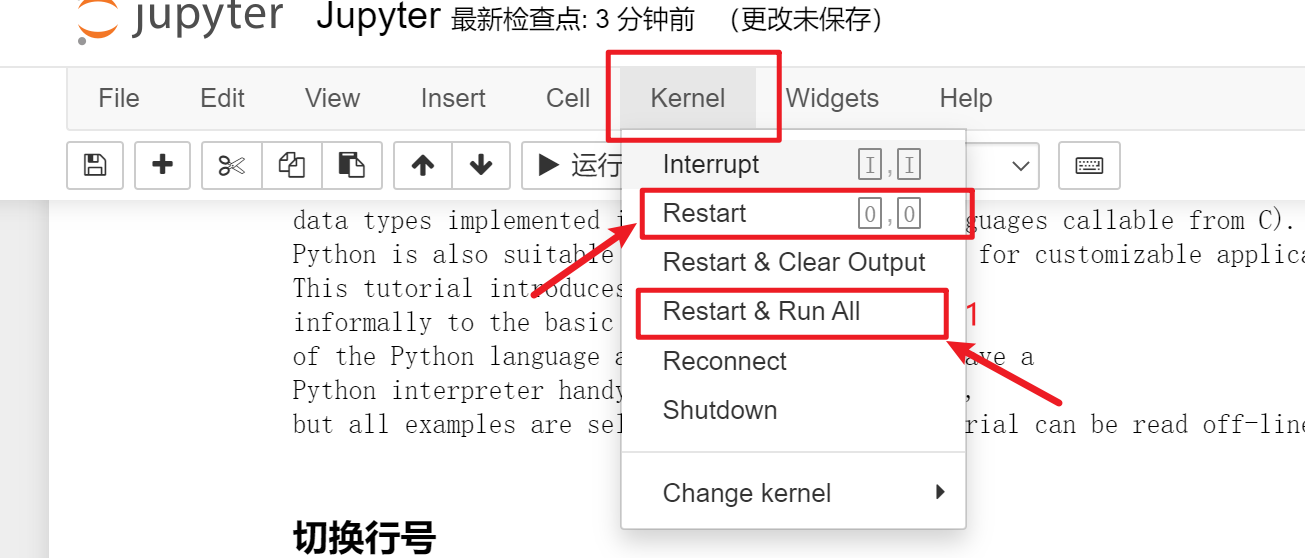
当我们想要重启当前notebook的内核时(重启内核会清空所有变量),可以使用下面两种办法:
- 在命令模式连着输入两个
0,即可重启内核 - 在页面上点击如下位置,同时也可以点击1处,可以直接重启内核然后运行所有的cell
1.2 查看库的帮助信息
在jupyter中编写代码时,可以通过jupyter提供的?来快速查看库,变量以及其他内容的信息
运行上方的代码,就会出现一个弹出框来显示os库的信息。
python
import os
os?或者通过将鼠标移动函数的两个括号中间,然后输入Shift+Tab来查看对应的注释信息
python
os.chdir()