查看原理图

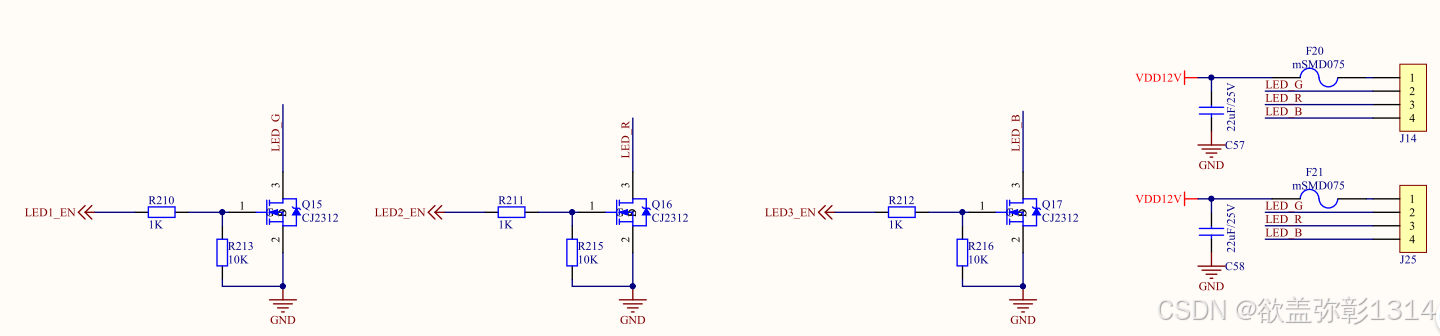

查看原理图,根据引脚分配表,找到led的gpio控制引脚。
led子系统
LED驱动可以直接采用gpio子系统或led子系统两种方式控制。此处采用led子系统,要确保内核启用了led子系统。
配置使能LED子系统:Device Drivers --> LEDs support
内核中设备树参考文档:kernel/Documentation/devicetree/bindings/leds/leds-gpio.txt
编写设备树节点
leds: leds {
	compatible = "gpio-leds";
	work_led: work {
		label = "work_led";
		gpios = <&gpio0 RK_PC0 GPIO_ACTIVE_HIGH>;
		linux,default-trigger = "heartbeat";
	};
	run_led: run {
		label = "run_led";
		gpios = <&gpio0 RK_PA5 GPIO_ACTIVE_HIGH>;
		linux,default-trigger = "heartbeat";
	};
};

gv_leds: gv-leds {
	compatible = "gpio-leds";
	pinctrl-names = "default";
	pinctrl-0 = <&gv_leds_gpio_fun>;
	status = "okay";

	led1_u: led1-u {
		label = "led1_up";
		gpios = <&gpio0 RK_PB0 GPIO_ACTIVE_HIGH>;
		default-state = "off";
	};

	led1_d: led1-d {
		label = "led1_down";
		gpios = <&gpio0 RK_PB5 GPIO_ACTIVE_HIGH>;
		/* Keep LED on if BIOS detected hardware fault */
		default-state = "off";
	};

	led2_u: led2-u {
		label = "led2_up";
		gpios = <&gpio0 RK_PB6 GPIO_ACTIVE_HIGH>;
		/* Keep LED on if BIOS detected hardware fault */
		default-state = "off";
	};

	 led2_d: led2-d {
		label = "led2_down";
		gpios = <&gpio0 RK_PC5 GPIO_ACTIVE_HIGH>;
		/* Keep LED on if BIOS detected hardware fault */
		default-state = "off";
	};

	led_rgb_1: led-rgb-1 {
		label = "led_rgb_1";
		gpios = <&gpio1 RK_PB0 GPIO_ACTIVE_HIGH>;
		/* Keep LED on if BIOS detected hardware fault */
		default-state = "off";
	};

	led_rgb_2: led-rgb-2 {
		label = "led_rgb_2";
		gpios = <&gpio1 RK_PB1 GPIO_ACTIVE_HIGH>;
		/* Keep LED on if BIOS detected hardware fault */
		default-state = "off";
	};

	led_rgb_3: led-rgb-3 {
		label = "led_rgb_3";
		gpios = <&gpio1 RK_PB2 GPIO_ACTIVE_HIGH>;
		/* Keep LED on if BIOS detected hardware fault */
		default-state = "off";
	};
};-
compatible属性:设备树和led子系统匹配的属性,表示这些led使用led子系统。
-
pinctrl-names属性:指定在不同状态下使用不同的引脚配置,这里是default,也就是pinctrl-0指定的属性。
-
pinctrl-0:pinctrl-names为default值时的引脚配置,这里值是gv_leds_gpio_fun。
-
status:表示使能该节点,若想禁用设置修改okay为disable即可。
-
label属性:系统将根据led子节点中的label属性在sysfs中生成相应的目录和设备文件。
-
gpios属性: 该属性指定了控制此led的是哪一个引脚。
-
更多属性配置参考内核中文档。
在pinctl节点增加gpio的配置:
c
gv-leds {
	gv_leds_gpio_fun: gv-leds-gpio-fun {
		rockchip,pins =
			<0 RK_PB0 RK_FUNC_GPIO &pcfg_pull_up>,
			<0 RK_PB5 RK_FUNC_GPIO &pcfg_pull_up>,
			<0 RK_PB6 RK_FUNC_GPIO &pcfg_pull_up>,
			<0 RK_PC5 RK_FUNC_GPIO &pcfg_pull_up>,
			<1 RK_PB0 RK_FUNC_GPIO &pcfg_pull_up>,
			<1 RK_PB1 RK_FUNC_GPIO &pcfg_pull_up>,
			<1 RK_PB2 RK_FUNC_GPIO &pcfg_pull_up>;
	};
};
如果后续不需要使用只需要将gv_leds设备节点status状态设置为disable。
在实现过程中,部分引脚被占用找到没有生成led的sysfs文件,需要解除引脚占用:
a) 配置内核禁用TouchScreen
b) 禁用以下设备树节点
c
vcc3v3_lcd1_n: vcc3v3-lcd1-n {
		compatible = "regulator-fixed";
		regulator-name = "vcc3v3_lcd1_n";
		regulator-boot-on;
		regulator-min-microvolt = <3300000>;
		regulator-max-microvolt = <3300000>;
		enable-active-high;
		gpio = <&gpio0 RK_PC5 GPIO_ACTIVE_HIGH>;
		vin-supply = <&vcc3v3_sys>;
		status = "disable";
		regulator-state-mem {
			regulator-off-in-suspend;
		};
	};

&wireless_bluetooth {
	compatible = "bluetooth-platdata";
	clocks = <&rk809 1>;
	clock-names = "ext_clock";
	//wifi-bt-power-toggle;
	uart_rts_gpios = <&gpio2 RK_PB1 GPIO_ACTIVE_LOW>;
	pinctrl-names = "default", "rts_gpio";
	pinctrl-0 = <&uart8m0_rtsn>;
	pinctrl-1 = <&uart8_gpios>;
	BT,reset_gpio    = <&gpio3 RK_PA0 GPIO_ACTIVE_HIGH>;
	BT,wake_gpio     = <&gpio3 RK_PA2 GPIO_ACTIVE_HIGH>;
	BT,wake_host_irq = <&gpio3 RK_PA1 GPIO_ACTIVE_HIGH>;
	status = "disable";
};

&pcie3x2 {
	reset-gpios = <&gpio2 RK_PD6 GPIO_ACTIVE_HIGH>;
	vpcie3v3-supply = <&vcc3v3_pcie>;
status = "disable";
};
将这些节点的status属性设置为"disable"。
用户空间访问
shell
root@M3:~# ls /sys/class/leds/
led_rgb_1/ led_rgb_2/ led_rgb_3/ mmc0::/    run_led/   work_led/


root@M3:~# ls /sys/class/leds/led_rgb_1/
brightness  device  max_brightness  power  subsystem  trigger  uevent
root@M3:~# ls /sys/class/leds/led_rgb_2/
brightness  device  max_brightness  power  subsystem  trigger  uevent
root@M3:~# ls /sys/class/leds/led_rgb_3/
brightness  device  max_brightness  power  subsystem  trigger  uevent
通过读写brightness属性就可以控led点亮/关闭。
rightness power subsystem trigger uevent
root@M3:~# ls /sys/class/leds/led_rgb_3/
brightness device max_brightness power subsystem trigger uevent
通过读写brightness属性就可以控led点亮/关闭。