我们平常使用的ai 也好 还是聊天也好 消息的处理当然重要不管是 通过webscoket 还是http 没有区别都是为了获取数据 只不过方式不一样
但是我们平常使用的deepseek 豆包 这些 回答的时候 文字不是一下全出来的 当然 这个流式数据 本身是需要切割的
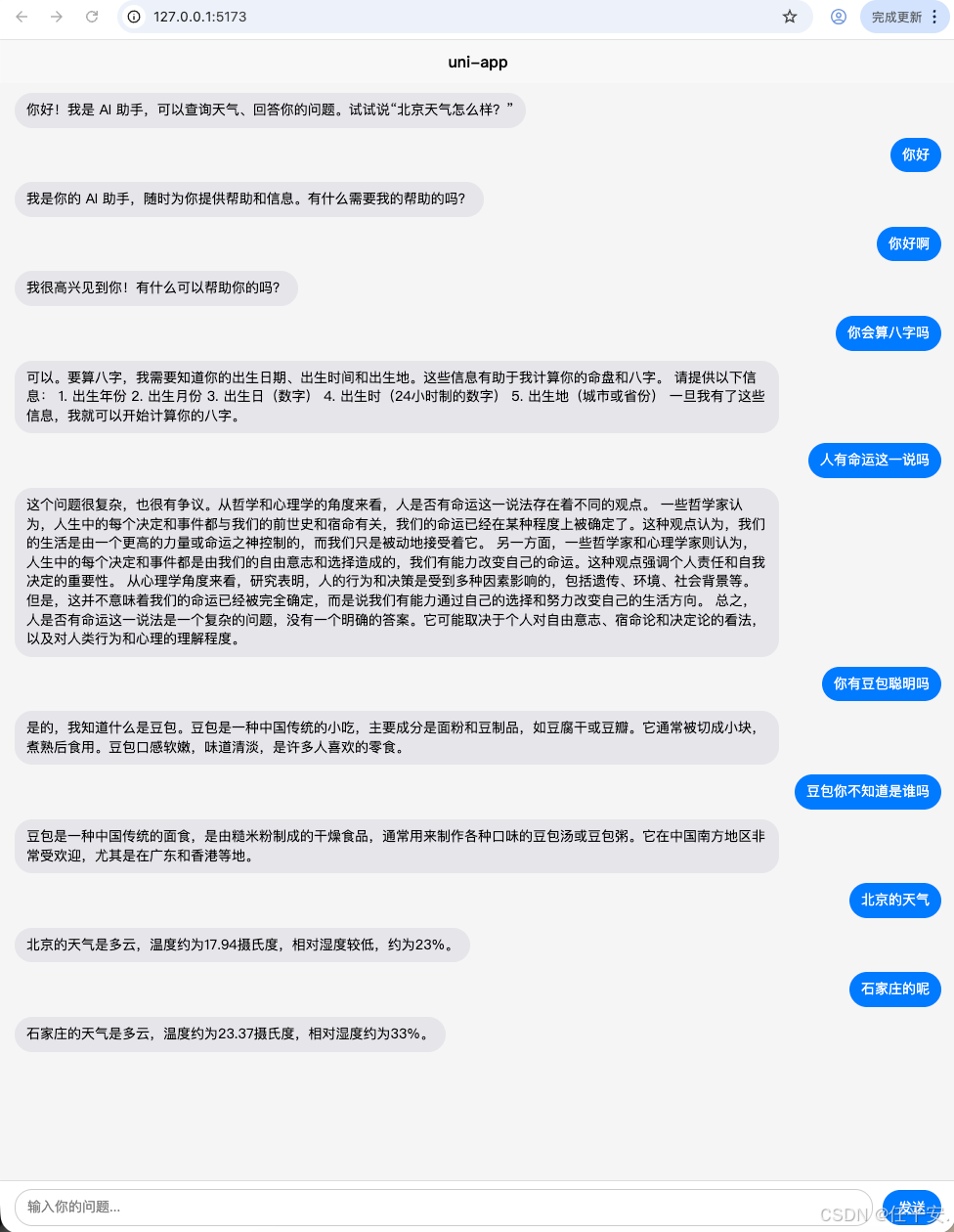
我做了一个简单的前后端程序
我本地布置了一套大模型 llm studio
自己写了部分简单接口
http://192.168.110.45:8001/ai/chat?input=%E4%BD%A0%E8%AF%B4%E4%BA%BA%E8%BF%99%E4%B8%80%E8%BE%88%E5%AD%90%E6%98%AF%E6%B3%A8%E5%AE%9A%E7%9A%84%E5%90%97我发了一个简单的问答
你说人这一辈子是注定的吗
后端返回数据
data: {"token":"这"}

data: {"token":"个"}

data: {"token":"问"}

data: {"token":"题"}

data: {"token":"很"}

data: {"token":"复"}

data: {"token":"杂"}

data: {"token":","}

data: {"token":"因"}

data: {"token":"为"}

data: {"token":"它"}

data: {"token":"涉"}

data: {"token":"及"}

data: {"token":"哲"}

data: {"token":"学"}

data: {"token":"、"}

data: {"token":"心"}

data: {"token":"理"}

data: {"token":"学"}

data: {"token":"和"}

data: {"token":"科"}

data: {"token":"学"}

data: {"token":"的"}

data: {"token":"多"}

data: {"token":"个"}

data: {"token":"方"}

data: {"token":"面"}

data: {"token":"。"}

data: {"token":"从"}

data: {"token":"哲"}

data: {"token":"学"}

data: {"token":"角"}

data: {"token":"度"}

data: {"token":"来"}

data: {"token":"看"}

data: {"token":","}

data: {"token":"有"}

data: {"token":"些"}

data: {"token":"人"}

data: {"token":"认"}

data: {"token":"为"}

data: {"token":"人"}

data: {"token":"生"}

data: {"token":"中"}

data: {"token":"的"}

data: {"token":"每"}

data: {"token":"一"}

data: {"token":"步"}

data: {"token":"都"}

data: {"token":"是"}

data: {"token":"由"}

data: {"token":"命"}

data: {"token":"运"}

data: {"token":"或"}

data: {"token":"上"}

data: {"token":"帝"}

data: {"token":"决"}

data: {"token":"定"}

data: {"token":"的"}

data: {"token":","}

data: {"token":"而"}

data: {"token":"我"}

data: {"token":"们"}

data: {"token":"只"}

data: {"token":"是"}

data: {"token":"被"}

data: {"token":"动"}

data: {"token":"地"}

data: {"token":"接"}

data: {"token":"受"}

data: {"token":"着"}

data: {"token":"。"}

data: {"token":"然"}

data: {"token":"而"}

data: {"token":","}

data: {"token":"另"}

data: {"token":"一"}

data: {"token":"些"}

data: {"token":"人"}

data: {"token":"则"}

data: {"token":"认"}

data: {"token":"为"}

data: {"token":"人"}

data: {"token":"生"}

data: {"token":"的"}

data: {"token":"选"}

data: {"token":"择"}

data: {"token":"和"}

data: {"token":"结"}

data: {"token":"果"}

data: {"token":"是"}

data: {"token":"由"}

data: {"token":"我"}

data: {"token":"们"}

data: {"token":"的"}

data: {"token":"自"}

data: {"token":"由"}

data: {"token":"意"}

data: {"token":"志"}

data: {"token":"决"}

data: {"token":"定"}

data: {"token":"的"}

data: {"token":"。"}

data: {"token":"\n"}

data: {"token":"\n"}

data: {"token":"从"}

data: {"token":"心"}

data: {"token":"理"}

data: {"token":"学"}

data: {"token":"角"}

data: {"token":"度"}

data: {"token":"来"}

data: {"token":"看"}

data: {"token":","}

data: {"token":"人"}

data: {"token":"的"}

data: {"token":"行"}

data: {"token":"为"}

data: {"token":"和"}

data: {"token":"决"}

data: {"token":"策"}

data: {"token":"受"}

data: {"token":"到"}

data: {"token":"各"}

data: {"token":"种"}

data: {"token":"因"}

data: {"token":"素"}

data: {"token":"的"}

data: {"token":"影"}

data: {"token":"响"}

data: {"token":","}

data: {"token":"如"}

data: {"token":"遗"}

data: {"token":"传"}

data: {"token":"、"}

data: {"token":"环"}

data: {"token":"境"}

data: {"token":"、"}

data: {"token":"经"}

data: {"token":"历"}

data: {"token":"和"}

data: {"token":"个"}

data: {"token":"性"}

data: {"token":"等"}

data: {"token":"。"}

data: {"token":"虽"}

data: {"token":"然"}

data: {"token":"这"}

data: {"token":"些"}

data: {"token":"因"}

data: {"token":"素"}

data: {"token":"可"}

data: {"token":"以"}

data: {"token":"影"}

data: {"token":"响"}

data: {"token":"我"}

data: {"token":"们"}

data: {"token":"的"}

data: {"token":"选"}

data: {"token":"择"}

data: {"token":","}

data: {"token":"但"}

data: {"token":"它"}

data: {"token":"们"}

data: {"token":"并"}

data: {"token":"不"}

data: {"token":"决"}

data: {"token":"定"}

data: {"token":"我"}

data: {"token":"们"}

data: {"token":"的"}

data: {"token":"人"}

data: {"token":"生"}

data: {"token":"道"}

data: {"token":"路"}

data: {"token":"。"}

data: {"token":"\n"}

data: {"token":"\n"}

data: {"token":"科"}

data: {"token":"学"}

data: {"token":"上"}

data: {"token":"来"}

data: {"token":"说"}

data: {"token":","}

data: {"token":"人"}

data: {"token":"生"}

data: {"token":"的"}

data: {"token":"发"}

data: {"token":"展"}

data: {"token":"也"}

data: {"token":"受"}

data: {"token":"到"}

data: {"token":"生"}

data: {"token":"物"}

data: {"token":"学"}

data: {"token":"和"}

data: {"token":"神"}

data: {"token":"经"}

data: {"token":"科"}

data: {"token":"学"}

data: {"token":"的"}

data: {"token":"影"}

data: {"token":"响"}

data: {"token":"。"}

data: {"token":"例"}

data: {"token":"如"}

data: {"token":","}

data: {"token":"基"}

data: {"token":"因"}

data: {"token":"、"}

data: {"token":"脑"}

data: {"token":"结"}

data: {"token":"构"}

data: {"token":"和"}

data: {"token":"功"}

data: {"token":"能"}

data: {"token":"都"}

data: {"token":"可"}

data: {"token":"能"}

data: {"token":"影"}

data: {"token":"响"}

data: {"token":"我"}

data: {"token":"们"}

data: {"token":"的"}

data: {"token":"行"}

data: {"token":"为"}

data: {"token":"和"}

data: {"token":"决"}

data: {"token":"策"}

data: {"token":"能"}

data: {"token":"力"}

data: {"token":"。"}

data: {"token":"但"}

data: {"token":"是"}

data: {"token":","}

data: {"token":"这"}

data: {"token":"些"}

data: {"token":"因"}

data: {"token":"素"}

data: {"token":"也"}

data: {"token":"不"}

data: {"token":"足"}

data: {"token":"以"}

data: {"token":"完"}

data: {"token":"全"}

data: {"token":"决"}

data: {"token":"定"}

data: {"token":"我"}

data: {"token":"们"}

data: {"token":"的"}

data: {"token":"命"}

data: {"token":"运"}

data: {"token":"。"}

data: {"token":"\n"}

data: {"token":"\n"}

data: {"token":"因"}

data: {"token":"此"}

data: {"token":","}

data: {"token":"我"}

data: {"token":"认"}

data: {"token":"为"}

data: {"token":"人"}

data: {"token":"这"}

data: {"token":"一"}

data: {"token":"辈"}

data: {"token":"子"}

data: {"token":"并"}

data: {"token":"不"}

data: {"token":"是"}

data: {"token":"完"}

data: {"token":"全"}

data: {"token":"注"}

data: {"token":"定"}

data: {"token":"的"}

data: {"token":"。"}

data: {"token":"虽"}

data: {"token":"然"}

data: {"token":"我"}

data: {"token":"们"}

data: {"token":"的"}

data: {"token":"人"}

data: {"token":"生"}

data: {"token":"道"}

data: {"token":"路"}

data: {"token":"会"}

data: {"token":"受"}

data: {"token":"到"}

data: {"token":"各"}

data: {"token":"种"}

data: {"token":"因"}

data: {"token":"素"}

data: {"token":"的"}

data: {"token":"影"}

data: {"token":"响"}

data: {"token":","}

data: {"token":"但"}

data: {"token":"我"}

data: {"token":"们"}

data: {"token":"仍"}

data: {"token":"然"}

data: {"token":"有"}

data: {"token":"自"}

data: {"token":"由"}

data: {"token":"选"}

data: {"token":"择"}

data: {"token":"和"}

data: {"token":"决"}

data: {"token":"定"}

data: {"token":"自"}

data: {"token":"己"}

data: {"token":"的"}

data: {"token":"生"}

data: {"token":"活"}

data: {"token":"方"}

data: {"token":"向"}

data: {"token":"。"}

data: [DONE]
当然可能我这个数据写的不标准 不应该使用token字段 先忽略
他是这样返回的
我前端代码处理文字流
// 发送消息
async function sendMessage() {
  const question = inputText.value.trim();
  if (!question || isLoading.value) return;

  // 添加用户消息
  messages.value.push({ role: 'user', content: question });
  inputText.value = '';
  scrollToBottom();

  // 显示加载状态
  isLoading.value = true;

  // 创建一个临时的 AI 消息占位,用于流式追加
  const assistantMsgIndex = messages.value.length;
  messages.value.push({ role: 'assistant', content: '' });

  let fullText = '';

  try {
    // 注意:uni-app 的 H5 端支持 fetch,但 App 端可能需要使用 uni.request 并自行处理流式
    // 这里以 H5 为例,使用 fetch 读取 ReadableStream
    const response = await fetch(`${API_URL}?input=${encodeURIComponent(question)}`);

    // if (!response.ok) {
    //   throw new Error(`HTTP ${response.status}`);
    // }

    const reader = response.body.getReader();
    const decoder = new TextDecoder();

    while (true) {
      const { done, value } = await reader.read();
      if (done) break;
      const chunk = decoder.decode(value, { stream: true });
      const lines = chunk.split('\n');
      for (const line of lines) {
        if (line.startsWith('data: ')) {
          const data = line.slice(6);
          if (data === '[DONE]') continue;
          try {
            const json = JSON.parse(data);
            if (json.token) {
              fullText += json.token;
              // 更新占位消息的内容
              messages.value[assistantMsgIndex].content = fullText;
              scrollToBottom();
            }
          } catch (e) {
            console.warn('JSON parse error', e);
          }
        }
      }
    }

    if (!fullText) {
      messages.value[assistantMsgIndex].content = '(无响应内容)';
    }
  } catch (err) {
    console.error('Request error:', err);
    messages.value[assistantMsgIndex].content = '连接失败,请稍后重试。';
  } finally {
    isLoading.value = false;
    scrollToBottom();
  }
}
这里主要其实 也是很简单的 是把文字拼接起来了 然后我们可能就看到 文字一部分一部分出来 交互效果就会特别好
后端我使用node 服务写的
我也贴下
import { Controller, Get, Query, Inject } from '@midwayjs/core';
import { Context } from '@midwayjs/koa';
import { BusinessChatService } from '../service/agent';

@Controller('/ai')
export class ChatController {
  @Inject()
  businessChatService: BusinessChatService;

  @Inject()
  ctx: Context;

  @Get('/chat')
  async chatStream(@Query('input') input: string) {
    if (!input) {
      this.ctx.status = 400;
      this.ctx.body = { error: '请输入问题' };
      return;
    }

    // 设置 SSE 响应头
    this.ctx.set({
      'Content-Type': 'text/event-stream',
      'Cache-Control': 'no-cache',
      Connection: 'keep-alive',
    });

    const res = this.ctx.res;
    // 监听客户端断开连接
    let isClosed = false;
    const onClose = () => {
      isClosed = true;
    };
    res.on('close', onClose);

    try {
      await this.businessChatService.chatStream(input, (token) => {
        if (!isClosed) {
          res.write(`data: ${JSON.stringify({ token })}\n\n`);
        }
      });
      if (!isClosed) {
        res.write(`data: [DONE]\n\n`);
        res.end();
      }
    } catch (err) {
      console.error('Stream error:', err);
      if (!isClosed) {
        res.write(`data: ${JSON.stringify({ token: '处理出错,请重试' })}\n\n`);
        res.write(`data: [DONE]\n\n`);
        res.end();
      }
    } finally {
      res.removeListener('close', onClose);
    }
  }
}
这个controller
我把前端代码 全部贴一下
<template>
  <view class="chat-container">
    <!-- 消息列表 -->
    <view class="message-list">
      <view
        v-for="(msg, idx) in messages"
        :key="idx"
        :class="['message', msg.role]"
      >
        <view class="bubble">{{ msg.content }}</view>
      </view>
      <!-- 加载中提示 -->
      <view v-if="isLoading" class="loading">思考中...</view>
    </view>

    <!-- 底部输入区 -->
    <view class="input-area">
      <input
        type="text"
        v-model="inputText"
        placeholder="输入你的问题..."
        @confirm="sendMessage"
        :disabled="isLoading"
      />
      <button @click="sendMessage" :disabled="isLoading">发送</button>
    </view>
  </view>
</template>

<script setup>
import { ref, reactive, nextTick } from 'vue';

// 消息列表
const messages = ref([
  {
    role: 'assistant',
    content: '你好!我是 AI 助手,可以查询天气、回答你的问题。试试说"北京天气怎么样?"',
  },
]);

// 输入框内容
const inputText = ref('');
// 是否正在请求(显示加载)
const isLoading = ref(false);

// 后端接口地址(请根据实际部署修改)
const API_URL = 'http://192.168.110.45:8001/ai/chat';

// 滚动到底部
function scrollToBottom() {
  nextTick(() => {
    const query = uni.createSelectorQuery();
    query.select('.message-list').boundingClientRect();
    query.exec((res) => {
      if (res[0]) {
        uni.pageScrollTo({
          scrollTop: res[0].height,
          duration: 100,
        });
      }
    });
  });
}

// 发送消息
async function sendMessage() {
  const question = inputText.value.trim();
  if (!question || isLoading.value) return;

  // 添加用户消息
  messages.value.push({ role: 'user', content: question });
  inputText.value = '';
  scrollToBottom();

  // 显示加载状态
  isLoading.value = true;

  // 创建一个临时的 AI 消息占位,用于流式追加
  const assistantMsgIndex = messages.value.length;
  messages.value.push({ role: 'assistant', content: '' });

  let fullText = '';

  try {
    // 注意:uni-app 的 H5 端支持 fetch,但 App 端可能需要使用 uni.request 并自行处理流式
    // 这里以 H5 为例,使用 fetch 读取 ReadableStream
    const response = await fetch(`${API_URL}?input=${encodeURIComponent(question)}`);

    // if (!response.ok) {
    //   throw new Error(`HTTP ${response.status}`);
    // }

    const reader = response.body.getReader();
    const decoder = new TextDecoder();

    while (true) {
      const { done, value } = await reader.read();
      if (done) break;
      const chunk = decoder.decode(value, { stream: true });
      const lines = chunk.split('\n');
      for (const line of lines) {
        if (line.startsWith('data: ')) {
          const data = line.slice(6);
          if (data === '[DONE]') continue;
          try {
            const json = JSON.parse(data);
            if (json.token) {
              fullText += json.token;
              // 更新占位消息的内容
              messages.value[assistantMsgIndex].content = fullText;
              scrollToBottom();
            }
          } catch (e) {
            console.warn('JSON parse error', e);
          }
        }
      }
    }

    if (!fullText) {
      messages.value[assistantMsgIndex].content = '(无响应内容)';
    }
  } catch (err) {
    console.error('Request error:', err);
    messages.value[assistantMsgIndex].content = '连接失败,请稍后重试。';
  } finally {
    isLoading.value = false;
    scrollToBottom();
  }
}
</script>

<style scoped>
/* 全局样式,使用 rpx 适配移动端 */
.chat-container {
  display: flex;
  flex-direction: column;
  height: 100vh;
  background-color: #f5f5f5;
}

.message-list {
  flex: 1;
  overflow-y: auto;
  padding: 20rpx 30rpx;
}

.message {
  margin-bottom: 20rpx;
  display: flex;
}

.message.user {
  justify-content: flex-end;
}

.message.assistant {
  justify-content: flex-start;
}

.bubble {
  max-width: 80%;
  padding: 16rpx 24rpx;
  border-radius: 36rpx;
  font-size: 28rpx;
  line-height: 1.4;
  word-break: break-word;
}

.user .bubble {
  background-color: #007aff;
  color: white;
}

.assistant .bubble {
  background-color: #e5e5ea;
  color: black;
}

.loading {
  padding: 20rpx 30rpx;
  color: #666;
  font-style: italic;
  font-size: 26rpx;
}

.input-area {
  position: fixed;
  bottom: 0;
  left: 0;
  right: 0;
  background-color: white;
  padding: 16rpx 30rpx;
  border-top: 1px solid #ddd;
  display: flex;
  gap: 20rpx;
  align-items: center;
  box-sizing: border-box;
}

.input-area input {
  flex: 1;
  height: 72rpx;
  padding: 0 24rpx;
  border: 1px solid #ccc;
  border-radius: 36rpx;
  font-size: 28rpx;
  background: white;
}

.input-area button {
  background-color: #007aff;
  color: white;
  border: none;
  padding: 0 32rpx;
  height: 72rpx;
  line-height: 72rpx;
  border-radius: 36rpx;
  font-size: 28rpx;
  font-weight: normal;
}

.input-area button[disabled] {
  background-color: #aaa;
}
</style>