在采用TongWeb7.0 集中管理heimdall做配置时,说明一下相关配置文件的存放目录和结构。其相关配置文件存放在: TongWeb_Home/applications/heimdall/masterConfig/,同时在 TongWeb_Home/masterConfigBAK做了一个备份。
其masterConfig目录下主要配置文件说明。
| 配置文件/目录 | 说明 |
|---|---|
| application.xml | 记录应用在集群、实例上的部署信息. |
| applications、drivers目录 | 分别是应用和驱动包的存放目录。先上传到heimdall,再分发到各个实例。 |
| nodeagents.xml | 记录各个Agent节点的ID,IP地址、port。 |
| TongwebClusterInfo.xml | 集群配置信息 |
| {数字目录}/tongwebinfo.xml | 以Agent ID命名的目录,tongwebinfo.xml存放该agent下管理的实例信息。 |
| machine.xml、machine-agent-node.xml | 节点机器信息,远程安装时记录的信息。 |
举例:
- TongWeb A节点注册到heimdall, 其agent/config/agent.xml信息如下:
XML
<?xml version="1.0" encoding="UTF-8" standalone="yes"?>
<configFile>
    <agentId>1774597043188</agentId>
    <agentIp>127.0.0.1</agentIp>
    <agentPort>7070</agentPort>
    <extendNodeRegistered/>
    <fileReceiverPort>19090</fileReceiverPort>
    <masterContextRoot>/heimdall</masterContextRoot>
    <!-- 指明heimdall地址  -->
    <masterIp>192.168.9.10</masterIp>
    <masterPath>/home/TongWeb7.0.4.9_M10</masterPath>
    <masterPort>9060</masterPort>
    <!-- 管理的实例  -->
    <tongwebRegistered>/home/TongWeb7.0.4.9_M10/Agent/nodes/tongweb-1</tongwebRegistered>
</configFile>- heimdall控制台显示的节点、实例信息取自如下文件。
nodeagents.xml
XML
<set>
  <NodeAgentInfo>
    <!-- 对应agent.xml中的agentId和其IP地址  -->
    <id>1774597043188</id>
    <ip>192.168.9.11</ip>
    <port>7070</port>
    <instanceHome>/home/TongWeb7.0.4.9_M10/Agent</instanceHome>
  </NodeAgentInfo>
</set>
1774597043188 目录以agentId命名生成,tongwebinfo.xml
XML
<set>
  <TongWebInfo>
    <!-- 实例ID以及所属集群 -->
    <id>1741676853</id>
    <instanceHome>/home/TongWeb7.0.4.9_M10/Agent/nodes/tongweb-1</instanceHome>
    <jmxServicePort>0</jmxServicePort>
    <clusterName>cluster01_1774597656709</clusterName>
    <ajpListenerPorts/>
    <JMXServicePort>0</JMXServicePort>
    <remoteConsoleContextRoot>/console</remoteConsoleContextRoot>
    <install>false</install>
    <restart>false</restart>
  </TongWebInfo>
</set>
TongwebClusterInfo.xml
XML
<list>
  <TongwebClusterInfo>
    <!--集群名和ID   -->
    <clusterName>cluster01</clusterName>
    <id>cluster01_1774597656709</id>
    <ifSmart>false</ifSmart>
    <autoSmart>true</autoSmart>
    <lbtype></lbtype>
    <virtualIp></virtualIp>
    <tlbCode>0</tlbCode>
    <thsCode>0</thsCode>
    <selected>false</selected>
    <commonJarDir>/home/TongWeb7.0.4.9_M10/lib/common/</commonJarDir>
    <commonClassesDir>/home/TongWeb7.0.4.9_M10/lib/classes\</commonClassesDir>
    <tongwebInstanceIds class="java.util.concurrent.CopyOnWriteArraySet">
      <al serialization="custom">
        <java.util.concurrent.CopyOnWriteArrayList>
          <default/>
          <int>1</int>
          <!--对应tongwebinfo.xml中的实例ID   -->
          <string>1741676853</string>
        </java.util.concurrent.CopyOnWriteArrayList>
      </al>
    </tongwebInstanceIds>
........略
application.xml
XML
<list>
  <Application>
    <!-- 应用存放目录和所属集群  -->
    <id>TC_examples</id>
<fullFilePath>/home/TongWeb7.0.4.9_M10/applications/heimdall/masterConfig/applications/TC_examples/TC_examples.war</fullFilePath>
    <isDirDeploy>false</isDirDeploy>
    <params/>
    <targets>
      <Target>
        <type>cluster</type>
        <!-- 对应TongwebClusterInfo.xml中集群的ID号 -->
        <targetId>cluster01_1774597656709</targetId>
        <enable>true</enable>
      </Target>
    </targets>
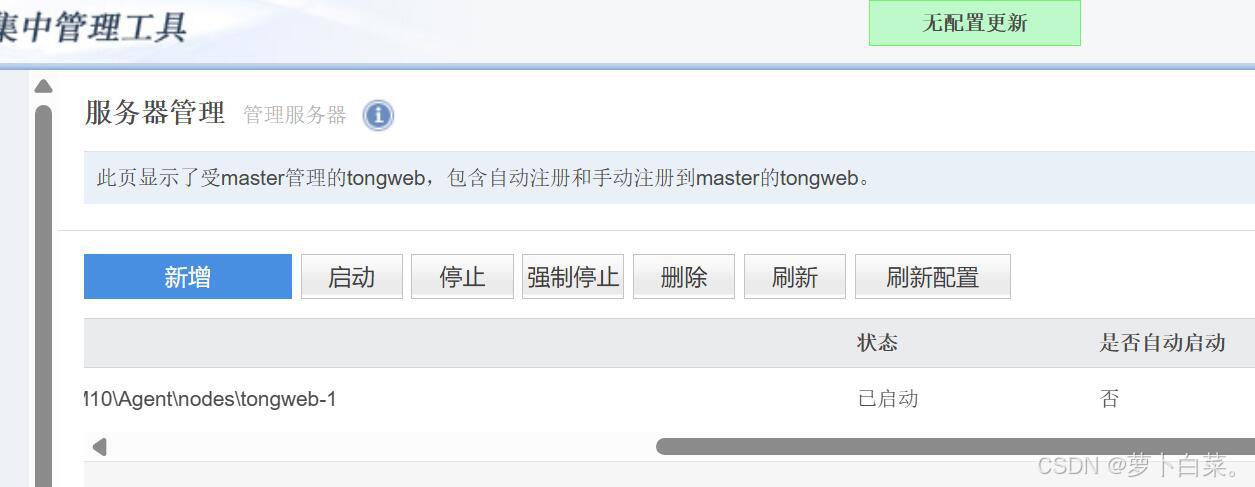
.....略- 若因服务器故障,当服务器实例丢失的时候,可以尝试点击服务器管理列表上方的"刷新配置"按钮进行恢复。如果agent 数据未丢且为启动状态,服务器管理列表中将显示丢失的服务器实例,即更新成功。如果更新失败,则会提示"无配置更新"