1.反向代理实验环境
#172.25.254.10 RS1 172.25.254.20 RS2
root@RSX \~# dnf install httpd -y
root@RSX \~# systemctl enable --now httpd
root@RSX \~# echo 172.25.254.20 > /var/www/html/index.html
在主机中测试
root@Nginx \~# curl 172.25.254.10
172.25.254.10
root@Nginx \~# curl 172.25.254.20
172.25.254.20
2.简单的代理方法
root@RS2 \~# mkdir /var/www/html/web
root@RS2 \~# echo 172.25.254.20 web > /var/www/html/web/index.html
root@Nginx \~# vim /usr/local/nginx/conf/conf.d/vhosts.confserver {
listen 80;
server_name lee.timinglee.org;
location / {
proxy_pass http://172.25.254.10:80;
}
location /web {
proxy_pass http://172.25.254.20:80;
}
}
root@Nginx \~# nginx -s reload
测试
root@Nginx \~# curl 172.25.254.20/web/
172.25.254.20 web
root@Nginx \~# curl 172.25.254.10
172.25.254.10
3.proxy_hide_header filed
Administrator.DESKTOP-VJ307M3 ➤ curl -v lee.timinglee.org
* Trying 172.25.254.100:80...
* TCP_NODELAY set
* Connected to lee.timinglee.org (172.25.254.100) port 80 (#0)
> GET / HTTP/1.1
> Host: lee.timinglee.org
> User-Agent: curl/7.65.0
> Accept: */*
>
* Mark bundle as not supporting multiuse
< HTTP/1.1 200 OK
< Server: nginx/1.28.1
< Date: Tue, 03 Feb 2026 06:31:03 GMT
< Content-Type: text/html; charset=UTF-8
< Content-Length: 14
< Connection: keep-alive
< Keep-Alive: timeout=100
< Last-Modified: Tue, 03 Feb 2026 06:20:50 GMT
< ETag: "e-649e570e8a49f" #可以看到ETAG信息
< Accept-Ranges: bytes
<
172.25.254.10
* Connection #0 to host lee.timinglee.org left intact
root@Nginx \~# vim /usr/local/nginx/conf/conf.d/vhosts.conf
server {
listen 80;
server_name lee.timinglee.org;
location / {
proxy_pass http://172.25.254.10:80;
proxy_hide_header ETag;
}
location /web {
proxy_pass http://172.25.254.20:80;
}
}
root@Nginx \~# nginx -s reload
测试
Administrator.DESKTOP-VJ307M3 ➤ curl -v lee.timinglee.org
* Trying 172.25.254.100:80...
* TCP_NODELAY set
* Connected to lee.timinglee.org (172.25.254.100) port 80 (#0)
> GET / HTTP/1.1
> Host: lee.timinglee.org
> User-Agent: curl/7.65.0
> Accept: */*
>
* Mark bundle as not supporting multiuse
< HTTP/1.1 200 OK
< Server: nginx/1.28.1
< Date: Tue, 03 Feb 2026 06:33:11 GMT
< Content-Type: text/html; charset=UTF-8
< Content-Length: 14
< Connection: keep-alive
< Keep-Alive: timeout=100
< Last-Modified: Tue, 03 Feb 2026 06:20:50 GMT
< Accept-Ranges: bytes
<
172.25.254.10
4.proxy_pass_header
Administrator.DESKTOP-VJ307M3 ➤ curl -v lee.timinglee.org
* Trying 172.25.254.100:80...
* TCP_NODELAY set
* Connected to lee.timinglee.org (172.25.254.100) port 80 (#0)
> GET / HTTP/1.1
> Host: lee.timinglee.org
> User-Agent: curl/7.65.0
> Accept: */*
>
* Mark bundle as not supporting multiuse
< HTTP/1.1 200 OK
< Server: nginx/1.28.1 #默认访问不透传server信息
< Date: Tue, 03 Feb 2026 06:35:35 GMT
< Content-Type: text/html; charset=UTF-8
< Content-Length: 14
< Connection: keep-alive
< Keep-Alive: timeout=100
< Last-Modified: Tue, 03 Feb 2026 06:20:50 GMT
< Accept-Ranges: bytes
<
172.25.254.10
* Connection #0 to host lee.timinglee.org left intact
root@Nginx \~# vim /usr/local/nginx/conf/conf.d/vhosts.conf
server {
listen 80;
server_name lee.timinglee.org;
location / {
proxy_pass http://172.25.254.10:80;
proxy_pass_header Server;
}
location /web {
proxy_pass http://172.25.254.20:80;
}
}
root@Nginx \~# nginx -s reload
Administrator.DESKTOP-VJ307M3] ➤ curl -v lee.timinglee.org
* Trying 172.25.254.100:80...
* TCP_NODELAY set
* Connected to lee.timinglee.org (172.25.254.100) port 80 (#0)
> GET / HTTP/1.1
> Host: lee.timinglee.org
> User-Agent: curl/7.65.0
> Accept: */*
>
* Mark bundle as not supporting multiuse
< HTTP/1.1 200 OK
< Date: Tue, 03 Feb 2026 06:37:25 GMT
< Content-Type: text/html; charset=UTF-8
< Content-Length: 14
< Connection: keep-alive
< Keep-Alive: timeout=100
< Server: Apache/2.4.62 (Red Hat Enterprise Linux) #透传结果
< Last-Modified: Tue, 03 Feb 2026 06:20:50 GMT
< Accept-Ranges: bytes
<
172.25.254.10
* Connection #0 to host lee.timinglee.org left intact
5.透传信息
root@RS1 \~# vim /etc/httpd/conf/httpd.conf
LogFormat "%h %l %u %t \"%r\" %>s %b \"%{Referer}i\" \"%{User-Agent}i\" \"%{X-Forwarded-For}i\"" combined
root@RS1 \~# systemctl restart httpd
root@Nginx \~# vim /usr/local/nginx/conf/conf.d/vhosts.confserver {
listen 80;
server_name lee.timinglee.org;
location / {
proxy_pass http://172.25.254.10:80;
proxy_set_header X-Forwarded-For $remote_addr;
}
location /web {
proxy_pass http://172.25.254.20:80;
}
root@Nginx \~# nginx -s reloadAdministrator.DESKTOP-VJ307M3 ➤ curl lee.timinglee.org
172.25.254.10
root@RS1 \~# cat /etc/httpd/logs/access_log
172.25.254.100 - - 03/Feb/2026:14:47:37 +0800 "GET / HTTP/1.0" 200 14 "-" "curl/7.65.0" "172.25.254.1"
6.反向代理负载均衡
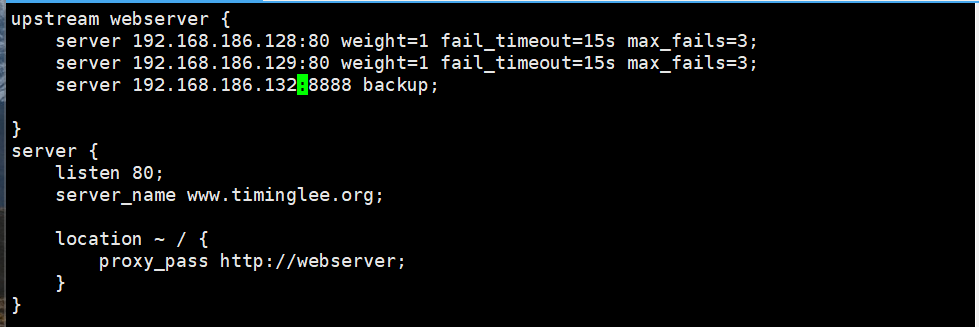
root@Nginx \~# mkdir /usr/local/nginx/conf/upstream/
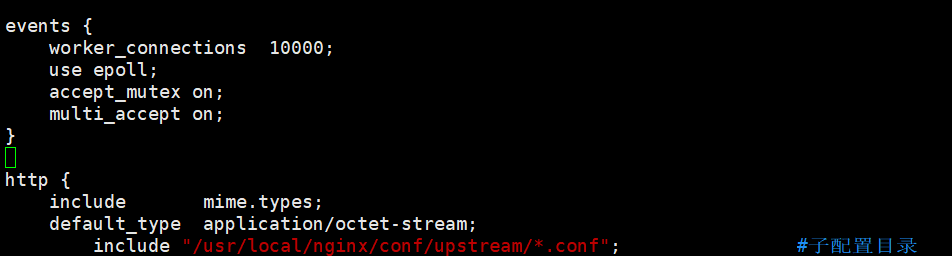
root@Nginx \~# vim /usr/local/nginx/conf/nginx.conf
root@Nginx \~# vim /usr/local/nginx/conf/upstream/loadbalance.conf
root@Nginx \~# mkdir /webdir/timinglee.org/error/html -p
root@Nginx \~# echo error > /webdir/timinglee.org/error/html/index.html
root@Nginx \~# vim /usr/local/nginx/conf/conf.d/vhosts.conf
server {
listen 8888;
root /webdir/timinglee.org/error/html;
}
测试
root@RS1+2 \~# systemctl stop httpd
