这道题主要是考察ingress的知识:
主要知识背景:url->ingress->service->pod
"路径错、后端名错、端口错、标签错"
更顺口一点:
"路名端口标,依次查四错"
路 :Ingress 的
path错误名 :Ingress 的
backend.service.name错误端 :Service 的
targetPort错误标 :Service 的
selector标签错误
1. URL → Ingress 环节:Ingress 的 path 错误
-
错误现象 :用户使用
curl -L http://content-marlin.local/访问根路径/,但请求无法被 Ingress 正确路由。 -
原因 :原 Ingress 配置中的
path可能设置为/content-marlin或其他错误值,而不是/。Deployment 容器探针的
path为/,且题目要求的访问地址为根路径,因此 Ingress 必须匹配/才能将请求转发给后端。 -
修复 :将 Ingress 的
path改为/。
2. Ingress → Service 环节:Ingress 的 backend.service.name 错误
-
错误现象:Ingress 匹配到请求后,无法找到正确的 Service 转发流量。
-
原因 :原 Ingress 中
backend.service.name指向的 Service 名称与实际创建的 Service 名称(nginx-ing-svc)不一致(例如可能写成了其他名字)。 -
修复 :将 Ingress 的
service.name改为nginx-ing-svc。
3. Service → Pod 环节(端口部分):Service 的 targetPort 错误
-
错误现象:Service 收到流量后,无法将请求转发到 Pod 的正确端口。
-
原因 :原 Service 的
targetPort与 Deployment 中 Pod 的containerPort(值为80)不匹配(例如可能是8080或其他端口)。 -
修复 :将 Service 的
targetPort改为80。
4. Service → Pod 环节(选择器部分):Service 的 selector 错误
-
错误现象:Service 无法找到任何可用的 Pod,因为标签选择器没有匹配到任何 Pod。
-
原因 :原 Service 的
selector中标签与 Deployment 中 Pod 模板的标签(app: nginx-ing)不一致(例如可能写成了app: nginx或其他值)。 -
修复 :将 Service 的
selector改为app: nginx-ing。
用户请求 http://content-marlin.local/content-marlin
│
▼
┌─────────────┐
│ Ingress │ ← 域名 + 路径匹配规则
│ nginx-ingress-test │
└──────┬──────┘
│ 转发到 Service
▼
┌─────────────┐
│ Service │ ← 固定 ClusterIP,负载均衡
│ (名字随意) │
└──────┬──────┘
│ 通过标签选择器匹配 Pod
▼
┌─────────────┐
│ Pod │ ← 标签 app: nginx-ing
│ (Deployment 创建) │
└─────────────┘
- Ingress 排错
Task
在 namespace content-marlin 下,名为 content-marlin-demployment 的 Deployment 通过 Ingress nginx-ingress-test 公开。
您可以在目录 /home/student/content-marlin-demployment 中找到 deployment、service、ingress 的清单文件。
Deployment 本应可以通过http://content-marlin.local/content-marlin正常访问,但是目前返回错误。
通过更新相关资源,来识别并修复问题,以便 Deployment 按计划可以被正常访问。
请注意,这道题的 deployment 是正确的,请不要修改 deployment。
最后,你可以使用命令来检测 curl -L http://content-marlin.local/
【1】 按照题目要求,在master 节点上执行,切换到题目要求节点
ssh ckad000000
【2】 因为题目告知了 deployment 是正确的,所以我们先看一下 deployment 配置信息。
cat /home/student/content-marlin-demployment/deployment.yaml
内容如下
bash
apiVersion: apps/v1

kind: Deployment

metadata:

  name: content-marlin-demployment

  namespace: content-marlin

spec:

  replicas: 1

  selector:

    matchLabels:

      app: nginx-ing字

  template:

    metadata:

      labels:

        app: nginx-ing  ## 3 ## 记住 Deployment 里 template 下的标签名

    spec:

      containers:

      - name: nginx

        image: vicuu/nginx:hello

        imagePullPolicy: IfNotPresent

        ports:

        - containerPort: 80 ## 1 ## 记住 Deployment 的容器的端口号,因为题目说明了 Deployment 是正确的。

        startupProbe:

          httpGet:

            path: / ## 2 ## 记住这个 path 的地址,这里是 /

            port: 80

          failureThreshold: 30

          periodSeconds: 10
【3】 修改 service 配置文件
vim /home/student/content-marlin-demployment/service.yaml
修改内容为下面红色字体
bash
apiVersion: v1

kind: Service

metadata:

  name: nginx-ing-svc # 记住 Service 里的这个 name

  namespace: content-marlin

  labels:

    app: nginx

spec:

  ports:

  - port: 80

    targetPort: 80 # 修改 Service 的 targetPort 端口与上面 Deployment 的 containerPort 端口号一致,即修改为 80

    protocol: TCP

  selector:

app: nginx-ing # 这里要修改为 Deployment 里的 template 下的那个标签名字。Service 通过选择标签跟 Deployment 建立关联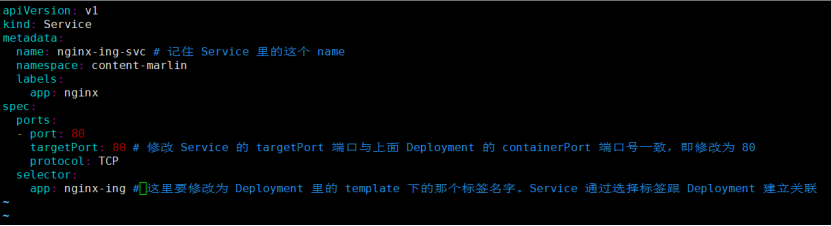
编辑完后,按 ESC,再按 :wq 保存退出
【4】 修改 ingress 配置文件
修改 ingress 配置文件,并重新创建 ingress。
vim /home/student/content-marlin-demployment/ingress.yaml
修改内容为下面红色字体
bashapiVersion: networking.k8s.io/v1 kind: Ingress metadata: name: nginx-ingress-test namespace: content-marlin spec: ingressClassName: traefix rules: - http: paths: - path: / # 这里要修改为 Deployment 里 那个 path 地址,也就是 / pathType: Prefix backend: service: name: nginx-ing-svc # 这里要修改成 Service 里的 name。因为 Ingress 通过 Service 的 name 建立关联。 port: number: 80
编辑完后,按 ESC,再按 :wq 保存退出
【5】 创建 service 和 ingress
kubectl apply -f /home/student/content-marlin-demployment/service.yaml
kubectl apply -f /home/student/content-marlin-demployment/ingress.yaml
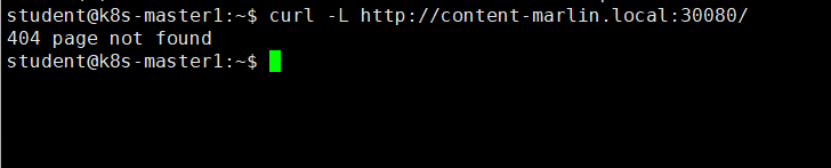
【6】 按照题目里要求的网址检测,是否能正常访问,模拟环境加上30080,与之前一样,404即为正常。
curl -L http://content-marlin.local:30080/