完整代码:
1、Form.cs
cs
using System;
using System.Drawing;
using System.IO;
using System.Windows.Forms;
using ZXing;
using ZXing.QrCode;

namespace 二维码
{
    public partial class Form1 : Form
    {
        private Bitmap currentBarcodeBitmap;
        private readonly string basePath = Application.StartupPath;
        private readonly string imgPath;
        private readonly string logPath;
        private readonly string historyPath;

        public Form1()
        {
            InitializeComponent();
            // 初始化目录
            imgPath = Path.Combine(basePath, "条码图片");
            logPath = Path.Combine(basePath, "运行日志");
            historyPath = Path.Combine(basePath, "历史记录");
            CreateAllFolders();
            WriteLog("程序启动成功");
        }

        #region 初始化:创建所有文件夹
        private void CreateAllFolders()
        {
            try
            {
                if (!Directory.Exists(imgPath)) Directory.CreateDirectory(imgPath);
                if (!Directory.Exists(logPath)) Directory.CreateDirectory(logPath);
                if (!Directory.Exists(historyPath)) Directory.CreateDirectory(historyPath);
            }
            catch (Exception ex)
            {
                MessageBox.Show($"创建文件夹失败:{ex.Message}", "错误", MessageBoxButtons.OK, MessageBoxIcon.Error);
                WriteLog($"创建文件夹失败:{ex.Message}");
            }
        }
        #endregion

        #region 日志写入
        private void WriteLog(string content)
        {
            try
            {
                string logFile = Path.Combine(logPath, $"日志_{DateTime.Now:yyyyMMdd}.txt");
                string logInfo = $"[{DateTime.Now:yyyy-MM-dd HH:mm:ss}] {content}";
                File.AppendAllText(logFile, logInfo + Environment.NewLine);
            }
            catch { }
        }
        #endregion

        #region 保存历史记录
        private void SaveHistory(string type, string content, string result = "")
        {
            try
            {
                string historyFile = Path.Combine(historyPath, $"历史记录_{DateTime.Now:yyyyMMdd}.txt");
                string info = $"[{DateTime.Now:yyyy-MM-dd HH:mm:ss}] [{type}] 内容:{content}  结果:{result}";
                File.AppendAllText(historyFile, info + Environment.NewLine);
                listHistory.Items.Insert(0, info);
            }
            catch (Exception ex)
            {
                WriteLog($"保存历史失败:{ex.Message}");
            }
        }
        #endregion

        #region 生成二维码
        private void btnGenerateQR_Click(object sender, EventArgs e)
        {
            string content = txtContent.Text.Trim();
            if (string.IsNullOrEmpty(content))
            {
                MessageBox.Show("请输入条码内容!", "提示", MessageBoxButtons.OK, MessageBoxIcon.Warning);
                return;
            }

            try
            {
                BarcodeWriter writer = new BarcodeWriter();
                writer.Format = BarcodeFormat.QR_CODE;
                QrCodeEncodingOptions options = new QrCodeEncodingOptions
                {
                    Width = 300,
                    Height = 300,
                    Margin = 1,
                    CharacterSet = "UTF-8"
                };
                writer.Options = options;

                currentBarcodeBitmap = writer.Write(content);
                picBarcode.Image = currentBarcodeBitmap;
                txtResult.Text = "✅ 二维码生成成功";
                SaveHistory("生成二维码", content, "成功");
                WriteLog($"生成二维码:{content}");
            }
            catch (Exception ex)
            {
                txtResult.Text = $"❌ 生成失败:{ex.Message}";
                MessageBox.Show($"生成失败:{ex.Message}", "错误", MessageBoxButtons.OK, MessageBoxIcon.Error);
                SaveHistory("生成二维码", content, $"失败:{ex.Message}");
                WriteLog($"生成二维码失败:{ex.Message}");
            }
        }
        #endregion

        #region 生成一维码
        private void btnGenerateBarcode_Click(object sender, EventArgs e)
        {
            string content = txtContent.Text.Trim();
            if (string.IsNullOrEmpty(content))
            {
                MessageBox.Show("请输入条码内容!", "提示", MessageBoxButtons.OK, MessageBoxIcon.Warning);
                return;
            }

            try
            {
                BarcodeWriter writer = new BarcodeWriter();
                writer.Format = BarcodeFormat.CODE_128;
                writer.Options = new ZXing.Common.EncodingOptions
                {
                    Height = 150,
                    Width = 300,
                    Margin = 1
                };

                currentBarcodeBitmap = writer.Write(content);
                picBarcode.Image = currentBarcodeBitmap;
                txtResult.Text = "✅ 一维码生成成功";
                SaveHistory("生成一维码", content, "成功");
                WriteLog($"生成一维码:{content}");
            }
            catch (Exception ex)
            {
                txtResult.Text = $"❌ 生成失败:{ex.Message}";
                MessageBox.Show($"生成失败:{ex.Message}", "错误", MessageBoxButtons.OK, MessageBoxIcon.Error);
                SaveHistory("生成一维码", content, $"失败:{ex.Message}");
                WriteLog($"生成一维码失败:{ex.Message}");
            }
        }
        #endregion

        #region 选择图片
        private void btnSelectImage_Click(object sender, EventArgs e)
        {
            using (OpenFileDialog ofd = new OpenFileDialog())
            {
                ofd.Filter = "图片文件|*.jpg;*.jpeg;*.png;*.bmp";
                ofd.Title = "选择条码图片";

                if (ofd.ShowDialog() == DialogResult.OK)
                {
                    try
                    {
                        picBarcode.Image = new Bitmap(ofd.FileName);
                        currentBarcodeBitmap = null;
                        txtResult.Text = "✅ 已加载图片,可点击识别";
                        SaveHistory("加载图片", ofd.FileName, "成功");
                        WriteLog($"加载图片:{ofd.FileName}");
                    }
                    catch (Exception ex)
                    {
                        MessageBox.Show($"图片加载失败:{ex.Message}", "错误");
                        WriteLog($"加载图片失败:{ex.Message}");
                    }
                }
            }
        }
        #endregion

        #region 识别条码(修复过时警告)
        private void btnRecognize_Click(object sender, EventArgs e)
        {
            if (picBarcode.Image == null)
            {
                MessageBox.Show("请先选择或生成条码图片!", "提示", MessageBoxButtons.OK, MessageBoxIcon.Warning);
                return;
            }

            try
            {
                BarcodeReader reader = new BarcodeReader();
                reader.Options = new ZXing.Common.DecodingOptions
                {
                    TryHarder = true,
                    TryInverted = true,
                    AutoRotate = true
                };

                Result result = reader.Decode((Bitmap)picBarcode.Image);
                if (result != null)
                {
                    string show = $"条码格式:{result.BarcodeFormat}\r\n识别内容:{result.Text}";
                    txtResult.Text = show;
                    SaveHistory("识别条码", result.Text, $"格式:{result.BarcodeFormat}");
                    WriteLog($"识别成功:{result.Text} 格式:{result.BarcodeFormat}");
                }
                else
                {
                    txtResult.Text = "❌ 未识别到有效条码,请检查图片清晰度";
                    SaveHistory("识别条码", "无内容", "识别失败");
                    WriteLog("条码识别失败:未找到有效条码");
                }
            }
            catch (Exception ex)
            {
                txtResult.Text = $"❌ 识别失败:{ex.Message}";
                MessageBox.Show($"识别失败:{ex.Message}", "错误", MessageBoxButtons.OK, MessageBoxIcon.Error);
                SaveHistory("识别条码", "异常", ex.Message);
                WriteLog($"识别异常:{ex.Message}");
            }
        }
        #endregion

        #region 保存图片
        private void btnSaveImage_Click(object sender, EventArgs e)
        {
            if (currentBarcodeBitmap == null)
            {
                MessageBox.Show("请先生成条码!", "提示", MessageBoxButtons.OK, MessageBoxIcon.Warning);
                return;
            }

            try
            {
                string fileName = $"条码_{DateTime.Now:yyyyMMddHHmmss}.png";
                string savePath = Path.Combine(imgPath, fileName);
                currentBarcodeBitmap.Save(savePath, System.Drawing.Imaging.ImageFormat.Png);

                txtResult.Text += $"\r\n🖼️ 图片已保存:{savePath}";
                MessageBox.Show("保存成功!\r\n路径:" + savePath, "提示", MessageBoxButtons.OK, MessageBoxIcon.Information);
                WriteLog($"保存条码图片:{savePath}");
            }
            catch (Exception ex)
            {
                MessageBox.Show($"保存失败:{ex.Message}", "错误");
                WriteLog($"保存图片失败:{ex.Message}");
            }
        }
        #endregion

        #region 清空
        private void btnClear_Click(object sender, EventArgs e)
        {
            picBarcode.Image = null;
            txtResult.Clear();
            currentBarcodeBitmap = null;
            WriteLog("执行清空操作");
        }
        #endregion

        #region 打开历史文件夹
        private void btnOpenHistory_Click(object sender, EventArgs e)
        {
            try
            {
                System.Diagnostics.Process.Start(historyPath);
                WriteLog("打开历史记录文件夹");
            }
            catch { }
        }
        #endregion

        #region 打开图片文件夹
        private void btnOpenImg_Click(object sender, EventArgs e)
        {
            try
            {
                System.Diagnostics.Process.Start(imgPath);
                WriteLog("打开图片文件夹");
            }
            catch { }
        }
        #endregion
    }
}
2.、Form1.Designer.cs
cs
namespace 二维码
{
    partial class Form1
    {
        private System.ComponentModel.IContainer components = null;

        protected override void Dispose(bool disposing)
        {
            if (disposing && (components != null))
            {
                components.Dispose();
            }
            base.Dispose(disposing);
        }

        #region Windows Form Designer generated code
        private void InitializeComponent()
        {
            this.txtContent = new System.Windows.Forms.TextBox();
            this.label1 = new System.Windows.Forms.Label();
            this.btnGenerateQR = new System.Windows.Forms.Button();
            this.btnGenerateBarcode = new System.Windows.Forms.Button();
            this.picBarcode = new System.Windows.Forms.PictureBox();
            this.btnSelectImage = new System.Windows.Forms.Button();
            this.btnRecognize = new System.Windows.Forms.Button();
            this.txtResult = new System.Windows.Forms.TextBox();
            this.label2 = new System.Windows.Forms.Label();
            this.btnSaveImage = new System.Windows.Forms.Button();
            this.btnClear = new System.Windows.Forms.Button();
            this.groupBox1 = new System.Windows.Forms.GroupBox();
            this.btnOpenImg = new System.Windows.Forms.Button();
            this.btnOpenHistory = new System.Windows.Forms.Button();
            this.label3 = new System.Windows.Forms.Label();
            this.listHistory = new System.Windows.Forms.ListBox();
            ((System.ComponentModel.ISupportInitialize)(this.picBarcode)).BeginInit();
            this.groupBox1.SuspendLayout();
            this.SuspendLayout();

            this.txtContent.Anchor = ((System.Windows.Forms.AnchorStyles)(((System.Windows.Forms.AnchorStyles.Top | System.Windows.Forms.AnchorStyles.Left) | System.Windows.Forms.AnchorStyles.Right)));
            this.txtContent.Location = new System.Drawing.Point(18, 52);
            this.txtContent.Margin = new System.Windows.Forms.Padding(4, 4, 4, 4);
            this.txtContent.Multiline = true;
            this.txtContent.Name = "txtContent";
            this.txtContent.Size = new System.Drawing.Size(598, 88);
            this.txtContent.TabIndex = 0;
            this.txtContent.Text = "输入要生成条码的内容";

            this.label1.AutoSize = true;
            this.label1.Location = new System.Drawing.Point(18, 30);
            this.label1.Margin = new System.Windows.Forms.Padding(4, 0, 4, 0);
            this.label1.Name = "label1";
            this.label1.Size = new System.Drawing.Size(98, 18);
            this.label1.TabIndex = 1;
            this.label1.Text = "条码内容:";

            this.btnGenerateQR.Location = new System.Drawing.Point(18, 152);
            this.btnGenerateQR.Margin = new System.Windows.Forms.Padding(4, 4, 4, 4);
            this.btnGenerateQR.Name = "btnGenerateQR";
            this.btnGenerateQR.Size = new System.Drawing.Size(135, 45);
            this.btnGenerateQR.TabIndex = 2;
            this.btnGenerateQR.Text = "生成二维码";
            this.btnGenerateQR.UseVisualStyleBackColor = true;
            this.btnGenerateQR.Click += new System.EventHandler(this.btnGenerateQR_Click);

            this.btnGenerateBarcode.Location = new System.Drawing.Point(162, 152);
            this.btnGenerateBarcode.Margin = new System.Windows.Forms.Padding(4, 4, 4, 4);
            this.btnGenerateBarcode.Name = "btnGenerateBarcode";
            this.btnGenerateBarcode.Size = new System.Drawing.Size(135, 45);
            this.btnGenerateBarcode.TabIndex = 3;
            this.btnGenerateBarcode.Text = "生成一维码";
            this.btnGenerateBarcode.UseVisualStyleBackColor = true;
            this.btnGenerateBarcode.Click += new System.EventHandler(this.btnGenerateBarcode_Click);

            this.picBarcode.Anchor = ((System.Windows.Forms.AnchorStyles)((((System.Windows.Forms.AnchorStyles.Top | System.Windows.Forms.AnchorStyles.Bottom) | System.Windows.Forms.AnchorStyles.Left) | System.Windows.Forms.AnchorStyles.Right)));
            this.picBarcode.BorderStyle = System.Windows.Forms.BorderStyle.FixedSingle;
            this.picBarcode.Location = new System.Drawing.Point(18, 206);
            this.picBarcode.Margin = new System.Windows.Forms.Padding(4, 4, 4, 4);
            this.picBarcode.Name = "picBarcode";
            this.picBarcode.Size = new System.Drawing.Size(599, 299);
            this.picBarcode.SizeMode = System.Windows.Forms.PictureBoxSizeMode.Zoom;
            this.picBarcode.TabIndex = 4;
            this.picBarcode.TabStop = false;

            this.btnSelectImage.Location = new System.Drawing.Point(18, 514);
            this.btnSelectImage.Margin = new System.Windows.Forms.Padding(4, 4, 4, 4);
            this.btnSelectImage.Name = "btnSelectImage";
            this.btnSelectImage.Size = new System.Drawing.Size(135, 45);
            this.btnSelectImage.TabIndex = 5;
            this.btnSelectImage.Text = "选择图片";
            this.btnSelectImage.UseVisualStyleBackColor = true;
            this.btnSelectImage.Click += new System.EventHandler(this.btnSelectImage_Click);

            this.btnRecognize.Location = new System.Drawing.Point(162, 514);
            this.btnRecognize.Margin = new System.Windows.Forms.Padding(4, 4, 4, 4);
            this.btnRecognize.Name = "btnRecognize";
            this.btnRecognize.Size = new System.Drawing.Size(135, 45);
            this.btnRecognize.TabIndex = 6;
            this.btnRecognize.Text = "识别条码";
            this.btnRecognize.UseVisualStyleBackColor = true;
            this.btnRecognize.Click += new System.EventHandler(this.btnRecognize_Click);

            this.txtResult.Anchor = ((System.Windows.Forms.AnchorStyles)(((System.Windows.Forms.AnchorStyles.Bottom | System.Windows.Forms.AnchorStyles.Left) | System.Windows.Forms.AnchorStyles.Right)));
            this.txtResult.Location = new System.Drawing.Point(18, 586);
            this.txtResult.Margin = new System.Windows.Forms.Padding(4, 4, 4, 4);
            this.txtResult.Multiline = true;
            this.txtResult.Name = "txtResult";
            this.txtResult.ReadOnly = true;
            this.txtResult.Size = new System.Drawing.Size(598, 88);
            this.txtResult.TabIndex = 7;

            this.label2.Anchor = ((System.Windows.Forms.AnchorStyles)((System.Windows.Forms.AnchorStyles.Bottom | System.Windows.Forms.AnchorStyles.Left)));
            this.label2.AutoSize = true;
            this.label2.Location = new System.Drawing.Point(18, 564);
            this.label2.Margin = new System.Windows.Forms.Padding(4, 0, 4, 0);
            this.label2.Name = "label2";
            this.label2.Size = new System.Drawing.Size(98, 18);
            this.label2.TabIndex = 8;
            this.label2.Text = "识别结果:";

            this.btnSaveImage.Location = new System.Drawing.Point(306, 152);
            this.btnSaveImage.Margin = new System.Windows.Forms.Padding(4, 4, 4, 4);
            this.btnSaveImage.Name = "btnSaveImage";
            this.btnSaveImage.Size = new System.Drawing.Size(135, 45);
            this.btnSaveImage.TabIndex = 9;
            this.btnSaveImage.Text = "保存图片";
            this.btnSaveImage.UseVisualStyleBackColor = true;
            this.btnSaveImage.Click += new System.EventHandler(this.btnSaveImage_Click);

            this.btnClear.Location = new System.Drawing.Point(450, 152);
            this.btnClear.Margin = new System.Windows.Forms.Padding(4, 4, 4, 4);
            this.btnClear.Name = "btnClear";
            this.btnClear.Size = new System.Drawing.Size(135, 45);
            this.btnClear.TabIndex = 10;
            this.btnClear.Text = "清空";
            this.btnClear.UseVisualStyleBackColor = true;
            this.btnClear.Click += new System.EventHandler(this.btnClear_Click);

            this.groupBox1.Anchor = ((System.Windows.Forms.AnchorStyles)((((System.Windows.Forms.AnchorStyles.Top | System.Windows.Forms.AnchorStyles.Bottom) | System.Windows.Forms.AnchorStyles.Left) | System.Windows.Forms.AnchorStyles.Right)));
            this.groupBox1.Controls.Add(this.btnOpenImg);
            this.groupBox1.Controls.Add(this.btnOpenHistory);
            this.groupBox1.Controls.Add(this.label3);
            this.groupBox1.Controls.Add(this.listHistory);
            this.groupBox1.Location = new System.Drawing.Point(627, 18);
            this.groupBox1.Margin = new System.Windows.Forms.Padding(4, 4, 4, 4);
            this.groupBox1.Name = "groupBox1";
            this.groupBox1.Padding = new System.Windows.Forms.Padding(4, 4, 4, 4);
            this.groupBox1.Size = new System.Drawing.Size(480, 658);
            this.groupBox1.TabIndex = 11;
            this.groupBox1.TabStop = false;
            this.groupBox1.Text = "历史记录";

            this.btnOpenImg.Anchor = ((System.Windows.Forms.AnchorStyles)((System.Windows.Forms.AnchorStyles.Bottom | System.Windows.Forms.AnchorStyles.Right)));
            this.btnOpenImg.Location = new System.Drawing.Point(243, 608);
            this.btnOpenImg.Margin = new System.Windows.Forms.Padding(4, 4, 4, 4);
            this.btnOpenImg.Name = "btnOpenImg";
            this.btnOpenImg.Size = new System.Drawing.Size(225, 45);
            this.btnOpenImg.TabIndex = 3;
            this.btnOpenImg.Text = "打开图片保存文件夹";
            this.btnOpenImg.UseVisualStyleBackColor = true;
            this.btnOpenImg.Click += new System.EventHandler(this.btnOpenImg_Click);

            this.btnOpenHistory.Anchor = ((System.Windows.Forms.AnchorStyles)((System.Windows.Forms.AnchorStyles.Bottom | System.Windows.Forms.AnchorStyles.Left)));
            this.btnOpenHistory.Location = new System.Drawing.Point(9, 608);
            this.btnOpenHistory.Margin = new System.Windows.Forms.Padding(4, 4, 4, 4);
            this.btnOpenHistory.Name = "btnOpenHistory";
            this.btnOpenHistory.Size = new System.Drawing.Size(225, 45);
            this.btnOpenHistory.TabIndex = 2;
            this.btnOpenHistory.Text = "打开历史记录文件夹";
            this.btnOpenHistory.UseVisualStyleBackColor = true;
            this.btnOpenHistory.Click += new System.EventHandler(this.btnOpenHistory_Click);

            this.label3.AutoSize = true;
            this.label3.Location = new System.Drawing.Point(9, 30);
            this.label3.Margin = new System.Windows.Forms.Padding(4, 0, 4, 0);
            this.label3.Name = "label3";
            this.label3.Size = new System.Drawing.Size(224, 18);
            this.label3.TabIndex = 1;
            this.label3.Text = "实时操作记录(最新至上)";

            this.listHistory.Anchor = ((System.Windows.Forms.AnchorStyles)((((System.Windows.Forms.AnchorStyles.Top | System.Windows.Forms.AnchorStyles.Bottom) | System.Windows.Forms.AnchorStyles.Left) | System.Windows.Forms.AnchorStyles.Right)));
            this.listHistory.FormattingEnabled = true;
            this.listHistory.ItemHeight = 18;
            this.listHistory.Location = new System.Drawing.Point(9, 52);
            this.listHistory.Margin = new System.Windows.Forms.Padding(4, 4, 4, 4);
            this.listHistory.Name = "listHistory";
            this.listHistory.Size = new System.Drawing.Size(460, 544);
            this.listHistory.TabIndex = 0;
            this.listHistory.HorizontalScrollbar = false;

            this.AutoScaleDimensions = new System.Drawing.SizeF(9F, 18F);
            this.AutoScaleMode = System.Windows.Forms.AutoScaleMode.Font;
            this.ClientSize = new System.Drawing.Size(1119, 684);
            this.Controls.Add(this.groupBox1);
            this.Controls.Add(this.btnClear);
            this.Controls.Add(this.btnSaveImage);
            this.Controls.Add(this.label2);
            this.Controls.Add(this.txtResult);
            this.Controls.Add(this.btnRecognize);
            this.Controls.Add(this.btnSelectImage);
            this.Controls.Add(this.picBarcode);
            this.Controls.Add(this.btnGenerateBarcode);
            this.Controls.Add(this.btnGenerateQR);
            this.Controls.Add(this.label1);
            this.Controls.Add(this.txtContent);
            this.FormBorderStyle = System.Windows.Forms.FormBorderStyle.Sizable;
            this.Margin = new System.Windows.Forms.Padding(4, 4, 4, 4);
            this.MaximizeBox = true;
            this.Name = "Form1";
            this.StartPosition = System.Windows.Forms.FormStartPosition.CenterScreen;
            this.Text = "条码生成与识别工具 - 增强自适应版";
            ((System.ComponentModel.ISupportInitialize)(this.picBarcode)).EndInit();
            this.groupBox1.ResumeLayout(false);
            this.groupBox1.PerformLayout();
            this.ResumeLayout(false);
            this.PerformLayout();
        }
        #endregion

        private System.Windows.Forms.TextBox txtContent;
        private System.Windows.Forms.Label label1;
        private System.Windows.Forms.Button btnGenerateQR;
        private System.Windows.Forms.Button btnGenerateBarcode;
        private System.Windows.Forms.PictureBox picBarcode;
        private System.Windows.Forms.Button btnSelectImage;
        private System.Windows.Forms.Button btnRecognize;
        private System.Windows.Forms.TextBox txtResult;
        private System.Windows.Forms.Label label2;
        private System.Windows.Forms.Button btnSaveImage;
        private System.Windows.Forms.Button btnClear;
        private System.Windows.Forms.GroupBox groupBox1;
        private System.Windows.Forms.ListBox listHistory;
        private System.Windows.Forms.Label label3;
        private System.Windows.Forms.Button btnOpenHistory;
        private System.Windows.Forms.Button btnOpenImg;
    }
}
功能照片:
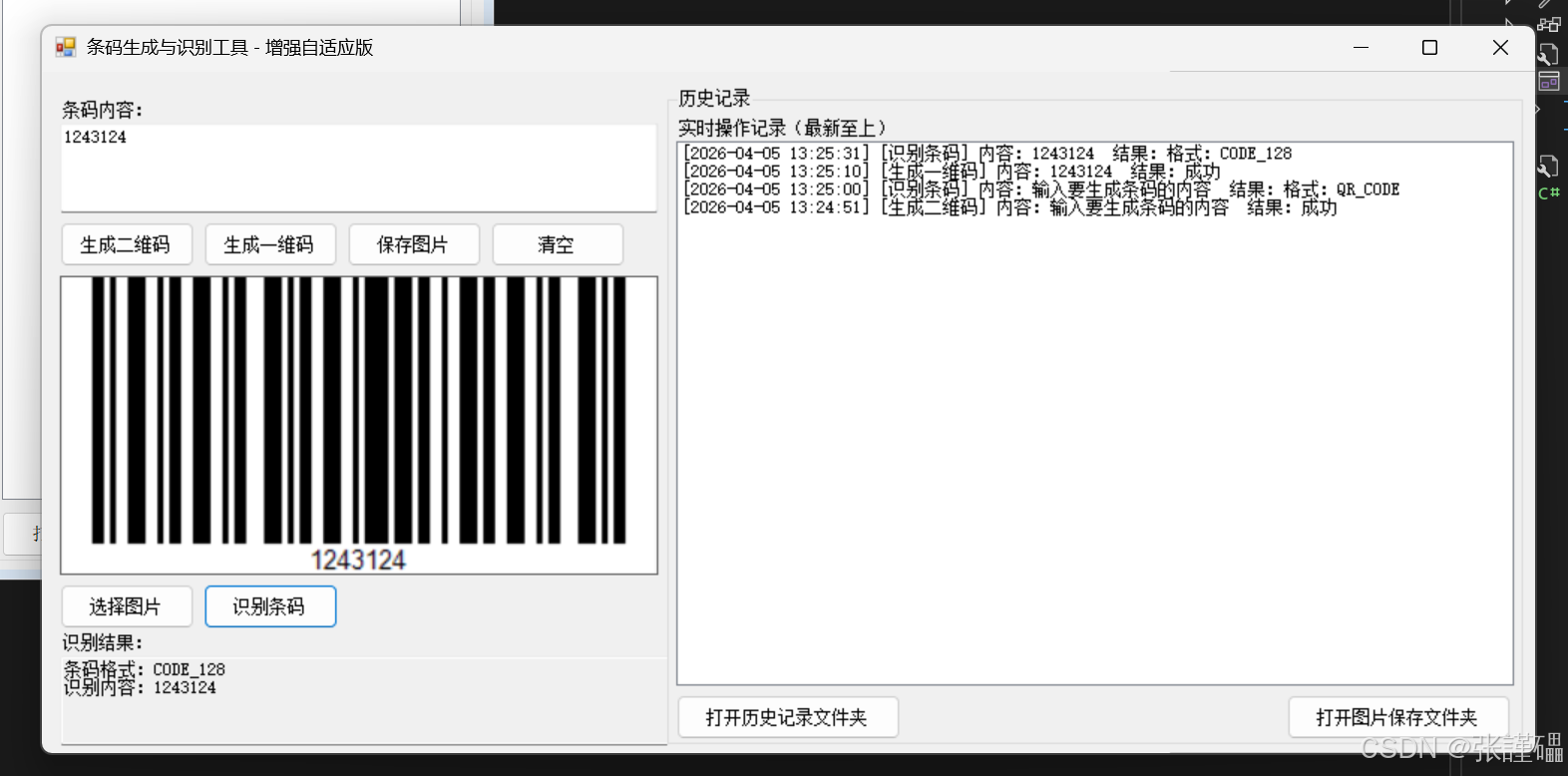
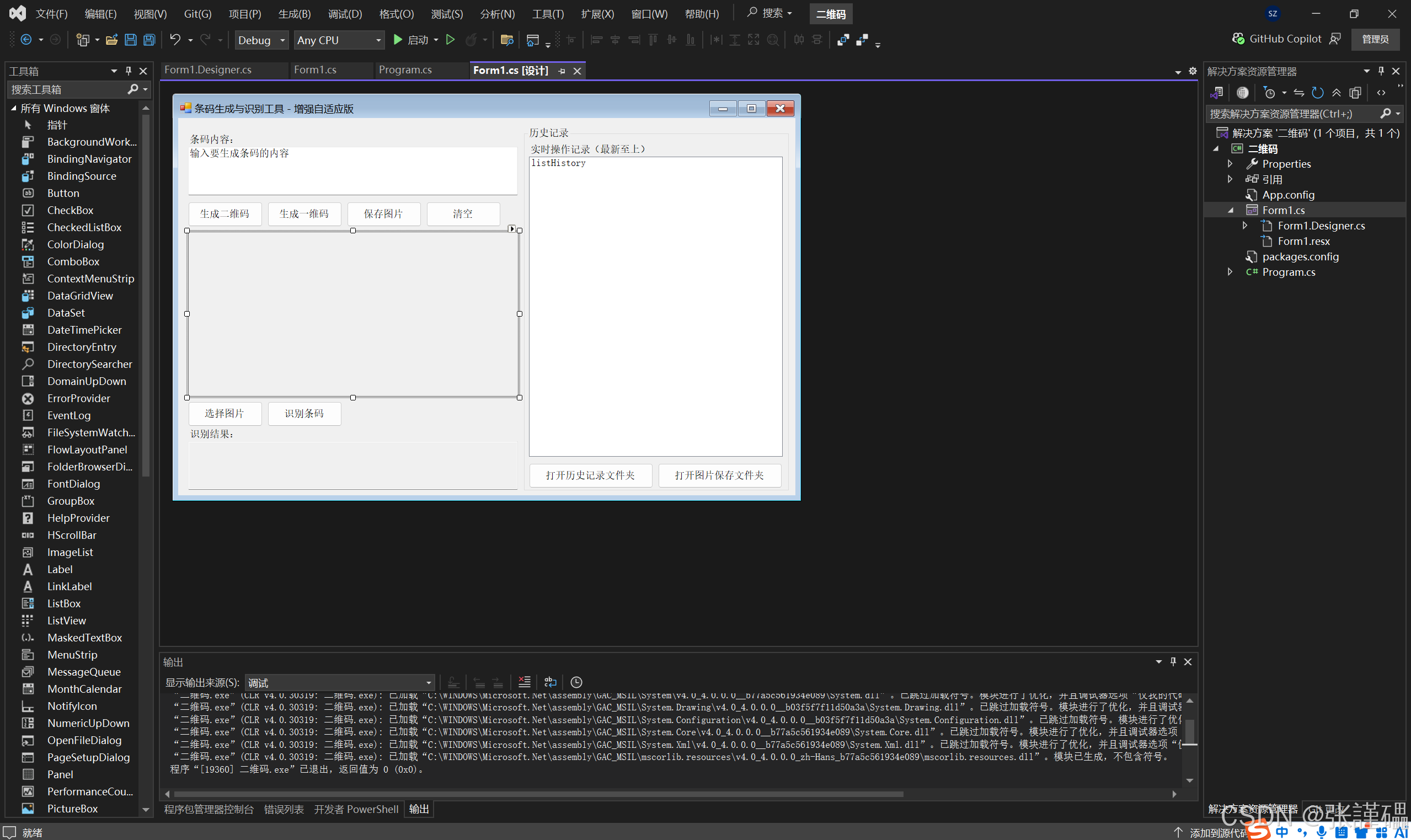


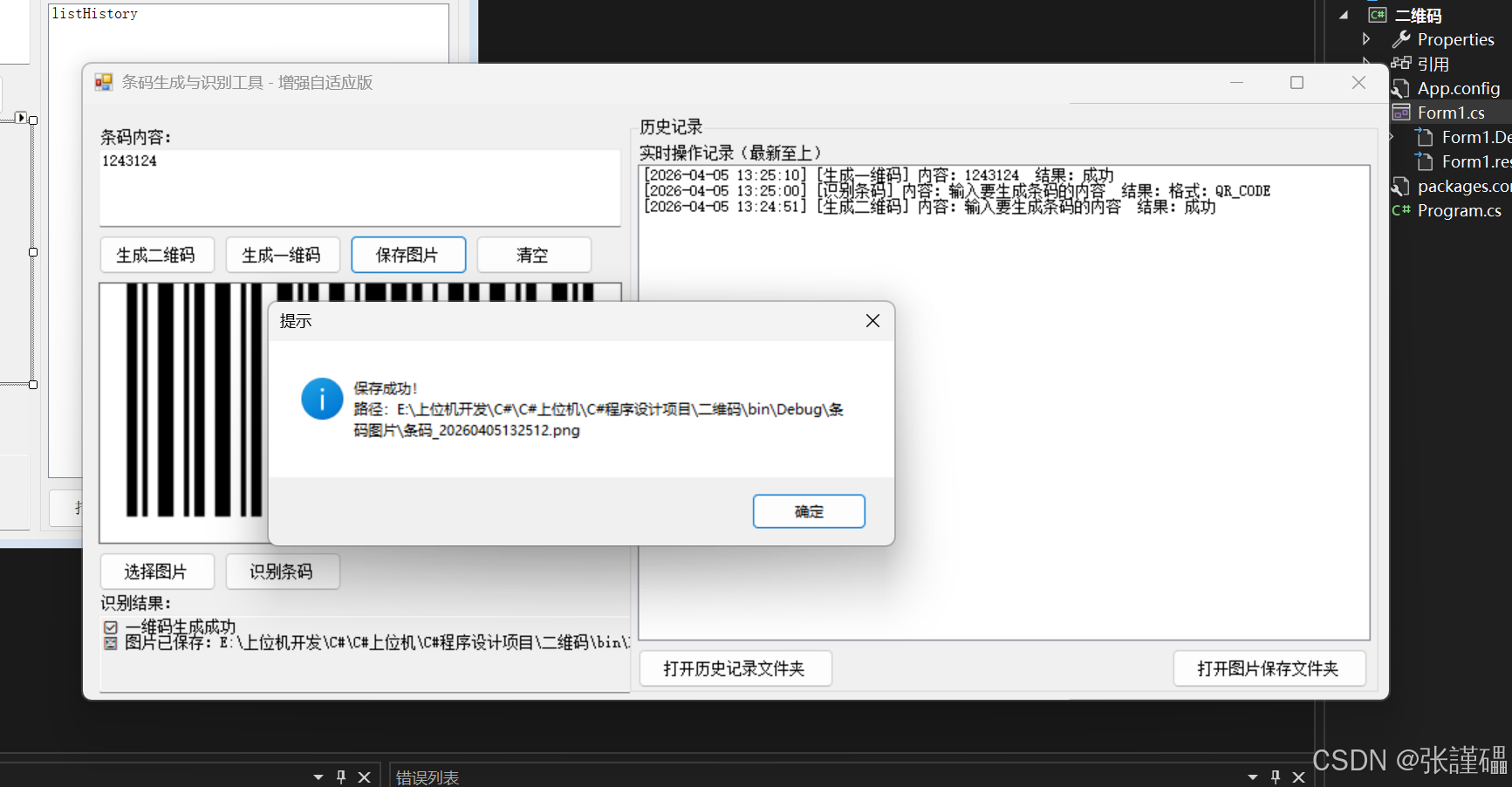
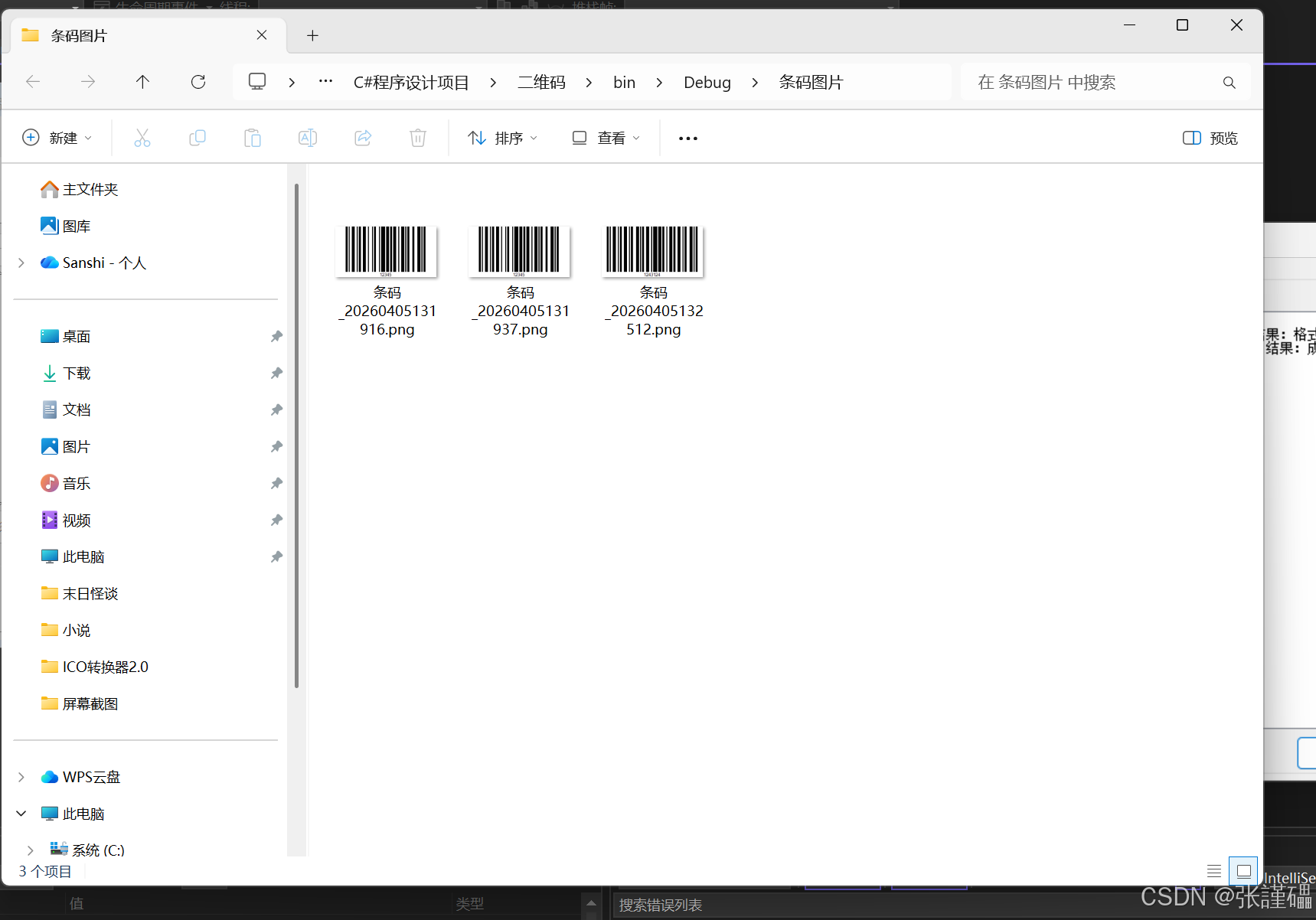
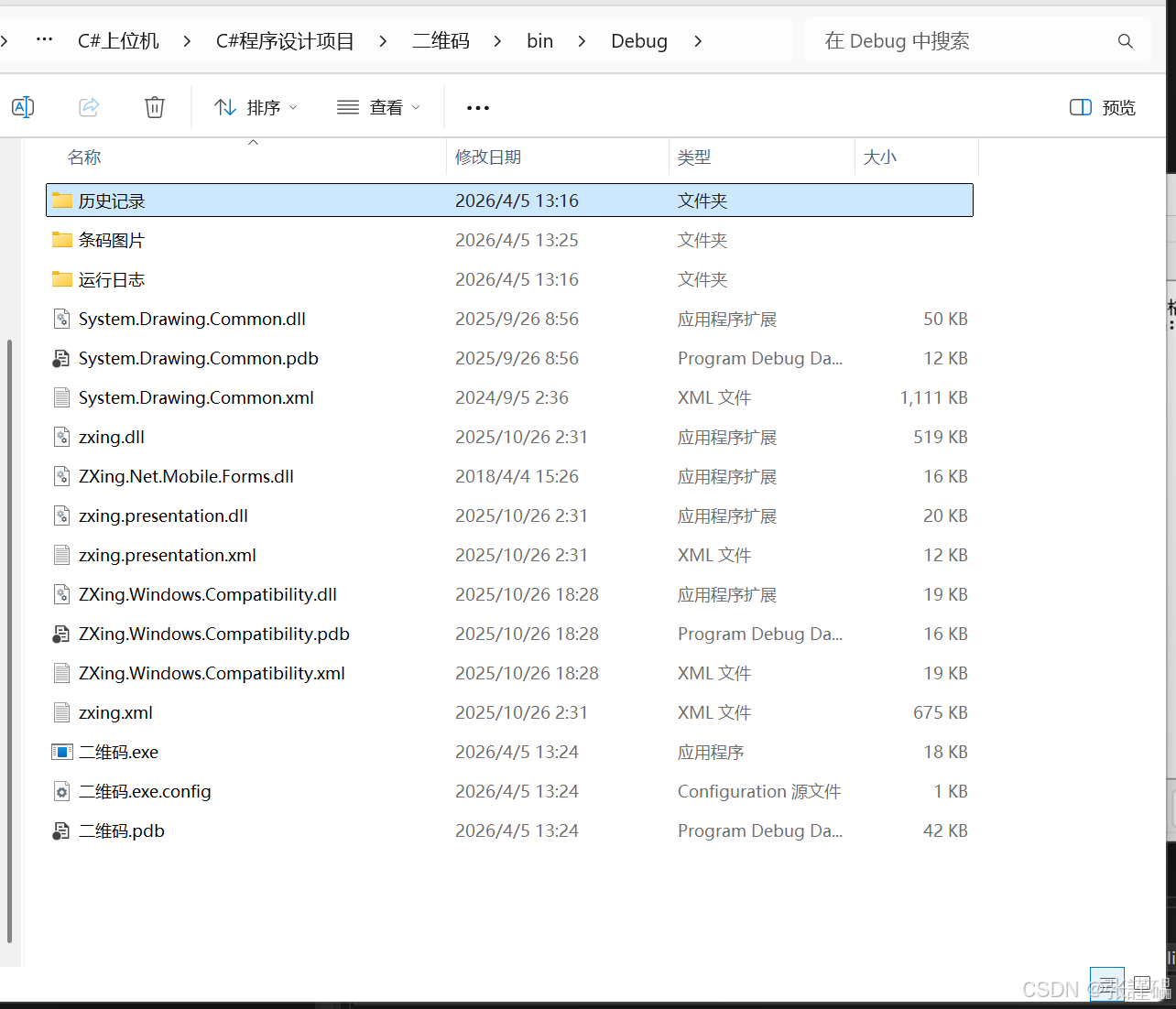
我把你这份WinForm 条码生成识别工具 的代码拆成核心知识点 + 技术点 + 设计思想,适合学习、总结、面试使用。
一、项目整体功能总结
这是一个桌面条码工具(二维码 + 一维码),基于 C# WinForm + ZXing 库开发,实现:
- 生成二维码 / CODE128 一维码
- 识别图片中的条码
- 自动保存图片、日志、历史记录
- 界面自适应、自动创建文件夹、操作记录
二、核心技术知识点(必学)
1. C# WinForm 窗体开发
知识点:
-
WinForm 窗体、控件基础Label、TextBox、Button、PictureBox、GroupBox、ListBox
-
控件布局:Anchor 锚定(自适应关键) 让控件跟随窗体大小变化
plaintext
Anchor = Top | Bottom | Left | Right -
事件驱动模型 按钮点击事件
Click -
控件常用属性
Multiline(多行文本)、ReadOnly(只读)、SizeMode(图片缩放)
2. 文件与文件夹操作(System.IO)
知识点:
-
创建目录
csharp
运行
Directory.CreateDirectory(path); -
判断目录是否存在
csharp
运行
Directory.Exists(path) -
路径拼接(安全规范)
csharp
运行
Path.Combine(基础路径, 子文件夹) -
文件写入(追加文本)
csharp
运行
File.AppendAllText(文件路径, 内容)
3. 图片操作(System.Drawing)
知识点:
Bitmap:位图对象,存储条码图片PictureBox:显示图片- 图片保存格式:PNG / JPG / BMP
4. ZXing 条码库(核心功能)
知识点:
- ZXing 是 .NET 主流条码开源库
- 生成条码:
BarcodeWriter - 识别条码:
BarcodeReader - 支持格式:
- QR_CODE 二维码
- CODE_128 一维码
重要优化点(新版 ZXing 规范):
csharp
运行
reader.Options = new DecodingOptions {
    TryHarder = true,     // 增强识别
    TryInverted = true,   // 反转色条码
    AutoRotate = true     // 自动旋转
};
5. 异常处理 try-catch
知识点:
- 防止程序崩溃
- 捕获错误并提示用户
- 记录错误日志
csharp
运行
try{
    // 代码逻辑
}catch(Exception ex){
    MessageBox.Show(ex.Message);
}
6. 日志与历史记录系统
知识点:
- 按日期生成日志文件
- 统一格式:
[时间] [类型] 内容 - 历史记录实时显示在界面
- 程序行为可追踪、可排查问题
7. 对话框操作
知识点:
OpenFileDialog:选择图片SaveFileDialog:保存图片MessageBox:提示信息
8. 系统调用
知识点:
csharp
运行
Process.Start(文件夹路径); // 打开文件夹三、代码架构与设计思想
1. 模块化(#region 代码分组)
- 生成条码
- 识别条码
- 保存记录
- 日志
- 文件夹创建优点:结构清晰、易维护
2. 解耦思想
- 界面操作 ↔ 功能逻辑 分离
- 工具方法独立(写日志、保存历史)
3. 健壮性
- 空值判断
- 异常捕获
- 自动创建目录
- 用户友好提示
四、可学习的编程规范
- 变量命名规范
txtContent、btnGenerate、picBarcode - 方法单一职责一个方法只做一件事
- 注释清晰
- 用户体验优化成功 / 失败图标 ✅ ❌实时提示自动保存
五、本项目能学到什么?
总结一句话:
这份代码是 C# 桌面开发的完整实战案例,覆盖:WinForm 界面、文件操作、图片处理、第三方库使用、异常处理、日志系统、用户交互。
核心技能清单:
✅ C# 基础语法✅ WinForm 开发✅ 文件 / 文件夹操作✅ 图片处理✅ ZXing 条码生成与识别✅ 日志系统✅ 异常处理✅ 程序架构与模块化✅ 界面自适应布局