之前见过一个项目中有配置fragment导航,实现页面跳转。写个测试下:
添加依赖:
app/build.gradle.kts:
Groovy
plugins {
    alias(libs.plugins.android.application)
    alias(libs.plugins.kotlin.android)
}

android {
    namespace = "com.example.testnavigation"
    compileSdk = 34

    defaultConfig {
        applicationId = "com.example.testnavigation"
        minSdk = 29
        targetSdk = 34
        versionCode = 1
        versionName = "1.0"

        testInstrumentationRunner = "androidx.test.runner.AndroidJUnitRunner"
    }

    buildTypes {
        release {
            isMinifyEnabled = false
            proguardFiles(
                getDefaultProguardFile("proguard-android-optimize.txt"),
                "proguard-rules.pro"
            )
        }
    }
    compileOptions {
        sourceCompatibility = JavaVersion.VERSION_11
        targetCompatibility = JavaVersion.VERSION_11
    }
    kotlinOptions {
        jvmTarget = "11"
    }
}

dependencies {
    implementation(libs.androidx.core.ktx)
    implementation(libs.androidx.lifecycle.runtime.ktx)
    implementation(libs.androidx.appcompat)
    implementation(libs.google.material)
    implementation(libs.androidx.fragment.ktx)
    testImplementation(libs.junit)
    androidTestImplementation(libs.androidx.junit)
    androidTestImplementation(libs.androidx.espresso.core)

    // Navigation Component
    val nav_version = "2.8.9"
    implementation("androidx.navigation:navigation-fragment-ktx:${nav_version}")
    implementation("androidx.navigation:navigation-ui-ktx:${nav_version}")
}
libs.versions.toml:
Groovy
[versions]
agp = "8.5.2"
coreKtx = "1.13.1"
junit = "4.13.2"
junitVersion = "1.3.0"
espressoCore = "3.7.0"
lifecycleRuntimeKtx = "2.7.0"
activityCompose = "1.13.0"
kotlin = "1.9.24"
composeBom = "2024.09.00"
#导航
navigation = "2.8.5"
appcompat = "1.7.0"
material = "1.12.0"
fragmentKtx = "1.7.1"

[libraries]
androidx-core-ktx = { group = "androidx.core", name = "core-ktx", version.ref = "coreKtx" }
androidx-appcompat = { group = "androidx.appcompat", name = "appcompat", version.ref = "appcompat" }
google-material = { group = "com.google.android.material", name = "material", version.ref = "material" }
androidx-fragment-ktx = { group = "androidx.fragment", name = "fragment-ktx", version.ref = "fragmentKtx" }
junit = { group = "junit", name = "junit", version.ref = "junit" }
androidx-junit = { group = "androidx.test.ext", name = "junit", version.ref = "junitVersion" }
androidx-espresso-core = { group = "androidx.test.espresso", name = "espresso-core", version.ref = "espressoCore" }
androidx-lifecycle-runtime-ktx = { group = "androidx.lifecycle", name = "lifecycle-runtime-ktx", version.ref = "lifecycleRuntimeKtx" }
androidx-activity-compose = { group = "androidx.activity", name = "activity-compose", version.ref = "activityCompose" }
androidx-compose-bom = { group = "androidx.compose", name = "compose-bom", version.ref = "composeBom" }
androidx-compose-ui = { group = "androidx.compose.ui", name = "ui" }
androidx-compose-ui-graphics = { group = "androidx.compose.ui", name = "ui-graphics" }
androidx-compose-ui-tooling = { group = "androidx.compose.ui", name = "ui-tooling" }
androidx-compose-ui-tooling-preview = { group = "androidx.compose.ui", name = "ui-tooling-preview" }
androidx-compose-ui-test-manifest = { group = "androidx.compose.ui", name = "ui-test-manifest" }
androidx-compose-ui-test-junit4 = { group = "androidx.compose.ui", name = "ui-test-junit4" }
androidx-compose-material3 = { group = "androidx.compose.material3", name = "material3" }

[plugins]
android-application = { id = "com.android.application", version.ref = "agp" }
kotlin-android = { id = "org.jetbrains.kotlin.android", version.ref = "kotlin" }
#导航
navigation-safeargs = { id = "androidx.navigation.safeargs.kotlin", version.ref = "navigation" }
根目录build.gradle.kts:
Groovy
plugins {
    alias(libs.plugins.android.application) apply false
    alias(libs.plugins.kotlin.android) apply false
}
FirstFragment布局:
XML
<?xml version="1.0" encoding="utf-8"?>
<LinearLayout xmlns:android="http://schemas.android.com/apk/res/android"
    android:layout_width="match_parent"
    android:layout_height="match_parent"
    android:gravity="center"
    android:orientation="vertical"
    android:padding="24dp">

    <TextView
        android:id="@+id/tvTitle"
        android:layout_width="wrap_content"
        android:layout_height="wrap_content"
        android:text="FirstFragment"
        android:textSize="22sp" />

    <Button
        android:id="@+id/btnToSecond"
        android:layout_width="wrap_content"
        android:layout_height="wrap_content"
        android:layout_marginTop="16dp"
        android:text="跳到 SecondFragment" />

</LinearLayout>
SecondFragment布局:
XML
<?xml version="1.0" encoding="utf-8"?>
<LinearLayout xmlns:android="http://schemas.android.com/apk/res/android"
    android:layout_width="match_parent"
    android:layout_height="match_parent"
    android:gravity="center"
    android:orientation="vertical"
    android:padding="24dp">

    <TextView
        android:id="@+id/tvTitle"
        android:layout_width="wrap_content"
        android:layout_height="wrap_content"
        android:text="SecondFragment"
        android:textAlignment="center"
        android:textSize="22sp" />

    <Button
        android:id="@+id/btnBack"
        android:layout_width="wrap_content"
        android:layout_height="wrap_content"
        android:layout_marginTop="16dp"
        android:text="返回" />

</LinearLayout>
创建导航图:
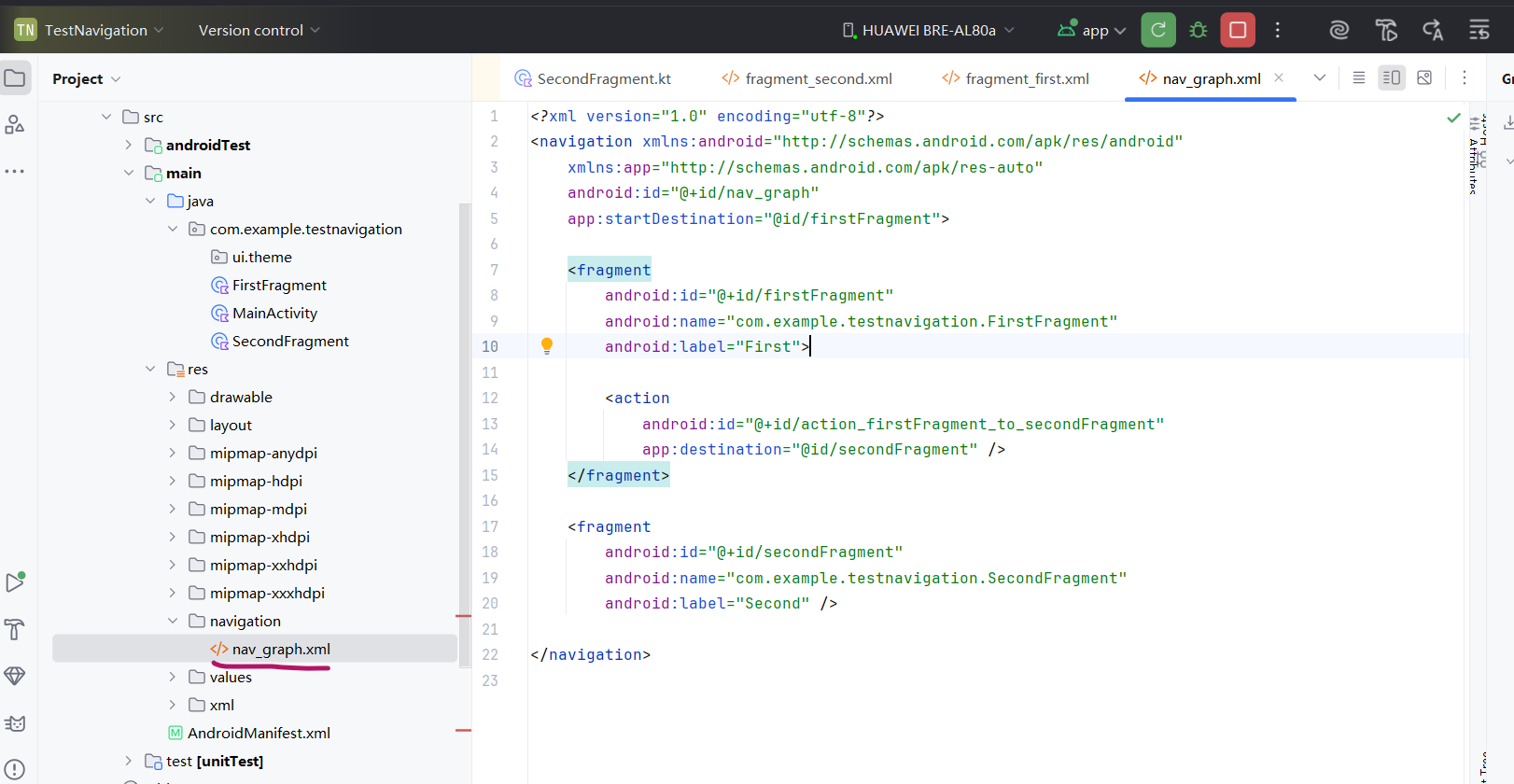
代码:
XML
<?xml version="1.0" encoding="utf-8"?>
<navigation xmlns:android="http://schemas.android.com/apk/res/android"
    xmlns:app="http://schemas.android.com/apk/res-auto"
    android:id="@+id/nav_graph"
    app:startDestination="@id/firstFragment">

    <fragment
        android:id="@+id/firstFragment"
        android:name="com.example.testnavigation.FirstFragment"
        android:label="First">

        <action
            android:id="@+id/action_firstFragment_to_secondFragment"
            app:destination="@id/secondFragment" />
    </fragment>

    <fragment
        android:id="@+id/secondFragment"
        android:name="com.example.testnavigation.SecondFragment"
        android:label="Second" />

</navigation>
MainActivity布局放NavHostFragment并关联导航图,defaultNavHost意思是支持返回键。
XML
<?xml version="1.0" encoding="utf-8"?>
<androidx.fragment.app.FragmentContainerView xmlns:android="http://schemas.android.com/apk/res/android"
    xmlns:app="http://schemas.android.com/apk/res-auto"
    android:id="@+id/nav_host"
    android:layout_width="match_parent"
    android:layout_height="match_parent"
    android:name="androidx.navigation.fragment.NavHostFragment"
    app:defaultNavHost="true"
    app:navGraph="@navigation/nav_graph" />
FirstFragment:
Kotlin
package com.example.testnavigation

import android.os.Bundle
import android.view.View
import android.widget.Button
import android.widget.TextView
import androidx.core.os.bundleOf
import androidx.fragment.app.Fragment
import androidx.navigation.fragment.findNavController

class FirstFragment : Fragment(R.layout.fragment_first) {
    override fun onViewCreated(view: View, savedInstanceState: Bundle?) {
        super.onViewCreated(view, savedInstanceState)

        view.findViewById<TextView>(R.id.tvTitle).text = "FirstFragment"

        view.findViewById<Button>(R.id.btnToSecond).setOnClickListener {
            findNavController().navigate(
                R.id.action_firstFragment_to_secondFragment,
                bundleOf("msg" to "不要为明天忧虑")
            )
        }
    }
}
SecondFragment:
Kotlin
package com.example.testnavigation

import android.os.Bundle
import android.view.View
import android.widget.Button
import android.widget.TextView
import androidx.fragment.app.Fragment
import androidx.navigation.fragment.findNavController

class SecondFragment : Fragment(R.layout.fragment_second) {
    override fun onViewCreated(view: View, savedInstanceState: Bundle?) {
        super.onViewCreated(view, savedInstanceState)

        val msg = arguments?.getString("msg").orEmpty()
        view.findViewById<TextView>(R.id.tvTitle).text = "SecondFragment\n$msg"

        view.findViewById<Button>(R.id.btnBack).setOnClickListener {
            findNavController().popBackStack()
        }
    }
}
MainActivity:
Kotlin
package com.example.testnavigation

import android.os.Bundle
import androidx.fragment.app.FragmentActivity

class MainActivity : FragmentActivity() {
    override fun onCreate(savedInstanceState: Bundle?) {
        super.onCreate(savedInstanceState)
        setContentView(R.layout.activity_main)
    }
}
运行:
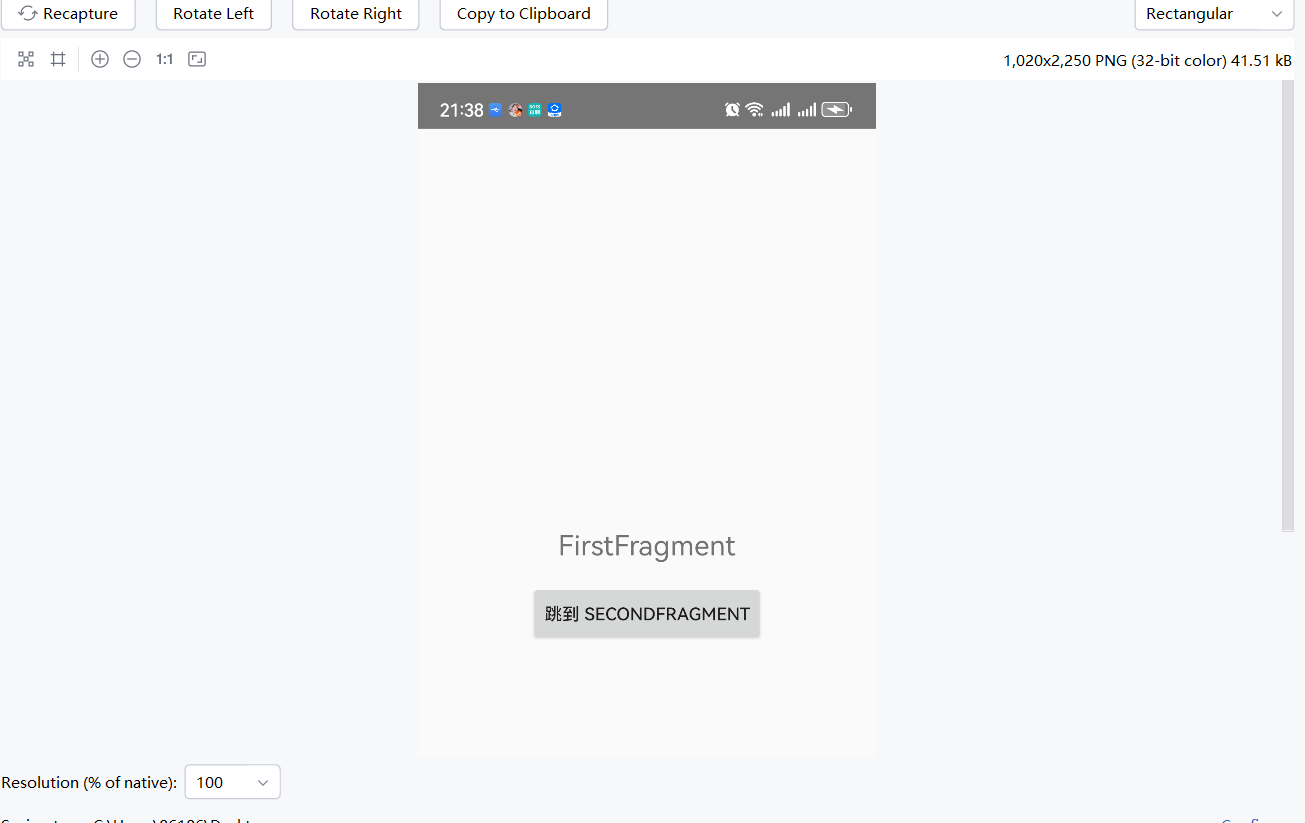
点击按钮跳转到第2个fragment:
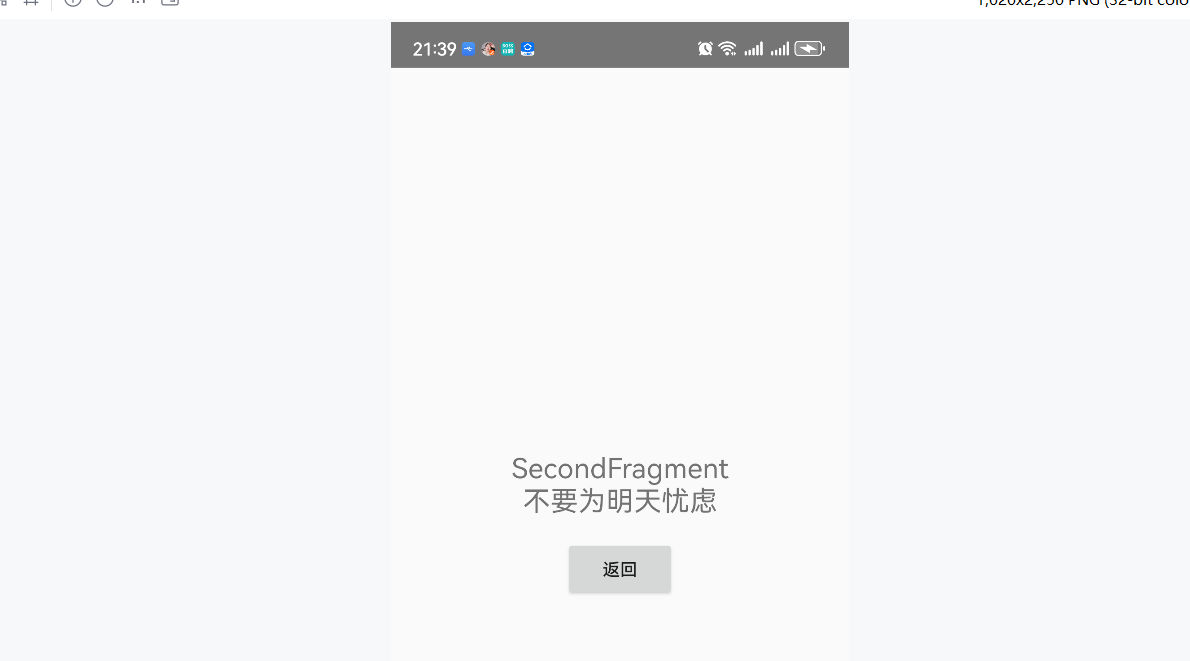
ok.