文章目录
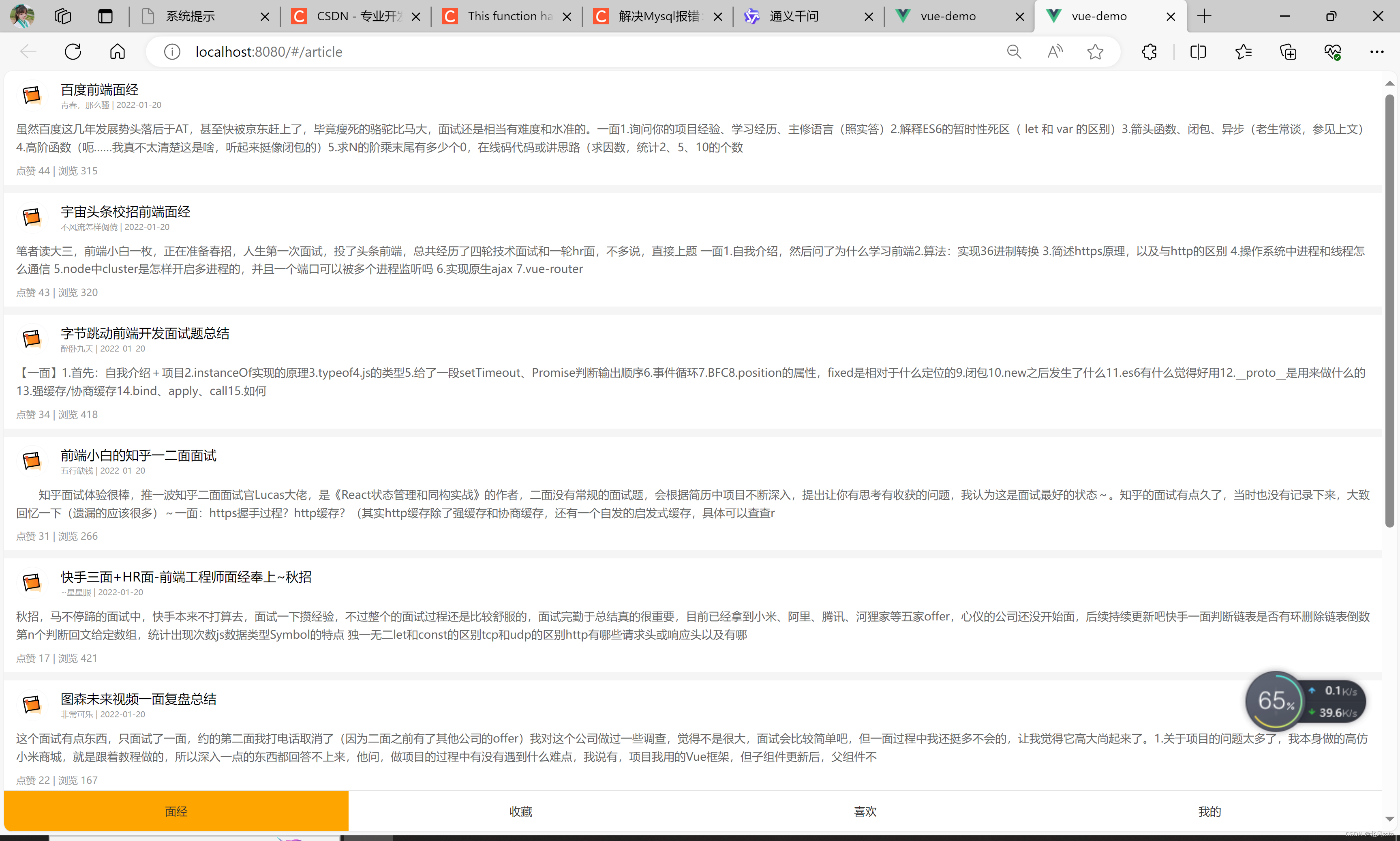
一、项目截图
二、主要知识点
路由跳转
路由传参
缓存组件:keep-alive
三、main.js
import Vue from 'vue'
import App from './App.vue'
import router from './router'

Vue.config.productionTip = false

new Vue({
  render: h => h(App),
  router
}).$mount('#app')
四、App.vue
<template>
  <div class="h5-wrapper">
    <keep-alive :include="['LayoutPage']">
      <router-view></router-view>
    </keep-alive>
  </div>
</template>

<script>
export default {
  name: "h5-wrapper",
}
</script>

<style>
body {
  margin: 0;
  padding: 0;
}
</style>
<style lang="less" scoped>
.h5-wrapper {
  .content {
    margin-bottom: 51px;
  }
  .tabbar {
    position: fixed;
    left: 0;
    bottom: 0;
    width: 100%;
    height: 50px;
    line-height: 50px;
    text-align: center;
    display: flex;
    background: #fff;
    border-top: 1px solid #e4e4e4;
    a {
      flex: 1;
      text-decoration: none;
      font-size: 14px;
      color: #333;
      -webkit-tap-highlight-color: transparent;
      &.router-link-active {
        color: #fa0;
      }
    }
  }
}
</style>
五、views
Article.vue
<template>
  <div class="article-page">
    <div
        v-for="(item,index) in articls"
        :key="index"
        @click="$router.push(`/detail?id=${item.id}`)"
        class="article-item"
    >
      <div class="head">
        <img
            :src="item.creatorAvatar"
            alt=""/>
        <div class="con">
          <p class="title">{{item.stem}}</p>
          <p class="other">{{item.creatorName}} | {{item.createdAt}}</p>
        </div>
      </div>
      <div class="body">
        {{item.content}}
      </div>
      <div class="foot">点赞 {{item.likeCount}} | 浏览 {{item.views}}</div>
    </div>
  </div>
</template>

<script>
// 请求地址: https://mock.boxuegu.com/mock/3083/articles
// 请求方式: get
import axios from "axios";

export default {
  name: 'ArticlePage',
  data() {
    return {
      articls: []
    }
  },
  async created() {
    const res = await axios.get("https://mock.boxuegu.com/mock/3083/articles")
    this.articls=res.data.result.rows
  }
}
</script>

<style lang="less" scoped>
.article-page {
  background: #f5f5f5;
}

.article-item {
  margin-bottom: 10px;
  background: #fff;
  padding: 10px 15px;

  .head {
    display: flex;

    img {
      width: 40px;
      height: 40px;
      border-radius: 50%;
      overflow: hidden;
    }

    .con {
      flex: 1;
      overflow: hidden;
      padding-left: 15px;

      p {
        margin: 0;
        line-height: 1.5;

        &.title {
          text-overflow: ellipsis;
          overflow: hidden;
          width: 100%;
          white-space: nowrap;
        }

        &.other {
          font-size: 10px;
          color: #999;
        }
      }
    }
  }

  .body {
    font-size: 14px;
    color: #666;
    line-height: 1.6;
    margin-top: 10px;
    overflow: hidden;
    text-overflow: ellipsis;
    display: -webkit-box;
    -webkit-line-clamp: 2;
    -webkit-box-orient: vertical;
  }

  .foot {
    font-size: 12px;
    color: #999;
    margin-top: 10px;
  }
}
</style>
ArticleDetail.vue
<template>
<div class="article-detail-page" v-show="articlDetail.id">
<nav class="nav"><span @click="$router.back()" class="back"><</span> 面经详情</nav>
<header class="header">
<h1>{{articlDetail.stem}}</h1>
<p>{{articlDetail.createdAt}} | {{articlDetail.views}} 浏览量 | {{articlDetail.likeCount}} 点赞数</p>
<p>
<img
:src="articlDetail.creatorAvatar"
alt=""
/>
<span>{{articlDetail.creatorName}}</span>
</p>
</header>
<main class="body">
{{articlDetail.content}}
</main>
</div>
</template>
<script>
// 请求地址: https://mock.boxuegu.com/mock/3083/articles/{id}
// 请求方式: get
import axios from "axios";
export default {
name: "ArticleDetailPage",
data() {
return {
articlDetail: {}
}
},
async created() {
const res = await axios.get("https://mock.boxuegu.com/mock/3083/articles/" + this.$route.query.id)
// this.articls=res.data.result.rows
this.articlDetail = res.data.result
console.log(this.articlDetail)
}
}
</script>
<style lang="less" scoped>
.article-detail-page {
.nav {
height: 44px;
border-bottom: 1px solid #e4e4e4;
line-height: 44px;
text-align: center;
.back {
font-size: 18px;
color: #666;
position: absolute;
left: 10px;
top: 0;
transform: scale(1, 1.5);
}
}
.header {
padding: 0 15px;
p {
color: #999;
font-size: 12px;
display: flex;
align-items: center;
}
img {
width: 40px;
height: 40px;
border-radius: 50%;
overflow: hidden;
}
}
.body {
padding: 0 15px;
}
}
</style>
Collect.vue
<template>
  <div>Collect</div>
</template>

<script>
export default {
  name: 'CollectPage'
}
</script>
Layout.vue
<template>
  <div class="h5-wrapper">
    <div class="content">
      <router-view></router-view>
    </div>
    <nav class="tabbar">
      <router-link to="/article">面经</router-link>
      <router-link to="/collect">收藏</router-link>
      <router-link to="/like">喜欢</router-link>
      <router-link to="/user">我的</router-link>
    </nav>
  </div>
</template>

<script>
export default {
  name: "LayoutPage",
}
</script>

<style>
body {
  margin: 0;
  padding: 0;
}
</style>
<style lang="less" scoped>
.h5-wrapper {
  .content {
    margin-bottom: 51px;
  }
  .tabbar {
    position: fixed;
    left: 0;
    bottom: 0;
    width: 100%;
    height: 50px;
    line-height: 50px;
    text-align: center;
    display: flex;
    background: #fff;
    border-top: 1px solid #e4e4e4;
    a {
      flex: 1;
      text-decoration: none;
      font-size: 14px;
      color: #333;
      -webkit-tap-highlight-color: transparent;
    }
    a.router-link-active {
      //color: orange;
      background: orange;
    }
  }
}
</style>
Like.vue
<template>
  <div>Like</div>
</template>

<script>
export default {
  name: 'LikePage'
}
</script>
User.vue
<template>
  <div>User</div>
</template>

<script>
export default {
  name: 'UserPage'
}
</script>
router
index.js
import Vue from 'vue'
import VueRouter from "vue-router";
import Layout from "@/views/Layout.vue";
import ArticleDetail from "@/views/ArticleDetail.vue";
import Article from "@/views/Article.vue";
import Collect from "@/views/Collect.vue";
import Like from "@/views/Like.vue";
import User from "@/views/User.vue";

Vue.use(VueRouter)

const router = new VueRouter({
    routes: [
        {
            path: "/",
            component: Layout,
            redirect: "/article",
            children: [
                {
                    path: "/article",
                    component: Article
                },
                {
                    path: "/collect",
                    component: Collect
                },
                {
                    path: "/like",
                    component: Like
                },
                {
                    path: "/user",
                    component: User
                }
            ]
        },
        {
            path: "/detail",
            component: ArticleDetail
        }
    ]
})

export default router