在前后端分离的开发模式中,跨域问题几乎是每个前端开发者都会遇到的"拦路虎"。当浏览器中运行的前端应用(例如 http://localhost:5173)向后端 API(例如 http://localhost:3000/api/users)发起请求时,由于协议、域名或端口不同,浏览器的同源策略会直接阻止请求,并抛出 CORS 错误。虽然可以通过后端配置 CORS 头解决,但在开发阶段,更便捷的方案是在前端开发服务器上设置代理。Vite 的 server.proxy 配置正是为此而生。本文将深入浅出地讲解 Vite 代理是如何解决跨域问题的。
同源策略与跨域的本质
首先,回顾一下跨域产生的根本原因:浏览器的同源策略。该策略规定,一个源(协议+域名+端口)的脚本只能访问同源的资源。当前端页面和 API 服务器源不一致时,浏览器就会拦截响应。
传统的解决方式包括:
- JSONP(只支持 GET)。
- CORS (后端配置
Access-Control-Allow-Origin)。 - 代理(前端开发服务器转发请求)。
Vite 代理的核心原理:中间件转发
Vite 开发服务器本质上是一个 Node.js HTTP 服务器。server.proxy 配置利用 http-proxy-3 库创建了一个代理中间件。该中间件会拦截特定规则的请求,不将请求交给 Vite 的静态文件服务或模块转换管道,而是直接转发到目标后端服务器,然后将后端的响应原样返回给浏览器。
为什么这能绕过同源策略?
关键点在于:代理发生在服务器端,而不是浏览器端。
- 浏览器向
http://localhost:5173/api/users发起请求(同源请求,因为页面也是从localhost:5173加载的)。 - Vite 服务器接收到请求后,根据代理配置,在服务器内部 向
http://localhost:3000/api/users发起新的 HTTP 请求。 - 后端返回响应给 Vite 服务器,Vite 服务器再将响应返回给浏览器。
由于浏览器始终与同源的 Vite 服务器通信,不存在跨域问题。整个过程对浏览器透明,它认为自己请求的是同源资源。
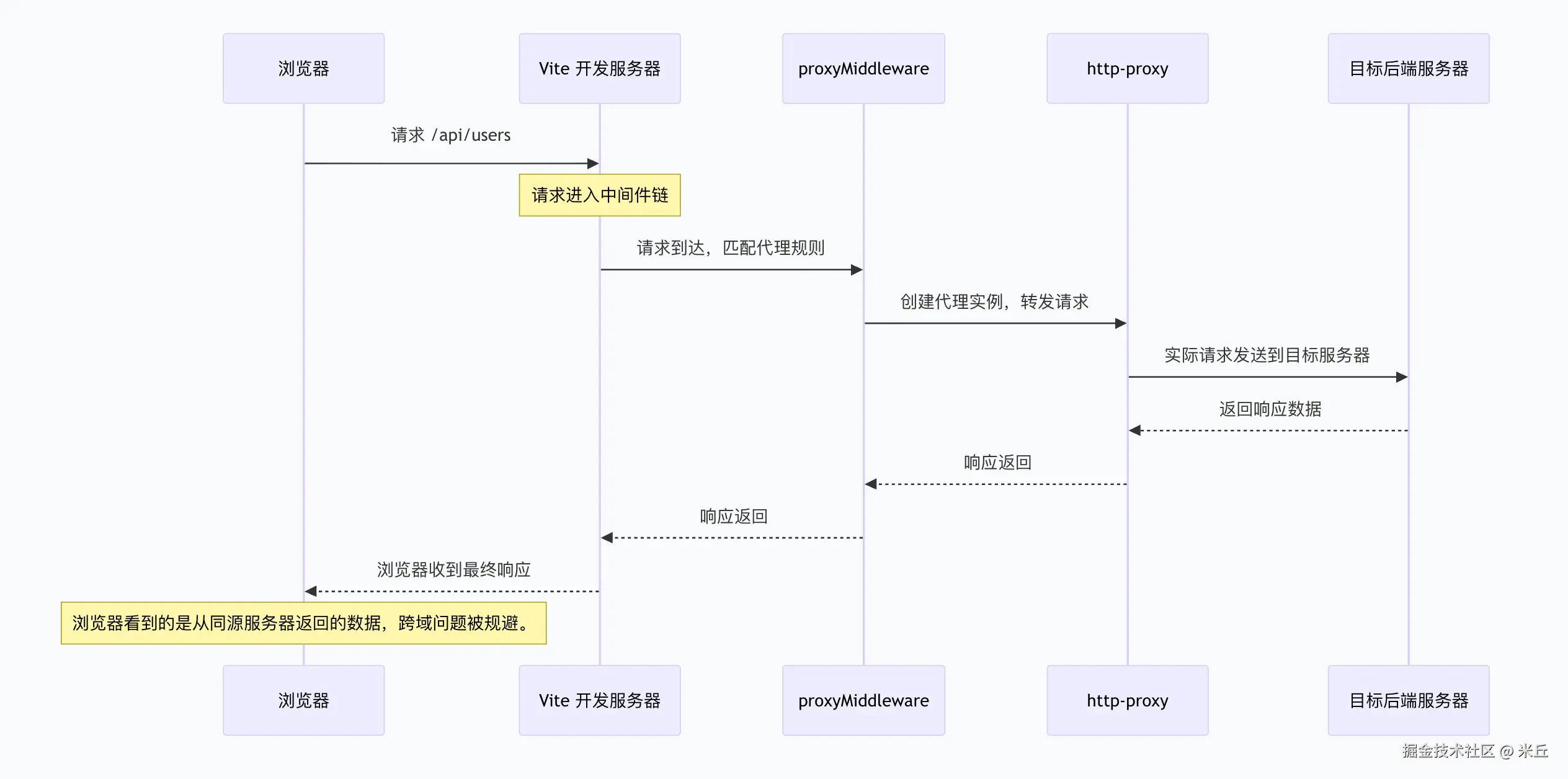
Vite 代理的工作流程
- 启动开发服务器 :Vite 读取
server.proxy配置,为每个规则创建一个http-proxy实例。 - 请求到达 :浏览器发送请求到 Vite 服务器(例如
http://localhost:5173/api/users)。 - 中间件匹配 :Vite 的
proxyMiddleware根据请求路径匹配代理规则。如果匹配,则进入代理流程;否则交给下一个中间件(如静态文件服务)。 - 转发请求 :
http-proxy向target发起新的 HTTP 请求,复制原请求的 headers、body 等。 - 接收响应 :目标服务器返回响应,
http-proxy将响应头和数据写回给浏览器。 - 完成:浏览器收到响应,由于是同源请求,没有跨域限制。
Vite 中的反向代理(最常用)
Vite 开发服务器(运行在 localhost:5173)通过 server.proxy 将特定前缀的请求转发到后端 API 服务器(如 http://localhost:3000),从而绕过浏览器的同源策略。
工作流程:
- 浏览器请求
http://localhost:5173/api/users。 - Vite 服务器识别到
/api前缀,作为代理客户端 。向http://localhost:3000/api/users发起请求。 - 后端返回数据,Vite 原样转发给浏览器。
- 整个过程浏览器只与 Vite 服务器通信,不知后端存在。
js
// vite.config.js
export default {
  server: {
    proxy: {
      '/api': {
        target: 'http://localhost:3000',   // 后端服务器地址
        changeOrigin: true,   // 修改 Host 头为 target
        rewrite: (path) => path.replace(/^\/api/, '')
      }
    }
  }
}
Vite 中的正向代理
工作流程:
- Vite 服务器收到
/api请求后,不直接连接 target ,而是先连接到forward指定的正向代理服务器。 - 正向代理再转发请求到真正的
target。 - 响应原路返回。
js
// vite.config.js
export default {
  server: {
    proxy: {
      '/api': {
        target: 'http://target-server.com',   // 最终目标
        forward: 'http://proxy.company.com:8080', // 正向代理地址
        changeOrigin: true
      }
    }
  }
}
当浏览器发起一个匹配 /api 的请求时,Vite 开发服务器会执行以下步骤:
- 浏览器请求 :
GET http://localhost:5173/api/users - Vite 代理中间件匹配:根据配置,该请求应被代理。
- 构造请求选项 :Vite 使用
common.setupOutgoing构造出站请求参数,包括目标主机、路径、头部等。 - 检测到
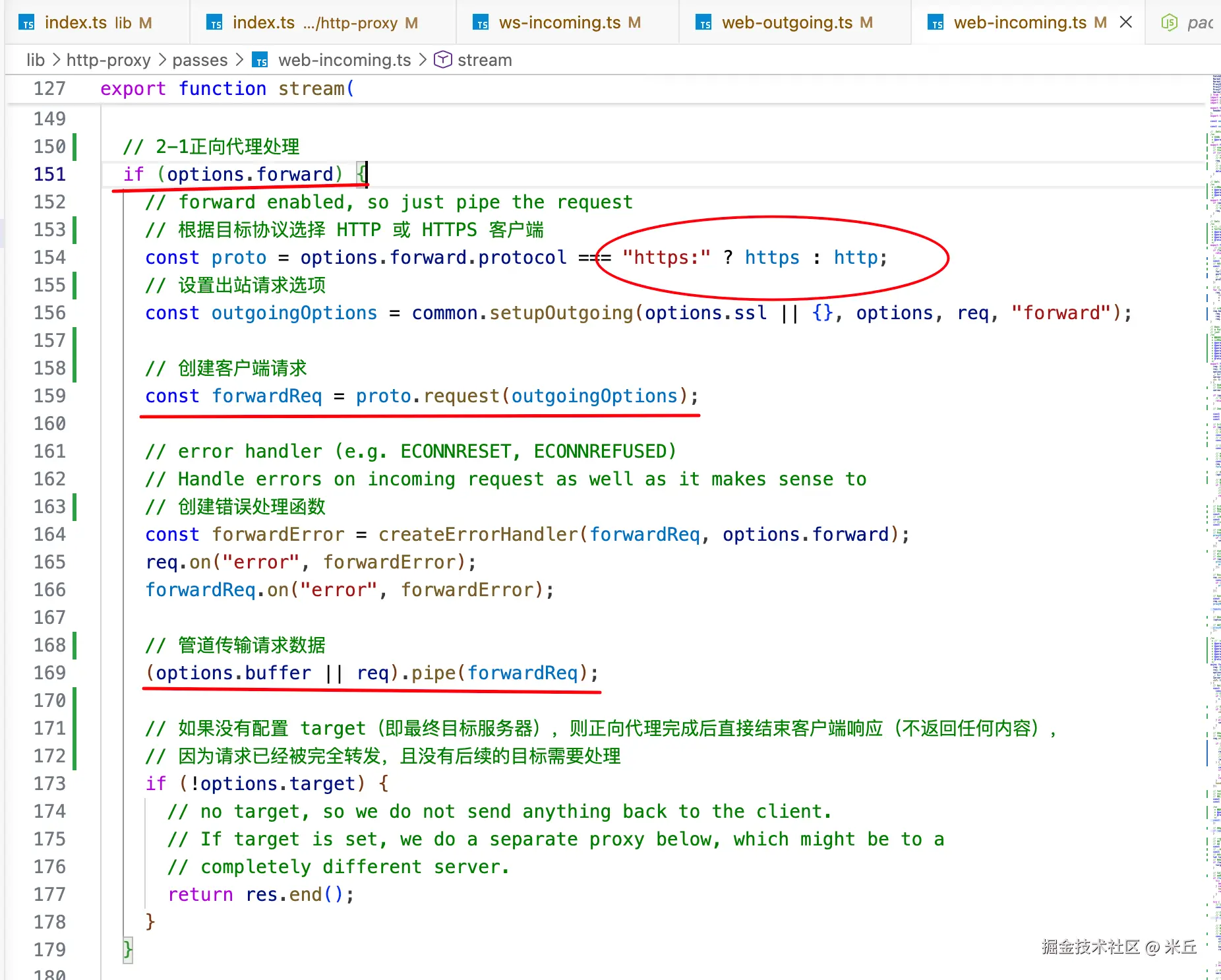
forward配置 :由于配置了forward,Vite 不会直接连接target,而是:- 创建一个到
forward地址(正向代理服务器)的 HTTP 或 HTTPS 请求。 - 将原始请求的 URL、头部、请求体等封装后发给正向代理。
- 创建一个到
- 正向代理转发 :正向代理服务器收到请求后,根据请求中的目标地址(即
target中的主机和路径)向真正的目标服务器发起请求。 - 目标服务器响应:目标服务器返回数据给正向代理。
- 正向代理回传:正向代理将响应返回给 Vite 开发服务器。
- Vite 转发给浏览器:Vite 将响应原样返回给浏览器。
整个流程对浏览器完全透明,浏览器只知道自己请求了 localhost:5173,并不知道请求经过了正向代理和目标服务器。
server.proxy 配置
js
proxy?: Record<string, string | ProxyOptions>
typescript
interface ProxyOptions extends httpProxy.ServerOptions {
  /**
   * rewrite path 重写请求路径
   * 接收原始路径,返回新路径。常用于去掉代理前缀。
   */
  rewrite?: (path: string) => string
  /**
   * configure the proxy server (e.g. listen to events)
   * 提供一个钩子,允许直接访问底层 http-proxy 实例,用于监听事件或自定义行为。
   */
  configure?: (proxy: httpProxy.ProxyServer, options: ProxyOptions) => void
  /**
   * webpack-dev-server style bypass function
   * 绕过代理,直接由 Vite 开发服务器处理请求
   */
  bypass?: (
    req: http.IncomingMessage,
    /** undefined for WebSocket upgrade requests */
    res: http.ServerResponse | undefined,
    options: ProxyOptions,
  ) =>
    | void
    | null
    | undefined
    | false
    | string
    | Promise<void | null | undefined | boolean | string>
  /**
   * rewrite the Origin header of a WebSocket request to match the target
   * 重写 WebSocket 请求的 Origin 头,使其与代理目标匹配。
   *
   * **Exercise caution as rewriting the Origin can leave the proxying open to [CSRF attacks](https://owasp.org/www-community/attacks/csrf).**
   * 安全警告:官方文档明确警告,重写 Origin 可能导致 CSRF 攻击,应谨慎使用。
   */
  rewriteWsOrigin?: boolean | undefined
}
http-proxy-3/lib/http-proxy/index.ts
typescript
interface ServerOptions {
  // NOTE: `options.target and `options.forward` cannot be both missing when the
  // actually proxying is called.  However, they can be missing when creating the
  // proxy server in the first place!  E.g., you could make a proxy server P with
  // no options, then use P.web(req,res, {target:...}).
  /** URL string to be parsed with the url module. */
  // 最终目标服务器 URL,代理请求将被转发到此地址
  target?: ProxyTarget;
  /** URL string to be parsed with the url module or a URL object. */
  // 上游正向代理服务器 URL。若指定,请求会先发给 forward,再由其转发到 target
  forward?: ProxyTargetUrl;
  /** Object to be passed to http(s).request. */
  // 自定义 HTTP/HTTPS 代理的 Agent 实例,用于控制连接池、代理认证等
  agent?: any;
  /** Object to be passed to https.createServer(). */
  // 当创建 HTTPS 服务器时,传入的 TLS 选项
  ssl?: any;
  /** If you want to proxy websockets. */
  // 是否代理 WebSocket 连接
  ws?: boolean;
  /** Adds x- forward headers. */
  // 是否添加 X-Forwarded-For、X-Forwarded-Port、X-Forwarded-Proto 等头部,用于向后端传递原始客户端信息
  xfwd?: boolean;
  /** Verify SSL certificate. */
  // 是否验证 SSL 证书
  secure?: boolean;
  /** Explicitly specify if we are proxying to another proxy. */
  // 是否将当前代理视为另一个代理的下游。用于链式代理场景,会影响请求路径的处理
  toProxy?: boolean;
  /** Specify whether you want to prepend the target's path to the proxy path. */
  // 是否将 target 的路径前缀添加到代理请求路径前
  prependPath?: boolean;
  /** Specify whether you want to ignore the proxy path of the incoming request. */
  // 是否忽略代理路径
  ignorePath?: boolean;
  /** Local interface string to bind for outgoing connections. */
  // 本地网络接口的 IP 地址,用于绑定出站连接的源地址
  localAddress?: string;
  /** Changes the origin of the host header to the target URL. */
  // 是否将请求头中的 Host 改为 target 的主机名。解决后端根据 Host 做虚拟主机路由时的跨域问题
  changeOrigin?: boolean;
  /** specify whether you want to keep letter case of response header key */
  preserveHeaderKeyCase?: boolean;
  /** Basic authentication i.e. 'user:password' to compute an Authorization header. */
  // 基本认证凭证('user:password'),会自动生成 Authorization 头
  auth?: string;
  /** Rewrites the location hostname on (301 / 302 / 307 / 308) redirects, Default: null. */
  // 重写重定向响应中的 Location 头的主机名部分
  hostRewrite?: string;
  /** Rewrites the location host/ port on (301 / 302 / 307 / 308) redirects based on requested host/ port.Default: false. */
  // 是否根据原始请求的主机和端口自动重写重定向的 Location 头
  autoRewrite?: boolean;
  /** Rewrites the location protocol on (301 / 302 / 307 / 308) redirects to 'http' or 'https'.Default: null. */
  // 强制将重定向中的协议重写为 'http' 或 'https'
  protocolRewrite?: string;
  /** rewrites domain of set-cookie headers. */
  // 重写 Set-Cookie 头中的 Domain 属性。可设为固定字符串或映射对象
  cookieDomainRewrite?: false | string | { [oldDomain: string]: string };
  /** rewrites path of set-cookie headers. Default: false */
  // 重写 Set-Cookie 头中的 Path 属性
  cookiePathRewrite?: false | string | { [oldPath: string]: string };
  /** object with extra headers to be added to target requests. */
  headers?: { [header: string]: string | string[] | undefined };
  /** Timeout (in milliseconds) when proxy receives no response from target. Default: 120000 (2 minutes) */
  // 代理请求超时(毫秒),超过此时间未收到目标服务器响应则断开连接
  proxyTimeout?: number;
  /** Timeout (in milliseconds) for incoming requests */
  // 客户端请求超时(毫秒),影响 req 的 timeout 事件
  timeout?: number;
  /** Specify whether you want to follow redirects. Default: false */
  // 是否自动跟随目标服务器返回的 3xx 重定向
  followRedirects?: boolean;
  /** If set to true, none of the webOutgoing passes are called and it's your responsibility to appropriately return the response by listening and acting on the proxyRes event */
  // 若为 true,代理不会自动将响应体返回给客户端,需用户通过监听 proxyRes 事件自行处理
  selfHandleResponse?: boolean;
  /** Buffer */
  // 预读的请求体流,用于在代理开始前已经读取了部分数据的情况
  buffer?: Stream;
  /** Explicitly set the method type of the ProxyReq */
  // 强制指定代理请求的 HTTP 方法
  method?: string;
  /**
   * Optionally override the trusted CA certificates.
   * This is passed to https.request.
   * 覆盖受信任的 CA 证书,用于自定义证书校验
   */
  ca?: string;
  /** Optional fetch implementation to use instead of global fetch, use this to activate fetch-based proxying,
   * for example to proxy HTTP/2 requests
   * 可选的自定义 fetch 实现,用于启用基于 Fetch API 的代理(支持 HTTP/2 等)
  */
 fetch?: typeof fetch;
  /** Optional configuration object for fetch-based proxy requests.
   * Use this to customize fetch request and response handling.
   * For custom fetch implementations, use the `fetch` property.*/
  // 配合 fetch 使用的额外选项,如请求重试、超时等
 fetchOptions?: FetchOptions;
}
一、字符串简写
js
// vite.config.js
export default {
  server: {
    proxy: {
      '/api': 'http://localhost:3000',
    },
  },
};
二、对象完整配置
js
export default {
  server: {
    proxy: {
      '/api': {
        target: 'http://localhost:3000',
        changeOrigin: true,
        rewrite: (path) => path.replace(/^\/api/, '')
      }
    }
  }
}
三、正则表达式匹配
js
export default {
  server: {
    proxy: {
      '^/api/.*': 'http://localhost:3000',
      '^/auth/.*': {
        target: 'http://localhost:4000',
        changeOrigin: true
      }
    }
  }
}
源码分析
js
  // proxy
  const { proxy } = serverConfig
  // 配置代理中间件
  // 用于将请求转发到其他服务器,如 API 服务器
  if (proxy) {
    const middlewareServer =
      (isObject(middlewareMode) ? middlewareMode.server : null) || httpServer

    middlewares.use(proxyMiddleware(middlewareServer, proxy, config))
  }
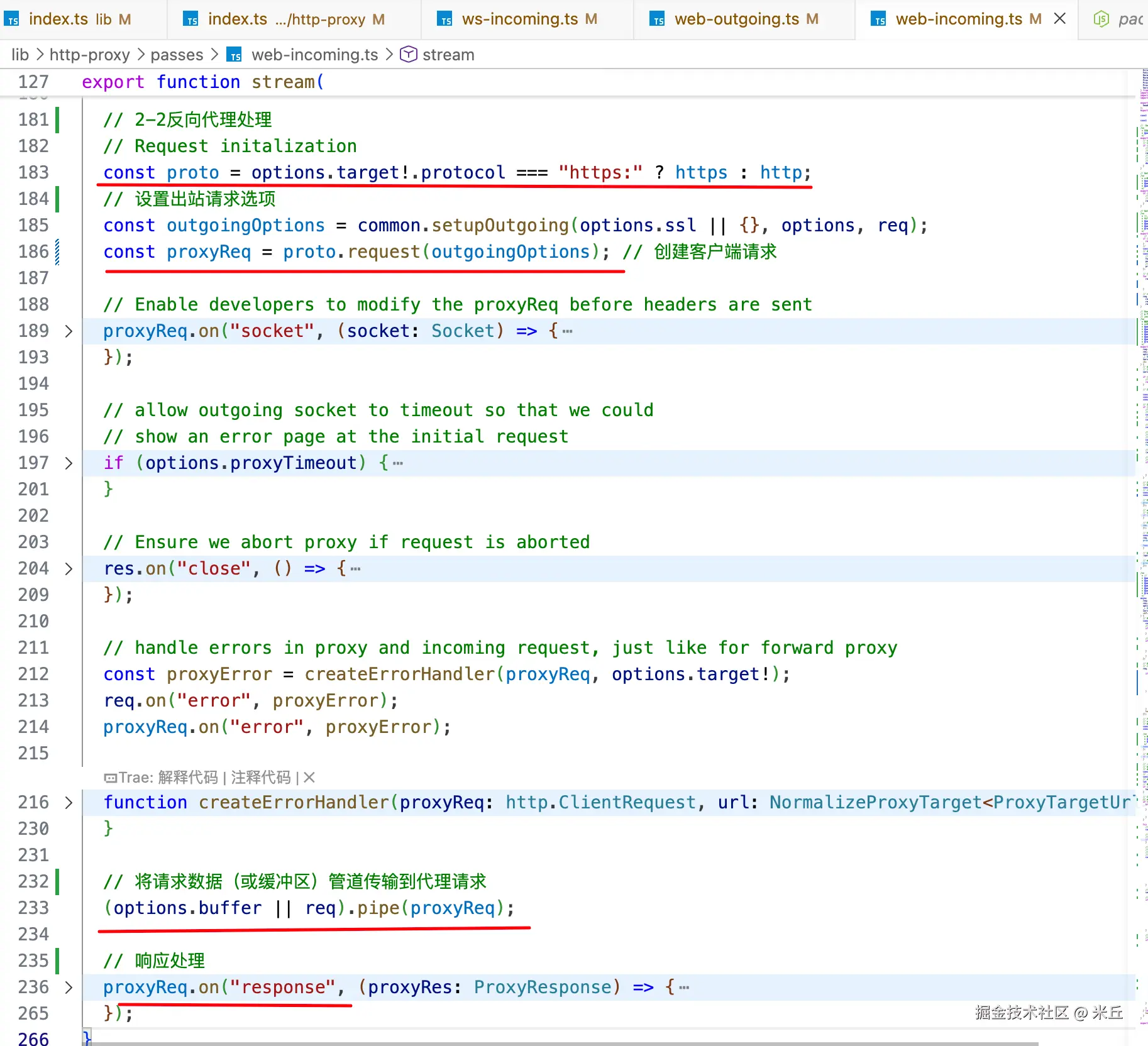
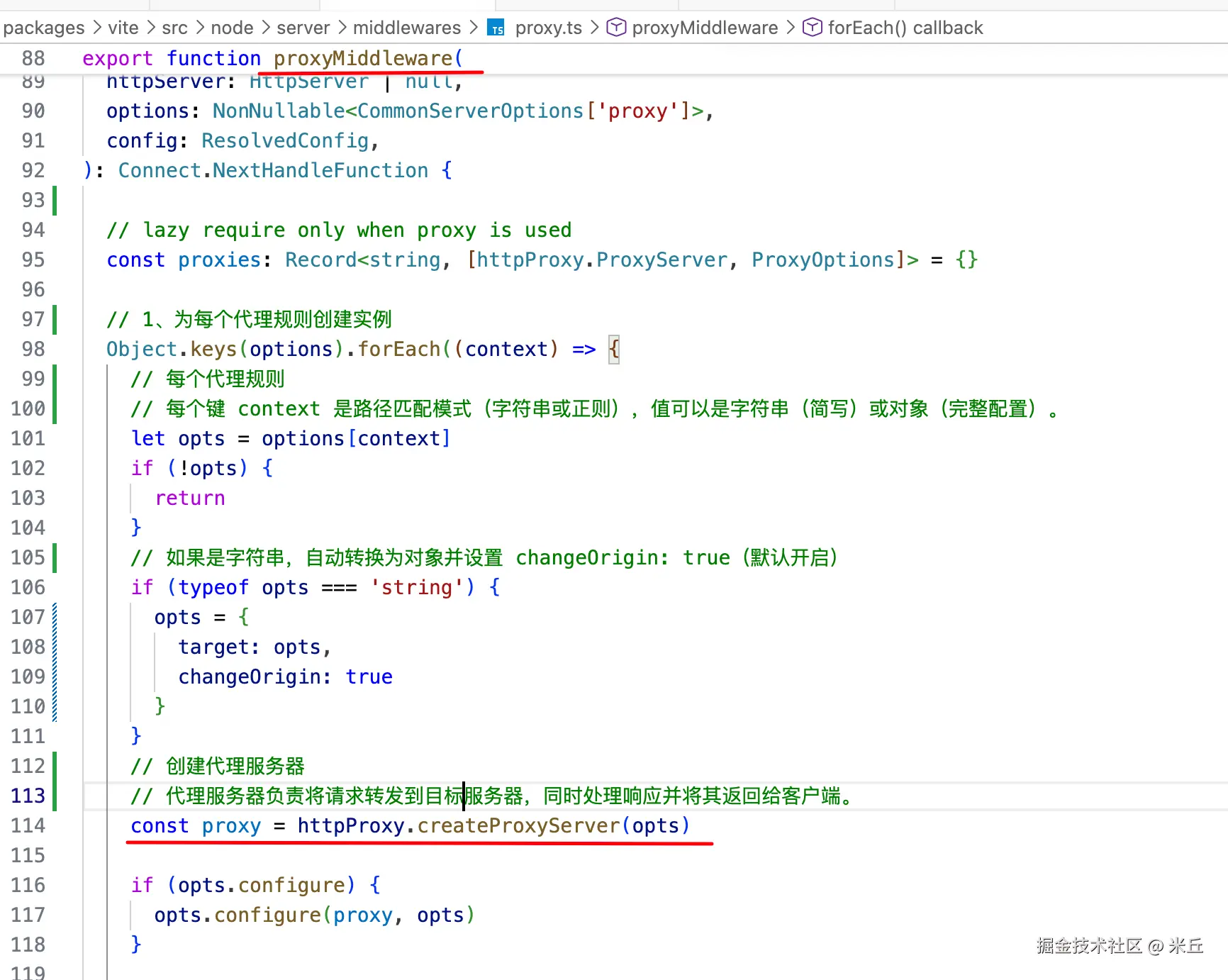
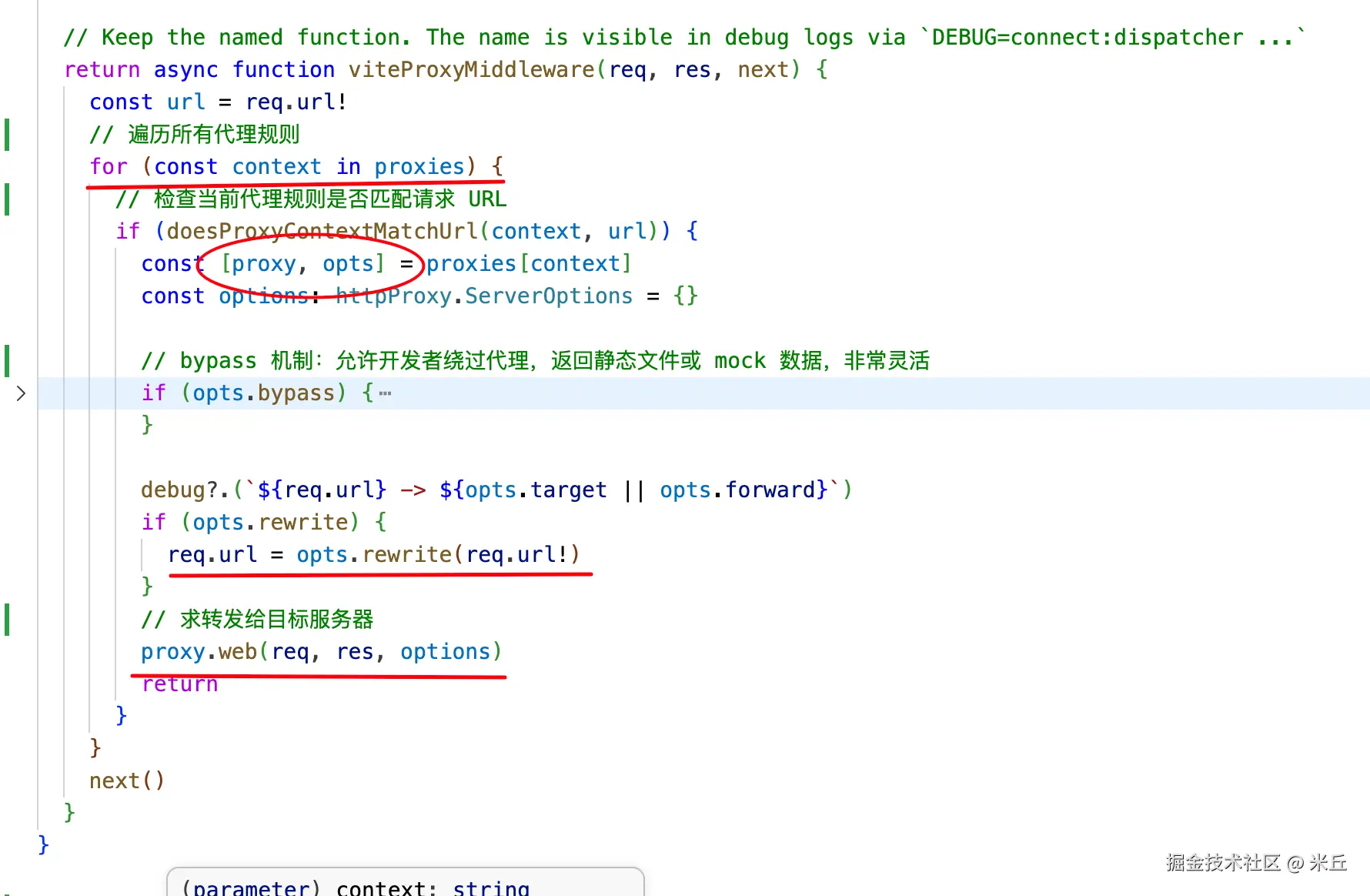
中间件会为每个规则创建代理
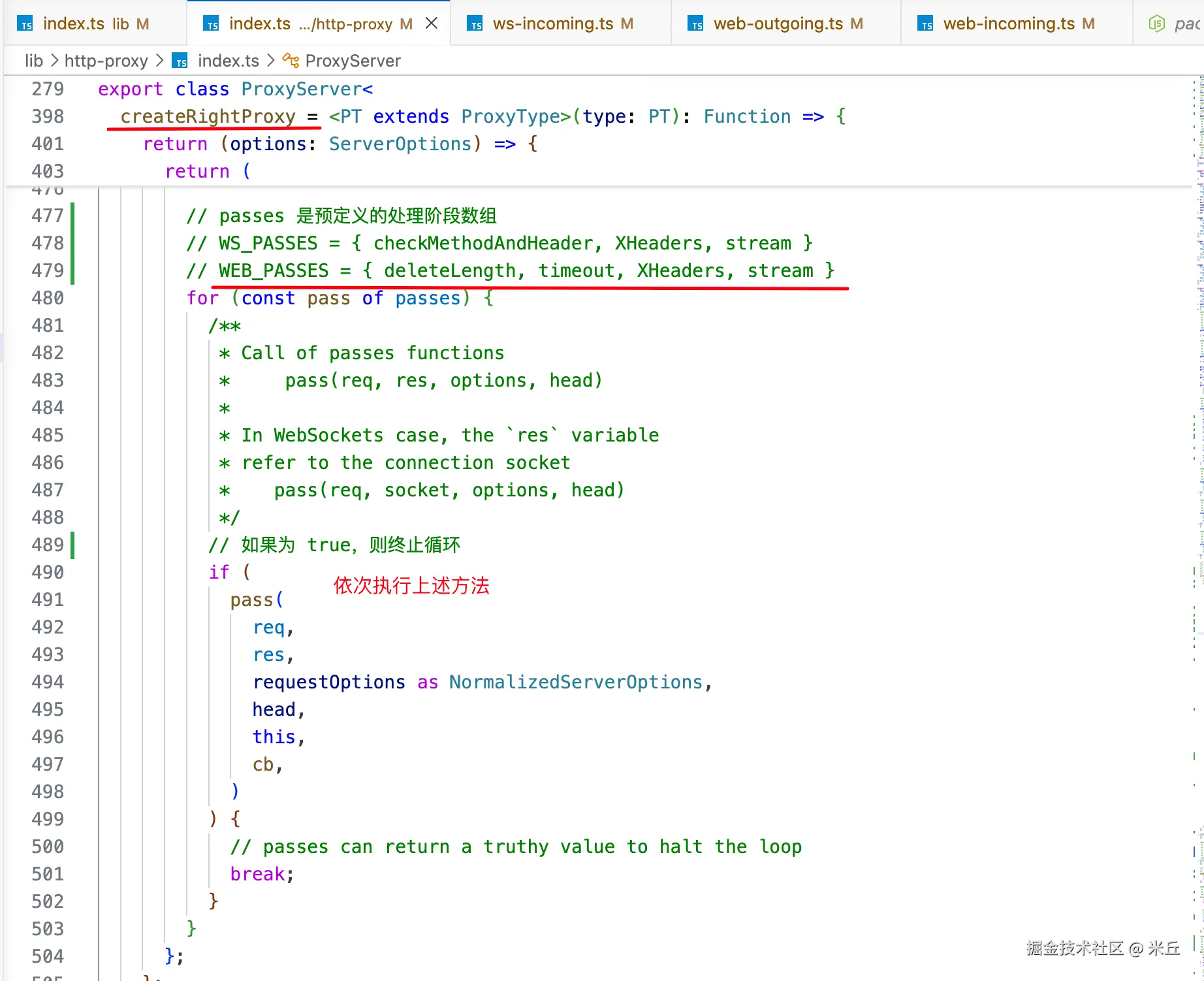
http-proxy-3 创建代理
配置了 forward
没有配置 forward