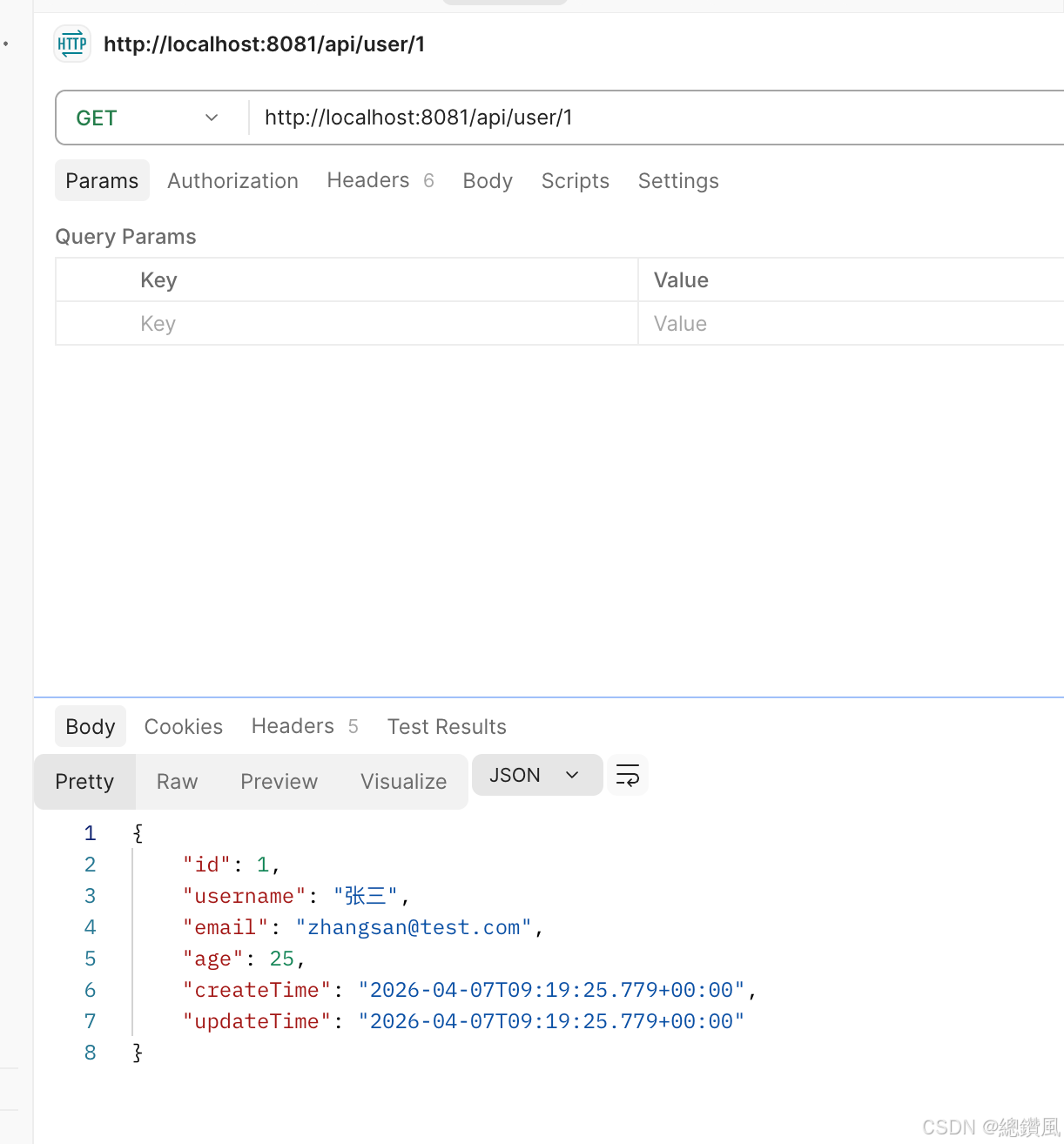
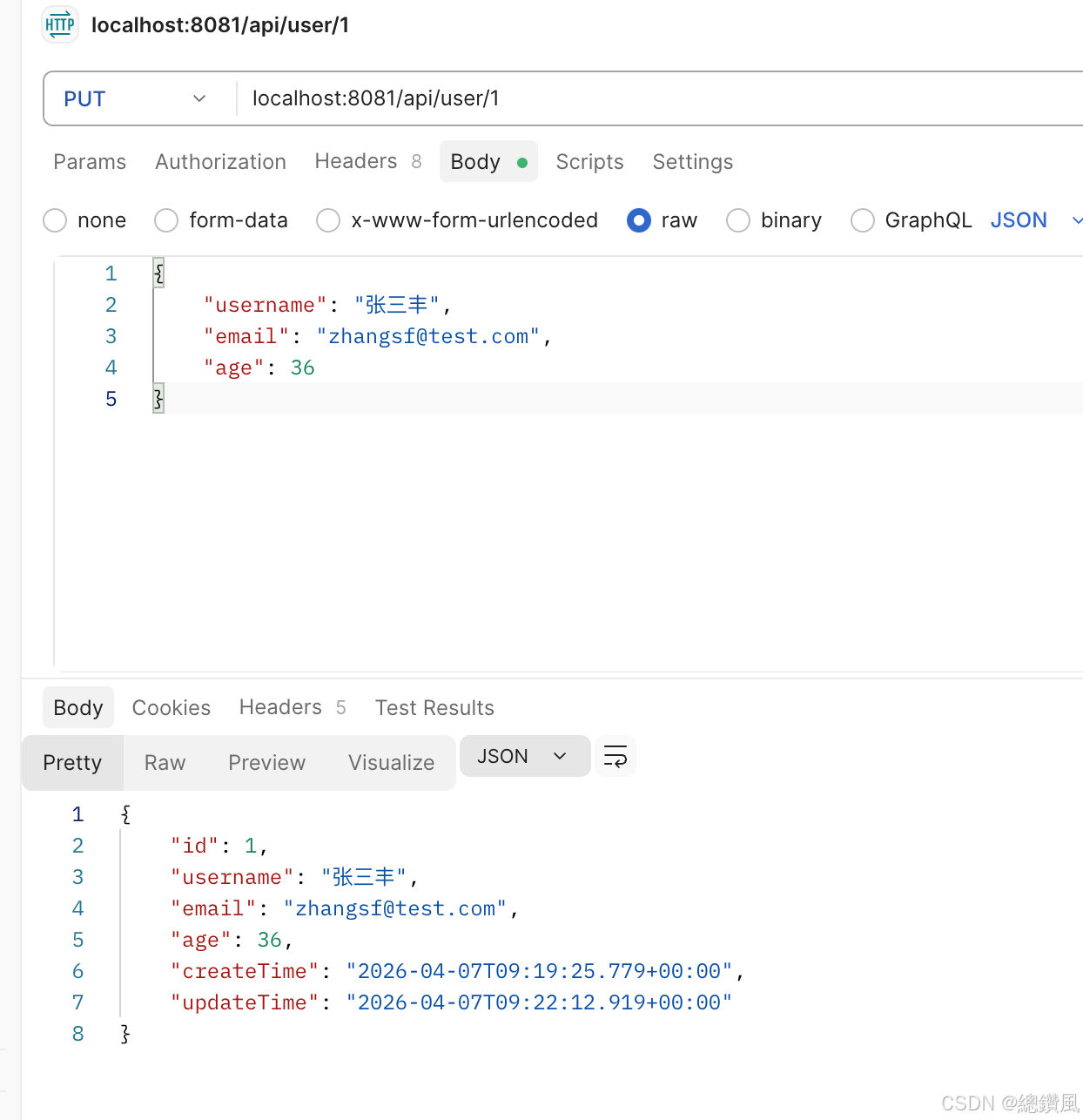
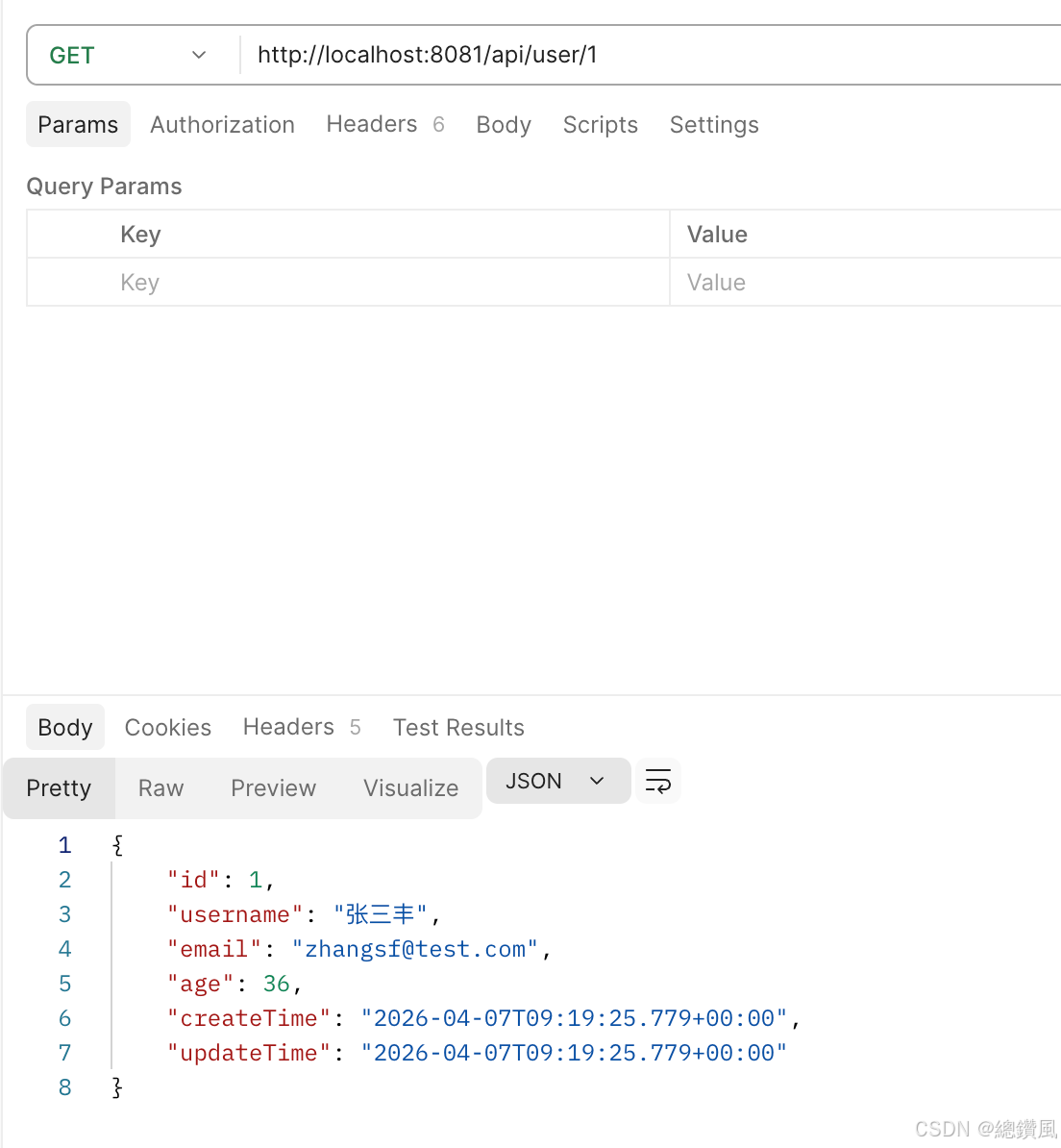
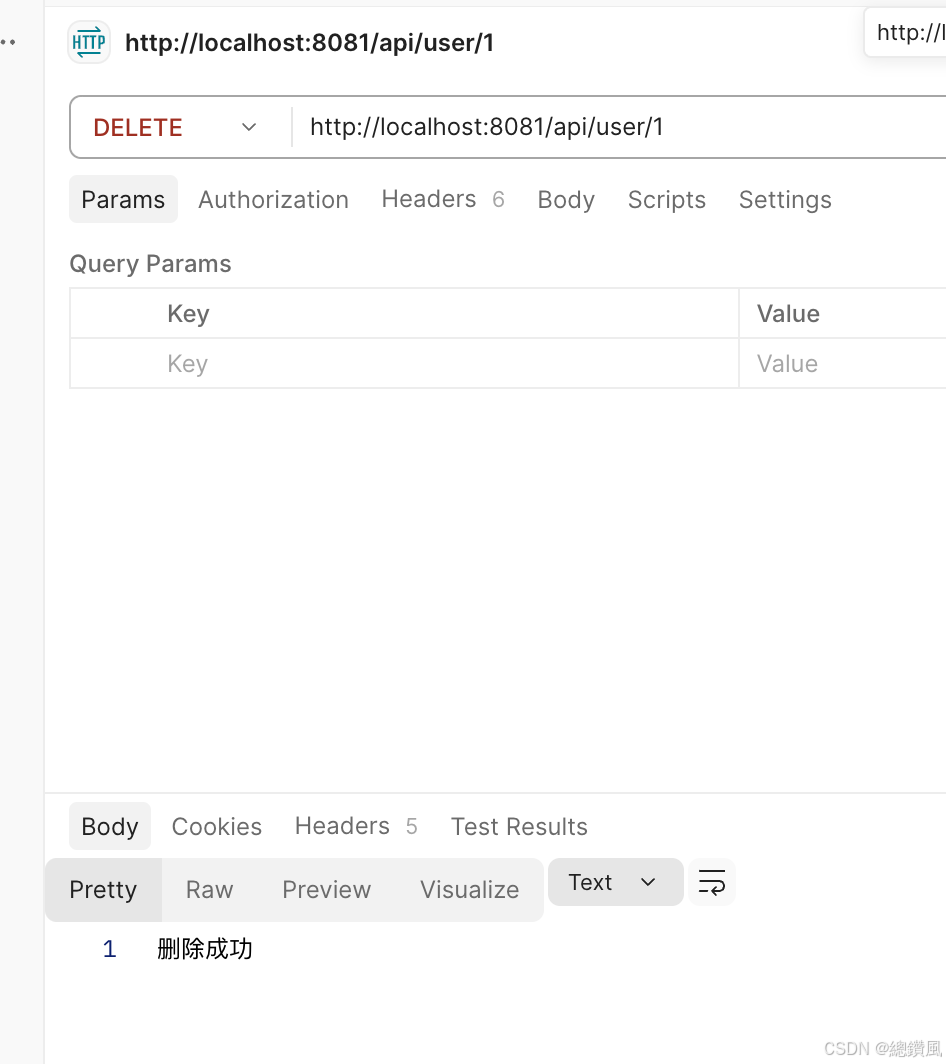
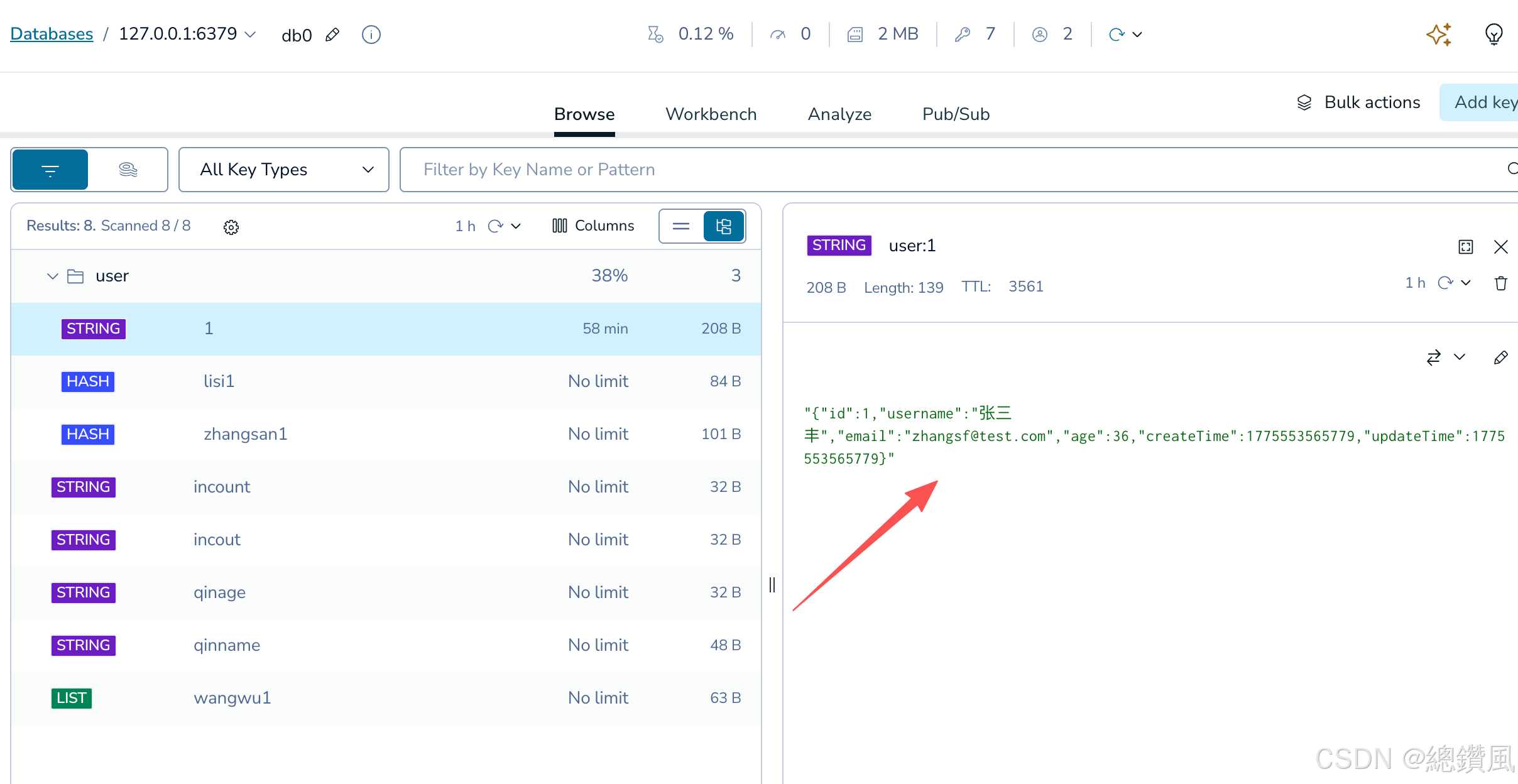
来由:
使用redis最常见的就是数据和数据库不一样,库里改了缓存还是旧数据,影响企业数据。
mysql里一般用的主从的binlog通知来更新数据;或者另一种方法就是用消息队列mq来通知后更新。
思路:
本文讲的是:mysql数据更新后rabbitmq通知redis更新数据
解决:
版本:
springboot-2.7.4 springcloudalibaba-2021.0.5.0
redis-8.6.1 rabbitmq-4.2.5

新建项目cache_consistency_rabbitmq_redis
目录:
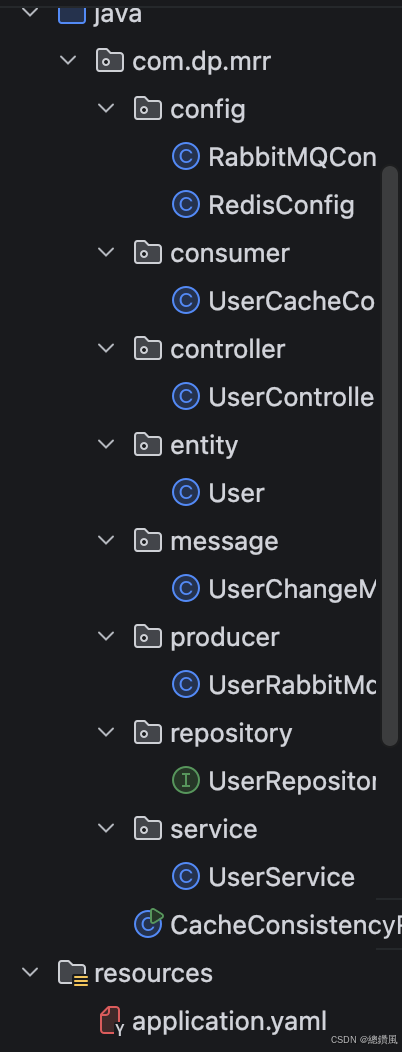
pom.xml
java
<?xml version="1.0" encoding="UTF-8"?>
<project xmlns="http://maven.apache.org/POM/4.0.0" xmlns:xsi="http://www.w3.org/2001/XMLSchema-instance"
         xsi:schemaLocation="http://maven.apache.org/POM/4.0.0 https://maven.apache.org/xsd/maven-4.0.0.xsd">
    <modelVersion>4.0.0</modelVersion>
    <parent>
        <groupId>org.springframework.boot</groupId>
        <artifactId>spring-boot-starter-parent</artifactId>
        <version>2.7.14</version>
        <relativePath/> <!-- lookup parent from repository -->
    </parent>
    <groupId>com.dp.ccrr</groupId>
    <artifactId>cache_consistency_rabbitmq_redis</artifactId>
    <version>1.0.0</version>
    <properties>
        <java.version>17</java.version>
        <spring-cloud-alibaba.version>2021.0.5.0</spring-cloud-alibaba.version>
    </properties>
    <dependencies>
        <dependency>
            <groupId>org.springframework.boot</groupId>
            <artifactId>spring-boot-starter-web</artifactId>
        </dependency>

        <!-- Spring Boot Data JPA -->
        <dependency>
            <groupId>org.springframework.boot</groupId>
            <artifactId>spring-boot-starter-data-jpa</artifactId>
        </dependency>

        <!-- Spring Boot AMQP (RabbitMQ) -->
        <dependency>
            <groupId>org.springframework.boot</groupId>
            <artifactId>spring-boot-starter-amqp</artifactId>
        </dependency>

        <!-- Spring Boot Redis -->
        <dependency>
            <groupId>org.springframework.boot</groupId>
            <artifactId>spring-boot-starter-data-redis</artifactId>
        </dependency>

        <!-- MySQL 驱动 -->
        <dependency>
            <groupId>mysql</groupId>
            <artifactId>mysql-connector-java</artifactId>
            <version>8.0.33</version>
        </dependency>

        <!-- 连接池 -->
        <dependency>
            <groupId>com.alibaba</groupId>
            <artifactId>druid-spring-boot-starter</artifactId>
            <version>1.2.16</version>
        </dependency>

        <!-- Lombok -->
        <dependency>
            <groupId>org.projectlombok</groupId>
            <artifactId>lombok</artifactId>
            <optional>true</optional>
        </dependency>

        <!-- JSON -->
        <dependency>
            <groupId>com.alibaba.fastjson2</groupId>
            <artifactId>fastjson2</artifactId>
            <version>2.0.43</version>
        </dependency>

        <dependency>
            <groupId>org.springframework.boot</groupId>
            <artifactId>spring-boot-starter-test</artifactId>
            <scope>test</scope>
        </dependency>
    </dependencies>

    <build>
        <plugins>
            <plugin>
                <groupId>org.springframework.boot</groupId>
                <artifactId>spring-boot-maven-plugin</artifactId>
            </plugin>
        </plugins>
    </build>

</project>RabbitMQConfig.java
java
package com.dp.mrr.config;


import org.springframework.amqp.core.*;
import org.springframework.amqp.rabbit.connection.ConnectionFactory;
import org.springframework.amqp.rabbit.core.RabbitTemplate;
import org.springframework.amqp.support.converter.Jackson2JsonMessageConverter;
import org.springframework.context.annotation.Bean;
import org.springframework.context.annotation.Configuration;

@Configuration
public class RabbitMQConfig {

    // 交换机名称
    public static final String USER_EXCHANGE = "user.exchange";

    // 队列名称
    public static final String USER_CACHE_QUEUE = "user.cache.queue";

    // 路由Key
    public static final String USER_CHANGE_ROUTING_KEY = "user.change";

    /**
     * 创建 Topic 交换机
     */
    @Bean
    public TopicExchange userExchange() {
        return ExchangeBuilder.topicExchange(USER_EXCHANGE).durable(true).build();
    }

    /**
     * 创建队列
     */
    @Bean
    public Queue userCacheQueue() {
        return QueueBuilder.durable(USER_CACHE_QUEUE).build();
    }

    /**
     * 绑定队列到交换机
     */
    @Bean
    public Binding userChangeBinding() {
        return BindingBuilder
                .bind(userCacheQueue())
                .to(userExchange())
                .with(USER_CHANGE_ROUTING_KEY);
    }

    /**
     * 配置消息转换器(JSON格式)
     */
    @Bean
    public Jackson2JsonMessageConverter messageConverter() {
        return new Jackson2JsonMessageConverter();
    }

    /**
     * 配置 RabbitTemplate
     */
    @Bean
    public RabbitTemplate rabbitTemplate(ConnectionFactory connectionFactory) {
        RabbitTemplate template = new RabbitTemplate(connectionFactory);
        template.setMessageConverter(messageConverter());
        return template;
    }
}RedisConfig.java
java
package com.dp.mrr.config;


import org.springframework.context.annotation.Bean;
import org.springframework.context.annotation.Configuration;
import org.springframework.data.redis.connection.RedisConnectionFactory;
import org.springframework.data.redis.core.RedisTemplate;
import org.springframework.data.redis.serializer.GenericJackson2JsonRedisSerializer;
import org.springframework.data.redis.serializer.StringRedisSerializer;

@Configuration
public class RedisConfig {

    @Bean
    public RedisTemplate<String, Object> redisTemplate(RedisConnectionFactory connectionFactory) {
        RedisTemplate<String, Object> template = new RedisTemplate<>();
        template.setConnectionFactory(connectionFactory);

        // Key 序列化器
        template.setKeySerializer(new StringRedisSerializer());
        template.setHashKeySerializer(new StringRedisSerializer());

        // Value 序列化器(JSON格式)
        GenericJackson2JsonRedisSerializer jsonSerializer = new GenericJackson2JsonRedisSerializer();
        template.setValueSerializer(jsonSerializer);
        template.setHashValueSerializer(jsonSerializer);

        template.afterPropertiesSet();
        return template;
    }
}UserCacheConsumer.java
java
package com.dp.mrr.consumer;


import com.alibaba.fastjson2.JSON;
import com.dp.mrr.message.UserChangeMessage;
import lombok.extern.slf4j.Slf4j;
import org.springframework.amqp.rabbit.annotation.RabbitListener;
import org.springframework.beans.factory.annotation.Autowired;
import org.springframework.data.redis.core.RedisTemplate;
import org.springframework.stereotype.Component;

import java.util.concurrent.TimeUnit;

import static com.dp.mrr.config.RabbitMQConfig.USER_CACHE_QUEUE;

@Slf4j
@Component
public class UserCacheConsumer {

    @Autowired
    private RedisTemplate<String, Object> redisTemplate;

    private static final String USER_CACHE_PREFIX = "user:";
    private static final long CACHE_EXPIRE_SECONDS = 3600; // 1小时过期

    /**
     * 监听用户变更消息,更新 Redis 缓存
     */
    @RabbitListener(queues = USER_CACHE_QUEUE)
    public void handleUserChange(UserChangeMessage message) {
        log.info("收到消息: operation={}, userId={}", message.getOperation(), message.getUserId());

        String cacheKey = USER_CACHE_PREFIX + message.getUserId();

        switch (message.getOperation()) {
            case "CREATE":
            case "UPDATE":
                // 创建或更新:将最新数据存入 Redis
                if (message.getUserData() != null) {
                    String userJson = JSON.toJSONString(message.getUserData());
                    redisTemplate.opsForValue().set(cacheKey, userJson, CACHE_EXPIRE_SECONDS, TimeUnit.SECONDS);
                    log.info("缓存已更新: key={}", cacheKey);
                }
                break;

            case "DELETE":
                // 删除:从 Redis 中移除
                redisTemplate.delete(cacheKey);
                log.info("缓存已删除: key={}", cacheKey);
                break;

            default:
                log.warn("未知操作类型: {}", message.getOperation());
        }
    }
}UserController.java
java
package com.dp.mrr.controller;


import com.dp.mrr.entity.User;
import com.dp.mrr.service.UserService;
import org.springframework.beans.factory.annotation.Autowired;
import org.springframework.web.bind.annotation.*;

@RestController
@RequestMapping("/api/user")
public class UserController {

    @Autowired
    private UserService userService;

    @PostMapping
    public User create(@RequestBody User user) {
        return userService.createUser(user);
    }

    @PutMapping("/{id}")
    public User update(@PathVariable Long id, @RequestBody User user) {
        return userService.updateUser(id, user);
    }

    @DeleteMapping("/{id}")
    public String delete(@PathVariable Long id) {
        userService.deleteUser(id);
        return "删除成功";
    }

    @GetMapping("/{id}")
    public User get(@PathVariable Long id) {
        return userService.getUser(id);
    }
}User.java
java
package com.dp.mrr.entity;


import lombok.Data;

import javax.persistence.*;
import java.io.Serializable;
import java.util.Date;

@Data
@Entity
@Table(name = "t_user")
public class User implements Serializable {

    @Id
    @GeneratedValue(strategy = GenerationType.IDENTITY)
    private Long id;

    private String username;

    private String email;

    private Integer age;

    @Column(updatable = false)
    private Date createTime;

    private Date updateTime;

    @PrePersist
    protected void onCreate() {
        createTime = new Date();
        updateTime = new Date();
    }

    @PreUpdate
    protected void onUpdate() {
        updateTime = new Date();
    }
}UserChangeMessage.java
java
package com.dp.mrr.message;


import lombok.AllArgsConstructor;
import lombok.Data;
import lombok.NoArgsConstructor;

import java.io.Serializable;

/**
 * 用户数据变更消息
 */
@Data
@NoArgsConstructor
@AllArgsConstructor
public class UserChangeMessage implements Serializable {

    /**
     * 操作类型: CREATE, UPDATE, DELETE
     */
    private String operation;

    /**
     * 变更的用户ID
     */
    private Long userId;

    /**
     * 变更后的完整用户数据(CREATE/UPDATE时携带)
     */
    private Object userData;

    /**
     * 时间戳
     */
    private Long timestamp;

    public UserChangeMessage(String operation, Long userId, Object userData) {
        this.operation = operation;
        this.userId = userId;
        this.userData = userData;
        this.timestamp = System.currentTimeMillis();
    }
}UserRabbitMqProducer.java
java
package com.dp.mrr.producer;


import com.dp.mrr.message.UserChangeMessage;
import lombok.extern.slf4j.Slf4j;
import org.springframework.amqp.rabbit.core.RabbitTemplate;
import org.springframework.beans.factory.annotation.Autowired;
import org.springframework.stereotype.Component;

import static com.dp.mrr.config.RabbitMQConfig.USER_CHANGE_ROUTING_KEY;
import static com.dp.mrr.config.RabbitMQConfig.USER_EXCHANGE;

@Slf4j
@Component
public class UserRabbitMqProducer {

    @Autowired
    private RabbitTemplate rabbitTemplate;

    /**
     * 发送用户变更消息
     *
     * @param operation 操作类型: CREATE, UPDATE, DELETE
     * @param userId    用户ID
     * @param userData  用户数据(可选)
     */
    public void sendUserChangeMessage(String operation, Long userId, Object userData) {
        UserChangeMessage message = new UserChangeMessage(operation, userId, userData);
        log.info("发送消息: operation={}, userId={}", operation, userId);
        rabbitTemplate.convertAndSend(USER_EXCHANGE, USER_CHANGE_ROUTING_KEY, message);
    }
}UserRepository.java
java
package com.dp.mrr.repository;

import com.dp.mrr.entity.User;
import org.springframework.data.jpa.repository.JpaRepository;
import org.springframework.stereotype.Repository;

@Repository
public interface UserRepository extends JpaRepository<User, Long> {
}UserService.java
java
package com.dp.mrr.service;


import com.alibaba.fastjson2.JSON;
import com.dp.mrr.entity.User;
import com.dp.mrr.producer.UserRabbitMqProducer;
import com.dp.mrr.repository.UserRepository;
import lombok.extern.slf4j.Slf4j;
import org.springframework.beans.factory.annotation.Autowired;
import org.springframework.data.redis.core.RedisTemplate;
import org.springframework.stereotype.Service;
import org.springframework.transaction.annotation.Transactional;

import java.util.Optional;
import java.util.concurrent.TimeUnit;

@Slf4j
@Service
public class UserService {
    @Autowired
    private RedisTemplate<String, Object> redisTemplate;
    @Autowired
    private UserRepository userRepository;

    @Autowired
    private UserRabbitMqProducer rabbitMqProducer;

    /**
     * 创建用户
     * 步骤:1. 保存到 MySQL → 2. 发送消息通知更新 Redis
     */
    @Transactional
    public User createUser(User user) {
        // 1. 保存到数据库
        User savedUser = userRepository.save(user);
        log.info("用户已保存到 MySQL: id={}", savedUser.getId());

        // 2. 发送消息通知其他服务更新缓存
        rabbitMqProducer.sendUserChangeMessage("CREATE", savedUser.getId(), savedUser);

        return savedUser;
    }

    /**
     * 更新用户
     * 步骤:1. 更新 MySQL → 2. 发送消息通知更新 Redis
     */
    @Transactional
    public User updateUser(Long id, User user) {
        // 1. 检查用户是否存在
        Optional<User> existingOpt = userRepository.findById(id);
        if (!existingOpt.isPresent()) {
            throw new RuntimeException("用户不存在: " + id);
        }

        User existing = existingOpt.get();
        existing.setUsername(user.getUsername());
        existing.setEmail(user.getEmail());
        existing.setAge(user.getAge());

        // 2. 更新到数据库
        User updatedUser = userRepository.save(existing);
        log.info("用户已更新到 MySQL: id={}", updatedUser.getId());

        // 3. 发送消息通知更新缓存
        rabbitMqProducer.sendUserChangeMessage("UPDATE", updatedUser.getId(), updatedUser);

        return updatedUser;
    }

    /**
     * 删除用户
     * 步骤:1. 从 MySQL 删除 → 2. 发送消息通知删除 Redis 缓存
     */
    @Transactional
    public void deleteUser(Long id) {
        // 1. 从数据库删除
        userRepository.deleteById(id);
        log.info("用户已从 MySQL 删除: id={}", id);

        // 2. 发送消息通知删除缓存
        rabbitMqProducer.sendUserChangeMessage("DELETE", id, null);
    }

    /**
     * 查询用户(带缓存)
     * 优先从 Redis 读取,没有则查 MySQL
     */
    public User getUser(Long id) {
        String cacheKey = "user:" + id;

        // 1. 先从 Redis 获取
        String cachedUser = (String) redisTemplate.opsForValue().get(cacheKey);
        if (cachedUser != null) {
            log.info("从 Redis 获取用户: id={}", id);
            return JSON.parseObject(cachedUser, User.class);
        }

        // 2. Redis 没有,查询 MySQL
        Optional<User> userOpt = userRepository.findById(id);
        if (userOpt.isPresent()) {
            User user = userOpt.get();
            log.info("从 MySQL 获取用户: id={}", id);

            // 3. 写入 Redis 缓存
            redisTemplate.opsForValue().set(cacheKey, JSON.toJSONString(user), 3600, TimeUnit.SECONDS);

            return user;
        }

        return null;
    }
}
application.yml
java
server:
  port: 8081
spring:
  application:
    name: cache_consistency_rabbitmq_redis
  # MySQL 数据源配置
  datasource:
    url: jdbc:mysql://localhost:3306/data_consistency?useSSL=false&serverTimezone=Asia/Shanghai&characterEncoding=utf8
    username: root
    password: XXX你的密码
    driver-class-name: com.mysql.cj.jdbc.Driver
    type: com.alibaba.druid.pool.DruidDataSource

  # JPA 配置
  jpa:
    hibernate:
      ddl-auto: update
    show-sql: true
    properties:
      hibernate:
        dialect: org.hibernate.dialect.MySQL8Dialect
        format_sql: true

  # RabbitMQ 配置
  rabbitmq:
    host: localhost
    port: 5672
    username: guest
    password: guest
    connection-timeout: 5000

  # Redis 配置
  redis:
    host: localhost
    port: 6379
    password: XXX你的密码  # 如果设置了密码。没设置不填
    timeout: 2000ms
    lettuce:
      pool:
        max-active: 10
        max-idle: 5

logging:
  level:
    com.example: DEBUG
测试: