问题漂流瓶应用
欢迎加入开源鸿蒙跨平台社区:
https://openharmonycrossplatform.csdn.net
一、项目概述
运行效果图
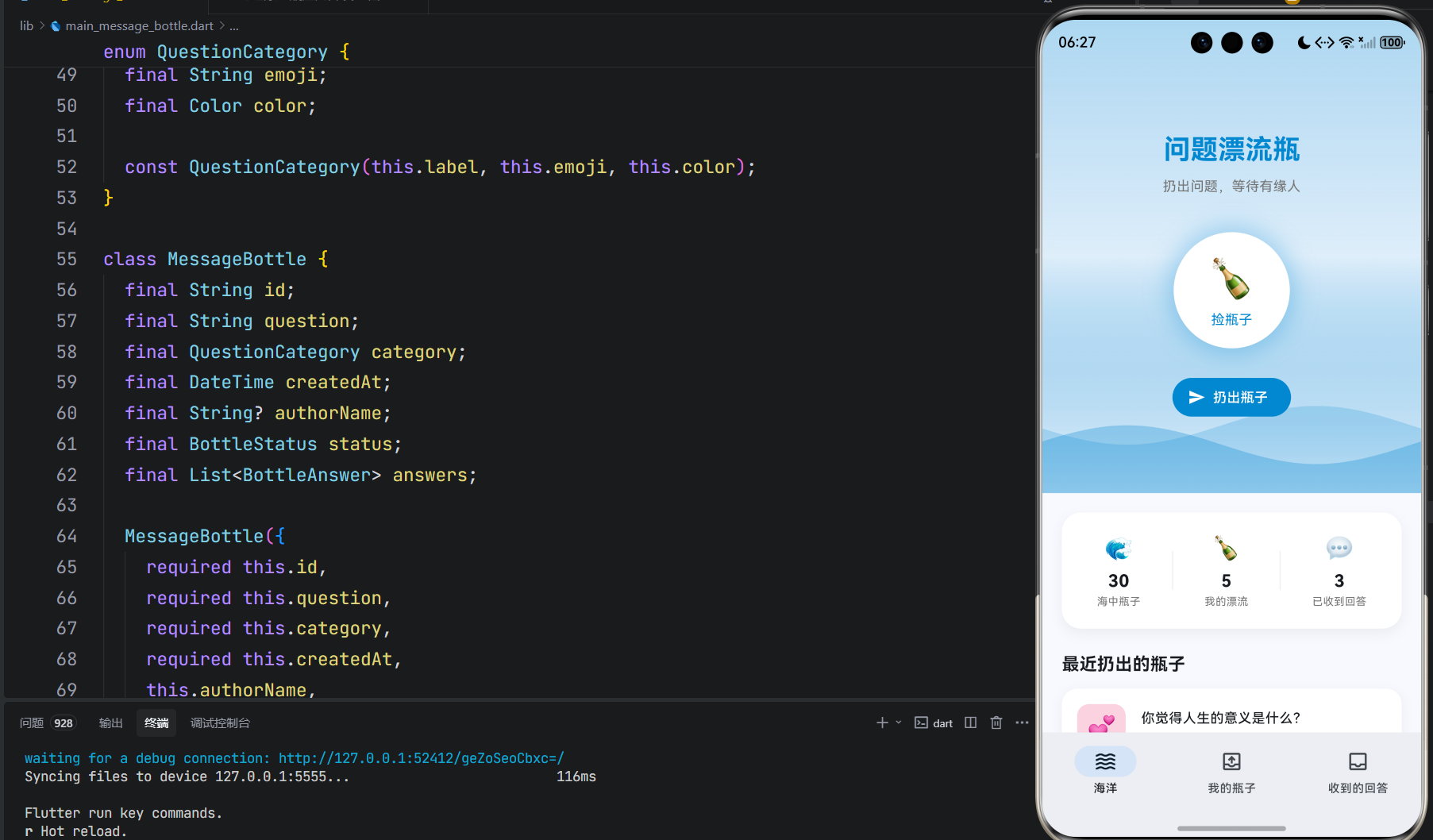
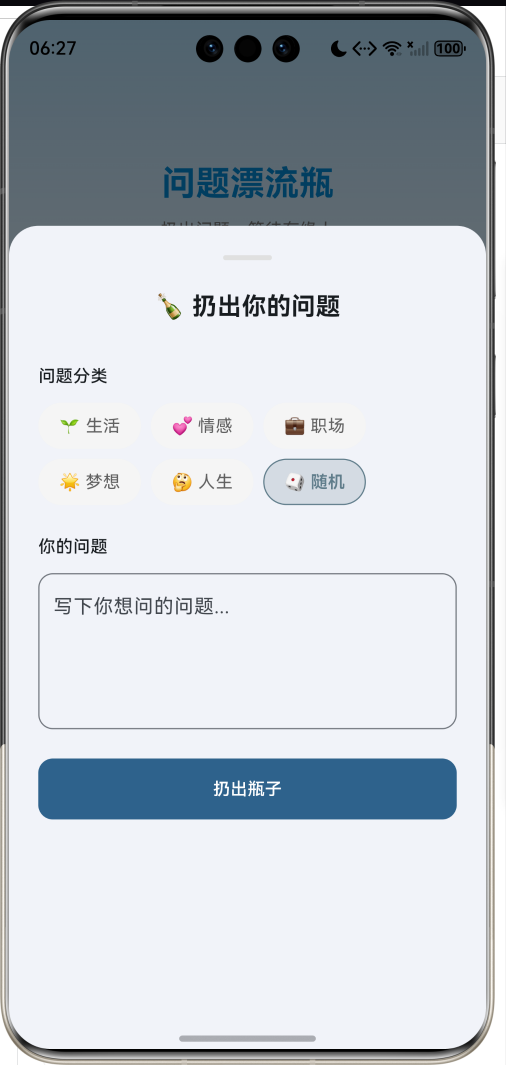
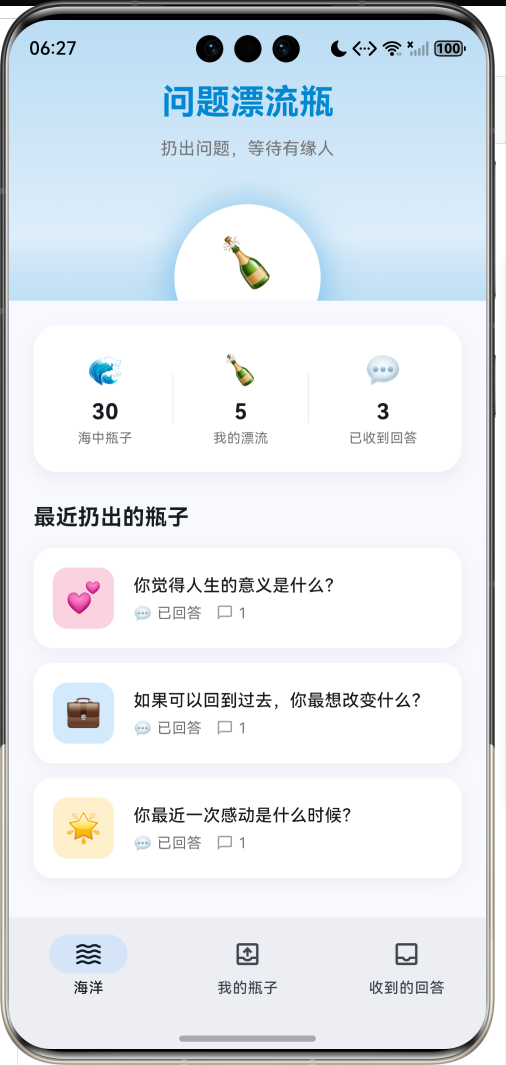
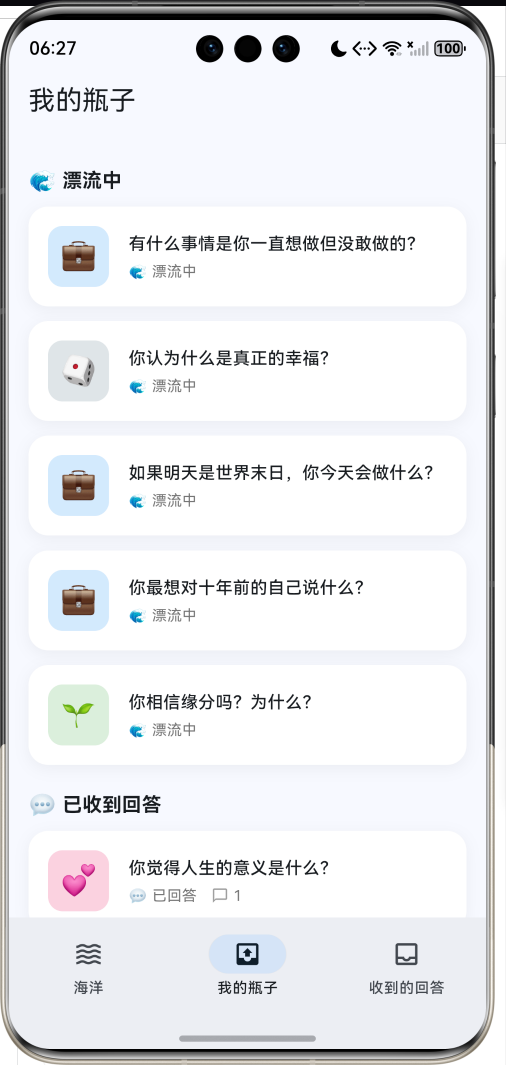
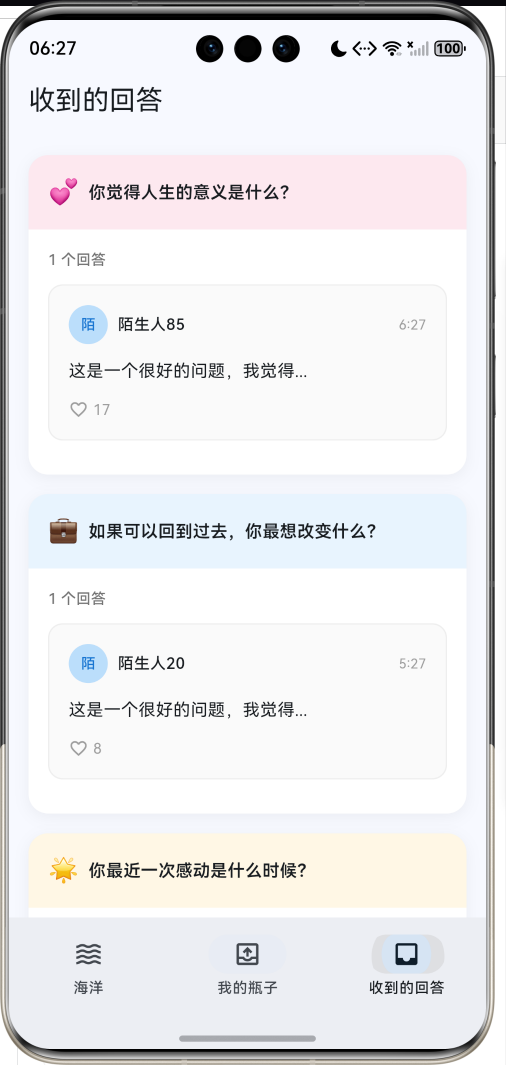
1.1 应用简介
问题漂流瓶应用是一款充满浪漫色彩的社交问答工具,灵感源自经典的漂流瓶概念。用户可以将自己的问题装入虚拟瓶子扔入"海洋",等待有缘人捡起并回答。应用以海洋蓝为主色调,营造广阔、神秘的海洋氛围。
应用涵盖了扔瓶子、捡瓶子、回答问题、我的瓶子、收到的回答五大模块,支持6种问题分类,每种分类对应特定的颜色和图标。通过匿名问答、随机匹配、互动回复等功能,让陌生人之间的交流变得有趣而神秘。
1.2 核心功能
| 功能模块 | 功能描述 | 实现方式 |
|---|---|---|
| 扔瓶子 | 发布问题到海洋 | 表单弹窗 |
| 捡瓶子 | 随机获取他人问题 | 随机算法 |
| 回答问题 | 回答捡到的问题 | 底部弹窗 |
| 我的瓶子 | 查看扔出的瓶子 | 列表展示 |
| 收到的回答 | 查看他人回答 | 卡片列表 |
| 海洋动画 | 波浪漂浮效果 | CustomPainter |
1.3 问题分类定义
| 序号 | 分类名称 | Emoji | 主题色 | 描述 |
|---|---|---|---|---|
| 1 | 生活 | 🌱 | #4CAF50 | 日常生活相关 |
| 2 | 情感 | 💕 | #E91E63 | 感情与人际关系 |
| 3 | 职业 | 💼 | #2196F3 | 工作与事业 |
| 4 | 梦想 | 🌟 | #FFB300 | 理想与追求 |
| 5 | 人生 | 🤔 | #9C27B0 | 哲学与思考 |
| 6 | 随机 | 🎲 | #607D8B | 不确定分类 |
1.4 瓶子状态
| 状态 | Emoji | 描述 |
|---|---|---|
| 漂流中 | 🌊 | 瓶子在海洋中等待被捡起 |
| 已回答 | 💬 | 已收到至少一个回答 |
| 已过期 | ⏰ | 超过有效期未被捡起 |
1.5 技术栈
| 技术领域 | 技术选型 | 版本要求 |
|---|---|---|
| 开发框架 | Flutter | >= 3.0.0 |
| 编程语言 | Dart | >= 2.17.0 |
| 设计规范 | Material Design 3 | - |
| 动画控制 | AnimationController | - |
| 图表绘制 | CustomPainter | - |
| 状态管理 | setState | - |
| 目标平台 | 鸿蒙OS / Web | API 21+ |
1.6 项目结构
lib/
└── main_message_bottle.dart
    ├── MessageBottleApp        # 应用入口
    ├── BottleStatus            # 瓶子状态枚举
    ├── QuestionCategory        # 问题分类枚举
    ├── MessageBottle           # 漂流瓶模型
    ├── BottleAnswer            # 回答模型
    ├── MessageBottleHomePage   # 主页面(底部导航)
    ├── _buildOceanPage         # 海洋页面
    ├── _buildMyBottlesPage     # 我的瓶子页面
    ├── _buildAnsweredPage      # 收到的回答页面
    └── WavePainter             # 波浪绘制器
二、系统架构
2.1 整体架构图
Data Layer
Presentation Layer
主页面
MessageBottleHomePage
海洋页面
我的瓶子
收到的回答
海洋动画
捡瓶子按钮
扔瓶子按钮
漂流中列表
已回答列表
回答卡片
MessageBottle
漂流瓶
BottleAnswer
回答
QuestionCategory
分类
BottleStatus
状态
2.2 类图设计
has
has
contains
manages
uses
MessageBottleApp
+Widget build()
<<enumeration>>
BottleStatus
+String label
+String emoji
+floating()
+answered()
+expired()
<<enumeration>>
QuestionCategory
+String label
+String emoji
+Color color
+life()
+love()
+career()
+dream()
+philosophy()
+random()
MessageBottle
+String id
+String question
+QuestionCategory category
+DateTime createdAt
+String? authorName
+BottleStatus status
+List<BottleAnswer> answers
+copyWith()
BottleAnswer
+String id
+String content
+DateTime answeredAt
+String? answererName
+int likes
MessageBottleHomePage
-int _selectedIndex
-List<MessageBottle> _myBottles
-List<MessageBottle> _oceanBottles
-AnimationController _waveController
-AnimationController _bottleFloatController
+Widget build()
-_throwBottle()
-_pickBottle()
-_submitAnswer()
WavePainter
+Animation animation
+Color color
+double offset
+void paint()
+bool shouldRepaint()
2.3 页面导航流程
海洋
我的瓶子
收到的回答
应用启动
海洋页面
底部导航
海洋主页
瓶子列表
回答列表
捡瓶子
扔瓶子
随机获取问题
回答弹窗
提交回答
问题表单
选择分类
扔出瓶子
查看瓶子详情
查看回答详情
2.4 漂流瓶流程
用户B 海洋 用户A 用户B 海洋 用户A 扔出问题瓶子 存储瓶子到海洋池 点击捡瓶子 随机选择瓶子 返回问题 撰写回答 提交回答 通知收到回答 查看回答
三、核心模块设计
3.1 数据模型设计
3.1.1 瓶子状态枚举 (BottleStatus)
dart
enum BottleStatus {
  floating('漂流中', '🌊'),
  answered('已回答', '💬'),
  expired('已过期', '⏰');

  final String label;  // 状态名称
  final String emoji;  // 状态图标
}
3.1.2 问题分类枚举 (QuestionCategory)
dart
enum QuestionCategory {
  life('生活', '🌱', Color(0xFF4CAF50)),
  love('情感', '💕', Color(0xFFE91E63)),
  career('职场', '💼', Color(0xFF2196F3)),
  dream('梦想', '🌟', Color(0xFFFFB300)),
  philosophy('人生', '🤔', Color(0xFF9C27B0)),
  random('随机', '🎲', Color(0xFF607D8B));

  final String label;  // 分类名称
  final String emoji;  // 分类图标
  final Color color;   // 主题颜色
}
3.1.3 漂流瓶模型 (MessageBottle)
dart
class MessageBottle {
  final String id;                    // 唯一标识
  final String question;              // 问题内容
  final QuestionCategory category;    // 问题分类
  final DateTime createdAt;           // 创建时间
  final String? authorName;           // 作者昵称(可选)
  final BottleStatus status;          // 瓶子状态
  final List<BottleAnswer> answers;   // 回答列表
}
3.1.4 回答模型 (BottleAnswer)
dart
class BottleAnswer {
  final String id;           // 唯一标识
  final String content;      // 回答内容
  final DateTime answeredAt; // 回答时间
  final String? answererName;// 回答者昵称
  final int likes;           // 点赞数
}
3.1.5 问题分类分布
17% 17% 17% 17% 17% 17% 问题分类分布 生活 情感 职场 梦想 人生 随机
3.2 页面结构设计
3.2.1 主页面布局
MessageBottleHomePage
IndexedStack
海洋页面
我的瓶子
收到的回答
NavigationBar
海洋 Tab
我的瓶子 Tab
收到的回答 Tab
3.2.2 海洋页面结构
海洋页面
SliverAppBar
内容区域
渐变背景
波浪动画
漂浮瓶子
捡瓶子按钮
扔瓶子按钮
统计卡片
最近瓶子列表
3.2.3 扔瓶子弹窗结构
扔瓶子弹窗
标题
分类选择
问题输入
扔出按钮
生活
情感
职场
梦想
人生
随机
3.2.4 回答弹窗结构
回答弹窗
问题展示
回答输入
提交按钮
其他回答
分类图标
问题内容
作者信息
回答卡片列表
3.3 捡瓶子流程
是
否
是
否
点击捡瓶子
海洋中有瓶子?
随机选择瓶子
提示暂无瓶子
显示问题弹窗
阅读问题
是否回答?
输入回答
提交回答
通知瓶子主人
关闭弹窗
3.4 扔瓶子流程
是
否
点击扔瓶子
显示表单弹窗
选择问题分类
输入问题内容
内容有效?
创建MessageBottle
提示输入内容
添加到我的瓶子列表
添加到海洋瓶子池
显示扔出动画
提示等待有缘人
四、UI设计规范
4.1 配色方案
应用以海洋蓝为主色调,营造广阔、神秘的海洋氛围:
| 颜色类型 | 色值 | 用途 |
|---|---|---|
| 主色 | #0288D1 (Ocean Blue) | 导航、强调元素 |
| 生活 | #4CAF50 | 绿色 |
| 情感 | #E91E63 | 粉红色 |
| 职业 | #2196F3 | 蓝色 |
| 梦想 | #FFB300 | 金黄色 |
| 人生 | #9C27B0 | 紫色 |
| 随机 | #607D8B | 灰色 |
4.2 海洋渐变
| 位置 | 颜色 | 透明度 |
|---|---|---|
| 顶部 | #0288D1 | 30% |
| 中间 | #0288D1 | 10% |
| 底部 | Surface | 0% |
4.3 字体规范
| 元素 | 字号 | 字重 | 颜色 |
|---|---|---|---|
| 应用标题 | 28px | Bold | 主色 |
| 问题内容 | 18px | SemiBold | #000000 |
| 分类标签 | 12px | Regular | 分类色 |
| 回答内容 | 14px | Regular | #000000 |
| 统计数值 | 18px | Bold | #000000 |
4.4 组件规范
4.4.1 海洋主界面
┌─────────────────────────────────────┐
│                                     │
│         问题漂流瓶                  │
│     扔出问题,等待有缘人            │
│                                     │
│           ┌─────────┐               │
│           │   🍾    │               │
│           │ 捡瓶子  │               │
│           └─────────┘               │
│                                     │
│     ┌─────────────────────┐         │
│     │  📤 扔出瓶子        │         │
│     └─────────────────────┘         │
│                                     │
│  〰️〰️〰️〰️〰️〰️〰️〰️〰️〰️〰️〰️  │
│  〰️〰️〰️〰️〰️〰️〰️〰️〰️〰️〰️〰️  │
└─────────────────────────────────────┘
4.4.2 瓶子卡片
┌─────────────────────────────────────────────┐
│ ┌────┐                              ┌────┐ │
│ │ 🌱 │  你觉得人生的意义是什么?    │ 🌊 │ │
│ │    │  🌊 漂流中    💬 2条回答     │    │ │
│ └────┘                              └────┘ │
└─────────────────────────────────────────────┘
4.4.3 回答卡片
┌─────────────────────────────────────────────┐
│ ┌──┐ 匿名用户42                    14:30   │
│ │A │                                       │
│ └──┘                                       │
│                                            │
│ 这是一个很好的问题,我觉得人生的意义       │
│ 在于不断探索和成长...                      │
│                                            │
│ ♡ 12                                       │
└─────────────────────────────────────────────┘
4.4.4 分类选择器
┌──────┐ ┌──────┐ ┌──────┐
│ 🌱   │ │ 💕   │ │ 💼   │
│ 生活 │ │ 情感 │ │ 职业 │
└──────┘ └──────┘ └──────┘
┌──────┐ ┌──────┐ ┌──────┐
│ 🌟   │ │ 🤔   │ │ 🎲   │
│ 梦想 │ │ 人生 │ │ 随机 │
└──────┘ └──────┘ └──────┘
五、核心功能实现
5.1 扔瓶子实现
dart
void _throwBottle(String question, QuestionCategory category) {
  final bottle = MessageBottle(
    id: DateTime.now().millisecondsSinceEpoch.toString(),
    question: question,
    category: category,
    createdAt: DateTime.now(),
    authorName: '我',
  );

  setState(() {
    _myBottles.insert(0, bottle);
  });

  _showThrowAnimation();
}

void _showThrowAnimation() {
  _rippleController.forward(from: 0);

  ScaffoldMessenger.of(context).showSnackBar(
    SnackBar(
      content: const Row(
        children: [
          Text('🍾 '),
          Text('瓶子已扔出,等待有缘人捡到...'),
        ],
      ),
      backgroundColor: const Color(0xFF0288D1),
    ),
  );
}
5.2 捡瓶子实现
dart
void _pickBottle() {
  if (_oceanBottles.isEmpty) {
    ScaffoldMessenger.of(context).showSnackBar(
      const SnackBar(content: Text('海洋里暂时没有瓶子了,稍后再来吧~')),
    );
    return;
  }

  final index = _random.nextInt(_oceanBottles.length);
  setState(() {
    _currentBottle = _oceanBottles[index];
  });

  _showBottleDetail(_currentBottle!);
}
5.3 提交回答实现
dart
void _submitAnswer(MessageBottle bottle, String answer) {
  final newAnswer = BottleAnswer(
    id: DateTime.now().millisecondsSinceEpoch.toString(),
    content: answer,
    answeredAt: DateTime.now(),
    answererName: '我',
  );

  final myBottleIndex = _myBottles.indexWhere((b) => b.id == bottle.id);
  if (myBottleIndex != -1) {
    setState(() {
      _myBottles[myBottleIndex] = bottle.copyWith(
        status: BottleStatus.answered,
        answers: [...bottle.answers, newAnswer],
      );
    });
  }

  ScaffoldMessenger.of(context).showSnackBar(
    SnackBar(
      content: Row(
        children: [
          const Text('💌 '),
          Text('回答已发送给 ${bottle.authorName ?? "匿名"}'),
        ],
      ),
      backgroundColor: bottle.category.color,
    ),
  );
}
5.4 波浪动画实现
dart
class WavePainter extends CustomPainter {
  final Animation<double> animation;
  final Color color;
  final double offset;

  WavePainter({
    required this.animation,
    required this.color,
    required this.offset,
  });

  @override
  void paint(Canvas canvas, Size size) {
    final paint = Paint()
      ..color = color
      ..style = PaintingStyle.fill;

    final path = Path();
    final value = animation.value + offset;

    path.moveTo(0, size.height);

    for (double x = 0; x <= size.width; x++) {
      final y = 20 * sin((x / size.width * 2 * pi) + value) + 30;
      path.lineTo(x, y);
    }

    path.lineTo(size.width, size.height);
    path.close();

    canvas.drawPath(path, paint);
  }

  @override
  bool shouldRepaint(covariant CustomPainter oldDelegate) => true;
}
5.5 瓶子漂浮动画
dart
AnimatedBuilder(
  animation: _bottleFloatController,
  builder: (context, child) {
    return Transform.translate(
      offset: Offset(0, _bottleFloatController.value * 10 - 5),
      child: GestureDetector(
        onTap: _pickBottle,
        child: Container(
          width: 120,
          height: 120,
          decoration: BoxDecoration(
            color: Colors.white,
            shape: BoxShape.circle,
            boxShadow: [
              BoxShadow(
                color: const Color(0xFF0288D1).withValues(alpha: 0.3),
                blurRadius: 20,
                spreadRadius: 5,
              ),
            ],
          ),
          child: const Column(
            mainAxisAlignment: MainAxisAlignment.center,
            children: [
              Text('🍾', style: TextStyle(fontSize: 40)),
              SizedBox(height: 4),
              Text('捡瓶子', style: TextStyle(fontSize: 14)),
            ],
          ),
        ),
      ),
    );
  },
)
六、交互设计
6.1 扔瓶子流程
表单弹窗 海洋页面 用户 表单弹窗 海洋页面 用户 点击扔瓶子 显示表单 展示输入项 选择分类 输入问题 点击扔出 创建MessageBottle 添加到列表 显示成功提示
6.2 捡瓶子流程
回答
关闭
点击捡瓶子
随机选择瓶子
显示问题弹窗
阅读问题
用户选择
输入回答
结束
提交回答
更新瓶子状态
通知瓶子主人
6.3 查看回答流程
切换Tab
切换Tab
点击卡片
点击卡片
海洋页面
我的瓶子
收到的回答
查看瓶子详情
查看回答详情
查看回答列表
七、扩展功能规划
7.1 后续版本规划
2024-01-07 2024-01-14 2024-01-21 2024-01-28 2024-02-04 2024-02-11 2024-02-18 2024-02-25 2024-03-03 2024-03-10 2024-03-17 2024-03-24 扔瓶子功能 捡瓶子功能 回答功能 数据持久化 用户系统 推送通知 瓶子装饰 社交功能 云端同步 V1.0 基础版本 V1.1 增强版本 V1.2 进阶版本 问题漂流瓶应用开发计划
7.2 功能扩展建议
7.2.1 数据持久化
本地数据存储:
- 使用SQLite存储瓶子数据
- 支持离线模式
- 数据同步机制
7.2.2 用户系统
用户身份管理:
- 匿名/注册用户
- 用户等级系统
- 积分与成就
7.2.3 瓶子装饰
个性化定制:
- 不同瓶子样式
- 瓶子贴纸
- 特殊效果
八、注意事项
8.1 开发注意事项
-
随机算法:使用Random确保随机性,可设置种子便于测试
-
动画释放:AnimationController需要在dispose中释放
-
状态更新:瓶子状态变化时需要copyWith创建新对象
-
列表管理:区分我的瓶子和海洋瓶子两个列表
8.2 常见问题
| 问题 | 原因 | 解决方案 |
|---|---|---|
| 波浪动画卡顿 | 未释放Controller | 在dispose中释放 |
| 瓶子状态不更新 | 直接修改对象 | 使用copyWith创建新对象 |
| 捡到重复瓶子 | 随机算法问题 | 添加已捡过标记 |
| 回答未关联 | ID不匹配 | 检查瓶子ID关联 |
8.3 漂流瓶寄语
🍾 漂流瓶寄语 🍾
每一个问题都是一次探索,
每一个回答都是一份温暖。
在茫茫人海中,
让瓶子成为连接彼此的桥梁。
扔出你的疑惑,
等待有缘人的回响。
愿每一个瓶子都能找到归宿 🌊
九、运行说明
9.1 环境要求
| 环境 | 版本要求 |
|---|---|
| Flutter SDK | >= 3.0.0 |
| Dart SDK | >= 2.17.0 |
| 鸿蒙OS | API 21+ |
9.2 运行命令
bash
# 查看可用设备
flutter devices

# 运行到Web服务器
flutter run -d web-server -t lib/main_message_bottle.dart --web-port 8117

# 运行到鸿蒙设备
flutter run -d 127.0.0.1:5555 lib/main_message_bottle.dart

# 运行到Windows
flutter run -d windows -t lib/main_message_bottle.dart

# 代码分析
flutter analyze lib/main_message_bottle.dart
十、总结
问题漂流瓶应用通过扔瓶子、捡瓶子、回答问题、我的瓶子、收到的回答五大模块,为用户提供了一个浪漫的陌生人问答平台。应用支持6种问题分类,每种分类对应特定的颜色和图标,让问答变得更有趣味。
核心功能涵盖扔瓶子、捡瓶子、回答问题、查看回答四大模块。扔瓶子支持问题分类和内容输入;捡瓶子通过随机算法获取他人问题;回答问题以弹窗形式呈现;查看回答支持列表和详情展示。
应用采用Material Design 3设计规范,以海洋蓝为主色调,配合波浪动画和漂浮效果,营造浪漫的海洋氛围。通过本应用,希望能够让陌生人之间的交流变得有趣而神秘,让每一个问题都能找到答案。
扔出问题,等待有缘人的回响