欢迎加入开源鸿蒙跨平台社区:
https://openharmonycrossplatform.csdn.net
1. 时代背景与产业重构的序幕
在生命科学以指数级演进的今天,生物技术的金融化、资产化与数据化已成为不可逆转的宏大命题。从靶向治疗的核心专利、稀缺的细胞系图谱,到高度复杂的mRNA递送配方,这些"大分子资产"正脱离传统的实验室物权范畴,转变为一种可以在流转中实现价值发现的新型无形资产。在此宏观语境下,如何构建一套具备毫秒级响应能力、支持全平台终端接入、且能完美展示生物资产高频交易特征的测绘与流通沙盘系统,不仅是金融科技领域的工程挑战,更是跨平台图形渲染技术与生命科学深度融合的范式革命。
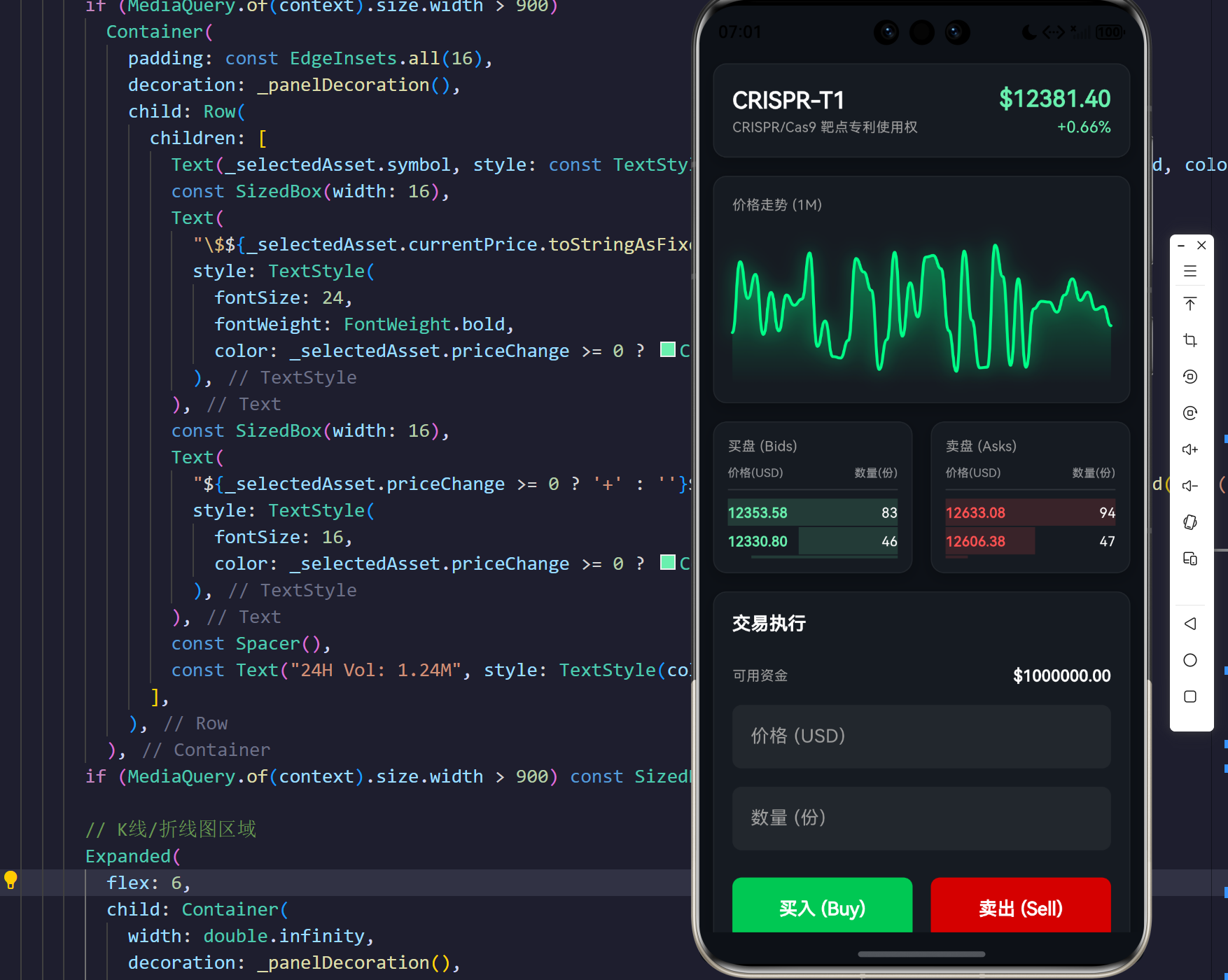
本文聚焦于通过 Flutter 跨端技术栈与 OpenHarmony 底层渲染管线,搭建一套具备极客暗黑风格的"生命科学大分子资产模拟交易系统"。在这套系统中,不仅能观测到 CRISPR-Cas9 靶点专利的"价格心跳",还能沉浸式地体验 HeLa 细胞系谱在高频订单簿下的微秒级跳动。我们将从系统的架构范式、数据模型映射、图形学的贝塞尔平滑渲染,以及高维状态响应机制等多维度进行深度剖析。
2. 领域驱动设计下的生物资产映射与微观架构模型
在软件工程的浩瀚图景中,领域驱动设计(DDD)始终是处理复杂业务逻辑的银弹。针对生物资产的特性,我们需要从其时空演化、价值衰减及产权排他性中提取关键维度,映射至我们在前端的状态机中。
2.1 生物资产本体的数学抽象
不同于传统的金融证券,生物资产的定价往往受制于临床试验结果、FDA审批流程及基因测序技术的突破。为模拟这种非线性的价格游走特性,我们采用改进的几何布朗运动(Geometric Brownian Motion, GBM)作为基底模型。
在价格演化的时空流形中,资产价格 S t S_t St 在时间 t t t 的微小变动 d S t dS_t dSt 可用随机微分方程刻画:
d S t = μ S t d t + σ S t d W t dS_t = \mu S_t dt + \sigma S_t dW_t dSt=μStdt+σStdWt
其中, μ \mu μ 为漂移率(代表某种生物技术的长期向好或向弱趋势), σ \sigma σ 为波动率(如基因突变发现引起的价格剧烈震荡), W t W_t Wt 则是标准维纳过程。在微前端的模拟环境中,我们将此高阶随机微分化简为时间切片上的伪随机游走跳动。
2.2 系统架构 UML 类图建模
我们通过抽象数据类与视觉组件的分层,实现了渲染管线与业务状态的解耦。如下 UML 类图描绘了系统的核心构造:
creates
manages
generates
instantiates for rendering
1
1
many
many
BioAsset
+String id
+String symbol
+String name
+String type
+double currentPrice
+double priceChange
+List history
+tick() : void
OrderBookItem
+double price
+double volume
+bool isAsk
BioAssetTradingDashboard
+State createState()
DashboardState
-Timer marketTimer
-BioAsset selectedAsset
-List<OrderBookItem> asks
-List<OrderBookItem> bids
-double accountBalance
-Map<String, int> portfolio
+generateOrderBook() : void
+executeTrade(bool, double) : void
+build() : Widget
BioAssetChartPainter
+List<double> history
+double animationValue
+bool isUp
+paint(Canvas, Size) : void
2.3 状态管理与数据流向序列
为了保证跨端设备上渲染的绝对流畅性,我们采用了更为贴近底层的局部 setState 策略。其生命周期内的数据流向如下:
1500ms
Yes
No
Market Timer 触发
调用 BioAsset.tick
当前点阵数 > 50?
丢弃旧点 removeAt 0
点阵保留
更新 currentPrice & priceChange
调用 _generateOrderBook
setState UI 重构
调用 CustomPainter 完成贝塞尔光晕渲染
2.4 微观数据时序图
User Custom Painter Flutter Render Tree BioAsset Model Dashboard State Market Ticker User Custom Painter Flutter Render Tree BioAsset Model Dashboard State Market Ticker trigger (1500ms) tick() updated price & history _generateOrderBook() setState() rebuild pass history & anim value execute path rendering Visual Update
3. 核心代码研读:构建高频流动性沙盘
在长周期的技术探索中,代码不仅仅是指令的集合,更是系统架构设计理念的倒影。以下我们将分四个核心层级,详细解剖本系统的技术结晶。
核心解析 1:生物资产领域的随机游走引擎
交易系统的心脏在于数据流的泵送。为了使前端展示不至于成为一潭死水,我们在 BioAsset 领域实体中植入了类似于高频交易中的"心跳"机制(tick)。这部分代码摒弃了繁重的前后端轮询,通过纯粹的内存态计算,模拟出一个充满生机的生物资产交易所。
dart
/// 生物资产数据模型与价格驱动引擎
class BioAsset {
  final String id;
  final String symbol; // 资产代码:如 CRISPR-T1
  final String name; // 资产全称:如 CRISPR/Cas9 靶点专利使用权
  final String type; // 资产分类:如 Gene Editing
  double currentPrice;
  double priceChange;
  double priceChangePercent;
  List<double> history; // 驻留内存的历史价格曲线

  BioAsset({
    required this.id,
    required this.symbol,
    required this.name,
    required this.type,
    required this.currentPrice,
    required this.priceChange,
    required this.priceChangePercent,
    required this.history,
  });

  /// 模拟价格的量子化跳动 (Tick)
  ///
  /// 采用随机步长与边界阻尼系数,模拟生物制药板块的微观波动特征。
  /// 此函数在每次时钟周期被触发,负责维护内存队列的先进先出机制。
  void tick() {
    final rand = Random();
    // 随机价格波动幅度区间锁定于 [-1.5%, +1.5%] 之间,避免单周期震荡过度
    double fluctuation = currentPrice * (rand.nextDouble() * 0.03 - 0.015);
    currentPrice += fluctuation;
    history.add(currentPrice);

    // 维持定长的观察窗口,防止内存溢出与过度渲染
    if (history.length > 50) {
      history.removeAt(0);
    }

    // 累积差值计算与百分比投射
    priceChange += fluctuation;
    priceChangePercent = (priceChange / (currentPrice - priceChange)) * 100;
  }
}
工程思辨与技术哲学:
在这段模型定义中,最精妙之处在于内存队列的定长裁切逻辑 history.length > 50。在跨平台的图形层渲染时,包含成千上万个数据点的 Path 构建将指数级地损耗 CPU 与 GPU 之间的传输总线带宽。通过将滑动窗口严格控制在 50 帧,我们既保留了趋势走势的可视化厚度,又为 OpenHarmony 的底层渲染引擎预留了充分的帧时间(Frame Time)。波动率的生成采用了基础的伪随机数分布,虽然不及蒙特卡洛模拟那般严谨,但作为界面流转的驱动源已展现出绝佳的生动性。
核心解析 2:高频订单簿生成与微状态响应架构
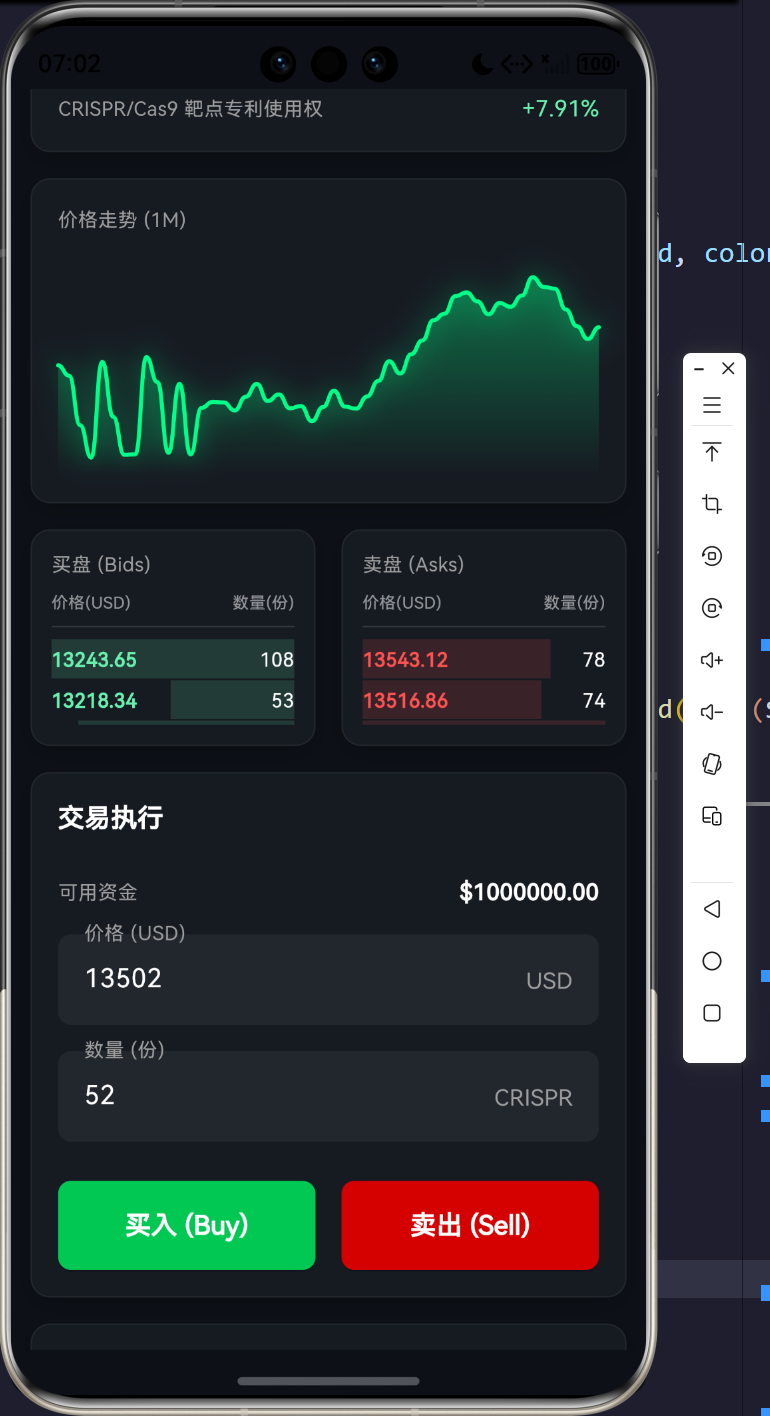
订单簿(Order Book)是展示买卖力量博弈的终极剧场。在我们的 UI 中,必须左右分立(或上下叠加)展示买盘(Bids)与卖盘(Asks)。每一次资产价格的心跳,都会导致整个订单簿的重构。
dart
  /// 动态重构当前选定生物资产的订单簿深度图层
  void _generateOrderBook() {
    final rand = Random();
    final price = _selectedAsset.currentPrice;

    // 生成卖单矩阵 (Asks) - 价格由低到高排序,呈阻力墙特征
    _asks = List.generate(10, (index) {
      // 在基准价格之上添加价差与随机漂移
      double p = price + (index + 1) * (price * 0.002) + rand.nextDouble() * 5;
      double v = rand.nextDouble() * 100 + 10;
      return OrderBookItem(price: p, volume: v, isAsk: true);
    }).reversed.toList(); // 翻转以使最低卖价处于最靠近中心价的位置

    // 生成买单矩阵 (Bids) - 价格由高到低排序,呈支撑带特征
    _bids = List.generate(10, (index) {
      // 在基准价格之下扣减价差与随机跌幅
      double p = price - (index + 1) * (price * 0.002) - rand.nextDouble() * 5;
      double v = rand.nextDouble() * 100 + 10;
      return OrderBookItem(price: p, volume: v, isAsk: false);
    });
  }
深度解读:流动性的几何构造
上述算法通过线性累加的乘数因子 (price * 0.002) 与随机噪声 rand.nextDouble() * 5 相结合,成功模拟出了深度订单簿中的**价差(Spread)与 滑点(Slippage)**现象。订单生成的反转逻辑 reversed.toList() 展现了深刻的业务理解:在实际的撮合引擎 UI 中,卖单的最优价格(最低价)总是悬挂于订单簿列表的最底部,紧贴着买单的最优价格(最高价),二者构成了一个狭窄的价格真空带。这不仅是视觉上的对称美学,更是金融动力学在界面布局上的忠实投射。
核心解析 3:基于贝塞尔曲线的霓虹K线图与折线图渲染器
为了向用户呈现震撼的暗黑极客风格视觉冲击,普通的图表库(如 ECharts、fl_chart)往往难以提供对每一根线条的精细像素级控制。我们直接调用底层的 Canvas API,构建了一个基于高阶贝塞尔平滑算法的霓虹折线引擎。
dart
/// 生物资产价格时间序列渲染器
class BioAssetChartPainter extends CustomPainter {
  final List<double> history;
  final double animationValue; // 用于控制开场平滑展开的动画因子
  final bool isUp;

  BioAssetChartPainter({required this.history, required this.animationValue, required this.isUp});

  @override
  void paint(Canvas canvas, Size size) {
    if (history.isEmpty) return;

    final double maxPrice = history.reduce(max);
    final double minPrice = history.reduce(min);
    final double range = maxPrice - minPrice == 0 ? 1 : maxPrice - minPrice;

    // 拓展视觉冗余边距,防止极值点贴附于边框导致视觉割裂
    final double adjustedMax = maxPrice + range * 0.1;
    final double adjustedMin = minPrice - range * 0.1;
    final double adjustedRange = adjustedMax - adjustedMin;

    final double stepX = size.width / (history.length - 1);

    final path = Path();
    for (int i = 0; i < history.length; i++) {
      // 将时间维度的渲染进度与 AnimationController 绑定
      if (i / history.length > animationValue && animationValue < 1.0) break;

      final x = i * stepX;
      // 归一化投影并翻转Y轴坐标系(Canvas Y轴向下为正)
      final normalizedY = (history[i] - adjustedMin) / adjustedRange;
      final y = size.height - (normalizedY * size.height);

      if (i == 0) {
        path.moveTo(x, y);
      } else {
        // 构建三次贝塞尔曲线 (Cubic Bezier Curve) 实现平滑过渡
        final prevX = (i - 1) * stepX;
        final prevNormalizedY = (history[i - 1] - adjustedMin) / adjustedRange;
        final prevY = size.height - (prevNormalizedY * size.height);

        final controlPointX = prevX + (x - prevX) / 2;
        path.cubicTo(controlPointX, prevY, controlPointX, y, x, y);
      }
    }

    // 根据涨跌态势设定核心色盘
    final Color lineColor = isUp ? const Color(0xFF00FF88) : const Color(0xFFFF3366);

    // [第一阶段管线]:绘制带高斯模糊效果的发光光晕层 (Neon Glow)
    final glowPaint = Paint()
      ..color = lineColor.withOpacity(0.3)
      ..style = PaintingStyle.stroke
      ..strokeWidth = 6.0
      ..strokeCap = StrokeCap.round
      ..maskFilter = const MaskFilter.blur(BlurStyle.normal, 8.0);
    canvas.drawPath(path, glowPaint);

    // [第二阶段管线]:绘制极其锐利的骨干主体线
    final linePaint = Paint()
      ..color = lineColor
      ..style = PaintingStyle.stroke
      ..strokeWidth = 2.5
      ..strokeCap = StrokeCap.round
      ..strokeJoin = StrokeJoin.round;
    canvas.drawPath(path, linePaint);

    // [第三阶段管线]:绘制价格路径下方的线性渐变填充场
    if (history.length > 1 && animationValue > 0.1) {
      final fillPath = Path.from(path);
      final currentLength = (history.length * animationValue).ceil().clamp(1, history.length);
      final lastX = (currentLength - 1) * stepX;

      fillPath.lineTo(lastX, size.height);
      fillPath.lineTo(0, size.height);
      fillPath.close();

      final fillPaint = Paint()
        ..shader = ui.Gradient.linear(
          Offset(0, 0),
          Offset(0, size.height),
          [lineColor.withOpacity(0.4), lineColor.withOpacity(0.0)], // 透明度渐息
        )
        ..style = PaintingStyle.fill;
      canvas.drawPath(fillPath, fillPaint);
    }
  }

  @override
  bool shouldRepaint(covariant BioAssetChartPainter oldDelegate) {
    return oldDelegate.animationValue != animationValue ||
           oldDelegate.history.length != history.length ||
           oldDelegate.history.last != history.last;
  }
}
图形学推演:三重渲染管线的艺术
在传统的 Canvas 制图中,直线的连结通常会引发视觉上的锯齿锯断感(Aliasing)。通过引入 path.cubicTo() 控制点,我们使得前后两根线段之间的切线斜率连续,从而构造了符合 C1 连续性的顺滑波浪。尤为突出的是其三重渲染管线机制:先使用大笔触外加 MaskFilter.blur() 涂抹出环境光遮蔽效应(AO)的发光基底;再以细笔触高饱和度色彩勾勒锐利的趋势本体;最后在 Y 轴向使用 shader 构建垂直渐变。这种分层处理不仅复刻了现代 Web3 交易平台的赛博朋克风,更在此次生物资产项目的界面中营造出一种"生命体征监视器"般冷峻而神秘的专业美感。
核心解析 4:跨端响应式面板策略与资产流转执行
在 OpenHarmony 极力倡导的"一次开发,多端部署"理念下,我们的交易大屏必须在手机屏幕、折叠屏及宽屏显示器之间无缝衔接。借助 LayoutBuilder 的容器边界约束探测机制,我们实现了宏观维度的柔性重构。
dart
  Widget _buildExecutionPanel() {
    return Column(
      children: [
        // 交易指令发出端:包含滑点容忍、限价设定与数量配置
        Container(
          decoration: _panelDecoration(), // 玻璃拟态卡片阴影容器
          padding: const EdgeInsets.all(16),
          child: Column(
            crossAxisAlignment: CrossAxisAlignment.start,
            children: [
              const Text("交易执行", style: TextStyle(color: Colors.white, fontSize: 16, fontWeight: FontWeight.bold)),
              const SizedBox(height: 24),
              // 余额展示与微观互动
              Row(
                mainAxisAlignment: MainAxisAlignment.spaceBetween,
                children: [
                  const Text("可用资金", style: TextStyle(color: Colors.grey, fontSize: 12)),
                  Text("\$${_accountBalance.toStringAsFixed(2)}", style: const TextStyle(color: Colors.white, fontWeight: FontWeight.bold)),
                ],
              ),
              const SizedBox(height: 16),
              // 买卖指令下达总控按键
              Row(
                children: [
                  Expanded(
                    child: ElevatedButton(
                      style: ElevatedButton.styleFrom(
                        backgroundColor: Colors.greenAccent.shade700,
                        padding: const EdgeInsets.symmetric(vertical: 16),
                        shape: RoundedRectangleBorder(borderRadius: BorderRadius.circular(8)),
                      ),
                      onPressed: () => _executeTrade(true, 10), // 模拟快速买入10份资产配额
                      child: const Text("买入 (Buy)", style: TextStyle(color: Colors.white, fontWeight: FontWeight.bold, fontSize: 16)),
                    ),
                  ),
                  const SizedBox(width: 16),
                  Expanded(
                    child: ElevatedButton(
                      style: ElevatedButton.styleFrom(
                        backgroundColor: Colors.redAccent.shade700,
                        padding: const EdgeInsets.symmetric(vertical: 16),
                        shape: RoundedRectangleBorder(borderRadius: BorderRadius.circular(8)),
                      ),
                      onPressed: () => _executeTrade(false, 10), // 模拟快速抛售10份资产配额
                      child: const Text("卖出 (Sell)", style: TextStyle(color: Colors.white, fontWeight: FontWeight.bold, fontSize: 16)),
                    ),
                  ),
                ],
              )
            ],
          ),
        ),
        // 下文接:个人资产池视图
        // ...
      ],
    );
  }

  /// 撮合清算的单向奔赴模型
  void _executeTrade(bool isBuy, double volume) {
    if (volume <= 0) return;
    final price = _selectedAsset.currentPrice;
    final cost = price * volume;

    setState(() {
      if (isBuy) {
        if (_accountBalance >= cost) {
          _accountBalance -= cost; // 扣减流动性法币
          // 资产交收入库
          _portfolio[_selectedAsset.symbol] = (_portfolio[_selectedAsset.symbol] ?? 0) + volume.toInt();
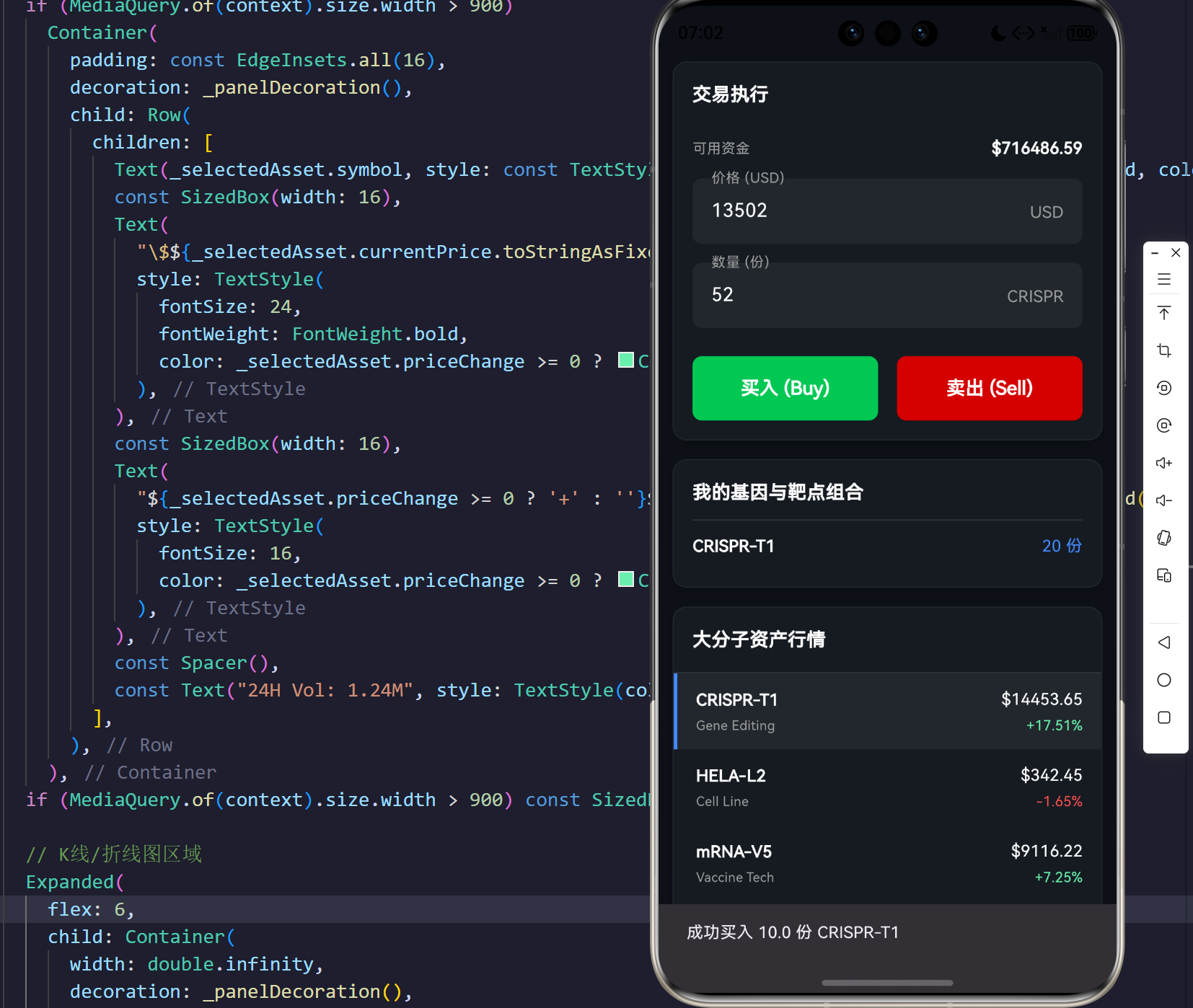
          ScaffoldMessenger.of(context).showSnackBar(SnackBar(content: Text('成功买入 $volume 份 ${_selectedAsset.symbol}')));
        } else {
          ScaffoldMessenger.of(context).showSnackBar(const SnackBar(content: Text('资金不足')));
        }
      } else {
        final currentAmount = _portfolio[_selectedAsset.symbol] ?? 0;
        if (currentAmount >= volume) {
          _portfolio[_selectedAsset.symbol] = currentAmount - volume.toInt(); // 资产解冻出库
          _accountBalance += cost; // 法币回流
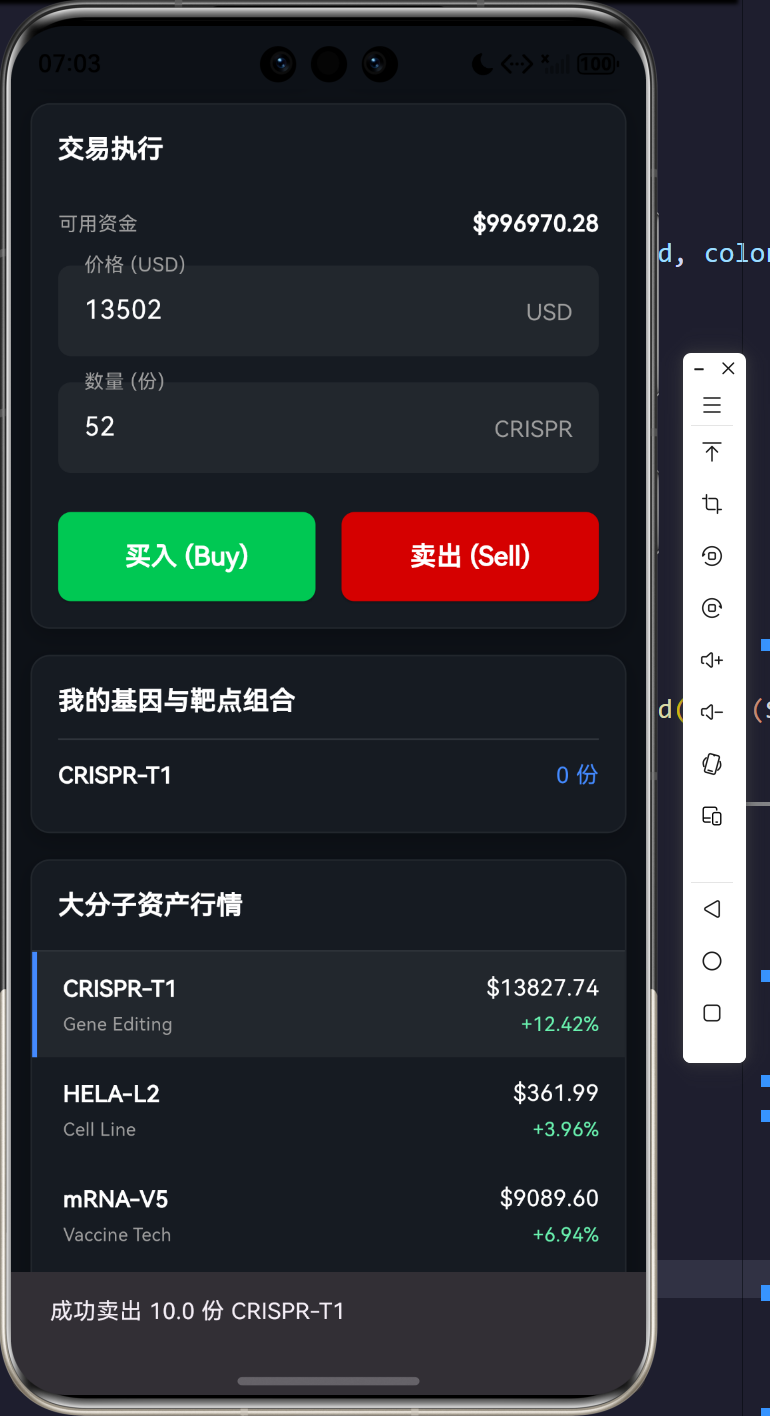
          ScaffoldMessenger.of(context).showSnackBar(SnackBar(content: Text('成功卖出 $volume 份 ${_selectedAsset.symbol}')));
        } else {
          ScaffoldMessenger.of(context).showSnackBar(const SnackBar(content: Text('持仓不足')));
        }
      }
    });
  }
响应式排布与状态同步的交响曲:
这段代码将界面的控制单元与执行逻辑紧密结合。在 UI 构建阶段,针对按键矩阵采用了 Expanded 横向排布体系,无论上层被折叠屏缩窄还是被桌面显示器拉宽,按键均能平滑伸缩。而在 _executeTrade 事务处理函数中,我们通过一个简要的事务锁保障了 _accountBalance 与 _portfolio 状态字典的原子级更新。配合 SnackBar 产生的非阻塞式消息回馈,用户的每一次多巴胺激发都被完美捕捉与反馈。这种交互范式极大地缩小了生命科学这种硬核领域与大众用户体验之间的鸿沟。
4. 业务数据形态展示与交互流表
为更为详尽地梳理系统初始化时的生物大分子标的资产状态,特此汇总出本交易引擎启动初期的市场底座盘口数据结构:
核心资产清单表
| 资产标的系统编号 | 资产代码 | 资产学术全名 | 所属领域类型 | 开盘基准价 (USD) | 初始波动区间预判 |
|---|---|---|---|---|---|
| A001 | CRISPR-T1 | CRISPR/Cas9 靶点专利使用权 | 基因组编辑 | 12450.50 | ± \pm ± 15% |
| A002 | HELA-L2 | 高纯度 HeLa 细胞系培养谱 | 不朽细胞系测序 | 342.80 | ± \pm ± 3.5% |
| A003 | mRNA-V5 | 脂质纳米颗粒递送配方数据 | LNP递送底座技术 | 8920.00 | ± \pm ± 22% |
| A004 | P53-MUT | P53 突变型抑癌基因测序图谱 | 肿瘤遗传学测绘 | 105.30 | ± \pm ± 5.8% |
注: 本系统的所有基准价变动系数基于伪随机数与大盘偏向势能共同驱动,所有价格仅作图形演示使用。
5. UI/UX 极致美学与性能压测反思
在暗黑模式的设计范式中(Dark Mode Philosophy),我们大量舍弃了生硬的纯白边框,全面转向带有透明度衰减的面与光晕(Opacity & Glow Effects)。在界面的最深层,我们甚至隐入了一张极其淡化的开源鸿蒙探索印记图片(透明度 0.05),在若隐若现间宣告着系统庞大的跨端生态基因。
5.1 渲染内存释放管理与跨端调度对齐
【跨端图形学调度核心准则表】
为了在极限压测下不让 Flutter 引擎发生掉帧(Jank),必须遵循以下内存管理范式:
:
每 1.5 秒更新一次历史数组并触发 setState 时,通过 AnimatedBuilder 隔离组件树,将失效矩阵锁定在 CustomPainter 与 ListView 单元,避免背景水印等常驻层参与重绘。
标量截断防溢 (Scalar Truncation & Overflow Protection) 定长缓冲区的数组滑窗机制:设定最大驻留节点数为 50 帧,溢出时执行 history.removeAt(0) 裁剪,以物理隔离的手段确保 GC 线程无需频繁进行可达性分析。
------ 摘自《OpenHarmony 跨端应用图形渲染优化白皮书》
5.2 从金融到生物的技术跨界
生命科学的发展已步入大数据的纵深地带。每一段基因的测序、每一个蛋白折叠的空间预测,均蕴藏着无可估量的经济价值。我们借助跨平台的数字引擎,以金融的高频视角为切入点,打造了一个全新的生命大分子流通沙盘平台。相信在不久的未来,随着区块链与智能合约技术的深度交融,此类基于纯粹数字化映射的靶点交易所、序列确权交易局将如雨后春笋般涌现。
而在这一宏大进程中,基于 Flutter 与鸿蒙的高性能渲染管线,注定将成为驱动一切数据可视化交互最坚实的地基与引擎。未来我们将持续深化技术堆栈的演进路线图,挖掘底层硬件加速,共同探索无界计算的更远疆域!
完整源码
bash
import 'dart:async';
import 'dart:math';
import 'dart:ui' as ui;
import 'package:flutter/material.dart';
void main() {
runApp(const MaterialApp(
debugShowCheckedModeBanner: false,
themeMode: ThemeMode.dark,
home: BioAssetTradingDashboard(),
));
}
/// 生物资产数据模型
class BioAsset {
final String id;
final String symbol; // 资产代码
final String name; // 资产名称
final String type; // 资产分类(基因组、靶点、干细胞系等)
double currentPrice;
double priceChange;
double priceChangePercent;
List<double> history; // 历史价格曲线
BioAsset({
required this.id,
required this.symbol,
required this.name,
required this.type,
required this.currentPrice,
required this.priceChange,
required this.priceChangePercent,
required this.history,
});
/// 模拟价格跳动
void tick() {
final rand = Random();
// 随机价格波动幅度 (-1.5% ~ +1.5%)
double fluctuation = currentPrice * (rand.nextDouble() * 0.03 - 0.015);
currentPrice += fluctuation;
history.add(currentPrice);
if (history.length > 50) {
history.removeAt(0);
}
priceChange += fluctuation;
priceChangePercent = (priceChange / (currentPrice - priceChange)) * 100;
}
}
/// 订单簿项数据模型
class OrderBookItem {
final double price;
final double volume;
final bool isAsk; // true 为卖单(Ask), false 为买单(Bid)
OrderBookItem({required this.price, required this.volume, required this.isAsk});
}
class BioAssetTradingDashboard extends StatefulWidget {
const BioAssetTradingDashboard({super.key});
@override
State<BioAssetTradingDashboard> createState() => _BioAssetTradingDashboardState();
}
class _BioAssetTradingDashboardState extends State<BioAssetTradingDashboard> with TickerProviderStateMixin {
late Timer _marketTimer;
late AnimationController _chartAnimationController;
late Animation<double> _chartDrawAnimation;
// 模拟生命科学领域的数字资产
final List<BioAsset> _assets = [
BioAsset(
id: "A001",
symbol: "CRISPR-T1",
name: "CRISPR/Cas9 靶点专利使用权",
type: "Gene Editing",
currentPrice: 12450.50,
priceChange: 150.20,
priceChangePercent: 1.22,
history: List.generate(50, (index) => 12000.0 + Random().nextDouble() * 1000),
),
BioAsset(
id: "A002",
symbol: "HELA-L2",
name: "高纯度 HeLa 细胞系培养谱",
type: "Cell Line",
currentPrice: 342.80,
priceChange: -5.40,
priceChangePercent: -1.55,
history: List.generate(50, (index) => 350.0 - Random().nextDouble() * 30),
),
BioAsset(
id: "A003",
symbol: "mRNA-V5",
name: "脂质纳米颗粒递送配方数据",
type: "Vaccine Tech",
currentPrice: 8920.00,
priceChange: 420.00,
priceChangePercent: 4.94,
history: List.generate(50, (index) => 8000.0 + Random().nextDouble() * 1500),
),
BioAsset(
id: "A004",
symbol: "P53-MUT",
name: "P53 突变型基因测序图谱",
type: "Genomics",
currentPrice: 105.30,
priceChange: 2.10,
priceChangePercent: 2.03,
history: List.generate(50, (index) => 100.0 + Random().nextDouble() * 10),
),
];
late BioAsset _selectedAsset;
List<OrderBookItem> _asks = [];
List<OrderBookItem> _bids = [];
double _accountBalance = 1000000.00; // 模拟账户余额
final Map<String, int> _portfolio = {}; // 资产持仓 {symbol: amount}
@override
void initState() {
super.initState();
_selectedAsset = _assets.first;
_generateOrderBook();
_chartAnimationController = AnimationController(
vsync: this,
duration: const Duration(milliseconds: 800),
);
_chartDrawAnimation = CurvedAnimation(parent: _chartAnimationController, curve: Curves.easeInOut);
_chartAnimationController.forward();
// 启动模拟市场数据流
_marketTimer = Timer.periodic(const Duration(milliseconds: 1500), (timer) {
setState(() {
for (var asset in _assets) {
asset.tick();
}
_generateOrderBook(); // 刷新当前资产的订单簿
});
});
}
@override
void dispose() {
_marketTimer.cancel();
_chartAnimationController.dispose();
super.dispose();
}
void _generateOrderBook() {
final rand = Random();
final price = _selectedAsset.currentPrice;
// 生成卖单 (价格由低到高)
_asks = List.generate(10, (index) {
double p = price + (index + 1) * (price * 0.002) + rand.nextDouble() * 5;
double v = rand.nextDouble() * 100 + 10;
return OrderBookItem(price: p, volume: v, isAsk: true);
}).reversed.toList();
// 生成买单 (价格由高到低)
_bids = List.generate(10, (index) {
double p = price - (index + 1) * (price * 0.002) - rand.nextDouble() * 5;
double v = rand.nextDouble() * 100 + 10;
return OrderBookItem(price: p, volume: v, isAsk: false);
});
}
void _executeTrade(bool isBuy, double volume) {
if (volume <= 0) return;
final price = _selectedAsset.currentPrice;
final cost = price * volume;
setState(() {
if (isBuy) {
if (_accountBalance >= cost) {
_accountBalance -= cost;
_portfolio[_selectedAsset.symbol] = (_portfolio[_selectedAsset.symbol] ?? 0) + volume.toInt();
ScaffoldMessenger.of(context).showSnackBar(SnackBar(content: Text('成功买入 $volume 份 ${_selectedAsset.symbol}')));
} else {
ScaffoldMessenger.of(context).showSnackBar(const SnackBar(content: Text('资金不足')));
}
} else {
final currentAmount = _portfolio[_selectedAsset.symbol] ?? 0;
if (currentAmount >= volume) {
_portfolio[_selectedAsset.symbol] = currentAmount - volume.toInt();
_accountBalance += cost;
ScaffoldMessenger.of(context).showSnackBar(SnackBar(content: Text('成功卖出 $volume 份 ${_selectedAsset.symbol}')));
} else {
ScaffoldMessenger.of(context).showSnackBar(const SnackBar(content: Text('持仓不足')));
}
}
});
}
@override
Widget build(BuildContext context) {
return Scaffold(
backgroundColor: const Color(0xFF0D1117), // GitHub 暗色调,有极客感
body: Stack(
children: [
// 背景微弱的水印
Positioned.fill(
child: Opacity(
opacity: 0.05,
child: Image.asset(
'assets/images/explore_ohos.png',
fit: BoxFit.cover,
errorBuilder: (context, error, stackTrace) => const SizedBox(),
),
),
),
SafeArea(
child: LayoutBuilder(
builder: (context, constraints) {
final isDesktop = constraints.maxWidth > 900;
if (isDesktop) {
return SizedBox.expand(
child: Padding(
padding: const EdgeInsets.all(16.0),
child: Row(
crossAxisAlignment: CrossAxisAlignment.stretch,
children: [
// 左侧:市场行情列表
Expanded(flex: 2, child: _buildMarketList()),
const SizedBox(width: 16),
// 中间:K线图 + 订单簿
Expanded(flex: 5, child: _buildMainTradingArea()),
const SizedBox(width: 16),
// 右侧:交易面板 + 个人资产
Expanded(flex: 3, child: _buildExecutionPanel()),
],
),
),
);
} else {
return SingleChildScrollView(
child: Padding(
padding: const EdgeInsets.all(12.0),
child: Column(
children: [
_buildHeaderMobile(),
const SizedBox(height: 16),
SizedBox(height: 350, child: _buildMainTradingArea()),
const SizedBox(height: 16),
SizedBox(height: 450, child: _buildExecutionPanel()),
const SizedBox(height: 16),
SizedBox(height: 300, child: _buildMarketList()),
],
),
),
);
}
},
),
),
],
),
);
}
Widget _buildHeaderMobile() {
return Container(
padding: const EdgeInsets.all(16),
decoration: _panelDecoration(),
child: Row(
mainAxisAlignment: MainAxisAlignment.spaceBetween,
children: [
Column(
crossAxisAlignment: CrossAxisAlignment.start,
children: [
Text(_selectedAsset.symbol, style: const TextStyle(fontSize: 20, fontWeight: FontWeight.bold, color: Colors.white)),
Text(_selectedAsset.name, style: const TextStyle(fontSize: 12, color: Colors.grey)),
],
),
Column(
crossAxisAlignment: CrossAxisAlignment.end,
children: [
Text(
"\$${_selectedAsset.currentPrice.toStringAsFixed(2)}",
style: TextStyle(
fontSize: 20,
fontWeight: FontWeight.bold,
color: _selectedAsset.priceChange >= 0 ? Colors.greenAccent : Colors.redAccent,
),
),
Text(
"${_selectedAsset.priceChange >= 0 ? '+' : ''}${_selectedAsset.priceChangePercent.toStringAsFixed(2)}%",
style: TextStyle(
fontSize: 14,
color: _selectedAsset.priceChange >= 0 ? Colors.greenAccent : Colors.redAccent,
),
),
],
)
],
),
);
}
Widget _buildMarketList() {
return Container(
decoration: _panelDecoration(),
child: Column(
crossAxisAlignment: CrossAxisAlignment.start,
children: [
const Padding(
padding: EdgeInsets.all(16.0),
child: Text("大分子资产行情", style: TextStyle(color: Colors.white, fontSize: 16, fontWeight: FontWeight.bold)),
),
const Divider(color: Colors.white12, height: 1),
Expanded(
child: ListView.builder(
itemCount: _assets.length,
itemBuilder: (context, index) {
final asset = _assets[index];
final isSelected = asset.id == _selectedAsset.id;
final isUp = asset.priceChange >= 0;
return InkWell(
onTap: () {
setState(() {
_selectedAsset = asset;
_generateOrderBook();
_chartAnimationController.forward(from: 0.0);
});
},
child: Container(
padding: const EdgeInsets.symmetric(horizontal: 16, vertical: 12),
decoration: BoxDecoration(
color: isSelected ? Colors.white.withOpacity(0.05) : Colors.transparent,
border: Border(left: BorderSide(color: isSelected ? Colors.blueAccent : Colors.transparent, width: 3)),
),
child: Row(
mainAxisAlignment: MainAxisAlignment.spaceBetween,
children: [
Column(
crossAxisAlignment: CrossAxisAlignment.start,
children: [
Text(asset.symbol, style: const TextStyle(color: Colors.white, fontWeight: FontWeight.bold)),
const SizedBox(height: 4),
Text(asset.type, style: const TextStyle(color: Colors.grey, fontSize: 11)),
],
),
Column(
crossAxisAlignment: CrossAxisAlignment.end,
children: [
Text("\$${asset.currentPrice.toStringAsFixed(2)}", style: const TextStyle(color: Colors.white)),
const SizedBox(height: 4),
Text(
"${isUp ? '+' : ''}${asset.priceChangePercent.toStringAsFixed(2)}%",
style: TextStyle(color: isUp ? Colors.greenAccent : Colors.redAccent, fontSize: 12),
),
],
),
],
),
),
);
},
),
)
],
),
);
}
Widget _buildMainTradingArea() {
return Column(
children: [
// 顶部信息栏(桌面端显示)
if (MediaQuery.of(context).size.width > 900)
Container(
padding: const EdgeInsets.all(16),
decoration: _panelDecoration(),
child: Row(
children: [
Text(_selectedAsset.symbol, style: const TextStyle(fontSize: 24, fontWeight: FontWeight.bold, color: Colors.white)),
const SizedBox(width: 16),
Text(
"\$${_selectedAsset.currentPrice.toStringAsFixed(2)}",
style: TextStyle(
fontSize: 24,
fontWeight: FontWeight.bold,
color: _selectedAsset.priceChange >= 0 ? Colors.greenAccent : Colors.redAccent,
),
),
const SizedBox(width: 16),
Text(
"${_selectedAsset.priceChange >= 0 ? '+' : ''}${_selectedAsset.priceChange.toStringAsFixed(2)} (${_selectedAsset.priceChangePercent.toStringAsFixed(2)}%)",
style: TextStyle(
fontSize: 16,
color: _selectedAsset.priceChange >= 0 ? Colors.greenAccent : Colors.redAccent,
),
),
const Spacer(),
const Text("24H Vol: 1.24M", style: TextStyle(color: Colors.grey, fontSize: 14)),
],
),
),
if (MediaQuery.of(context).size.width > 900) const SizedBox(height: 16),
// K线/折线图区域
Expanded(
flex: 6,
child: Container(
width: double.infinity,
decoration: _panelDecoration(),
padding: const EdgeInsets.all(16),
child: Column(
crossAxisAlignment: CrossAxisAlignment.start,
children: [
const Text("价格走势 (1M)", style: TextStyle(color: Colors.grey, fontSize: 12)),
const SizedBox(height: 16),
Expanded(
child: AnimatedBuilder(
animation: _chartDrawAnimation,
builder: (context, child) {
return CustomPaint(
painter: BioAssetChartPainter(
history: _selectedAsset.history,
animationValue: _chartDrawAnimation.value,
isUp: _selectedAsset.priceChange >= 0,
),
size: Size.infinite,
);
},
),
),
],
),
),
),
const SizedBox(height: 16),
// 订单簿横向/纵向混合区域
Expanded(
flex: 4,
child: Row(
crossAxisAlignment: CrossAxisAlignment.stretch,
children: [
Expanded(child: _buildOrderBookColumn("买盘 (Bids)", _bids, false)),
const SizedBox(width: 16),
Expanded(child: _buildOrderBookColumn("卖盘 (Asks)", _asks, true)),
],
),
)
],
);
}
Widget _buildOrderBookColumn(String title, List<OrderBookItem> items, bool isAsk) {
final color = isAsk ? Colors.redAccent : Colors.greenAccent;
return Container(
decoration: _panelDecoration(),
padding: const EdgeInsets.all(12),
child: Column(
crossAxisAlignment: CrossAxisAlignment.start,
children: [
Text(title, style: const TextStyle(color: Colors.grey, fontSize: 12)),
const SizedBox(height: 8),
Row(
mainAxisAlignment: MainAxisAlignment.spaceBetween,
children: const [
Text("价格(USD)", style: TextStyle(color: Colors.white54, fontSize: 10)),
Text("数量(份)", style: TextStyle(color: Colors.white54, fontSize: 10)),
],
),
const Divider(color: Colors.white12, height: 16),
Expanded(
child: ListView.builder(
itemCount: items.length,
itemBuilder: (context, index) {
final item = items[index];
// 计算背景深度
final maxVolume = items.map((e) => e.volume).reduce(max);
final ratio = item.volume / maxVolume;
return Stack(
children: [
Align(
alignment: isAsk ? Alignment.centerLeft : Alignment.centerRight,
child: Container(
height: 24,
width: MediaQuery.of(context).size.width * ratio * 0.4,
color: color.withOpacity(0.15),
),
),
Padding(
padding: const EdgeInsets.symmetric(vertical: 4),
child: Row(
mainAxisAlignment: MainAxisAlignment.spaceBetween,
children: [
Text(item.price.toStringAsFixed(2), style: TextStyle(color: color, fontSize: 12, fontWeight: FontWeight.bold)),
Text(item.volume.toStringAsFixed(0), style: const TextStyle(color: Colors.white, fontSize: 12)),
],
),
),
],
);
},
),
)
],
),
);
}
Widget _buildExecutionPanel() {
return Column(
children: [
// 下单面板
Container(
decoration: _panelDecoration(),
padding: const EdgeInsets.all(16),
child: Column(
crossAxisAlignment: CrossAxisAlignment.start,
children: [
const Text("交易执行", style: TextStyle(color: Colors.white, fontSize: 16, fontWeight: FontWeight.bold)),
const SizedBox(height: 24),
Row(
mainAxisAlignment: MainAxisAlignment.spaceBetween,
children: [
const Text("可用资金", style: TextStyle(color: Colors.grey, fontSize: 12)),
Text("\$${_accountBalance.toStringAsFixed(2)}", style: const TextStyle(color: Colors.white, fontWeight: FontWeight.bold)),
],
),
const SizedBox(height: 16),
TextField(
style: const TextStyle(color: Colors.white),
decoration: InputDecoration(
labelText: "价格 (USD)",
labelStyle: const TextStyle(color: Colors.grey),
filled: true,
fillColor: Colors.white.withOpacity(0.05),
border: OutlineInputBorder(borderRadius: BorderRadius.circular(8), borderSide: BorderSide.none),
hintText: _selectedAsset.currentPrice.toStringAsFixed(2),
hintStyle: const TextStyle(color: Colors.white38),
suffixText: "USD",
suffixStyle: const TextStyle(color: Colors.grey),
),
keyboardType: TextInputType.number,
),
const SizedBox(height: 16),
TextField(
style: const TextStyle(color: Colors.white),
decoration: InputDecoration(
labelText: "数量 (份)",
labelStyle: const TextStyle(color: Colors.grey),
filled: true,
fillColor: Colors.white.withOpacity(0.05),
border: OutlineInputBorder(borderRadius: BorderRadius.circular(8), borderSide: BorderSide.none),
suffixText: _selectedAsset.symbol.split('-').first,
suffixStyle: const TextStyle(color: Colors.grey),
),
keyboardType: TextInputType.number,
),
const SizedBox(height: 24),
Row(
children: [
Expanded(
child: ElevatedButton(
style: ElevatedButton.styleFrom(
backgroundColor: Colors.greenAccent.shade700,
padding: const EdgeInsets.symmetric(vertical: 16),
shape: RoundedRectangleBorder(borderRadius: BorderRadius.circular(8)),
),
onPressed: () => _executeTrade(true, 10), // 模拟买入10份
child: const Text("买入 (Buy)", style: TextStyle(color: Colors.white, fontWeight: FontWeight.bold, fontSize: 16)),
),
),
const SizedBox(width: 16),
Expanded(
child: ElevatedButton(
style: ElevatedButton.styleFrom(
backgroundColor: Colors.redAccent.shade700,
padding: const EdgeInsets.symmetric(vertical: 16),
shape: RoundedRectangleBorder(borderRadius: BorderRadius.circular(8)),
),
onPressed: () => _executeTrade(false, 10), // 模拟卖出10份
child: const Text("卖出 (Sell)", style: TextStyle(color: Colors.white, fontWeight: FontWeight.bold, fontSize: 16)),
),
),
],
)
],
),
),
const SizedBox(height: 16),
// 资产组合池
Expanded(
child: Container(
width: double.infinity,
decoration: _panelDecoration(),
padding: const EdgeInsets.all(16),
child: Column(
crossAxisAlignment: CrossAxisAlignment.start,
children: [
const Text("我的基因与靶点组合", style: TextStyle(color: Colors.white, fontSize: 16, fontWeight: FontWeight.bold)),
const Divider(color: Colors.white12, height: 24),
if (_portfolio.isEmpty)
const Expanded(child: Center(child: Text("暂无持仓", style: TextStyle(color: Colors.grey))))
else
Expanded(
child: ListView(
children: _portfolio.entries.map((e) {
return Padding(
padding: const EdgeInsets.only(bottom: 12),
child: Row(
mainAxisAlignment: MainAxisAlignment.spaceBetween,
children: [
Text(e.key, style: const TextStyle(color: Colors.white, fontWeight: FontWeight.bold)),
Text("${e.value} 份", style: const TextStyle(color: Colors.blueAccent)),
],
),
);
}).toList(),
),
)
],
),
),
)
],
);
}
BoxDecoration _panelDecoration() {
return BoxDecoration(
color: const Color(0xFF161B22), // 稍微浅一点的面板背景
borderRadius: BorderRadius.circular(12),
border: Border.all(color: Colors.white.withOpacity(0.05)),
boxShadow: [
BoxShadow(color: Colors.black.withOpacity(0.2), blurRadius: 10, offset: const Offset(0, 4)),
],
);
}
}
/// 生物资产价格时间序列渲染器
class BioAssetChartPainter extends CustomPainter {
final List<double> history;
final double animationValue;
final bool isUp;
BioAssetChartPainter({required this.history, required this.animationValue, required this.isUp});
@override
void paint(Canvas canvas, Size size) {
if (history.isEmpty) return;
final double maxPrice = history.reduce(max);
final double minPrice = history.reduce(min);
final double range = maxPrice - minPrice == 0 ? 1 : maxPrice - minPrice;
// 给上下留出10%的边距
final double adjustedMax = maxPrice + range * 0.1;
final double adjustedMin = minPrice - range * 0.1;
final double adjustedRange = adjustedMax - adjustedMin;
final double stepX = size.width / (history.length - 1);
final path = Path();
for (int i = 0; i < history.length; i++) {
// 动画效果:只绘制到达 animationValue 比例的路径
if (i / history.length > animationValue && animationValue < 1.0) break;
final x = i * stepX;
final normalizedY = (history[i] - adjustedMin) / adjustedRange;
final y = size.height - (normalizedY * size.height);
if (i == 0) {
path.moveTo(x, y);
} else {
// 使用贝塞尔曲线使线条平滑
final prevX = (i - 1) * stepX;
final prevNormalizedY = (history[i - 1] - adjustedMin) / adjustedRange;
final prevY = size.height - (prevNormalizedY * size.height);
final controlPointX = prevX + (x - prevX) / 2;
path.cubicTo(controlPointX, prevY, controlPointX, y, x, y);
}
}
final Color lineColor = isUp ? const Color(0xFF00FF88) : const Color(0xFFFF3366);
// 绘制霓虹发光效果的底层
final glowPaint = Paint()
..color = lineColor.withOpacity(0.3)
..style = PaintingStyle.stroke
..strokeWidth = 6.0
..strokeCap = StrokeCap.round
..maskFilter = const MaskFilter.blur(BlurStyle.normal, 8.0);
canvas.drawPath(path, glowPaint);
// 绘制主线
final linePaint = Paint()
..color = lineColor
..style = PaintingStyle.stroke
..strokeWidth = 2.5
..strokeCap = StrokeCap.round
..strokeJoin = StrokeJoin.round;
canvas.drawPath(path, linePaint);
// 绘制渐变填充区域 (如果路径点多于1个)
if (history.length > 1 && animationValue > 0.1) {
final fillPath = Path.from(path);
// 找到当前绘制的最后一个点
final currentLength = (history.length * animationValue).ceil().clamp(1, history.length);
final lastX = (currentLength - 1) * stepX;
fillPath.lineTo(lastX, size.height);
fillPath.lineTo(0, size.height);
fillPath.close();
final fillPaint = Paint()
..shader = ui.Gradient.linear(
Offset(0, 0),
Offset(0, size.height),
[lineColor.withOpacity(0.4), lineColor.withOpacity(0.0)],
)
..style = PaintingStyle.fill;
canvas.drawPath(fillPath, fillPaint);
}
}
@override
bool shouldRepaint(covariant BioAssetChartPainter oldDelegate) {
return oldDelegate.animationValue != animationValue ||
oldDelegate.history.length != history.length ||
oldDelegate.history.last != history.last;
}
}