java+三角测量(两个工业级)+人体3d骨骼关键点获取(yolov8+HRNET_w48_2d)
摄像头用的是迈德威视的api
这里主要写三角测量方面的
1.标定图片
准备好人体2d关键点识别模型
摄像头固定后开始标定图片(要使用标定板,根据自己的需求直接去打印店用哑光的硬的材料打印就行,因为这里不用太精准,专业的太贵了)
需要精准的标定板(黑白表格),多角度照片
1.要手动曝光,不能自动,增益要低,曝光时间<=2ms,需场地无强光干扰
2.对焦和光圈调整到最佳后要锁紧螺丝
其他如下
关闭:自动曝光 AE、自动增益 AGC、自动白平衡 AWB
固定:曝光时间、增益、白平衡、色温
关闭:强降噪、锐化过度、图像增强
运动场景:硬件触发 + 全局快门
图像:灰度模式 > 彩色模式
光照:均匀、无反光、无过曝
标定建议20-30张合格的图片
package com.common.util.test;

import com.common.service.MultiCameraMvService;//这个是相机调用的封装
import org.opencv.calib3d.Calib3d;
import org.opencv.core.Mat;
import org.opencv.core.MatOfPoint2f;
import org.opencv.core.Size;
import org.opencv.core.TermCriteria;
import org.opencv.imgcodecs.Imgcodecs;
import org.opencv.imgproc.Imgproc;
import org.opencv.core.Scalar;
import org.opencv.core.Point;

import javax.swing.*;
import java.awt.*;
import java.awt.event.KeyAdapter;
import java.awt.event.KeyEvent;
import java.awt.event.WindowAdapter;
import java.awt.event.WindowEvent;
import java.awt.image.BufferedImage;
import java.io.File;
import java.util.concurrent.BlockingQueue;
import java.util.concurrent.LinkedBlockingQueue;
/**采集图片
 * 描述:
 * 1. 采集标定图片
 * 2. 批量保存图片
 */
public class a_CalibrationCollectorSwing {

    private static final int BOARD_W = 9;
    private static final int BOARD_H = 6;
    private static final File SAVE_DIR = new File("./data/calibration/images");
    private static final double SCALE = 0.5;

    private final MultiCameraMvService service = new MultiCameraMvService();
    private final JLabel label0 = new JLabel();
    private final JLabel label1 = new JLabel();

    // 🔥 修复:保存序号(确保全局唯一)
    private int saveCount = 0;
    private volatile boolean running = true;

    private final BlockingQueue<Mat> frameQueue0 = new LinkedBlockingQueue<>(1);
    private final BlockingQueue<Mat> frameQueue1 = new LinkedBlockingQueue<>(1);

    public static void main(String[] args) {
        nu.pattern.OpenCV.loadLocally();
        SwingUtilities.invokeLater(() -> new a_CalibrationCollectorSwing().start());
    }

    public void start() {
        // 添加JVM关闭钩子,确保在IDE中关闭程序时也能正确释放相机
        Runtime.getRuntime().addShutdownHook(new Thread(() -> {
            System.out.println("🛑 JVM关闭钩子:正在安全关闭相机...");
            running = false;
            try {
                Thread.sleep(100);
            } catch (Exception ignored) {}
            service.shutdownAllCameras();
            System.out.println("✅ 所有相机已关闭");
        }));
        service.startCamera(0);
        service.startCamera(1);
        SAVE_DIR.mkdirs();
        new File(SAVE_DIR, "cam0").mkdirs();
        new File(SAVE_DIR, "cam1").mkdirs();

        JFrame frame = new JFrame("迈德威视标定采集");
        frame.setLayout(new GridLayout(1, 2));
        frame.add(new JScrollPane(label0));
        frame.add(new JScrollPane(label1));
        frame.setSize(2448, 2048);
        frame.setDefaultCloseOperation(JFrame.EXIT_ON_CLOSE);
        frame.addWindowListener(new WindowAdapter() {
            @Override
            public void windowClosing(WindowEvent e) {
                System.out.println("🛑 正在安全关闭相机...");
                running = false;
                try {
                    Thread.sleep(1000);
                } catch (Exception ignored) {
                }
                service.shutdownAllCameras();
                frame.dispose();
                // 强制退出 JVM,确保相机彻底释放
                new Thread(() -> {
                    try {
                        Thread.sleep(1000);
                    } catch (Exception ignored) {
                    }
                    System.exit(0);
                }).start();
            }
        });
        frame.setVisible(true);

        frame.addKeyListener(new KeyAdapter() {
            @Override
            public void keyPressed(KeyEvent e) {
                if (e.getKeyCode() == KeyEvent.VK_ESCAPE) {
                    running = false;
                    service.shutdownAllCameras();
                    frame.dispose();
                    System.exit(0);
                }
                if (e.getKeyCode() == KeyEvent.VK_SPACE) {
                    saveImages();
                }
            }
        });

        new Thread(this::captureLoop, "CaptureThread").start();
        new Thread(this::displayLoop, "DisplayThread").start();
    }

    private void captureLoop() {
        while (running) {
            Mat f0 = service.captureFrame(0);
            Mat f1 = service.captureFrame(1);

            if (f0 == null || f1 == null || f0.empty() || f1.empty()) {
                try {
                    Thread.sleep(5);
                } catch (Exception ignored) {
                }
                continue;
            }

            frameQueue0.poll();
            frameQueue1.poll();
            frameQueue0.offer(f0);
            frameQueue1.offer(f1);
        }
    }


    private void displayLoop() {
        while (running) {
            Mat f0 = frameQueue0.peek();
            Mat f1 = frameQueue1.peek();

            if (f0 == null || f1 == null) {
                try {
                    Thread.sleep(5);
                } catch (Exception ignored) {
                }
                continue;
            }

            Mat small0 = new Mat();
            Mat small1 = new Mat();
            Imgproc.resize(f0, small0, new Size(), SCALE, SCALE);
            Imgproc.resize(f1, small1, new Size(), SCALE, SCALE);

            processFrame(small0);
            processFrame(small1);

            label0.setIcon(new ImageIcon(matToImage(small0)));
            label1.setIcon(new ImageIcon(matToImage(small1)));

            small0.release();
            small1.release();

            try {
                Thread.sleep(10);
            } catch (Exception ignored) {
            }
        }
    }

    // =======================
    // 🔥 完全修复:序号正常自增
    // =======================
    private synchronized void saveImages() {
        Mat f0 = frameQueue0.peek();
        Mat f1 = frameQueue1.peek();

        if (f0 == null || f1 == null || f0.empty() || f1.empty()) {
            System.out.println("暂无画面,跳过保存");
            return;
        }


        // ------------------------------
        // 🔥 关键:缩放到小图,判断两个相机是否都检测到棋盘格
        // ------------------------------
        Mat clone0 = f0.clone();
        Mat clone1 = f1.clone();
        Mat small0 = new Mat();
        Mat small1 = new Mat();
        Imgproc.resize(clone0, small0, new Size(), SCALE, SCALE);
        Imgproc.resize(clone1, small1, new Size(), SCALE, SCALE);

        boolean detected0 = isChessboardDetected(small0);
        boolean detected1 = isChessboardDetected(small1);
        // 全部释放临时图
        small0.release();
        small1.release();
        clone0.release();
        clone1.release();

        // ------------------------------
        // 保存用原图(安全)
        // ------------------------------
        Mat save0 = f0.clone();
        Mat save1 = f1.clone();

        // ------------------------------
        // 🔥 判断:两个都检测到 → 正常命名;否则加 error_ 前缀
        // ------------------------------
        String prefix = (detected0 && detected1) ? "" : "error_";
        String p0 = String.format("%s/cam0/%simage_%03d.png", SAVE_DIR, prefix, saveCount);
        String p1 = String.format("%s/cam1/%simage_%03d.png", SAVE_DIR, prefix, saveCount);

        Imgcodecs.imwrite(p0, save0);
        Imgcodecs.imwrite(p1, save1);

        save0.release();
        save1.release();

        // ------------------------------
        // 日志输出
        // ------------------------------
        if (detected0 && detected1) {
            System.out.println("✅ 保存成功(双相机均检测到棋盘格):" + saveCount);
        } else {
            System.out.println("⚠️ 保存成功(未检测到棋盘格):error_" + saveCount);
        }
        saveCount++;
    }

    // =======================
    // 棋盘格检测(只读,绝不修改图像、不持有资源)
    // =======================
    private boolean isChessboardDetected(Mat mat) {
        if (mat == null || mat.empty()) return false;
        Mat gray = new Mat();
        Imgproc.cvtColor(mat, gray, Imgproc.COLOR_BGR2GRAY);

        MatOfPoint2f corners = new MatOfPoint2f();
        boolean found = Calib3d.findChessboardCorners(gray, new Size(BOARD_W, BOARD_H), corners, Calib3d.CALIB_CB_ADAPTIVE_THRESH + Calib3d.CALIB_CB_NORMALIZE_IMAGE + Calib3d.CALIB_CB_FILTER_QUADS);

        gray.release();
        corners.release();
        return found;
    }

    private void processFrame(Mat mat) {
        Mat gray =new Mat();
        Imgproc.cvtColor(mat, gray, Imgproc.COLOR_BGR2GRAY);//灰度
        MatOfPoint2f corners = new MatOfPoint2f();

        boolean found = Calib3d.findChessboardCorners(gray, new Size(BOARD_W, BOARD_H), corners, Calib3d.CALIB_CB_ADAPTIVE_THRESH | Calib3d.CALIB_CB_NORMALIZE_IMAGE | Calib3d.CALIB_CB_FILTER_QUADS);

        if (found) {
            Imgproc.cornerSubPix(gray, corners, new Size(11, 11), new Size(-1, -1), new TermCriteria(TermCriteria.EPS + TermCriteria.COUNT, 30, 0.001));
            Calib3d.drawChessboardCorners(mat, new Size(BOARD_W, BOARD_H), corners, found);
            Imgproc.putText(mat, "DETECTED", new Point(20, 50), Imgproc.FONT_HERSHEY_SIMPLEX, 1.2, new Scalar(0, 255, 0), 2);
        } else {
            Imgproc.putText(mat, "NO BOARD", new Point(20, 50), Imgproc.FONT_HERSHEY_SIMPLEX, 1.2, new Scalar(0, 0, 255), 2);
        }
        gray.release();
        corners.release();
    }

    private BufferedImage matToImage(Mat mat) {
        Mat rgbMat = new Mat();
        Imgproc.cvtColor(mat, rgbMat, Imgproc.COLOR_BGR2RGB); // 修复预览红蓝反色
        int w = mat.cols();
        int h = mat.rows();
        BufferedImage image = new BufferedImage(w, h, BufferedImage.TYPE_3BYTE_BGR);
        byte[] data = new byte[w * h * 3];
        rgbMat.get(0, 0, data);
        image.getRaster().setDataElements(0, 0, w, h, data);
        rgbMat.release();
        return image;
    }
}
2.生成标定数据
根据标定好的图片生成三角测量要用到的相机参数数据
这个是结果类
/**
 * 摄像头标定结果
 */
@Data
public class CalibrationResult {
    private String calibrationId;
    private long timestamp;
    private double reprojectionError;     // 平均重投影误差
    private Map<String, Double> cameraErrors; // 每个相机的误差
    private Mat reprojectionImage;        // 重投影误差可视化图像
    private List<String> calibrationImages; // 用于标定的图像路径
    private int boardWidth;              // 棋盘格宽度
    private int boardHeight;             // 棋盘格高度
    private double squareSize;           // 方格尺寸(mm)
    private int validImageCount;         // 有效图像数量
    private boolean isStereoCalibrated;  // 是否进行了立体标定


    // 单目标定结果
    private Map<String, CameraCalibration> cameraCalibrations;

    // 立体标定结果(如果进行了立体标定)
    private StereoCalibration stereoCalibration;

    @Data
    public static class CameraCalibration {
        private String cameraId;
        private Mat cameraMatrix;      // 3x3 内参矩阵
        private Mat distCoeffs;        // 畸变系数
        private double reprojectionError; // 该相机的重投影误差
        private List<Mat> rvecs;       // 每张图像的旋转向量
        private List<Mat> tvecs;       // 每张图像的平移向量
        private List<MatOfPoint2f> imagePoints; // 保存每张有效图像的角点
        private List<String> validImagePaths;
    }

    @Data
    public static class StereoCalibration {
        private Mat R;                 // 旋转矩阵
        private Mat T;                 // 平移向量
        private Mat E;                 // 本质矩阵
        private Mat F;                 // 基础矩阵
        private double stereoError;    // 立体标定误差
        private double baseline;       // 基线距离(mm)
    }
}
直接运行会根据前面的图片生成标定数据
package com.common.util.test;

import nu.pattern.OpenCV;
import org.opencv.core.Mat;

import java.io.File;
import java.util.*;

/**
 * 标定第二步
 * 多[相机标定]
 */
public class b_CalibrationExample {


    private static final int BOARD_WIDTH = 9;//棋盘格横向的内角点个数
    private static final int BOARD_HEIGHT = 6;//棋盘格纵向的内角点个数
    private static final double BOARD_SQUARE_SIZE = 50;//棋盘格方块边长 (mm)
    private static final String CAMERA_DIR = "./data/calibration/images";

    public static void main(String[] args) {
        // 初始化OpenCV
        OpenCV.loadLocally();

        System.out.println("📷 相机标定示例");

        // 创建标定管理器
        EnhancedCalibrationManager calibrationManager = new EnhancedCalibrationManager();

        // 1. 收集标定图像
        Map<String, List<String>> cameraImagePaths = collectCalibrationImages();

        if (cameraImagePaths.isEmpty()) {
            System.out.println("❌ 未找到标定图像");
            return;
        }

        // 2. 执行多相机标定
        System.out.println("开始多相机标定...");
        CalibrationResult result = calibrationManager.calibrateMultipleCameras(
                cameraImagePaths,
                BOARD_WIDTH, BOARD_HEIGHT, BOARD_SQUARE_SIZE  // 棋盘格参数:9x6内角点,每个方格23.77mm
        );

        if (result == null) {
            System.out.println("❌ 标定失败");
            return;
        }

        System.out.println("✅ 标定成功");
        System.out.printf("平均重投影误差: %.3f 像素%n", result.getReprojectionError());
        System.out.printf("有效图像数量: %d%n", result.getValidImageCount());

        // 3. 如果多于1个相机,执行立体标定
        if (cameraImagePaths.size() >= 2) {
            System.out.println("\n开始立体标定...");

            List<String> cameraIds = new ArrayList<>(cameraImagePaths.keySet());
            String camera1 = cameraIds.get(0);
            String camera2 = cameraIds.get(1);

            CalibrationResult.StereoCalibration stereoCalib =
                    calibrationManager.calibrateStereo(
                            camera1, camera2,
                            cameraImagePaths.get(camera1),
                            cameraImagePaths.get(camera2),
                            result.getCameraCalibrations().get(camera1),
                            result.getCameraCalibrations().get(camera2),
                            BOARD_WIDTH, BOARD_HEIGHT, BOARD_SQUARE_SIZE
                    );

            if (stereoCalib != null) {
                result.setStereoCalibration(stereoCalib);
                result.setStereoCalibrated(true);

                System.out.printf("立体标定完成,基线距离: %.1fmm%n", stereoCalib.getBaseline());
                System.out.printf("立体标定误差: %.3f 像素%n", stereoCalib.getStereoError());

                // 更新标定结果
                calibrationManager.saveCalibrationResult(result);
            }
        }

        // 4. 加载并验证标定结果
        System.out.println("\n验证标定结果...");
        CalibrationResult loadedResult = calibrationManager.loadCalibrationResult(
                result.getCalibrationId());

        if (loadedResult != null) {
            System.out.println("标定结果加载成功");
            System.out.println("标定ID: " + loadedResult.getCalibrationId());

            // 显示相机参数
            for (Map.Entry<String, CalibrationResult.CameraCalibration> entry :
                    loadedResult.getCameraCalibrations().entrySet()) {

                System.out.printf("\n相机: %s%n", entry.getKey());
                CalibrationResult.CameraCalibration calib = entry.getValue();

                Mat cameraMatrix = calib.getCameraMatrix();
                System.out.println("内参矩阵:");
                for (int i = 0; i < 3; i++) {
                    System.out.printf("  [%.2f, %.2f, %.2f]%n",
                            cameraMatrix.get(i, 0)[0],
                            cameraMatrix.get(i, 1)[0],
                            cameraMatrix.get(i, 2)[0]);
                }

                System.out.printf("重投影误差: %.3f 像素%n", calib.getReprojectionError());
            }
        }

        // 5. 获取标定历史
        System.out.println("\n标定历史:");
        List<CalibrationResult> history = calibrationManager.getCalibrationHistory();
        for (int i = 0; i < history.size(); i++) {
            CalibrationResult histResult = history.get(i);
            System.out.printf("%d. ID: %s, 时间: %s, 误差: %.3f%n",
                    i + 1,
                    histResult.getCalibrationId().substring(0, 8),
                    new Date(histResult.getTimestamp()),
                    histResult.getReprojectionError());
        }
    }

    /**
     * 收集标定图像
     */
    private static Map<String, List<String>> collectCalibrationImages() {
        Map<String, List<String>> imagePaths = new HashMap<>();

        // 假设图像存储在特定目录结构下
        File baseDir = new File(CAMERA_DIR);
        if (!baseDir.exists()) {
            System.out.println("标定图像目录不存在: " + baseDir.getPath());
            return imagePaths;
        }

        // 遍历相机目录
        for (File cameraDir : baseDir.listFiles(File::isDirectory)) {
            String cameraId = cameraDir.getName();
            List<String> paths = new ArrayList<>();

            // 收集所有图像文件
            File[] imageFiles = cameraDir.listFiles((dir, name) ->
                    name.toLowerCase().endsWith(".jpg") ||
                            name.toLowerCase().endsWith(".png"));

            if (imageFiles != null) {
                for (File imageFile : imageFiles) {
                    paths.add(imageFile.getAbsolutePath());
                }
            }

            if (!paths.isEmpty()) {
                imagePaths.put(cameraId, paths);
                System.out.printf("找到相机 %s 的 %d 张标定图像%n",
                        cameraId, paths.size());
            }
        }

        return imagePaths;
    }
}
3.生成实时3D的json数据并查看调试
1.主体代码
拍视频并生成json数据
import ai.onnxruntime.OrtException;
import com.fasterxml.jackson.databind.ObjectMapper;
import org.opencv.calib3d.Calib3d;
import org.opencv.core.*;
import org.opencv.core.Point;
import org.opencv.imgproc.Imgproc;
import org.slf4j.Logger;
import org.slf4j.LoggerFactory;
import javax.swing.*;
import java.awt.*;
import java.awt.event.WindowAdapter;
import java.awt.event.WindowEvent;
import java.awt.image.BufferedImage;
import java.io.File;
import java.nio.charset.StandardCharsets;
import java.nio.file.Files;
import java.nio.file.Paths;
import java.nio.file.StandardOpenOption;
import java.util.*;
import java.util.List;
import java.util.concurrent.CompletableFuture;
import java.util.concurrent.ConcurrentLinkedDeque;
import java.util.concurrent.atomic.AtomicBoolean;
public class d_Test_HRNet_MV {
private static final Logger log = LoggerFactory.getLogger(d_Test_HRNet_MV.class);
static {
nu.pattern.OpenCV.loadLocally();
}
// 🔥 相机ID与标定目录一致
private static final String CAM0_ID = "cam0";
private static final String CAM1_ID = "cam1";
// 🔥 500W 工业相机标准分辨率
private static final int CAM_WIDTH = 2448;
private static final int CAM_HEIGHT = 2048;
private static final String CALIBRATION_DIR = "./data/calibration";
private static final String JSON_FILE = "cd5d8a07-6f0f-4954-8f51-8833f7ab8241.json";//标定文件
private static final long SYNC_TOLERANCE_MS = 33;
private static Mat P0_CACHED, P1_CACHED;
private static Mat map1_0, map2_0, map1_1, map2_1;
private static final Deque<TimestampedFrame> buffer0 = new ConcurrentLinkedDeque<>();
private static final Deque<TimestampedFrame> buffer1 = new ConcurrentLinkedDeque<>();
private static final int[][] SKELETON = PoseVisualizer.getH36mSkeleton();
private static final String[] KEYPOINT_NAMES = PoseVisualizer.getH36mKeypointNames();
private static final ObjectMapper jsonMapper = new ObjectMapper();
private static final String OUTPUT_JSON_FILE = "./3d_pose_result.json";
private static int globalSequenceIndex = 0; // 全局序列索引,每次运行重置
// 🔥 迈德威视服务 + 开关控制(完全同 c_ 类)
private static final MultiCameraMvService mvService = new MultiCameraMvService();
private static final AtomicBoolean running = new AtomicBoolean(true);
// Swing 显示
private static JFrame frame;
private static JLabel label0, label1;
// 姿势优化器
private static PoseOptimizer poseOptimizer = new PoseOptimizer();
public static void main(String[] args) {
// 初始化模型
HRNet_2DPeopleDetector keypointDetector = new HRNet_2DPeopleDetector();
YOLOv8_Detector yolo8sDetector = new YOLOv8_Detector();
try {
keypointDetector.init();
yolo8sDetector.init();
} catch (Exception e) {
log.error("模型初始化失败", e);
return;
}
// 🔥 每次运行前清空JSON文件,覆盖之前的记录
try {
File outputFile = new File(OUTPUT_JSON_FILE);
if (outputFile.exists()) {
outputFile.delete(); // 删除旧文件
log.info("已删除旧的JSON结果文件");
}
} catch (Exception e) {
log.warn("清理旧JSON文件失败", e);
}
// 退出钩子 - 确保JSON文件格式正确
Runtime.getRuntime().addShutdownHook(new Thread(() -> {
try {
File f = new File(OUTPUT_JSON_FILE);
if (f.exists()) {
// 如果文件不为空,需要确保JSON格式正确
String content = new String(Files.readAllBytes(f.toPath()));
if (!content.trim().isEmpty() && !content.trim().endsWith("]")) {
// 添加数组结束符
if (content.endsWith(",")) {
content = content.substring(0, content.length() - 1) + "]";
} else {
content += "]";
}
Files.write(f.toPath(), content.getBytes(StandardCharsets.UTF_8));
} else if (content.trim().isEmpty()) {
// 如果文件为空,写入空数组
Files.write(f.toPath(), "[]".getBytes(StandardCharsets.UTF_8));
}
System.out.println("✅ JSON 已安全闭合");
}
} catch (Exception e) {
log.error("关闭时处理JSON文件失败", e);
}
// 强制关闭相机
try {
mvService.shutdownAllCameras();
log.info("✅ 相机服务已关闭");
} catch (Exception e) {
log.error("关闭相机服务失败", e);
}
}));
// 加载标定
Map<String, CameraInfo> calibMap = loadCalibrationData();
CameraInfo cam0Info = calibMap.get(CAM0_ID);
CameraInfo cam1Info = calibMap.get(CAM1_ID);
if (cam0Info == null || cam1Info == null) {
System.err.println("❌ 未找到 cam0 / cam1 标定");
return;
}
// 预计算去畸变映射
map1_0 = new Mat();
map2_0 = new Mat();
map1_1 = new Mat();
map2_1 = new Mat();
Calib3d.initUndistortRectifyMap(
cam0Info.getCameraMatrix(), cam0Info.getDistCoeffs(), new Mat(),
cam0Info.getCameraMatrix(), new Size(CAM_WIDTH, CAM_HEIGHT), CvType.CV_16SC2, map1_0, map2_0);
Calib3d.initUndistortRectifyMap(
cam1Info.getCameraMatrix(), cam1Info.getDistCoeffs(), new Mat(),
cam1Info.getCameraMatrix(), new Size(CAM_WIDTH, CAM_HEIGHT), CvType.CV_16SC2, map1_1, map2_1);
// 投影矩阵
P0_CACHED = buildProjectionMatrix(cam0Info.getCameraMatrix(), cam0Info.getRvec(), cam0Info.getTvec());
P1_CACHED = buildProjectionMatrix(cam1Info.getCameraMatrix(), cam1Info.getRvec(), cam1Info.getTvec());
// ====================== Swing 界面(双相机同步显示) ======================
frame = new JFrame("迈德威视 500W 双相机同步显示");
frame.setDefaultCloseOperation(JFrame.DO_NOTHING_ON_CLOSE);
frame.setSize(2448, 1024);
frame.setLayout(new BorderLayout());
label0 = new JLabel();
label1 = new JLabel();
label0.setHorizontalAlignment(SwingConstants.CENTER);
label1.setHorizontalAlignment(SwingConstants.CENTER);
JPanel cameraPanel = new JPanel(new GridLayout(1, 2));
cameraPanel.add(new JScrollPane(label0));
cameraPanel.add(new JScrollPane(label1));
frame.add(cameraPanel, BorderLayout.CENTER);
// ====================== 安全关闭(参考 c_DualCameraRecorderMVSDK) ======================
frame.addWindowListener(new WindowAdapter() {
@Override
public void windowClosing(WindowEvent e) {
System.out.println("🛑 安全关闭相机...");
running.set(false);
try {
Thread.sleep(100);
} catch (Exception ignored) {
}
// 关闭取流线程
closeCaptureThreads();
// 关闭相机
mvService.shutdownAllCameras();
frame.dispose();
// 强制退出,彻底释放相机
new Thread(() -> {
try {
Thread.sleep(500);
} catch (Exception ignored) {
}
System.exit(0);
}).start();
}
});
frame.setVisible(true);
// 🔥 启动相机
if (!mvService.startCamera(0) || !mvService.startCamera(1)) {
System.err.println("❌ 相机启动失败");
System.exit(1);
}
// 启动取流线程
new Thread(() -> captureLoop(0, buffer0), "Cam0-Thread").start();
new Thread(() -> captureLoop(1, buffer1), "Cam1-Thread").start();
// 🔥 不再启动3D显示
log.info("✅ 3D界面已禁用,仅使用双相机同步显示和JSON输出");
Mat frame0 = new Mat();
Mat frame1 = new Mat();
Mat undist0 = new Mat();
Mat undist1 = new Mat();
Mat show0 = new Mat();
Mat show1 = new Mat();
log.info("开始运行...");
try {
while (running.get()) {
SyncedPair pair = findSyncedPair(SYNC_TOLERANCE_MS);
if (pair == null) {
try {
Thread.sleep(5);
} catch (Exception ignored) {
}
continue;
}
pair.f0.copyTo(frame0);
pair.f1.copyTo(frame1);
// 去畸变
Imgproc.remap(frame0, undist0, map1_0, map2_0, Imgproc.INTER_LINEAR);
Imgproc.remap(frame1, undist1, map1_1, map2_1, Imgproc.INTER_LINEAR);
// 缩放到 0.5 显示(500W直接显示太大)
Imgproc.resize(undist0, show0, new Size(), 0.5, 0.5);
Imgproc.resize(undist1, show1, new Size(), 0.5, 0.5);
long ts = System.currentTimeMillis();
byte[] img0 = CommonUtils.encodeImage(undist0);
byte[] img1 = CommonUtils.encodeImage(undist1);
// 检测主体
Rect box0 = yolo8sDetector.detectMainPerson(img0);
Rect box1 = yolo8sDetector.detectMainPerson(img1);
if (box0 == null) box0 = new Rect(0, 0, undist0.cols(), undist0.rows());
if (box1 == null) box1 = new Rect(0, 0, undist1.cols(), undist1.rows());
Rect e0 = CommonUtils.expandRect(box0, 1.2, undist0.cols(), undist0.rows());
Rect e1 = CommonUtils.expandRect(box1, 1.2, undist1.cols(), undist1.rows());
// 2D关键点 - 并行处理以提高性能
CompletableFuture<Pose2DResult> f0 = CompletableFuture.supplyAsync(() -> {
try {
return keypointDetector.detectKeypoints(img0, e0, 0, ts);
} catch (OrtException e) {
throw new RuntimeException(e);
}
});
CompletableFuture<Pose2DResult> f1 = CompletableFuture.supplyAsync(() -> {
try {
return keypointDetector.detectKeypoints(img1, e1, 0, ts);
} catch (OrtException e) {
throw new RuntimeException(e);
}
});
Pose2DResult pose0 = f0.get();
Pose2DResult pose1 = f1.get();
if (pose0 != null && pose1 != null && pose0.getKeypoints().size() > 10 && pose1.getKeypoints().size() > 10) {
List<Keypoint3D> points3D = triangulate3D(pose0, pose1, cam0Info, cam1Info, P0_CACHED, P1_CACHED, 500.0);
long count = points3D.stream().filter(p -> !(p.getX() == -1 && p.getY() == -1 && p.getZ() == -1)).count();
log.info("有效3D关键点数量: {}", count);
if (!points3D.isEmpty() && count > 10) {
// List<Keypoint3D> optimizedPose = poseOptimizer.optimizePose(points3D);
// 保存到JSON文件
saveFrameAsJSON(points3D, ts);
log.debug("已保存第 {} 帧的姿态数据", globalSequenceIndex - 1);
}
// 绘制到小图(同步显示)
Imgproc.rectangle(show0, new Rect(
e0.x / 2, e0.y / 2, e0.width / 2, e0.height / 2
), new Scalar(0, 255, 0), 2);
Imgproc.rectangle(show1, new Rect(
e1.x / 2, e1.y / 2, e1.width / 2, e1.height / 2
), new Scalar(0, 255, 0), 2);
drawSkeleton(show0, pose0, 0.3f);
drawSkeleton(show1, pose1, 0.3f);
}
// Swing 显示 - 确保线程安全,双相机同步显示
SwingUtilities.invokeLater(() -> {
label0.setIcon(new ImageIcon(matToBufferedImage(show0)));
label1.setIcon(new ImageIcon(matToBufferedImage(show1)));
});
try {
Thread.sleep(10);
} catch (Exception ignored) {
}
}
} catch (Exception e) {
log.error("运行过程中出现异常", e);
} finally {
running.set(false);
closeCaptureThreads();
mvService.shutdownAllCameras();
frame.dispose();
System.exit(0);
}
}
// ====================== 新增:关闭取流线程 ======================
private static void closeCaptureThreads() {
// 清空缓冲区并释放资源
TimestampedFrame frame;
while ((frame = buffer0.pollFirst()) != null) {
if (frame.frame != null) {
frame.frame.release();
}
}
while ((frame = buffer1.pollFirst()) != null) {
if (frame.frame != null) {
frame.frame.release();
}
}
}
// 相机取流(同 c_)
private static void captureLoop(int camIdx, Deque<TimestampedFrame> buffer) {
while (running.get()) {
Mat mat = mvService.captureFrame(camIdx);
if (mat == null || mat.empty()) {
try {
Thread.sleep(5);
} catch (Exception ignored) {
}
continue;
}
Mat clone = mat.clone();
buffer.offerLast(new TimestampedFrame(clone, System.currentTimeMillis()));
// 限制缓冲区大小,防止内存溢出
while (buffer.size() > 5) {
TimestampedFrame old = buffer.pollFirst();
if (old != null && old.frame != null) old.frame.release();
}
}
}
// ======================================================================
// 同步帧查找 - 改进算法,确保双相机同步
// ======================================================================
static class TimestampedFrame {
Mat frame;
long timestamp;
TimestampedFrame(Mat f, long ts) {
frame = f;
timestamp = ts;
}
}
static class SyncedPair {
Mat f0, f1;
SyncedPair(Mat a, Mat b) {
f0 = a;
f1 = b;
}
}
static SyncedPair findSyncedPair(long tolerance) {
// 确保缓冲区中有足够的帧
if (buffer0.size() < 1 || buffer1.size() < 1) {
return null;
}
// 尝试找到时间戳最接近的帧对
TimestampedFrame bestF0 = null, bestF1 = null;
long minTimeDiff = Long.MAX_VALUE;
// 查找最佳匹配
for (TimestampedFrame f0 : buffer0) {
for (TimestampedFrame f1 : buffer1) {
long diff = Math.abs(f0.timestamp - f1.timestamp);
if (diff <= tolerance && diff < minTimeDiff) {
minTimeDiff = diff;
bestF0 = f0;
bestF1 = f1;
}
}
}
if (bestF0 != null && bestF1 != null) {
// 移除已使用的帧
buffer0.remove(bestF0);
buffer1.remove(bestF1);
return new SyncedPair(bestF0.frame, bestF1.frame);
}
return null;
}
// ======================================================================
// 加载标定(修复空指针 + 正确分辨率)
// ======================================================================
public static Map<String, CameraInfo> loadCalibrationData() {
Map<String, CameraInfo> cameraInfos = new HashMap<>();
try {
File calibrationFile = new File(CALIBRATION_DIR, JSON_FILE);
if (!calibrationFile.exists()) {
log.error("标定文件不存在: {}", calibrationFile.getAbsolutePath());
return cameraInfos;
}
ObjectMapper objectMapper = new ObjectMapper();
Map<String, Object> root = objectMapper.readValue(calibrationFile, Map.class);
Map<String, Map<String, Object>> camCalibs = (Map) root.get("cameraCalibrations");
for (Map.Entry<String, Map<String, Object>> entry : camCalibs.entrySet()) {
String camId = entry.getKey();
Map<String, Object> data = entry.getValue();
CameraInfo info = new CameraInfo();
info.setCameraId(camId);
// 内参
List<Double> kData = (List) data.get("cameraMatrix");
Mat K = new Mat(3, 3, CvType.CV_64F);
int idx = 0;
for (int i = 0; i < 3; i++)
for (int j = 0; j < 3; j++)
K.put(i, j, kData.get(idx++));
info.setCameraMatrix(K);
// 畸变系数
List<Double> distData = (List) data.get("distCoeffs");
Mat D = new Mat(1, distData.size(), CvType.CV_64F);
for (int i = 0; i < distData.size(); i++)
D.put(0, i, distData.get(i));
info.setDistCoeffs(D);
// 🔥 500W 分辨率设置
info.setWidth(CAM_WIDTH);
info.setHeight(CAM_HEIGHT);
info.setRvec(Mat.zeros(3, 1, CvType.CV_64F));
info.setTvec(Mat.zeros(3, 1, CvType.CV_64F));
cameraInfos.put(camId, info);
}
// 立体标定参数
if (root.containsKey("stereoCalibration")) {
Map<String, Object> stereo = (Map) root.get("stereoCalibration");
List<Double> R = (List) stereo.get("R");
List<Double> T = (List) stereo.get("T");
if (R != null && T != null) {
// 🔥 修复空指针:cam1
CameraInfo c1 = cameraInfos.get("cam1");
if (c1 != null) {
Mat Rm = new Mat(3, 3, CvType.CV_64F);
int idx = 0;
for (int i = 0; i < 3; i++)
for (int j = 0; j < 3; j++)
Rm.put(i, j, R.get(idx++));
Mat rvec = new Mat();
Calib3d.Rodrigues(Rm, rvec);
Mat tvec = new Mat(3, 1, CvType.CV_64F);
for (int i = 0; i < 3; i++)
tvec.put(i, 0, T.get(i));
c1.setRvec(rvec);
c1.setTvec(tvec);
}
}
}
log.info("成功加载相机标定参数: cam0={}, cam1={}",
cameraInfos.containsKey("cam0"), cameraInfos.containsKey("cam1"));
} catch (Exception e) {
log.error("加载标定数据失败", e);
}
return cameraInfos;
}
// ======================================================================
// 三角化 - 3D姿态重建核心算法
// 使用双目标定参数将两组2D关键点三角化为3D点
// ======================================================================
static List<Keypoint3D> triangulate3D(Pose2DResult p0, Pose2DResult p1, CameraInfo c0, CameraInfo c1, Mat P0, Mat P1, double threshold) {
List<Keypoint3D> result = new ArrayList<>();
int n = Math.min(p0.getKeypoints().size(), p1.getKeypoints().size());
for (int i = 0; i < n; i++) {
Keypoint2D k0 = p0.getKeypoints().get(i);
Keypoint2D k1 = p1.getKeypoints().get(i);
// 低置信度的关键点直接标记为无效
if (k0.getConfidence() < 0.3f || k1.getConfidence() < 0.3f) {
result.add(new Keypoint3D(i, KEYPOINT_NAMES[i], -1, -1, -1, 0));
continue;
}
// 准备2D点坐标
Mat m0 = new Mat(2, 1, CvType.CV_64F);
Mat m1 = new Mat(2, 1, CvType.CV_64F);
m0.put(0, 0, k0.getX(), k0.getY());
m1.put(0, 0, k1.getX(), k1.getY());
// 三角测量
Mat X = new Mat(4, 1, CvType.CV_64F);
Calib3d.triangulatePoints(P0, P1, m0, m1, X);
double w = X.get(3, 0)[0];
// 转换为欧几里得坐标
double x = X.get(0, 0)[0] / w;
double y = X.get(1, 0)[0] / w;
double z = X.get(2, 0)[0] / w;
// 创建3D关键点
Keypoint3D keypoint3D = new Keypoint3D(i, KEYPOINT_NAMES[i], x, y, z, (k0.getConfidence() + k1.getConfidence()) / 2);
// 验证重投影误差
boolean isValid = isReprojectionValid(keypoint3D, k0, k1, c0, c1, threshold);
// 只有满足条件的点才保留
if (isValid && z > 0) {
result.add(keypoint3D);
} else {
// 无效点用-1表示
result.add(new Keypoint3D(i, KEYPOINT_NAMES[i], -1, -1, -1, 0));
}
// 释放临时矩阵
m0.release();
m1.release();
X.release();
}
return result;
}
// ======================================================================
// 重投影验证 - 确保3D点的准确性
// ======================================================================
static boolean isReprojectionValid(Keypoint3D p3, Keypoint2D kp0, Keypoint2D kp1, CameraInfo c0, CameraInfo c1, double threshold) {
MatOfPoint3f obj = new MatOfPoint3f(new Point3(p3.getX(), p3.getY(), p3.getZ()));
MatOfPoint2f img0 = new MatOfPoint2f();
MatOfPoint2f img1 = new MatOfPoint2f();
// 重投影到两台相机
Calib3d.projectPoints(obj, c0.getRvec(), c0.getTvec(), c0.getCameraMatrix(), new MatOfDouble(c0.getDistCoeffs()), img0);
Calib3d.projectPoints(obj, c1.getRvec(), c1.getTvec(), c1.getCameraMatrix(), new MatOfDouble(c1.getDistCoeffs()), img1);
List<Point> l0 = img0.toList();
List<Point> l1 = img1.toList();
if (l0.isEmpty() || l1.isEmpty()) {
obj.release();
img0.release();
img1.release();
return false;
}
// 计算重投影误差
double error0 = Math.hypot(l0.get(0).x - kp0.getX(), l0.get(0).y - kp0.getY());
double error1 = Math.hypot(l1.get(0).x - kp1.getX(), l1.get(0).y - kp1.getY());
obj.release();
img0.release();
img1.release();
// 误差都小于阈值才认为有效
boolean b = error0 < threshold && error1 < threshold;
if (!b) {
System.out.println("相机1误差: " + error0 + ", 相机2误差: " + error1);
}
return b;
}
// ======================================================================
// 构建投影矩阵
// ======================================================================
static Mat buildProjectionMatrix(Mat K, Mat rvec, Mat tvec) {
Mat R = new Mat();
Calib3d.Rodrigues(rvec, R);
// 构建 [R|t] 矩阵
Mat Rt = new Mat(3, 4, CvType.CV_64F);
R.col(0).copyTo(Rt.col(0));
R.col(1).copyTo(Rt.col(1));
R.col(2).copyTo(Rt.col(2));
tvec.copyTo(Rt.col(3));
// P = K * [R|t]
Mat P = new Mat();
Core.gemm(K, Rt, 1, new Mat(), 0, P);
R.release();
Rt.release();
return P;
}
// ======================================================================
// 保存3D姿态结果到JSON文件 - 改进版本,确保JSON格式正确
// ======================================================================
static void saveFrameAsJSON(List<Keypoint3D> pts, long ts) {
try {
if (pts.isEmpty() || pts.get(0).getX() == -1) {
log.debug("跳过无效的帧数据");
return;
}
Keypoint3D pelvis = pts.get(0); // 骨盆作为参考点
List<Keypoint3D> normalizedPoints = new ArrayList<>();
float sumConfidence = 0;//用于计算平均置信度
String[] keypointNames = PoseVisualizer.getH36mKeypointNames();
// 标准化3D点,相对于骨盆位置
for (int i = 0; i < Math.min(pts.size(), keypointNames.length); i++) {
Keypoint3D originalPoint = pts.get(i);
// 更新最小置信度
sumConfidence = sumConfidence + originalPoint.getConfidence();
if (originalPoint.getX() == -1 && originalPoint.getY() == -1) {
// 无效点用原点表示,置信度为0
normalizedPoints.add(new Keypoint3D(i, keypointNames[i], 0, 0, 0, 0));
continue;
}
// 相对骨盆坐标的转换(MotionBERT标准格式)
double relativeX = originalPoint.getX() - pelvis.getX();
double relativeY = originalPoint.getY() - pelvis.getY();
double relativeZ = originalPoint.getZ() - pelvis.getZ();
normalizedPoints.add(new Keypoint3D(i, keypointNames[i], relativeX, relativeY, relativeZ, originalPoint.getConfidence()));
}
// 创建结果对象
Pose3DResult result = new Pose3DResult();
result.setSequenceIndex(globalSequenceIndex++); // 递增序列号
result.setKeypoints(normalizedPoints);// 保存3D点
result.setConfidence(sumConfidence / pts.size());//总体的平均置信度
//假数据
result.setStartTime(ts);
result.setEndTime(ts + 33); // 假设帧间隔为33ms
result.setModelName("mv_hrnet_coco_H36m");
String jsonString = jsonMapper.writeValueAsString(result);
// 写入JSON文件,确保格式正确
File file = new File(OUTPUT_JSON_FILE);
if (!file.exists()) {
// 第一次写入,添加数组开始符
Files.write(Paths.get(OUTPUT_JSON_FILE), ("[\n" + jsonString).getBytes(), StandardOpenOption.CREATE);
} else {
// 追加模式,先添加逗号分隔符
Files.write(Paths.get(OUTPUT_JSON_FILE), (",\n" + jsonString).getBytes(), StandardOpenOption.APPEND);
}
} catch (Exception e) {
log.error("保存JSON数据失败", e);
}
}
// ======================================================================
// 绘制骨架到图像上 - 用于同步显示
// ======================================================================
static void drawSkeleton(Mat img, Pose2DResult pose, float threshold) {
if (pose == null) return;
java.util.List<Keypoint2D> keypoints = pose.getKeypoints();
// 1. 绘制关节点
for (Keypoint2D keypoint : keypoints) {
if (keypoint.getConfidence() > threshold) {
// 在缩放后的图像上绘制(除以2)
Imgproc.circle(img, new Point(keypoint.getX() / 2, keypoint.getY() / 2), 4, new Scalar(0, 255, 255), -1);
}
}
// 2. 绘制骨骼连线(H36M骨架)
Scalar[] colors = PoseVisualizer.JOINT_COLORS.clone();
for (int i = 0; i < SKELETON.length; i++) {
int[] bone = SKELETON[i];
if (bone[0] >= keypoints.size() || bone[1] >= keypoints.size()) continue;
Keypoint2D point1 = keypoints.get(bone[0]);
Keypoint2D point2 = keypoints.get(bone[1]);
if (point1.getConfidence() > threshold && point2.getConfidence() > threshold) {
// 在缩放后的图像上绘制(除以2)
Imgproc.line(img,
new Point(point1.getX() / 2, point1.getY() / 2),
new Point(point2.getX() / 2, point2.getY() / 2),
colors[i % colors.length], 2);
}
}
}
// ======================================================================
// 工具方法:Mat转BufferedImage - 参考 c_DualCameraRecorderMVSDK 的稳定方法
// ======================================================================
static BufferedImage matToBufferedImage(Mat mat) {
int width = mat.cols();
int height = mat.rows();
int channels = mat.channels();
byte[] data = new byte[width * height * channels];
mat.get(0, 0, data);
BufferedImage image;
if (channels == 3) {
image = new BufferedImage(width, height, BufferedImage.TYPE_3BYTE_BGR);
byte[] buffer = ((java.awt.image.DataBufferByte) image.getRaster().getDataBuffer()).getData();
System.arraycopy(data, 0, buffer, 0, data.length);
} else {
image = new BufferedImage(width, height, BufferedImage.TYPE_BYTE_GRAY);
byte[] buffer = ((java.awt.image.DataBufferByte) image.getRaster().getDataBuffer()).getData();
System.arraycopy(data, 0, buffer, 0, data.length);
}
return image;
}
}2.相关实体类
@Data
public class Keypoint2D {
    private int id;            // 关节ID (0-16)
    private String name;       // 关节名称
    private float x;           // X坐标
    private float y;           // Y坐标
    private float confidence;  // 关节置信度

    public Keypoint2D() {
    }

    public Keypoint2D(int id, String name, float x, float y, float confidence) {
        this.id = id;
        this.name = name;
        this.x = x;
        this.y = y;
        this.confidence = confidence;
    }
}
java
@Data
public class Keypoint3D {
    private int id;            // 关节ID
    private String name;       // 关节名称
    private float x;           // X坐标 (mm)
    private float y;           // Y坐标 (mm)
    private float z;           // Z坐标 (mm)
    private float confidence;  // 关节置信度

    public Keypoint3D(int id, String name, float x, float y, float z, float confidence) {
        this.id = id;
        this.name = name;
        this.x = x;
        this.y = y;
        this.z = z;
        this.confidence = confidence;
    }

    public Keypoint3D() {
    }

    public Keypoint3D(int id, String name, int x, int y, int z, float confidence) {
        this.id = id;
        this.name = name;
        this.x = x;
        this.y = y;
        this.z = z;
        this.confidence = confidence;
    }

    public Keypoint3D(int id, String name, double x, double y, double z, float confidence) {
        this.id = id;
        this.name = name;
        this.x = (float) x;
        this.y = (float) y;
        this.z = (float) z;
        this.confidence = confidence;
    }

}
java
@Data
public class Pose2DResult {
    private int frameIndex;             // 帧索引
    private long timestamp;             // 时间戳
    private List<Keypoint2D> keypoints; // 关键点列表
    private float confidence;           // 模型置信度
    private BBox bbox;                  // 检测框
    private String handType;            // "left" 或 "right"
}
java
/**
 * 3D Pose结果
 */
@Data
public class Pose3DResult {
    private int sequenceIndex;          // 动作序列索引
    private long startTime;             // 动作开始时间
    private long endTime;               // 动作结束时间
    private List<Keypoint3D> keypoints; // 关键点列表
    private float smoothness;           // 动作平滑度
    private float confidence;           // 动作置信度
    private int startFrameIndex;        // 动作开始帧索引(新增日期25/12/22)
    private float motionRange;          // 动作幅度(新增日期25/12/23)
    private String modelName;           // 模型名称(新增日期25/12/23)

    private int windowSize;             // 窗口大小 (新增日期25/12/25)
    private int windowStep;             // 窗口步长 (新增日期25/12/25))

    public Pose3DResult(List<Keypoint3D> keypoints3D, float avgConfidence, int i) {
        this.keypoints = keypoints3D;
        this.confidence = avgConfidence;
        this.sequenceIndex = i;
    }

    public Pose3DResult() {
    }
}
java
/**
 * 相机信息
 */
@Data
public class CameraInfo {
    private String cameraId;
    private Mat cameraMatrix;      // 内参矩阵 3x3
    private Mat distCoeffs;        // 畸变系数
    private Mat rvec;             // 旋转向量 (如果相对于世界坐标系)
    private Mat tvec;             // 平移向量
    private int width;
    private int height;
    private double timestamp;     // 用于同步的时间戳


    public void release() {
        if (cameraMatrix != null) cameraMatrix.release();
        if (distCoeffs != null) distCoeffs.release();
        if (rvec != null) rvec.release();
        if (tvec != null) tvec.release();
    }
}
3.工具方法和对应模型关键点类型
java
    public static byte[] encodeImage(Mat mat) {
        return encodeImage(mat, ".jpg");
    }
        /**
     * 扩大边界框(有些检测框太小需要按比例扩大一点)
     *
     * @param rect      // 边界框
     * @param scale     // 缩放比例 一般最好不要超过1.3
     * @param maxWidth  // 最大宽度
     * @param maxHeight // 最大高度
     * @return // 扩大后的边界框
     */
    public static Rect expandRect(Rect rect, double scale, int maxWidth, int maxHeight) {
        int cx = rect.x + rect.width / 2;
        int cy = rect.y + rect.height / 2;
        int newW = (int) (rect.width * scale);
        int newH = (int) (rect.height * scale);

        int x = Math.max(0, cx - newW / 2);
        int y = Math.max(0, cy - newH / 2);
        newW = Math.min(newW, maxWidth - x);
        newH = Math.min(newH, maxHeight - y);

        return new Rect(x, y, newW, newH);
    }
java
@Component
public class PoseVisualizer {

    private static final Logger logger = LoggerFactory.getLogger(PoseVisualizer.class);

    // COCO关键点类别名称 (17个)
    private static final String[] COCO_KEYPOINT_NAMES = {"nose", "left_eye", "right_eye", "left_ear", "right_ear", "left_shoulder", "right_shoulder", "left_elbow", "right_elbow", "left_wrist", "right_wrist", "left_hip", "right_hip", "left_knee", "right_knee", "left_ankle", "right_ankle"};

    // H36M 关键点名称 (顺序必须与模型期望一致) (17个)
    private static final String[] H36M_KEYPOINT_NAMES = {"Pelvis", "R_Hip", "R_Knee", "R_Ankle", "L_Hip", "L_Knee", "L_Ankle", "Torso", "Neck", "Nose", "Head", "L_Shoulder", "L_Elbow", "L_Wrist", "R_Shoulder", "R_Elbow", "R_Wrist"};

    //NTU关键点关键点名称 (25个)
    private static final String[] NTU_KEYPOINT_NAMES = {"pelvis", "spine_mid", "neck", "head", "left_shoulder", "left_elbow", "left_wrist", "left_hand", "right_shoulder", "right_elbow", "right_wrist", "right_hand", "left_hip", "left_knee", "left_ankle", "left_foot", "right_hip", "right_knee", "right_ankle", "right_foot", "spine_shoulder", "left_hand_tip", "left_thumb", "right_hand_tip", "right_thumb"};
    //HAND关键点名称
    private static final String[] HAND_KEYPOINT_NAMES = {"wrist", "thumb_mcp", "thumb_pip", "thumb_dip", "thumb_tip", "index_mcp", "index_pip", "index_dip", "index_tip", "middle_mcp", "middle_pip", "middle_dip", "middle_tip", "ring_mcp", "ring_pip", "ring_dip", "ring_tip", "pinky_mcp", "pinky_pip", "pinky_dip", "pinky_tip"};

    // 创建 COCO 名称到索引的映射,方便查找
    private static final Map<String, Integer> COCO_NAME_TO_INDEX = new HashMap<>();

    static {
        for (int i = 0; i < COCO_KEYPOINT_NAMES.length; i++) {
            COCO_NAME_TO_INDEX.put(COCO_KEYPOINT_NAMES[i], i);
        }
    }

    // 骨架连接关系(COCO 的 17点)
    private static final int[][] COCO_SKELETON = {{15, 13}, {13, 11}, {16, 14}, {14, 12}, {11, 12}, {5, 11}, {6, 12}, {5, 6}, {5, 7}, {6, 8}, {7, 9}, {8, 10}, {1, 2}, {0, 1}, {0, 2}, {1, 3}, {2, 4}, {3, 5}, {4, 6}};

    // 3D 骨架连接关系 (H36M 17 点索引 0-16)
    private static final int[][] H36M_SKELETON = {{0, 1}, {0, 4},           // 骨盆到左右髋
            {1, 2}, {2, 3},           // 右腿
            {4, 5}, {5, 6},           // 左腿
            {0, 7}, {7, 8},           // 骨盆到躯干到颈部
            {8, 9},                   // 颈部到鼻子
            {8, 11}, {8, 14},         // 颈部到左右肩
            {9, 10},                  // 鼻子到头
            {11, 12}, {12, 13},       // 左臂
            {14, 15}, {15, 16}        // 右臂
    };
    //NTU 骨架连接关系 (25点)
    private static final int[][] NTU_SKELETON = {{0, 1}, {1, 20}, {20, 2}, {2, 3},// 脊柱与中心部分
            // 左臂
            {20, 4}, {4, 5}, {5, 6}, {6, 7}, {7, 21},    // 左手到左手指尖
            {6, 22},    // 左腕到左拇指
            // 右臂
            {20, 8}, {8, 9}, {9, 10}, {10, 11}, {11, 23},   // 右手到右手指尖
            {10, 24},   // 右腕到右拇指
            {0, 12}, {12, 13}, {13, 14}, {14, 15},   // 左腿
            {0, 16}, {16, 17}, {17, 18}, {18, 19}    // 右腿
    };

    // 手部骨架连接(COCO-WholeBody-Hand 的 20 条边)
    private static final int[][] HAND_SKELETON = {{0, 1}, {1, 2}, {2, 3}, {3, 4},             // thumb
            {0, 5}, {5, 6}, {6, 7}, {7, 8},             // index
            {0, 9}, {9, 10}, {10, 11}, {11, 12},        // middle
            {0, 13}, {13, 14}, {14, 15}, {15, 16},      // ring
            {0, 17}, {17, 18}, {18, 19}, {19, 20}       // pinky
            , {5, 9}, {9, 13}, {13, 17}//yolo手部连接
    };

    /**
     * 获取关键点名称
     */
    public static String[] getCocoKeypointNames() {
        return COCO_KEYPOINT_NAMES.clone();
    }

    public static String[] getH36mKeypointNames() {
        return H36M_KEYPOINT_NAMES.clone();
    }

    public static String[] getNtuKeypointNames() {
        return NTU_KEYPOINT_NAMES.clone();
    }

    public static String[] getHandKeypointNames() {
        return HAND_KEYPOINT_NAMES.clone();
    }

    /**
     * 获取骨架连接关系
     */
    public static int[][] getCocoSkeleton() {
        return COCO_SKELETON.clone();
    }

    public static int[][] getH36mSkeleton() {
        return H36M_SKELETON.clone();
    }

    public static int[][] getNtuSkeleton() {
        return NTU_SKELETON.clone();
    }

    public static int[][] getHandSkeleton() {
        return HAND_SKELETON.clone();
    }

    // 关节颜色
    public static final Scalar[] JOINT_COLORS = {new Scalar(255, 0, 0),    // 红色 - 鼻子
            new Scalar(0, 255, 0),    // 绿色 - 左眼
            new Scalar(0, 0, 255),    // 蓝色 - 右眼
            new Scalar(255, 255, 0),  // 青色 - 左耳
            new Scalar(255, 0, 255),  // 洋红 - 右耳
            new Scalar(0, 255, 255),  // 黄色 - 左肩
            new Scalar(128, 0, 128),  // 紫色 - 右肩
            new Scalar(255, 165, 0),  // 橙色 - 左肘
            new Scalar(139, 69, 19),  // 棕色 - 右肘
            new Scalar(0, 128, 128),  // 青色 - 左手腕
            new Scalar(128, 128, 0),  // 橄榄色 - 右手腕
            new Scalar(128, 0, 0),    // 栗色 - 左臀
            new Scalar(0, 128, 0),    // 绿色 - 右臀
            new Scalar(0, 0, 128),    // 海军蓝 - 左膝
            new Scalar(128, 128, 128),// 灰色 - 右膝
            new Scalar(192, 192, 192),// 银色 - 左脚踝
            new Scalar(64, 64, 64)    // 深灰 - 右脚踝
    };
    private static final Scalar SKELETON_COLOR = new Scalar(0, 255, 0);   // 绿色
    private static final Scalar JOINT_COLOR = new Scalar(0, 0, 255);   // 红色
    private static final Scalar TEXT_COLOR = new Scalar(255, 255, 255); // 白色
    //置信度
    private static final double MIN_CONFIDENCE = 0.25;
    ...
 }
4.关于模型
1.yolo直接用官方的pose模型导出就可以
yolo export model=yolov8s.pt format=onnx imgsz=640 simplify=True opset=21
2.关于hrnet_w48我好像是从MMPOSE里面下载的
5.关于测试
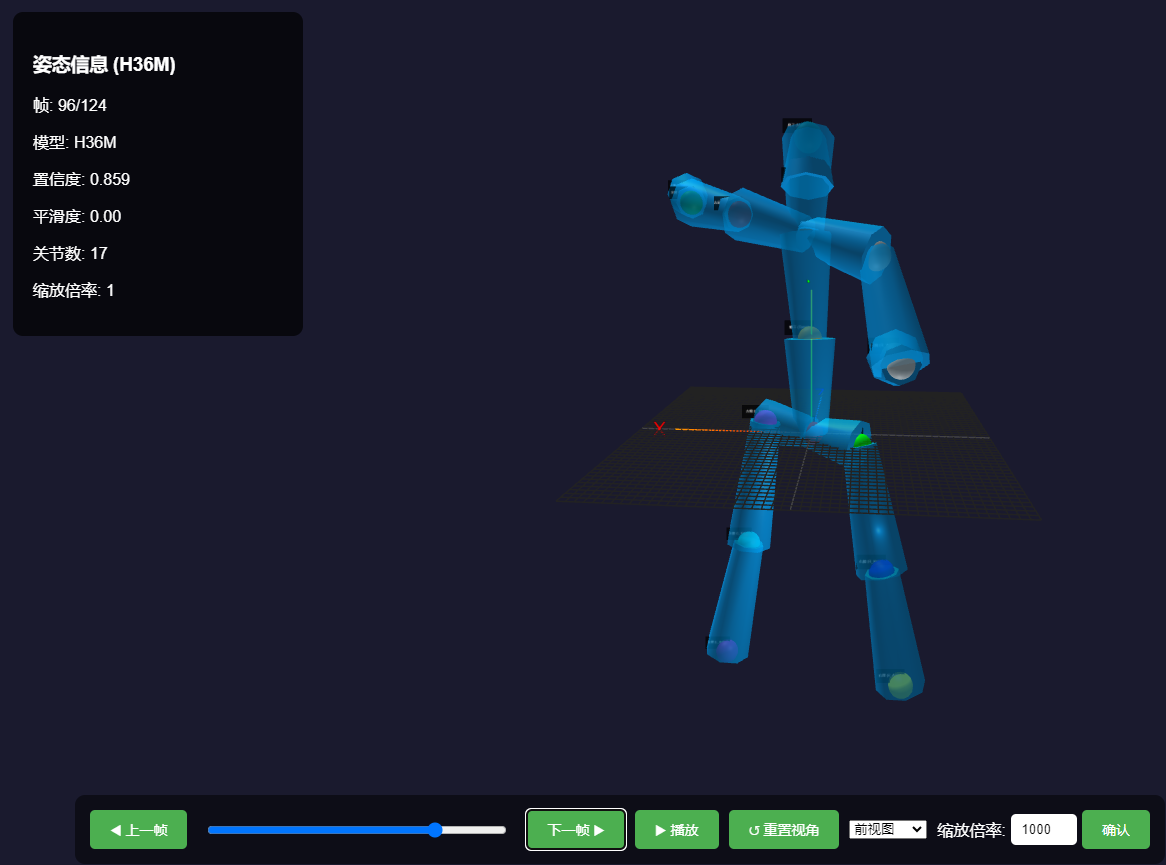
我让模型生成了一个预览3djson的代码
python.bat 和 3d_pose_result 和 三角测量预览(版本一).html
以上3个文件在一个目录就行,启动bat文件后就可以打开
http://localhost:8000/三角测量(标准版本一).html
预览你拍的效果
1.启动 python.bat 文件
@echo off
echo 启动 Python HTTP 服务器,端口 8000...
python -m http.server 8000
pause
2.生成了一个html的文件用来预览json
<!DOCTYPE html>
<html lang="zh-CN">
<head>
    <meta charset="UTF-8">
    <title>3D姿态可视化 - 警训分析系统 (H36M版)</title>
    <style>
        body {
            margin: 0;
            overflow: hidden;
            font-family: Arial, sans-serif;
            background: linear-gradient(135deg, #667eea 0%, #764ba2 100%);
        }

        #container {
            position: relative;
            width: 100vw;
            height: 100vh;
        }

        #info-panel {
            position: absolute;
            top: 20px;
            left: 20px;
            background: rgba(0, 0, 0, 0.7);
            color: white;
            padding: 20px;
            border-radius: 10px;
            min-width: 250px;
            z-index: 1000;
        }

        #controls {
            position: absolute;
            bottom: 10px;
            left: 5%;
            background: rgba(0, 0, 0, 0.5);
            padding: 15px;
            border-radius: 10px;
            display: flex;
            gap: 10px;
            z-index: 1000;
            align-items: center;
        }

        /* 新增倍率控制样式 */
        #scale-controls {
            display: flex;
            align-items: center;
            gap: 5px;
        }

        #scale-input {
            width: 50px;
            padding: 8px;
            border-radius: 5px;
            border: none;
            text-align: center;
        }

        button {
            background: #4CAF50;
            color: white;
            border: none;
            padding: 10px 20px;
            border-radius: 5px;
            cursor: pointer;
            font-size: 14px;
        }

        button:hover {
            background: #45a049;
        }

        #frame-slider {
            width: 300px;
            margin: 0 10px;
        }

        #loading {
            position: absolute;
            top: 50%;
            left: 50%;
            transform: translate(-50%, -50%);
            color: white;
            font-size: 24px;
        }
    </style>
    <script src="https://cdnjs.cloudflare.com/ajax/libs/three.js/r128/three.min.js"></script>
    <script src="https://cdn.jsdelivr.net/npm/three@0.128.0/examples/js/controls/OrbitControls.min.js"></script>
    <script src="https://cdn.jsdelivr.net/npm/three@0.128.0/examples/js/loaders/GLTFLoader.min.js"></script>
</head>
<body>
<div id="container">
    <div id="loading">加载3D可视化中...</div>
    <div id="info-panel" style="display: none;">
        <h3>姿态信息 (H36M)</h3>
        <p>帧: <span id="frame-info">0/0</span></p>
        <p>模型: <span id="model-info">H36M</span></p>
        <p>置信度: <span id="confidence-info">0.00</span></p>
        <p>平滑度: <span id="smoothness-info">0.00</span></p>
        <p>关节数: <span id="joints-info">0</span></p>
        <p>缩放倍率: <span id="scale-info">1000</span></p> <!-- 新增倍率显示 -->
    </div>
    <div id="controls" style="display: none;">
        <button onclick="prevFrame()">◀ 上一帧</button>
        <input type="range" id="frame-slider" min="0" max="0" value="0">
        <button onclick="nextFrame()">下一帧 ▶</button>
        <button onclick="togglePlay()" id="play-btn">▶ 播放</button>
        <button onclick="resetView()">↺ 重置视角</button>
        <select id="view-select" onchange="changeView(this.value)">
            <option value="front">前视图</option>
            <option value="side">侧视图</option>
            <option value="top">俯视图</option>
            <option value="free">自由视角</option>
        </select>
        <!-- 新增倍率控制输入框 -->
        <div id="scale-controls">
            <span style="color: white;">缩放倍率:</span>
            <input type="number" id="scale-input" value="1000" min="1" step="10">
            <button onclick="applyScale()">确认</button>
        </div>
    </div>
</div>

<script>
    // 全局变量
    let scene, camera, renderer, controls;
    let poseData = [];
    let currentFrame = 0;
    let isPlaying = false;
    let playInterval;
    let jointSpheres = [];
    let boneCylinders = [];
    let scaleMultiplier = 1; // 新增缩放倍率变量,默认1

    // H36M 骨架连接关系 (基于 H36M 17 点索引 0-16)
    const SKELETON = [
        [0, 1], [0, 4],           // 骨盆到左右髋
        [1, 2], [2, 3],           // 右腿
        [4, 5], [5, 6],           // 左腿
        [0, 7], [7, 8],           // 骨盆到躯干到颈部
        [8, 9],                   // 颈部到鼻子
        [8, 11], [8, 14],         // 颈部到左右肩
        [9, 10],                  // 鼻子到头
        [11, 12], [12, 13],       // 左臂
        [14, 15], [15, 16]        // 右臂
    ];

    // 关节颜色映射 (保持不变,用于区分不同关节点)
    const JOINT_COLORS = [
        0xFF0000, 0x00FF00, 0x0000FF, 0xFFFF00, 0xFF00FF,
        0x00FFFF, 0x800080, 0xFFA500, 0x8B4513, 0x008080,
        0x808000, 0x800000, 0x008000, 0x000080, 0x808080,
        0xC0C0C0, 0x404040
    ];

    // H36M 关节名称 (对应索引 0-16)
    const JOINT_NAMES = [
        "骨盆 (Pelvis)",
        "右髋 (R_Hip)",
        "右膝 (R_Knee)",
        "右踝 (R_Ankle)",
        "左髋 (L_Hip)",
        "左膝 (L_Knee)",
        "左踝 (L_Ankle)",
        "躯干 (Torso)",
        "颈部 (Neck)",
        "鼻子 (Nose)",
        "头 (Head)",
        "左肩 (L_Shoulder)",
        "左肘 (L_Elbow)",
        "左腕 (L_Wrist)",
        "右肩 (R_Shoulder)",
        "右肘 (R_Elbow)",
        "右腕 (R_Wrist)"
    ];

    // 初始化Three.js场景
    function init() {
        // 创建场景
        scene = new THREE.Scene();
        scene.background = new THREE.Color(0x1a1a2e);

        // 创建相机
        camera = new THREE.PerspectiveCamera(75, window.innerWidth / window.innerHeight, 0.1, 5000);
        camera.position.set(300, 300, 300);

        // 创建渲染器
        renderer = new THREE.WebGLRenderer({ antialias: true });
        renderer.setSize(window.innerWidth, window.innerHeight);
        renderer.shadowMap.enabled = true;
        renderer.shadowMap.type = THREE.PCFSoftShadowMap;

        // 添加到容器
        document.getElementById('container').appendChild(renderer.domElement);

        // 添加轨道控制
        controls = new THREE.OrbitControls(camera, renderer.domElement);
        controls.enableDamping = true;
        controls.dampingFactor = 0.05;

        // 添加光源
        addLights();

        // 添加坐标轴
        addCoordinateAxes();

        // 添加网格地面
        addGrid();

        // 加载姿态数据
        loadPoseData();

        // 窗口大小调整
        window.addEventListener('resize', onWindowResize);

        // 开始渲染
        animate();
    }

    // 添加光源
    function addLights() {
        // 环境光
        const ambientLight = new THREE.AmbientLight(0xffffff, 0.5);
        scene.add(ambientLight);

        // 平行光
        const directionalLight = new THREE.DirectionalLight(0xffffff, 0.8);
        directionalLight.position.set(100, 200, 100);
        directionalLight.castShadow = true;
        scene.add(directionalLight);

        // 点光源
        const pointLight = new THREE.PointLight(0xffffff, 0.5);
        pointLight.position.set(-100, -100, -100);
        scene.add(pointLight);
    }

    // 添加坐标轴
    function addCoordinateAxes() {
        const axesHelper = new THREE.AxesHelper(200);
        scene.add(axesHelper);

        // 添加坐标轴标签
        addAxisLabel('X', [220, 0, 0], 0xFF0000);
        addAxisLabel('Y', [0, 220, 0], 0x00FF00);
        addAxisLabel('Z', [0, 0, 220], 0x0000FF);
    }

    function addAxisLabel(text, position, color) {
        const canvas = document.createElement('canvas');
        const context = canvas.getContext('2d');
        canvas.width = 64;
        canvas.height = 64;

        context.fillStyle = 'rgba(0, 0, 0, 0)';
        context.fillRect(0, 0, canvas.width, canvas.height);

        context.font = '48px Arial';
        context.fillStyle = `rgb(${(color >> 16) & 255}, ${(color >> 8) & 255}, ${color & 255})`;
        context.fillText(text, 10, 50);

        const texture = new THREE.CanvasTexture(canvas);
        const material = new THREE.SpriteMaterial({ map: texture });
        const sprite = new THREE.Sprite(material);
        sprite.position.set(...position);
        sprite.scale.set(40, 40, 1);
        scene.add(sprite);
    }

    // 添加网格地面
    function addGrid() {
        const gridHelper = new THREE.GridHelper(500, 50, 0x444444, 0x222222);
        scene.add(gridHelper);
    }

    // 加载姿态数据
    async function loadPoseData() {
        try {
            // 替换为你的 H36M JSON 数据文件路径
            //const response = await fetch('pose3d_data_1766651742977.json');
            const response = await fetch('3d_pose_result.json');
            // 修正:确保获取到正确的响应文本
            const text = await response.text();
            poseData = JSON.parse(text);

            if (poseData.length > 0) {
                // 初始化UI
                document.getElementById('frame-slider').max = poseData.length - 1;
                document.getElementById('loading').style.display = 'none';
                document.getElementById('info-panel').style.display = 'block';
                document.getElementById('controls').style.display = 'flex';

                // 显示当前缩放倍率
                document.getElementById('scale-info').textContent = scaleMultiplier;

                // 显示第一帧
                updateFrameDisplay();
                updatePoseVisualization();
            }
        } catch (error) {
            console.error('加载姿态数据失败:', error);
            document.getElementById('loading').innerHTML = '加载失败,请检查控制台';
        }
    }

    // 新增:应用缩放倍率
    function applyScale() {
        const input = document.getElementById('scale-input');
        const newScale = parseInt(input.value);
        if (!isNaN(newScale) && newScale > 0) {
            scaleMultiplier = newScale;
            // 更新显示
            document.getElementById('scale-info').textContent = scaleMultiplier;
            // 重新渲染当前帧
            updatePoseVisualization();
        } else {
            alert('请输入有效的正整数倍率');
            // 恢复原值
            input.value = scaleMultiplier;
        }
    }

    // 更新帧显示
    function updateFrameDisplay() {
        if (poseData.length === 0) return;

        const pose = poseData[currentFrame];
        document.getElementById('frame-info').textContent =
            `${currentFrame + 1}/${poseData.length}`;
        // 模型信息固定为 H36M
        document.getElementById('model-info').textContent = 'H36M';
        // 假设 pose 对象包含 confidence 和 smoothness 属性
        // 如果你的数据结构不同,请相应修改
        document.getElementById('confidence-info').textContent =
            (pose.keypoints && pose.keypoints.length > 0) ?
                (pose.keypoints.reduce((sum, kp) => sum + kp.confidence, 0) / pose.keypoints.length).toFixed(3) : '0.00';
        document.getElementById('smoothness-info').textContent = '0.00'; // 假设值
        document.getElementById('joints-info').textContent =
            pose.keypoints ? pose.keypoints.length : 0;
        document.getElementById('frame-slider').value = currentFrame;
    }

    // 更新姿态可视化
    function updatePoseVisualization() {
        if (poseData.length === 0) return;

        const pose = poseData[currentFrame];

        // 清除之前的可视化
        clearPreviousVisualization();

        if (pose.keypoints && pose.keypoints.length > 0) {
            // 绘制关节
            drawJoints(pose.keypoints);

            // 绘制骨架
            drawSkeleton(pose.keypoints);

            // 添加关节标签
            addJointLabels(pose.keypoints);
        }
    }

    // 清除之前的可视化
    function clearPreviousVisualization() {
        jointSpheres.forEach(sphere => scene.remove(sphere));
        boneCylinders.forEach(cylinder => scene.remove(cylinder));
        jointSpheres = [];
        boneCylinders = [];

        // 清除标签
        scene.children = scene.children.filter(child =>
            !child.userData || !child.userData.isLabel
        );
    }

    // 绘制关节 - 修改为使用自定义倍率
    function drawJoints(keypoints) {
        for (let i = 0; i < keypoints.length; i++) {
            const kp = keypoints[i];
            if (i >= JOINT_COLORS.length) break; // 防止索引超出颜色数组

            // 根据置信度调整球体大小
            const radius = 5 + kp.confidence * 15;
            const color = JOINT_COLORS[i % JOINT_COLORS.length];
            const opacity = 0.3 + kp.confidence * 0.7;

            const geometry = new THREE.SphereGeometry(radius, 16, 16);
            const material = new THREE.MeshPhongMaterial({
                color: color,
                transparent: true,
                opacity: opacity
            });

            const sphere = new THREE.Mesh(geometry, material);
            // 使用自定义缩放倍率
            sphere.position.set(kp.x * scaleMultiplier, -kp.y * scaleMultiplier, kp.z * scaleMultiplier);
            sphere.castShadow = true;

            scene.add(sphere);
            jointSpheres.push(sphere);
        }
    }

    // 绘制骨骼
    function drawSkeleton(keypoints) {
        for (const [start, end] of SKELETON) {
            if (start < keypoints.length && end < keypoints.length) {
                const kp1 = keypoints[start];
                const kp2 = keypoints[end];

                if (kp1.confidence > 0.3 && kp2.confidence > 0.3) {
                    drawBone(kp1, kp2);
                }
            }
        }
    }

    // 绘制骨骼 - 修改为使用自定义倍率
    function drawBone(kp1, kp2) {
        // 使用自定义缩放倍率
        const start = new THREE.Vector3(kp1.x * scaleMultiplier, -kp1.y * scaleMultiplier, kp1.z * scaleMultiplier);
        const end = new THREE.Vector3(kp2.x * scaleMultiplier, -kp2.y * scaleMultiplier, kp2.z * scaleMultiplier);

        const length = start.distanceTo(end);
        if (length < 0.1) return;

        const direction = new THREE.Vector3().subVectors(end, start).normalize();
        const orientation = new THREE.Matrix4();
        orientation.lookAt(start, end, new THREE.Vector3(0, 1, 0)); // Up vector for orientation
        orientation.multiply(new THREE.Matrix4().makeRotationX(Math.PI / 2));

        const geometry = new THREE.CylinderGeometry(24, 36, length, 8);
        const material = new THREE.MeshPhongMaterial({
            color: 0x00a8ff,
            transparent: true,
            opacity: 0.7
        });

        const cylinder = new THREE.Mesh(geometry, material);
        cylinder.applyMatrix4(orientation);
        cylinder.position.copy(start).add(direction.clone().multiplyScalar(length / 2));

        scene.add(cylinder);
        boneCylinders.push(cylinder);
    }

    // 添加关节标签 - 修改为使用自定义倍率
    function addJointLabels(keypoints) {
        for (let i = 0; i < keypoints.length && i < JOINT_NAMES.length; i++) {
            const kp = keypoints[i];
            if (kp.confidence > 0.3) {
                // 使用自定义缩放倍率
                addLabel(JOINT_NAMES[i], kp.x * scaleMultiplier, -kp.y * scaleMultiplier, kp.z * scaleMultiplier);
            }
        }
    }

    function addLabel(text, x, y, z) {
        const canvas = document.createElement('canvas');
        const context = canvas.getContext('2d');
        canvas.width = 128;
        canvas.height = 64;

        context.fillStyle = 'rgba(0, 0, 0, 0.7)';
        context.fillRect(0, 0, canvas.width, canvas.height);

        context.font = '16px Arial'; // 标签字体稍小
        context.fillStyle = 'white';
        context.textAlign = 'center';
        context.fillText(text, canvas.width / 2, 35); // 调整文本位置

        const texture = new THREE.CanvasTexture(canvas);
        const material = new THREE.SpriteMaterial({ map: texture });
        const sprite = new THREE.Sprite(material);
        // 标签位置稍微偏移,避免遮挡
        sprite.position.set(x + 15, y + 15, z);
        sprite.scale.set(40, 20, 1);
        sprite.userData = { isLabel: true };

        scene.add(sprite);
    }

    // UI控制函数
    function prevFrame() {
        currentFrame = Math.max(0, currentFrame - 1);
        updateFrameDisplay();
        updatePoseVisualization();
    }

    function nextFrame() {
        currentFrame = Math.min(poseData.length - 1, currentFrame + 1);
        updateFrameDisplay();
        updatePoseVisualization();
    }

    function togglePlay() {
        isPlaying = !isPlaying;
        const playBtn = document.getElementById('play-btn');

        if (isPlaying) {
            playBtn.textContent = '⏸ 暂停';
            playInterval = setInterval(() => {
                currentFrame = (currentFrame + 1) % poseData.length;
                updateFrameDisplay();
                updatePoseVisualization();
            }, 100); // 10 FPS
        } else {
            playBtn.textContent = '▶ 播放';
            clearInterval(playInterval);
        }
    }

    function resetView() {
        controls.reset();
        camera.position.set(300, 300, 300);
    }

    function changeView(viewType) {
        switch(viewType) {
            case 'front':
                camera.position.set(0, 0, 500);
                break;
            case 'side':
                camera.position.set(500, 0, 0);
                break;
            case 'top':
                camera.position.set(0, 500, 0);
                break;
            case 'free':
                // 自由视角,不改变位置
                break;
        }
        controls.update();
    }

    // 滑块变化
    document.getElementById('frame-slider').addEventListener('input', function(e) {
        currentFrame = parseInt(e.target.value);
        updateFrameDisplay();
        updatePoseVisualization();
    });

    // 窗口大小调整
    function onWindowResize() {
        camera.aspect = window.innerWidth / window.innerHeight;
        camera.updateProjectionMatrix();
        renderer.setSize(window.innerWidth, window.innerHeight);
    }

    // 动画循环
    function animate() {
        requestAnimationFrame(animate);
        controls.update();
        renderer.render(scene, camera);
    }

    // 页面加载完成后初始化
    window.onload = init;
</script>
</body>
</html>