前言
图片上传是前端开发中高频且核心的功能场景,如头像上传、素材管理、表单提交等。本文基于原生 HTML+CSS+JavaScript 实现一套企业级图片预览上传组件,包含多图选择、拖拽上传、实时预览、图片裁剪、上传进度显示、文件大小 / 格式校验等功能,无任何第三方框架依赖,代码模块化封装,可直接集成到各类项目中。
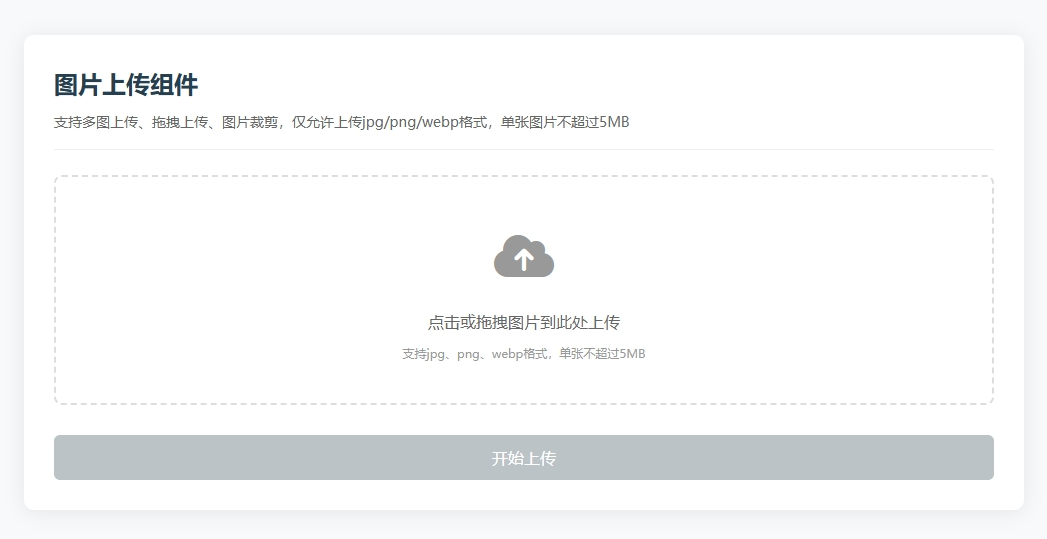
实现效果
- 支持单图 / 多图选择上传,兼容主流浏览器
- 拖拽上传:可直接将图片拖入上传区域完成选择
- 实时预览:选中图片后立即展示缩略图,支持删除单张图片
- 图片裁剪:内置简易裁剪功能,支持固定比例裁剪
- 格式 / 大小校验:限制仅允许 jpg/png/webp 格式,可自定义文件大小上限
- 上传进度:模拟 AJAX 上传,实时显示上传进度条
- 响应式布局:适配 PC 端、平板、手机等多端设备
- 友好提示:操作反馈清晰,错误提示直观
技术栈
- HTML5:FileReader API、拖放 API、Canvas(图片裁剪)
- CSS3:Flex 布局、Grid 布局、过渡动画、响应式适配
- 原生 JavaScript:文件处理、Blob/FormData、异步编程、DOM 操作
- 性能优化:图片压缩、懒加载思想、事件委托
完整代码
html
预览
html
<!DOCTYPE html>
<html lang="zh-CN">
<head>
<meta charset="UTF-8">
<meta name="viewport" content="width=device-width, initial-scale=1.0">
<title>图片预览上传组件 | 原生JS实现</title>
<meta name="keywords" content="图片上传,原生JS,拖拽上传,图片预览,图片裁剪,FileReader">
<meta name="description" content="原生JavaScript实现图片预览上传组件,支持多图上传、拖拽上传、裁剪预览、进度显示、格式校验">
<link rel="stylesheet" href="https://cdn.bootcdn.net/ajax/libs/font-awesome/6.4.0/css/all.min.css">
<style>
* {
margin: 0;
padding: 0;
box-sizing: border-box;
font-family: "Microsoft YaHei", sans-serif;
}
body {
background-color: #f8f9fa;
color: #333;
line-height: 1.6;
padding: 50px 20px;
}
.upload-container {
max-width: 1000px;
margin: 0 auto;
background-color: #fff;
border-radius: 10px;
box-shadow: 0 2px 20px rgba(0,0,0,0.08);
padding: 30px;
}
.upload-header {
margin-bottom: 25px;
padding-bottom: 15px;
border-bottom: 1px solid #eee;
}
.upload-header h2 {
color: #2c3e50;
font-size: 24px;
margin-bottom: 8px;
}
.upload-header .tips {
color: #666;
font-size: 14px;
}
/* 上传区域样式 */
.upload-area {
border: 2px dashed #ddd;
border-radius: 8px;
padding: 40px 20px;
text-align: center;
cursor: pointer;
transition: all 0.3s ease;
margin-bottom: 30px;
}
.upload-area:hover {
border-color: #3498db;
background-color: #f0f8ff;
}
.upload-area.active {
border-color: #2ecc71;
background-color: #f8fff8;
}
.upload-icon {
font-size: 48px;
color: #999;
margin-bottom: 15px;
transition: color 0.3s;
}
.upload-area:hover .upload-icon {
color: #3498db;
}
.upload-text {
font-size: 16px;
color: #666;
margin-bottom: 10px;
}
.upload-hint {
font-size: 12px;
color: #999;
}
#fileInput {
display: none;
}
/* 预览区域样式 */
.preview-container {
margin-bottom: 30px;
}
.preview-header {
display: flex;
justify-content: space-between;
align-items: center;
margin-bottom: 15px;
}
.preview-title {
font-size: 18px;
color: #333;
}
.preview-actions {
display: flex;
gap: 10px;
}
.action-btn {
padding: 6px 12px;
border: none;
border-radius: 4px;
cursor: pointer;
font-size: 14px;
transition: all 0.3s;
}
.crop-btn {
background-color: #3498db;
color: #fff;
}
.clear-btn {
background-color: #e74c3c;
color: #fff;
}
.action-btn:hover {
opacity: 0.9;
transform: translateY(-2px);
}
.preview-list {
display: grid;
grid-template-columns: repeat(auto-fill, minmax(150px, 1fr));
gap: 15px;
}
.preview-item {
position: relative;
border-radius: 6px;
overflow: hidden;
box-shadow: 0 2px 8px rgba(0,0,0,0.1);
aspect-ratio: 1/1;
}
.preview-img {
width: 100%;
height: 100%;
object-fit: cover;
display: block;
}
.preview-close {
position: absolute;
top: 5px;
right: 5px;
width: 24px;
height: 24px;
background-color: rgba(0,0,0,0.6);
color: #fff;
border-radius: 50%;
display: flex;
align-items: center;
justify-content: center;
cursor: pointer;
font-size: 12px;
transition: all 0.2s;
}
.preview-close:hover {
background-color: #e74c3c;
}
/* 进度条样式 */
.upload-progress {
margin-bottom: 25px;
display: none;
}
.progress-bar {
width: 100%;
height: 8px;
background-color: #eee;
border-radius: 4px;
overflow: hidden;
margin-top: 8px;
}
.progress-fill {
height: 100%;
background-color: #2ecc71;
width: 0%;
transition: width 0.3s ease;
border-radius: 4px;
}
/* 上传按钮 */
.submit-btn {
width: 100%;
padding: 12px;
background-color: #2ecc71;
color: #fff;
border: none;
border-radius: 6px;
font-size: 16px;
cursor: pointer;
transition: all 0.3s;
}
.submit-btn:disabled {
background-color: #bdc3c7;
cursor: not-allowed;
transform: none;
}
.submit-btn:hover:not(:disabled) {
background-color: #27ae60;
transform: translateY(-2px);
}
/* 裁剪弹窗 */
.crop-modal {
position: fixed;
top: 0;
left: 0;
width: 100%;
height: 100%;
background-color: rgba(0,0,0,0.7);
display: none;
align-items: center;
justify-content: center;
z-index: 999;
padding: 20px;
}
.crop-content {
background-color: #fff;
border-radius: 8px;
width: 100%;
max-width: 800px;
padding: 20px;
}
.crop-header {
display: flex;
justify-content: space-between;
align-items: center;
margin-bottom: 20px;
}
.crop-title {
font-size: 18px;
color: #333;
}
.crop-close {
font-size: 20px;
cursor: pointer;
color: #666;
}
.crop-close:hover {
color: #e74c3c;
}
.crop-body {
display: flex;
flex-direction: column;
gap: 20px;
}
.crop-preview {
width: 100%;
height: 300px;
border: 1px solid #eee;
display: flex;
align-items: center;
justify-content: center;
overflow: hidden;
}
.crop-img {
max-width: 100%;
max-height: 100%;
}
.crop-actions {
display: flex;
justify-content: flex-end;
gap: 10px;
}
.confirm-crop {
background-color: #3498db;
color: #fff;
}
/* 响应式适配 */
@media (max-width: 768px) {
.upload-container {
padding: 20px;
}
.upload-area {
padding: 30px 15px;
}
.crop-preview {
height: 200px;
}
}
@media (max-width: 480px) {
.preview-list {
grid-template-columns: repeat(auto-fill, minmax(100px, 1fr));
}
.upload-header h2 {
font-size: 20px;
}
}
</style>
</head>
<body>
<div class="upload-container">
<!-- 头部说明 -->
<div class="upload-header">
<h2>图片上传组件</h2>
<p class="tips">支持多图上传、拖拽上传、图片裁剪,仅允许上传jpg/png/webp格式,单张图片不超过5MB</p>
</div>
<!-- 上传区域 -->
<div class="upload-area" id="uploadArea">
<input type="file" id="fileInput" accept="image/jpeg,image/png,image/webp" multiple>
<div class="upload-icon">
<i class="fas fa-cloud-upload-alt"></i>
</div>
<div class="upload-text">点击或拖拽图片到此处上传</div>
<div class="upload-hint">支持jpg、png、webp格式,单张不超过5MB</div>
</div>
<!-- 预览区域 -->
<div class="preview-container" id="previewContainer" style="display: none;">
<div class="preview-header">
<h3 class="preview-title">图片预览</h3>
<div class="preview-actions">
<button class="action-btn crop-btn" id="cropBtn" disabled>裁剪选中图片</button>
<button class="action-btn clear-btn" id="clearBtn">清空所有</button>
</div>
</div>
<div class="preview-list" id="previewList"></div>
</div>
<!-- 上传进度 -->
<div class="upload-progress" id="uploadProgress">
<div class="progress-text">上传进度:<span id="progressPercent">0</span>%</div>
<div class="progress-bar">
<div class="progress-fill" id="progressFill"></div>
</div>
</div>
<!-- 上传按钮 -->
<button class="submit-btn" id="submitBtn" disabled>开始上传</button>
</div>
<!-- 裁剪弹窗 -->
<div class="crop-modal" id="cropModal">
<div class="crop-content">
<div class="crop-header">
<h3 class="crop-title">图片裁剪</h3>
<span class="crop-close" id="cropClose"><i class="fas fa-times"></i></span>
</div>
<div class="crop-body">
<div class="crop-preview" id="cropPreview">
<img src="" alt="裁剪预览" class="crop-img" id="cropImg">
</div>
<div class="crop-actions">
<button class="action-btn" id="cancelCrop">取消</button>
<button class="action-btn confirm-crop" id="confirmCrop">确认裁剪</button>
</div>
</div>
</div>
</div>
<script>
// 全局变量
let fileList = []; // 存储选中的文件
let selectedImageIndex = -1; // 当前选中的图片索引
let cropFile = null; // 待裁剪的文件
// DOM元素缓存
const uploadArea = document.getElementById('uploadArea');
const fileInput = document.getElementById('fileInput');
const previewContainer = document.getElementById('previewContainer');
const previewList = document.getElementById('previewList');
const cropBtn = document.getElementById('cropBtn');
const clearBtn = document.getElementById('clearBtn');
const submitBtn = document.getElementById('submitBtn');
const uploadProgress = document.getElementById('uploadProgress');
const progressPercent = document.getElementById('progressPercent');
const progressFill = document.getElementById('progressFill');
const cropModal = document.getElementById('cropModal');
const cropImg = document.getElementById('cropImg');
const cropClose = document.getElementById('cropClose');
const cancelCrop = document.getElementById('cancelCrop');
const confirmCrop = document.getElementById('confirmCrop');
// 初始化
function init() {
bindEvents();
}
// 绑定所有事件
function bindEvents() {
// 点击上传区域触发文件选择
uploadArea.addEventListener('click', () => {
fileInput.click();
});
// 拖放相关事件
uploadArea.addEventListener('dragover', (e) => {
e.preventDefault();
uploadArea.classList.add('active');
});
uploadArea.addEventListener('dragleave', () => {
uploadArea.classList.remove('active');
});
uploadArea.addEventListener('drop', (e) => {
e.preventDefault();
uploadArea.classList.remove('active');
const files = e.dataTransfer.files;
handleFiles(files);
});
// 文件选择事件
fileInput.addEventListener('change', (e) => {
const files = e.target.files;
handleFiles(files);
});
// 清空所有图片
clearBtn.addEventListener('click', () => {
if (confirm('确定要清空所有图片吗?')) {
fileList = [];
selectedImageIndex = -1;
updatePreview();
updateButtonStatus();
}
});
// 裁剪按钮事件
cropBtn.addEventListener('click', () => {
if (selectedImageIndex >= 0 && selectedImageIndex < fileList.length) {
cropFile = fileList[selectedImageIndex];
const reader = new FileReader();
reader.onload = (e) => {
cropImg.src = e.target.result;
cropModal.style.display = 'flex';
};
reader.readAsDataURL(cropFile);
}
});
// 关闭裁剪弹窗
cropClose.addEventListener('click', () => {
cropModal.style.display = 'none';
cropFile = null;
});
cancelCrop.addEventListener('click', () => {
cropModal.style.display = 'none';
cropFile = null;
});
// 确认裁剪(简易裁剪,实际项目可集成cropper.js)
confirmCrop.addEventListener('click', () => {
// 创建Canvas进行裁剪(此处模拟1:1裁剪)
const canvas = document.createElement('canvas');
const ctx = canvas.getContext('2d');
const img = new Image();
img.onload = () => {
// 取图片最小边作为裁剪尺寸,实现1:1裁剪
const size = Math.min(img.width, img.height);
canvas.width = size;
canvas.height = size;
// 居中裁剪
const x = (img.width - size) / 2;
const y = (img.height - size) / 2;
ctx.drawImage(img, x, y, size, size, 0, 0, size, size);
// 将Canvas转为Blob
canvas.toBlob((blob) => {
// 替换原文件
const newFile = new File([blob], cropFile.name, {
type: cropFile.type,
lastModified: Date.now()
});
fileList[selectedImageIndex] = newFile;
updatePreview();
cropModal.style.display = 'none';
cropFile = null;
}, cropFile.type);
};
img.src = cropImg.src;
});
// 提交上传
submitBtn.addEventListener('click', () => {
if (fileList.length === 0) {
alert('请先选择要上传的图片!');
return;
}
simulateUpload();
});
// 预览项点击/删除事件(事件委托)
previewList.addEventListener('click', (e) => {
const previewItem = e.target.closest('.preview-item');
if (!previewItem) return;
const index = parseInt(previewItem.dataset.index);
// 删除图片
if (e.target.classList.contains('preview-close')) {
fileList.splice(index, 1);
// 重置选中索引
if (selectedImageIndex === index) {
selectedImageIndex = -1;
} else if (selectedImageIndex > index) {
selectedImageIndex--;
}
updatePreview();
updateButtonStatus();
return;
}
// 选中图片(用于裁剪)
selectedImageIndex = index;
// 移除所有选中样式
document.querySelectorAll('.preview-item').forEach(item => {
item.style.border = 'none';
});
// 添加选中样式
previewItem.style.border = '2px solid #3498db';
cropBtn.disabled = false;
});
}
// 处理选中的文件
function handleFiles(files) {
if (!files || files.length === 0) return;
// 遍历文件
for (let i = 0; i < files.length; i++) {
const file = files[i];
// 校验文件类型
if (!['image/jpeg', 'image/png', 'image/webp'].includes(file.type)) {
alert(`文件${file.name}格式不支持,仅允许jpg/png/webp格式!`);
continue;
}
// 校验文件大小(5MB)
const maxSize = 5 * 1024 * 1024;
if (file.size > maxSize) {
alert(`文件${file.name}大小超过5MB限制!`);
continue;
}
// 添加到文件列表
fileList.push(file);
}
// 更新预览和按钮状态
updatePreview();
updateButtonStatus();
}
// 更新预览列表
function updatePreview() {
if (fileList.length === 0) {
previewContainer.style.display = 'none';
return;
}
previewContainer.style.display = 'block';
previewList.innerHTML = '';
// 渲染预览项
fileList.forEach((file, index) => {
const reader = new FileReader();
reader.onload = (e) => {
const previewItem = document.createElement('div');
previewItem.className = 'preview-item';
previewItem.dataset.index = index;
// 选中状态样式
if (index === selectedImageIndex) {
previewItem.style.border = '2px solid #3498db';
}
previewItem.innerHTML = `
<img src="${e.target.result}" alt="预览图" class="preview-img">
<span class="preview-close"><i class="fas fa-times"></i></span>
`;
previewList.appendChild(previewItem);
};
reader.readAsDataURL(file);
});
}
// 更新按钮状态
function updateButtonStatus() {
// 上传按钮状态
submitBtn.disabled = fileList.length === 0;
// 裁剪按钮状态
cropBtn.disabled = selectedImageIndex < 0 || fileList.length === 0;
}
// 模拟上传(实际项目替换为真实AJAX请求)
function simulateUpload() {
uploadProgress.style.display = 'block';
submitBtn.disabled = true;
clearBtn.disabled = true;
cropBtn.disabled = true;
let progress = 0;
const totalFiles = fileList.length;
let uploadedFiles = 0;
// 模拟进度更新
const progressInterval = setInterval(() => {
uploadedFiles++;
progress = Math.floor((uploadedFiles / totalFiles) * 100);
progressPercent.textContent = progress;
progressFill.style.width = `${progress}%`;
// 上传完成
if (progress >= 100) {
clearInterval(progressInterval);
// 延迟提示,模拟真实上传耗时
setTimeout(() => {
alert(`成功上传${totalFiles}张图片!`);
// 重置状态
fileList = [];
selectedImageIndex = -1;
uploadProgress.style.display = 'none';
progressFill.style.width = '0%';
progressPercent.textContent = '0';
updatePreview();
updateButtonStatus();
clearBtn.disabled = false;
}, 500);
}
}, 500);
// 实际项目中使用FormData上传示例
/*
const formData = new FormData();
fileList.forEach(file => {
formData.append('files', file);
});
fetch('/api/upload', {
method: 'POST',
body: formData,
onUploadProgress: (e) => {
const progress = Math.floor((e.loaded / e.total) * 100);
progressPercent.textContent = progress;
progressFill.style.width = `${progress}%`;
}
}).then(response => response.json())
.then(data => {
alert('上传成功!');
// 后续处理
}).catch(error => {
alert('上传失败:' + error.message);
});
*/
}
// 启动应用
init();
</script>
</body>
</html>功能说明
- 基础上传:点击上传区域可打开文件选择器,支持多选图片,自动过滤非图片文件,限制单张图片大小不超过 5MB。
- 拖拽上传:直接将本地图片拖入上传区域,自动完成文件选择和校验,操作更便捷。
- 图片预览:选中图片后实时生成缩略图预览,预览项支持点击选中、删除单张图片、清空所有图片。
- 图片裁剪:选中单张图片后点击 "裁剪选中图片",可打开裁剪弹窗进行 1:1 比例裁剪,裁剪后替换原图片。
- 上传进度:点击 "开始上传" 后模拟上传进度,实时显示上传百分比和进度条,上传完成后给出成功提示。
- 格式校验:仅允许上传 jpg/png/webp 格式图片,非支持格式会给出明确的错误提示。
- 响应式适配:预览列表采用网格布局,自动适配不同屏幕宽度,移动端优化显示效果。
总结
本图片上传组件基于原生 JS 实现,无任何第三方依赖,涵盖了企业级图片上传场景的核心功能,代码结构清晰、模块化程度高,易于扩展和二次开发。开发者可在此基础上进一步扩展:
- 集成专业裁剪库(如 cropper.js)实现更灵活的裁剪功能;
- 增加图片压缩功能,降低上传带宽消耗;
- 对接真实后端接口,实现图片上传到服务器;
- 增加上传失败重试、断点续传等高级功能;
- 支持图片旋转、缩放、水印添加等编辑功能。该组件可直接应用于表单提交、头像上传、素材管理等业务场景,是前端开发中极具实用价值的实战项目。