欢迎加入开源鸿蒙跨平台社区:
https://openharmonycrossplatform.csdn.net
一、项目概述
运行效果图
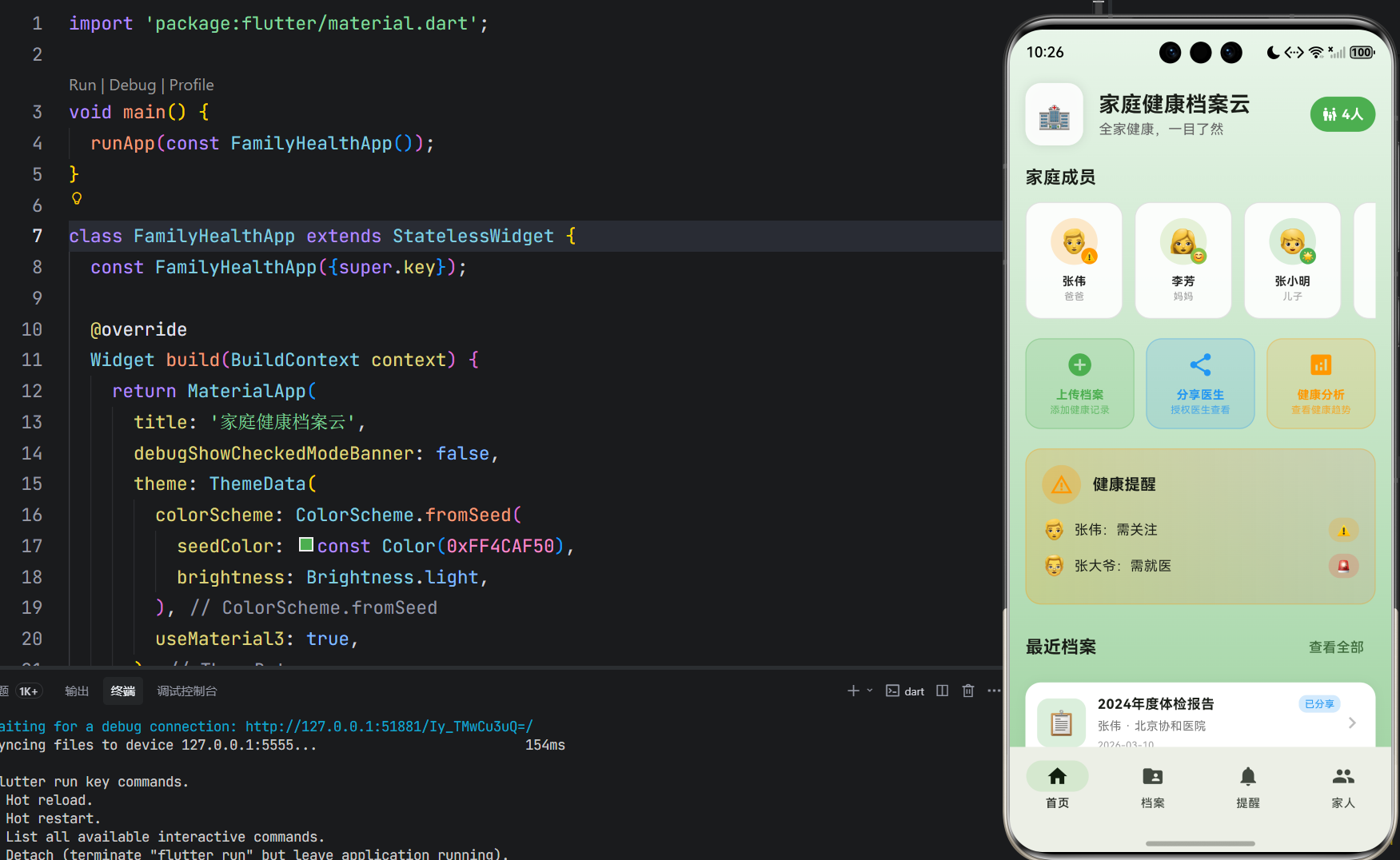
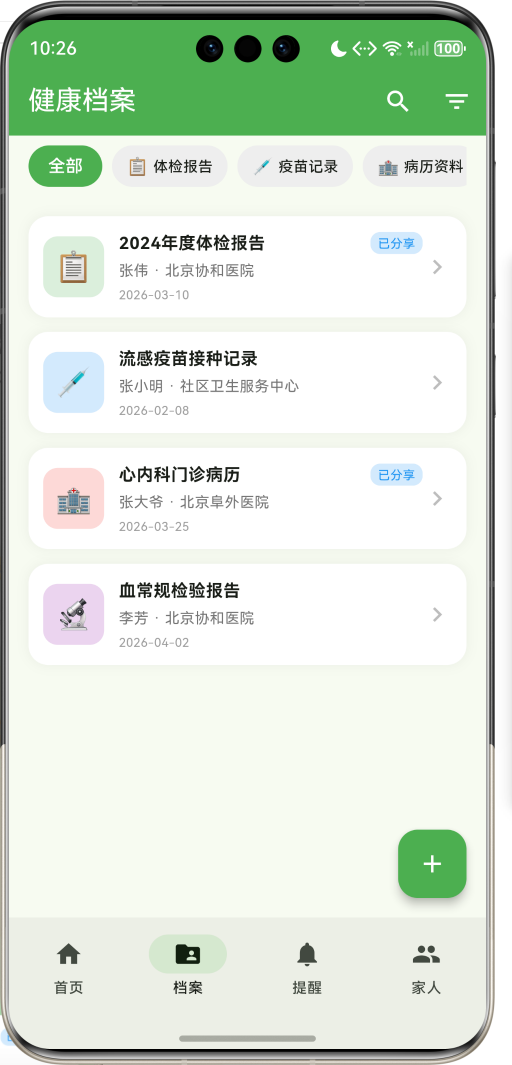
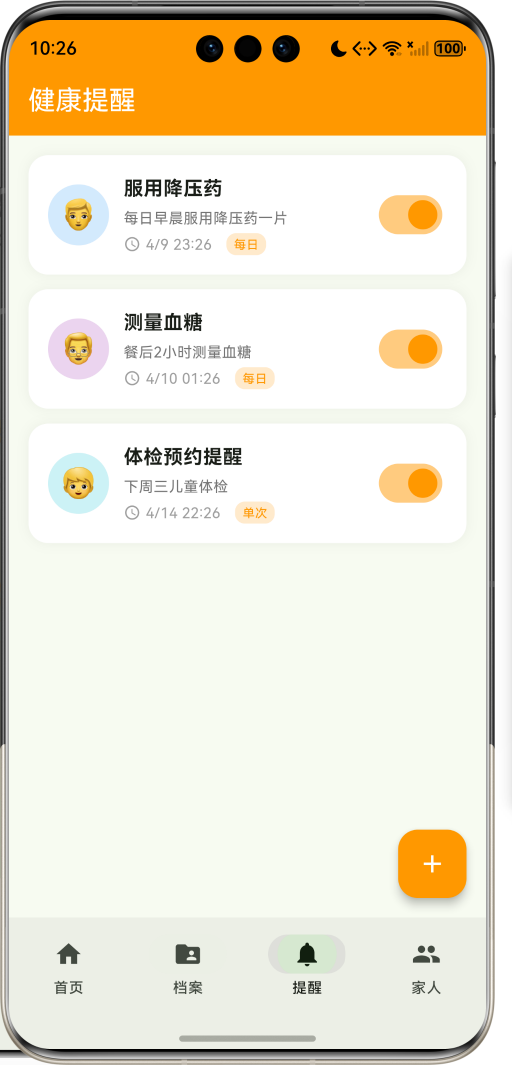
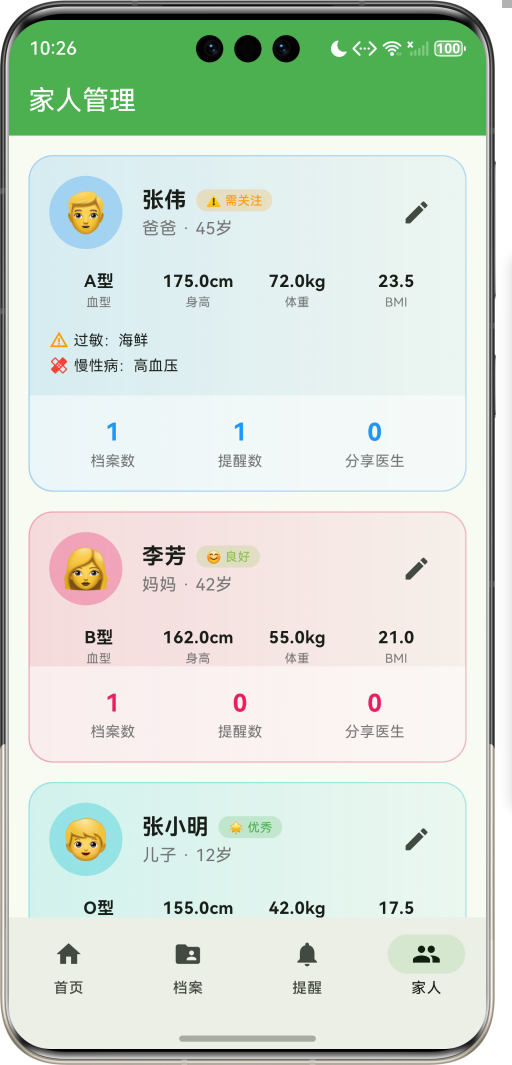
1.1 应用简介
家庭健康档案云是一款健康管理类应用,致力于为家庭提供统一的健康档案管理平台。支持全家成员健康档案集中管理,包括体检报告、疫苗记录、病历资料、处方药单、检验报告、影像资料等多种类型。通过医生授权分享功能,让医生随时查看健康档案,看病更方便、更高效。
应用以健康的绿色为主色调,象征生命与活力。涵盖首页导航、档案管理、健康提醒、家人管理四大模块。用户可以添加家庭成员、上传健康档案、设置健康提醒、授权医生查看,全方位守护家人健康。
1.2 核心功能
| 功能模块 | 功能描述 | 实现方式 |
|---|---|---|
| 成员管理 | 6种家庭角色管理 | 枚举定义 |
| 档案分类 | 6种健康档案类型 | 分类管理 |
| 档案上传 | 多种格式档案上传 | 表单提交 |
| 医生分享 | 授权医生查看档案 | 分享对话框 |
| 健康提醒 | 用药/体检提醒 | 定时提醒 |
| 健康分析 | 家庭健康概况统计 | 数据分析 |
1.3 家庭角色定义
| 序号 | 角色名称 | Emoji | 色值 |
|---|---|---|---|
| 1 | 爸爸 | 👨 | #2196F3 |
| 2 | 妈妈 | 👩 | #E91E63 |
| 3 | 爷爷 | 👴 | #9C27B0 |
| 4 | 奶奶 | 👵 | #FF5722 |
| 5 | 儿子 | 👦 | #00BCD4 |
| 6 | 女儿 | 👧 | #FF9800 |
1.4 档案类型定义
| 序号 | 类型名称 | Emoji | 色值 |
|---|---|---|---|
| 1 | 体检报告 | 📋 | #4CAF50 |
| 2 | 疫苗记录 | 💉 | #2196F3 |
| 3 | 病历资料 | 🏥 | #F44336 |
| 4 | 处方药单 | 💊 | #FF9800 |
| 5 | 检验报告 | 🔬 | #9C27B0 |
| 6 | 影像资料 | 📷 | #00BCD4 |
1.5 健康状态定义
| 序号 | 状态名称 | Emoji | 色值 |
|---|---|---|---|
| 1 | 优秀 | 🌟 | #4CAF50 |
| 2 | 良好 | 😊 | #8BC34A |
| 3 | 一般 | 😐 | #FFC107 |
| 4 | 需关注 | ⚠️ | #FF9800 |
| 5 | 需就医 | 🚨 | #F44336 |
1.6 技术栈
| 技术领域 | 技术选型 | 版本要求 |
|---|---|---|
| 开发框架 | Flutter | >= 3.0.0 |
| 编程语言 | Dart | >= 2.17.0 |
| 设计规范 | Material Design 3 | - |
| 动画控制 | AnimationController | - |
| 状态管理 | setState | - |
| 目标平台 | 鸿蒙OS / Web | API 21+ |
1.7 项目结构
lib/
└── main_family_health.dart
    ├── FamilyHealthApp              # 应用入口
    ├── FamilyRole                   # 家庭角色枚举
    ├── RecordType                   # 档案类型枚举
    ├── HealthStatus                 # 健康状态枚举
    ├── FamilyMember                 # 家庭成员模型
    ├── HealthRecord                 # 健康档案模型
    ├── HealthReminder               # 健康提醒模型
    ├── FamilyHealthHomePage         # 主页面(底部导航)
    ├── _buildHomePage               # 首页模块
    ├── _buildRecordsPage            # 档案页模块
    ├── _buildRemindersPage          # 提醒页模块
    ├── _buildProfilePage            # 家人页模块
    ├── RecordDetailPage             # 档案详情页面
    ├── AddMemberSheet               # 添加成员弹窗
    ├── AddRecordSheet               # 上传档案弹窗
    └── AddReminderSheet             # 添加提醒弹窗
二、系统架构
2.1 整体架构图
Data Layer
Business Layer
Presentation Layer
主页面
FamilyHealthHomePage
首页
档案页
提醒页
家人页
成员概览
快速操作
健康预警
最近档案
档案分类
档案列表
档案详情
提醒列表
提醒开关
成员卡片
健康信息
档案管理器
RecordManager
提醒管理器
ReminderManager
分享管理器
ShareManager
FamilyMember
家庭成员
HealthRecord
健康档案
HealthReminder
健康提醒
2.2 类图设计
has
has
has
belongsTo
belongsTo
FamilyHealthApp
+Widget build()
<<enumeration>>
FamilyRole
+String label
+String emoji
+Color color
+father()
+mother()
+grandpa()
+grandma()
+son()
+daughter()
<<enumeration>>
RecordType
+String label
+String emoji
+Color color
+checkup()
+vaccine()
+medical()
+prescription()
+test()
+image()
<<enumeration>>
HealthStatus
+String label
+String emoji
+Color color
+excellent()
+good()
+normal()
+attention()
+warning()
FamilyMember
+String id
+String name
+FamilyRole role
+int age
+String bloodType
+double height
+double weight
+List<String> allergies
+List<String> chronicDiseases
+HealthStatus healthStatus
+double bmi
HealthRecord
+String id
+String memberId
+RecordType type
+String title
+String hospital
+String doctor
+DateTime date
+String summary
+List<String> tags
+bool isShared
HealthReminder
+String id
+String memberId
+String title
+String description
+DateTime time
+String frequency
+bool isActive
2.3 页面导航流程
首页
档案
提醒
家人
应用启动
首页
底部导航
成员概览
档案列表
提醒列表
成员管理
选择成员
档案分类
点击档案
档案详情
查看摘要
分享医生
下载档案
添加提醒
添加成员
2.4 档案管理流程
医生 详情页 档案页 首页 用户 医生 详情页 档案页 首页 用户 点击上传档案 打开上传表单 填写档案信息 选择成员/类型 上传文件 保存档案 返回首页 点击分享医生 发送授权请求 确认查看
三、核心模块设计
3.1 数据模型设计
3.1.1 家庭角色枚举 (FamilyRole)
dart
enum FamilyRole {
  father('爸爸', '👨', Color(0xFF2196F3)),
  mother('妈妈', '👩', Color(0xFFE91E63)),
  grandpa('爷爷', '👴', Color(0xFF9C27B0)),
  grandma('奶奶', '👵', Color(0xFFFF5722)),
  son('儿子', '👦', Color(0xFF00BCD4)),
  daughter('女儿', '👧', Color(0xFFFF9800));

  final String label;
  final String emoji;
  final Color color;

  const FamilyRole(this.label, this.emoji, this.color);
}
3.1.2 档案类型枚举 (RecordType)
dart
enum RecordType {
  checkup('体检报告', '📋', Color(0xFF4CAF50)),
  vaccine('疫苗记录', '💉', Color(0xFF2196F3)),
  medical('病历资料', '🏥', Color(0xFFF44336)),
  prescription('处方药单', '💊', Color(0xFFFF9800)),
  test('检验报告', '🔬', Color(0xFF9C27B0)),
  image('影像资料', '📷', Color(0xFF00BCD4));

  final String label;
  final String emoji;
  final Color color;

  const RecordType(this.label, this.emoji, this.color);
}
3.1.3 家庭成员模型 (FamilyMember)
dart
class FamilyMember {
  final String id;              // 成员ID
  final String name;            // 姓名
  final FamilyRole role;        // 家庭角色
  final int age;                // 年龄
  final String bloodType;       // 血型
  final double height;          // 身高(cm)
  final double weight;          // 体重(kg)
  final List<String> allergies; // 过敏史
  final List<String> chronicDiseases; // 慢性病
  final HealthStatus healthStatus; // 健康状态
  final String avatar;          // 头像

  double get bmi => weight / ((height / 100) * (height / 100));
}
3.1.4 健康档案模型 (HealthRecord)
dart
class HealthRecord {
  final String id;              // 档案ID
  final String memberId;        // 成员ID
  final RecordType type;        // 档案类型
  final String title;           // 档案标题
  final String hospital;        // 医院名称
  final String doctor;          // 医生姓名
  final DateTime date;          // 就诊日期
  final String summary;         // 档案摘要
  final String? filePath;       // 文件路径
  final List<String> tags;      // 标签
  final bool isShared;          // 是否已分享
}
3.1.5 健康提醒模型 (HealthReminder)
dart
class HealthReminder {
  final String id;              // 提醒ID
  final String memberId;        // 成员ID
  final String title;           // 提醒标题
  final String description;     // 提醒描述
  final DateTime time;          // 提醒时间
  final String frequency;       // 重复频率
  final bool isActive;          // 是否启用
}
3.1.6 家庭健康状态分布
25% 25% 25% 25% 家庭健康状态分布示例 优秀 良好 一般 需关注 需就医
3.2 页面结构设计
3.2.1 主页面布局
FamilyHealthHomePage
IndexedStack
首页
档案页
提醒页
家人页
NavigationBar
首页 Tab
档案 Tab
提醒 Tab
家人 Tab
3.2.2 首页结构
首页
渐变背景
头部信息
家庭成员概览
快速操作
健康预警
最近档案
应用图标
应用名称
成员总数
横向滚动列表
健康状态标识
添加成员按钮
上传档案
分享医生
健康分析
预警动画
预警列表
3.2.3 档案详情页结构
档案详情页
SliverAppBar
信息卡片
摘要卡片
标签卡片
渐变背景
档案类型图标
档案标题
分享/下载按钮
成员信息
医院名称
医生姓名
就诊日期
档案摘要内容
标签列表
3.2.4 家人管理页结构
家人管理页
成员卡片列表
基本信息
健康指标
过敏/病史
统计数据
头像图标
姓名
角色/年龄
健康状态
血型
身高
体重
BMI
档案数
提醒数
分享医生数
3.3 健康预警逻辑
需关注
需就医
其他
加载家庭成员
遍历健康状态
状态判断
添加到预警列表
跳过
显示预警卡片
脉冲动画效果
用户点击
跳转成员详情
3.4 档案分享逻辑
有效
无效
点击分享医生
输入医生手机号
选择要分享的档案
确认分享
验证医生信息
发送授权请求
提示错误
医生接收通知
医生确认查看
建立查看权限
更新档案分享状态
显示分享成功
四、UI设计规范
4.1 配色方案
应用以健康的绿色为主色调,象征生命与活力:
| 颜色类型 | 色值 | 用途 |
|---|---|---|
| 主色 | #4CAF50 (Green) | 导航、主题元素 |
| 辅助色 | #81C784 | 次要元素 |
| 强调色 | #A5D6A7 | 背景渐变 |
| 背景色 | #E8F5E9 → #A5D6A7 | 首页渐变背景 |
| 卡片背景 | #FFFFFF | 内容卡片 |
4.2 家庭角色配色
| 角色 | 色值 | 视觉效果 |
|---|---|---|
| 爸爸 | #2196F3 | 稳重蓝色 |
| 妈妈 | #E91E63 | 温馨粉色 |
| 爷爷 | #9C27B0 | 睿智紫色 |
| 奶奶 | #FF5722 | 温暖橙色 |
| 儿子 | #00BCD4 | 活力青色 |
| 女儿 | #FF9800 | 可爱橙色 |
4.3 字体规范
| 元素 | 字号 | 字重 | 颜色 |
|---|---|---|---|
| 页面标题 | 22px | Bold | #000000 |
| 成员名称 | 18px | Bold | 角色色 |
| 档案标题 | 14px | Bold | #000000 |
| 摘要文字 | 14px | Regular | #424242 |
| 统计数字 | 20px | Bold | 角色色 |
4.4 组件规范
4.4.1 家庭成员卡片
┌─────────────────────────────────────┐
│  家庭成员                            │
│                                     │
│  ┌────┐ ┌────┐ ┌────┐ ┌────┐ ┌──┐ │
│  │ 👨 │ │ 👩 │ │ 👴 │ │ 👵 │ │ + │ │
│  │张伟│ │李芳│ │张老│ │王老│ │添加│ │
│  │爸爸│ │妈妈│ │爷爷│ │奶奶│ │成员│ │
│  └────┘ └────┘ └────┘ └────┘ └──┘ │
└─────────────────────────────────────┘
4.4.2 健康预警卡片
┌─────────────────────────────────────┐
│  ⚠️ 健康提醒                        │
│                                     │
│  👨 张伟:需关注               ⚠️   │
│  👴 张大爷:需就医             🚨   │
└─────────────────────────────────────┘
4.4.3 档案卡片
┌─────────────────────────────────────┐
│  ┌────┐  2024年度体检报告    [已分享]│
│  │ 📋 │  张伟 · 北京协和医院        │
│  │    │  2024-01-15              >  │
│  └────┘                             │
└─────────────────────────────────────┘
4.4.4 健康提醒卡片
┌─────────────────────────────────────┐
│  ┌────┐  服用降压药            [开关]│
│  │ 👨 │  每日早晨服用降压药一片      │
│  │    │  1/20 08:00    [每日]       │
│  └────┘                             │
└─────────────────────────────────────┘
4.4.5 成员详情卡片
┌─────────────────────────────────────┐
│  ┌────┐  张伟 [🌟 优秀]        [编辑]│
│  │ 👨 │  爸爸 · 45岁                │
│  └────┘                             │
│                                     │
│  A型    175cm   72kg    23.5 BMI   │
│                                     │
│  ⚠️ 过敏:海鲜                       │
│  💊 慢性病:高血压                   │
│                                     │
│  ┌──────────────────────────────┐  │
│  │  3档案    1提醒    0分享医生  │  │
│  └──────────────────────────────┘  │
└─────────────────────────────────────┘
五、核心功能实现
5.1 家庭成员卡片实现
dart
Widget _buildMemberCard(FamilyMember member) {
  final isSelected = _selectedMember?.id == member.id;
  return GestureDetector(
    onTap: () {
      setState(() {
        _selectedMember = isSelected ? null : member;
      });
    },
    child: Container(
      width: 100,
      margin: const EdgeInsets.only(right: 12),
      decoration: BoxDecoration(
        gradient: isSelected
            ? LinearGradient(colors: [member.role.color, member.role.color.withValues(alpha: 0.7)])
            : null,
        color: isSelected ? null : Colors.white.withValues(alpha: 0.9),
        borderRadius: BorderRadius.circular(16),
      ),
      child: Column(
        mainAxisAlignment: MainAxisAlignment.center,
        children: [
          Stack(
            children: [
              Container(
                width: 48,
                height: 48,
                decoration: BoxDecoration(
                  color: member.healthStatus.color.withValues(alpha: 0.2),
                  shape: BoxShape.circle,
                ),
                child: Center(child: Text(member.avatar, style: const TextStyle(fontSize: 24))),
              ),
              Positioned(
                right: 0,
                bottom: 0,
                child: Container(
                  padding: const EdgeInsets.all(2),
                  decoration: BoxDecoration(
                    color: member.healthStatus.color,
                    shape: BoxShape.circle,
                  ),
                  child: Text(member.healthStatus.emoji, style: const TextStyle(fontSize: 10)),
                ),
              ),
            ],
          ),
          const SizedBox(height: 8),
          Text(member.name, style: const TextStyle(fontSize: 12, fontWeight: FontWeight.bold)),
          Text(member.role.label, style: const TextStyle(fontSize: 10)),
        ],
      ),
    ),
  );
}
5.2 健康预警实现
dart
Widget _buildHealthAlerts() {
  final warningMembers = _members.where((m) =>
      m.healthStatus == HealthStatus.warning ||
      m.healthStatus == HealthStatus.attention).toList();

  if (warningMembers.isEmpty) return const SizedBox();

  return Container(
    padding: const EdgeInsets.all(16),
    decoration: BoxDecoration(
      gradient: LinearGradient(
        colors: [Colors.orange.withValues(alpha: 0.2), Colors.red.withValues(alpha: 0.1)],
      ),
      borderRadius: BorderRadius.circular(16),
      border: Border.all(color: Colors.orange.withValues(alpha: 0.3)),
    ),
    child: Column(
      crossAxisAlignment: CrossAxisAlignment.start,
      children: [
        Row(
          children: [
            AnimatedBuilder(
              animation: _pulseController,
              builder: (context, child) {
                return Container(
                  padding: const EdgeInsets.all(8),
                  decoration: BoxDecoration(
                    color: Colors.orange.withValues(alpha: 0.2 + _pulseController.value * 0.1),
                    shape: BoxShape.circle,
                  ),
                  child: const Icon(Icons.warning_amber, color: Colors.orange),
                );
              },
            ),
            const SizedBox(width: 12),
            const Text('健康提醒', style: TextStyle(fontSize: 16, fontWeight: FontWeight.bold)),
          ],
        ),
        ...warningMembers.map((member) => Padding(
          padding: const EdgeInsets.only(bottom: 8),
          child: Row(
            children: [
              Text(member.avatar, style: const TextStyle(fontSize: 20)),
              const SizedBox(width: 8),
              Expanded(child: Text('${member.name}:${member.healthStatus.label}')),
              Container(
                padding: const EdgeInsets.symmetric(horizontal: 8, vertical: 4),
                decoration: BoxDecoration(
                  color: member.healthStatus.color.withValues(alpha: 0.2),
                  borderRadius: BorderRadius.circular(12),
                ),
                child: Text(member.healthStatus.emoji, style: const TextStyle(fontSize: 12)),
              ),
            ],
          ),
        )),
      ],
    ),
  );
}
5.3 档案详情实现
dart
Widget _buildInfoCard(FamilyMember member) {
  return Container(
    padding: const EdgeInsets.all(16),
    decoration: BoxDecoration(
      color: record.type.color.withValues(alpha: 0.1),
      borderRadius: BorderRadius.circular(16),
    ),
    child: Column(
      children: [
        Row(
          children: [
            Text(member.avatar, style: const TextStyle(fontSize: 24)),
            const SizedBox(width: 8),
            Text(member.name, style: const TextStyle(fontWeight: FontWeight.bold)),
            const Spacer(),
            Container(
              padding: const EdgeInsets.symmetric(horizontal: 8, vertical: 4),
              decoration: BoxDecoration(
                color: record.type.color,
                borderRadius: BorderRadius.circular(12),
              ),
              child: Text(record.type.label, style: const TextStyle(color: Colors.white, fontSize: 12)),
            ),
          ],
        ),
        const SizedBox(height: 16),
        Row(
          mainAxisAlignment: MainAxisAlignment.spaceAround,
          children: [
            _buildInfoItem(Icons.local_hospital, record.hospital, '医院'),
            _buildInfoItem(Icons.person, record.doctor, '医生'),
            _buildInfoItem(Icons.calendar_today, _formatDate(record.date), '日期'),
          ],
        ),
      ],
    ),
  );
}
5.4 成员详情实现
dart
Widget _buildMemberDetailCard(FamilyMember member) {
  final memberRecords = _records.where((r) => r.memberId == member.id).length;
  final memberReminders = _reminders.where((r) => r.memberId == member.id).length;

  return Container(
    margin: const EdgeInsets.only(bottom: 16),
    decoration: BoxDecoration(
      gradient: LinearGradient(
        colors: [member.role.color.withValues(alpha: 0.15), member.role.color.withValues(alpha: 0.05)],
      ),
      borderRadius: BorderRadius.circular(20),
      border: Border.all(color: member.role.color.withValues(alpha: 0.3)),
    ),
    child: Column(
      children: [
        Padding(
          padding: const EdgeInsets.all(16),
          child: Row(
            children: [
              Container(
                width: 60,
                height: 60,
                decoration: BoxDecoration(
                  color: member.role.color.withValues(alpha: 0.3),
                  shape: BoxShape.circle,
                ),
                child: Center(child: Text(member.avatar, style: const TextStyle(fontSize: 32))),
              ),
              const SizedBox(width: 16),
              Expanded(
                child: Column(
                  crossAxisAlignment: CrossAxisAlignment.start,
                  children: [
                    Row(
                      children: [
                        Text(member.name, style: const TextStyle(fontSize: 18, fontWeight: FontWeight.bold)),
                        const SizedBox(width: 8),
                        Container(
                          padding: const EdgeInsets.symmetric(horizontal: 8, vertical: 2),
                          decoration: BoxDecoration(
                            color: member.healthStatus.color.withValues(alpha: 0.2),
                            borderRadius: BorderRadius.circular(12),
                          ),
                          child: Text(
                            '${member.healthStatus.emoji} ${member.healthStatus.label}',
                            style: TextStyle(fontSize: 10, color: member.healthStatus.color),
                          ),
                        ),
                      ],
                    ),
                    Text('${member.role.label} · ${member.age}岁', style: TextStyle(color: Colors.grey[600])),
                  ],
                ),
              ),
            ],
          ),
        ),
        Padding(
          padding: const EdgeInsets.symmetric(horizontal: 16),
          child: Row(
            children: [
              _buildInfoItem('血型', member.bloodType),
              _buildInfoItem('身高', '${member.height}cm'),
              _buildInfoItem('体重', '${member.weight}kg'),
              _buildInfoItem('BMI', member.bmi.toStringAsFixed(1)),
            ],
          ),
        ),
      ],
    ),
  );
}
5.5 健康提醒实现
dart
Widget _buildReminderCard(HealthReminder reminder) {
  final member = _members.firstWhere((m) => m.id == reminder.memberId);
  return Container(
    margin: const EdgeInsets.only(bottom: 12),
    padding: const EdgeInsets.all(16),
    decoration: BoxDecoration(
      color: Colors.white,
      borderRadius: BorderRadius.circular(16),
      boxShadow: [BoxShadow(color: Colors.black.withValues(alpha: 0.05), blurRadius: 8)],
    ),
    child: Row(
      children: [
        Container(
          width: 50,
          height: 50,
          decoration: BoxDecoration(
            color: member.role.color.withValues(alpha: 0.2),
            shape: BoxShape.circle,
          ),
          child: Center(child: Text(member.avatar, style: const TextStyle(fontSize: 24))),
        ),
        const SizedBox(width: 12),
        Expanded(
          child: Column(
            crossAxisAlignment: CrossAxisAlignment.start,
            children: [
              Text(reminder.title, style: const TextStyle(fontSize: 16, fontWeight: FontWeight.bold)),
              const SizedBox(height: 4),
              Text(reminder.description, style: TextStyle(fontSize: 12, color: Colors.grey[600])),
              const SizedBox(height: 4),
              Row(
                children: [
                  Icon(Icons.access_time, size: 14, color: Colors.grey[500]),
                  const SizedBox(width: 4),
                  Text(_formatDateTime(reminder.time), style: TextStyle(fontSize: 12, color: Colors.grey[500])),
                  const SizedBox(width: 12),
                  Container(
                    padding: const EdgeInsets.symmetric(horizontal: 6, vertical: 2),
                    decoration: BoxDecoration(
                      color: Colors.orange.withValues(alpha: 0.2),
                      borderRadius: BorderRadius.circular(8),
                    ),
                    child: Text(reminder.frequency, style: const TextStyle(fontSize: 10, color: Colors.orange)),
                  ),
                ],
              ),
            ],
          ),
        ),
        Switch(value: reminder.isActive, onChanged: (value) {}, activeColor: Colors.orange),
      ],
    ),
  );
}
六、交互设计
6.1 档案浏览流程
详情页 档案页 首页 用户 详情页 档案页 首页 用户 选择家庭成员 更新选中状态 点击最近档案 跳转档案详情 浏览档案列表 按类型筛选 点击档案卡片 显示详情 点击分享 打开分享对话框
6.2 健康提醒流程
是
否
添加提醒
选择成员
填写标题
填写描述
选择频率
保存提醒
显示在提醒列表
到达提醒时间
发送通知
用户确认
等待
用户关闭开关
暂停提醒
6.3 医生分享流程
有效
无效
医生确认
医生拒绝
选择档案
输入医生信息
验证信息
发送请求
等待确认
分享成功
分享取消
七、扩展功能规划
7.1 后续版本规划
2024-01-07 2024-01-14 2024-01-21 2024-01-28 2024-02-04 2024-02-11 2024-02-18 2024-02-25 2024-03-03 2024-03-10 2024-03-17 2024-03-24 2024-03-31 2024-04-07 基础UI框架 成员管理功能 档案管理功能 云端同步 OCR识别 智能提醒 AI健康分析 医院对接 家庭医生签约 V1.0 基础版本 V1.1 增强版本 V1.2 进阶版本 家庭健康档案云开发计划
7.2 功能扩展建议
7.2.1 云端同步
同步功能:
- 多设备数据同步
- 数据备份恢复
- 家庭成员共享
- 隐私加密保护
7.2.2 OCR识别
识别功能:
- 拍照识别体检报告
- 自动提取关键指标
- 智能分类归档
- 异常指标提醒
7.2.3 AI健康分析
AI功能:
- 健康趋势分析
- 异常预警
- 用药建议
- 就医推荐
八、注意事项
8.1 开发注意事项
-
数据安全:健康档案涉及隐私,需加密存储
-
权限管理:分享功能需严格控制访问权限
-
文件处理:档案文件可能较大,需压缩和分片上传
-
动画控制:AnimationController需正确释放
-
状态管理:成员选择状态需及时同步
8.2 常见问题
| 问题 | 原因 | 解决方案 |
|---|---|---|
| 档案上传失败 | 文件过大 | 压缩后上传 |
| 分享链接失效 | 权限过期 | 重新授权 |
| 提醒不生效 | 系统权限问题 | 检查通知权限 |
| 成员状态错误 | 数据未同步 | 刷新数据 |
| BMI计算异常 | 身高体重缺失 | 检查数据完整性 |
8.3 使用技巧
🏥 家庭健康管理技巧 🏥
档案管理
- 定期上传体检报告,建立健康档案库
- 按时间顺序整理,便于追踪健康变化
- 重要档案标记分享,方便就医时查看
健康提醒
- 设置用药提醒,避免漏服药物
- 定期体检提醒,早发现早治疗
- 疫苗接种提醒,保护家人健康
医生分享
- 就诊前分享相关档案给医生
- 授权时选择必要档案,保护隐私
- 及时撤销过期授权,确保安全
九、运行说明
9.1 环境要求
| 环境 | 版本要求 |
|---|---|
| Flutter SDK | >= 3.0.0 |
| Dart SDK | >= 2.17.0 |
| 鸿蒙OS | API 21+ |
| Web浏览器 | Chrome 90+ |
9.2 运行命令
bash
# 查看可用设备
flutter devices

# 运行到Web服务器
flutter run -d web-server -t lib/main_family_health.dart --web-port 8142

# 运行到鸿蒙设备
flutter run -d 127.0.0.1:5555 lib/main_family_health.dart

# 代码分析
flutter analyze lib/main_family_health.dart
十、总结
家庭健康档案云通过首页导航、档案管理、健康提醒、家人管理四大模块,为家庭提供了一个统一的健康档案管理平台。应用支持6种家庭角色、6种档案类型、5种健康状态,让全家健康一目了然。
核心功能涵盖成员管理、档案分类、医生分享、健康提醒、健康分析五大模块。成员管理支持爸爸、妈妈、爷爷、奶奶、儿子、女儿六种角色;档案分类包括体检报告、疫苗记录、病历资料、处方药单、检验报告、影像资料;医生分享功能让医生随时查看健康档案;健康提醒支持用药、体检等多种提醒类型;健康分析提供家庭健康概况统计。
应用采用 Material Design 3 设计规范,以健康的绿色为主色调,象征生命与活力。通过本应用,希望能够帮助家庭更好地管理健康档案,守护家人健康,让看病更方便、更高效。
家庭健康档案云------全家健康,一目了然