性能优化是哪里都躲不过去的重要问题。
一、性能问题全景图
很多 Electron 应用在上线后才会暴露性能问题:
javascript
┌─────────────────────────────────────────────────────────────────┐
│                    性能问题用户反馈                              │
├─────────────────────────────────────────────────────────────────┤
│                                                                  │
│  😤 "打开应用要等5秒,我还不如用网页版"                         │
│  😤 "用了一小时后越来越卡,必须重启"                            │
│  😤 "打开三个窗口后电脑风扇狂转"                                │
│  😤 "切换标签页有明显卡顿"                                      │
│  😤 "导入大文件时界面直接卡死"                                  │
│                                                                  │
└─────────────────────────────────────────────────────────────────┘
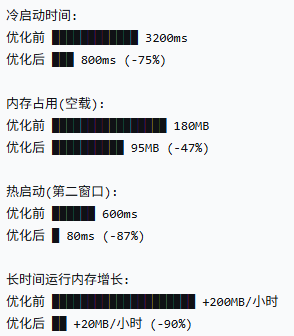
优化前后对比:
二、启动速度优化
2.1 启动流程分析
javascript
优化前启动流程:
━━━━━━━━━━━━━━━━━━━━━━━━━━━━━━━━━━━━━━━━━━━━━━━━━━━━━━━━━━━━━━━━━━━━━━━━━━━━━━━━━

主进程启动    加载模块    创建窗口    加载HTML    执行JS    首屏渲染    用户可交互
   │            │           │           │          │          │           │
   ●────────────●───────────●───────────●──────────●──────────●───────────●
   0ms        150ms       300ms      800ms     1200ms    1800ms      3200ms

   ├─ 同步require ┤
   │              ├─ 窗口创建 ┤
   │              │            ├─ 网络请求 ┤
   │              │            │            ├─ 解析执行 ┤
   │              │            │            │            ├─ 渲染 ┤

优化后启动流程:
━━━━━━━━━━━━━━━━━━━━━━━━━━━━━━━━━━━━━━━━━━━━━━━━━━━━━━━━━━━━━━━━━━━━━━━━━━━━━━━━━

主进程启动    懒加载模块    预创建窗口    预加载HTML    缓存JS    渐进渲染    可交互
   │            │            │             │            │          │         │
   ●────────────●────────────●─────────────●────────────●──────────●─────────●
   0ms         50ms        100ms         200ms       350ms      500ms     800ms

   ├─ 按需加载 ┤
   │            ├─ 后台创建 ┤
   │            │             ├─ 预解析 ┤
   │            │             │          ├─ 缓存 ┤
   │            │             │          │        ├─ 骨架屏 ┤
2.2 主进程启动优化
javascript
// ❌ 错误示例:同步加载所有模块
import { app, BrowserWindow, ipcMain, Menu, Tray, shell } from 'electron'
import fs from 'fs'
import path from 'path'
import Database from 'better-sqlite3'
// ... 20+ 个同步导入,阻塞启动

// ✅ 正确示例:按需懒加载
import { app } from 'electron'

// 使用动态导入
const lazyLoad = {
  BrowserWindow: null as any,
  ipcMain: null as any,

  async getBrowserWindow() {
    if (!this.BrowserWindow) {
      const { BrowserWindow } = await import('electron')
      this.BrowserWindow = BrowserWindow
    }
    return this.BrowserWindow
  },

  async getIpcMain() {
    if (!this.ipcMain) {
      const { ipcMain } = await import('electron')
      this.ipcMain = ipcMain
    }
    return this.ipcMain
  }
}

// 延迟注册IPC处理器
app.whenReady().then(async () => {
  // 先创建窗口
  const { BrowserWindow } = await lazyLoad.getBrowserWindow()
  const win = new BrowserWindow({ show: false })

  // 窗口显示后再注册IPC
  win.once('ready-to-show', async () => {
    const { ipcMain } = await lazyLoad.getIpcMain()
    registerIpcHandlers(ipcMain)
    win.show()
  })
})
2.3 窗口创建优化
javascript
// packages/main/src/window/optimizedWindow.ts

import { BrowserWindow, app } from 'electron'
import path from 'path'

// 窗口池 - 预创建窗口
class WindowPool {
  private pool: BrowserWindow[] = []
  private maxSize = 3
  private isReady = false

  async init() {
    // 后台预创建窗口
    for (let i = 0; i < this.maxSize; i++) {
      const win = await this.createHiddenWindow()
      this.pool.push(win)
    }
    this.isReady = true
  }

  private async createHiddenWindow(): Promise<BrowserWindow> {
    const win = new BrowserWindow({
      show: false,  // 关键:先隐藏
      width: 1200,
      height: 800,
      webPreferences: {
        preload: path.join(__dirname, '../preload/dist/index.js'),
        contextIsolation: true,
        nodeIntegration: false,
      }
    })

    // 预加载HTML
    await win.loadFile(path.join(__dirname, '../renderer/dist/index.html'))

    return win
  }

  getWindow(): BrowserWindow {
    if (this.pool.length > 0) {
      const win = this.pool.pop()!
      win.show()
      return win
    }
    return this.createWindow()
  }

  private createWindow() {
    const win = new BrowserWindow({ show: true })
    win.loadFile(path.join(__dirname, '../renderer/dist/index.html'))
    return win
  }

  returnWindow(win: BrowserWindow) {
    if (this.pool.length < this.maxSize && !win.isDestroyed()) {
      win.hide()
      this.pool.push(win)
    } else {
      win.destroy()
    }
  }
}

export const windowPool = new WindowPool()

// 使用窗口池
app.whenReady().then(async () => {
  await windowPool.init()  // 后台预热

  // 用户需要时立即获取
  const mainWindow = windowPool.getWindow()
})
2.4 渲染进程启动优化
javascript
// packages/renderer/src/main.ts - 优化入口

import { createApp } from 'vue'

// 1. 使用异步组件
const AsyncComponent = defineAsyncComponent(() =>
  import('./components/HeavyComponent.vue')
)

// 2. 路由懒加载
const router = createRouter({
  routes: [
    {
      path: '/dashboard',
      component: () => import('./views/Dashboard.vue')
    },
    {
      path: '/analytics',
      component: () => import('./views/Analytics.vue')
    }
  ]
})

// 3. 延迟非关键功能
const initNonCriticalFeatures = async () => {
  // 首屏渲染后再加载
  requestIdleCallback(() => {
    import('./analytics').then(m => m.initAnalytics())
    import('./autoSave').then(m => m.initAutoSave())
    import('./plugins').then(m => m.loadPlugins())
  })
}

// 4. 骨架屏优先显示
const app = createApp(App)
app.mount('#app')

// 5. 首屏后再执行重任务
window.addEventListener('load', () => {
  initNonCriticalFeatures()
})

// 6. 使用 Vite 的预构建
// vite.config.ts
export default {
  optimizeDeps: {
    include: ['vue', 'vue-router', 'pinia'],  // 预构建大型依赖
    exclude: ['heavy-package']  // 排除不常用的
  }
}
2.5 V8 编译缓存
javascript
// packages/main/src/index.ts

import { app } from 'electron'
import path from 'path'

// 启用 V8 编译缓存
require('v8-compile-cache')

// 自定义缓存目录
const cacheDir = path.join(app.getPath('userData'), 'v8-cache')
process.env.V8_CACHE_DIR = cacheDir

// 预编译常用模块
const precompileModules = async () => {
  const modules = [
    'electron',
    'fs',
    'path',
    'better-sqlite3'
  ]

  for (const mod of modules) {
    try {
      require(mod)
    } catch (e) {
      // 忽略错误
    }
  }
}

app.whenReady().then(() => {
  precompileModules()
})
三、内存优化
3.1 内存泄漏排查
javascript
// packages/main/src/monitor/memoryMonitor.ts

import { app, BrowserWindow, webContents } from 'electron'

interface MemorySnapshot {
  timestamp: number
  mainProcess: NodeJS.MemoryUsage
  renderers: Array<{
    pid: number
    memory: Electron.ProcessMemoryInfo
    url: string
  }>
}

class MemoryMonitor {
  private snapshots: MemorySnapshot[] = []
  private interval: NodeJS.Timeout | null = null
  private threshold = 500 * 1024 * 1024  // 500MB 阈值

  start() {
    this.interval = setInterval(() => {
      this.takeSnapshot()
      this.checkForLeaks()
    }, 60000)  // 每分钟检查一次
  }

  async takeSnapshot() {
    const snapshot: MemorySnapshot = {
      timestamp: Date.now(),
      mainProcess: process.memoryUsage(),
      renderers: []
    }

    // 获取所有渲染进程内存
    const windows = BrowserWindow.getAllWindows()
    for (const win of windows) {
      const memory = await win.webContents.getProcessMemoryInfo()
      snapshot.renderers.push({
        pid: win.webContents.getProcessId(),
        memory,
        url: win.webContents.getURL()
      })
    }

    this.snapshots.push(snapshot)

    // 只保留最近10个快照
    if (this.snapshots.length > 10) {
      this.snapshots.shift()
    }

    return snapshot
  }

  checkForLeaks() {
    if (this.snapshots.length < 2) return

    const first = this.snapshots[0]
    const last = this.snapshots[this.snapshots.length - 1]

    // 检查主进程内存增长
    const mainGrowth = last.mainProcess.heapUsed - first.mainProcess.heapUsed
    if (mainGrowth > 100 * 1024 * 1024) {
      console.warn(`⚠️ 主进程内存增长: ${this.formatBytes(mainGrowth)}`)
      this.generateLeakReport()
    }

    // 检查渲染进程
    for (const renderer of last.renderers) {
      const firstRenderer = first.renderers.find(r => r.pid === renderer.pid)
      if (firstRenderer) {
        const growth = renderer.memory.private - firstRenderer.memory.private
        if (growth > 200 * 1024 * 1024) {
          console.warn(`⚠️ 渲染进程 ${renderer.pid} 内存增长: ${this.formatBytes(growth)}`)
        }
      }
    }
  }

  generateLeakReport() {
    const report = {
      timestamp: new Date().toISOString(),
      snapshots: this.snapshots,
      suggestions: this.analyzeSuggestions()
    }

    // 保存报告
    const fs = require('fs')
    const path = require('path')
    const reportPath = path.join(app.getPath('userData'), 'memory-leak-report.json')
    fs.writeFileSync(reportPath, JSON.stringify(report, null, 2))

    console.log(`📊 内存泄漏报告已保存: ${reportPath}`)
  }

  analyzeSuggestions(): string[] {
    const suggestions: string[] = []

    // 分析建议
    if (this.hasUnclosedWindows()) {
      suggestions.push('检测到未正确关闭的窗口')
    }

    if (this.hasEventListenersLeak()) {
      suggestions.push('可能存在未移除的事件监听器')
    }

    if (this.hasLargeArrays()) {
      suggestions.push('检测到大数组未释放')
    }

    return suggestions
  }

  private hasUnclosedWindows(): boolean {
    const windows = BrowserWindow.getAllWindows()
    const hiddenWindows = windows.filter(w => !w.isVisible() && !w.isDestroyed())
    return hiddenWindows.length > 0
  }

  private hasEventListenersLeak(): boolean {
    // 通过 webContents 监听器数量判断
    const contents = webContents.getAllWebContents()
    const avgListeners = contents.reduce((sum, c) => sum + c.getListeners('*').length, 0) / contents.length
    return avgListeners > 100
  }

  private hasLargeArrays(): boolean {
    // 通过 heap snapshot 分析
    // 需要额外实现
    return false
  }

  private formatBytes(bytes: number): string {
    return `${(bytes / 1024 / 1024).toFixed(2)} MB`
  }

  stop() {
    if (this.interval) {
      clearInterval(this.interval)
      this.interval = null
    }
  }
}

export const memoryMonitor = new MemoryMonitor()

// 开发环境启动监控
if (process.env.NODE_ENV === 'development') {
  memoryMonitor.start()
}
3.2 常见内存泄漏场景与修复
javascript
// ❌ 场景1:未清理的定时器
class TimerComponent {
  start() {
    setInterval(() => {
      this.updateData()
    }, 1000)
  }
}
// ✅ 修复
class TimerComponent {
  private interval: NodeJS.Timeout | null = null

  start() {
    this.interval = setInterval(() => {
      this.updateData()
    }, 1000)
  }

  destroy() {
    if (this.interval) {
      clearInterval(this.interval)
      this.interval = null
    }
  }
}

// ❌ 场景2:未移除的事件监听器
window.addEventListener('resize', this.onResize)
// ✅ 修复
window.addEventListener('resize', this.onResize)
// 组件销毁时
window.removeEventListener('resize', this.onResize)

// ❌ 场景3:闭包引用
function createHandler() {
  const largeData = new Array(1000000).fill('data')
  return () => {
    console.log(largeData.length)  // 一直持有引用
  }
}
// ✅ 修复
function createHandler() {
  const largeData = new Array(1000000).fill('data')
  const length = largeData.length
  largeData.length = 0  // 释放数据
  return () => {
    console.log(length)
  }
}

// ❌ 场景4:全局变量
window.cache = {}
window.cache[userId] = largeData
// ✅ 修复:使用 WeakMap
const cache = new WeakMap()
cache.set(element, largeData)  // 元素被销毁时自动释放

// ❌ 场景5:console.log 保留对象引用
console.log(largeObject)  // 开发环境
// ✅ 修复
if (process.env.NODE_ENV === 'development') {
  console.log(largeObject)
}
// 或使用深度限制
console.log(JSON.stringify(largeObject, null, 2).slice(0, 1000))
3.3 主动内存管理
javascript
// packages/main/src/memory/manager.ts

import { app } from 'electron'

export class MemoryManager {
  private gcInterval: NodeJS.Timeout | null = null

  start() {
    // 定期触发GC
    this.gcInterval = setInterval(() => {
      this.triggerGC()
    }, 5 * 60 * 1000)  // 每5分钟

    // 监听内存压力
    this.setupMemoryPressureHandler()
  }

  private triggerGC() {
    // 触发垃圾回收(需要 --expose-gc 标志)
    if (global.gc) {
      global.gc()
      console.log('GC triggered')
    }

    // 清除所有渲染进程的缓存
    const { webContents } = require('electron')
    webContents.getAllWebContents().forEach(contents => {
      if (!contents.isDestroyed()) {
        contents.session.clearCache()
      }
    })
  }

  private setupMemoryPressureHandler() {
    // 监听系统内存压力
    app.on('low-memory', () => {
      console.warn('System low memory, triggering aggressive GC')
      this.aggressiveCleanup()
    })

    // macOS 内存压力通知
    if (process.platform === 'darwin') {
      process.on('message', (msg) => {
        if (msg === 'memory-pressure') {
          this.aggressiveCleanup()
        }
      })
    }
  }

  private aggressiveCleanup() {
    // 清理所有隐藏窗口
    const { BrowserWindow } = require('electron')
    BrowserWindow.getAllWindows().forEach(win => {
      if (!win.isVisible() && !win.isDestroyed()) {
        win.destroy()
      }
    })

    // 触发多次GC
    for (let i = 0; i < 3; i++) {
      if (global.gc) global.gc()
    }
  }

  async getMemoryReport() {
    const { BrowserWindow } = require('electron')
    const windows = BrowserWindow.getAllWindows()

    const report = {
      mainProcess: process.memoryUsage(),
      renderers: [] as any[]
    }

    for (const win of windows) {
      const memory = await win.webContents.getProcessMemoryInfo()
      report.renderers.push({
        pid: win.webContents.getProcessId(),
        url: win.webContents.getURL(),
        memory
      })
    }

    return report
  }

  stop() {
    if (this.gcInterval) {
      clearInterval(this.gcInterval)
      this.gcInterval = null
    }
  }
}
四、渲染性能优化
4.1 长列表虚拟滚动
javascript
<!-- packages/renderer/src/components/VirtualList.vue -->
<template>
  <div class="virtual-list" ref="container" @scroll="onScroll">
    <div class="spacer" :style="{ height: totalHeight + 'px' }"></div>
    <div class="items" :style="{ transform: `translateY(${offsetY}px)` }">
      <div
        v-for="item in visibleItems"
        :key="item.id"
        class="list-item"
        :style="{ height: itemHeight + 'px' }"
      >
        {{ item.content }}
      </div>
    </div>
  </div>
</template>

<script setup lang="ts">
import { ref, computed, onMounted, onUnmounted } from 'vue'

const props = defineProps<{
  items: any[]
  itemHeight: number
  bufferSize?: number
}>()

const container = ref<HTMLDivElement>()
const scrollTop = ref(0)
const containerHeight = ref(0)

const bufferSize = props.bufferSize || 5

// 计算可见范围
const visibleRange = computed(() => {
  const start = Math.floor(scrollTop.value / props.itemHeight)
  const end = Math.ceil((scrollTop.value + containerHeight.value) / props.itemHeight)

  return {
    start: Math.max(0, start - bufferSize),
    end: Math.min(props.items.length, end + bufferSize)
  }
})

// 可见项
const visibleItems = computed(() => {
  return props.items.slice(visibleRange.value.start, visibleRange.value.end)
})

// 总高度
const totalHeight = computed(() => props.items.length * props.itemHeight)

// 偏移量
const offsetY = computed(() => visibleRange.value.start * props.itemHeight)

// 滚动处理(带节流)
let ticking = false
const onScroll = (e: Event) => {
  if (!ticking) {
    requestAnimationFrame(() => {
      scrollTop.value = (e.target as HTMLDivElement).scrollTop
      ticking = false
    })
    ticking = true
  }
}

// 监听容器尺寸变化
const resizeObserver = new ResizeObserver((entries) => {
  containerHeight.value = entries[0].contentRect.height
})

onMounted(() => {
  if (container.value) {
    containerHeight.value = container.value.clientHeight
    resizeObserver.observe(container.value)
  }
})

onUnmounted(() => {
  resizeObserver.disconnect()
})
</script>

<style scoped>
.virtual-list {
  height: 100%;
  overflow-y: auto;
  position: relative;
}

.spacer {
  position: absolute;
  top: 0;
  left: 0;
  right: 0;
  z-index: -1;
}

.items {
  position: absolute;
  top: 0;
  left: 0;
  right: 0;
}

.list-item {
  padding: 12px;
  border-bottom: 1px solid var(--border-color);
}
</style>
4.2 Web Worker 处理重任务
javascript
// packages/renderer/src/workers/dataProcessor.worker.ts

// 数据处理器 Worker
self.addEventListener('message', (e) => {
  const { type, data } = e.data

  switch (type) {
    case 'PROCESS_LARGE_DATA':
      const result = processLargeData(data)
      self.postMessage({ type: 'PROCESSED', data: result })
      break

    case 'FILTER_DATA':
      const filtered = filterData(data.data, data.predicate)
      self.postMessage({ type: 'FILTERED', data: filtered })
      break

    case 'SORT_DATA':
      const sorted = sortData(data.data, data.comparator)
      self.postMessage({ type: 'SORTED', data: sorted })
      break
  }
})

function processLargeData(data: any[]) {
  // 重计算任务
  const result = []
  for (let i = 0; i < data.length; i++) {
    // 模拟复杂计算
    result.push({
      ...data[i],
      computed: expensiveComputation(data[i])
    })

    // 每1000条报告进度
    if (i % 1000 === 0) {
      self.postMessage({ type: 'PROGRESS', data: i / data.length })
    }
  }
  return result
}

function expensiveComputation(item: any): number {
  // 模拟复杂计算
  return Math.sqrt(Math.pow(item.value, 2) + Math.pow(item.other, 2))
}

// 使用示例
// 主线程
const worker = new Worker(new URL('./dataProcessor.worker.ts', import.meta.url))

worker.postMessage({
  type: 'PROCESS_LARGE_DATA',
  data: largeDataset
})

worker.onmessage = (e) => {
  if (e.data.type === 'PROGRESS') {
    console.log(`进度: ${e.data.data * 100}%`)
  } else if (e.data.type === 'PROCESSED') {
    console.log('处理完成', e.data.data)
  }
}
4.3 图片懒加载与优化
javascript
<!-- packages/renderer/src/components/LazyImage.vue -->
<template>
  <div class="lazy-image" :style="placeholderStyle">
    <img
      v-if="loaded"
      :src="src"
      :alt="alt"
      :class="{ loaded: isLoaded }"
      @load="onLoad"
    />
    <div v-if="!loaded" class="skeleton"></div>
  </div>
</template>

<script setup lang="ts">
import { ref, onMounted, onUnmounted } from 'vue'

const props = defineProps<{
  src: string
  alt?: string
  width?: number
  height?: number
}>()

const loaded = ref(false)
const isLoaded = ref(false)
const observer = ref<IntersectionObserver | null>(null)

const placeholderStyle = computed(() => ({
  width: props.width ? `${props.width}px` : 'auto',
  height: props.height ? `${props.height}px` : 'auto',
  minHeight: props.height ? `${props.height}px` : '100px',
  backgroundColor: '#f0f0f0'
}))

const onLoad = () => {
  isLoaded.value = true
  setTimeout(() => {
    loaded.value = true
  }, 300)
}

onMounted(() => {
  const element = document.querySelector('.lazy-image')
  if (!element) return

  observer.value = new IntersectionObserver(
    (entries) => {
      entries.forEach(entry => {
        if (entry.isIntersecting) {
          loaded.value = true
          observer.value?.disconnect()
        }
      })
    },
    { rootMargin: '50px' }  // 提前50px加载
  )

  observer.value.observe(element)
})

onUnmounted(() => {
  observer.value?.disconnect()
})
</script>

<style scoped>
.lazy-image {
  position: relative;
  overflow: hidden;
}

.skeleton {
  position: absolute;
  top: 0;
  left: 0;
  right: 0;
  bottom: 0;
  background: linear-gradient(
    90deg,
    #f0f0f0 25%,
    #e0e0e0 50%,
    #f0f0f0 75%
  );
  background-size: 200% 100%;
  animation: loading 1.5s infinite;
}

@keyframes loading {
  0% { background-position: 200% 0; }
  100% { background-position: -200% 0; }
}

img {
  width: 100%;
  height: auto;
  opacity: 0;
  transition: opacity 0.3s;
}

img.loaded {
  opacity: 1;
}
</style>
4.4 防抖与节流
javascript
// packages/renderer/src/utils/performance.ts

// 防抖:延迟执行,适合输入框
export function debounce<T extends (...args: any[]) => any>(
  fn: T,
  delay: number
): T & { cancel: () => void } {
  let timeoutId: NodeJS.Timeout

  const debounced = function(this: any, ...args: Parameters<T>) {
    clearTimeout(timeoutId)
    timeoutId = setTimeout(() => fn.apply(this, args), delay)
  } as T & { cancel: () => void }

  debounced.cancel = () => clearTimeout(timeoutId)

  return debounced
}

// 节流:限制执行频率,适合滚动
export function throttle<T extends (...args: any[]) => any>(
  fn: T,
  limit: number
): T {
  let inThrottle = false
  let lastResult: ReturnType<T>

  return function(this: any, ...args: Parameters<T>) {
    if (!inThrottle) {
      lastResult = fn.apply(this, args)
      inThrottle = true
      setTimeout(() => {
        inThrottle = false
      }, limit)
    }
    return lastResult
  } as T
}

// 使用示例
const handleSearch = debounce(async (keyword: string) => {
  const results = await searchAPI(keyword)
  updateResults(results)
}, 300)

const handleScroll = throttle(() => {
  console.log('滚动位置', window.scrollY)
}, 100)

// Vue 组件中使用
const onInput = (e: Event) => {
  handleSearch((e.target as HTMLInputElement).value)
}
五、网络与IO优化
5.1 请求缓存与去重
javascript
// packages/renderer/src/utils/requestCache.ts

interface CacheEntry<T> {
  data: T
  timestamp: number
  ttl: number
}

class RequestCache {
  private cache = new Map<string, CacheEntry<any>>()
  private pendingRequests = new Map<string, Promise<any>>()

  async fetch<T>(
    key: string,
    fetcher: () => Promise<T>,
    ttl: number = 5 * 60 * 1000  // 默认5分钟
  ): Promise<T> {
    // 1. 检查缓存
    const cached = this.cache.get(key)
    if (cached && Date.now() - cached.timestamp < cached.ttl) {
      console.log(`[Cache] Hit: ${key}`)
      return cached.data
    }

    // 2. 检查是否有相同请求进行中(去重)
    const pending = this.pendingRequests.get(key)
    if (pending) {
      console.log(`[Cache] Pending: ${key}`)
      return pending
    }

    // 3. 发起新请求
    console.log(`[Cache] Fetch: ${key}`)
    const promise = fetcher()
      .then(data => {
        this.cache.set(key, {
          data,
          timestamp: Date.now(),
          ttl
        })
        return data
      })
      .finally(() => {
        this.pendingRequests.delete(key)
      })

    this.pendingRequests.set(key, promise)
    return promise
  }

  invalidate(key: string) {
    this.cache.delete(key)
  }

  clear() {
    this.cache.clear()
    this.pendingRequests.clear()
  }

  getStats() {
    return {
      cacheSize: this.cache.size,
      pendingSize: this.pendingRequests.size
    }
  }
}

export const requestCache = new RequestCache()

// 使用示例
const userData = await requestCache.fetch(
  `/api/users/${userId}`,
  () => fetch(`/api/users/${userId}`).then(r => r.json()),
  10 * 60 * 1000  // 10分钟缓存
)
5.2 大文件分片传输
javascript
// packages/main/src/ipc/fileTransfer.ts

import { ipcMain } from 'electron'
import fs from 'fs'
import crypto from 'crypto'

const CHUNK_SIZE = 1024 * 1024  // 1MB 分片

// 文件上传处理器
ipcMain.handle('file:upload-chunked', async (event, { filePath, fileId, totalChunks, chunkIndex, data }) => {
  const uploadDir = path.join(app.getPath('temp'), 'uploads', fileId)

  if (!fs.existsSync(uploadDir)) {
    fs.mkdirSync(uploadDir, { recursive: true })
  }

  const chunkPath = path.join(uploadDir, `chunk_${chunkIndex}`)
  fs.writeFileSync(chunkPath, Buffer.from(data, 'base64'))

  // 检查是否完成
  const chunks = fs.readdirSync(uploadDir)
  if (chunks.length === totalChunks) {
    // 合并分片
    const writeStream = fs.createWriteStream(filePath)
    for (let i = 0; i < totalChunks; i++) {
      const chunk = fs.readFileSync(path.join(uploadDir, `chunk_${i}`))
      writeStream.write(chunk)
    }
    writeStream.end()

    // 清理临时文件
    fs.rmSync(uploadDir, { recursive: true })

    return { success: true, filePath }
  }

  return { success: true, chunkIndex, received: chunks.length }
})

// 文件下载处理器
ipcMain.handle('file:download-chunked', async (event, { filePath, chunkIndex }) => {
  const fileSize = fs.statSync(filePath).size
  const start = chunkIndex * CHUNK_SIZE
  const end = Math.min(start + CHUNK_SIZE, fileSize)

  const buffer = Buffer.alloc(end - start)
  const fd = fs.openSync(filePath, 'r')
  fs.readSync(fd, buffer, 0, buffer.length, start)
  fs.closeSync(fd)

  return {
    data: buffer.toString('base64'),
    isLast: end === fileSize
  }
})
六、性能监控与度量
6.1 性能指标收集
javascript
// packages/renderer/src/monitor/performance.ts

interface PerformanceMetric {
  name: string
  value: number
  unit: string
  timestamp: number
  tags?: Record<string, string>
}

class PerformanceMonitor {
  private metrics: PerformanceMetric[] = []
  private maxMetrics = 1000

  // 记录自定义指标
  record(metric: PerformanceMetric) {
    this.metrics.push(metric)
    if (this.metrics.length > this.maxMetrics) {
      this.metrics.shift()
    }

    // 开发环境输出
    if (process.env.NODE_ENV === 'development') {
      console.log(`[Performance] ${metric.name}: ${metric.value}${metric.unit}`)
    }
  }

  // 测量函数执行时间
  async measure<T>(name: string, fn: () => Promise<T> | T): Promise<T> {
    const start = performance.now()
    try {
      const result = await fn()
      const duration = performance.now() - start
      this.record({
        name,
        value: duration,
        unit: 'ms',
        timestamp: Date.now()
      })
      return result
    } catch (error) {
      throw error
    }
  }

  // 监控内存
  monitorMemory() {
    if ('memory' in performance) {
      const memory = (performance as any).memory
      this.record({
        name: 'memory_used',
        value: memory.usedJSHeapSize / 1024 / 1024,
        unit: 'MB',
        timestamp: Date.now()
      })
    }
  }

  // 监控FPS
  monitorFPS() {
    let frameCount = 0
    let lastTime = performance.now()

    const countFrame = () => {
      frameCount++
      const now = performance.now()

      if (now - lastTime >= 1000) {
        const fps = frameCount
        this.record({
          name: 'fps',
          value: fps,
          unit: 'fps',
          timestamp: now
        })

        frameCount = 0
        lastTime = now
      }

      requestAnimationFrame(countFrame)
    }

    requestAnimationFrame(countFrame)
  }

  // 监控启动时间
  measureStartup() {
    const navigationStart = performance.timing.navigationStart
    const domReady = performance.timing.domContentLoadedEventEnd
    const loadComplete = performance.timing.loadEventEnd

    this.record({
      name: 'dom_ready_time',
      value: domReady - navigationStart,
      unit: 'ms',
      timestamp: Date.now()
    })

    this.record({
      name: 'load_complete_time',
      value: loadComplete - navigationStart,
      unit: 'ms',
      timestamp: Date.now()
    })
  }

  // 获取报告
  getReport() {
    const metrics = this.metrics
    const stats: Record<string, { avg: number; min: number; max: number }> = {}

    // 按名称分组统计
    const groups = new Map<string, number[]>()
    for (const metric of metrics) {
      if (!groups.has(metric.name)) {
        groups.set(metric.name, [])
      }
      groups.get(metric.name)!.push(metric.value)
    }

    for (const [name, values] of groups) {
      stats[name] = {
        avg: values.reduce((a, b) => a + b, 0) / values.length,
        min: Math.min(...values),
        max: Math.max(...values)
      }
    }

    return {
      metrics: metrics.slice(-100),  // 最近100条
      stats,
      timestamp: Date.now()
    }
  }
}

export const perfMonitor = new PerformanceMonitor()

// 自动开始监控
if (process.env.NODE_ENV === 'development') {
  perfMonitor.monitorFPS()
  setInterval(() => perfMonitor.monitorMemory(), 30000)
}
七、优化检查清单
| 优化项 | 状态 | 预期收益 |
|---|---|---|
| 主进程模块懒加载 | ⬜ | 启动时间 -30% |
| 窗口预创建池 | ⬜ | 新窗口打开 -80% |
| V8编译缓存 | ⬜ | 启动时间 -20% |
| 路由懒加载 | ⬜ | 首屏加载 -40% |
| 虚拟滚动 | ⬜ | 长列表渲染 +10x |
| Web Worker | ⬜ | UI不卡顿 |
| 图片懒加载 | ⬜ | 首屏流量 -50% |
| 请求缓存 | ⬜ | 网络请求 -70% |
| 防抖节流 | ⬜ | 事件处理 -90% |
| 内存监控 | ⬜ | 泄漏预警 |
| 定时器清理 | ⬜ | 内存 -30% |
| 事件监听清理 | ⬜ | 内存 -20% |