欢迎加入开源鸿蒙跨平台社区:
https://openharmonycrossplatform.csdn.net
一、项目概述
运行效果图
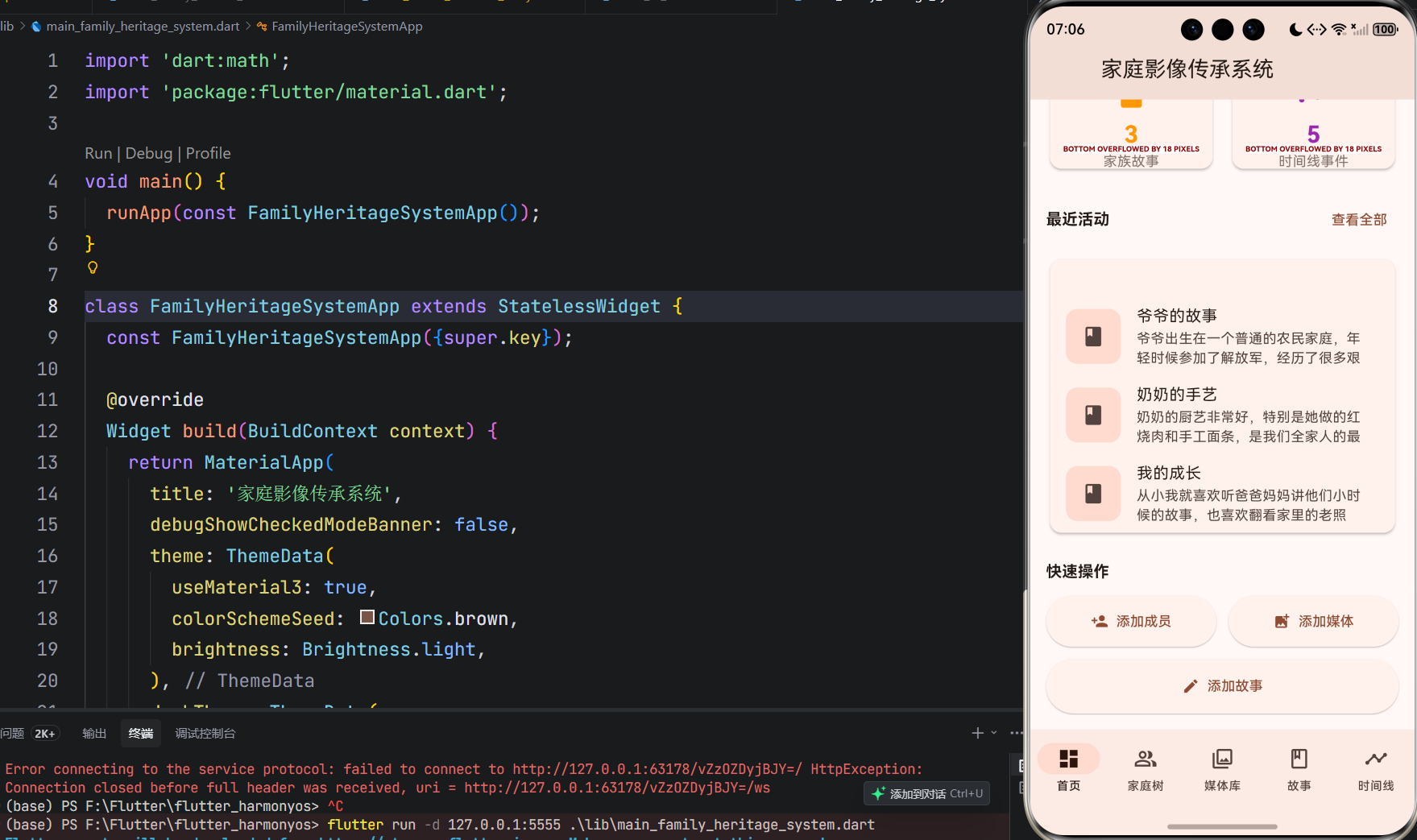
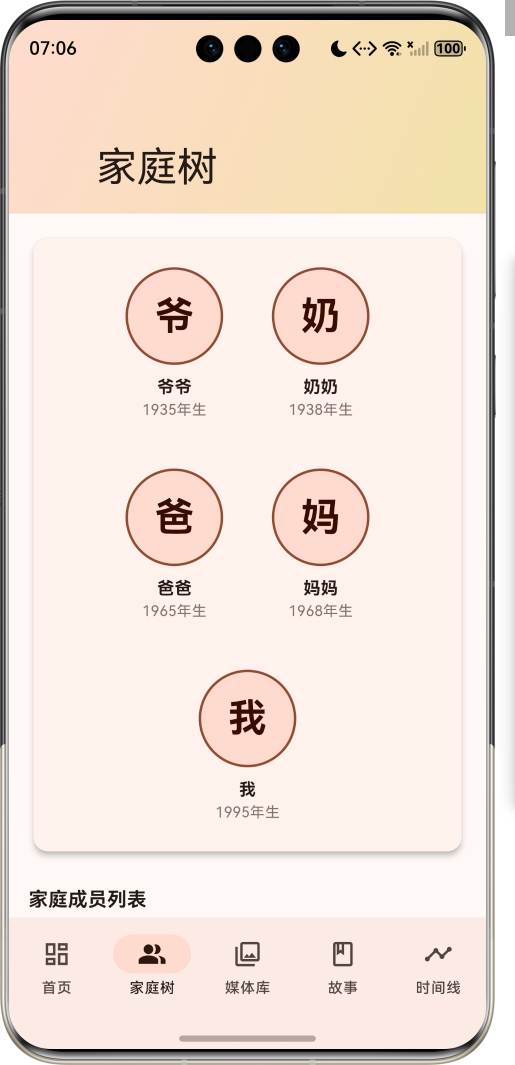
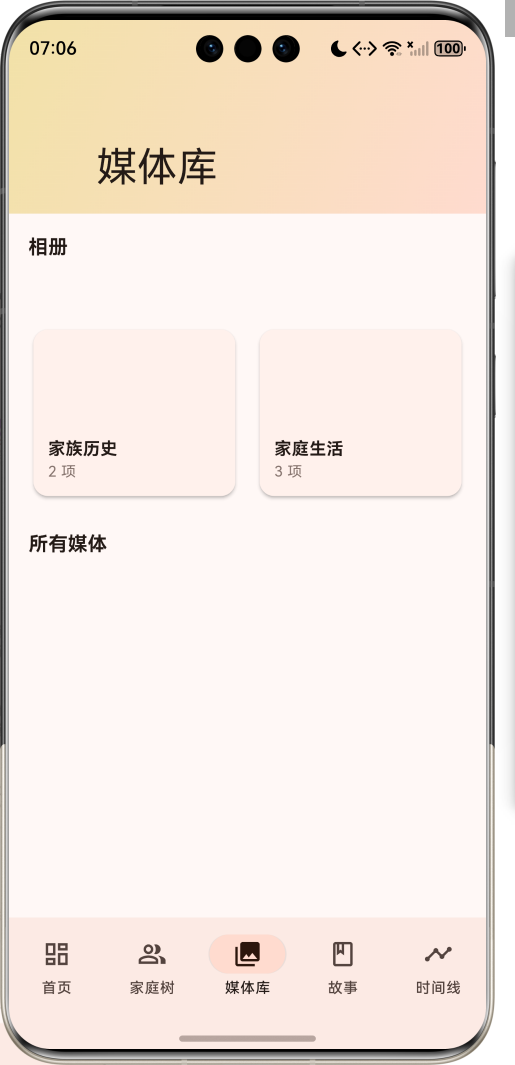
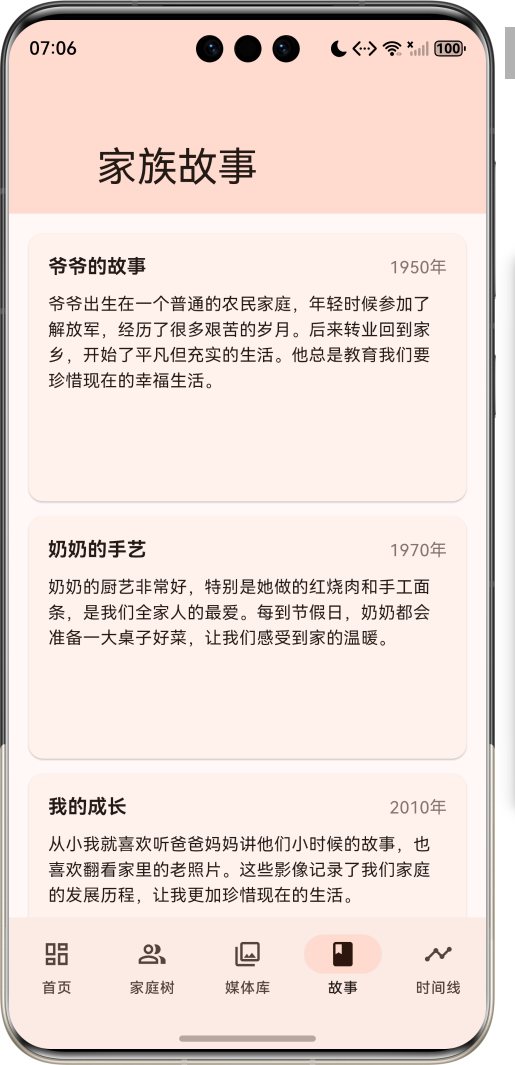
1.1 应用简介
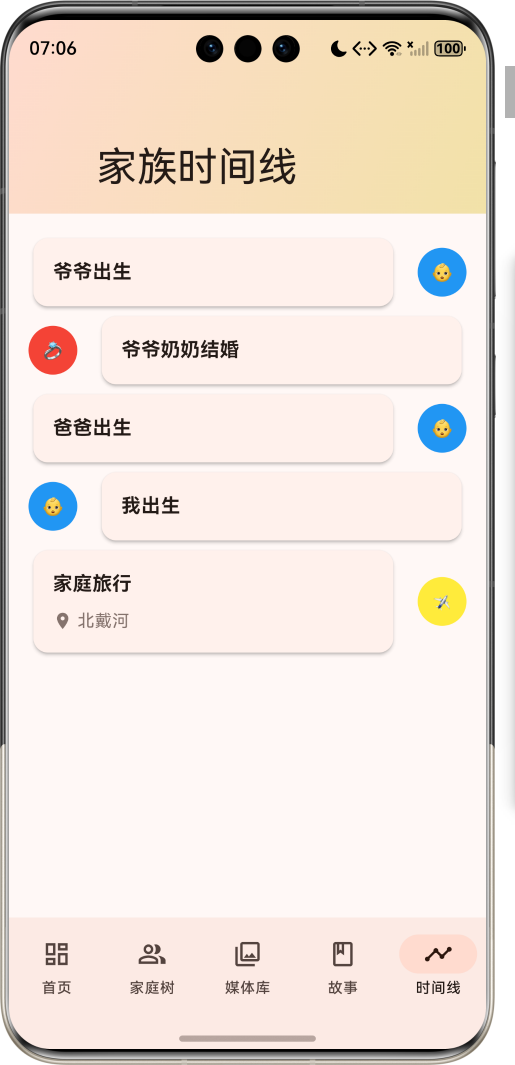
家庭影像传承系统是一款生活服务类应用,专为整理家庭老照片、老视频而设计。通过添加故事说明、制作家庭影像史,让后代能够了解家族历史,传承家族记忆。应用支持家庭成员管理、媒体库整理、故事记录、时间线展示等功能,为家族历史保存提供了一个完整的数字解决方案。
应用以温暖的棕色为主色调,象征家庭的温馨与传承。涵盖首页、家庭树、媒体库、故事、时间线五大模块。用户可以添加家庭成员、上传媒体文件、记录家族故事、查看时间线事件,构建完整的家族影像档案。
1.2 核心功能
| 功能模块 | 功能描述 | 实现方式 |
|---|---|---|
| 家庭成员管理 | 家族成员信息管理 | 数据模型 |
| 媒体库管理 | 照片视频分类存储 | 相册组织 |
| 家族故事 | 添加故事说明 | 文本编辑器 |
| 家庭树 | 家族关系可视化 | 树形结构 |
| 时间线 | 历史事件记录 | 时间轴展示 |
1.3 媒体类型定义
| 序号 | 类型名称 | Emoji | 描述 |
|---|---|---|---|
| 1 | 照片 | 📷 | 静态图像文件 |
| 2 | 视频 | 🎬 | 动态视频文件 |
1.4 家庭成员关系定义
| 序号 | 关系名称 | Emoji | 描述 |
|---|---|---|---|
| 1 | 父亲 | 👨🦰 | 父亲角色 |
| 2 | 母亲 | 👩🦳 | 母亲角色 |
| 3 | 儿子 | 👦 | 儿子角色 |
| 4 | 女儿 | 👧 | 女儿角色 |
| 5 | 祖父 | 👴 | 祖父角色 |
| 6 | 祖母 | 👵 | 祖母角色 |
| 7 | 兄弟 | 👨👦 | 兄弟角色 |
| 8 | 姐妹 | 👩👧 | 姐妹角色 |
| 9 | 叔叔 | 👨💼 | 叔叔角色 |
| 10 | 阿姨 | 👩💼 | 阿姨角色 |
| 11 | 堂/表兄弟姐妹 | 👨👩👧👦 | 堂/表兄弟姐妹角色 |
1.5 时间线事件分类
| 序号 | 分类名称 | Emoji | 颜色 | 描述 |
|---|---|---|---|---|
| 1 | 出生 | 👶 | 蓝色 | 家庭成员出生 |
| 2 | 结婚 | 💍 | 红色 | 结婚事件 |
| 3 | 毕业 | 🎓 | 绿色 | 毕业事件 |
| 4 | 旅行 | ✈️ | 黄色 | 旅行事件 |
| 5 | 庆祝 | 🎉 | 橙色 | 庆祝事件 |
| 6 | 里程碑 | 🏆 | 紫色 | 里程碑事件 |
| 7 | 其他 | 📝 | 灰色 | 其他事件 |
1.6 技术栈
| 技术领域 | 技术选型 | 版本要求 |
|---|---|---|
| 开发框架 | Flutter | >= 3.0.0 |
| 编程语言 | Dart | >= 2.17.0 |
| 设计规范 | Material Design 3 | - |
| 数据管理 | 本地存储 | - |
| 界面组件 | Material Components | - |
| 目标平台 | 鸿蒙OS / Web | API 21+ |
1.7 项目结构
lib/
└── main_family_heritage_system.dart
    ├── FamilyHeritageSystemApp    # 应用入口
    ├── MediaType                  # 媒体类型枚举
    ├── Relationship               # 家庭成员关系枚举
    ├── TimelineCategory           # 时间线事件分类枚举
    ├── FamilyMember               # 家庭成员模型
    ├── MediaItem                  # 媒体项模型
    ├── Story                      # 故事模型
    ├── FamilyAlbum                # 相册模型
    ├── TimelineEvent              # 时间线事件模型
    ├── FamilyHeritageHomePage     # 主页面(底部导航)
    ├── _buildDashboardPage        # 首页
    ├── _buildFamilyTreePage       # 家庭树页面
    ├── _buildMediaLibraryPage     # 媒体库页面
    ├── _buildStoriesPage          # 故事页面
    └── _buildTimelinePage         # 时间线页面
二、系统架构
2.1 整体架构图
Data Layer
Business Layer
Presentation Layer
主页面
FamilyHeritageHomePage
首页
家庭树页
媒体库页
故事页
时间线页
快速统计
最近活动
快速操作
家庭树可视化
成员列表
相册网格
媒体网格
故事列表
故事详情
时间线事件
事件详情
数据管理
DataManager
媒体处理
MediaProcessor
时间线生成
TimelineGenerator
FamilyMember
家庭成员
MediaItem
媒体项
Story
故事
FamilyAlbum
相册
TimelineEvent
时间线事件
2.2 类图设计
has
has
references
references
contains
contains
has
references
references
FamilyHeritageSystemApp
+Widget build()
<<enumeration>>
MediaType
+String label
+String emoji
+IconData icon
+photo()
+video()
<<enumeration>>
Relationship
+String label
+String emoji
+father()
+mother()
+son()
+daughter()
+grandfather()
+grandmother()
<<enumeration>>
TimelineCategory
+String label
+String emoji
+Color color
+birth()
+marriage()
+graduation()
+travel()
+celebration()
+milestone()
+other()
FamilyMember
+String id
+String name
+String? nickname
+DateTime? birthDate
+DateTime? deathDate
+String? avatarUrl
+String? description
+List<Relationship> relationships
+List<String> mediaIds
+List<String> storyIds
MediaItem
+String id
+String title
+String? description
+String path
+MediaType type
+DateTime? captureDate
+String? location
+List<String> people
+List<String> tags
Story
+String id
+String title
+String content
+DateTime? date
+String? location
+List<String> mediaIds
+List<String> peopleIds
FamilyAlbum
+String id
+String title
+String? description
+List<String> mediaIds
+List<String> storyIds
+String? coverMediaId
+int mediaCount
TimelineEvent
+String id
+String title
+String? description
+DateTime date
+TimelineCategory category
+List<String> mediaIds
+List<String> peopleIds
2.3 页面导航流程
首页
家庭树
媒体库
故事
时间线
应用启动
首页
底部导航
快速操作
查看家族关系
浏览媒体
阅读故事
查看历史
添加成员
添加媒体
添加故事
成员详情
媒体详情
故事详情
事件详情
2.4 数据管理流程
时间线 时间线生成 媒体处理 数据管理 首页 用户 时间线 时间线生成 媒体处理 数据管理 首页 用户 添加家庭成员 创建成员 返回成员信息 添加媒体 处理媒体 返回媒体信息 添加故事 创建故事 返回故事信息 查看时间线 生成时间线 返回时间线事件
三、核心模块设计
3.1 数据模型设计
3.1.1 家庭成员模型 (FamilyMember)
dart
class FamilyMember {
  final String id;              // 成员ID
  final String name;            // 姓名
  final String? nickname;       // 昵称
  final DateTime? birthDate;     // 出生日期
  final DateTime? deathDate;     // 去世日期
  final String? avatarUrl;       // 头像URL
  final String? description;     // 描述
  final List<Relationship> relationships; // 关系
  final List<String> mediaIds;   // 相关媒体ID
  final List<String> storyIds;   // 相关故事ID
  final DateTime createdAt;      // 创建时间
  final DateTime updatedAt;      // 更新时间
}
3.1.2 媒体项模型 (MediaItem)
dart
class MediaItem {
  final String id;              // 媒体ID
  final String title;           // 标题
  final String? description;     // 描述
  final String path;            // 路径
  final MediaType type;         // 类型
  final DateTime? captureDate;   // 拍摄日期
  final String? location;       // 拍摄地点
  final List<String> people;     // 相关人物
  final List<String> tags;       // 标签
  final int? width;             // 宽度
  final int? height;            // 高度
  final int? duration;          // 时长(视频)
  final DateTime createdAt;      // 创建时间
  final DateTime updatedAt;      // 更新时间
}
3.1.3 故事模型 (Story)
dart
class Story {
  final String id;              // 故事ID
  final String title;           // 标题
  final String content;         // 内容
  final DateTime? date;         // 日期
  final String? location;       // 地点
  final List<String> mediaIds;   // 相关媒体ID
  final List<String> peopleIds;  // 相关人物ID
  final String? coverMediaId;    // 封面媒体ID
  final int likes;              // 点赞数
  final DateTime createdAt;      // 创建时间
  final DateTime updatedAt;      // 更新时间
}
3.1.4 相册模型 (FamilyAlbum)
dart
class FamilyAlbum {
  final String id;              // 相册ID
  final String title;           // 标题
  final String? description;     // 描述
  final List<String> mediaIds;   // 媒体ID列表
  final List<String> storyIds;   // 故事ID列表
  final String? coverMediaId;    // 封面媒体ID
  final int mediaCount;         // 媒体数量
  final DateTime createdAt;      // 创建时间
  final DateTime updatedAt;      // 更新时间
}
3.1.5 时间线事件模型 (TimelineEvent)
dart
class TimelineEvent {
  final String id;              // 事件ID
  final String title;           // 标题
  final String? description;     // 描述
  final DateTime date;          // 日期
  final TimelineCategory category; // 分类
  final List<String> mediaIds;   // 相关媒体ID
  final List<String> peopleIds;  // 相关人物ID
  final String? location;       // 地点
  final DateTime createdAt;      // 创建时间
  final DateTime updatedAt;      // 更新时间
}
3.2 页面结构设计
3.2.1 主页面布局
FamilyHeritageHomePage
IndexedStack
首页
家庭树页
媒体库页
故事页
时间线页
NavigationBar
首页 Tab
家庭树 Tab
媒体库 Tab
故事 Tab
时间线 Tab
3.2.2 首页结构
首页
SliverAppBar
统计网格
最近活动
快速操作
成员统计
媒体统计
故事统计
事件统计
最近故事
添加成员
添加媒体
添加故事
3.2.3 家庭树结构
家庭树页
SliverAppBar
家族树可视化
成员列表
祖先层
父母层
子女层
成员卡片
成员详情
3.2.4 媒体库结构
媒体库页
SliverAppBar
相册网格
媒体网格
相册卡片
照片网格
视频网格
媒体详情
3.3 数据管理逻辑
添加成员
验证输入
创建成员对象
保存到列表
添加媒体
验证输入
创建媒体对象
保存到列表
添加故事
验证输入
创建故事对象
保存到列表
生成时间线事件
查看家庭树
加载成员数据
构建树形结构
查看时间线
加载事件数据
按时间排序
生成时间线
四、UI设计规范
4.1 配色方案
应用以温暖的棕色为主色调,象征家庭的温馨与传承:
| 颜色类型 | 色值 | 用途 |
|---|---|---|
| 主色 | Brown | 导航、主题元素 |
| 辅助色 | Sienna | 家庭树页面 |
| 第三色 | Tan | 媒体库页面 |
| 强调色 | Sandy Brown | 故事页面 |
| 背景色 | #FAFAFA | 页面背景 |
| 卡片背景 | #FFFFFF | 内容卡片 |
4.2 事件分类色彩
| 分类 | 颜色 | 用途 |
|---|---|---|
| 出生 | 蓝色 | 出生事件标识 |
| 结婚 | 红色 | 结婚事件标识 |
| 毕业 | 绿色 | 毕业事件标识 |
| 旅行 | 黄色 | 旅行事件标识 |
| 庆祝 | 橙色 | 庆祝事件标识 |
| 里程碑 | 紫色 | 里程碑事件标识 |
| 其他 | 灰色 | 其他事件标识 |
4.3 字体规范
| 元素 | 字号 | 字重 | 颜色 |
|---|---|---|---|
| 页面标题 | 24px | Bold | 主色 |
| 模块标题 | 18px | Bold | #000000 |
| 成员姓名 | 16px | Bold | #000000 |
| 媒体标题 | 14px | Regular | #000000 |
| 描述文字 | 14px | Regular | 灰色 |
| 统计数字 | 20px | Bold | 白色 |
4.4 组件规范
4.4.1 统计卡片
┌─────────────────────────────────────┐
│  ┌─────┐                            │
│  │ 👥 │                            │
│  └─────┘                            │
│                                     │
│          5                           │
│                                     │
│      家庭成员                        │
└─────────────────────────────────────┘
4.4.2 家庭成员卡片
┌─────────────────────────────────────┐
│  ┌─────┐                            │
│  │ 爷  │ 爷爷                        │
│  └─────┘  1935年生                   │
│                                     │
│  家族的长辈,经历了很多历史事件        │
└─────────────────────────────────────┘
4.4.3 媒体网格
┌─────────────────────────────────────┐
│  ┌────┐ ┌────┐ ┌────┐               │
│  │ 📷 │ │ 📷 │ │ 🎬 │               │
│  └────┘ └────┘ └────┘               │
│  ┌────┐ ┌────┐ ┌────┐               │
│  │ 📷 │ │ 📷 │ │ 📷 │               │
│  └────┘ └────┘ └────┘               │
└─────────────────────────────────────┘
4.4.4 故事卡片
┌─────────────────────────────────────┐
│ 爷爷的故事                          │
│ 1950年                              │
│                                     │
│ 爷爷出生在一个普通的农民家庭,年轻     │
│ 时候参加了解放军,经历了很多艰苦的     │
│ 岁月。后来转业回到家乡,开始了平凡     │
│ 但充实的生活。                       │
│                                     │
│  ┌────┐ ┌────┐                      │
│  │ 📷 │ │ 📷 │                      │
│  └────┘ └────┘                      │
└─────────────────────────────────────┘
4.4.5 时间线事件
┌─────────────────────────────────────┐
│                                     │
│ 爷爷出生                            │
│ 1935年5月15日                       │
│                                     │
│          👶                          │
│                                     │
│ 爷爷奶奶结婚                        │
│ 1958年8月8日                         │
│                                     │
│          💍                          │
└─────────────────────────────────────┘
五、核心功能实现
5.1 家庭树可视化实现
dart
Widget _buildFamilyTreeVisualization() {
  return Card(
    elevation: 4,
    child: Padding(
      padding: const EdgeInsets.all(24),
      child: Column(
        children: [
          Row(
            mainAxisAlignment: MainAxisAlignment.center,
            children: [
              _buildFamilyMemberNode(_familyMembers[0]),
              const SizedBox(width: 40),
              _buildFamilyMemberNode(_familyMembers[1]),
            ],
          ),
          const SizedBox(height: 40),
          Row(
            mainAxisAlignment: MainAxisAlignment.center,
            children: [
              _buildFamilyMemberNode(_familyMembers[2]),
              const SizedBox(width: 40),
              _buildFamilyMemberNode(_familyMembers[3]),
            ],
          ),
          const SizedBox(height: 40),
          Row(
            mainAxisAlignment: MainAxisAlignment.center,
            children: [
              _buildFamilyMemberNode(_familyMembers[4]),
            ],
          ),
        ],
      ),
    ),
  );
}

Widget _buildFamilyMemberNode(FamilyMember member) {
  return GestureDetector(
    onTap: () {
      setState(() {
        _selectedMember = member;
      });
      _showMemberDetail(member);
    },
    child: Column(
      children: [
        Container(
          width: 80,
          height: 80,
          decoration: BoxDecoration(
            color: Theme.of(context).colorScheme.primaryContainer,
            borderRadius: BorderRadius.circular(40),
            border: Border.all(
              color: Theme.of(context).colorScheme.primary,
              width: 2,
            ),
          ),
          child: Center(
            child: Text(
              member.name[0],
              style: TextStyle(
                fontSize: 32,
                fontWeight: FontWeight.bold,
                color: Theme.of(context).colorScheme.onPrimaryContainer,
              ),
            ),
          ),
        ),
        const SizedBox(height: 8),
        Text(
          member.name,
          style: const TextStyle(
            fontWeight: FontWeight.bold,
          ),
        ),
        if (member.birthDate != null)
          Text(
            '${member.birthDate!.year}年生',
            style: TextStyle(
              fontSize: 12,
              color: Theme.of(context).colorScheme.outline,
            ),
          ),
      ],
    ),
  );
}
5.2 媒体库实现
dart
Widget _buildMediaGrid() {
  return Column(
    crossAxisAlignment: CrossAxisAlignment.start,
    children: [
      Text(
        '所有媒体',
        style: Theme.of(context).textTheme.titleMedium?.copyWith(
              fontWeight: FontWeight.bold,
            ),
      ),
      const SizedBox(height: 12),
      GridView.builder(
        shrinkWrap: true,
        physics: const NeverScrollableScrollPhysics(),
        gridDelegate: const SliverGridDelegateWithFixedCrossAxisCount(
          crossAxisCount: 3,
          childAspectRatio: 1,
          crossAxisSpacing: 8,
          mainAxisSpacing: 8,
        ),
        itemCount: _mediaItems.length,
        itemBuilder: (context, index) {
          final media = _mediaItems[index];
          return GestureDetector(
            onTap: () {
              setState(() {
                _selectedMedia = media;
              });
              _showMediaDetail(media);
            },
            child: Container(
              decoration: BoxDecoration(
                borderRadius: BorderRadius.circular(8),
                image: DecorationImage(
                  image: NetworkImage(media.path),
                  fit: BoxFit.cover,
                ),
              ),
              child: media.type == MediaType.video
                  ? Container(
                      alignment: Alignment.bottomRight,
                      padding: const EdgeInsets.all(8),
                      child: Icon(
                        Icons.play_circle,
                        color: Colors.white.withAlpha(200),
                        size: 32,
                      ),
                    )
                  : null,
            ),
          );
        },
      ),
    ],
  );
}
5.3 故事管理实现
dart
void _addStory() {
  if (_titleController.text.isEmpty || _descriptionController.text.isEmpty) {
    ScaffoldMessenger.of(context).showSnackBar(
      const SnackBar(content: Text('请输入标题和内容')),
    );
    return;
  }

  final story = Story(
    id: 'story_${DateTime.now().millisecondsSinceEpoch}',
    title: _titleController.text,
    content: _descriptionController.text,
  );

  setState(() {
    _stories.add(story);
    _titleController.clear();
    _descriptionController.clear();
  });

  ScaffoldMessenger.of(context).showSnackBar(
    const SnackBar(content: Text('故事已添加')),
  );
}

void _showStoryDetail(Story story) {
  showModalBottomSheet(
    context: context,
    isScrollControlled: true,
    backgroundColor: Colors.transparent,
    builder: (context) {
      return DraggableScrollableSheet(
        initialChildSize: 0.8,
        minChildSize: 0.5,
        maxChildSize: 0.95,
        builder: (context, scrollController) {
          return Container(
            decoration: BoxDecoration(
              color: Theme.of(context).scaffoldBackgroundColor,
              borderRadius: const BorderRadius.vertical(top: Radius.circular(20)),
            ),
            child: Column(
              children: [
                Container(
                  width: 40,
                  height: 4,
                  margin: const EdgeInsets.symmetric(vertical: 12),
                  decoration: BoxDecoration(
                    color: Theme.of(context).colorScheme.outline,
                    borderRadius: BorderRadius.circular(2),
                  ),
                ),
                Expanded(
                  child: ListView(
                    controller: scrollController,
                    padding: const EdgeInsets.all(16),
                    children: [
                      Text(
                        story.title,
                        style: Theme.of(context).textTheme.headlineSmall?.copyWith(
                              fontWeight: FontWeight.bold,
                            ),
                      ),
                      if (story.date != null)
                        Text(
                          '${story.date!.year}年${story.date!.month}月${story.date!.day}日',
                          style: TextStyle(
                            color: Theme.of(context).colorScheme.outline,
                          ),
                        ),
                      const SizedBox(height: 16),
                      Text(
                        story.content,
                        style: Theme.of(context).textTheme.bodyLarge,
                      ),
                      if (story.mediaIds.isNotEmpty)
                        Column(
                          children: [
                            const SizedBox(height: 16),
                            Text(
                              '相关照片',
                              style: Theme.of(context).textTheme.titleMedium?.copyWith(
                                    fontWeight: FontWeight.bold,
                                  ),
                            ),
                            const SizedBox(height: 12),
                            GridView.builder(
                              shrinkWrap: true,
                              physics: const NeverScrollableScrollPhysics(),
                              gridDelegate: const SliverGridDelegateWithFixedCrossAxisCount(
                                crossAxisCount: 3,
                                childAspectRatio: 1,
                                crossAxisSpacing: 8,
                                mainAxisSpacing: 8,
                              ),
                              itemCount: story.mediaIds.length,
                              itemBuilder: (context, index) {
                                final mediaId = story.mediaIds[index];
                                final media = _mediaItems.firstWhere(
                                  (m) => m.id == mediaId,
                                  orElse: () => MediaItem(
                                    id: 'default',
                                    title: '默认图片',
                                    path: 'https://via.placeholder.com/150',
                                    type: MediaType.photo,
                                  ),
                                );
                                return Container(
                                  decoration: BoxDecoration(
                                    borderRadius: BorderRadius.circular(8),
                                    image: DecorationImage(
                                      image: NetworkImage(media.path),
                                      fit: BoxFit.cover,
                                    ),
                                  ),
                                );
                              },
                            ),
                          ],
                        ),
                    ],
                  ),
                ),
              ],
            ),
          );
        },
      );
    },
  );
}
5.4 时间线实现
dart
Widget _buildTimelinePage() {
  return CustomScrollView(
    slivers: [
      SliverAppBar(
        expandedHeight: 120,
        floating: true,
        pinned: true,
        flexibleSpace: FlexibleSpaceBar(
          title: const Text('家族时间线'),
          background: Container(
            decoration: BoxDecoration(
              gradient: LinearGradient(
                begin: Alignment.topLeft,
                end: Alignment.bottomRight,
                colors: [
                  Theme.of(context).colorScheme.secondaryContainer,
                  Theme.of(context).colorScheme.tertiaryContainer,
                ],
              ),
            ),
          ),
        ),
      ),
      SliverPadding(
        padding: const EdgeInsets.all(16),
        sliver: _timelineEvents.isEmpty
            ? SliverFillRemaining(
                child: Center(
                  child: Column(
                    mainAxisAlignment: MainAxisAlignment.center,
                    children: [
                      Icon(
                        Icons.timeline_outlined,
                        size: 64,
                        color: Theme.of(context).colorScheme.outline,
                      ),
                      const SizedBox(height: 16),
                      Text(
                        '还没有时间线事件',
                        style: Theme.of(context).textTheme.titleMedium,
                      ),
                      const SizedBox(height: 8),
                      Text(
                        '随着家族故事的添加,时间线会自动生成',
                        style: Theme.of(context).textTheme.bodyMedium?.copyWith(
                              color: Theme.of(context).colorScheme.outline,
                            ),
                      ),
                    ],
                  ),
                ),
              )
            : SliverList(
                delegate: SliverChildBuilderDelegate(
                  (context, index) {
                    final event = _timelineEvents[index];
                    return _buildTimelineEvent(event, index);
                  },
                  childCount: _timelineEvents.length,
                ),
              ),
      ),
    ],
  );
}

Widget _buildTimelineEvent(TimelineEvent event, int index) {
  final isLeft = index % 2 == 0;

  return Row(
    children: [
      if (isLeft)
        Expanded(
          child: Container(
            margin: const EdgeInsets.only(right: 16),
            child: Card(
              elevation: 2,
              child: Padding(
                padding: const EdgeInsets.all(16),
                child: Column(
                  crossAxisAlignment: CrossAxisAlignment.start,
                  children: [
                    Text(
                      event.title,
                      style: Theme.of(context).textTheme.titleMedium?.copyWith(
                            fontWeight: FontWeight.bold,
                          ),
                    ),
                    if (event.description != null)
                      Padding(
                        padding: const EdgeInsets.only(top: 8),
                        child: Text(event.description!),
                      ),
                    if (event.location != null)
                      Padding(
                        padding: const EdgeInsets.only(top: 8),
                        child: Row(
                          children: [
                            Icon(
                              Icons.location_on,
                              size: 16,
                              color: Theme.of(context).colorScheme.outline,
                            ),
                            const SizedBox(width: 4),
                            Text(
                              event.location!,
                              style: TextStyle(
                                color: Theme.of(context).colorScheme.outline,
                              ),
                            ),
                          ],
                        ),
                      ),
                  ],
                ),
              ),
            ),
          ),
        ),
      Container(
        width: 40,
        height: 40,
        decoration: BoxDecoration(
          color: event.category.color,
          borderRadius: BorderRadius.circular(20),
        ),
        child: Center(
          child: Text(event.category.emoji),
        ),
      ),
      if (!isLeft)
        Expanded(
          child: Container(
            margin: const EdgeInsets.only(left: 16),
            child: Card(
              elevation: 2,
              child: Padding(
                padding: const EdgeInsets.all(16),
                child: Column(
                  crossAxisAlignment: CrossAxisAlignment.start,
                  children: [
                    Text(
                      event.title,
                      style: Theme.of(context).textTheme.titleMedium?.copyWith(
                            fontWeight: FontWeight.bold,
                          ),
                    ),
                    if (event.description != null)
                      Padding(
                        padding: const EdgeInsets.only(top: 8),
                        child: Text(event.description!),
                      ),
                    if (event.location != null)
                      Padding(
                        padding: const EdgeInsets.only(top: 8),
                        child: Row(
                          children: [
                            Icon(
                              Icons.location_on,
                              size: 16,
                              color: Theme.of(context).colorScheme.outline,
                            ),
                            const SizedBox(width: 4),
                            Text(
                              event.location!,
                              style: TextStyle(
                                color: Theme.of(context).colorScheme.outline,
                              ),
                            ),
                          ],
                        ),
                      ),
                  ],
                ),
              ),
            ),
          ),
        ),
    ],
  );
}
六、交互设计
6.1 首页交互
数据管理 首页 用户 数据管理 首页 用户 查看统计数据 获取数据 返回统计信息 点击添加成员 显示添加对话框 输入成员信息 保存成员 保存成功 点击添加媒体 显示添加对话框 输入媒体信息 保存媒体 保存成功 点击添加故事 显示添加对话框 输入故事内容 保存故事 保存成功
6.2 家庭树交互
点击成员
查看成员列表
进入家庭树页
查看家族树
用户操作
查看成员详情
查看成员信息
查看相关媒体
查看相关故事
浏览所有成员
6.3 媒体库交互
查看相册
查看所有媒体
点击媒体
点击媒体
返回
媒体库
相册网格
媒体网格
媒体详情
6.4 故事交互
数据管理 故事页 用户 数据管理 故事页 用户 查看故事列表 获取故事 返回故事列表 点击故事 显示故事详情 阅读故事内容 查看相关媒体 点击添加故事 显示添加对话框 输入故事内容 保存故事 保存成功
七、扩展功能规划
7.1 后续版本规划
2024-01-07 2024-01-14 2024-01-21 2024-01-28 2024-02-04 2024-02-11 2024-02-18 2024-02-25 2024-03-03 2024-03-10 2024-03-17 2024-03-24 2024-03-31 基础UI框架 家庭成员管理 媒体库管理 云存储同步 视频处理 家族树编辑 AI识别 社交分享 多语言支持 V1.0 基础版本 V1.1 增强版本 V1.2 进阶版本 家庭影像传承系统开发计划
7.2 功能扩展建议
7.2.1 云存储同步
同步功能:
- 云端备份
- 多设备同步
- 版本控制
- 共享访问
7.2.2 视频处理
视频功能:
- 视频剪辑
- 视频转码
- 视频压缩
- 视频字幕
7.2.3 家族树编辑
编辑功能:
- 拖拽编辑
- 关系自定义
- 分支管理
- 导出功能
7.2.4 AI识别
识别功能:
- 人脸识别
- 场景识别
- 自动分类
- 智能标签
八、注意事项
8.1 开发注意事项
-
数据安全:家庭数据需安全存储
-
性能优化:大量媒体文件需优化加载
-
用户体验:操作流程需简洁直观
-
兼容性:支持不同设备屏幕尺寸
-
本地化:支持多语言和地区设置
8.2 常见问题
| 问题 | 原因 | 解决方案 |
|---|---|---|
| 媒体加载慢 | 图片尺寸大 | 图片压缩处理 |
| 数据丢失 | 本地存储 | 定期备份提醒 |
| 界面卡顿 | 渲染压力大 | 懒加载优化 |
| 关系混乱 | 关系复杂 | 可视化编辑工具 |
8.3 使用技巧
📚 家庭影像管理技巧 📚
媒体整理建议
- 按年代分类:建立不同年代的相册
- 按事件分类:为重要事件创建专属相册
- 按人物分类:为每个家庭成员创建相册
- 定期整理:每月花时间整理新的媒体文件
故事记录技巧
- 及时记录:事件发生后尽快记录
- 详细描述:记录时间、地点、人物、背景
- 关联媒体:为故事添加相关照片视频
- 传承视角:从后代的角度记录家族历史
家庭树维护
- 完整记录:包括出生日期、重要事件
- 关系清晰:明确标注家庭成员关系
- 定期更新:添加新成员和新关系
- 备份数据:防止数据丢失
九、运行说明
9.1 环境要求
| 环境 | 版本要求 |
|---|---|
| Flutter SDK | >= 3.0.0 |
| Dart SDK | >= 2.17.0 |
| 鸿蒙OS | API 21+ |
| Web浏览器 | Chrome 90+ |
9.2 运行命令
bash
# 查看可用设备
flutter devices

# 运行到Web服务器
flutter run -d web-server -t lib/main_family_heritage_system.dart --web-port 8139

# 运行到鸿蒙设备
flutter run -d 127.0.0.1:5555 lib/main_family_heritage_system.dart

# 代码分析
flutter analyze lib/main_family_heritage_system.dart
十、总结
家庭影像传承系统通过首页、家庭树、媒体库、故事、时间线五大模块,为用户提供了一个完整的家庭影像管理平台。应用支持家庭成员管理、媒体库整理、故事记录、时间线展示等功能,让用户能够系统地整理家庭老照片、老视频,添加故事说明,制作家庭影像史。
核心功能涵盖家庭成员管理、媒体库组织、故事记录、家庭树可视化、时间线展示五大模块。家庭成员管理支持添加、编辑、查看家庭成员信息;媒体库组织支持照片视频分类存储和管理;故事记录支持添加详细的家族故事;家庭树可视化展示家族关系;时间线展示记录家族历史事件。
应用采用 Material Design 3 设计规范,以温暖的棕色为主色调,象征家庭的温馨与传承。通过本应用,希望能够帮助用户系统地整理家庭影像资料,记录家族历史,让后代能够了解家族的发展历程,传承家族记忆。
家庭影像传承系统------记录家族历史,传承家庭记忆