Recipe-app 菜谱应用开发教程
项目介绍
项目背景
菜谱应用是一个综合性的烹饪应用,帮助用户浏览、搜索和学习各种菜谱。无论您是厨房新手还是经验丰富的厨师,这个应用都提供了一个直观的界面,让您发现新菜肴、了解烹饪技巧,享受烹饪创作的艺术。
烹饪不仅仅是准备食物,它是一种融合了创造力、文化和科学的艺术形式。拥有一个组织良好的菜谱应用可以将您的烹饪体验从单调的备餐转变为令人兴奋的美食之旅。
应用场景
-
学习做菜:逐步学习准备美味佳肴。每个菜谱都包含详细的食材清单、烹饪步骤和时间信息,即使是初学者也能确保成功。
-
菜谱收藏:浏览按菜系类型、难度和烹饪时间组织的精选菜谱集。用户可以探索不同的类别,如家常菜、川菜、粤菜等。
-
食材准备:查看每个菜谱的详细食材清单,高效规划购物清单。应用帮助用户在开始烹饪前了解需要准备什么。
-
分类浏览:按菜系类型、难度或烹饪时间筛选菜谱,找到适合任何场合的完美菜肴。
功能特性
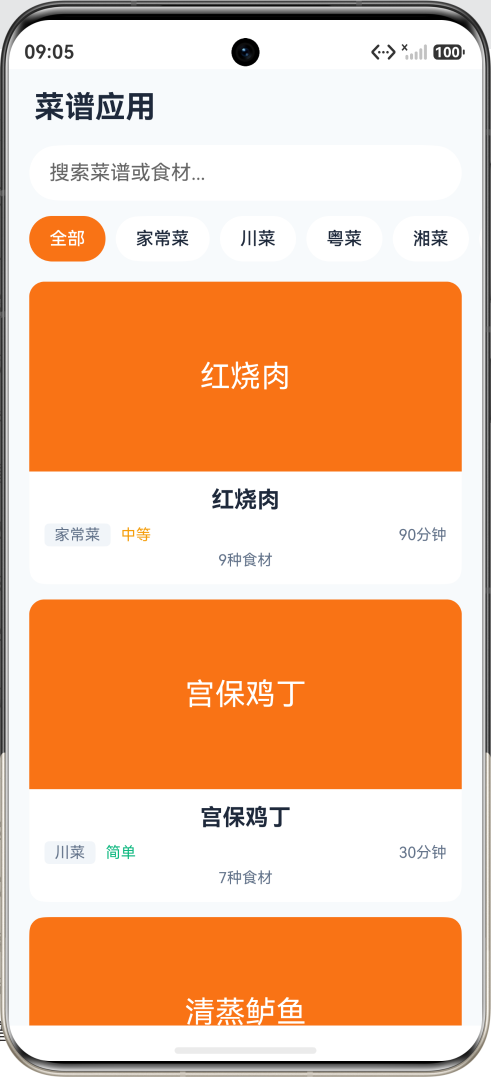
- 菜谱列表:显示带有图片、名称和基本信息的菜谱卡片。
- 分类筛选:按菜系类型筛选(家常菜、川菜、粤菜等)。
- 搜索功能:按名称或食材搜索菜谱。
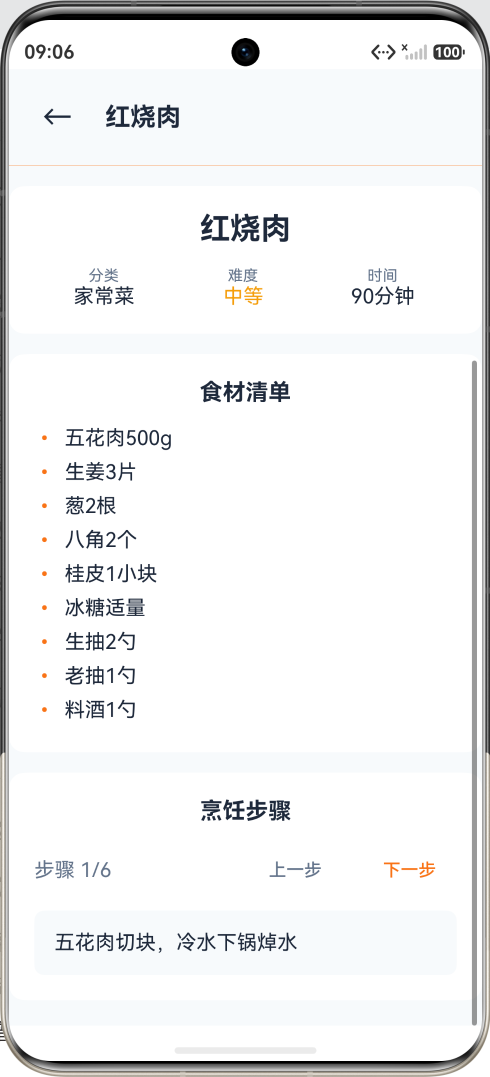
- 菜谱详情:显示详细的菜谱信息,包括食材清单和烹饪步骤。
- 步骤导航:使用上一步/下一步按钮浏览烹饪步骤。
最终效果
应用采用温暖的橙色主题,唤起温暖和食欲的感觉。主界面包含:
- 顶部导航栏,显示应用标题
- 搜索输入框,用于查找特定菜谱
- 水平可滚动的分类标签
- 菜谱卡片列表,显示图片和信息
技术栈
- 开发框架:HarmonyOS NEXT (API 20+)
- 编程语言:ArkTS
- UI框架:ArkUI 声明式 UI
- 核心组件:Column, Row, List, TextInput, Scroll, Grid
知识点讲解
1. 页面路由 (router)
页面路由用于在不同页面之间进行导航,是多页面应用的基础。
typescript
// 导入路由模块
import router from '@ohos.router'

// 跳转到详情页面
private showDetail(recipe: Recipe) {
  router.pushUrl({
    url: 'pages/RecipeDetail',
    params: {
      recipeId: recipe.id,
      recipeName: recipe.name
    }
  })
}

// 在详情页面接收参数
@State recipeId: number = 0

aboutToAppear() {
  const params = router.getParams() as Record<string, Object>
  this.recipeId = params.recipeId as number
}

// 返回上一页
private goBack() {
  router.back()
}
路由方法:
router.pushUrl():跳转到新页面router.back():返回上一页router.replaceUrl():替换当前页面router.getParams():获取页面参数
2. TextInput 搜索组件
TextInput 用于单行文本输入,常用于搜索框。
typescript
TextInput({
  placeholder: '搜索菜谱或食材...',
  text: this.searchKeyword
})
.width('100%')
.height(44)
.borderRadius(22)
.backgroundColor('#ffffff')
.padding({ left: 16, right: 16 })
.onChange((value: string) => {
  this.searchKeyword = value
  // 实时搜索
  this.filterRecipes()
})
常用属性:
placeholder:占位文字text:输入内容type:输入类型(文本、密码、数字等)maxLength:最大输入长度
3. Scroll 滚动视图
Scroll 组件用于创建可滚动的区域。
typescript
Scroll() {
  Column() {
    // 放置需要滚动的内容
    ForEach(this.items, (item: string) => {
      Text(item)
        .fontSize(16)
        .padding(16)
    })
  }
}
.width('100%')
.height(300)  // 设置固定高度
.scrollable(ScrollDirection.Vertical)  // 垂直滚动
4. 数据过滤与搜索
结合分类筛选和关键词搜索进行数据过滤。
typescript
private getFilteredRecipes(): Recipe[] {
  let filtered = this.recipes

  // 按分类过滤
  if (this.selectedCategory !== '全部') {
    filtered = filtered.filter(recipe =>
      recipe.category === this.selectedCategory
    )
  }

  // 按关键词搜索
  if (this.searchKeyword.trim() !== '') {
    const keyword = this.searchKeyword.trim().toLowerCase()
    filtered = filtered.filter(recipe =>
      // 搜索菜名
      recipe.name.toLowerCase().includes(keyword) ||
      // 搜索食材
      recipe.ingredients.some(ingredient =>
        ingredient.toLowerCase().includes(keyword)
      )
    )
  }

  return filtered
}
5. 多条件判断
在菜谱应用中,经常需要根据多个条件进行判断。
typescript
// 获取难度颜色
private getDifficultyColor(difficulty: string): string {
  if (difficulty === '简单') return '#10b981'  // 绿色
  if (difficulty === '中等') return '#f59e0b'  // 黄色
  return '#ef4444'  // 红色(困难)
}

// 获取难度文本
private getDifficultyText(level: number): string {
  switch (level) {
    case 1: return '简单'
    case 2: return '中等'
    case 3: return '困难'
    default: return '未知'
  }
}
6. 数组的高级操作
typescript
// 使用 map 提取特定属性
const recipeNames = this.recipes.map(recipe => recipe.name)

// 使用 find 查找单个元素
const recipe = this.recipes.find(r => r.id === id)

// 使用 some 检查是否包含
const hasIngredient = recipe.ingredients.some(i =>
  i.includes('鸡肉')
)

// 使用 every 检查是否全部满足
const allEasy = this.recipes.every(r => r.difficulty === '简单')
7. 字符串处理
typescript
// 转换为小写进行不区分大小写的搜索
const keyword = this.searchKeyword.toLowerCase()
const name = recipe.name.toLowerCase()

// 检查是否包含关键词
if (name.includes(keyword)) {
  // 匹配成功
}

// 截取字符串
const shortName = recipe.name.substring(0, 10)

// 替换字符串
const description = recipe.description.replace(/\n/g, '<br>')
8. 条件渲染的多种形式
typescript
// 方式1:if/else
if (this.recipes.length === 0) {
  Text('暂无菜谱')
} else {
  List() { ... }
}

// 方式2:三元运算符
Text(this.isLoading ? '加载中...' : '加载完成')

// 方式3:&& 短路
{this.showError && Text('加载失败')}
9. 卡片式布局
typescript
Column() {
  // 图片区域
  Column() {
    Text(recipe.image)
      .fontSize(24)
      .fontColor('#ffffff')
  }
  .width('100%')
  .height(150)
  .borderRadius({ topLeft: 12, topRight: 12 })
  .backgroundColor('#f97316')
  .justifyContent(FlexAlign.Center)

  // 信息区域
  Column() {
    Text(recipe.name)
      .fontSize(18)
      .fontWeight(FontWeight.Bold)

    Row() {
      Text(recipe.category)
        .fontSize(12)
        .fontColor('#64748b')
        .backgroundColor('#f1f5f9')
        .borderRadius(4)
        .padding({ left: 8, right: 8, top: 2, bottom: 2 })

      Text(recipe.difficulty)
        .fontSize(12)
        .fontColor(this.getDifficultyColor(recipe.difficulty))
        .margin({ left: 8 })
    }
  }
  .width('100%')
  .padding(12)
}
.width('100%')
.backgroundColor('#ffffff')
.borderRadius(12)
10. 组件的 margin 和 padding
typescript
// margin: 外边距,组件与其他组件之间的距离
Text('标题')
  .margin({ top: 16, left: 20, right: 20, bottom: 8 })

// padding: 内边距,组件内容与边框之间的距离
Column() {
  Text('内容')
}
.padding(16)  // 四个方向都是 16

// 可以单独设置某个方向
.padding({ left: 20, right: 20 })
.margin({ bottom: 12 })
完整代码解析
主页面结构
┌─────────────────────────────────┐
│         顶部标题栏              │
│         [菜谱应用]              │
├─────────────────────────────────┤
│         搜索框                  │
│  [🔍 搜索菜谱或食材...]         │
├─────────────────────────────────┤
│         分类选择                │
│  [全部][家常菜][川菜][粤菜]...   │
├─────────────────────────────────┤
│         菜谱列表                │
│  ┌───────────────────────────┐  │
│  │      [菜谱图片]           │  │
│  │      红烧肉               │  │
│  │  家常菜  中等  90分钟      │  │
│  │  9种食材                  │  │
│  └───────────────────────────┘  │
│  ┌───────────────────────────┐  │
│  │      [菜谱图片]           │  │
│  │      宫保鸡丁             │  │
│  │  川菜  简单  30分钟        │  │
│  │  7种食材                  │  │
│  └───────────────────────────┘  │
└─────────────────────────────────┘
核心方法实现
1. 初始化菜谱数据
typescript
aboutToAppear() {
  this.recipes = [
    {
      id: 1,
      name: '红烧肉',
      category: '家常菜',
      ingredients: ['五花肉500g', '生姜3片', '葱2根', '八角2个', '桂皮1小块', '冰糖适量', '生抽2勺', '老抽1勺', '料酒1勺'],
      steps: ['五花肉切块,冷水下锅焯水', '锅中放油,加冰糖炒出糖色', '放入五花肉翻炒上色', '加入调料和适量热水', '大火烧开后转小火炖1小时', '大火收汁即可'],
      cookTime: 90,
      difficulty: '中等',
      image: '红烧肉'
    },
    {
      id: 2,
      name: '宫保鸡丁',
      category: '川菜',
      ingredients: ['鸡胸肉300g', '花生米50g', '干辣椒5个', '花椒10粒', '葱姜蒜适量', '黄瓜半根', '胡萝卜半根'],
      steps: ['鸡胸肉切丁,加调料腌制15分钟', '花生米炸熟备用', '锅中放油,炒香花椒和干辣椒', '放入鸡丁翻炒至变色', '加入蔬菜丁和调料', '最后加入花生米翻炒均匀'],
      cookTime: 30,
      difficulty: '简单',
      image: '宫保鸡丁'
    }
    // 更多菜谱...
  ]
}
2. 搜索和筛选
typescript
private getFilteredRecipes(): Recipe[] {
  let filtered = this.recipes

  // 按分类过滤
  if (this.selectedCategory !== '全部') {
    filtered = filtered.filter(recipe =>
      recipe.category === this.selectedCategory
    )
  }

  // 按关键词搜索
  if (this.searchKeyword.trim() !== '') {
    const keyword = this.searchKeyword.trim().toLowerCase()
    filtered = filtered.filter(recipe =>
      recipe.name.toLowerCase().includes(keyword) ||
      recipe.ingredients.some(ingredient =>
        ingredient.toLowerCase().includes(keyword)
      )
    )
  }

  return filtered
}
3. 显示菜谱详情
typescript
private showDetail(recipe: Recipe) {
  this.selectedRecipe = recipe
  this.showRecipeDetail = true
}
常见问题与解决方案
问题1:搜索结果不准确
现象:输入关键词后没有显示匹配的菜谱。
解决方案:
typescript
// 确保搜索时忽略大小写
const keyword = this.searchKeyword.trim().toLowerCase()

// 同时搜索菜名和食材
filtered = filtered.filter(recipe =>
  recipe.name.toLowerCase().includes(keyword) ||
  recipe.ingredients.some(ingredient =>
    ingredient.toLowerCase().includes(keyword)
  )
)
问题2:页面跳转参数丢失
现象:跳转到详情页后,无法获取传递的参数。
解决方案:
typescript
// 发送端:确保参数可序列化
router.pushUrl({
  url: 'pages/RecipeDetail',
  params: {
    recipeId: recipe.id,  // 使用基本类型
    recipeName: recipe.name
  }
})

// 接收端:正确获取参数
aboutToAppear() {
  const params = router.getParams() as Record<string, Object>
  if (params) {
    this.recipeId = params.recipeId as number
    this.recipeName = params.recipeName as string
  }
}
问题3:分类切换后列表不更新
现象:点击分类标签后,菜谱列表没有变化。
解决方案:
typescript
// 确保在 ForEach 中使用过滤后的数据
List() {
  ForEach(this.getFilteredRecipes(), (recipe: Recipe) => {
    ListItem() {
      // 列表项内容
    }
  })
}

// 而不是直接使用 this.recipes
扩展学习
可添加功能
-
收藏功能
- 收藏喜欢的菜谱
- 收藏列表页面
-
菜谱分享
- 分享到社交媒体
- 生成分享图片
-
营养成分分析
- 显示卡路里
- 营养成分表
-
购物清单
- 根据菜谱生成购物清单
- 一键添加到购物车
-
视频教程
- 嵌入视频播放
- 步骤视频演示
优化建议
-
图片优化
- 使用懒加载
- 压缩图片大小
-
搜索优化
- 添加搜索历史
- 搜索建议
-
性能优化
- 使用 LazyForEach
- 缓存计算结果
总结
通过本教程,您学会了:
- 页面路由:如何在页面之间跳转和传递参数
- 搜索功能:如何实现实时搜索
- 数据过滤:如何进行多条件筛选
- 卡片布局:如何设计美观的卡片式界面
- Scroll 组件:如何创建可滚动的区域
- 字符串处理:如何进行不区分大小写的搜索
这些技能可以应用于各种列表展示和搜索场景。