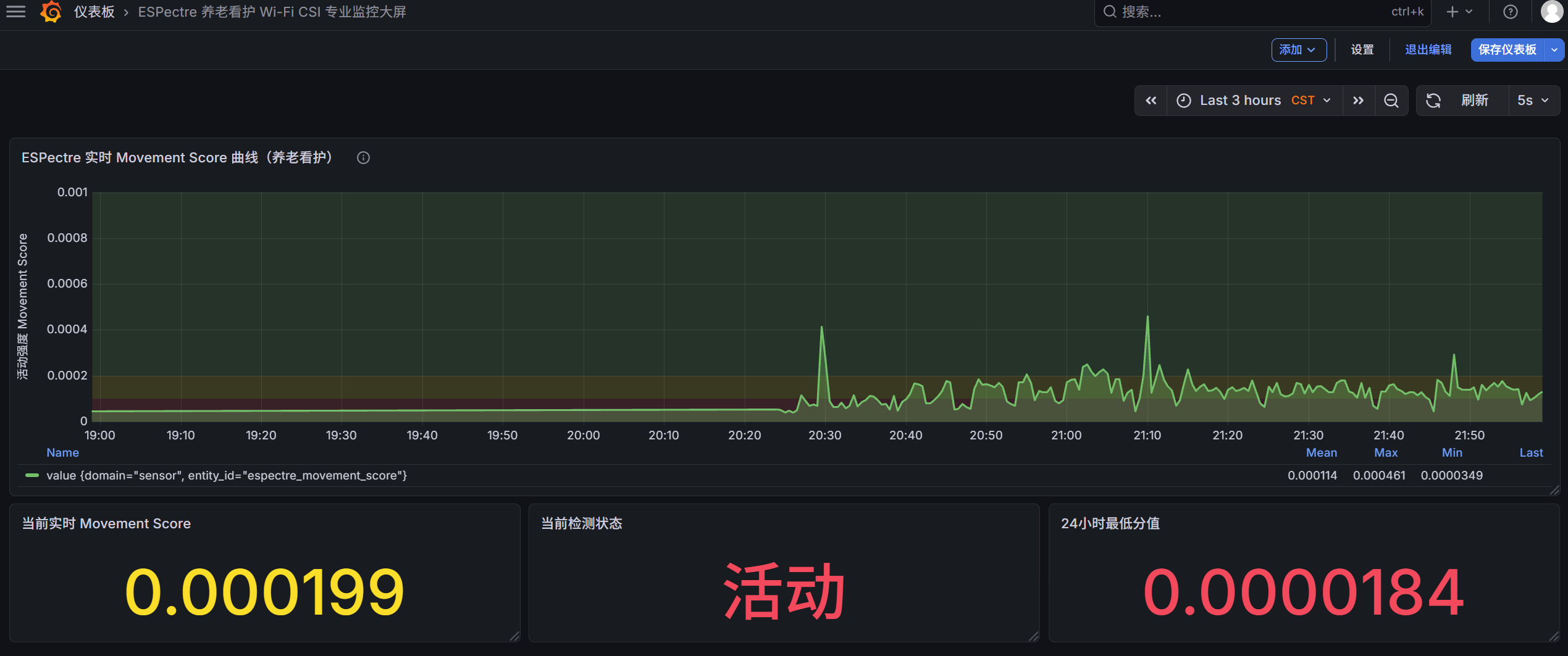
适合:养老院、看护中心、项目交付、客户演示 效果:专业级 CSI 波形图 + 运动强度曲线 + 多房间监控墙
一、整体数据流
1. 硬件环境
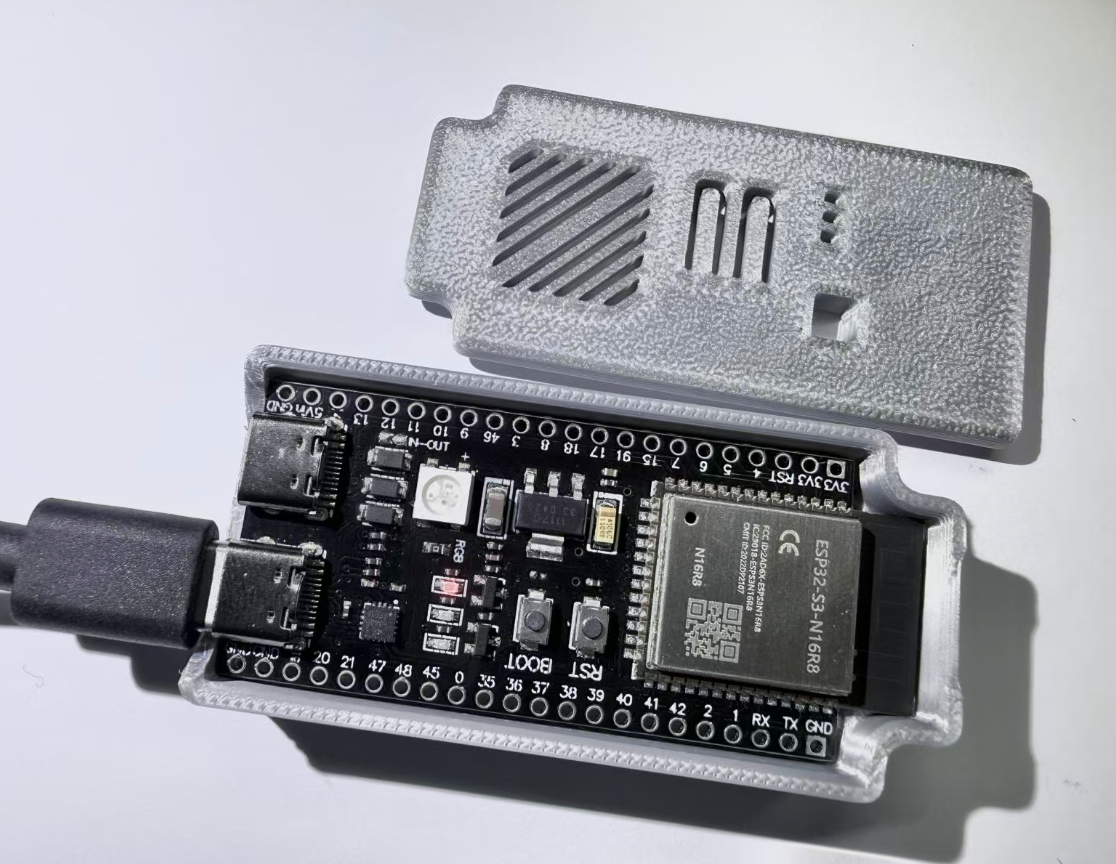
ESP32S3 Dev Module开发板(主要是国内兼容版本的ESP32S3-N16R8开发板)
2. 软件环境
- ESPectre(ESP32)
- Home Assistant
- InfluxDB 数据库(存历史数据)
- Grafana(可视化面板)
建议通过Linux 服务器运维管理面板1Panel进行安装相关服务组件 。

3. 整体数据流
ESP32 ESPectre → ESPHome → Home Assistant → InfluxDB 2.8 → Grafana 专业面板
ESP32 (ESPectre)
   ↓(ESPHome 本地直连)
Home Assistant(已实现)
   ↓(HA 自带集成:自动转发)
InfluxDB(存历史数据)
   ↓
Grafana(专业可视化)
二、 HA 配置 InfluxDB 集成
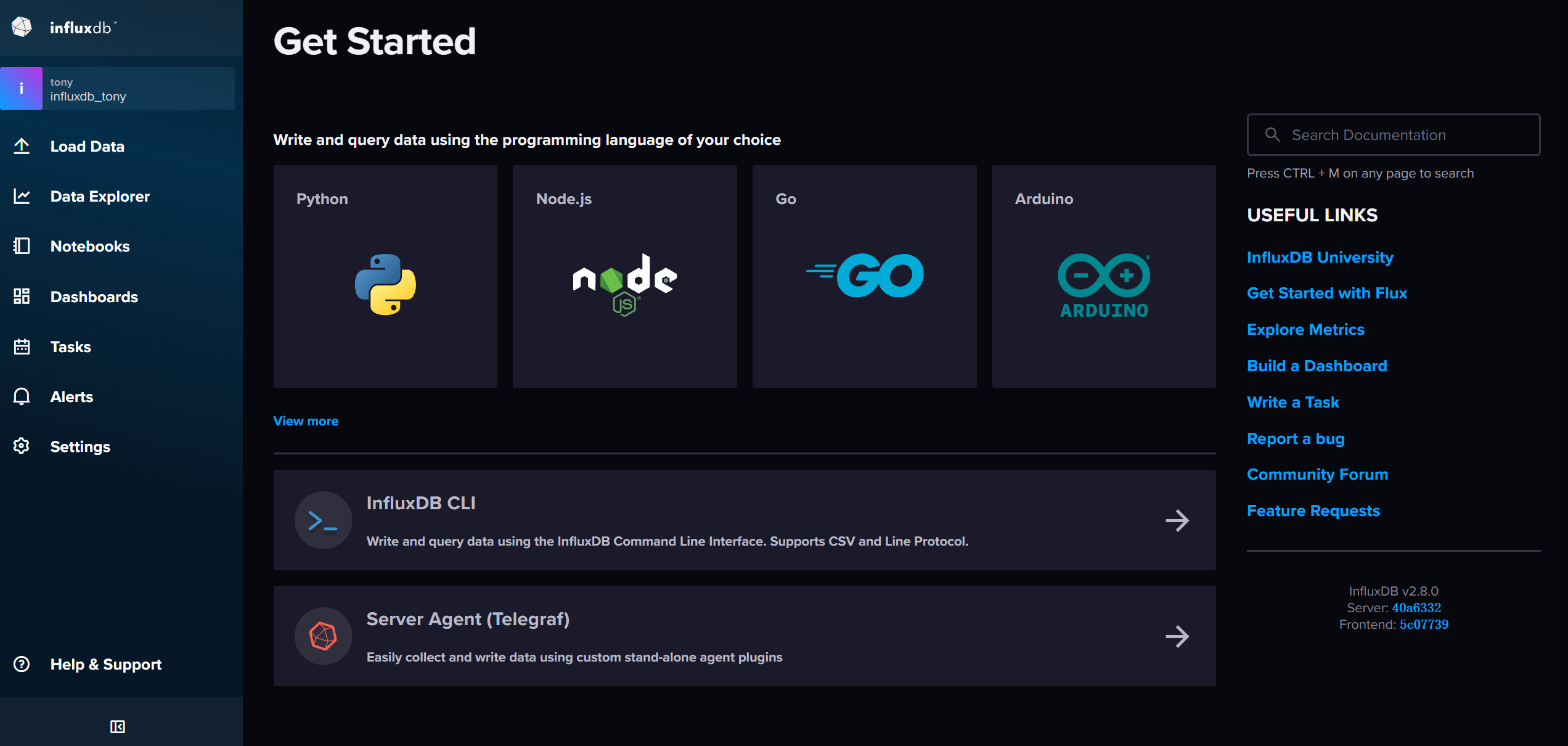
1. 安装 InfluxDB
你可以用 1Panel / 群晖 / Docker 安装
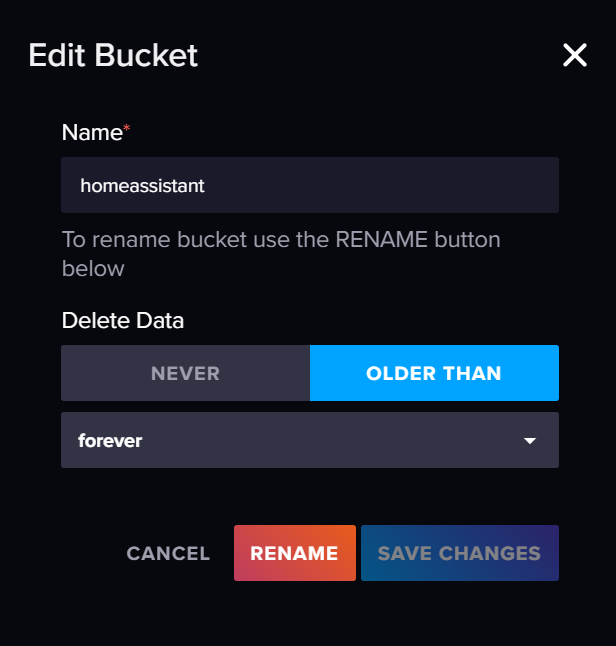
创建:
- 数据库名:
homeassistant
2. HA 里添加 InfluxDB 集成
- 打开 Home Assistant
- 设置 → 设备与服务 → 添加集成
- 搜索 InfluxDB()
- 输入:
-
- URL:
http://IP:8086(不能漏 http://,不能加 https) - 组织:你的 InfluxDB 组织名
- 数据库:
homeassistant - API令牌:InfluxDB 管理员全局 Token
- URL:
HA 会自动把所有实体数据写入 InfluxDB包括:
sensor.movement_scorebinary_sensor.motion_detected- 所有 ESPHome 设备数据
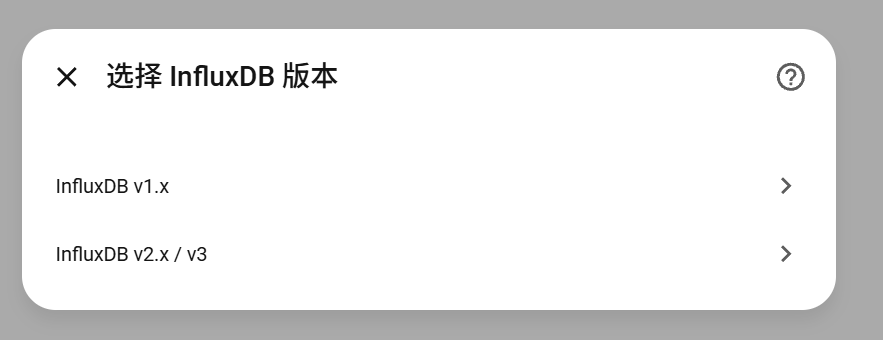
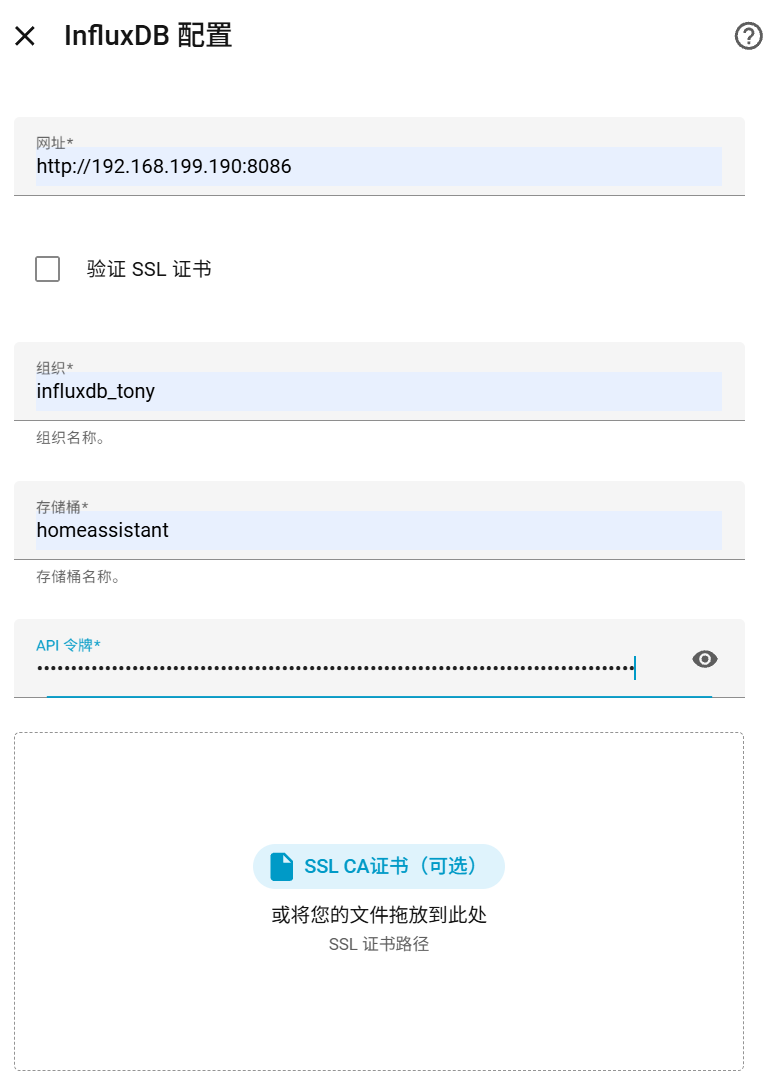
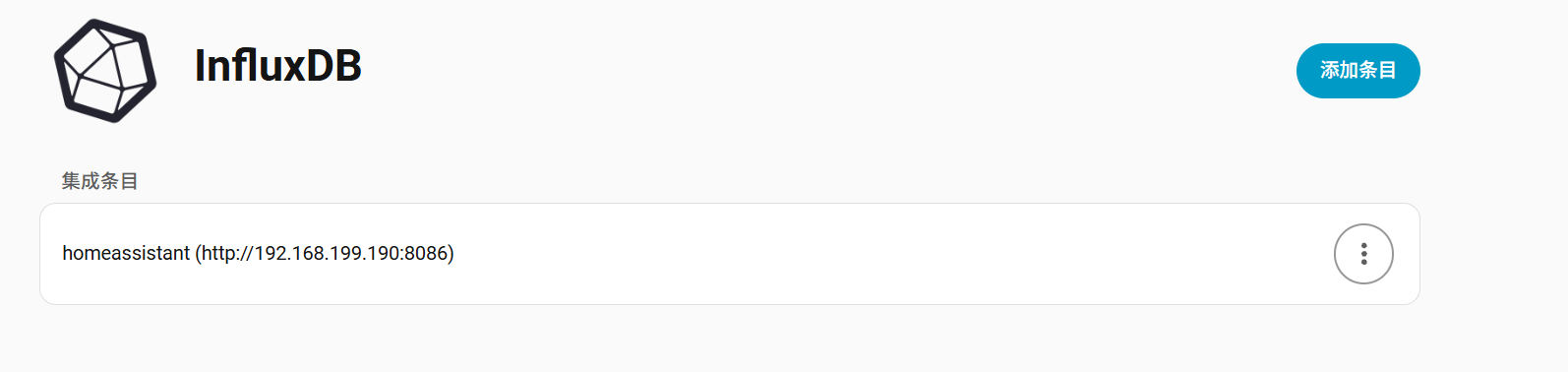
HA的configration.yaml配置文件添加influxdb的序列化数据条目。
# INFLUXDB 2.x 写入配置(直接复制)
influxdb:
  include:
    entities:
      - sensor.espectre_movement_score
      - binary_sensor.espectre_motion_detected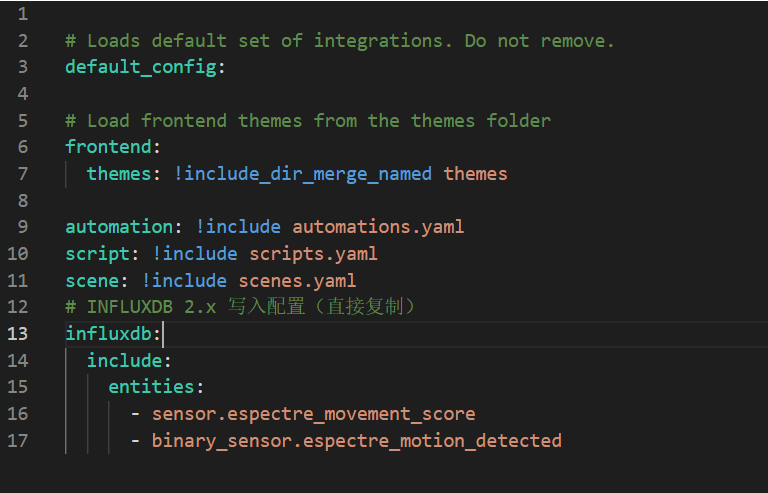
三、InfluxDB测试数据源
1. Home Assistant端验证
HA 里能看到:
- 运动强度 Movement Score
- 运动检测
- 校准开关
2. InfluxDB 端验证
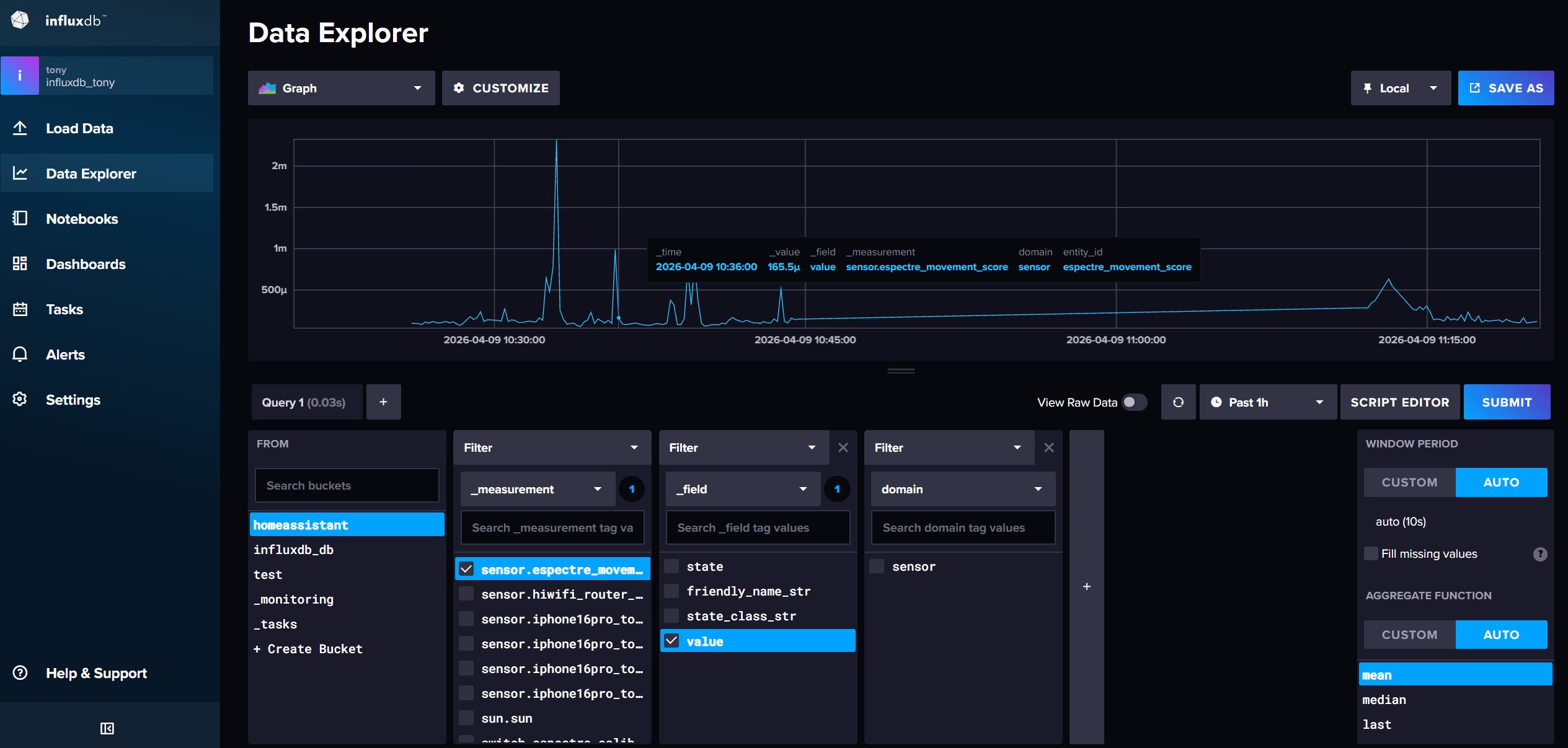
- 打开 InfluxDB 2.8 → Data Explorer
- 选择 Bucket:homeassistant
- 筛选 measurement:
sensor.movement_score
只要出现数据 → 成功!
四、Grafana 配置InfluxDB 数据源
1. 数据源配置
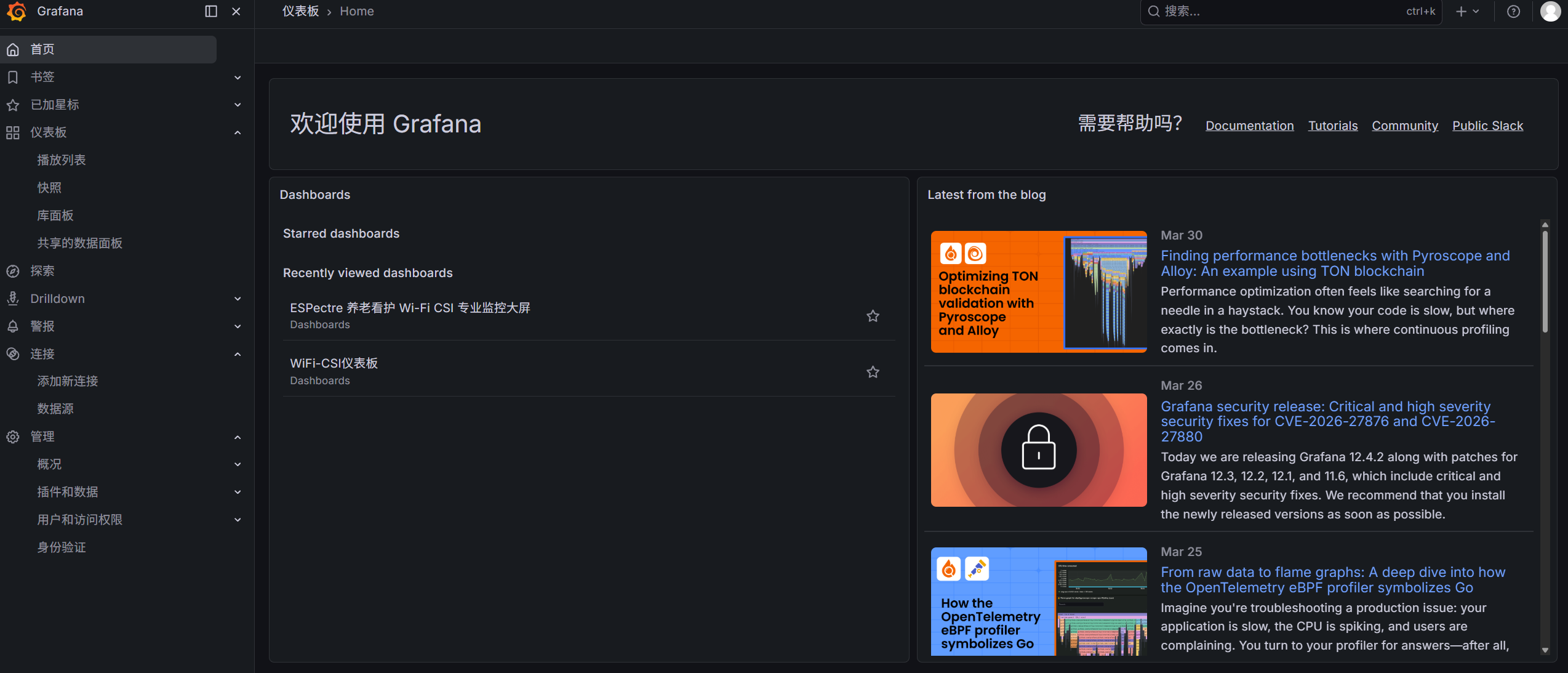
- 打开 Grafana → 左侧边栏 ⚙️ Configuration → Data sources
- 点击 Add data source ,选择 InfluxDB
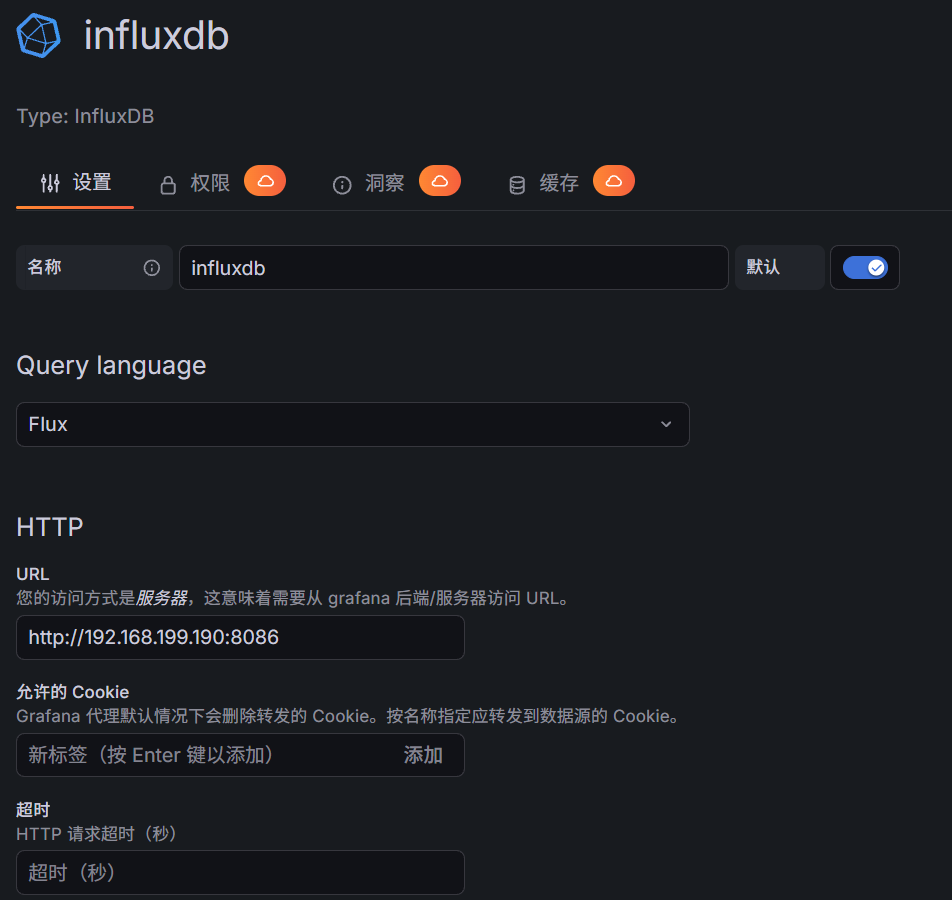
2. 关键参数填写
|-----------------------|-------------------------------|----------------------------------------------------------|
| 配置项 | 填写内容 | 注意事项 |
| Query Language | Flux | 必须选 Flux!InfluxDB 2.x 不支持 InfluxQL |
| URL | http://你的InfluxDB服务器IP:8086 | 必须加 http:// ,不能漏端口 8086 |
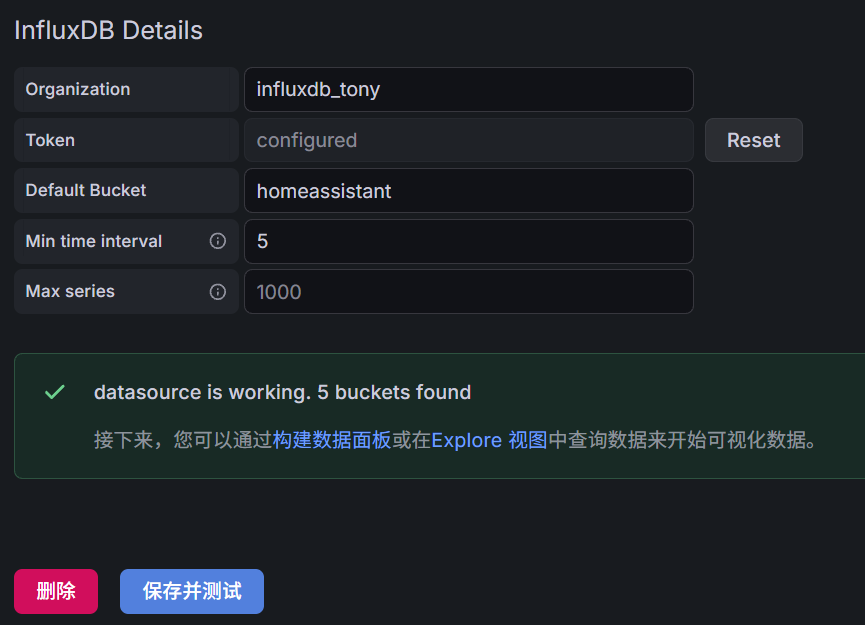
| Organization | 你的 InfluxDB 组织名 | 和 InfluxDB 网页里的组织名完全一致(大小写敏感) |
| Token | InfluxDB 管理员全局 Token | 复制 InfluxDB → Load Data → API Tokens 里的 All Access Token |
| Default Bucket | homeassistant | 你提前建好的桶名,大小写一致 |
| Min time interval | 5s | 匹配 ESPectre 数据上报频率,保证曲线流畅 |
3. 测试连通性
拉到页面最底部,点击 Save & test
- 显示
Data source is working:配置成功 - 报错:检查 Token 权限、Bucket 名、IP 端口、防火墙
五、Grafana 查询 ESPectre 数据
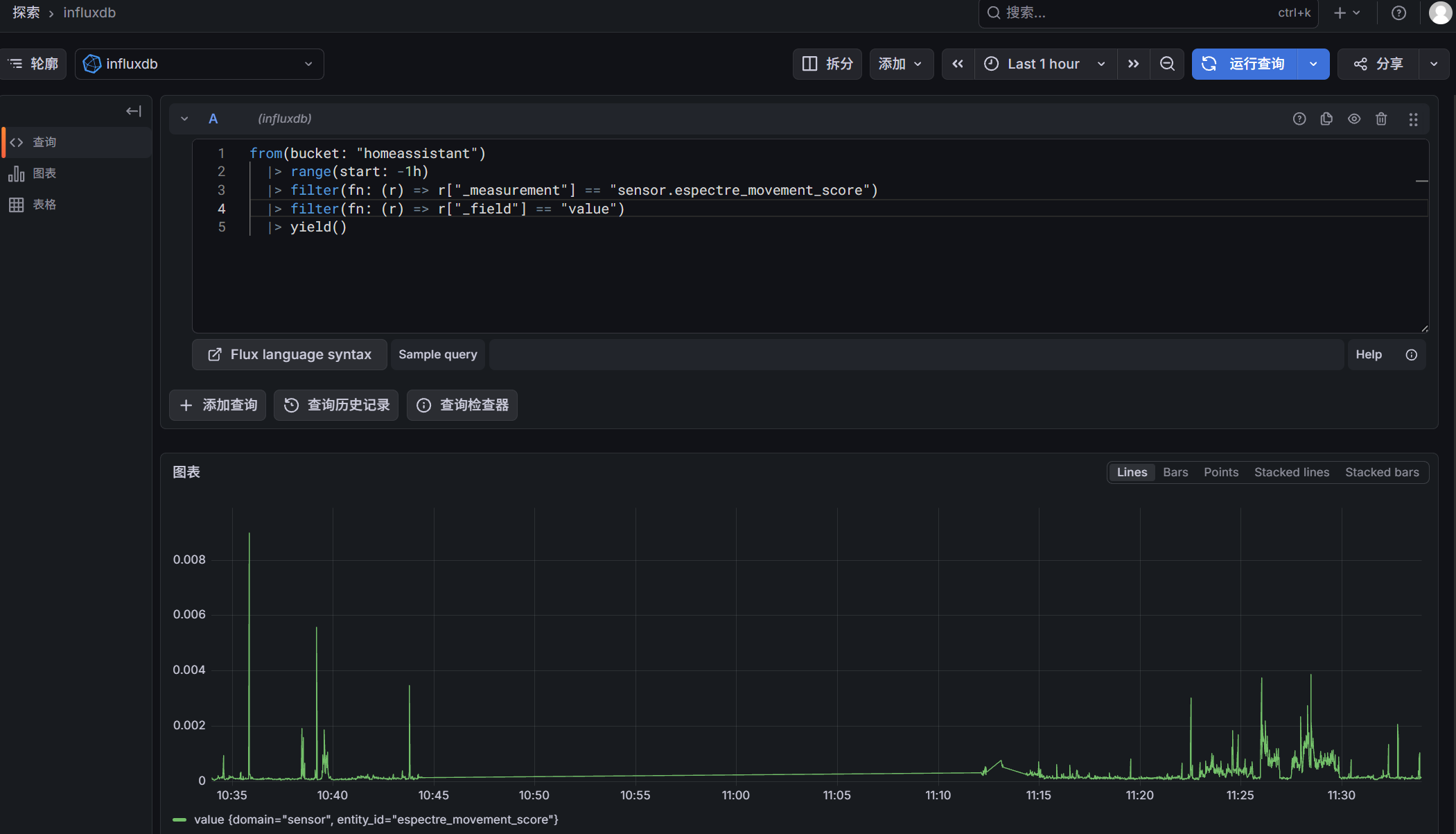
1. 测试 Flux 语句
from(bucket: "homeassistant")
  |> range(start: -1h)
  |> filter(fn: (r) => r["_measurement"] == "sensor.espectre_movement_score")
  |> filter(fn: (r) => r["_field"] == "value")
  |> yield()
2. 查询内容
- 查 最近 1 小时
- 查你的实体 sensor.espectre_movement_score
- 最简单、最快、不报错
六、导入仪表板
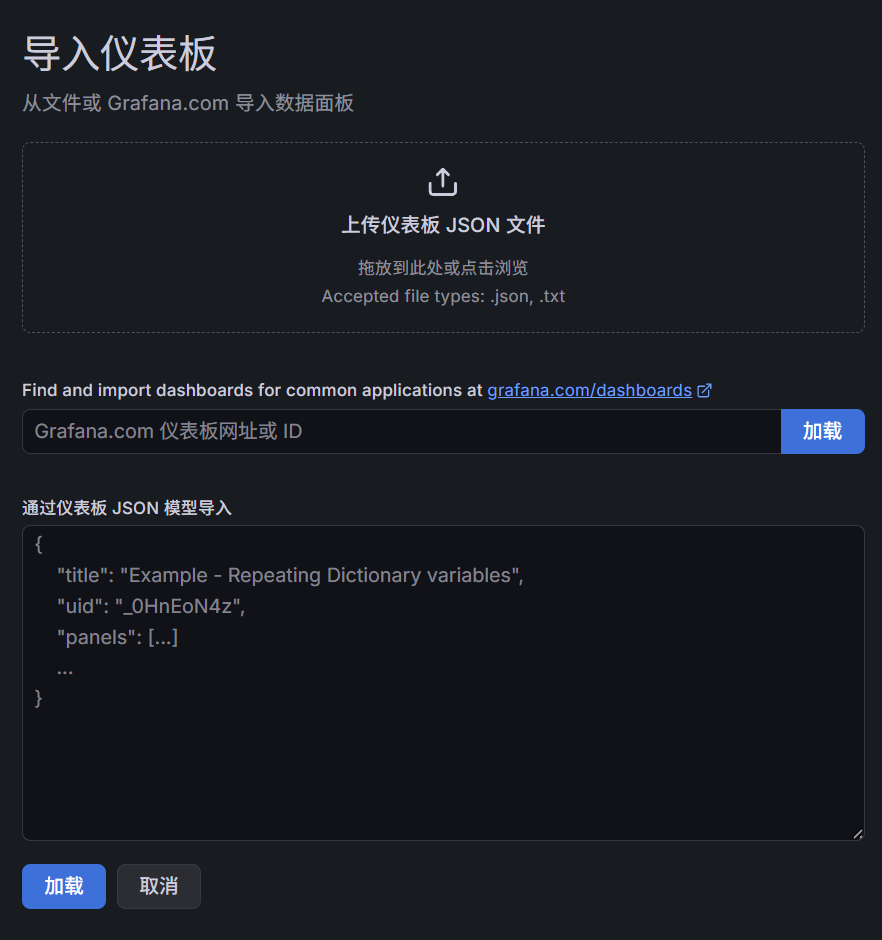
1. 操作步骤
- 点击「导入仪表板」 点击你截图右下角那个 「导入仪表板」 按钮。
- 选择 JSON 文件 弹出窗口后,点击 "从文件上传"(通常是一个上传图标或文字链接),找到你下载的 JSON 文件选中。
- 完成导入 下方会出现一个 "导入" 按钮,点击它,仪表盘就会自动生成。
仪表盘JSON文件:
{
  "annotations": {
    "list": [
      {
        "builtIn": 1,
        "datasource": {
          "type": "grafana",
          "uid": "-- Grafana --"
        },
        "enable": true,
        "hide": true,
        "iconColor": "rgba(0, 211, 255, 1)",
        "name": "Annotations & Alerts",
        "type": "dashboard"
      }
    ]
  },
  "editable": true,
  "fiscalYearStartMonth": 0,
  "graphTooltip": 0,
  "links": [],
  "panels": [
    {
      "datasource": {
        "type": "influxdb",
        "uid": "influxdb"
      },
      "description": "ESPectre Wi-Fi CSI 实时运动强度曲线",
      "fieldConfig": {
        "defaults": {
          "color": {
            "mode": "palette-classic"
          },
          "custom": {
            "axisBorderShow": false,
            "axisCenteredZero": false,
            "axisColorMode": "text",
            "axisLabel": "活动强度 Movement Score",
            "axisPlacement": "auto",
            "barAlignment": 0,
            "barWidthFactor": 0.6,
            "drawStyle": "line",
            "fillOpacity": 30,
            "gradientMode": "none",
            "hideFrom": {
              "legend": false,
              "tooltip": false,
              "viz": false
            },
            "insertNulls": false,
            "lineInterpolation": "linear",
            "lineWidth": 2,
            "pointSize": 5,
            "scaleDistribution": {
              "type": "linear"
            },
            "showPoints": "never",
            "showValues": false,
            "spanNulls": true,
            "stacking": {
              "group": "A",
              "mode": "none"
            },
            "thresholdsStyle": {
              "mode": "area"
            }
          },
          "mappings": [],
          "max": 0.001,
          "min": 0,
          "thresholds": {
            "mode": "absolute",
            "steps": [
              {
                "color": "red",
                "value": 0
              },
              {
                "color": "yellow",
                "value": 0.0001
              },
              {
                "color": "green",
                "value": 0.0002
              }
            ]
          },
          "unit": "short"
        },
        "overrides": []
      },
      "gridPos": {
        "h": 10,
        "w": 24,
        "x": 0,
        "y": 0
      },
      "id": 1,
      "options": {
        "legend": {
          "calcs": [
            "mean",
            "max",
            "min",
            "last"
          ],
          "displayMode": "table",
          "placement": "bottom",
          "showLegend": true
        },
        "tooltip": {
          "hideZeros": false,
          "max": true,
          "mode": "single",
          "sort": "none"
        }
      },
      "pluginVersion": "12.4.2",
      "targets": [
        {
          "datasource": {
            "type": "influxdb",
            "uid": "influxdb"
          },
          "query": "from(bucket: \"homeassistant\")\n  |> range(start: -24h)\n  |> filter(fn: (r) => r[\"_measurement\"] == \"sensor.espectre_movement_score\")\n  |> filter(fn: (r) => r[\"_field\"] == \"value\")\n  |> aggregateWindow(every: 30s, fn: mean)\n  |> yield()",
          "refId": "A",
          "type": "flux"
        }
      ],
      "title": "ESPectre 实时 Movement Score 曲线(养老看护)",
      "type": "timeseries"
    },
    {
      "datasource": {
        "type": "influxdb",
        "uid": "influxdb"
      },
      "fieldConfig": {
        "defaults": {
          "color": {
            "mode": "thresholds"
          },
          "mappings": [],
          "max": 0.001,
          "min": 0,
          "thresholds": {
            "mode": "absolute",
            "steps": [
              {
                "color": "red",
                "value": 0
              },
              {
                "color": "yellow",
                "value": 0.0001
              },
              {
                "color": "green",
                "value": 0.0002
              }
            ]
          },
          "unit": "short"
        },
        "overrides": []
      },
      "gridPos": {
        "h": 4,
        "w": 8,
        "x": 0,
        "y": 10
      },
      "id": 2,
      "options": {
        "colorMode": "value",
        "graphMode": "none",
        "justifyMode": "auto",
        "orientation": "auto",
        "percentChangeColorMode": "standard",
        "reduceOptions": {
          "calcs": [
            "lastNotNull"
          ],
          "fields": "",
          "values": false
        },
        "showPercentChange": false,
        "textMode": "auto",
        "wideLayout": true
      },
      "pluginVersion": "12.4.2",
      "targets": [
        {
          "datasource": {
            "type": "influxdb",
            "uid": "influxdb"
          },
          "query": "from(bucket: \"homeassistant\")\n  |> range(start: -5m)\n  |> filter(fn: (r) => r[\"_measurement\"] == \"sensor.espectre_movement_score\")\n  |> filter(fn: (r) => r[\"_field\"] == \"value\")\n  |> last()\n  |> yield()",
          "refId": "A",
          "type": "flux"
        }
      ],
      "title": "当前实时 Movement Score",
      "type": "stat"
    },
    {
      "datasource": {
        "type": "influxdb",
        "uid": "influxdb"
      },
      "fieldConfig": {
        "defaults": {
          "color": {
            "mode": "thresholds"
          },
          "mappings": [
            {
              "options": {
                "0": {
                  "color": "green",
                  "index": 1,
                  "text": "静默"
                },
                "1": {
                  "color": "red",
                  "index": 0,
                  "text": "活动"
                }
              },
              "type": "value"
            }
          ],
          "thresholds": {
            "mode": "absolute",
            "steps": [
              {
                "color": "green",
                "value": 0
              },
              {
                "color": "red",
                "value": "on"
              }
            ]
          },
          "unit": "none"
        },
        "overrides": []
      },
      "gridPos": {
        "h": 4,
        "w": 8,
        "x": 8,
        "y": 10
      },
      "id": 3,
      "options": {
        "colorMode": "value",
        "graphMode": "none",
        "justifyMode": "auto",
        "orientation": "auto",
        "percentChangeColorMode": "standard",
        "reduceOptions": {
          "calcs": [
            "lastNotNull"
          ],
          "fields": "",
          "values": false
        },
        "showPercentChange": false,
        "textMode": "auto",
        "wideLayout": true
      },
      "pluginVersion": "12.4.2",
      "targets": [
        {
          "datasource": {
            "type": "influxdb",
            "uid": "influxdb"
          },
          "query": "from(bucket: \"homeassistant\")\n  |> range(start: -5m)\n  |> filter(fn: (r) => r[\"_measurement\"] == \"binary_sensor.espectre_motion_detected\")\n  |> filter(fn: (r) => r[\"_field\"] == \"value\")\n  |> last()\n  |> yield()",
          "refId": "A",
          "type": "flux"
        }
      ],
      "title": "当前检测状态",
      "type": "stat"
    },
    {
      "datasource": {
        "type": "influxdb",
        "uid": "influxdb"
      },
      "fieldConfig": {
        "defaults": {
          "color": {
            "mode": "thresholds"
          },
          "mappings": [],
          "max": 0.001,
          "min": 0,
          "thresholds": {
            "mode": "absolute",
            "steps": [
              {
                "color": "red",
                "value": 0
              },
              {
                "color": "yellow",
                "value": 0.0001
              },
              {
                "color": "green",
                "value": 0.0002
              }
            ]
          },
          "unit": "short"
        },
        "overrides": []
      },
      "gridPos": {
        "h": 4,
        "w": 8,
        "x": 16,
        "y": 10
      },
      "id": 4,
      "options": {
        "colorMode": "value",
        "graphMode": "none",
        "justifyMode": "auto",
        "orientation": "auto",
        "percentChangeColorMode": "standard",
        "reduceOptions": {
          "calcs": [
            "min"
          ],
          "fields": "",
          "values": false
        },
        "showPercentChange": false,
        "textMode": "auto",
        "wideLayout": true
      },
      "pluginVersion": "12.4.2",
      "targets": [
        {
          "datasource": {
            "type": "influxdb",
            "uid": "influxdb"
          },
          "query": "from(bucket: \"homeassistant\")\n  |> range(start: -24h)\n  |> filter(fn: (r) => r[\"_measurement\"] == \"sensor.espectre_movement_score\")\n  |> filter(fn: (r) => r[\"_field\"] == \"value\")\n  |> filter(fn: (r) => r[\"_value\"] > 0)\n  |> min()\n  |> yield()",
          "refId": "A",
          "type": "flux"
        }
      ],
      "title": "24小时最低分值",
      "type": "stat"
    }
  ],
  "preload": false,
  "refresh": "5s",
  "schemaVersion": 42,
  "tags": [
    "ESPectre",
    "Wi-Fi CSI",
    "养老看护",
    "监控大屏"
  ],
  "templating": {
    "list": []
  },
  "time": {
    "from": "now-24h",
    "to": "now"
  },
  "timepicker": {},
  "timezone": "Asia/Shanghai",
  "title": "ESPectre 养老看护 Wi-Fi CSI 专业监控大屏",
  "uid": "espectre-elderly-final-final",
  "version": 3,
  "weekStart": ""
}
2. 曲线解读
- 红色区域(<0.0001):长期静默,老人躺卧 / 不动,属于正常状态,可作为跌倒 / 异常告警的触发阈值
- 黄色区域(0.0001~0.0002):低活动,老人轻微动作
- 绿色区域(>0.0002):正常活动,老人走动 / 起身,20:20 后的峰值就是典型的活动信号
- 统计值:Mean (均值 0.000106)、Max (峰值 0.000461)、Min (最低 0.000181,修复后显示真实值)、Last (当前 0.0000636,静默状态)