核心:让应用从代码变成可交付的安装包,覆盖Windows、macOS、Linux三大平台
一、为什么打包如此重要?
很多Electron开发者认为打包就是简单的"npm run build",但实际上:
javascript
┌─────────────────────────────────────────────────────────────────┐
│                    打包常见问题集锦                              │
├─────────────────────────────────────────────────────────────────┤
│                                                                  │
│  ❌ 开发环境运行正常,打包后白屏                                 │
│  ❌ Windows打包成功,macOS上路径报错                             │
│  ❌ 安装包200MB,用户抱怨太大                                   │
│  ❌ 没有代码签名,被杀毒软件报毒                                │
│  ❌ 更新功能不工作,用户用着旧版本                              │
│  ❌ CI/CD构建失败,每次手动打包                                 │
│                                                                  │
└─────────────────────────────────────────────────────────────────┘
来跟着系统性地解决这些问题。
二、打包工具对比
2.1 主流工具对比表
| 维度 | electron-builder | electron-forge | @electron/packager |
|---|---|---|---|
| 易用性 | ⭐⭐⭐⭐ | ⭐⭐⭐⭐⭐ | ⭐⭐⭐ |
| 配置灵活度 | ⭐⭐⭐⭐⭐ | ⭐⭐⭐⭐ | ⭐⭐⭐ |
| Windows支持 | ⭐⭐⭐⭐⭐ | ⭐⭐⭐⭐ | ⭐⭐⭐⭐ |
| macOS支持 | ⭐⭐⭐⭐⭐ | ⭐⭐⭐⭐⭐ | ⭐⭐⭐⭐ |
| Linux支持 | ⭐⭐⭐⭐⭐ | ⭐⭐⭐⭐ | ⭐⭐⭐⭐ |
| 自动更新 | ✅ 内置 | ✅ 内置 | ❌ 需自行实现 |
| 代码签名 | ✅ 完善 | ✅ 支持 | ⚠️ 基础 |
| 应用商店发布 | ✅ 支持 | ✅ 支持 | ❌ |
| 社区活跃度 | ⭐⭐⭐⭐⭐ | ⭐⭐⭐⭐ | ⭐⭐⭐ |
| 学习曲线 | 中等 | 低 | 低 |
2.2 选型建议
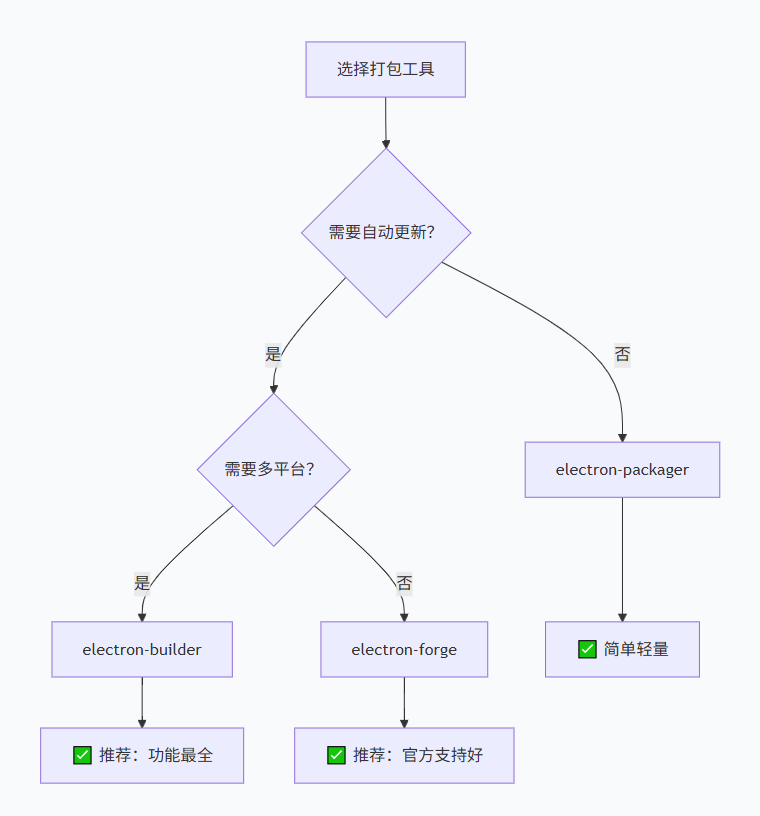
本系列选择:electron-builder(我们通用的vue3插件,react插件里面用的就是这个)
-
功能最全面
-
自动更新方案成熟
-
CI/CD集成友好
三、electron-builder 完整配置
3.1 基础配置
electron-builder.json:
javascript
{
  "appId": "com.yourcompany.yourapp",
  "productName": "MyElectronApp",
  "copyright": "Copyright © 2024 YourCompany",
  "directories": {
    "output": "release",
    "buildResources": "build"
  },
  "files": [
    "packages/main/dist/**/*",
    "packages/preload/dist/**/*",
    "packages/renderer/dist/**/*",
    "node_modules/**/*"
  ],
  "extraResources": [
    {
      "from": "resources/",
      "to": "resources/",
      "filter": ["**/*"]
    }
  ],
  "asar": true,
  "asarUnpack": [
    "**/node_modules/sharp/**/*",
    "**/node_modules/ffmpeg-static/**/*"
  ],
  "compression": "maximum"
}
3.2 Windows 配置
javascript
{
  "win": {
    "target": [
      {
        "target": "nsis",
        "arch": ["x64", "ia32"]
      },
      {
        "target": "portable",
        "arch": ["x64"]
      }
    ],
    "icon": "build/icon.ico",
    "publisherName": "YourCompany",
    "certificateFile": "cert.pfx",
    "certificatePassword": "",
    "verifyUpdateCodeSignature": true,
    "signAndEditExecutable": true,
    "signDlls": true
  },
  "nsis": {
    "oneClick": false,
    "perMachine": true,
    "allowToChangeInstallationDirectory": true,
    "createDesktopShortcut": true,
    "createStartMenuShortcut": true,
    "shortcutName": "MyElectronApp",
    "installerIcon": "build/icon.ico",
    "uninstallerIcon": "build/icon.ico",
    "license": "LICENSE.txt",
    "language": "2052",
    "installerHeader": "build/installerHeader.bmp",
    "installerSidebar": "build/installerSidebar.bmp",
    "uninstallerDisplayName": "MyElectronApp",
    "include": "build/installer.nsh"
  },
  "portable": {
    "requestExecutionLevel": "user",
    "unpackDirName": "MyElectronApp"
  }
}
3.3 macOS 配置
javascript
{
  "mac": {
    "target": [
      {
        "target": "dmg",
        "arch": ["x64", "arm64"]
      },
      {
        "target": "zip",
        "arch": ["x64", "arm64"]
      }
    ],
    "icon": "build/icon.icns",
    "category": "public.app-category.productivity",
    "hardenedRuntime": true,
    "gatekeeperAssess": true,
    "entitlements": "build/entitlements.mac.plist",
    "entitlementsInherit": "build/entitlements.mac.plist",
    "darkModeSupport": true,
    "minimumSystemVersion": "10.15"
  },
  "dmg": {
    "title": "MyElectronApp ${version}",
    "icon": "build/icon.icns",
    "iconSize": 100,
    "background": "build/dmg-background.png",
    "window": {
      "width": 540,
      "height": 380
    },
    "contents": [
      {
        "x": 130,
        "y": 150,
        "type": "file",
        "path": "/Applications"
      },
      {
        "x": 410,
        "y": 150,
        "type": "file",
        "path": "/Volumes/MyElectronApp/MyElectronApp.app"
      }
    ]
  },
  "mas": {
    "entitlements": "build/entitlements.mas.plist",
    "entitlementsInherit": "build/entitlements.mas.plist",
    "hardenedRuntime": false,
    "type": "distribution"
  }
}build/entitlements.mac.plist:
XML
<?xml version="1.0" encoding="UTF-8"?>
<!DOCTYPE plist PUBLIC "-//Apple//DTD PLIST 1.0//EN" "http://www.apple.com/DTDs/PropertyList-1.0.dtd">
<plist version="1.0">
<dict>
    <key>com.apple.security.cs.allow-jit</key>
    <true/>
    <key>com.apple.security.cs.allow-unsigned-executable-memory</key>
    <true/>
    <key>com.apple.security.cs.disable-library-validation</key>
    <true/>
    <key>com.apple.security.device.audio-input</key>
    <true/>
    <key>com.apple.security.device.camera</key>
    <true/>
    <key>com.apple.security.files.user-selected.read-only</key>
    <true/>
    <key>com.apple.security.files.user-selected.read-write</key>
    <true/>
    <key>com.apple.security.files.downloads.read-write</key>
    <true/>
    <key>com.apple.security.network.client</key>
    <true/>
    <key>com.apple.security.network.server</key>
    <false/>
</dict>
</plist>
3.4 Linux 配置
javascript{ "linux": { "target": [ { "target": "AppImage", "arch": ["x64", "arm64"] }, { "target": "deb", "arch": ["x64", "arm64"] }, { "target": "rpm", "arch": ["x64"] }, { "target": "snap", "arch": ["x64"] } ], "icon": "build/icon.png", "category": "Utility", "maintainer": "YourCompany <support@example.com>", "description": "MyElectronApp - A powerful desktop application", "desktop": { "Name": "MyElectronApp", "Comment": "A powerful desktop application", "Categories": ["Utility"] } }, "AppImage": { "systemIntegration": "doNotAsk", "synopsis": "MyElectronApp", "description": "A powerful desktop application", "license": "MIT" }, "deb": { "priority": "optional", "depends": ["gconf2", "gconf-service", "libnotify4"] }, "snap": { "confinement": "strict", "grade": "stable", "plugs": ["network", "network-bind", "home", "removable-media"] } }
四、代码签名完整流程
4.1 Windows代码签名

步骤1:申请证书
从CA机构购买代码签名证书
推荐:DigiCert、Sectigo、GlobalSign
价格:普通证书 200-300/年,EV证书 400-600/年
步骤2:安装证书
导入证书到Windows
certlm.msc
导入到"个人" -> "证书"
导出为PFX格式
包含私钥和证书链
步骤3:配置签名
javascript
// electron-builder.json
{
  "win": {
    "signingHashAlgorithms": ["sha256"],
    "signDlls": true,
    "certificateFile": "./certs/my-cert.pfx",
    "certificatePassword": "${CERT_PASSWORD}",
    "rfc3161TimeStampServer": "http://timestamp.digicert.com",
    "timeStampServer": "http://timestamp.digicert.com"
  }
}
步骤4:CI/CD环境变量
GitHub Secrets
CERT_PASSWORD=your_password
CERT_BASE64=base64_encoded_cert
4.2 macOS代码签名

步骤1:准备证书
**# 需要三种证书
1. Developer ID Application (用于分发)
2. Developer ID Installer (用于安装包)
3. Mac App Distribution (用于Mac App Store)**
# 查看证书
security find-identity -v -p basic
步骤2:配置签名
javascript
// electron-builder.json
{
  "mac": {
    "identity": "Developer ID Application: YourCompany (TEAMID)",
    "notarize": {
      "teamId": "TEAMID",
      "appleId": "apple@example.com",
      "appleIdPassword": "@keychain:AC_PASSWORD"
    }
  }
}
步骤3:公证配置
javascript
# 使用环境变量
export APPLE_ID="apple@example.com"
export APPLE_APP_SPECIFIC_PASSWORD="xxxx-xxxx-xxxx-xxxx"
export APPLE_TEAM_ID="TEAMID"

# 或使用keychain
xcrun notarytool store-credentials "AC_PASSWORD" \
  --apple-id "apple@example.com" \
  --team-id "TEAMID" \
  --password "xxxx-xxxx-xxxx-xxxx"
4.3 验证签名
javascript
# Windows验证
signtool verify /pa /v MyApp.exe

# macOS验证
codesign -dv --verbose=4 MyApp.app
spctl -a -v MyApp.app

# 验证公证
xcrun stapler validate MyApp.app
五、自动更新方案
5.1 更新流程图
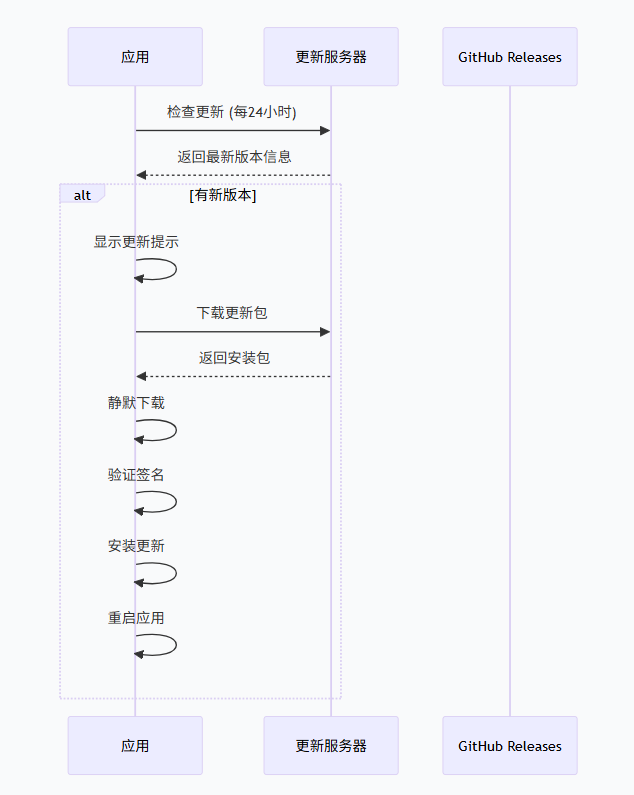
5.2 完整更新实现
packages/main/src/updater/index.ts:
javascript
import { autoUpdater } from 'electron-updater'
import { BrowserWindow, dialog } from 'electron'
import log from 'electron-log'

// 配置日志
autoUpdater.logger = log
autoUpdater.logger.transports.file.level = 'info'

// 更新状态
let updateCheckInterval: NodeJS.Timeout | null = null
let downloadProgress = 0

export function setupAutoUpdater(mainWindow: BrowserWindow) {
  // 开发环境跳过更新检查
  if (process.env.NODE_ENV === 'development') {
    log.info('Skip auto updater in development')
    return
  }

  // 配置更新源
  autoUpdater.setFeedURL({
    provider: 'github',
    owner: 'your-username',
    repo: 'your-repo',
    private: false
  })

  // 检查更新
  autoUpdater.checkForUpdates()

  // 设置定时检查(每4小时)
  updateCheckInterval = setInterval(() => {
    autoUpdater.checkForUpdates()
  }, 4 * 60 * 60 * 1000)

  // ============== 事件监听 ==============

  // 发现新版本
  autoUpdater.on('checking-for-update', () => {
    log.info('Checking for update...')
    mainWindow.webContents.send('update:checking')
  })

  // 没有新版本
  autoUpdater.on('update-not-available', (info) => {
    log.info('Update not available', info)
    mainWindow.webContents.send('update:not-available')
  })

  // 发现新版本
  autoUpdater.on('update-available', (info) => {
    log.info('Update available', info)

    // 显示更新对话框
    const response = dialog.showMessageBoxSync(mainWindow, {
      type: 'info',
      title: '发现新版本',
      message: `发现新版本 ${info.version},是否立即更新?`,
      detail: `当前版本: ${autoUpdater.currentVersion}\n最新版本: ${info.version}`,
      buttons: ['立即更新', '稍后提醒'],
      defaultId: 0,
      cancelId: 1
    })

    if (response === 0) {
      // 开始下载
      autoUpdater.downloadUpdate()
      mainWindow.webContents.send('update:downloading', { progress: 0 })
    }
  })

  // 下载进度
  autoUpdater.on('download-progress', (progress) => {
    downloadProgress = progress.percent
    log.info(`Download progress: ${progress.percent}%`)

    mainWindow.webContents.send('update:progress', {
      percent: progress.percent,
      bytesPerSecond: progress.bytesPerSecond,
      total: progress.total,
      transferred: progress.transferred
    })
  })

  // 下载完成
  autoUpdater.on('update-downloaded', (info) => {
    log.info('Update downloaded', info)

    mainWindow.webContents.send('update:downloaded')

    // 询问用户是否立即重启
    const response = dialog.showMessageBoxSync(mainWindow, {
      type: 'info',
      title: '更新就绪',
      message: '更新已下载完成,是否立即重启应用?',
      buttons: ['立即重启', '稍后重启'],
      defaultId: 0
    })

    if (response === 0) {
      // 退出并安装更新
      setImmediate(() => {
        autoUpdater.quitAndInstall()
      })
    }
  })

  // 更新错误
  autoUpdater.on('error', (err) => {
    log.error('Update error', err)

    dialog.showErrorBox('更新失败', `更新过程中发生错误:${err.message}`)
    mainWindow.webContents.send('update:error', err.message)
  })
}

// 手动检查更新
export function checkForUpdates() {
  autoUpdater.checkForUpdates()
}

// 开始下载更新
export function downloadUpdate() {
  autoUpdater.downloadUpdate()
}

// 退出并安装
export function quitAndInstall() {
  autoUpdater.quitAndInstall()
}

// 获取下载进度
export function getDownloadProgress() {
  return downloadProgress
}

// 清理定时器
export function cleanupUpdater() {
  if (updateCheckInterval) {
    clearInterval(updateCheckInterval)
    updateCheckInterval = null
  }
}
5.3 更新UI组件
packages/renderer/src/components/UpdateNotification.vue:
javascript
<template>
  <Transition name="slide">
    <div v-if="visible" class="update-notification" :class="status">
      <div class="notification-icon">
        <span v-if="status === 'checking'">🔍</span>
        <span v-else-if="status === 'available'">📦</span>
        <span v-else-if="status === 'downloading'">⬇️</span>
        <span v-else-if="status === 'downloaded'">✅</span>
        <span v-else-if="status === 'error'">❌</span>
      </div>

      <div class="notification-content">
        <div class="notification-title">{{ title }}</div>
        <div class="notification-message">{{ message }}</div>

        <div v-if="status === 'downloading'" class="progress-bar">
          <div class="progress-fill" :style="{ width: progressPercent + '%' }"></div>
          <span class="progress-text">{{ progressPercent }}%</span>
        </div>
      </div>

      <div class="notification-actions">
        <button v-if="status === 'available'" @click="downloadNow" class="btn-primary">
          立即更新
        </button>
        <button v-if="status === 'downloaded'" @click="restartNow" class="btn-primary">
          立即重启
        </button>
        <button v-if="status !== 'downloading'" @click="dismiss" class="btn-secondary">
          稍后
        </button>
      </div>
    </div>
  </Transition>
</template>

<script setup lang="ts">
import { ref, onMounted, onUnmounted } from 'vue'

type UpdateStatus = 'checking' | 'available' | 'downloading' | 'downloaded' | 'error' | 'hidden'

const visible = ref(false)
const status = ref<UpdateStatus>('hidden')
const title = ref('')
const message = ref('')
const progressPercent = ref(0)
const versionInfo = ref<any>(null)

let timeoutId: NodeJS.Timeout | null = null

const showNotification = (newStatus: UpdateStatus, customTitle?: string, customMessage?: string) => {
  status.value = newStatus
  visible.value = true

  switch (newStatus) {
    case 'checking':
      title.value = customTitle || '检查更新'
      message.value = customMessage || '正在检查新版本...'
      break
    case 'available':
      title.value = customTitle || '发现新版本'
      message.value = customMessage || `发现新版本 ${versionInfo.value?.version},是否立即更新?`
      break
    case 'downloading':
      title.value = customTitle || '正在下载'
      message.value = customMessage || '正在下载更新包...'
      break
    case 'downloaded':
      title.value = customTitle || '更新就绪'
      message.value = customMessage || '更新已下载完成,重启后生效'
      break
    case 'error':
      title.value = customTitle || '更新失败'
      message.value = customMessage || '更新过程中发生错误'
      break
  }

  // 5秒后自动隐藏(除了下载中)
  if (newStatus !== 'downloading') {
    if (timeoutId) clearTimeout(timeoutId)
    timeoutId = setTimeout(() => {
      if (status.value !== 'downloading') {
        visible.value = false
      }
    }, 5000)
  }
}

const downloadNow = () => {
  window.electronAPI?.downloadUpdate()
  showNotification('downloading')
}

const restartNow = () => {
  window.electronAPI?.quitAndInstall()
}

const dismiss = () => {
  visible.value = false
}

// 监听更新事件
onMounted(() => {
  window.electronAPI?.onUpdateStatus?.((event: any, data: any) => {
    switch (data.type) {
      case 'checking':
        showNotification('checking')
        break
      case 'not-available':
        showNotification('hidden')
        break
      case 'available':
        versionInfo.value = data.info
        showNotification('available')
        break
      case 'progress':
        progressPercent.value = data.progress.percent
        showNotification('downloading')
        break
      case 'downloaded':
        showNotification('downloaded')
        break
      case 'error':
        showNotification('error', '更新失败', data.error)
        break
    }
  })
})

onUnmounted(() => {
  if (timeoutId) clearTimeout(timeoutId)
})
</script>

<style scoped>
.update-notification {
  position: fixed;
  bottom: 20px;
  right: 20px;
  width: 360px;
  background: var(--bg-primary);
  border-radius: 12px;
  box-shadow: 0 8px 24px rgba(0, 0, 0, 0.15);
  display: flex;
  padding: 16px;
  gap: 12px;
  z-index: 10000;
  border-left: 4px solid;
}

.update-notification.checking { border-left-color: #ffa500; }
.update-notification.available { border-left-color: #2196f3; }
.update-notification.downloading { border-left-color: #4caf50; }
.update-notification.downloaded { border-left-color: #4caf50; }
.update-notification.error { border-left-color: #f44336; }

.notification-icon {
  font-size: 24px;
  width: 40px;
  text-align: center;
}

.notification-content {
  flex: 1;
}

.notification-title {
  font-weight: 600;
  margin-bottom: 4px;
}

.notification-message {
  font-size: 13px;
  color: var(--text-secondary);
  margin-bottom: 8px;
}

.progress-bar {
  height: 6px;
  background: var(--border-color);
  border-radius: 3px;
  overflow: hidden;
  position: relative;
  margin-top: 8px;
}

.progress-fill {
  height: 100%;
  background: #4caf50;
  border-radius: 3px;
  transition: width 0.3s;
}

.progress-text {
  position: absolute;
  right: 0;
  top: -18px;
  font-size: 11px;
  color: var(--text-secondary);
}

.notification-actions {
  display: flex;
  gap: 8px;
  align-items: flex-start;
}

.btn-primary {
  padding: 4px 12px;
  background: #2196f3;
  border: none;
  border-radius: 4px;
  color: white;
  cursor: pointer;
  font-size: 12px;
}

.btn-secondary {
  padding: 4px 12px;
  background: transparent;
  border: 1px solid var(--border-color);
  border-radius: 4px;
  cursor: pointer;
  font-size: 12px;
}

.slide-enter-active,
.slide-leave-active {
  transition: all 0.3s ease;
}

.slide-enter-from,
.slide-leave-to {
  transform: translateX(100%);
  opacity: 0;
}
</style>
六、CI/CD 集成
6.1 GitHub Actions 完整配置
.github/workflows/build.yml:
javascript
name: Build and Release

on:
  push:
    tags:
      - 'v*'
  workflow_dispatch:

jobs:
  build:
    strategy:
      matrix:
        os: [ubuntu-latest, windows-latest, macos-latest]
        include:
          - os: windows-latest
            platform: win
          - os: macos-latest
            platform: mac
          - os: ubuntu-latest
            platform: linux

    runs-on: ${{ matrix.os }}

    steps:
      - name: Checkout code
        uses: actions/checkout@v4

      - name: Setup Node.js
        uses: actions/setup-node@v4
        with:
          node-version: '20'
          cache: 'pnpm'

      - name: Setup pnpm
        uses: pnpm/action-setup@v2
        with:
          version: 8

      - name: Install dependencies
        run: pnpm install

      - name: Build all packages
        run: pnpm run build:all

      # Windows 签名
      - name: Import Windows certificate
        if: matrix.os == 'windows-latest'
        run: |
          $pfxPath = Join-Path $env:temp "cert.pfx"
          [System.IO.File]::WriteAllBytes($pfxPath, [System.Convert]::FromBase64String($env:WINDOWS_CERT_BASE64))
          Import-PfxCertificate -FilePath $pfxPath -CertStoreLocation Cert:\CurrentUser\My -Password (ConvertTo-SecureString -String $env:CERT_PASSWORD -Force -AsPlainText)
        env:
          WINDOWS_CERT_BASE64: ${{ secrets.WINDOWS_CERT_BASE64 }}
          CERT_PASSWORD: ${{ secrets.CERT_PASSWORD }}

      # macOS 签名
      - name: Import macOS certificate
        if: matrix.os == 'macos-latest'
        run: |
          echo $MACOS_CERT_BASE64 | base64 --decode > certificate.p12
          security create-keychain -p ${{ secrets.MACOS_KEYCHAIN_PASSWORD }} build.keychain
          security default-keychain -s build.keychain
          security unlock-keychain -p ${{ secrets.MACOS_KEYCHAIN_PASSWORD }} build.keychain
          security import certificate.p12 -k build.keychain -P ${{ secrets.MACOS_CERT_PASSWORD }} -T /usr/bin/codesign
          security set-key-partition-list -S apple-tool:,apple: -s -k ${{ secrets.MACOS_KEYCHAIN_PASSWORD }} build.keychain
        env:
          MACOS_CERT_BASE64: ${{ secrets.MACOS_CERT_BASE64 }}
          MACOS_CERT_PASSWORD: ${{ secrets.MACOS_CERT_PASSWORD }}
          MACOS_KEYCHAIN_PASSWORD: ${{ secrets.MACOS_KEYCHAIN_PASSWORD }}

      # 打包
      - name: Build Electron app
        run: |
          pnpm run build:electron
        env:
          GH_TOKEN: ${{ secrets.GITHUB_TOKEN }}
          APPLE_ID: ${{ secrets.APPLE_ID }}
          APPLE_APP_SPECIFIC_PASSWORD: ${{ secrets.APPLE_APP_SPECIFIC_PASSWORD }}
          APPLE_TEAM_ID: ${{ secrets.APPLE_TEAM_ID }}
          CERT_PASSWORD: ${{ secrets.CERT_PASSWORD }}
          NODE_ENV: production

      # 上传 artifacts
      - name: Upload artifacts
        uses: actions/upload-artifact@v4
        with:
          name: ${{ matrix.platform }}-artifacts
          path: |
            release/**/*.exe
            release/**/*.dmg
            release/**/*.zip
            release/**/*.AppImage
            release/**/*.deb
            release/**/latest.yml
            release/**/latest-mac.yml
            release/**/latest-linux.yml

  release:
    needs: build
    runs-on: ubuntu-latest
    if: startsWith(github.ref, 'refs/tags/')

    steps:
      - name: Download all artifacts
        uses: actions/download-artifact@v4
        with:
          path: artifacts

      - name: Create Release
        uses: softprops/action-gh-release@v1
        with:
          files: |
            artifacts/**/*.exe
            artifacts/**/*.dmg
            artifacts/**/*.zip
            artifacts/**/*.AppImage
            artifacts/**/*.deb
            artifacts/**/latest.yml
            artifacts/**/latest-mac.yml
            artifacts/**/latest-linux.yml
          generate_release_notes: true
        env:
          GITHUB_TOKEN: ${{ secrets.GITHUB_TOKEN }}
6.2 版本管理策略
scripts/version.js:
javascript
const fs = require('fs')
const path = require('path')
const { execSync } = require('child_process')

// 获取版本号
const getVersion = () => {
  const packageJson = JSON.parse(fs.readFileSync('package.json', 'utf-8'))
  return packageJson.version
}

// 更新版本号
const updateVersion = (type) => {
  const commands = {
    patch: 'npm version patch --no-git-tag-version',
    minor: 'npm version minor --no-git-tag-version',
    major: 'npm version major --no-git-tag-version'
  }

  execSync(commands[type], { stdio: 'inherit' })

  const newVersion = getVersion()
  console.log(`Version updated to ${newVersion}`)

  // 更新所有子包
  const packages = ['main', 'preload', 'renderer']
  packages.forEach(pkg => {
    const pkgPath = path.join('packages', pkg, 'package.json')
    const pkgJson = JSON.parse(fs.readFileSync(pkgPath, 'utf-8'))
    pkgJson.version = newVersion
    fs.writeFileSync(pkgPath, JSON.stringify(pkgJson, null, 2))
  })

  return newVersion
}

// 创建Git标签
const createTag = (version) => {
  execSync(`git add .`, { stdio: 'inherit' })
  execSync(`git commit -m "chore: release v${version}"`, { stdio: 'inherit' })
  execSync(`git tag -a v${version} -m "Release v${version}"`, { stdio: 'inherit' })
  execSync(`git push && git push --tags`, { stdio: 'inherit' })
}

// 主函数
const main = () => {
  const type = process.argv[2]

  if (!['patch', 'minor', 'major'].includes(type)) {
    console.error('Usage: node scripts/version.js [patch|minor|major]')
    process.exit(1)
  }

  const newVersion = updateVersion(type)
  createTag(newVersion)
}

main()
七、体积优化技巧
7.1 优化前后对比
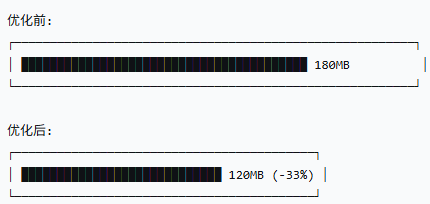
优化项:
 • node_modules 去重: -25MB
 • 图片压缩: -15MB
 • 代码分割: -10MB
 • asar 打包: -8MB
 • 移除 source map: -12MB
7.2 优化配置
javascript
// electron-builder.json - 体积优化配置
{
  "compression": "maximum",
  "asar": true,
  "asarUnpack": [],
  "files": [
    "packages/**/dist/**/*",
    "!**/*.map",
    "!**/test/**",
    "!**/tests/**",
    "!**/__tests__/**",
    "!**/*.d.ts",
    "!**/*.log",
    "!**/docs/**",
    "!**/examples/**"
  ],
  "extraMetadata": {
    "main": "packages/main/dist/index.js"
  }
}
javascript
// vite.config.js - 构建优化
export default {
  build: {
    minify: 'terser',
    terserOptions: {
      compress: {
        drop_console: true,
        drop_debugger: true,
        pure_funcs: ['console.log']
      }
    },
    rollupOptions: {
      output: {
        manualChunks: {
          'vendor': ['vue', 'vue-router', 'pinia'],
          'ui': ['element-plus']
        }
      }
    }
  }
}
八、常见问题排查
问题1:打包后白屏
javascript
// 原因:路径问题
// 错误写法
win.loadFile('./index.html')

// 正确写法
import path from 'path'
win.loadFile(path.join(__dirname, '../renderer/dist/index.html'))

// 生产环境检查
const isDev = !app.isPackaged
const indexPath = isDev
  ? 'http://localhost:5173'
  : path.join(__dirname, '../renderer/dist/index.html')
问题2:node_modules找不到
javascript
// 确保 asarUnpack 包含需要原生模块的包
{
  "asarUnpack": [
    "**/node_modules/sharp/**/*",
    "**/node_modules/ffi-napi/**/*",
    "**/node_modules/ref-napi/**/*"
  ]
}
问题3:代码签名失败
javascript
# Windows: 检查证书
certlm.msc
# 确认证书有效期和私钥

# macOS: 检查钥匙串
security find-identity -v
# 确认证书已安装

# 验证签名
codesign -dv --verbose=4 YourApp.app